

Scheduling conflicts represent one of the most prevalent challenges encountered across all types of projects. This article provides a comprehensive overview of scheduling conflicts, including their definition, various types, and the underlying causes that give rise to them. It then outlines proven strategies for effectively preventing and managing these conflicts.
As a project manager, it is essential to develop a thorough understanding of scheduling conflicts and implement the most effective approaches to mitigate their impact on your team’s overall productivity and performance. Read on to explore what scheduling conflicts are, why they occur, and most importantly, the 9 proven ways you can avoid them to keep your projects on track.
What are Scheduling Conflicts?
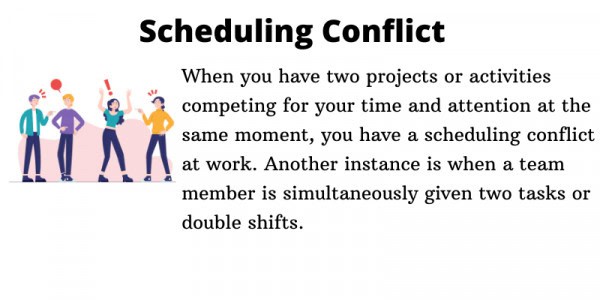
Projects inherently involve multiple stakeholders, and this complexity frequently gives rise to conflicts — the most common of which are scheduling conflicts. Before exploring this topic further, it is important to establish a clear definition: in a project management context, a scheduling conflict occurs when an employee or team is assigned two tasks or shifts that overlap or run concurrently.
Scheduling conflicts are fundamentally issues of time management and task distribution. As a project manager, effectively overseeing these critical aspects of a project is a core responsibility. It is equally important to recognize that your role extends beyond merely preventing such conflicts — you are also accountable for actively monitoring, controlling, and resolving them as they arise.
Types of Scheduling Conflicts
Scheduling conflicts come in many forms, each capable of disrupting your project’s workflow. Understanding these different types is the first step toward effectively managing and preventing them. Here are the most common scheduling conflicts you’ll encounter as a project manager.
Double Booking
Double booking occurs when an employee is assigned to two different shifts that overlap or run concurrently. These shifts may take place at the same location or at different sites, with the latter presenting additional operational challenges. The financial and logistical costs associated with deploying staff across two separate locations under different managers can be significant, often resulting in understaffing and employee burnout. Furthermore, as a project manager, it is important to recognize that rectifying such scheduling errors can be an exceptionally demanding and time-consuming process.
Unbalanced Shift Distribution
This scheduling conflict happens when certain employees are scheduled more than others. As a project manager, you must know that making this mistake could lead to conflict between team members. For example, allowing an employee to always choose his preferred shift would necessarily lead to complaints from others. From a wider perspective, these complaints could be a source of lower productivity levels.
Overlapping Events
This type of scheduling conflict occurs when the end of an event tends to overlap with the beginning of another event. This might push you to prioritize one or the other events and thus lead to putting one or both teams in rather difficult situations. Practically, this will cause the postponement of an event or will require the teams to run back and forth between their tasks (events). Again, overlapping events might lead to a domino effect that will hamper the proper finalization of the products.
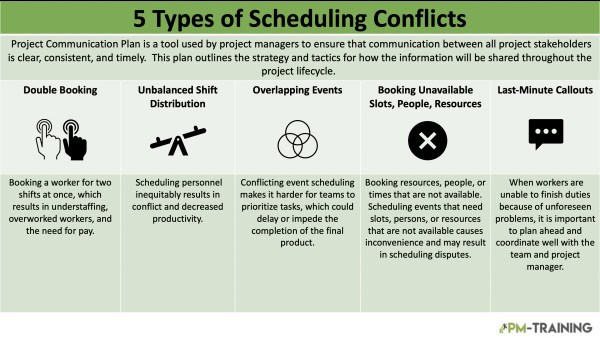
Booking Unavailable Slots, People, or Resources
As the name implies, this type of scheduling conflict occurs when a manager schedules events involving slots, personnel, or resources that are unavailable at the required time. For instance, arranging an online meeting between two project team members located in incompatible time zones will inevitably cause significant inconvenience for at least one participant.
This is a particularly common challenge when managing large, distributed teams. As a best practice, project managers should always verify the availability of all required slots, personnel, and resources before committing to any decisions or advancing with scheduled tasks.
Last-Minute Callouts
Last-minute callouts occur when employees are unable to complete an assigned task and notification is received with little to no advance notice. It is important to highlight that this type of scheduling conflict typically arises from unforeseen circumstances, such as sudden illness or urgent travel requirements. Establishing strong communication channels and proactive coordination between the project manager and the team are key strategies in effectively mitigating the impact of such situations.
Why Do Scheduling Conflicts Arise?
Some of the main factors that lead to scheduling conflicts are:
- Inaccurate estimation of the time it takes to complete a tasks
- Inaccurate forecasting of the need for resources
- Improper understanding of the project scope (work to be done)
- Improper communication between the team regarding the schedule
9 Ways to Avoid Scheduling Conflicts
Here are nine effective strategies for managing your team’s schedule and minimizing conflicts.
1. Publish the Schedule in Advance
Publishing a draft of your schedule well ahead of time allows employees to review their upcoming shifts against personal commitments. This early notice gives the team enough lead time to request changes or swap shifts before the final version is set. It dramatically reduces last-minute conflicts by encouraging planning and open communication between management and the workforce.
2. Make the Schedule Available Anytime

Using cloud-based scheduling tools ensures your team can access their schedules 24/7 from any device. When employees can instantly check their hours and shifts on their smartphones, they are less likely to miss a shift or double-book themselves. This constant accessibility also means that when management makes updates, everyone sees the current, accurate version in real time.
3. Design an Availability Chart
An availability chart can be an invaluable tool. It lists not just assigned shifts, but the specific times each employee is available for work, which can guide you when creating a schedule. If a conflict arises, a quick glance at the chart helps pinpoint who can cover. This proactive data gathering prevents management from unknowingly scheduling someone during their unavailable hours.
4. Be Flexible with Non-Critical Deadlines
In many industries, especially service or task-based ones, there may be some buffer room for deadlines. When a potential conflict involves a valued client or vendor, reach out and explain the situation. Often, they will be happy to adjust the deadline by a day or two to accommodate your needs, provided you communicate openly and give sufficient notice.
5. Create a Robust Communication Channel
Utilizing modern communication tools like Slack, MS Teams, or a specialized group chat ensures that all schedule-related news is received instantly. When a shift change, open slot, or new priority arises, it should be blasted through a dedicated channel so everyone is informed. This prevents communication bottlenecks that can lead to missed shifts and unhappy employees.
6. Budget for Required and Voluntary Breaks

Failing to account for breaks is a common source of scheduling errors. When you plan a schedule, you must block out time not only for required rests (e.g., lunches) but also for potential voluntarily requested time off for personal matters. A schedule without breaks leaves no wiggle room and is brittle, failing when the smallest change occurs.
7. Centralize Your Master Schedule
Do not have your schedule scattered across spreadsheets, group texts, and written notes. Establish one master, definitive version that is the single source of truth for the entire organization. A centralized system, ideally a cloud-based software, prevents duplicate bookings, data-entry errors, and the general confusion that comes with managing multiple versions of a document.
8. Leverage Dedicated Scheduling Software
Ditch the pen and paper for professional scheduling software. These platforms offer robust features like drag-and-drop interfaces, visibility into employee skills and certifications, and automated compliance checks (e.g., for maximum hours). Utilizing technology streamlines the entire work scheduling process and builds in guardrails that make it much harder for conflicts to occur.
9. Allow Your Staff to Propose Adjustments
Instead of dictating a final schedule, empower your employees to take part by allowing them to suggest changes. Many modern scheduling tools have “shift swap” or “propose change” features. Giving staff this autonomy lets them resolve potential conflicts among themselves before they ever become an issue for management, saving time for everyone involved.
Video About Resolving Scheduling Conflicts
Watch the video below to learn practical strategies for identifying and resolving scheduling conflicts, helping you keep your projects running smoothly and on track.
Conclusion
Scheduling conflicts are an almost unavoidable reality in any project environment. As a project manager, it is essential to consistently account for the careful management of limited time, financial, and most critically, human resources in order to minimize the likelihood of preventable scheduling conflicts. This guide has provided a thorough and structured overview of scheduling conflicts: the circumstances under which they arise, and the most effective strategies for addressing them.
While the complexity of modern projects can make this a demanding undertaking, the availability of robust methodologies, accumulated professional experience, and advancing technology ensures that scheduling conflicts remain a manageable challenge for any diligent and well-prepared project manager.
FAQs About Scheduling Conflicts
How do you identify a scheduling conflict in Microsoft Project?
When Microsoft Project detects a potential conflict—such as an overallocation or a dependency violation—it generates a visual warning. This alert changes the ‘Warning’ field setting from ‘No’ to ‘Yes’. This visual cue is crucial for identifying problems within a complex project timeline and takes some of the guesswork out of schedule maintenance.
How do I resolve resource overallocation in Microsoft Project?
The simplest way to resolve resource overallocation in Microsoft Project is by delaying or “leveling” one of the conflicting tasks. Ideally, you should delay the task with the lower priority, allowing resources to focus on critical-path activities first. Microsoft Project also offers automatic leveling tools, which will automatically adjust the schedule based on resource availability.
What are the main causes of scheduling conflicts?
Scheduling conflicts typically arise from two primary sources: resource overallocation and logic errors in dependencies. Overallocation occurs when a person, piece of equipment, or facility is scheduled for more hours than they are available. Logic errors occur when tasks are linked sequentially in a way that is physically or legally impossible, such as scheduling a foundation to be poured before the blueprints are finished.
How can scheduling software prevent conflicts before they happen?
Modern scheduling software is proactive, not just reactive. Many platforms utilize conflict-detection algorithms. When a project manager attempts to assign a resource that is already double-booked, the system will instantly flag the error. Furthermore, robust scheduling tools often include predictive analytics, identifying future bottlenecks by analyzing the team’s historical capacity and the upcoming project pipeline.
What is the role of an availability chart in conflict prevention?
An availability chart (or skills matrix) is a central repository detailing when each staff member is available, their specific skills, and their current workload. Managers consult this chart before assigning tasks. If a conflict arises unexpectedly, the chart allows for quick identification of a suitable substitute who is currently free, minimizing downtime and confusion.
How does centralized scheduling improve conflict resolution?
A centralized schedule is a single, “source of truth” accessible by all relevant team members. When a conflict occurs (e.g., due to an emergency absence), the adjustment is made on the main master schedule. This change immediately propagates to everyone’s individual calendars, preventing communication silos where different team members might be working off outdated versions of the plan.
Suggested articles:
- Project Schedule Quality 101: 14 Ways to Improve Schedule
- How To Calculate Schedule Variance with Examples
- Project Schedule Compression Techniques for PMs

Shane Drumm, holding certifications in PMP®, PMI-ACP®, CSM, and LPM, is the author behind numerous articles featured here. Hailing from County Cork, Ireland, his expertise lies in implementing Agile methodologies with geographically dispersed teams for software development projects. In his leisure, he dedicates time to web development and Ironman triathlon training. Find out more about Shane on shanedrumm.com and please reach out and connect with Shane on LinkedIn.