
This Project Office Checklist Template makes sure the working environment, tools, standards and governance support for a project are actually in place before it moves into execution. It covers the workspace and hybrid or remote working, equipment and tools, communication, the team’s roles and access, the meetings and reports set in the project charter, the registers and logs, and document control, and it calculates how ready each area is and lists every open item for you. Fill it in below, free, with no sign-up. Your answers save automatically as you type. 50+ PM Templates.
- Custom version ($)
- Word template ($)
- How to use the templates
- What is inside
- What is a project office checklist?
Loading the interactive form. If this message stays on screen, JavaScript is switched off or blocked in this browser.
Your answers are stored in this browser only and are not sent anywhere. Clearing your browsing data, or using a different device or a private window, will start a blank form.
What is inside the template
The checklist follows the order in which a project manager sets up a project office, from where the team works, through the tools and people, to the governance and records that keep the project under control:
- Project office overview. Who runs the project office, the office model (one physical office, hybrid or fully remote), the team, the key dates and the type and date of the check, with the governance, management approach, tolerances, team and budget copied from the approved charter.
- Workplace and ways of working. Premises and workspace, including space at the sites where the work is delivered, and the arrangements for hybrid and remote working.
- Equipment and tools. Computers, phones and test devices, and the collaboration, planning, cost tracking and test tools the team needs, with licences and support.
- Communication and collaboration. Channels, contact and distribution lists, video calls, the communications plan and the escalation contacts.
- Team, roles and access. Roles filled with agreed job descriptions, releases and backfill, induction, and access to accounts, folders, data and sites for the team and suppliers, removed again when people leave.
- Governance and reporting. The meetings and reports from the charter, booked for the whole project, with the tolerances and the criteria for the next stage gate.
- Processes, registers and documents. Change, risk, issue, quality, supplier, schedule and cost processes; the registers and logs; and document control from naming and versions to archiving.
- Project office services. The support the project office provides week after week: reports, registers, meeting papers, forecasts and onboarding.
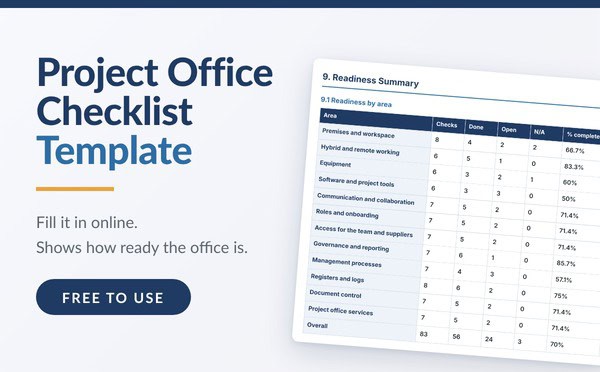
- Readiness summary. The number of checks, how many are done and open, and the % complete for each area and overall, a list of every open item with its owner, and the review points. The form calculates these for you.
- Approval, which records the readiness decision, the conditions and who confirmed it.
What is a project office checklist?
A project office checklist confirms that a project has what it needs to work before delivery starts: somewhere to work, the right equipment and tools, channels to communicate, people appointed with the access they need, the meetings and reports booked, the registers and logs open, and documents under control. The project office is not only a room. On many projects it is a hybrid arrangement, or a fully remote one, and the checklist covers both.
Each check is given a status of Done, In progress, Not started or Not applicable, an owner and the evidence or next action. That turns a list of questions into a working tool: you can see at a glance what is ready, what is still open and who is dealing with it.
Where it fits
The project office checklist is the last of the initiation templates. Each one answers a different question, and each takes its facts from the one before.
- The proposal establishes that the problem is worth solving.
- The feasibility study tests whether each candidate solution can realistically be delivered.
- The business case justifies the preferred option financially and secures the funding.
- The project charter formally starts the project and sets its governance, meetings, reports and management approach.
- The job descriptions define each key role in full, so the team can be appointed.
- The project office checklist makes sure all of that works in practice before the project moves into execution.
See our Project Job Description Template, Project Charter Template, Business Case Template, Feasibility Study Template and Project Proposal Template. The worked examples in all six follow the same fictional project, Northfield Home Services, so you can see how the facts carry through: the full-time project manager appointed by the charter for months 1 to 7, and defined in the job description, sets up the project office in month 1, before configuration starts.
Governance comes from the charter
The checklist does not create new governance. It copies the meetings and reports from the approved charter and checks that each one is booked and running. In the worked example, that means a monthly steering group, a weekly project team meeting, a weekly vendor delivery meeting, a fortnightly status report and stage gate reviews in months 3 and 6, with tolerances of plus or minus 10% on cost and 2 weeks on any milestone.

How ready is ready?
The form counts the checks in each area, how many are done and how many are still open, and calculates the % complete, leaving out anything marked Not applicable. It also lists every open item with its owner and next action. In the example, 56 of the 80 checks that apply are done, so the project office is 70% complete, with 24 items open. None of them blocks the vendor configuration, so the sponsor records the decision as ready with actions and sets the pilot gate in month 3 as the next review.
A project office rarely needs to be 100% complete to start. What matters is that nothing still open blocks the work about to begin, and that every open item has an owner and a date.
When to use one
Use the checklist once the charter is approved and the team appointed, and again whenever the way the project works changes. You need one when:
- The project is about to move from initiation into execution
- The team works in more than one place, or partly or fully remotely
- Suppliers need access to your systems, data or sites
- A stage gate is coming up and the next phase needs different space, tools or people
- The project is closing, and access must be removed, equipment returned and documents archived
Keep it practical. Delete the checks that do not apply to your project or mark them Not applicable, add the ones that do, and give every open item an owner.