
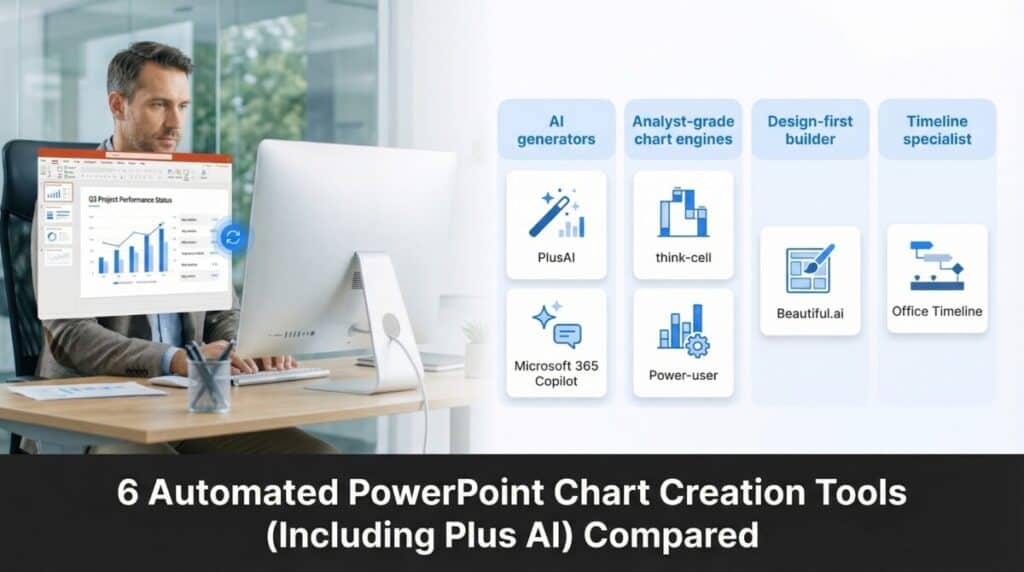
Manual chart updates still swallow 37 percent of slide-building time, according to a 2023 MirrorReview study. PowerPoint chart-automation add-ins—such as PlusAI—hand that time back by generating branded slides, keeping charts editable, and refreshing data with one click.
Here’s how this guide slices six leading tools by what they automate:
- AI slide-and-chart generators inside PowerPoint
- Analyst-grade chart engines
- A design-first cloud builder with PPT export
- A timeline specialist for schedules
At-a-Glance Comparison
A visual overview of AI generators, analyst-grade engines, design-first builders, and timeline specialists for automated PowerPoint charts. If you’d rather skim the essentials, the grid below lines up six leading PowerPoint chart-automation tools. Scan each row to see which one keeps charts editable, offers advanced visuals, refreshes data in seconds, and still fits your budget.
| Tool | Core Strength | Charts Stay Editable? | Notable Chart Types | Data Refresh | Security Highlight |
| PlusAI | AI drafts full decks inside PowerPoint | Yes | Bar, line, pie | Prompt-based insert | SOC 2 Type II |
| Microsoft 365 Copilot | Native AI across Office | Yes | Standard PPT set | Live Excel link + tenant files | Inherits Microsoft 365 controls |
| Think-Cell | Consultant-grade chart engine | Yes | Waterfall, Mekko, Gantt | One-click Excel link | Local processing |
| Power-User | Swiss-army productivity add-in | Yes | Waterfall, tornado, infographics | Linked Excel & text | Local processing |
| Beautiful.ai (Pro) | Design-first cloud builder | On export (Pro) | Basic + smart visuals | Manual entry | SOC 2 Type II; SSO |
| Office Timeline | Timeline & Gantt specialist | Yes | Timelines, swimlanes | Excel or MS Project import | Local add-in or web app |
- Only a sample of each tool’s catalogue.
- Public list prices, checked November 2025. Office Timeline bills $99 per user per year, or about $8.25 per month.
You’ll Notice a Pattern: AI assistants top the table, analyst favorites sit in the middle, and design or timeline specialists round out the list. Keep that mental map handy as we dive into the hands-on reviews—starting with the AI generators such as PlusAI.
1. PlusAI: From Blank Canvas to Branded Deck in Under a Minute

PlusAI lives inside PowerPoint, so you stay in one window. Type a prompt such as “Build a five-slide Q4 update with charts,” and the add-in drafts titles, bullet points, and native charts in your template’s fonts and colors. You’ll see the first draft in seconds because the engine runs on GPT-4.
Security meets enterprise standards. PlusAI is SOC 2 Type II compliant, and its public audit covers data confidentiality, availability, and integrity (see the Microsoft AppSource listing).
Everything it inserts stays editable: charts link to an embedded data sheet, and text sits in normal placeholders. Drop in last quarter’s Excel file, click Refresh once, and the visuals update—no copy-pasting required.
Pricing is straightforward. The Pro tier costs $20 per user per month, billed annually, after a seven-day free trial, undercutting Microsoft 365 Copilot’s $30 seat while working on any Microsoft 365 Business or Enterprise plan.
When the cursor blinks on an empty deck—or a manager drops a dense report late in the day—teams open PlusAI, let it frame the story, and then fine-tune the details. Hours saved, nerves intact.
2. Microsoft 365 Copilot: Turning Existing Files Into Ready-to-Present Slides

Copilot sits in the PowerPoint ribbon. You click the sparkle icon, type a prompt such as “Create a five-slide Q1 results overview,” and the AI searches SharePoint, OneDrive, and Teams for charts, quotes, and figures you already own. The draft lands with editable PowerPoint charts linked to embedded Excel sheets, so updating numbers is still a two-second task instead of a full rebuild.
Because Copilot runs inside your Microsoft 365 tenant, it inherits the same permissions, encryption, and compliance policies that already protect your files.
What it Costs
Microsoft lists Copilot at $30 per user per month (annual billing) as an add-on for Microsoft 365 E3, E5, Business Standard, or Business Premium plans.
Does it Pay Off?
In a 2025 civil-service pilot, 14,500 employees saved an average of 26 minutes per day—roughly two hours each week—by offloading drafting and search tasks to Copilot, according to Barron’s. Analysts still polish layouts or swap generic charts for Think-Cell visuals, but the time reclaimed from hunting through folders often outweighs the $30 seat fee.
If your organization already relies on Microsoft 365, Copilot feels like a natural extension: one prompt, one cohesive story, fewer clicks between files.
3. Think-Cell: Consultant-Grade Charts at Breakneck Speed

Teams often start by letting an AI deck builder shape the storyline and then switch to Think-Cell for the precision charts. The Prompt to Presentation feature (PlusAI) turns a plain-English brief, such as “five-slide Q4 update,” into a branded starter deck inside PowerPoint, freeing analysts to focus on the complex visuals that Think-Cell excels at. Think-Cell installs inside PowerPoint and unlocks chart types that the native toolset never learned, including waterfall, Mekko, Gantt, bubble, and more than forty others. Paste an Excel range, click Refresh, and every bar, connector, and variance label snaps into place.
Its live Excel link drives the payoff. Change one cell, and all linked charts—even delta arrows—update instantly. Internal user surveys report that this automation trims 70 percent of chart-prep time.
Design defaults stay corporate-clean by inheriting your slide master’s fonts and colors. The trade-off is intentional rigidity: Think-Cell favors consistency over bespoke flair, which is why 88 of the Fortune 100 use it daily.
Pricing
A single license costs $24.90 per user per month, billed annually. Volume discounts apply, and the learning curve pays off fastest for number-heavy teams. When your presentation hinges on complex charts minutes before showtime, Think-Cell delivers surgical precision, no pixel nudging required.
4. Power-User: The Swiss-Army Add-In for Slides That Do More Than Charts

Power-User adds a full ribbon of shortcuts to PowerPoint, letting you insert a waterfall chart, drop a Europe map, or clean fifty misaligned bullet points without leaving the toolbar.
Why Teams Adopt It
- Chart depth: Waterfalls, tornado charts, gauges, funnels, and more all link back to Excel, so one refresh updates every figure.
- Visual library: Over 700 templates, icons, and maps swap to your theme colors with a single click.
- Productivity boosters: Auto-format tables, align shapes, or roll “key takeaways” into one executive slide.
Constraints to Note
- Windows only; Mac users pair it with a helper such as BrightSlide.
- The wide feature set can feel overwhelming, so a short onboarding webinar helps.
Pricing
Power-User Pro costs $24 per user per month, billed annually, with volume discounts. That matches Think-Cell’s seat price, yet covers charts, design, and clean-up in one license.
If your deck needs more than charts—icons, maps, quick formatting—Power-User’s all-in-one ribbon can save you hours of slide surgery.
5. Beautiful.Ai: Instant Polish When Design Matters More Than Data Plumbing

When the brief is “make it look great, fast,” Beautiful.ai does the design for you. Its browser and desktop apps build each slide on 300-plus Smart Slide layouts that auto-adjust spacing, font size, and chart position as you type, so the deck looks purposely designed even if you finish it in an airport lounge.
How it works
- Work in the cloud, or in a desktop wrapper, and invite teammates to edit live, Google Docs style.
- Business-basic charts—bars, lines, funnels, timelines—inherit your theme colors and resize automatically, so headlines never crowd the graphic.
- On Pro and higher tiers, click Export → PowerPoint to download an editable PPTX; text stays in live boxes, and charts convert to native PPT objects for final tweaks.
Security and Pricing
All data sits on Beautiful.ai servers. The Enterprise plan is SOC 2 Type II certified and offers SSO controls. The individual Pro plan costs $12 per user per month, billed annually, after a 14-day free trial.
Choose Beautiful.ai when visual punch and speed outweigh deep Excel links. It is perfect for pitch decks, marketing summaries, or early-stage concept sell-ins where story flow, not spreadsheet plumbing, steals the show.
6. Office Timeline: Crystal-Clear Schedules Without the Pixel Tug-Of-War
Status reviews often hinge on one slide: Are we on track? While broader PowerPoint automation tools can streamline an entire deck, Office Timeline answers with timelines and Gantt charts that anyone can scan in seconds.
Paste milestone dates or import an Excel or MS Project file, click Create, and a polished timeline lands on your slide, complete with today’s line and auto-spaced labels. Every bar, diamond, and text box is a native PowerPoint shape, so shifting a deadline and hitting Refresh realigns the entire visual.
Plans and Pricing
As of January 2025, Office Timeline offers two tiers:
- Lite (formerly Basic) – $108 per user per year, includes up to two swimlanes and Excel import.
- Plus (formerly Pro+) – $149 per user per year, unlocks unlimited swimlanes, multi-timescales, and percent-complete shading.
Mac users build timelines in the web app and download an editable PPT slide, while Windows users get the full desktop add-in. Either way, the graphic stays native PowerPoint, ready for last-second tweaks when the VP walks in.
When your deck needs a single slide that crystallizes a six-month plan, Office Timeline turns dates into clarity in under a minute.
Conclusion
Automating PowerPoint charts is no longer a niche perk—it’s the new baseline for teams that move quickly and present often. Across the six tools compared here, a clear pattern emerges:
- AI-first assistants like PlusAI and Microsoft 365 Copilot excel at turning messy inputs into fast, editable drafts without leaving PowerPoint.
- Analyst-grade engines such as Think-Cell and Power-User deliver precision charts and data-linked workflows that slash manual formatting time.
- Design-forward and timeline specialists like Beautiful.ai and Office Timeline bring polish or clarity where visuals matter more than spreadsheet plumbing.
The right pick depends on what you automate most: story framing, chart precision, slide design, or schedule visualization. But all six tools share a common promise—less time coaxing PowerPoint and more time shaping the narrative behind the numbers.
If your team is still manually rebuilding charts from scratch, these tools return hours of your week, keep visuals editable, and bring consistency that used to require a designer or a power user. Automated chart creation isn’t just faster—it’s repeatable, reliable, and now broadly accessible.
FAQ
1. Which tool is best if I want fully editable PowerPoint charts?
PlusAI, Microsoft 365 Copilot, Think-Cell, Power-User, and Office Timeline all keep charts entirely editable in PowerPoint. Beautiful.ai exports editable charts only on its Pro plan.
2. What’s the fastest option for drafting an entire presentation?
PlusAI and Microsoft 365 Copilot are the quickest because they generate multi-slide drafts directly inside PowerPoint based on prompts or existing files.
3. Which tool offers the most advanced chart types?
Think-Cell leads with consultant-grade visuals like waterfall, Mekko, Gantt, and variance charts. Power-User follows with a broad library including tornado, funnel, and gauge charts.
4. Do these tools keep my data secure?
- PlusAI and Beautiful.ai Enterprise: SOC 2 Type II compliant.
- Microsoft 365 Copilot: Inherits your Microsoft 365 tenant’s permissions and encryption.
- Think-Cell and Power-User: Process data locally.
- Office Timeline: Offers local add-ins or a secure web app.
5. What if I work mostly with timelines or project schedules?
Office Timeline is purpose-built for timelines, swimlanes, and Gantt charts. It produces clean, client-ready visuals in seconds.
6. Which tool is best for teams with heavy Excel workflows?
Think-Cell and Power-User both offer robust, refreshable Excel links. Microsoft 365 Copilot also works well with tenant files, pulling charts and data from Excel documents you already have.
7. Is Beautiful.ai a replacement for PowerPoint?
Not exactly. It’s best for fast, design-polished slides. Most teams use it for drafts or marketing decks, then export to PowerPoint for final edits.
8. What’s the most budget-friendly option?
Beautiful.ai Pro is the lowest-cost pick at $12/month. PlusAI is mid-range at $20/month. Copilot, Think-Cell, and Power-User sit at the higher end.
9. Which of these works best for non-designers?
Beautiful.ai shines for design automation, while PlusAI and Copilot help non-designers generate structured, clean slide drafts instantly.
10. Can I combine multiple tools?
Yes—many teams do. A common workflow is:
- PlusAI or Copilot for the first draft
- Think-Cell or Power-User for advanced charts
- Office Timeline for project visuals
- Beautiful.ai for polished concept decks
Suggested articles:
- How AI Tools Revolutionize PowerPoint Presentations: A Full Guide
- 5 Pros and Cons of Using PowerPoint Templates for Presentations
- 10 Mistakes to Avoid in Your Project Management Presentation

Daniel Raymond, a project manager with over 20 years of experience, is the former CEO of a successful software company called Websystems. With a strong background in managing complex projects, he applied his expertise to develop AceProject.com and Bridge24.com, innovative project management tools designed to streamline processes and improve productivity. Throughout his career, Daniel has consistently demonstrated a commitment to excellence and a passion for empowering teams to achieve their goals.