
Microsoft Project has evolved into Microsoft Planner, creating a more unified work management platform that combines traditional project planning with modern collaboration tools. Instead of separating lightweight task management from enterprise-level project execution, Microsoft now brings both experiences together under the Planner ecosystem.
The platform helps businesses organize projects, manage resources, track deadlines, and improve team coordination across departments. It also connects deeply with Microsoft Teams, Outlook, SharePoint, and the broader Microsoft 365 environment, making collaboration more centralized and efficient. Modern Planner plans now include timeline views, sprint management, dependencies, reporting dashboards, roadmaps, budgeting tools, and AI-powered work management capabilities.
This transition reflects Microsoft’s push toward integrated work management rather than standalone scheduling software. In this article, you’ll explore the pros and cons of using Microsoft Planner and how it fits into today’s project management and enterprise collaboration landscape.
If you feel Microsoft Planner’s pricing is too high for your budget, consider looking at AceProject. By charging per project instead of per user, this software offers the potential for significant cost savings.
Microsoft Planner – Work Management and Project Planning Software
Microsoft Planner is Microsoft’s modern work management platform that combines task management, collaborative planning, and enterprise-grade project management into a single ecosystem. Originally launched as Microsoft Project decades ago for structured project scheduling, the platform has gradually evolved into a cloud-first solution integrated directly into Microsoft 365. Today, Planner supports everything from lightweight task organization to advanced portfolio management. Teams can manage projects through Kanban boards, Gantt timelines, sprint backlogs, dashboards, and resource planning tools.
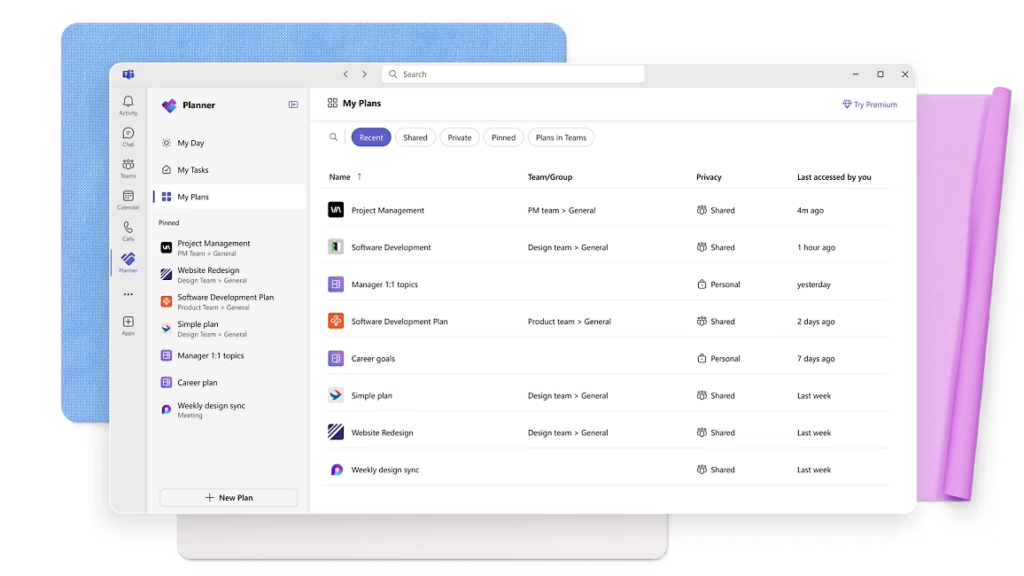
The platform operates inside Microsoft Teams and the web-based Planner app, allowing organizations to centralize communication, documents, schedules, and reporting. One of Planner’s biggest advantages is its deep integration with Microsoft’s ecosystem. Businesses already using Teams, Outlook, SharePoint, Power BI, and Copilot can extend workflows without relying heavily on third-party software integrations. By combining collaborative work management with advanced project controls, Microsoft Planner helps organizations improve visibility, accountability, resource allocation, and long-term operational planning.
The Pros or Advantages of Microsoft Planner

Microsoft Planner continues to attract businesses because it combines collaboration, structured planning, and enterprise-grade project management in one ecosystem. The platform supports both simple team coordination and highly detailed project execution. Its strongest advantage lies in how naturally it fits into existing Microsoft 365 workflows while offering scalable tools for organizations managing multiple teams, deadlines, and operational processes.
- Deep Microsoft 365 Integration: Microsoft Planner integrates directly with Teams, Outlook, SharePoint, Power BI, and OneDrive. This creates a connected workflow where conversations, files, schedules, and reporting exist inside the same ecosystem. Businesses already invested in Microsoft infrastructure can streamline collaboration without depending heavily on third-party applications.
- Supports Both Agile and Traditional Project Management: Planner supports Kanban boards, sprint backlogs, task dependencies, timelines, and Gantt-style planning. This flexibility allows agile teams, IT departments, marketers, and traditional project managers to use the same platform while following different workflow methodologies depending on project complexity and business requirements.
- Strong Enterprise-Level Planning Tools: Higher-tier Planner plans include baselines, critical path analysis, budgeting, roadmaps, and resource management capabilities. These advanced planning tools help organizations manage large-scale projects more effectively while improving forecasting, workload balancing, and long-term operational planning across multiple departments or programs.
- Centralized Team Collaboration: Teams can collaborate directly inside tasks using comments, shared files, labels, checklists, and status tracking. Since Planner operates inside Microsoft Teams, communication becomes more centralized, reducing the need to switch between multiple platforms during project execution and daily operational coordination.
- Improved Visibility Through Dashboards and Reporting: Planner includes dashboards, charts, progress tracking, and reporting tools that provide managers with real-time visibility into project performance. Businesses can monitor deadlines, resource utilization, task completion, and project bottlenecks faster, helping leaders make informed operational decisions before delays escalate.
- Flexible Work Views: Users can switch between Grid, Board, Timeline, Schedule, and Charts views depending on how they prefer managing work. This flexibility helps different teams visualize projects more effectively, improving organization and making complex project schedules easier to understand and manage daily.
- Cloud-Based Accessibility: Microsoft Planner operates as a cloud-based platform accessible through browsers, Teams, and mobile devices. Teams working remotely or across multiple locations can collaborate in real time without depending on local installations or manual file synchronization processes common in older project management systems.
- Scalable for Growing Organizations: Planner can support small internal projects while also scaling into enterprise portfolio management through higher subscription tiers. Businesses can start with basic task coordination and later adopt advanced planning capabilities as operational complexity, team size, and project demands continue growing.
The Cons or Disadvantages of Microsoft Planner

Although Microsoft Planner has become more capable and collaborative, it still presents several challenges for certain businesses. Some limitations involve pricing, usability, learning complexity, and dependency on the Microsoft ecosystem. Organizations with specialized workflows or smaller budgets may find certain aspects restrictive compared to alternative project management platforms.
- Advanced Features Have a Steep Learning Curve: While the basic Planner experience is relatively simple, advanced planning features like baselines, critical path analysis, budgeting, and dependency management can overwhelm inexperienced users. Teams unfamiliar with enterprise project management methodologies may require significant onboarding and training before using the platform effectively.
- Pricing Can Become Expensive at Scale: Advanced project management capabilities are locked behind higher-tier subscriptions like Planner and Project Plan 3. Businesses managing large teams may face substantial monthly costs, especially when combining Microsoft 365 licensing with premium Planner subscriptions and additional enterprise services.
- Best Experience Requires Microsoft Ecosystem Adoption: Planner works best when organizations already rely heavily on Microsoft Teams, Outlook, SharePoint, and other Microsoft services. Companies using alternative communication or productivity ecosystems may encounter workflow fragmentation or reduced integration efficiency compared to fully Microsoft-centered organizations.
- Customization Still Has Limits: Although Planner now supports better customization and integrations, some businesses may still find workflow automation, dashboard personalization, and reporting flexibility less advanced than specialized project management platforms designed specifically for highly customized operational processes and niche industry requirements.
- Performance May Slow on Large Enterprise Projects: Complex enterprise projects with thousands of tasks, multiple dependencies, large resource pools, and extensive reporting requirements can sometimes reduce system responsiveness. Heavy project datasets may create slower load times, particularly when handling large portfolio-level planning environments.
- Desktop Dependency for Some Advanced Features: Certain advanced capabilities still rely on Project Desktop or Project Online components included with higher-tier subscriptions. Businesses expecting every enterprise feature inside the simplified web Planner experience may discover limitations that require separate desktop tools or additional configuration steps.
Microsoft Planner Key Features
Microsoft Planner combines collaborative task management with enterprise project planning tools designed to improve workflow visibility and operational coordination. Its features support both lightweight team collaboration and complex project execution. Businesses can organize work visually, manage dependencies, track resources, and centralize communication while integrating directly into existing Microsoft 365 environments.
- Task Management: Planner allows users to create tasks with priorities, deadlines, labels, file attachments, checklists, and comments. Teams can organize responsibilities clearly while tracking project progress in real time, reducing confusion and improving accountability across departments and collaborative workflows.
- Board View: The Kanban-style Board View helps teams visualize project stages and move tasks between workflow columns. This feature supports agile work management by simplifying task tracking, improving workflow transparency, and helping teams identify operational bottlenecks faster during project execution.
- Timeline and Gantt Views: Planner Plan 1 and higher tiers include timeline-based project scheduling similar to traditional Gantt charts. Teams can manage deadlines, dependencies, milestones, and scheduling conflicts visually while improving long-term project coordination and delivery planning across complex initiatives.
- Task Dependencies: Users can establish task dependencies to control project sequencing and prevent scheduling conflicts. This helps project managers maintain logical workflows while reducing delays caused by incomplete prerequisite tasks or poor coordination between interconnected project activities.
- Sprint and Backlog Management: Agile teams can manage backlogs, plan sprints, prioritize tasks, and organize development cycles directly inside Planner. These tools support software development, product management, and iterative project environments requiring continuous planning and rapid operational adjustments.
- Roadmaps: Roadmap capabilities allow organizations to connect multiple projects into broader strategic views. Leadership teams can monitor progress across departments, align initiatives with business goals, and improve visibility into enterprise-wide operational planning and execution efforts.
- Reporting and Dashboards: Planner provides visual dashboards and reporting tools that help managers monitor progress, workload distribution, and project health. Real-time reporting improves decision-making by highlighting delays, incomplete tasks, and operational risks before they impact delivery timelines.
- Resource Management: Advanced Planner subscriptions include resource allocation and workload management capabilities. Project managers can distribute work more effectively, prevent team overload, and improve operational efficiency by balancing assignments across available resources and departments.
- Project Budgeting and Cost Tracking: Higher-tier plans support budgeting, costing, and financial management features that help organizations monitor project expenses. Teams can track labor costs, compare planned budgets against actual spending, and improve financial oversight throughout project execution.
- Microsoft Teams Integration: Planner integrates directly into Microsoft Teams, allowing users to manage tasks, communicate, and share files without switching applications. This centralization reduces workflow fragmentation while improving collaboration and team responsiveness across ongoing projects.
- AI-Powered Work Management: Microsoft is increasingly integrating AI-powered planning and work management capabilities into Planner through Copilot and automation features. These tools help teams summarize updates, organize workloads, generate plans, and improve operational efficiency through intelligent assistance.
- Cross-Platform Accessibility: Planner is accessible through web browsers, Teams, desktop applications, and mobile devices. Remote teams can collaborate from different locations while maintaining synchronized project updates, schedules, and communication without relying on localized project files.
Microsoft Planner Use Cases
Microsoft Planner supports a wide range of industries and operational workflows because it combines collaborative task management with structured project planning. Organizations use the platform for scheduling, reporting, agile coordination, budgeting, and resource management. Its flexibility makes it suitable for both small departmental projects and large enterprise-wide operational initiatives.
- IT and Software Development: Development teams use Planner to manage sprint backlogs, organize agile workflows, track bugs, and coordinate releases. Timeline views, dependencies, and sprint management tools help technical teams maintain delivery schedules while improving visibility across development cycles and collaborative engineering efforts.
- Marketing Campaign Management: Marketing departments use Planner to coordinate campaigns, assign creative tasks, manage approvals, and track deadlines. Shared dashboards and collaborative task management help teams streamline content production, event planning, advertising coordination, and multi-channel campaign execution more efficiently.
- Construction and Engineering Projects: Construction managers and engineering teams use Planner for scheduling, milestone tracking, resource allocation, and budget oversight. Timeline planning and dependency management help coordinate subcontractors, deadlines, procurement processes, and operational workflows across large infrastructure or facility projects.
- Enterprise Portfolio Management: Large organizations use advanced Planner plans to manage multiple projects simultaneously through roadmaps and centralized reporting. Leadership teams can monitor strategic initiatives, evaluate resource distribution, and align operational priorities across departments, divisions, and long-term business objectives.
- Human Resources and Employee Onboarding: HR teams use Planner to organize hiring workflows, onboarding processes, compliance tasks, and training schedules. Shared task management improves coordination between departments while ensuring new employees complete required documentation, training, and operational setup steps efficiently.
- Financial and Consulting Services: Consulting firms and finance teams use Planner to coordinate deliverables, manage client timelines, track workloads, and organize collaborative reporting processes. Budget tracking and structured project management features improve accountability while helping firms maintain operational consistency across client engagements.
- Education and Training Programs: Educational institutions and corporate training departments use Planner to organize coursework, learning initiatives, and certification programs. Teams can coordinate schedules, assign responsibilities, track participant progress, and centralize communication throughout long-term educational or professional development projects.
- Operations and Internal Business Management: Operations teams use Planner for workflow coordination, process improvement initiatives, internal audits, and departmental planning. Centralized dashboards and collaboration tools help businesses monitor ongoing operational activities while improving visibility into task completion and organizational efficiency.
Microsoft Planner Pricing and Costs
For businesses looking to combine collaborative task management with advanced project planning, Microsoft Planner offers several pricing tiers designed for different levels of operational complexity. The platform now blends traditional Microsoft Project functionality with modern work management tools inside the Microsoft 365 ecosystem. Pricing is structured per user/month, with annual billing required for the listed discounted rates.
Subscription Plans
- Microsoft Planner in Microsoft 365 (Included): Ideal for teams already using Microsoft 365 that need lightweight work management and task collaboration. This version includes real-time collaboration through Microsoft Teams and the Planner web app, task assignments, labels, dashboards, dependencies, and Grid, Board, Schedule, and Charts views. It works well for smaller teams handling day-to-day project coordination without advanced enterprise planning requirements.
- Planner Plan 1 ($10/user/month billed annually): Previously known as Project Plan 1, this tier is designed for teams needing more advanced project execution capabilities. It includes project goals, sprint and backlog management, premium templates, timeline (Gantt) views, advanced dashboards, customization tools, and dependency tracking. This plan is suitable for growing businesses managing more structured workflows and multi-team projects.
- Planner and Project Plan 3 ($30/user/month billed annually): Formerly Project Plan 3, this plan targets organizations handling large-scale or highly complex projects. It includes everything in Plan 1 plus baselines, critical path analysis, roadmaps, advanced dependencies with lead and lag, budgeting, project costing, resource request management, Project Desktop, and Project Online capabilities. It is best suited for enterprise project managers, PMOs, and organizations requiring deeper portfolio oversight and resource planning.
One-Time Purchase
- Project Standard 2024 ($679.99 one-time purchase): This desktop-based version is designed for businesses or professionals who prefer traditional on-premises project management without requiring cloud collaboration tools. It focuses primarily on scheduling, planning, reporting, and timeline management, making it suitable for standalone project managers working independently or within smaller operational environments.
- Project Professional 2024 ($1,129.99 one-time purchase): Project Professional 2024 expands on the Standard version by adding enhanced collaboration, resource management, and enterprise connectivity capabilities. It is designed for organizations needing a more comprehensive on-premises project management solution while still maintaining compatibility with broader Microsoft project management environments.
- Project Server (Custom Enterprise Pricing): Project Server remains Microsoft’s flexible on-premises solution for enterprise portfolio management and advanced operational oversight. It is built for organizations requiring scalable infrastructure, deeper administrative control, enterprise-wide resource planning, and centralized management across large project portfolios and operational programs.
Microsoft also supports scalability through integrations with Power BI, Microsoft Copilot AI capabilities, SharePoint, and other Microsoft 365 enterprise services. Businesses can expand functionality further depending on operational complexity and reporting requirements.
If you’re currently evaluating which Microsoft Planner tier best fits your operational needs and budget, we’ve also published a detailed guide on Microsoft Planner Pricing Plans & Costs to help break down every feature, limitation, and upgrade path more clearly.
Conclusion
Microsoft Planner represents a major shift from traditional Microsoft Project scheduling into a broader work management platform designed for modern collaboration. The software now combines task management, agile planning, reporting, budgeting, and enterprise project controls within the Microsoft 365 ecosystem. Its biggest strengths include deep Microsoft integration, flexible project views, scalable planning tools, and centralized collaboration capabilities. However, businesses should still evaluate pricing, training requirements, and ecosystem dependency before fully adopting the platform for large-scale operational management.
Organizations already invested in Microsoft 365 will likely gain the most value because Planner integrates naturally into existing workflows and communication systems. Smaller businesses or teams needing lightweight project tracking may prefer simpler alternatives with lower complexity. Microsoft Planner continues to shape how businesses manage projects, coordinate teams, and streamline operational workflows, setting a strong foundation for future growth and innovation.
Suggested articles:
- Top 10 Cons or Disadvantages of Using Microsoft Planner Software
- Microsoft Project Tutorial: Import Excel Into Microsoft Project (Planner)
- The Cons & Disadvantages of Using Microsoft Power Apps

Daniel Raymond, a project manager with over 20 years of experience, is the former CEO of a successful software company called Websystems. With a strong background in managing complex projects, he applied his expertise to develop AceProject.com and Bridge24.com, innovative project management tools designed to streamline processes and improve productivity. Throughout his career, Daniel has consistently demonstrated a commitment to excellence and a passion for empowering teams to achieve their goals.
A very useful article and source for learning such high-quality information! I appreciate you sharing this useful information.