

Project teams can lose hours tracking down the right files, checking outdated information, and correcting avoidable mistakes. The Autodesk and FMI Construction Disconnected report found that construction professionals spend 35% of their time, or more than 14 hours a week, on non-productive activities. Dynamic QR codes offer a simple way to reduce this wasted time by giving team members quick access to project documents, drawings, and other resources through a printed code.
Unlike static QR codes, which typically point to a fixed destination, dynamic QR codes use a redirect link that lets you change where it points without reprinting it. This flexibility can simplify document access and project coordination, but it also introduces potential drawbacks, including ongoing costs and reliance on third-party providers. Understanding these trade-offs is essential before adopting the technology. This guide explores five pros and five cons of using dynamic QR codes in project management, along with practical ways to address their limitations.
Key Takeaways
- Documents Stay Current: One printed code can open the latest drawing, and a highway construction study found a benefit-cost ratio of 1.70.
- The Speed Gains Are Real but Thinly Measured: Graham reports digital tools up to 10% more efficient, and does not isolate QR codes.
- Control Sits with the Provider: Stop paying, hit a scan limit, or lose the vendor, and the printed code can go dead.
- Every Code Is a Security Item: The FBI and the FTC both warn about tampered codes, so inspect them and protect the account behind them.
Pros of Dynamic QR Codes in Project Management
The primary advantage of dynamic QR codes lies in their flexible redirect capability. When managed effectively, this feature ensures site crews always access the most current documentation, significantly reducing time lost to information retrieval. For a deeper breakdown of how they work and how to choose software, read this in-depth guide on dynamic QR codes.
1. Documents Stay Current Without Reprinting

A dynamic QR code points to a redirect, not to the file. When the drawing changes, you change the destination, and the code on the wall stays put. That attacks the oldest problem in document control: nobody can tell whether the paper in their hand is current. Crews scan and see the latest version.
Why It Works:
- One Live Link: A single QR code can always open the latest revision, so crews stop comparing revision clouds on paper.
- No Reprint Cycle: You update the link, not the sheet, so a late revision does not trigger a print run.
Project Scenario: A revised stair detail is issued on Tuesday. You repoint the QR code on the level-3 drawing board to Revision C before the morning briefing. Crews who scan it get the new file. The risk is the printed copy someone already carries in a pocket.
What Project Managers Can Do:
- Show the revision date on the page the QR code opens, so crews can confirm it.
- Remove superseded prints from site when you repoint a QR code.
- Check every QR code on a set schedule, such as monthly, to confirm it opens the right file.
Real-Life Example
A Highway Study Found a 1.70 Benefit-Cost Ratio
Researchers Lee and Harapanahalli tested QR codes for construction document control. They surveyed the highway industry and ran a time study on a real infrastructure project covering detail look-up, specification check, and version check. The time savings were statistically significant. It was one project, so treat the result as a signal, not a guarantee.
By the Numbers
- 1.70
benefit-cost ratio reported for QR codes in highway document control.
- 35%
of time spent on non-productive work, over 14 hours a week, in the broader construction industry. This is not QR-specific.
- 48%
of U.S. construction rework linked to poor data and miscommunication, costing $31.3 billion. Also not QR-specific.
2. Handovers and Snagging Move Faster

Because handovers occur room by room, digital records should follow suit. A wall-mounted QR code can instantly access that room’s snag list, photos, and floor plans, much like the digital snag lists that speed handover used on large-scale projects. This eliminates the need for navigating complex folder structures in difficult site conditions, ensuring all completed items update the central record immediately.
What Changes:
- Room-Level Records: Each QR code opens the record for the space you are standing in.
- Cleaner Close-Out: Snags can be checked and closed where they sit, with a photo, instead of back in the site office.
Project Scenario: A project manager walks apartment 5.02, scans the wall QR code, and sees three open snags with photos. Two are fixed, so they are closed on the spot. The third gets an owner and a date before the walk ends.
What Project Managers Can Do:
- Use one QR code per room or zone, not one per floor.
- Point each QR code at a live record, not a static PDF.
- Name an owner on every snag so scanning leads to action.
Real-Life Example
Graham Used Wall Codes on a 201-Apartment Scheme
At Weavers Quay, a £28m, 10-storey build-to-rent scheme in Manchester completed in 2019, Graham stuck codes on walls. Scanning one opened related records in Autodesk BIM 360 Field, and the codes helped close out snags. The figures below are the contractor’s own claims about its digital tools as a whole.
Expert View
“The QR code system is the most efficient way to navigate through locations/rooms”
Shervin Yousefzadeh, digital construction manager at Graham, as reported by Construction Management
By the Numbers
- £28m
value of the Weavers Quay scheme, a 10-storey build-to-rent block.
- 201
apartments handed over on the scheme.
- Up to 10%
more efficient than traditional methods, about half a day a week saved. This covers digital tools in total, not QR codes alone.
3. Crews Get Access Without Apps or Logins

Site teams change fast. Subcontractors arrive, rotate, and leave, and each newcomer needs the same briefings. A QR code at the gate that opens inductions and briefings on any phone removes the setup step that stops people from using a system at all, because nothing needs installing or signing in to before the first scan.
Why It Helps:
- No Install: A scan opens a web page, so there is nothing to download first.
- Fast Onboarding: New starters can reach inductions and emergency procedures on arrival.
Project Scenario: A new groundworks crew arrives at 7:00. They scan the QR code at the gate, read the induction and the emergency plan, and start work. The supervisor does not spend the first hour answering the same questions.
What Project Managers Can Do:
- Place QR codes where the question arises: gates, welfare areas, and work zones.
- Keep the destination page short and readable on a cracked phone screen.
- Ask crews which document they struggled to find, and add it.
Real-Life Example
A Contractor Put the Induction Pack Behind a Scan
QR Safety describes a contractor that placed codes at entrances, welfare areas, and near active work zones. Scanning opened inductions, RAMS, emergency procedures, and site briefings, with no downloads, logins, or training. The write-up is by the vendor and gives no results figures.
By the Numbers
- Several times a day
is how often supervisors were stopped by operatives looking for documents before the change.
From the Field
“removed the friction around access”
Frazer Visser, operations manager at QR Safety, in a vendor-written post on Concrete Connect
4. Scan Data Shows What the Team Actually Uses
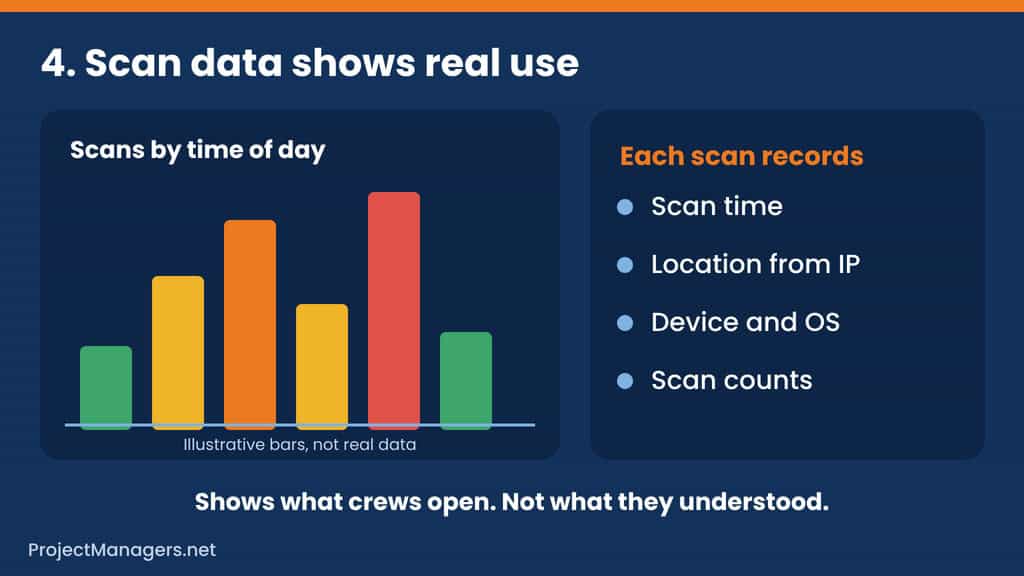
A dynamic QR code can track its own scan frequency. This provides a cost-effective way to identify which documents crews frequently access and which ones are ignored. By analyzing these patterns, you can see exactly what information is being used on site. While this reveals what people reach for, it does not confirm if they actually read or understood it.
What You Can Learn:
- Usage Patterns: Scan times show when questions come up, such as the start of a shift.
- Dead Documents: A QR code nobody scans points to a document nobody thinks they need, or one nobody can find.
Project Scenario: A monthly check shows the evacuation-plan QR code on the welfare cabin is almost never scanned. The plan is fine. The QR code sits behind the door. You move it to the wall by the kettle.
What Project Managers Can Do:
- Pick a review day and look at scan counts per QR code.
- Ask foremen why a quiet QR code is quiet before you remove it.
- Do not read a scan as proof someone read or understood the content.
Real-Life Example
What a Dynamic Code Records on Each Scan
According to IONOS, tracking can capture the time of each scan, the region, city, and country derived from the scanner’s IP address, the device and its operating system, and total and unique scan counts. That is usage data, not identity data.
5. Rollout Needs Only the Phones Crews Already Carry
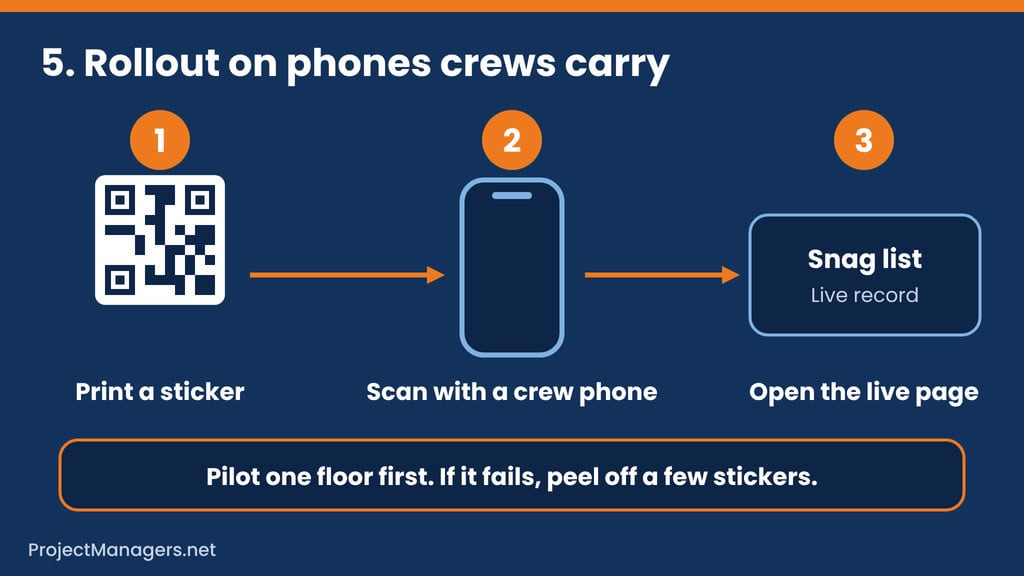
You do not need to purchase expensive hardware to begin. A simple sticker, a mobile phone, and a destination webpage are sufficient for a pilot program. This allows your first test to remain small and affordable. Because most workers already understand how to scan QR codes, training requirements are minimal, and the initial cost of validation stays very low.
Why Adoption Is Easy:
- Familiar Habit: Smartphone QR scanning is common among consumers, so crews rarely need to be taught the gesture.
- Small Starting Cost: Printing a sticker costs far less than issuing tablets, so you can test one floor first.
Project Scenario: You pilot QR codes on one floor of a fit-out for a month. If scans are steady and snags close faster, you extend them to the other floors. If not, you peel off a few stickers.
What Project Managers Can Do:
- Start with one workflow, such as snagging or inductions.
- Set a success measure before the pilot, such as snags closed per week.
- Keep a paper fallback for the first month.
Real-Life Example
Graham Rolled Codes Across Residential, Healthcare, and Civils
Graham stuck codes on walls across its portfolio. Scanning opened project records in Autodesk BIM 360 Field, which site managers and subcontractors used on tablets to view and update quality records, snags, floor plans, and progress photos.
By the Numbers
- 94 million
U.S. consumers expected to use smartphone QR scanners in 2023, per an eMarketer projection. This is consumer data, not crew data.
- 102.6 million
projected for 2026 by the same source.
Cons of Dynamic QR Codes in Project Management
The inherent risks of dynamic QR codes stem directly from the redirect mechanism. Because a third party manages the link, they maintain the power to change destinations or deactivate access entirely. These systems only function as long as your subscription remains active. While these risks are manageable, they require dedicated ownership, regular audits, and a contingency plan.
1. QR Codes Stop Working When the Plan Lapses

The printed dynamic QR code square looks identical even after a subscription lapses. The actual failure occurs within the hidden redirect link. Because most providers require an active paid plan to maintain the service, a cancelled credit card can instantly deactivate every QR code on your project site. Consequently, crews scanning these codes will find only broken links or empty pages.
Where It Breaks:
- Lapsed Payment: When payments stop, the link pauses, and the QR code opens nothing useful.
- Trials and Scan Limits: QR codes made in a free trial switch off when it ends, and passing a plan’s scan limit can pause them until the next billing cycle.
- Downgrades: Dropping to a free plan can keep only a few QR codes live and deactivate the rest.
Project Scenario: Finance cancels a corporate card in month nine. Forty QR codes on the site go dark during a concrete pour, and the pour crew cannot open the pump-sequence sheet.
What Project Managers Can Do:
- Put plan renewal in the project calendar, with a named owner.
- Keep a register of every QR code and its destination.
- Pay through project close-out, plus the warranty period if QR codes stay on site.
Real-Life Example
Cancel a Plan and the Extra Codes Go Dark
Hovercode moves a cancelled account to its free plan. The first three dynamic codes stay active. Any beyond that become inactive, though they are not deleted and work again if you resubscribe.
By the Numbers
- 3
dynamic codes stay active on Hovercode’s free plan after cancelling.
- At trial end
is when codes made during a free trial deactivate automatically.
- On expiry
is when GS1 UK says Premium links and landing pages stop. The code can be repointed through its basic service.
2. Tampered Codes Can Send Crews to Fake Pages
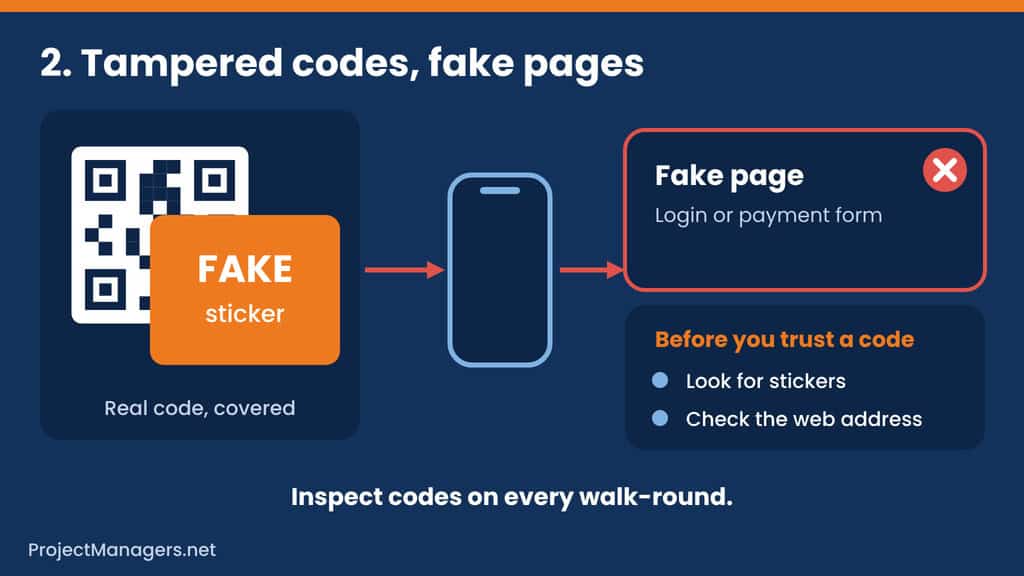
A QR code is simply a visual image. This means anyone can print a fraudulent version and stick it directly over the original. A scan then redirects users to a deceptive login or payment page. While the FBI states that QR codes are not inherently malicious, physical tampering is a serious risk on unattended project sites.
Two Ways In:
- Physical Overlay: A sticker over the real QR code sends the scan to a fake page. Regulators warn about this on parking meters.
- Account Takeover: Whoever controls the dynamic-code account can change where every printed code points, so the account needs the same protection as any project system.
Project Scenario: Someone covers the site-entrance sign-in QR code with their own sticker. New starters scan it, land on a convincing page, and type their email and phone number into it.
What Project Managers Can Do:
- Inspect physical QR codes on site walk-rounds for stickers or overlays.
- Protect the QR account with strong passwords and multifactor authentication.
- Teach crews to check the web address after scanning, and not to enter payment details after a scan.
Real-Life Example
The FBI Warned That Criminals Swap Codes and Payment Details
In January 2022 the FBI’s Internet Crime Complaint Center warned that criminals replace legitimate digital and physical QR codes with malicious ones that lead to fake sites capturing logins and financial details. Some embed malware, and some swap in payment destinations. The Swiss National Cyber Security Centre also describes fraudsters placing stickers over parking-meter codes.
Expert View
“Unfortunately, scammers hide harmful links in QR codes to steal personal information.”
Alvaro Puig, consumer education specialist at the FTC, as reported by CNBC
By the Numbers
- 94 million
U.S. consumers were expected to use smartphone QR scanners in 2023, which is the pool scammers target.
From the Field
“QR codes are not malicious in nature.”
FBI, Internet Crime Complaint Center, in its January 2022 alert
3. One Provider Becomes a Single Point of Failure
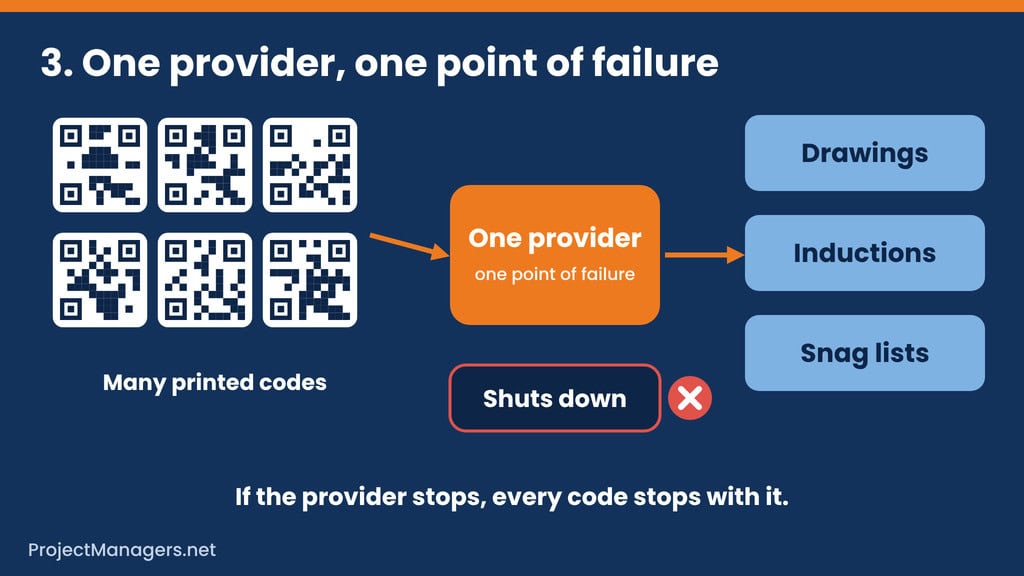
Every dynamic QR code on your project routes through one company’s servers. If that company shuts down, so does the redirect. Re-pointing hundreds of printed QR codes after a company shuts down is not possible without that provider, because the printed pattern holds only the short link. Plan the exit before you print anything.
Where the Risk Sits:
- Server Dependence: Dynamic QR codes use a short redirect managed by the platform, so they stop if the provider stops.
- Hard Exit: Moving to another vendor means reprinting, unless you planned the exit up front.
Project Scenario: Your provider is acquired and changes its plans. You find out when codes start to redirect to a sales page. A rival tool cannot take over the old short links.
What Project Managers Can Do:
- Ask the provider what happens to your QR codes if you leave or they close.
- Ask whether you can use a web address you own for the redirect.
- Keep an export of every QR code and destination in your own files.
Real-Life Example
If the Provider Shuts Down, the Codes Stop
QR Code Generator states that dynamic codes depend on the provider’s servers, so they stop working if the provider shuts down. GS1 UK shows the other side of this: when a Premium plan ends, its links stop, but a code can be pointed at a new address through its basic service. That helps only while the provider still runs.
4. Scan Tracking Brings Privacy and Consent Duties
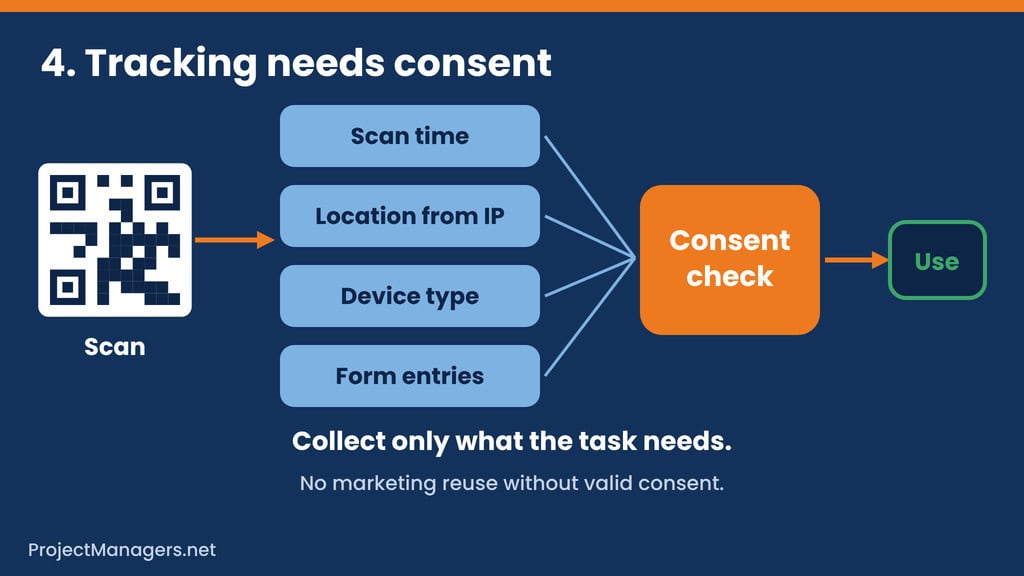
Scan analytics seem harmless until a QR code opens a digital form. At that point, you are actively collecting names, emails, and phone numbers, which means you must treat this information as protected personal data. Because regulators have strictly penalized QR data misuse, any information collected via a site QR code requires a clear purpose, a privacy notice, and a designated responsible person.
What Gets Collected:
- Scan Details: Time, rough location from the IP address, and device type, per the analytics features most platforms offer.
- Form Data: Any QR code that opens a sign-in or feedback form collects contact details, and you own that responsibility.
Project Scenario: A site sign-in QR code collects visitor names and numbers for safety. Months later, the marketing team wants the list for a newsletter. That use was never agreed with the people who signed in.
What Project Managers Can Do:
- Ask your data protection lead before you switch on tracking.
- Collect only what the task needs.
- Do not reuse sign-in data for marketing without valid consent.
Real-Life Example
A QR Provider Was Fined for Spamming Its Users
The UK Information Commissioner’s Office fined Tested.me £8,000. The St Albans firm ran contact tracing through QR codes and used the data to send nearly 84,000 marketing emails between September and November 2020 without adequate valid consent.
By the Numbers
- £8,000
fine issued by the ICO.
- Nearly 84,000
marketing emails sent using data collected through QR codes.
From the Field
“abused its access to personal data to spam individuals with direct marketing”
Infosecurity Magazine, reporting on the ICO action
5. Damaged Codes and Weak Signal Block Access
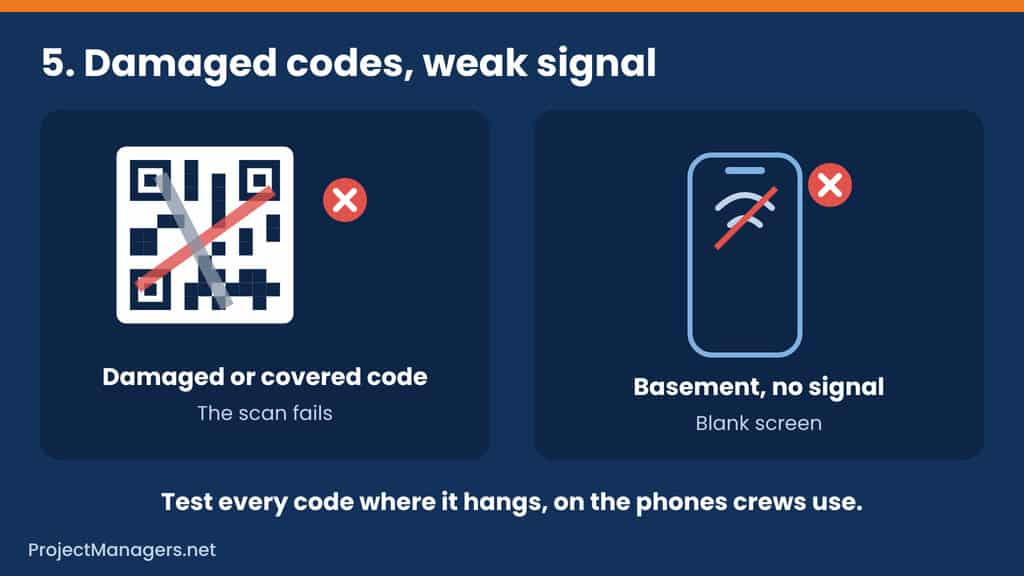
A QR code is merely a gateway to a digital link. Without a cellular signal, the document remains inaccessible. Similarly, a scuffed, dirty, or obscured code prevents a successful scan. These failures typically occur during critical moments in basements, plant rooms, or rain-soaked stairwells. These are exactly the locations where crews desperately need the correct drawings in hand.
Where It Fails:
- Weak Signal: A scan needs a connection to reach the redirect, and then the page, so low-signal areas can fail. Test it in the places that matter.
- Damaged or Covered QR Codes: Dirt, damage, and stickers stop scans. Swiss authorities advise checking for stickers placed over the original code.
Project Scenario: The pump-room QR code is the one that matters in an emergency. It sits in a basement with no signal, so a crew member scans it and gets a blank screen.
What Project Managers Can Do:
- Test every QR code on site, on the actual phones crews use, in the actual spot.
- Print critical instructions on paper at points with weak signal.
- Protect QR codes with laminate, and add a short web address as a text fallback.
- Implement QR code security strategies to help address potential issues like duplication, tampering, and misuse.
Studies and Official Warnings on QR Codes
Only one of these five is QR-specific research. The rest are industry data and official warnings that bear on the pros and cons above.
-
Document ControlSource 1 of 5
Feasibility of QR Codes in Highway Construction Document Control
Lee and Harapanahalli, PacTrans, 2015
1.70benefit-cost ratio- Surveyed the highway industry on document control and mobile IT.
- Found hardcopy is still the most common method.
- Ran a time study on one real project with statistically significant time savings.
Item: 1
Read the source -
Project DataSource 2 of 5
Construction Disconnected
Autodesk and FMI, 2018
35%of time spent on non-productive work- Surveyed nearly 600 construction professionals.
- Linked 48% of U.S. rework to poor data and miscommunication, at $31.3 billion.
- Not QR-specific, but it frames the problem codes try to solve.
Item: 1
Read the source -
SecuritySource 3 of 5
Cybercriminals Tampering with QR Codes to Steal Victim Funds
FBI Internet Crime Complaint Center, January 2022
Jan 2022public warning- Criminals replace real codes with malicious ones, leading to fake sites.
- Some codes embed malware, and some swap payment destinations.
- Advises checking the web address and inspecting physical codes.
Item: 7
Read the source -
SecuritySource 4 of 5
QR Codes May Be a Gateway to Identity Theft
FTC warning, December 2023, via CNBC
94 millionU.S. consumers expected to scan in 2023- Scammers paste fake codes over real ones and send codes by text or email.
- Advises checking URLs and using multifactor authentication.
- Scanner-user figures come from an eMarketer projection.
Item: 7
Read the source -
PrivacySource 5 of 5
ICO Fines QR Code Provider Tested.me
Infosecurity Magazine, May 2021
£8,000fine for data misuse- Provider used QR-collected data to send nearly 84,000 marketing emails.
- The ICO found it lacked adequate valid consent.
- Shows scan and form data carries legal duties.
Item: 9
Read the source
Facts Worth Checking
Claims about dynamic QR codes often run ahead of the evidence. Here is what each source actually supports.
| Item | You May Hear | What the Data Says | Source |
|---|---|---|---|
| 1 | Printed drawings are obsolete once you add a code. | Hardcopy was still the most common document control method in the survey. QR codes are positioned as a link between paper and electronic versions. | Lee and Harapanahalli |
| 2 | QR codes alone made one scheme 10% more efficient. | The 10% figure covers Graham’s digital tools in total, and the article does not isolate QR codes. It is the contractor’s claim. | Construction Management |
| 3 | Codes remove the need for training. | One vendor-written case says no downloads, logins, or training were needed. It gives no results figures. | Concrete Connect |
| 4 | Scan analytics show who read your document. | Typical data is scan time, location from IP address, device, and counts. It does not show who read or understood the content. | IONOS |
| 5 | Everyone already scans, so adoption is guaranteed. | An eMarketer projection put U.S. smartphone QR-scanner users at 94 million in 2023. That is consumers, not site crews. | CNBC |
| 6 | A printed code lasts as long as the paper. | The printed square stays valid, but the redirect needs an active plan. Trial codes switch off at trial end. | QR Code Generator |
| 7 | QR codes themselves are dangerous. | The FBI says codes are not malicious in nature. The danger is tampering, such as fake stickers over real codes. | FBI IC3 |
| 8 | If your provider disappears, you can re-point the code yourself. | Dynamic codes depend on the provider’s servers and stop if it shuts down. | QR Code Generator |
| 9 | Scan tracking is harmless, so no consent is needed. | The ICO fined Tested.me £8,000 for using QR-collected data to send nearly 84,000 marketing emails without adequate valid consent. | Infosecurity Magazine |
| 10 | A damaged code is a minor nuisance. | Swiss authorities advise checking for stickers over the original code. Signal loss on site is a design limit, so test each code where it is posted. | Swiss NCSC |
Conclusion
Dynamic QR codes are a good bet for one narrow job: keeping crews on the current version of a document without reprinting. The best-documented gains are in document control and handovers, and even those rest on one highway study and a contractor’s own figures. The risks are better documented than the benefits.
Treat the redirect like any other project system. Name an owner, put the renewal date in the calendar, keep a register of every QR code, inspect them on site, and protect the account. Do that, and the QR codes earn their place. Skip it, and a lapsed plan or a sticker over a sign-in QR code makes the problem bigger than the one you set out to fix.
Suggested articles:
- How QR Codes Are Revolutionising PM Workflows
- 5 Advantages and 3 Disadvantages of Using QR Codes
- Optimizing Inventory Management with Mobile Barcode Software Solutions

Daniel Raymond, a project manager with over 20 years of experience, is the former CEO of a successful software company called Websystems. With a strong background in managing complex projects, he applied his expertise to develop AceProject and Bridge24, innovative project management tools designed to streamline processes and improve productivity. Throughout his career, Daniel has consistently demonstrated a commitment to excellence and a passion for empowering teams to achieve their goals.