
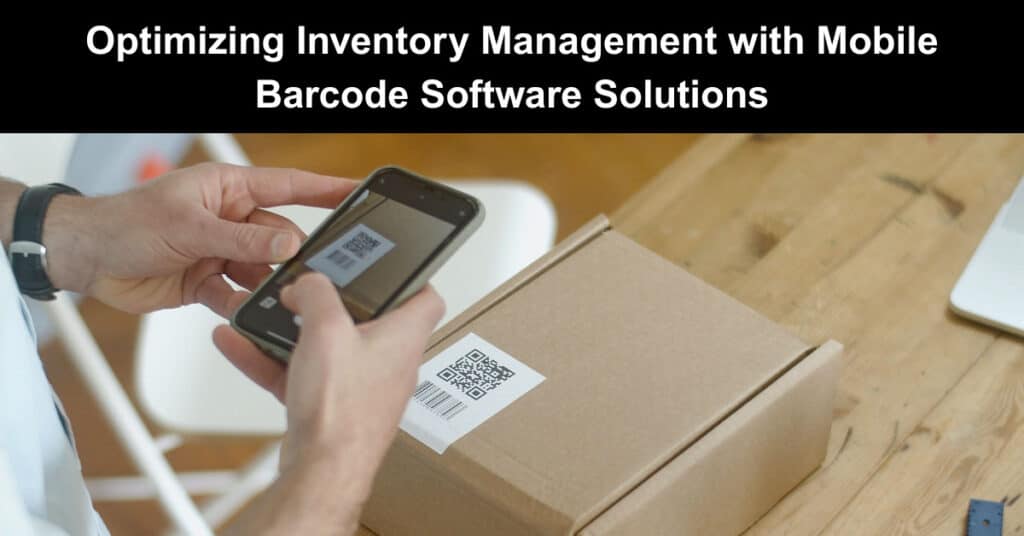
To optimize stock management and streamline operations, consider implementing a solution that integrates scanning capabilities with real-time tracking of items. These tools provide precise insights into stock levels, helping to avert shortages and overages, which can lead to financial losses. Using smartphone capabilities for data capture enhances the ability to manage assets effectively. The integration of scanning technology into everyday tasks eliminates manual entry errors and accelerates the check-in and check-out process, facilitating smoother transactions and inventory audits.
When selecting a platform, focus on user-friendly interfaces and customizable features that cater to specific business needs. Reliable reporting functions are crucial for analyzing trends and making informed decisions regarding stock replenishment and procurement strategies. Investing in cloud-based solutions ensures accessibility from various locations, allowing teams to collaborate in real-time and maintain accurate records regardless of physical presence. Enhanced security protocols protect sensitive data while offering flexible access for authorized personnel.
Key Features of Mobile Inventory Applications
Real-time monitoring stands out as a critical attribute of a mobile inventory app, allowing for instant updates on stock levels. This feature helps businesses maintain optimal stock amounts, reducing excess or shortages. Utilizing cloud technology ensures data is accessed immediately, enhancing the decision-making process.
Barcode Scanning Integration
Barcode scanning integration is what turns a mobile inventory app into a practical day-to-day tool. When scanning is built into the workflow, teams can capture item data quickly, keep inventory accurate, and reduce the errors that happen with manual entry. Key details to look for include:
- Scan to Update in Real Time: Implement scanning so barcodes can be scanned directly into the system. This allows teams to update stock counts instantly and keep inventory records accurate throughout receiving, audits, and routine operations.
- Better Validation During Receiving and Audits: Barcode scanning helps confirm item identities when products arrive or when stock is verified. That means fewer incorrect items, fewer discrepancies, and smoother audit results.
- Fewer Duplicate or Missed Entries: When scanning replaces manual typing, it reduces the chances of entering the wrong product code or skipping items—improving overall inventory reliability.
- Support for Multiple Barcode Formats: Choose software that can read more than one barcode type so the same system can support different suppliers, warehouses, and industries without extra workarounds.
- User-Friendly Interface for Fast Training: A simplified layout makes navigation easier and helps staff learn quickly. The faster users become comfortable with the app, the fewer errors occur in daily inventory tasks.
- Customizable Dashboards by Role: Ensure dashboards can be tailored to different job roles—for example, showing stock alerts, recent scans, or reorder thresholds. This keeps each person focused on the most relevant information and improves productivity.
Reporting and Analytics
Strong reporting and analytics are what turn barcode scanning into real business insight. When your mobile inventory app shows the right data clearly, you can spot trends early, prevent stock issues, and make smarter decisions about purchasing and operations. Here are the main capabilities to look for:
- Analytics for Trends and Performance: Choose software with robust reporting that highlights key metrics like sales forecasts and inventory turnover ratios. This helps you identify fast- and slow-moving products so you can adjust stock levels, reduce excess inventory, and avoid shortages.
- Automated Alerts for Proactive Management: Look for built-in notifications that warn users about low stock levels or upcoming expiration dates. Alerts help teams act quickly, improving accuracy and reducing the risk of missed replenishment or wasted inventory.
- Integrations That Streamline Operations: Confirm the system can connect with other tools—such as accounting software or POS platforms—to keep workflows efficient. Good integration reduces manual updates and helps keep records consistent across departments.
- Multi-Location Inventory Visibility: If you manage multiple outlets or warehouses, ensure the platform supports multi-location tracking. Centralized reporting makes it easier to monitor stock, compare performance by location, and coordinate replenishment.
- Security, Backups, and Access Controls: Security is essential. The software should use encryption to protect sensitive data, offer role-based access controls so only authorized users can view or edit information, and include regular backups to maintain data integrity in case of hardware failures or cyber incidents.
- Customization for Business-Specific Needs: Pick a platform that can be tailored to your processes, industries, and compliance requirements. Customizable features make the system more useful for your team and help ensure it supports your unique operational rules.
Choosing the Right Barcode Software for Your Business
Choosing the right barcode inventory software doesn’t have to be complicated—it just requires matching the software capabilities to how your team actually works. By thinking through your operation first, you can avoid costly workarounds and pick a system that supports accurate tracking from day one. Here’s what to consider before making your selection:
- Identify Your Business Requirements: Start by defining what you need the software to do. Consider the size of your operation, the types of assets you manage, and how much integration you require with existing tools like accounting or POS systems. Your goals will determine which features are truly essential.
- Ensure Hardware Compatibility: Check that the software works smoothly with your scanners, printers, and mobile devices. If possible, test the system in your actual workflow to confirm connectivity, scanning speed, label printing quality, and day-to-day usability—so you don’t run into disruptions after rollout.
- Evaluate the User Interface: Choose a platform with an intuitive interface that staff can learn quickly. If screens are confusing or workflows are unclear, it can slow down operations and increase the chance of entry mistakes. Trials or demos can help you gauge how comfortable your team will be.
- Confirm Scalability for Growth: Pick a solution that can grow with your business. As you add locations, products, or users, confirm whether upgrades and new features can be added easily—without forcing you to replace the entire system.
- Compare Total Cost and Budget Fit: Consider the full cost of ownership, including licensing, subscription fees, and any added expenses for support or maintenance. The best choice is usually the one that delivers value and reliability—not just the lowest upfront price.
- Prioritize Reliable Support and Training: Look for responsive customer support and strong onboarding resources. Good training and quick help during implementation can reduce downtime and ensure the software is used correctly from the beginning.
Integrating Inventory Management with Existing Systems
Connecting stock control with current business frameworks requires seamless data synchronization. Implement APIs that allow for real-time communication between the systems to ensure that updates in one platform reflect promptly in others. This interoperability promotes accuracy and minimizes discrepancies, which can arise from manual data entry.
Assess Compatibility
Before implementation, evaluate the existing infrastructure and ensure compatibility with new functionalities. Conduct an audit of current systems to identify integration points and potential bottlenecks. This proactive measure will help address issues early in the process, facilitating smoother transitions and reducing downtime during integration.
Training and Support
Once the systems are connected, provide comprehensive training sessions to familiarize employees with the new processes. Continuous support should be accessible to address user concerns and enhance usability. Regular feedback loops can help refine the integration, making it more effective over time.
Best Practices for Training Staff on Mobile Inventory Tools
Begin with hands-on training sessions. Create real-world scenarios that staff will encounter when using the technology. This allows them to familiarize themselves with the interface and functionalities in a practical context. Use common tasks like stock counting, item look-up, or data entry to build their confidence.
Leverage Visual Aids
Training staff on mobile inventory tools works best when you blend clear instruction with practical, visual guidance. When people can see the workflow and then practice it step by step, they learn faster, feel more confident, and make fewer mistakes—especially with scanning and data entry tasks.
To make that training stick, use these key approaches:
- Visual Aids for Clear Understanding: Use visual aids such as infographics, flowcharts, and screenshots to break down each process into easy-to-follow steps. Visuals help staff grasp “what to do next” and remember key features faster than text alone.
- Structured Manual with Simple Steps: Create a structured training manual with short, digestible instructions that employees can revisit as needed. Including step-by-step workflows (like stock counts, item lookups, and check-in/check-out) helps reduce confusion during real-world shifts.
- Troubleshooting & FAQs for Fast Support: Include troubleshooting tips and frequently asked questions so staff has quick answers when common issues occur—like scanner problems, barcode mismatches, or failed updates. This lowers downtime and prevents small errors from becoming bigger ones.
Encourage Peer Learning
Once hands-on training is in place, the next step is creating a learning culture that keeps getting stronger over time. Encourage support within the team, so staff continues improving—not just learning once. Use these main strategies:
- Mentorship & Peer Support: Establish a mentorship program where experienced users guide new staff. Pair less experienced team members with confident users to foster collaboration and speed up learning in a supportive environment.
- Gamification During Training: Use quizzes or challenges to reinforce learning objectives. This keeps participants engaged and motivated to build confidence with the tools.
- Measure Training Effectiveness with Feedback: Regularly reassess training by seeking feedback from staff. Use their insights to identify gaps, strengthen weak areas, and expand what’s working well.
- Ongoing Training & Refresher Sessions: Offer continuous learning opportunities as the technology evolves. Schedule short, frequent refresher sessions, so teams stay up to date on new features and updates.
- Recognize and Reward Proficiency: Acknowledge staff achievements in using the tools to boost morale and encourage continued engagement. This helps build motivation and ownership over time.
Conclusion
Implementing mobile barcode software can transform inventory management by delivering accurate, real-time visibility into stock levels. With streamlined scanning, teams reduce manual entry errors, speed up receiving, check-in, and check-out, and support faster, more reliable audits. When you choose a solution with user-friendly workflows, customizable dashboards, and strong reporting, you gain actionable insights into trends, turnover, and replenishment needs.
Integrating the system through APIs and training staff ensures data consistency across tools like accounting or POS platforms. Just as importantly, security features such as encryption and role-based access protect sensitive information. Overall, the right platform helps businesses minimize shortages and overstock, protect margins, and operate with greater confidence.
FAQs About Mobile Inventory App, Barcode Inventory Software
What are the main features of a mobile inventory app?
A mobile inventory app typically includes features such as barcode scanning, real-time inventory tracking, stock level management, reporting tools, and integration with other software like point of sale systems. Scanning barcodes allows users to quickly add or remove items from their inventory, while reporting tools help analyze stock discrepancies and sales trends. Many apps also offer user-friendly interfaces that simplify the inventory management process.
How does barcode software work within an inventory system?
Barcode software functions by generating unique barcodes for each item in inventory, which can then be scanned using a mobile device or scanner. Once scanned, the software updates the inventory records in real-time, allowing users to keep track of stock levels accurately. Additionally, the software can provide features like batch processing, which aids in managing multiple items simultaneously, and reporting capabilities that summarize inventory data.
Can a mobile inventory app help with reducing errors in inventory management?
Yes, a mobile inventory app can significantly reduce errors associated with manual inventory tracking. By utilizing barcode scanning, the chances of human errors, such as incorrect data entry or missed items, decrease. The app’s automated processes ensure that inventory counts are accurate, and real-time updates minimize discrepancies. This leads to more reliable stock management and improved operational efficiency.
What types of businesses can benefit from using mobile inventory apps?
A wide range of businesses can benefit from mobile inventory apps, including retail stores, warehouses, manufacturing companies, and logistics providers. Retailers can manage stock levels and sales efficiently, while warehouses can streamline their receiving and shipping processes. Manufacturers can monitor raw materials and finished goods, and logistics companies can keep track of shipments and inventory across multiple locations. In essence, any business that deals with physical goods can leverage these apps for better inventory control.
Are there any challenges associated with implementing a mobile inventory app?
Implementing a mobile inventory app may present several challenges. First, there may be a learning curve for staff who are not familiar with mobile technology. Second, ensuring that the app integrates well with existing systems can sometimes be complex, requiring technical adjustments. Additionally, consistent internet access is crucial for real-time updates, which can be challenging in areas with poor connectivity. Organizations should plan for training and support to mitigate these issues and ensure a smooth transition to the new system.
Suggested articles:
- Common Mistakes to Avoid in Inventory Management
- How ERP Improves Job Costing and Inventory Management
- 10 Best Tech Solutions for Your E-Commerce Startup

Daniel Raymond, a project manager with over 20 years of experience, is the former CEO of a successful software company called Websystems. With a strong background in managing complex projects, he applied his expertise to develop AceProject.com and Bridge24.com, innovative project management tools designed to streamline processes and improve productivity. Throughout his career, Daniel has consistently demonstrated a commitment to excellence and a passion for empowering teams to achieve their goals.