
Online shoppers now expect to see, change and price a product before they buy it. For brands that sell furniture, footwear, cabinets, bikes or any product with options, a static photo gallery is no longer enough, and sellers that cannot offer a personalized experience lose sales to competitors that can. That is why more project managers are being asked to add a 3D product configurator to an e-commerce store.
A configurator project looks simple from the outside: pick a vendor, add a widget to the product page, launch. In practice, it touches the e-commerce platform, product data, 3D assets, pricing, the ERP, the CRM and the production floor. This guide explains what a 3D configurator does, the benefits a project manager can promise the sponsor, a 4-step integration plan, and the pitfalls that push these projects over budget.
- A 3D product configurator lets shoppers customize a product in real time, see it from every angle and get a valid price, which turns the product page into a sales tool.
- Personalization most often lifts revenue by 10 to 15% (McKinsey), and Rebecca Minkoff shoppers who viewed products in 3D were 27% more likely to place an order.
- The hard part is not the 3D viewer: it is product rules, 3D asset quality, pricing data and the hand-off to the ERP, the CRM and production.
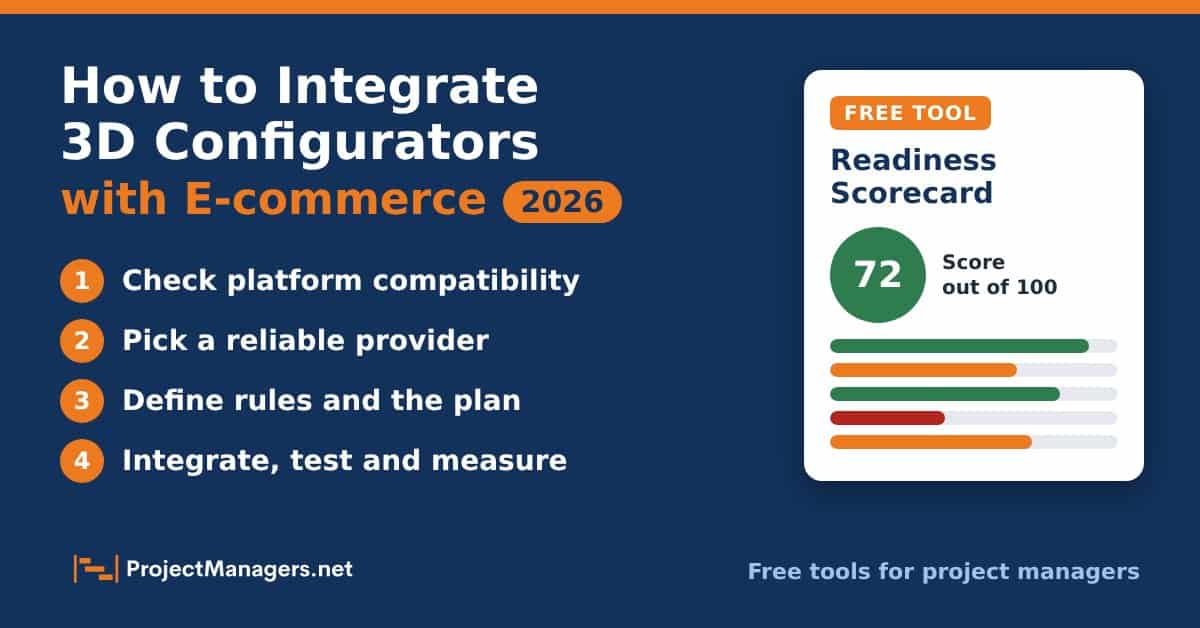
- Score your project with the free readiness scorecard below to see your weakest area and a ranked list of actions before you sign a vendor.
Done well, a configurator can help recover part of the 10 to 15% in potential revenue that companies leave on the table when they do not personalize. Done badly, it becomes a slow, expensive widget that nobody maintains. The difference is almost always project management: clear requirements, the right partner, a realistic integration plan and a team that owns the configurator after launch.
What Is a 3D Product Configurator?
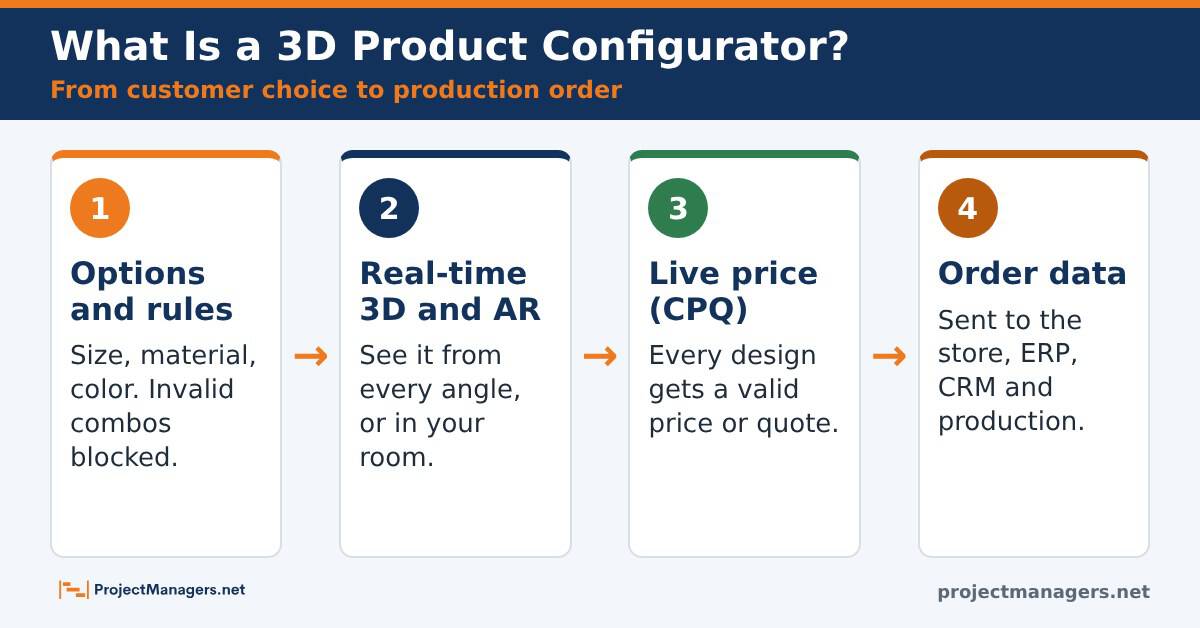
A 3D product configurator is software that lets customers design and personalize a product while they see the result in real time in an interactive, three-dimensional view. The shopper picks a size, a material, a color or an add-on, and the 3D model, the price and the available options update instantly.
Modern configurators go well beyond a 3D viewer. Most of them include:
- Rule-based logic that hides or blocks combinations that cannot be built or shipped.
- Visual CPQ (configure, price, quote), so every design comes with a correct price or a quote.
- Augmented reality (AR), so shoppers can place the product in their own room or try it on with a phone.
- Back-office integration with the e-commerce platform, the ERP, the CRM and, for made-to-order products, production systems.
Because most configurators work with the major e-commerce platforms, many project managers now plan them as an add-on to an existing store rather than a separate site. Integrating eCommerce configurators still requires careful alignment of technical requirements and stakeholder expectations. Strong project management skills, such as budget management, stakeholder management and strategic problem-solving, keep the implementation focused on business goals instead of features.
Real-life example
IKEA Kreativ turns a photo of your room into a 3D design space
In June 2022, IKEA launched IKEA Kreativ in the United States, a free design tool for computers and phones. Shoppers can browse more than 50 3D showrooms, scan their own room with the IKEA app, erase existing furniture and place IKEA products in a lifelike 3D replica, then add the whole design to the cart. For a project manager, it is a good picture of the end goal: the configurator is not a gadget on the side, it is part of the buying path.
Source: IKEA US newsroom
Numbers that matter
4 Benefits of 3D Product Configurators in E-commerce
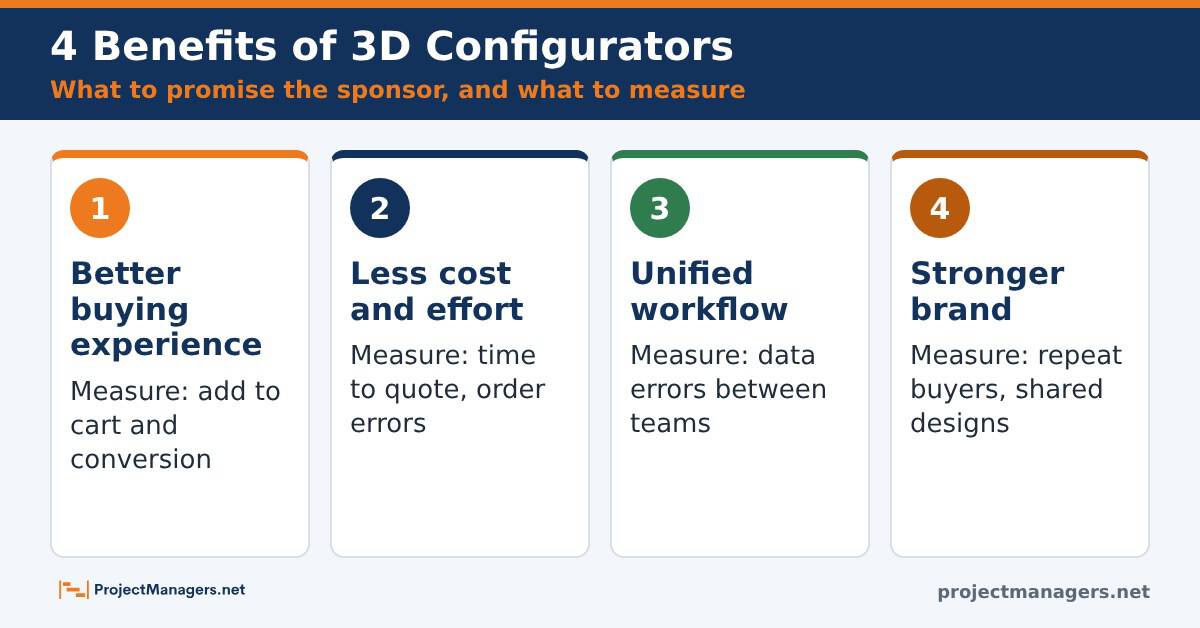
A 3D configurator improves both the customer journey and internal efficiency. These are the four benefits project managers can put in the business case, along with the metric to track for each one.
1. Better Shopping Experiences and Buyer Confidence
3D configurators let customers explore a product from every angle and in every variation. With AR, they can see a sofa in their living room or a shoe on their foot before they buy. That level of realism answers the questions a photo cannot, such as how big it is, how the fabric looks or whether the color matches, and it gives shoppers the confidence to complete the purchase.
Customization also gives buyers a sense of control. When customers co-create their product, they engage longer, feel more satisfied and are more likely to come back. Metric to track: add-to-cart rate and conversion rate on configurable products, compared with a baseline taken before launch.
2. Lower Cost, Time and Effort in the Sales Process
Selling bespoke or modular products usually means long email threads: customers ask what is possible, sales staff check with production, quotes go back and forth. The cycle slows decisions, puts pressure on the sales team and delays orders.
A configurator automates most of that work and can optimize project management workflows across sales and operations. Customers explore options on their own, see changes instantly and get a price without waiting for a sales rep. Visual CPQ shows the quote while the customer configures, and the rule engine blocks invalid combinations, which reduces order errors and returns. Metric to track: time from first inquiry to quote, and the share of orders that need manual correction.
3. A Smooth, Unified Workflow Across Teams
Besides plugging into platforms such as Shopify, WooCommerce or BigCommerce, a configurator can connect to the ERP and the CRM. Product data, inventory, customer preferences and pricing then stay aligned across sales, operations and finance, which removes data silos and the costly miscommunication that comes with them.
For the project manager, this means one source of truth for every configured order. Teams spend less time fixing re-keyed orders and more time serving customers. Metric to track: order-entry errors and the number of manual hand-offs between the store and fulfillment.
4. A Stronger, More Innovative Brand
Offering a configurator tells customers that the brand invests in their experience. It sets the store apart from competitors that still rely on photos and spec sheets, and it strengthens the brand in categories where buyers compare many similar products.
The effect goes beyond looks. When shoppers design their own product, they feel ownership of it, which builds loyalty and turns buyers into advocates who share their designs. Metric to track: repeat purchase rate and saved or shared designs.
Real-life example
Rebecca Minkoff saw shoppers buy more after adding 3D and AR
The fashion brand Rebecca Minkoff added 3D models and AR views to its Shopify product pages. Shopify reports that shoppers who viewed a product as a 3D model were 44% more likely to add it to the cart and 27% more likely to place an order, and that shoppers who viewed a product in AR were 65% more likely to buy. The lesson for project managers: measure these effects on your own products with a clean before-and-after baseline.
Source: Shopify
Numbers that matter
- 80%of shoppers say AR tools make them feel more confident about their purchases.Source: Snap and Publicis Media survey, via Retail Dive
- 2 in 3shoppers say they are less likely to return a product after using an AR feature.Source: Snap and Publicis Media survey, via Retail Dive
Free 3D Configurator Readiness Scorecard
Before you talk to vendors, check whether your project is ready. The scorecard asks 20 yes-or-no questions across five areas: platform and tech, product data and 3D assets, backend integration, people and budget, and customer experience. It loads with an example furniture brand on Shopify so you can see how it works.
- Pick your platform and product type, or load one of the examples.
- Answer the 4 questions in each area with Yes, Partly or No.
- Optionally, add your traffic, conversion rate and order value to see the revenue at stake.
- Read your score, your weakest areas and the top actions, then copy the action plan into your project plan.
Loading the scorecard…
4 Steps to Integrate 3D Configurators with E-commerce Platforms

With the benefits clear, it is time to plan the work. The four steps below give project managers a structured path from the first compatibility check to a tested, measurable launch.
Step 1: Assess Platform Compatibility
Start by checking how your current e-commerce platform supports 3D configurators. Shopify, WooCommerce and BigCommerce all support 3D integration through apps, plug-ins or APIs, but each one has its own requirements and limits. Work with your technical team early to list the integration options, the theme changes and the apps already installed that might conflict.
Check the platform limits that shape the design. Shopify, for example, raised its product limit to 2,048 variants in October 2025, so some products that once needed a configurator only for their option count may now fit in native variants. Products built to size or with complex rules still need one. Also measure your current mobile page speed so you can prove later that the configurator did not slow the store down.
If you are using BigCommerce and need guidance on getting the most out of your platform’s architecture, consulting with BigCommerce development experts can ensure seamless integration and optimal performance. Their specialized knowledge helps reduce implementation risk while keeping your project on schedule and within budget.
Step 2: Select a Reliable 3D Configuration Provider
Building a configurator from scratch takes significant time, 3D expertise and budget, especially for a team that has never done it. Partnering with a trustworthy provider simplifies the project. Look for a robust 3D product configurator with AR, real-time customization, Visual CPQ and proven integration with the systems you already use.
For footwear brands looking to create more engaging digital shopping experiences, a 3D commerce platform & experiences for footwear interactive shopping can help bring products to life through interactive visualization and customization. This allows shoppers to examine fabric textures, color options, and design details with better accuracy before making a purchase decision.
Manufacturers selling furniture, cabinets or other made-to-order products may need a 3D configurator with production outputs, which turns each finished design into bills of materials and CNC-ready files.
When you compare providers, go beyond the feature list:
- Ask for a demo built on one of your products, not the vendor’s showcase.
- Call at least one reference that runs on the same e-commerce platform as you.
- Check who creates and updates the 3D models, and at what cost per product.
- Review support hours, response times and update terms in the contract.
A reliable partner delivers a technically sound solution and guides your team through implementation, which keeps the project on schedule, within budget and aligned with business goals.
Step 3: Define Requirements and the Integration Plan
Before any build starts, define the objectives and the functional requirements. Document every product option, the rules between them, the pricing logic and the data each system must send or receive. Then build a detailed integration plan with timelines, owners and KPIs. A stakeholder engagement plan helps keep sales, IT, operations and the vendor aligned.
Thorough requirements are also your best defense against scope creep. Share the plan with your technical team and the configurator provider, track risks in a risk register, and run regular check-ins against the KPIs so bottlenecks surface early. Use the table below as a starting point for the plan.
Integration plan by phase
What the project manager delivers in each phase, who is involved and how you know the phase is done.
| Phase | Key deliverables | Who is involved | Done when |
|---|---|---|---|
| 1. Discovery | Business case, baseline KPIs, platform and speed audit | Sponsor, e-commerce lead, IT | Budget approved and baseline recorded |
| 2. Vendor selection | Shortlist, demo on your product, reference calls, contract | Project manager, IT, procurement | Contract signed with support terms |
| 3. Requirements | Option matrix and rules, pricing source, data map, 3D asset standard | Product, sales, operations, vendor | Rules signed off by product and sales |
| 4. Build and assets | 3D models, configurator setup, ERP and CRM connections | Vendor, developers, 3D artists | All products work on staging |
| 5. Test | Browser and device tests, pricing checks, usability sessions | QA, real customers, sales | No blocking issues and speed within target |
| 6. Launch and improve | Go-live, KPI dashboard, content owner, update backlog | Content owner, marketing, vendor | KPIs reviewed after 30, 60 and 90 days |
Step 4: Integrate the Product Configurator Into Your Platform
You can integrate product configurators into e-commerce platforms through APIs, custom code or third-party apps. Whichever route you choose, the configurator must blend with your product pages without hurting the current user experience: same fonts and colors, a clear call to action, and an add-to-cart flow that carries every chosen option and the right price.
Before launch, test the configurator on every major browser and device, with special attention to phones. Check loading time, the customization flow, pricing for edge cases and the order data that reaches fulfillment. After launch, track conversion, order value, returns and quote time against your baseline, and work with the provider on a regular optimization cycle. A simple status report keeps the sponsor informed during this phase.
Real-life example
Shopify’s own rules show why 3D assets need a standard
Shopify’s guidelines for 3D models ask for GLB files of about 4 MB in total, with textures no larger than 2048 x 2048 pixels for mobile web, and a polygon count kept as low as possible without losing detail. A configurator multiplies these files across every material and option, so project managers should write a 3D asset standard into the requirements and review each model before it goes live.
Source: Shopify Help Center
Plans are worthless, but planning is everything.
Dwight D. Eisenhower, 1957
Numbers that matter
- 2,048variants per product are now allowed on Shopify, up from 100, since October 2025.Source: Shopify developer changelog
- 4 MBis the recommended total size of a 3D model file on Shopify.Source: Shopify Help Center
Common Pitfalls Project Managers Should Avoid

A 3D configurator can deliver strong results, but these projects rarely go in a straight line. Knowing the common mistakes in advance helps project managers plan smarter and avoid costly setbacks.
1. Underestimating Integration Complexity
Many teams assume a plug-and-play configurator will work out of the box. In reality, integration involves theme changes, pricing logic, data mapping and order hand-offs that can derail the timeline and budget if they surface late. To reduce this risk:
- Run a compatibility audit of your platform and installed apps before you commit to a solution.
- Involve your IT team and the configurator provider from the very first workshop.
- Document every technical requirement and known blocker upfront, and track them as risks.
2. Neglecting Post-Launch Support and Updates
Launch is the beginning, not the finish line. New products, new materials, price changes and platform updates all require configurator updates. Without a plan, the configurator falls out of date within months. Plan for:
- A named content owner who adds products, options and prices after launch.
- Regular performance monitoring to catch issues before customers do.
- A support budget and a backlog for bugs, feedback and improvements.
3. Overlooking User Experience and Customer Needs
Even the most advanced configurator fails if shoppers find it confusing. Too many options, unclear steps or poor mobile navigation push customers away instead of helping them decide. To make the configurator work for your audience:
- Partner closely with UI/UX designers during both design and testing.
- Run usability tests with real customers on staging to find pain points before launch.
- Collect feedback after launch and iterate, starting with the options buyers use most.
4. Ignoring Page Speed and 3D File Weight
Heavy 3D models and textures can make a product page slow, especially on phones. Every second counts: a slow configurator loses shoppers before they even see the product. Set a performance budget in the requirements, compress models and textures, load the 3D view only when the shopper opens it, and compare page speed before and after launch.
Real-life example
Google found that slow mobile pages lose half their visitors
Google’s research on mobile speed found that 53% of mobile visits are abandoned when a page takes longer than three seconds to load, and that sites loading within five seconds had 70% longer sessions than slower ones. The study dates from 2016, but the lesson still applies to 3D configurators, which add some of the heaviest files a product page can carry.
Numbers that matter
- 52%of projects completed in the previous 12 months experienced scope creep, up from 43% five years earlier.Source: PMI Pulse of the Profession 2018
- 70.22%is the average documented online shopping cart abandonment rate across 50 studies.Source: Baymard Institute
Test Your Knowledge: 10 Quick Questions
10 questions on 3D configurator projects
Check what you learned. Click Show answer under each question.
What does Visual CPQ add to a 3D configurator?
- AA faster 3D rendering engine
- BConfigure, price and quote in one flow
- CA backup of the product catalog
- DAutomatic translation of product pages
Show answer
Answer B. CPQ stands for configure, price, quote: the shopper sees a valid price or quote while designing the product.
What should a project manager record before the configurator goes live?
- AThe vendor’s marketing claims
- BA list of competitors
- CA baseline for conversion, order value, returns and quote time
- DThe number of 3D artists hired
Show answer
Answer C. Without a baseline, you cannot prove the lift the configurator created.
What is the main job of rule-based logic in a configurator?
- ABlock combinations that cannot be built or shipped
- BMake the 3D model look more realistic
- CTranslate prices into other currencies
- DSend marketing emails
Show answer
Answer A. Rules prevent invalid orders, which cuts errors and returns.
Since October 2025, how many variants can a Shopify product have?
- A100
- B250
- C1,000
- D2,048
Show answer
Answer D. Shopify raised the limit from 100 to 2,048 variants for all merchants.
About how large should a 3D model file be for Shopify, according to its guidelines?
- AAbout 4 MB
- BAbout 40 MB
- CAbout 400 MB
- DThere is no recommendation
Show answer
Answer A. Shopify recommends a total file size of about 4 MB and textures no larger than 2048 px for mobile web.
When you compare configurator vendors, what is the best test?
- AThe length of the feature list
- BA demo built on one of your own products
- CThe vendor’s social media followers
- DThe lowest licence price
Show answer
Answer B. A demo on your own product reveals the real effort for rules, assets and integration.
Which risk does a thorough requirements document reduce most?
- AServer outages
- BCurrency fluctuations
- CScope creep
- DStaff turnover
Show answer
Answer C. PMI found that 52% of projects experienced scope creep. Documented requirements are the first defense.
What often happens to a configurator without a named content owner after launch?
- AIt becomes faster
- BIt goes out of date as products and prices change
- CIt updates itself automatically
- DIt ranks higher in search engines
Show answer
Answer B. New products, materials and prices need someone who keeps the configurator current.
According to Google research, what share of mobile visits are abandoned when a page takes over 3 seconds to load?
- A13%
- B33%
- C53%
- D73%
Show answer
Answer C. Google reported 53%, which is why heavy 3D files need a performance budget.
A furniture maker sells made-to-order cabinets. What should it ask configurator vendors to show?
- AOnly the AR view
- BSocial sharing buttons
- CA discount engine
- DHow a finished design becomes production data such as bills of materials and machine files
Show answer
Answer D. For made-to-order products, the hand-off to production is where most of the value and the risk sit.
Video: See a 3D Product Configurator in Action
This short video from Nextech3D.ai shows how a 3D product configurator lets shoppers personalize products on an e-commerce site. Watch it with your team before the requirements workshop: it helps everyone picture the same end result.
Video: Personalize the Shopping Experience with 3D Product Configurators, Nextech3D.ai on YouTube.
Facts Worth Checking
Facts worth checking
Common claims about 3D configurators and e-commerce projects, checked against the original source.
| Claim | Verdict | What the source says |
|---|---|---|
| Personalization can lift revenue by 10 to 15%. | True | Most often 10 to 15%, with a company-specific range of 5 to 25% depending on sector and execution. McKinsey |
| Most consumers expect personalized experiences. | True | 71% expect personalized interactions and 76% are frustrated when they do not get them. McKinsey |
| Showing products in 3D helps shoppers buy. | True | Rebecca Minkoff shoppers who viewed 3D models were 44% more likely to add to cart and 27% more likely to order. Results vary by brand. Shopify |
| AR cuts product returns by two thirds. | Partly true | Two in three shoppers say they are less likely to return a product after using AR. That is a survey answer, not a measured return rate. Retail Dive |
| Shopify products are limited to 100 variants. | Out of date | The limit rose to 2,048 variants for all merchants in October 2025. Shopify |
| Any 3D file size works on a product page. | False | Shopify recommends about 4 MB per model and textures up to 2048 px for mobile web. Shopify Help Center |
| More than half of projects suffer scope creep. | True | 52% of projects completed in the prior 12 months had scope creep, up from 43% five years earlier (2018 survey). PMI |
| Most mobile visitors leave a slow page. | Partly true | 53% of mobile visits are abandoned after 3 seconds. The figure is from 2016 research and is still widely cited. Marketing Dive |
| About 7 in 10 online carts are abandoned. | True | The documented average is 70.22% across 50 studies. Baymard Institute |
| A 3D configurator is plug-and-play. | False | Platform apps make the viewer easy, but rules, pricing, 3D assets and ERP or production hand-offs need a real project plan. This guide |
Checked November 9, 2026.
FAQs About 3D Configurator Integration
What is the difference between a 3D viewer and a 3D product configurator?
A 3D viewer shows a fixed product that shoppers can rotate and zoom. A 3D product configurator lets them change the product itself (size, material, color, add-ons) with rules that block invalid combinations and a price that updates with each choice.
How long does it take to integrate a 3D configurator with an e-commerce store?
It depends mostly on product complexity and 3D assets. A few products with simple options on a platform app can go live in weeks. Made-to-order products with complex rules, ERP connections and many 3D models usually need a multi-month project with discovery, build, testing and a staged launch.
Do I need a 3D configurator if my platform supports many variants?
Not always. If your products have a limited set of fixed options, native variants plus 3D media may be enough. A configurator pays off when options interact through rules, when products are built to size, or when every design needs a custom price or production data.
Which e-commerce platforms support 3D configurators?
Shopify, WooCommerce, BigCommerce, Adobe Commerce and headless storefronts can all host configurators through apps, plug-ins, embeds or APIs. Each has different limits, so confirm the integration route with your platform and the vendor before you sign.
Who should own the configurator after launch?
Name one content owner, often in e-commerce or product management, who adds new products, options and prices. The project manager should hand over a support contract, a backlog and a KPI dashboard to that person at project closure.
How do I measure the ROI of a 3D configurator?
Record a baseline before launch for conversion rate, average order value, return rate and time to quote. Compare the same metrics 30, 60 and 90 days after launch, and subtract the licence, 3D modelling, integration and support costs. The scorecard on this page gives a first estimate of the revenue at stake.
Conclusion
Integrating a 3D product configurator is more than a technology upgrade. It changes how a brand sells: customers design and price their own products, sales teams spend less time on back-and-forth, and every configured order reaches operations with the right data. For project managers, success comes from the same disciplines as any complex project: clear requirements, the right provider, a realistic integration plan and an owner after launch.
Start with the readiness scorecard above, close the gaps it finds, and plan the integration in phases with a measurable baseline. With that foundation, a configurator becomes a lasting competitive advantage that helps your brand grow, adapt and deliver personalized shopping experiences to every customer. For more free tools to run the project, visit the Free Project Management Toolkit.
Suggested articles:
- Project Management Tips for Operating an E-Commerce Website
- The Future of E-commerce: Key Insights for Success
- Boosting B2B e-commerce Sales Efficiency: Practical Strategies for 2025
- What Is the RICE Framework? How to Prioritize Features

Daniel Raymond, a project manager with over 20 years of experience, is the former CEO of a successful software company called Websystems. With a strong background in managing complex projects, he applied his expertise to develop AceProject.com and Bridge24.com, innovative project management tools designed to streamline processes and improve productivity. Throughout his career, Daniel has consistently demonstrated a commitment to excellence and a passion for empowering teams to achieve their goals.