
Document summarization condenses lengthy text into a shorter version while preserving the essential information and core arguments. Reading through reports, contracts, or research papers multiple times to extract the main points takes time that most professionals and students do not have to spare. An AI summarizer solves this by automatically analyzing text and producing a concise, readable summary in seconds.
This guide walks through what AI summarizers are, how they work behind the scenes, and the exact steps to use one effectively. It also covers tool selection by use case, common mistakes that reduce the quality of summaries, and data privacy considerations to check before uploading sensitive files. By the end, you will know how to pick the right tool and use it with confidence.
What is an AI Summarizer?
An AI summarizer is a tool that uses artificial intelligence to shorten any piece of text while retaining its essential meaning. Rather than skimming or rereading a document several times, the tool reads it once, identifies the most important content, and returns a condensed version in seconds. This makes it useful for students, researchers, legal teams, and busy professionals alike.
Modern AI summarizers rely on a mix of natural language processing techniques and machine learning models trained to recognize sentence importance, topic relevance, and contextual relationships within text. Earlier tools depended heavily on statistical methods like NLP, TextRank, latent semantic analysis (LSA), and LSTM, while current tools increasingly use large language models that understand meaning rather than just word frequency.
The tool’s basic operation has stayed consistent even as the underlying technology has advanced. It reads the input text, builds an understanding of its structure and main arguments, extracts or rewrites the most relevant points, and then delivers the output. Speed remains one of the biggest draws: most tools generate a usable summary in under a minute, even for documents running several thousand words.
How AI Document Summarization Works
Understanding the mechanics behind summarization helps explain why some tools produce better results than others for certain document types. There are two core approaches, and most modern tools blend elements of both depending on the content and the user’s settings. A short transition sentence introduces the two main summarization methods below:
- Extractive Summarization: This method works like a highlighter, pulling sentences directly from the source text without rewriting them. It tends to preserve technical accuracy and exact wording, which makes it a strong fit for legal, scientific, or compliance documents where precise phrasing carries weight.
- Abstractive Summarization: This method generates new sentences that paraphrase the original content in different words. Large language models such as those powering ChatGPT, Gemini, and Claude excel here because they understand semantic meaning and can rephrase naturally, though this approach carries a higher risk of introducing small inaccuracies if not checked.
- Hybrid Summarization: Many enterprise-grade tools now combine both methods, extracting key facts first and then rewriting them into a cleaner, more readable summary. This hybrid approach balances factual reliability with natural-sounding prose, which is why it has become the standard in newer summarization platforms.
Why Use an AI Summarizer for Document Summarization
Manual summarization requires reading a document multiple times to identify recurring themes, eliminate redundancy, and condense ideas without losing meaning, which is slow and mentally taxing for long or technical material. An AI summarizer for document summarization automates this process, cutting review time significantly while still surfacing the core arguments, supporting details, and conclusions a reader actually needs.
Beyond speed, AI summarizers help with comprehension by reorganizing dense paragraphs into clear takeaways, bullet points, or structured flashcards, depending on the tool. Professionals report that AI summarizers can reduce document analysis time by up to 70 percent, freeing hours each week for other work. This time savings compounds across teams that regularly process contracts, research, or long reports.
Steps to Use an AI Summarizer to Summarize a Document Effectively
Here is the step-by-step procedure for using an online summarizing tool to handle document summarization from start to finish, including a verification step that many guides skip entirely.
1. Choose An AI-Based Tool
The first step before summarizing anything is finding a reliable tool built on genuine AI algorithms rather than basic keyword extraction. There are hundreds of summarizers available, but only a portion use advanced natural language processing or large language models capable of understanding context rather than just counting word frequency.
The right choice depends heavily on what type of document needs summarizing. A tool built for academic papers will not necessarily handle a legal contract well, and a meeting transcript tool will not be the best fit for a long PDF report. The following list breaks down strong options by use case:
- General Purpose Summaries: ChatGPT and QuillBot’s Summarizer handle a wide range of content types, from articles to reports, with adjustable length controls and bullet point or paragraph output formats.
- Academic Research: Scholarcy converts long-form PDFs into structured flashcards containing the abstract, synopsis, and key highlights, and it has become notably precise at extracting and summarizing tables and figures from research papers.
- Source Verification and Legal Review: Sharly AI stands out for source traceability, including citations with page references so users can verify exactly where each claim originated, which matters for legal review and compliance work.
- Contracts and Legal Documents: AI Lawyer is purpose-built for legal documents, summarizing contracts, comparing agreement versions, and handling scanned legal files that often trip up general-purpose tools.
- Meetings and Spoken Content: Notta and Sembly AI are designed for transcription, recap, and action items from meetings, interviews, and recorded calls rather than static documents.
- Marketing and Content Teams: Jasper and Hypotenuse AI summarize long briefs, research documents, and call notes into overviews that feed directly into content creation workflows.
Here’s a further breakdown of top AI summarizer tools:
Summarizer
This freemium AI summarizing tool supports the summarization of long-form text up to 3,000 words at no cost. It offers multilingual functionality and features two distinct, powerful summarization modes.

| Strengths | Weakness |
| Effectively understand the input text. | Provide a cost |
| Generate an abstractive summary. | |
| Quickly generate the summary in seconds. |
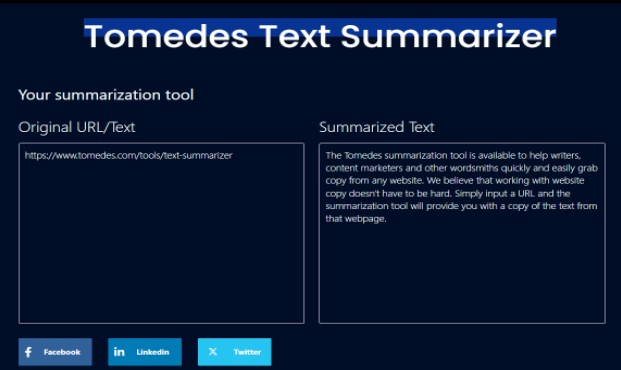
Tomedes Text Summarizer
The Tomedes Text Summarizer is a powerful tool designed to help writers and marketers efficiently extract and condense website content. By simply entering a URL, the tool automatically generates a clear, concise summary that is ready for further refinement and customization.
| Strengths | Weaknesses |
| Quick and easy text extraction from any website | The quality of summaries can vary based on the complexity of the original text. |
| Provides a concise summary, ready for further editing | |
| Supports content summarization in multiple languages. | |
| Saves time for writers and content marketers |
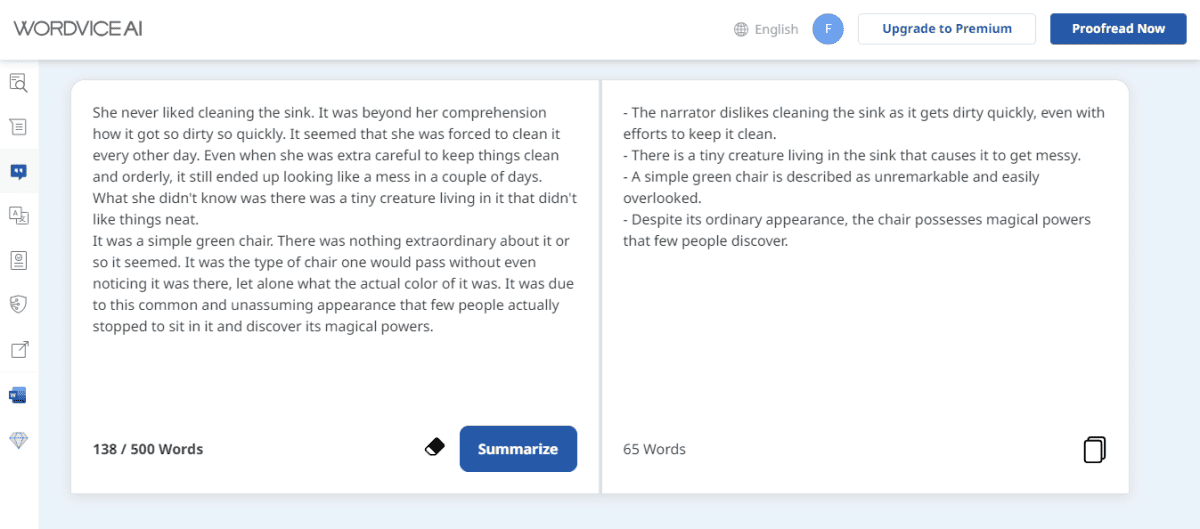
Wordvice AI Summarizing Tool
Wordvice AI is a freemium tool that requires users to register before accessing its features. It offers a 500-word limit for free users, which, while relatively modest, makes it a suitable option for summarizing shorter documents.
| Strengths | Weakness |
| Effectively understand the input text. | Only provide a 500-word limit for free users. |
| Generate an abstractive summary. | It doesn’t provide a feature to download the output. |
| Quickly generate the summary in seconds. | Ask for registration first. |
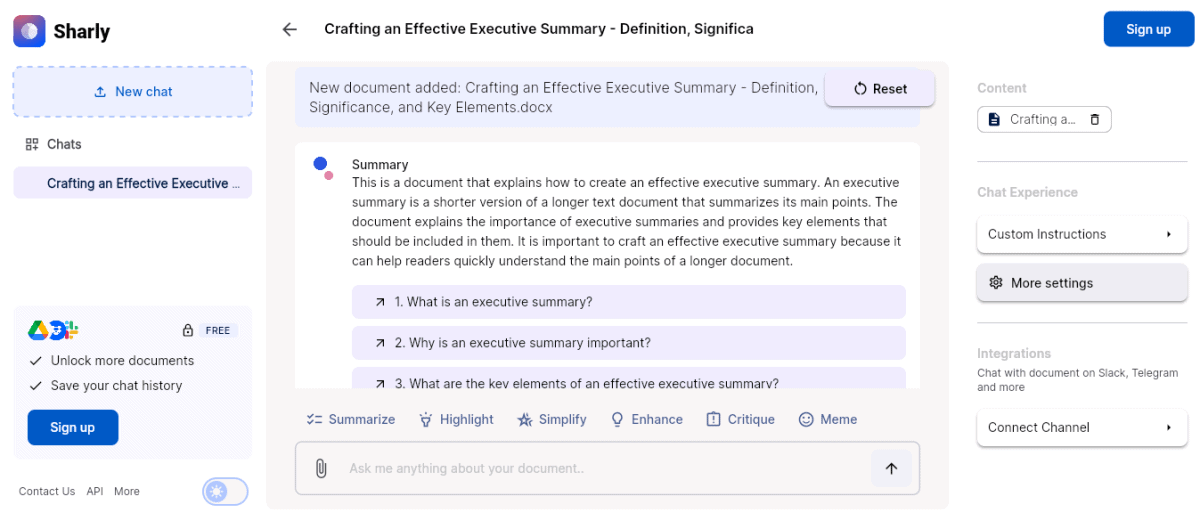
Sharly Text Summarizer
Sharly is a versatile online platform offering a suite of tools, including a powerful text summarizer. While the tool is available free of charge, it does come with certain limitations. Additionally, users are required to create an account before accessing its features.
| Strengths | Weakness |
| The summary it generates is readable and to the point. | Premium plans are pretty expensive. |
| The algorithms are based on the GPT model | Premium plans are quite expensive. |
| Allow users to write the prompt of what type of summary they want. |
Summarizing Tool
SummarizingTool.io is a free, AI-powered summarization tool capable of condensing text of up to 500 words. Designed with simplicity in mind, it offers a straightforward user experience — users can either paste their text directly or input a URL, and the tool will generate a clear, concise summary within seconds.

2. Upload Your Document
The next step is importing the text document into the chosen tool, which then extracts the text and loads it into the input field automatically. Most platforms accept direct file uploads rather than requiring users to copy and paste large blocks of text manually, which saves time on longer files.
Before uploading, check the tool’s word or page limit, since free tiers vary considerably between platforms. Some free plans cap input at a few hundred words, while others handle several thousand words or full-length PDFs without restriction. Confirming this upfront avoids a failed upload partway through the process.
A brief transition leads into the accepted file formats most tools support today:
- DOC and DOCX: Standard Word document formats are supported by nearly every summarization tool currently available, including both legacy and modern Word file types.
- PDF: Most tools extract text from PDFs directly, though scanned or image-based PDFs may require optical character recognition (OCR) support, which not every tool includes by default.
- TXT: Plain text files are the simplest format for most summarizers to process and typically upload without any formatting issues or extraction errors.
- URL Input: Several tools, including browser-based summarizers, allow pasting a web page link directly instead of uploading a file, which extracts the article content automatically.
If a file is not in one of the supported formats, converting it first using a free document converter avoids upload errors and ensures the tool reads the full text accurately.
3. Select The Necessary Options
With the document uploaded, the next step is configuring the AI summarization settings to match the intended use of the output. These options shape how useful the final summary will be for the specific task at hand, whether that is a quick skim or a detailed research reference. The following options appear across most modern summarization tools:
- Choose the Correct Language: Many AI summarizers support multiple languages, so selecting the document’s actual language ensures accurate processing rather than relying on automatic detection, which occasionally misreads mixed-language content.
- Adjust the Summary Length: Most tools include a length slider or percentage control, typically ranging from 20 percent to 100 percent of the original text, letting users dial in exactly how condensed the output should be.
- Specify Keywords to Include: Some platforms extract the most frequently used terms from the document and display them for selection, letting users guide the summary toward specific topics or sections they care about most.
- Select Output Format: Many tools now offer a choice between paragraph-style summaries, bullet point lists, or structured flashcards, depending on whether the goal is quick scanning or deeper reference material.
- Generate the Output: After configuring these settings, clicking “Summarize” or “Shorten the Text” triggers the tool to analyze the content, apply the chosen settings, and return the finished summary.
You can then copy the summarized version of the document and use it wherever you want. The summarizers can download the generated summary as DOC, TXT, or PDF files.
4. Verify and Export the Summary
A step many users skip is checking the summary against the source document before relying on it, particularly for abstractive summaries where the tool rewrites content in its own words. Spot-checking a few key claims against the original text catches the occasional inaccuracy or dropped nuance before it causes a problem downstream.
Once verified, most summarizers allow exporting the result as a DOC, TXT, or PDF file, and a growing number integrate directly with tools like Notion, Zotero, or Obsidian for researchers who want summaries to flow straight into their existing notes.
Common Mistakes to Avoid When Using AI Summarizers
Even reliable tools produce weaker results when used carelessly, and a few recurring mistakes show up across most workflows. Recognizing these patterns early helps avoid wasted time, inaccurate summaries, and unnecessary exposure of sensitive information to platforms that were never designed to handle it securely.
Skipping the Source Verification Step
Trusting an abstractive summary without checking it against the original document risks acting on a subtly altered claim. Large language models occasionally rephrase a statistic or condition in a way that shifts its meaning, even when the overall summary reads smoothly and sounds confident.
Real-Life Example: A research assistant relied on an AI-generated summary of a clinical study without checking the source. The summary reversed a key statistical finding through imprecise rewording, leading to an incorrect citation in a draft report that needed correction before submission.
Resolution: Spot-check at least two or three key claims or figures against the source document before using a summary in any formal context. Tools with citation tracking, such as those offering page-level references, make this verification step considerably faster.
Uploading Sensitive Documents Without Checking Privacy Policies
Many free summarization tools process documents through third-party servers, and not all of them clearly disclose how long files are retained or whether they are used to train future models. Uploading a confidential contract or proprietary report without reviewing this first can create unintended exposure.
Real-Life Example: A small business uploaded a draft vendor contract containing pricing terms to a free summarizer to save time. The company later discovered the platform’s terms allowed indefinite data retention, prompting a scramble to confirm no sensitive terms had been logged or shared.
Resolution: Review a tool’s data retention and privacy policy before uploading anything confidential, and favor paid or enterprise-grade platforms with explicit no-training-on-user-data guarantees for sensitive files. When in doubt, redact identifying details first.
Conclusion
An AI summarizer for document summarization turns hours of careful rereading into a task that takes minutes, without sacrificing the core information a reader actually needs. Choosing the right tool for the document type, configuring the output settings thoughtfully, and verifying key claims against the source are what separate a genuinely useful summary from one that quietly misleads.
As these tools continue maturing, the gap between extractive accuracy and abstractive readability keeps narrowing through hybrid approaches that blend both methods. Whether the task involves a research paper, a contract, or a lengthy business report, building a consistent verification habit alongside AI summarization will keep the output both fast and dependable for whatever comes next.
Frequently Asked Questions About AI Summarizers
Is there a free AI summarizer for long documents?
Yes, several tools offer free tiers, though word limits vary widely. Some cap-free use around 500 to 600 words, while others allow several thousand words or a limited number of summaries per day. Checking the specific limit before uploading a long document avoids a failed or truncated summary partway through.
How accurate are AI summarizing tools?
Accuracy depends heavily on the document type and the summarization method used. Extractive tools tend to be more reliable for legal or technical material since they preserve original wording, while abstractive tools can occasionally introduce small inaccuracies through paraphrasing. Verifying key claims against the source remains the best safeguard regardless of which method a tool uses.
What file formats do AI summarizers support?
Most tools accept DOC, DOCX, PDF, and TXT files, with many also supporting direct URL input for web articles. Scanned or image-based PDFs sometimes require optical character recognition support, which is not included in every summarization tool by default, so checking compatibility first prevents upload errors.
Is it safe to upload confidential documents to an AI summarizer?
Safety depends entirely on the specific platform’s data retention and privacy policies, which vary considerably between free and paid tiers. Reviewing a tool’s terms before uploading sensitive contracts, financial reports, or proprietary research is worth the extra few minutes, and enterprise-grade tools generally offer stronger guarantees against data retention or model training use.
How is an AI summarizer different from using ChatGPT directly?
Dedicated AI summarizers are typically optimized for handling long documents in one pass, offering built-in length sliders, citation tracking, or structured output formats that general chat tools require manual prompting to replicate. ChatGPT works well for quick, one-off summaries, but dedicated tools tend to be more efficient and consistent for recurring or large-scale summarization workflows.
Suggested articles:
- Top 10 Cons & Disadvantages of Artificial Intelligence (AI)
- Top 10 Cons & Disadvantages of Generative AI
- Understanding AI Checkers: Why They Matter in Digital Writing

Daniel Raymond, a project manager with over 20 years of experience, is the former CEO of a successful software company called Websystems. With a strong background in managing complex projects, he applied his expertise to develop AceProject.com and Bridge24.com, innovative project management tools designed to streamline processes and improve productivity. Throughout his career, Daniel has consistently demonstrated a commitment to excellence and a passion for empowering teams to achieve their goals.