
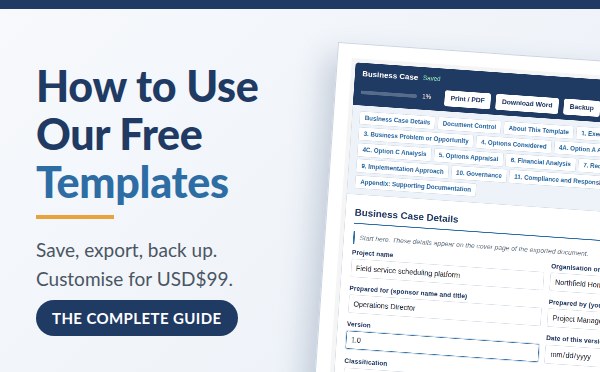
Every template on ProjectManagers.net works the same way. You fill it in online, free, with no sign-up and nothing to download. This page explains how saving, exporting and moving your work between devices behave, and how to get a version customised for your organisation.
- Custom version USD$99
- Word template USD$49
- How it works
- Saving and privacy
- Word and PDF
- Move between devices
Want your own version of a template?
Every template is free and always will be. If you need one changed to fit your organisation, that is where we can help.
USD$99 per template, one flat fee, one round of changes, your own private link.
How it works
- Pay the USD$99 fee. Contact us by email to receive the payment link, and tell us which template you want customised.
- Send us your prompt in English so we can understand what you are requesting. Write a single set of instructions describing everything you want changed. We run it against the template in one pass with Claude AI.
- Get your link. We host your customised template at a private URL that works exactly like the public one. It saves in the browser the same way and exports to Word the same way. We password protect your private URL with your order number. Share it with your whole team.
- Need more changes later? We charge USD$49 for each additional pass of modifications.
What you can ask for
- Translation into your language
- Adding, removing or reordering sections
- Rewriting the guidance notes and worked examples
- Matching your organisation’s terminology, roles, approval process and governance model
- Renaming fields and tables to match your PMO or finance standards
- Changing rating scales, tolerances, criteria or reporting periods
Writing a good prompt
Everything you want goes into one message, so be specific. Name the template and the sections, quote the wording you want changed, and say what should replace it. Here is an example that works:
Template: Business Case. Translate the whole template into French (Canada), including all guidance notes and examples. Remove section 11, Compliance and Responsible Delivery, entirely. Add a fourth option panel, Option D, with the same structure as the others, and add an Option D column to the appraisal table. Rename “Project sponsor” to “Executive sponsor” everywhere it appears.
One prompt, one pass. We build exactly what your prompt asks for. We do not interpret, add to it, or fill in the gaps, so anything you leave out will not appear in your version. Take a few minutes over it and you will get precisely what you had in mind.
Contact us by email to request a custom version
Prices in US dollars. Your customised template is hosted by us and is not listed publicly or indexed by search engines.
Prefer to work in Word? Buy the Word template
Every online template is also available as a professionally formatted Microsoft Word template that you download once and keep. Fill it in directly in Word, share it with your team, or add it to your PMO’s template library.
USD$49 per template, one-time purchase, yours to keep and reuse.
What you get
- The complete template as an editable .docx file, with every section and table of the online version
- Guidance notes and a worked example in every section, in shaded boxes you delete once you are done
- A cover page, document control, version history and a table of contents
- A file that opens in Microsoft Word, Google Docs and LibreOffice
- Reuse on as many of your projects as you like
Word template or Download Word? The free Download Word button on each template page exports what you typed into the online form, as a finished document without the guidance. The Word template is the template itself, blank and complete with all the guidance and worked examples, for people who prefer to write in Word from the start.
How to buy
- Contact us by email and tell us which template you want.
- Pay the USD$49 fee with the payment link we send you.
- Receive your .docx file by email once payment is confirmed.
Contact us by email to buy a Word template
Prices in US dollars. One purchase per template.
How the templates work
There is nothing to download and no account to create. The form on each template page is the complete template, ready to type into. Each section carries the guidance a good template should: what belongs there, what your sponsor or approver is actually looking for, and worked examples you can adapt to your own project.
Tables grow with your project. Press Add row to extend a register or a list, and the small cross to remove a row you do not need. The percentage in the toolbar tracks how much of the template you have filled in.
Some templates also do the arithmetic for you. The Business Case, for example, calculates weighted option scores, net present value, return on investment and payback as you type.
It saves itself as you type
Every keystroke is saved automatically in your own browser. Close the tab, shut down your laptop, come back next Tuesday, and your work is exactly where you left it. There is no save button to forget. Each template keeps its own draft, so working on one never overwrites another.
Nothing is sent to us. Your work is stored in your browser’s local storage and never reaches our servers. That means you can put real budgets, real client names and real internal politics into it without a second thought.
The trade-off is that your draft is tied to one browser on one device. Clearing your browsing data will erase it, and a private or incognito window will always start blank. The Backup button exists for exactly that reason.
Turn it into a Word document or a PDF
When your document is ready to share, press Download Word. You get a formatted document containing your content and none of the guidance notes. Every section heading is kept, so the document always shows the full structure, and tables you left completely blank are dropped so a half-finished draft still reads cleanly.
Print / PDF does the same for a PDF or a paper copy. It hides the toolbar, the navigation and the guidance, and prints only the document itself.
Move your draft to another computer
Press Backup and you get a small file containing everything you have typed. Email it to yourself, put it on a USB stick, or send it to a colleague.
On any other computer, open the same template page and press Restore to load that file back in, exactly as you left it. Your colleague can do the same, which makes this a simple way to hand a draft over. It is also worth doing before you clear your browser history. A backup only restores into the template it came from.