
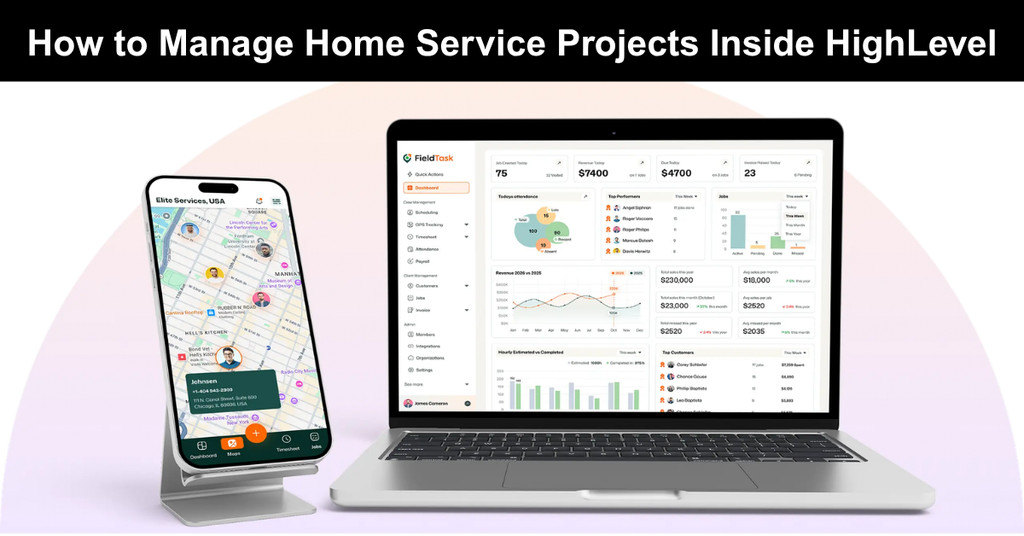
A home service project has a lot of moving parts. There is a customer to keep happy, a crew to send out, photos to collect, hours to track, and a bill to send. Manage all of that across five apps, and things fall through. HighLevel gives you one place to run it. It holds your customers, your pipeline, and your communication in a single system.
Add FieldTask, and the field side joins in, so you can manage every project from lead to paid without leaving the platform. This guide shows how to manage home service projects inside HighLevel, step by step. I will keep it simple and practical. Let us start with what a project actually involves.
What a Home Service Project Involves
Not every job is a quick in-and-out visit. Some are, but many are bigger. A water heater swap might take one trip, while a full remodel or a system install can take several. Either way, a project has the same core pieces to manage:
- The customer and their contact details.
- The schedule and the assigned crew.
- The job notes, measurements, and materials.
- Photos of the site and the finished work.
- The messages between office, crew, and customer.
- The hours worked and the final payment.
Lose track of any one of those, and the project gets harder. The goal is to keep them all tied to the same job, in one place.
Keep Every Project on One Board
Start with the pipeline. In HighLevel, a pipeline is a simple board that shows every job and its current stage, from first contact to final payment. Think of it as your project tracker, giving you a clear view of where each customer stands. It keeps every job visible, organized, and easy to follow at a glance.
For home service, the stages might read like this:
- New Request
- Scheduled
- In Progress
- Work Complete
- Paid
Each project sits in one stage at a time. You move it forward as the work goes along. In one glance, you know what is booked, what is active, and what is waiting on payment. This board is where management starts. If a project is not on the board, it is not being managed.
Turn a Lead into a Managed Job
A project really begins when a lead becomes a real job. This is where FieldTask comes in. FieldTask is a field service app that runs inside GoHighLevel, so the handoff happens in the same system. Here is the simple split. HighLevel does the CRM part, and FieldTask does the field management. One holds the customer, and the other runs the job in the field.
The setup is easy too. You don’t have to set up any manual integration. You just install FieldTask from the app marketplace, and it takes care of the rest. Once it is in, a booked lead turns into a job your crew can actually work.
Assign the Right Crew to the Project
A project is only as good as the crew you send. FieldTask helps you match them well. It puts dispatch and resource scheduling on one board, and it uses proximity-based job assignment to pick the right fit. FieldTask is the only system that suggests the best techs for a job, based on who is closest and who fits the work.
For a multi-visit project, you can keep the same technician on it so the customer sees a familiar face. That continuity matters more than people think. Route planning and route optimization handle the rest of the day. Your crew drives less and gets to more jobs. Less time on the road means more time on the project.
Keep All the Job Details in One Place
This is where most projects get messy. Notes end up in one app, photos on someone’s phone, and updates in a group text. FieldTask keeps them together. Your crew adds jobsite photos and work photos right to the job. Notes and job details ride along with it. Best of all, that data syncs back into HighLevel, so the office sees everything next to the customer record.
Now anyone on the team can open a project and immediately know its full story, from the first visit to the latest update. There is no need to call the tech to ask what happened on Tuesday or dig through old texts for an answer. The job record holds every note, photo, and detail, and it answers for itself.
Keep the Customer in the Loop
A managed project keeps the customer informed at every turn. HighLevel centralizes customer communication across the whole journey. Every text, email, and note sits in one thread tied to that customer. FieldTask adds the field updates. An on-my-way text tells the customer when the crew is close.
For a longer project, a quick message after each visit keeps them calm and confident. Here is my take. Most complaints in home service are not about the work. They are about silence, and steady updates prevent most of them.
Track Time and Progress on the Project
Long projects need progress tracking, not just a start and an end. FieldTask works as a time clock app for HighLevel, so each team member clocks in from the field. The hours post to the system as the work happens. A geofence adds another layer. It logs when a field crew member reaches or leaves the site, so you know a visit really happened.
For a multi-day project, you can watch the hours stack up against the budget. That view keeps a project from quietly running over. You catch a problem while you can still fix it. Guessing at the end of the job is too late.
Close Out the Project the Right Way
Closing a project is more than sending an invoice. Do it well, and you set up the next job and the review. Do it poorly, and you leave money and goodwill on the table.
Here is a clean closeout:
- Confirm the work photos are attached as proof.
- Move the project to “Work Complete” on the board.
- Send the invoice and mark it “Paid” when it clears.
- Trigger a review request the next morning.
- Let the crew’s hours flow into timesheet and payroll calculation.
Each of those can run on its own through a workflow. The project closes cleanly, and you barely lift a finger.
Manage Many Projects at Once
One project is easy. Ten at once is the real test. This is where a single system earns its keep. Your pipeline board shows every active project side by side. You spot the one stuck in “In Progress” for too long. You see which crew has a heavy workload and which one has room.
Because HighLevel and FieldTask share one system, you manage all of it from one screen. You probably know GHL is best in category for marketing, and with FieldTask it also gets enabled for home service in one unified system. That is what makes FieldTask the most integrated FSM app for HighLevel.
Handle Changes and Surprises
No project runs exactly to plan. A tech opens a wall and finds a bigger problem. A customer adds a request halfway through. Managing a project means handling those turns without losing the thread. The fix is to log every change against the job right away. Add a note, snap a photo, and message the customer from inside HighLevel so the record stays complete. When the scope grows, update the pipeline stage and the quote before the crew keeps working.
Here is the rule I follow. Never let a change live only in a phone call. If it is not written on the job, it did not happen, and it will cost you at invoice time. A clear record also protects you in a dispute. When the photos, notes, and messages all sit on one job, the story is easy to prove. That alone has saved plenty of home service owners a painful argument.
A Few Habits That Keep Projects on Track
Good tools help, but good habits finish the job. HighLevel and FieldTask give you the system, but it still takes a steady routine to use that system well. A couple of simple habits, done consistently, keep every project moving and stop small issues from turning into bigger ones later.
- Check the pipeline board each morning for stuck jobs.
- Add a quick note after every customer call, so nothing lives only in your head.
- Review open projects on Friday and clear anything waiting on you.
These take minutes. They also stop the small misses that turn into angry calls later.
Final Thoughts
Managing home service projects does not have to mean juggling apps and chasing your crew for updates. With HighLevel, you keep the customer, the pipeline, and the communication in one place. With FieldTask, you add the crew, the schedule, the photos, and the hours to the same system.
FieldTask is an FSM app built exclusively for GoHighLevel, so every project detail lives right beside your leads and customers. As a home service management marketplace app for HighLevel, it turns your CRM into a real project hub for the field. Run your projects this way, and the chaos settles. You always know where each job stands, who is on it, and what is left to do.
Suggested articles:
- Top 16 Field Service Management Software for Small Businesses
- How to Build a Field Service Project Plan
- The Art of the Multi-Site Project: Coordinating Field Service Across State Lines

Daniel Raymond, a project manager with over 20 years of experience, is the former CEO of a successful software company called Websystems. With a strong background in managing complex projects, he applied his expertise to develop AceProject.com and Bridge24.com, innovative project management tools designed to streamline processes and improve productivity. Throughout his career, Daniel has consistently demonstrated a commitment to excellence and a passion for empowering teams to achieve their goals.