
Stakeholder maps rarely fail because teams skip them. They fail because the map takes too long to build, so the people who matter most get missed. A blank page does not help, while a free stakeholder map template turns a worry about who to talk to into a clear picture of power, interest, and next steps. Choices cover Word, PowerPoint, Google Slides, and online whiteboards.
A stakeholder map shows who holds power, who cares most, and who needs a quick update instead of a meeting. Building one takes four moves: identify people, rank them, plot them, and share the result. A template speeds up the last two moves and keeps your format consistent from project to project. Here is how to work through each move before you pick a template.
Identifying Stakeholders
First, who is a stakeholder?
Stakeholders are individuals (or groups) that can either impact the success and execution of a product or are impacted by a product. The first “upstream” category includes everyone who must contribute to or approve of the activities required to design, build, and bring the product to market. The second “downstream” batch includes both those who purchase or use the product, as well as those who must support, sell, and market it. What is a Stakeholder? | Definition, Strategies, and Overview (productplan.com)
These stakeholder groups deserve a place on your list before mapping begins:
- Internal Stakeholders: People inside your company, such as colleagues, managers, customer support, and the receptionist. Use organization charts and department conversations to find them, because quiet roles are the easiest to miss.
- External Stakeholders: Customers and outside parties such as suppliers, bank clerks, investors, and competitors. Ask who will use the product, who it affects, and which community groups or third parties have an interest in it.
- Upstream and Downstream Stakeholders: Upstream stakeholders contribute to or approve the work needed to build and launch a product. Downstream stakeholders buy, use, support, sell, or market it, so both belong on the same list.
Categorizing Stakeholders
Ranking turns a long list of names into a short list of priorities. List every stakeholder in a table, brainstorm freely, and then carefully sort each person you identified onto a power-interest grid for stakeholder mapping, which shows who needs close management and who needs only light contact. Remove low-interest, low-power names so your time goes to the critical few.
Rate each stakeholder on these scales before you plot anyone:
- Interest Rating: Score how much each person cares about the outcome from 1 to 3, where 1 marks the highest interest. Mary the customer scores a 1 in the sample table below because the website affects her.
- Influence Rating: Grade each person’s power over the project from A to C, where A marks the most influence. James, the marketing manager, earns an A in the sample, while John, the receptionist, earns a C.
- Stakeholder Type: Tag every row as internal or external, so the finished map shows which relationships sit inside the company and which sit outside it. The sample table below uses this column for a website launch.
| Type | Stakeholder | Interest (1-3) | Influence (A-C) |
|---|---|---|---|
| Internal | John (Receptionist) | 3 | C |
| Internal | James (Marketing Manager) | 1 | A |
| External | Mary (Customer) | 1 | A |
Mapping Stakeholders
Mapping turns the ranked table into a visual that everyone can read at a glance. If you already ranked your stakeholders, this step becomes a job of visualizing and double-checking rather than starting over. The main benefit of a stakeholder map is a single picture of every person who can influence your project and how those people connect.
Drawing further pictures of each stakeholder group also helps you categorize people and spot clusters that share the same concerns, which makes the map easier to explain to others and easier to update when circumstances change. Plenty of tools can support this work, whether you are comparing Milanote vs Notion or other collaboration platforms for your team.
Use these steps to turn your ranked table into a visual map:
- Plot Each Position: Place every stakeholder on the grid using the interest and influence scores from your table, so close-management candidates land together in the high-power, high-interest corner.
- Show Connections: Draw lines or group shapes between stakeholders who work together, report to each other, or share concerns, so the map reveals relationships as well as rankings.
- Share and Check: Walk key stakeholders and teammates through the finished map to confirm placements before you finalize it. A visual makes it easy for others to spot errors you missed.
List of Free Stakeholder Map Templates
The best free template is the one your team already knows how to use. Teams without a Microsoft license do better with an online tool or Google’s free tools, while people who are not tech-savvy can print a PDF and work by hand. This list groups the templates by file type so you can choose quickly.
These ready-made boards and files give you a fast starting point:
Milanote Board
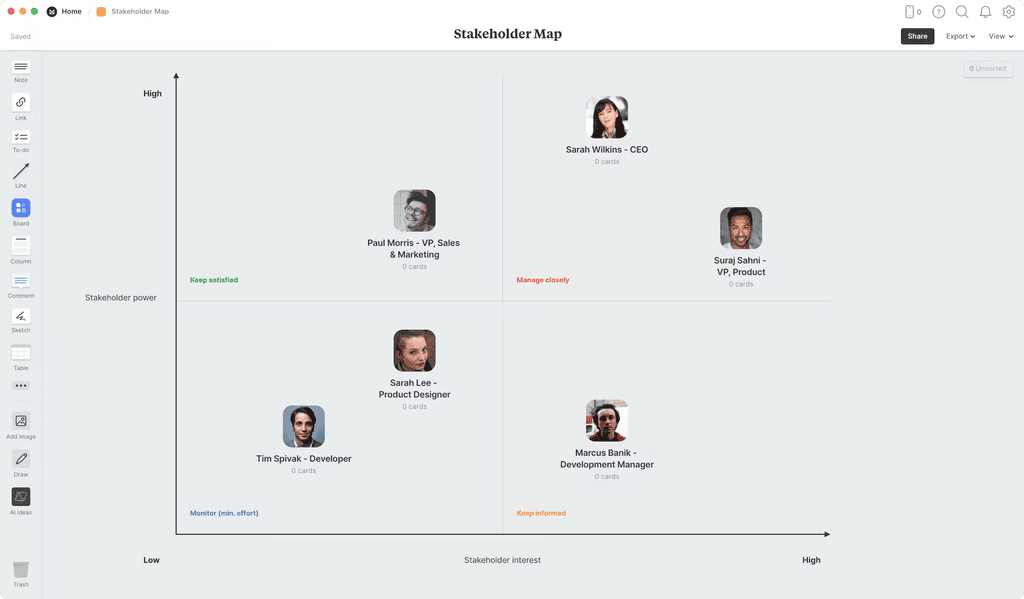
Milanote – Stakeholder Map offers a free template and a worked example for placing people on a stakeholder map, using a flexible visual canvas that suits quick brainstorming sessions.
Mural Template

Mural – Stakeholder Map Template helps minimize confusion about who is who and provides clarity on responsibilities, so stakeholders move from strangers to collaborators early.
Miro Template
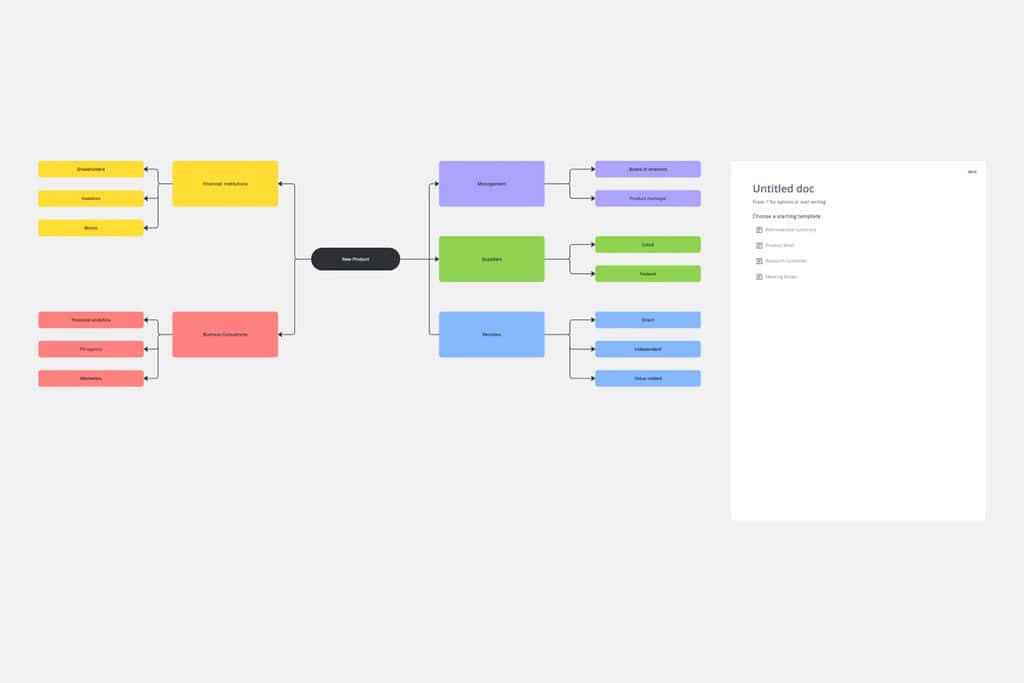
Miro – Stakeholder Map Template helps you understand the people who influence your projects, so you can earn their support early in the planning process.
PowerPoint Zip File
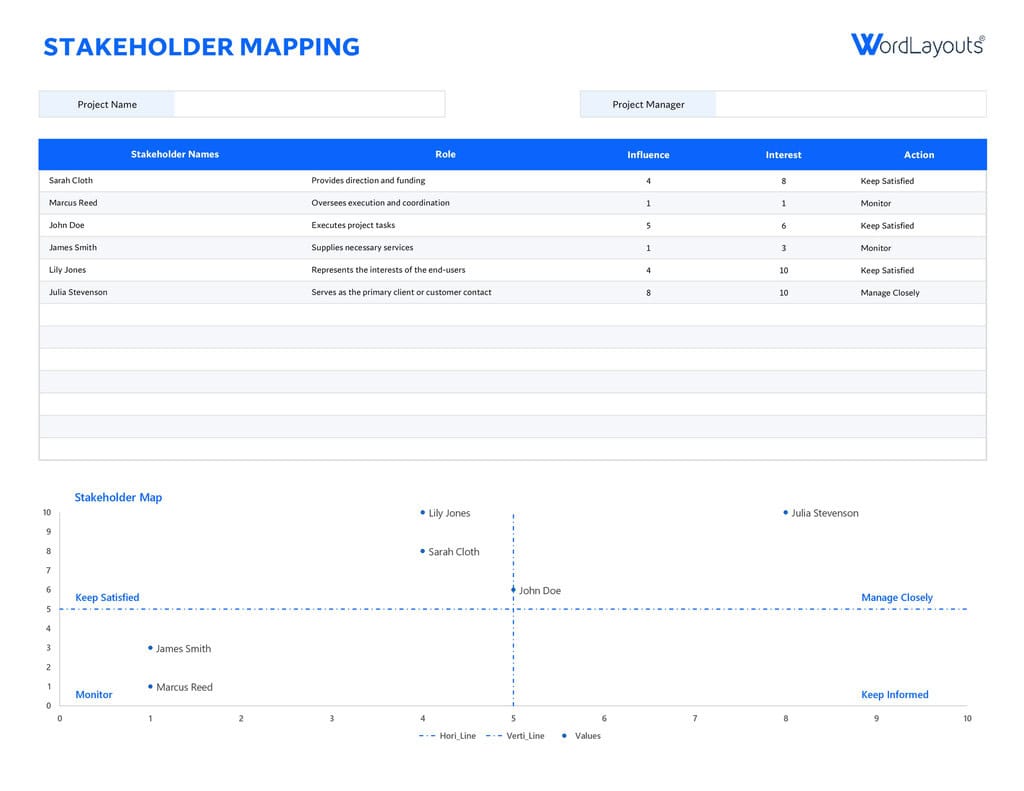
PowerPoint – Stakeholder Map Template is a free zip download, so unzip it first, then open the slides and replace the sample content with your own stakeholders.
Smartsheet Downloads
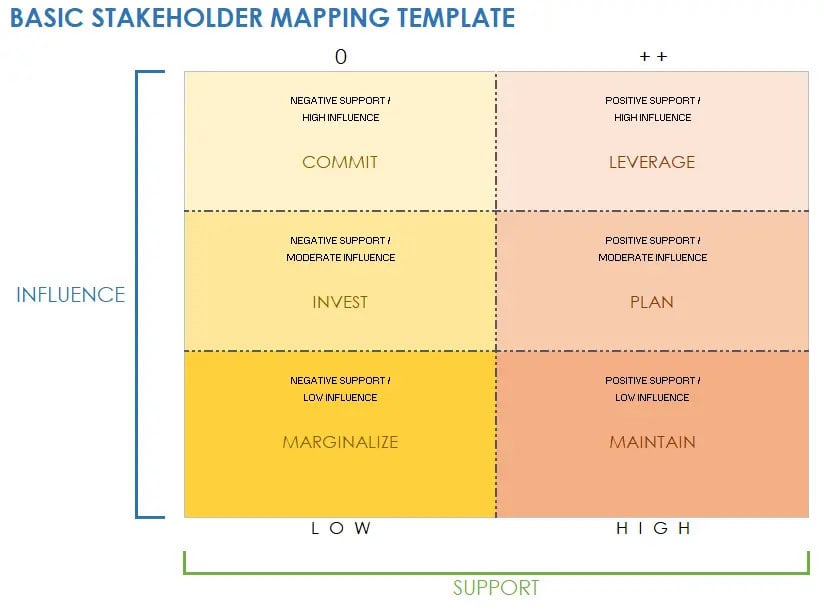
Smartsheet Free Stakeholder Mapping Templates offers no-cost files for mapping stakeholders by influence, interest, engagement, and impact, ready in Excel, Word, PowerPoint, Google Sheets, Google Docs, Google Slides, and PDF.
Canva Whiteboard
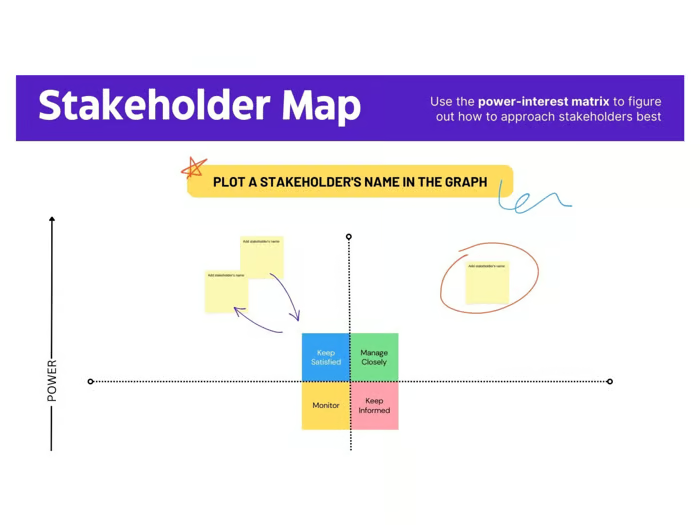
Canva Free Online Stakeholder Mapping Tool lets you build and manage a stakeholder map online for free, so you can drag in names, group them visually, and share the design.
ClickUp Template
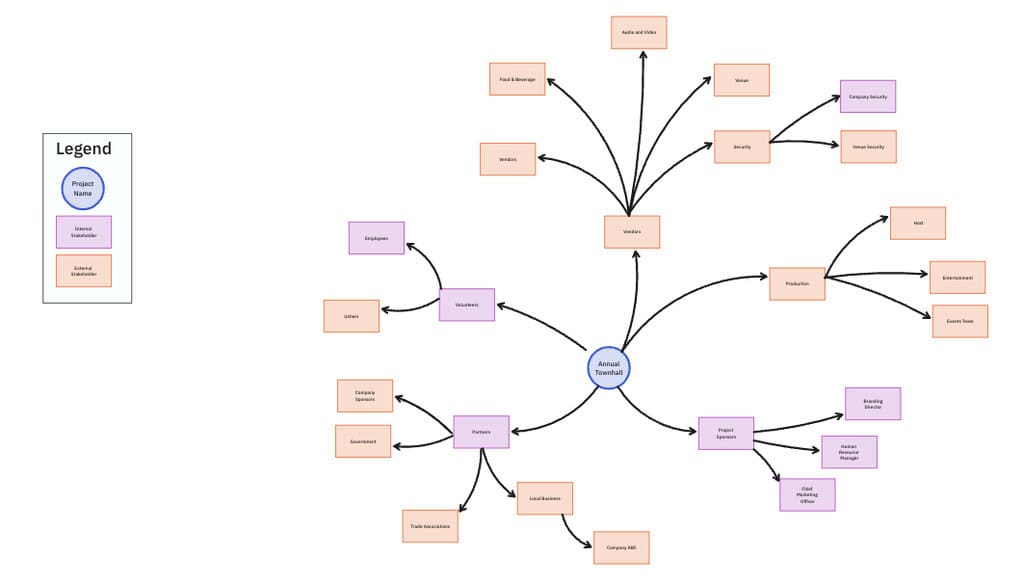
ClickUp Stakeholder Map Template is a free whiteboard for identifying project stakeholders and mapping their relationships, which suits teams that already manage tasks and documents in the same workspace.
FigJam Board

Figma Stakeholder Analysis Example is an interactive FigJam template for mapping stakeholders by influence and interest, so your team can plan communication together on a shared canvas.
Microsoft Word Stakeholder Templates
Word templates suit teams that already share documents by email and want an editable stakeholder map in a familiar program. Both options below are free, and each arrives ready for you to type names, interest scores, and notes directly into the file, with no design skills required, so you can start mapping within a few minutes.
These Word downloads cost nothing and are ready for editing:
- TemplateLab: Free Stakeholder Map Template is a free Word file from a large library of stakeholder analysis templates. Download it, replace the sample names with your own, and add interest and influence scores so the document works as both a record and a reference for planning conversations. It suits anyone who prefers a word processor over a whiteboard app.
- StakeholderMap: Download the free Word template delivers the stakeholder map as a Word file inside a zip, so extract it before editing. Once open, type your stakeholder list into the layout, adjust the wording to match your project, and save a copy for each new initiative. It gives you a clean, reusable base for every future project.
PowerPoint Stakeholder Templates
PowerPoint templates work well when you must present the stakeholder map to a sponsor or steering group. Each option below is free, but each needs a sign-up or a zip download first, so read the access note beside each item before you commit to one of them, and keep a copy of the file you choose.
Each of these PowerPoint options has a small access step to note:
- Slideteam: Requires sign-up to download the PPT file, so create an account first. Once you have the slides, edit the stakeholder shapes and labels to match your project, then present the map to your sponsor or steering group. It suits teams that expect to reuse the slides for several initiatives, so the sign-up effort pays off quickly.
- 24Slides: Sign up for free to download this corporate stakeholder map template. After you register, open it in PowerPoint, swap in your own stakeholder names and categories, and adjust the layout so the finished slide matches the visual style your organization already uses. The free sign-up is the only barrier, which keeps setup short for busy project managers.
- StakeholderMap: Free download zip file containing the PowerPoint version of the stakeholder map. Extract the archive, open the presentation, and fill the grid with your own stakeholders. No account is needed, which makes it the quickest route if you want to start immediately, and you can duplicate the slide for each new project or client you support.
- WordLayouts: Free download zip file with a stakeholder map template for PowerPoint. Unzip it, open the slide, and replace the placeholder text with your own stakeholder names. Because it needs no sign-up, it works well for a fast first draft that you refine later with your team, then polish before presenting it to senior leaders and sponsors.
Google Slides Template
Google Slides gives teams a free, browser-based way to share and edit a stakeholder map without installing software. It works especially well for distributed teams, because colleagues can comment on the same slide and see changes appear as they happen during planning and review sessions, which keeps everyone aligned on who sits where on the map.
This single Google Slides option offers a choice of color schemes:
- SketchBubble: 2 color themes to choose from, so you can match the map to your company palette. Drop in your stakeholder names, adjust the categories, and present the finished map straight from your slides. The same stakeholder mapping presentation also opens in PowerPoint, which helps when colleagues use different tools or prefer a desktop program.
Online Tools to Create Free Stakeholder Templates
Online whiteboards let several people build a stakeholder map together and update it as the project changes, with no files to email around. This list collects tools with ready-made templates, and the first one is the preferred pick for stakeholder maps because it needs no signup, so you can test the idea before involving your wider team.
These online tools each ship with a ready stakeholder mapping template:
- Visual Paradigm Online: No signup required, so you can edit the template quickly, straight away. Open the stakeholder matrix, type your names into the grid, and adjust positions as your ratings change. It is the preferred starting point for anyone who wants a finished map within minutes, without creating an account or learning new software first.
- LucidSpark: Use a stakeholder map to plan communications with stakeholders based on their role and interest in your project. The map plots power on one axis and interest on the other, which makes it easy to decide who gets frequent updates and who needs only an occasional message. Teams can then share the finished board with colleagues for review.
- Miro: Understand the people who influence your projects so that you can get their support. The templates page offers several stakeholder map layouts, so you can compare formats, pick the one that fits your project, and then invite teammates to place stakeholders together on the same shared board during a planning workshop or project kickoff session.
- Moqups: This stakeholder mapping template will help you identify, prioritize, and understand your project’s key stakeholders. Start from the ready layout, add each person with their interest and influence, and use the result to decide who needs one-to-one meetings and who needs only regular written updates as the project moves forward and stakeholder interest changes over time.
- Mural: This template helps minimize confusion about who is who, provides clarity of responsibilities, and helps stakeholders move from strangers to collaborators. Use it in a workshop, where the whole team can add names to the shared canvas and agree on placements before the project kicks off and the first deliverables are due to your sponsor or client.
- Milanote: Visualizing people on this matrix makes it easier to see where everyone fits on your project and the level of communication you should deliver to each person. Add a short note beside each name, so the map also records what each stakeholder expects from you and when they expect it, which helps you plan every conversation.
Stakeholder Mapping Step-by-Step Instruction Video
Lauren Kress, the Business Scientist, explains the role of stakeholders in a short video on stakeholder mapping. The lesson shows how to identify people affected by what you say and do, plus those who shape what you can say or do, and how to place each one on your map so your priorities become clear to everyone.
Keep these points in mind while you watch the lesson:
- Who You Affect: Identify the people with an interest in your activities, because the decisions you make and the messages you send reach them directly and shape how they respond.
- Who Affects You: Spot the people who influence what you can say or do on the project, and note how much weight their opinions carry when decisions are made.
- Where They Sit: Find a place for each person on your stakeholder map, and pause the video whenever you want to update your own draft before moving on.
Benefits of Stakeholder Mapping
Stakeholder mapping repays the time it takes by giving teams a shared view of who matters and why. It also supports engagement planning, because ranking people by influence and interest feeds a plan that tracks the five levels of stakeholder engagement and stays current as stakeholders change over the full life of the project and its phases.
Teams that map their stakeholders usually gain these practical benefits:
- Shared Understanding: Everyone on the team sees the same key players, so conversations about priorities start from one picture instead of several competing assumptions held by different people.
- Team Communication Strategy: The map gives the team a base for a team-level communication and engagement strategy, with clear owners, messages, and timing for each stakeholder group you identified.
- Role-Based Priorities: Prioritizing stakeholders according to their roles keeps limited time focused on the people with the most influence and interest, instead of spreading effort evenly across everyone.
- Stakeholders Who Feel Heard: Regular contact planned from the map helps you avoid leaving stakeholders feeling unheard, which protects trust and reduces surprise objections later in the project delivery.
How to Choose the Right Stakeholder Map Template
Choose the template that matches how your team already shares work, not the one with the most features. Word and PowerPoint files suit offline review, Google Slides suits remote editing, and online whiteboards suit live workshops. Complex projects may also call for influence maps showing who sways decisions alongside a grid. Match the format to your audience, then check for sign-ups and zip downloads.
Weigh these factors before you download or sign up for anything:
- Team Tools: Pick a format your colleagues already open every day, because teams abandon a template that nobody can edit quickly after the first meeting, and the map goes stale.
- Audience: Choose slides for sponsors and steering groups, documents for written plans, and whiteboards for working sessions where several people place stakeholders together in real time.
- Collaboration Needs: Online tools let several people edit at once, while downloaded files suit a single owner who updates the map and shares copies after each review.
- Access Steps: Check for sign-ups and zip downloads in advance, so a quick start does not turn into a slow setup right before an important meeting with your sponsor.
Common Stakeholder Mapping Mistakes
The most costly mistake is treating the map as finished after one workshop. Stakeholder power and interest change as projects move, so a stale map points effort at the wrong people. Teams that keep the stakeholder register as a living document revisit placements regularly, catch shifts in influence early, and adjust their engagement before small concerns grow.
These common errors can weaken an otherwise strong stakeholder map:
- Missing Hidden Stakeholders: Quiet roles such as support staff, suppliers, and community groups often hold more influence than their job titles suggest, so ask around before you finalize the list.
- Rating by Gut Feel Alone: Scores improve when several teammates rate each person, and you combine their views, instead of relying on a single opinion that may reflect one relationship.
- Mapping Without Follow-Up: A map that never leads to an engagement plan is only a diagram, so attach an owner, a message, and a contact date to every stakeholder you plot.
- Skipping Regular Updates: Review the map at every project milestone, and whenever a new sponsor, supplier, or customer group appears, so the picture matches reality when decisions are made.
Stakeholder Mapping Quick Reference: Grid Quadrants, Formats, and Fixes
This quick reference gathers the key answers from the guide in one place. Use it when you need to explain the grid to a colleague, choose a format fast, or remind yourself how often the map needs attention. Each row stands alone, so you can copy the facts you need straight into a project plan or kickoff deck.
The table below summarizes the main facts about stakeholder mapping:
| Aspect | Key Fact or Answer | Why It Matters |
|---|---|---|
| Power-Interest Grid | The grid has four quadrants: manage closely for high power and high interest, keep satisfied for high power and low interest, keep informed for low power and high interest, and monitor for low power and low interest. | Each quadrant tells you how much effort and contact a stakeholder deserves. |
| Stakeholder Types | Internal stakeholders work inside the company, while external stakeholders include customers, suppliers, investors, and competitors. | Listing both groups prevents blind spots on the final map. |
| Rating Scales | The sample table scores interest from 1 to 3 and influence from A to C. | Simple scales make rankings quick to repeat and easy to explain. |
| Template Formats | Free templates exist for Word, PowerPoint, Google Slides, and online whiteboards. | Matching the format to your team removes friction from updates. |
| Access Steps | Some PowerPoint templates need a sign-up or a zip download before use. | Knowing this in advance saves time before a deadline. |
| Update Cadence | Stakeholder interest and influence shift as a project progresses. | Regular reviews keep effort aimed at the right people. |
Conclusion
A stakeholder map works best when it follows a simple path: identify everyone who can affect your project or feel its effects, rank them by interest and influence, and plot them so the whole team can see priorities. Internal and external stakeholders both belong on the list, and the power-interest grid shows who needs close management and who needs only light contact.
The thirteen templates above remove the blank-page problem, whether you prefer Word, PowerPoint, Google Slides, or an online whiteboard. Choose the format your team will actually open, fill it in with real names and ratings, and review it at every milestone. Pick one template today, map your first ten stakeholders, and use the result to plan your next round of conversations.
Frequently Asked Questions About Stakeholder Mapping
What is a stakeholder map template?
A stakeholder map template is a ready-made layout for listing the people connected to your project and placing them by interest and influence. It saves you from designing a grid from scratch. Free versions exist for Word, PowerPoint, Google Slides, and online whiteboards, so you can pick the format your team already uses and start filling it in immediately.
How do you create a stakeholder map step by step?
Start by listing internal and external stakeholders, then rank each one by interest and influence using simple scales such as 1 to 3 and A to C. Next, plot every person on a power-interest grid, draw links between related groups, and review the result with your team. Finally, plan how you will communicate with each group.
Which free stakeholder map template works best for PowerPoint?
The best choice depends on your access preferences. Slideteam and 24Slides both require a sign-up before you can download, while StakeholderMap and WordLayouts offer free zip downloads. If you want to start immediately without creating an account, the zip files are the quickest route, and you can edit the slides to match your own company style.
What is the difference between internal and external stakeholders?
Internal stakeholders work inside your company, such as colleagues, managers, customer support, and reception staff. External stakeholders sit outside it and include customers, suppliers, banks, investors, and competitors. Both groups can influence your project or feel its effects, so a complete stakeholder map includes people from each group instead of focusing only on the colleagues you meet every day.
How often should you update a stakeholder map?
Update the map whenever the project changes in a way that affects who holds influence or who cares about the outcome. A review at each milestone is a practical habit, and a new sponsor, supplier, or customer group is a clear trigger. Stakeholder interest and influence shift over time, so a map that never changes points effort at the wrong people.
Suggested articles:
- 11 Free Stakeholder Engagement Planning Templates
- 26 Free Stakeholder Analysis Templates (Word, Excel, and PDF)
- 67+ PMP Stakeholder Register Templates: Google, Word, and Excel

Shane Drumm, holding certifications in PMP®, PMI-ACP®, CSM, and LPM, is the author behind numerous articles featured here. Hailing from County Cork, Ireland, his expertise lies in implementing Agile methodologies with geographically dispersed teams for software development projects. In his leisure, he dedicates time to web development and Ironman triathlon training. Find out more about Shane on shanedrumm.com and please reach out and connect with Shane on LinkedIn.