
As businesses grow and projects become more dynamic, streamlining workflow and team management becomes more critical. Organizations must constantly seek ways to improve efficiency, communication and overall productivity. Project management solutions like AceProject simplify these processes through centralization and collaboration: one place to plan, track and execute projects, so teams stay coordinated and tasks stay well managed.
AceProject is a web-based tool for tasks, timesheets, documents and expenses, with a flat monthly price per account instead of a price per user. This review looks at what it does well, where it falls short, what it costs in November 2026 and who it fits. Every price and feature below was checked on AceProject’s own pages, its help center and independent review sites.
- AceProject charges one flat monthly price per account, not per user: $0 for 3 users, $24 for 10, $49 for 30 and $99 for 100. Gold (unlimited) is now quote only.
- Every plan, including the free Basic plan, has all features: tasks, Gantt, time clock and timesheet approval, expenses, documents and reports.
- Recent updates added project portfolios (2024) and custom fields (2025), but custom fields work only in the new interface.
- The main limits: no subtasks, simple task dependencies, no labor cost rates, few native integrations, no AI features and an iOS app last updated in 2017.
AceProject: Online Project Management Software
AceProject is an online project management application developed by Websystems Inc., a software company in Quebec City, Canada. It has been on the market for more than 20 years. As a web application, it runs in all major browsers, with nothing to install.
The core of the product has stayed the same: tasks and projects, timesheets with approval, expense tracking and document storage. Since 2021, AceProject has been moving users to a new interface with grid, board, calendar and Gantt views, interactive charts, a reporting engine and a bulk document download manager. Users can still switch between the classic and new interfaces while the move finishes.
One thing sets AceProject apart from most project tools: its pricing. You pay one price for the whole account, not one price per person, and every plan, including the free one, has all features enabled. Paid plans only raise the number of active users, active projects and storage.
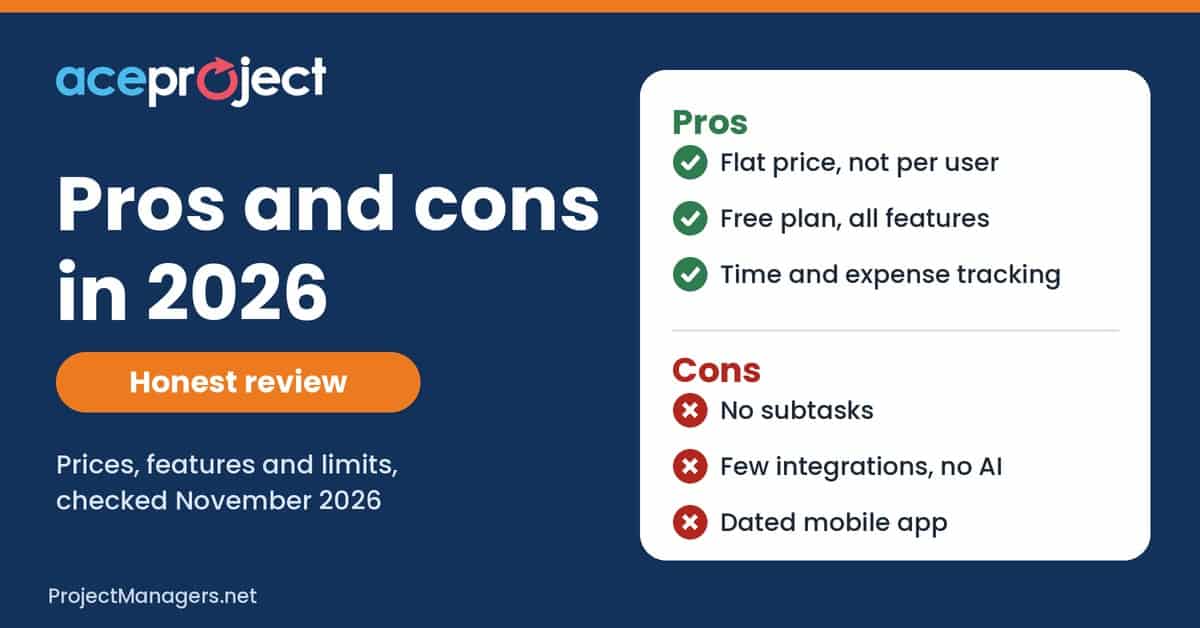
AceProject pros and cons at a glance
Pros
- Flat price per account, not per user
- Free plan with every feature enabled
- Time clock, timesheets and time approval
- Expense tracking with approval and reports
- Document versioning, locking and bulk download
- Grid, board, calendar, Gantt, charts and exports
- Portfolios and custom fields (new interface)
- Phone, live chat and email support
Cons
- No subtasks: tasks have one level only
- Simple dependencies, no lag or start-to-start links documented
- Tracks hours and expenses, but no labor cost rates
- Few native integrations (API and exports instead)
- No built-in AI features
- iOS app last updated in 2017
- Two interfaces during the move to the new one
- Limits on active projects and storage, Gold price not published
Best for: small and midsize teams that track time and expenses on client or internal projects and want a predictable bill as headcount grows.
Look elsewhere if: you need deep task hierarchies, advanced scheduling, many app integrations or built-in AI.
Checked November 2, 2026 against AceProject pricing, the AceProject help center and the App Store listing.

The Pros or Advantages of AceProject
AceProject is still a solid choice for organizations seeking an efficient project and team management tool at a predictable cost. Its notable pros include:
1. Flat Pricing That Does Not Grow With Each User
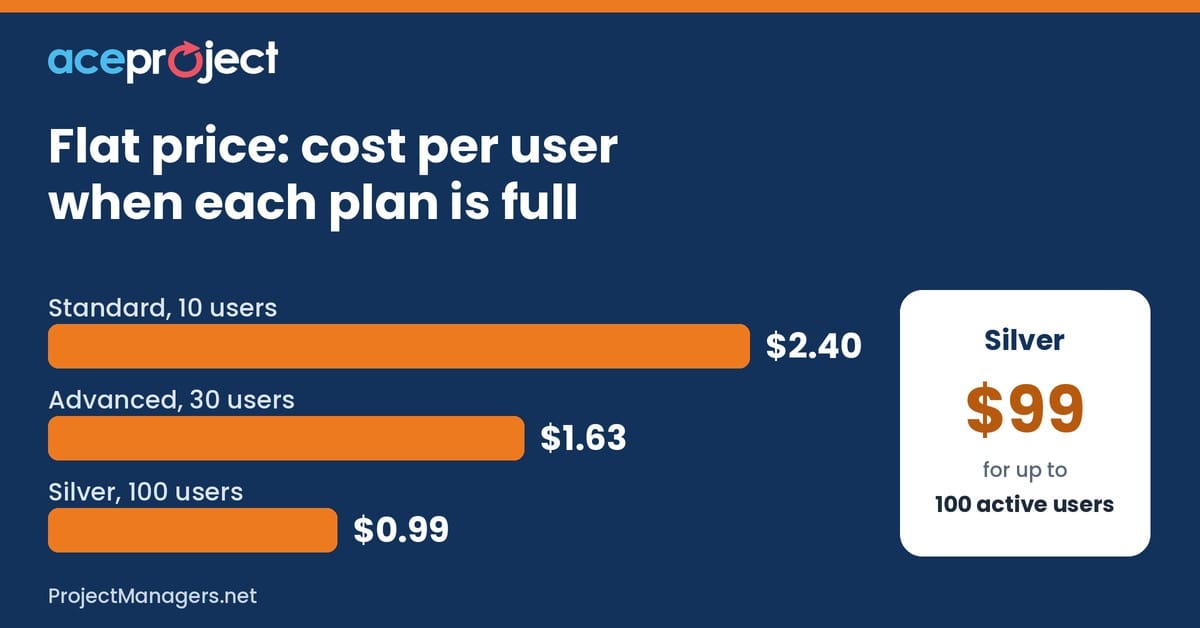
Most project tools charge per user, so the bill rises every time someone joins. AceProject’s prices are total subscription fees: $24 a month covers up to 10 active users, $49 covers 30 and $99 covers 100. On a full Silver plan, that is under $1 per user per month. Only active users count, so former employees and finished projects do not use up your limits.
2. A Free Plan With Every Feature Enabled
The Basic plan is free for 3 active users, 3 active projects and 1 GB of storage, and it is not a trimmed-down trial: the comparison table shows all features enabled on every plan. Freelancers and very small teams can run real projects on it, and larger teams can test everything before paying.
3. Strong Time Tracking and Timesheet Approval
Time is where AceProject is strongest. Users can punch in and out of a task with the time clock or type hours in a weekly timesheet. Project managers and users with approval rights approve or reject time, and approved entries lock. 2024 updates added a default approver, a “Submitted to” column and reminders for incomplete timesheets, plus a time entry summary panel that shows missing hours for each person you manage.
4. Expense Tracking With Approval
Many simple tools skip expenses. AceProject lets users record expenses against a project or task, attach receipts, submit them for approval and run expense reports. Actual expenses roll up from what users record, which helps teams that bill clients or watch budgets.
5. Solid Document Management
Files live at the project or task level, with versioning so you can see earlier copies and locking so nobody overwrites a key document. The new interface adds a document download manager that saves all files from a set of tasks into structured zip files, which is handy at project closure or for audits.
6. Flexible Views, Reports and Exports
The new interface offers a grid you can sort, group and filter, a kanban-style board, a calendar, a Gantt view with dependencies and milestones, and interactive charts with drill-down. Custom reports export to PDF or Excel, and most lists export to CSV or Excel. Paid plans add an API for your own integrations and reports.
7. Portfolios and Custom Fields
In 2024, AceProject replaced parent and child projects with project portfolios: similar projects share users, statuses, groups, types and priorities, and you can see all their tasks in one click. In June 2025 it added custom fields for tasks and users, with 6 types: Boolean, date, list, numeric (including currency and percentage), text and user.
8. Reachable Human Support
Support is included on every plan, by email, live chat and phone, with toll-free numbers for North America and an international line. The help center lists hours of 8:30 a.m. to 4:30 p.m. Eastern, Monday to Friday, and adds FAQs, guides and short videos.
The Cons or Disadvantages of AceProject
While AceProject covers the essentials well, it is also important to consider its drawbacks before you commit. The main disadvantages are:
1. No Subtasks
AceProject does not support multiple levels of tasks. A task cannot sit inside another task. The suggested workaround is to use task groups or task types to represent main tasks. Teams used to deep work breakdown structures in other tools will feel this limit.
2. Simple Task Dependencies
You can link tasks as predecessor and successor, and choose whether the link is mandatory. Changing an estimated end date reschedules the tasks that follow. The help center does not document start-to-start, finish-to-finish or start-to-finish links, or lag time, so projects that need advanced scheduling will find it basic.
3. Hours and Expenses, but No Labor Cost
AceProject tracks estimated and actual hours and actual expenses, which covers a lot of project control. We found no hourly cost or billing rates in the help center, though, so it does not turn hours into labor cost or budget burn. Teams that need that view export timesheets to a spreadsheet or accounting tool.
4. Few Native Integrations
AceProject focuses on its own features. Its site highlights the API, CSV and Excel exports and email notifications, not a library of ready-made connectors for chat, calendar or accounting apps. If your team lives in Slack or Microsoft Teams, plan for some API work or manual steps. One long-time reviewer on Capterra also wished alerts went beyond email.
5. No Built-In AI Features
Many competitors now add AI writing, summaries or task suggestions. AceProject’s pricing and feature pages list no AI features. For some teams that is a plus (simpler, no extra AI charges), but if AI help is on your list, AceProject does not offer it today.
6. A Dated Mobile App
The iOS app still exists, but its App Store listing shows version 1.6, last updated in February 2017. Its description still mentions the old free plan limits. Most teams will get a better experience from the web app in a mobile browser.
7. Two Interfaces During the Transition
The new interface has been rolling out since 2021, and some features exist in only one of the two. For example, custom fields can be used only in the new interface, and portfolios are managed there too. Long-time users have to learn both, and some reviewers describe the classic look as dated or a bit cluttered.
8. Limits on Projects and Storage, and a Hidden Gold Price
Each plan caps active projects as well as active users: 3, 10, 30 and 100. A small team that runs many short projects at once may need a bigger plan than its headcount suggests. Storage is 1 to 50 GB depending on the plan, with extra space at $10 a month per 10 GB. Gold, the only unlimited plan, has no public price.
AceProject Key Features
Whether you run one team or several, AceProject offers a broad set of tools on every plan. Here are the key features you should know:

- Task management: create, assign, prioritize and track tasks, with recurring tasks, marked tasks and task groups.
- Views: grid, board (kanban), calendar and Gantt, with dependencies, milestones and PDF export.
- Project templates and portfolios: copy projects with their tasks and documents, and group similar projects under one structure.
- Time clock and timesheets: punch in and out of tasks or enter hours weekly, with approval, locking and missing-hours alerts.
- Expense tracking: record expenses against projects and tasks, attach receipts, approve them and report on them.
- Documents: store files on projects and tasks, with versioning, locking and bulk download.
- Reports and charts: custom reports with grouping and totals, interactive charts and exports to PDF, Excel and CSV.
- Custom fields: add your own fields to tasks and users (new interface only).
- Access rights and branding: fine-grained rights per project, a team sub-domain, account skins and your own logo.
- API: available on paid plans for custom integrations and reports.
AceProject Pricing and Plans
AceProject offers five plans. Each one includes every feature; they differ only in active users, active projects and storage.
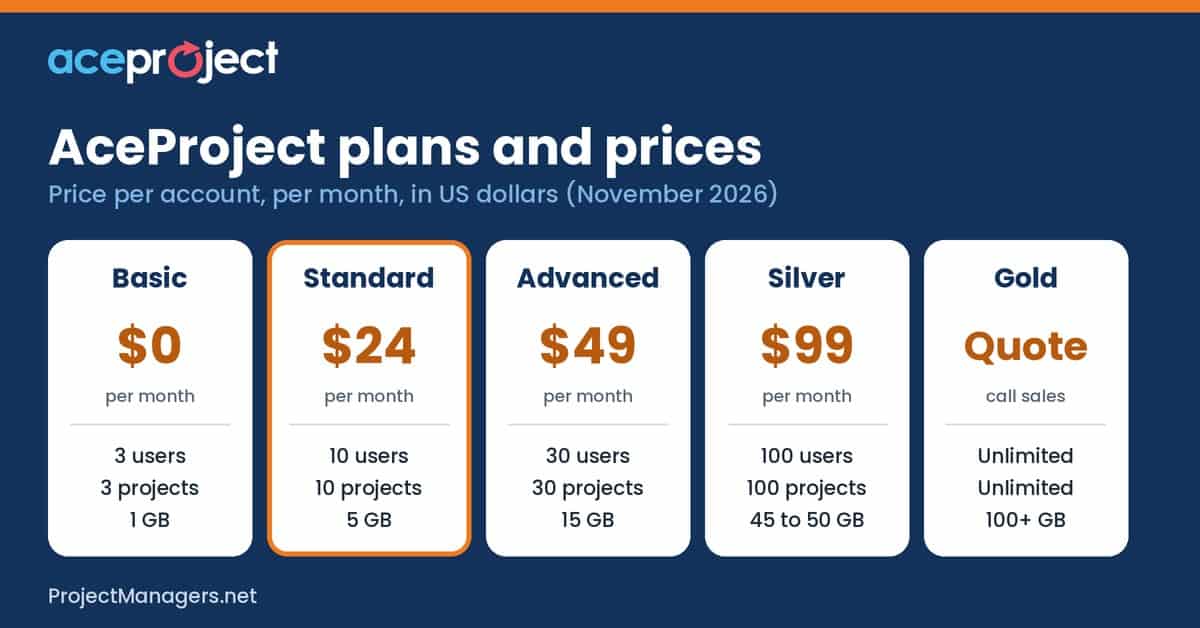
AceProject plans compared (November 2026)
Prices are for the whole account, not per user, in US dollars, before tax. Every plan includes all features and unlimited tasks.
| Plan | Price per month (whole account) | Active users | Active projects | Storage | Best for |
|---|---|---|---|---|---|
| Basic | $0 | 3 | 3 | 1 GB | Freelancers and very small teams |
| Standard | $24 | 10 | 10 | 5 GB | Small teams |
| Advanced | $49 | 30 | 30 | 15 GB | Growing teams with many projects |
| Silver | $99 | 100 | 100 | 45 to 50 GB | Departments and agencies |
| Gold | Quote (call sales) | Unlimited | Unlimited | 100+ GB | Large organizations |
Only active users and projects count: disabled users and completed projects do not. Extra storage costs $10 a month per 10 GB. Nonprofits get 20% off. The Silver plan shows 50 GB on its price card and 45 GB in the comparison table. Source: AceProject pricing, checked November 2, 2026.
There are no other fees, you can cancel at any time, and you can move back to the free plan as long as your account fits its limits. For a plan-by-plan breakdown, see our AceProject Pricing Plans and Costs Guide.
What AceProject Users Say
AceProject has a small but steady group of reviewers. Their comments match the pros and cons above: people like the easy task and time tracking and the free plan, and wish for more modern reporting and notifications.
What AceProject users say
- 4.4/5
Capterra overall rating, from 14 verified reviews
- 4.7/5
Capterra value for money score, the highest of its four scores
- 3.9/5
G2 rating, also from 14 reviews
What reviewers like
- Easy task tracking and timesheets
- Full features on the free plan
- Custom reports and data export
- Fair price and solid support
What reviewers dislike
- Some learning curve at the start
- A look that has changed slowly over the years
- Reporting and reminder options that newer tools beat
- Notifications by email only
From the field
“Free version fully featured. Good custom reporting.”
Peg P., CEO of an internet company, in a 5-star Capterra review (April 2017).
Sources: Capterra AceProject reviews (updated October 19, 2026), G2 AceProject reviews. Both sites hold few reviews, and many are several years old, so read them as a signal, not a verdict.
Who Should Use AceProject?
AceProject fits best where tasks, time and expenses meet, and where a per-user price would add up quickly. Typical use cases include:
- Agencies and consultancies: track hours and expenses per client project, approve timesheets and export them for billing.
- IT and software teams: plan releases, follow bugs and support requests as tasks, and see progress on the board or Gantt.
- Engineering and construction teams: share drawings with version control, log site expenses and track field time with the time clock.
- Nonprofits and education: run programs, grants and research projects on a fixed budget, with 20% off for registered nonprofits.
- Growing companies: add staff without raising the bill until you reach the plan limit, then move up in one step.
It is a weaker fit for teams that need multi-level work breakdowns, advanced scheduling, a wide set of native integrations or AI features. Those teams should test AceProject against their must-haves first, which the free plan makes easy.
Video: AceProject Quick Introduction
Want to see it in action? This short video from AceProject covers the basics in about seven minutes.
AceProject quick introduction (official, 7 minutes)
AceProject’s own team walks through projects, tasks, timesheets and documents. It shows the classic interface, so some screens now look different in the new one.
Conclusion
AceProject is a practical, no-frills project management tool with one big advantage: a flat price per account, with every feature on every plan. Its time tracking, timesheet approval, expense tracking and document control are stronger than many tools at the same price. In return, you give up subtasks, advanced dependencies, labor cost tracking, broad integrations, AI features and a modern mobile app.
Understanding these pros and cons is the key to deciding whether AceProject fits your organization. The free Basic plan lets you test it with a real project before you pay, so you can check your own must-haves rather than rely on any review, including this one.
Recommended articles:
- AceProject Pricing Plans and Costs Guide
- 15 Best Project Management Software
- Asana Pricing 2026: Plans, Real Costs and Free Calculator

Peter Kanai is a Google-certified freelance writer with over a decade of experience crafting high-quality content for business websites, blogs, and SEO & email marketing campaigns. His on-demand writing services are all about helping businesses expand their online presence and achieve their objectives. With a proven track record in delivering results-driven content, Peter is the go-to freelance writer for business owners seeking a strategic partner to help them grow their brand online.