

Field service businesses that adopt scheduling software consistently report measurable gains in job completion rates, and industry researchers point to smarter dispatch as a core driver behind that improvement. Yet technology alone does not guarantee success for every crew. Field work stays unpredictable, with shifting job locations, sudden weather delays, and long drive times, and scheduling software promises to bring structure to that volatility.
This guide breaks down the real advantages and drawbacks of scheduling software for field teams, along with the use cases where it delivers the most value. Whether you run a plumbing crew, an HVAC company, or a landscaping business, weighing both sides helps you make a grounded decision instead of guesswork. Here is what field teams should understand before adopting a scheduling platform.
The 5 Pros of Scheduling Software
Scheduling software solves several of the most persistent headaches in field service management, from missed appointments to wasted fuel and disorganized routes. The five benefits below represent the areas where field teams consistently see the clearest return on investment, based on adoption data and real operator feedback across HVAC, plumbing, electrical, and landscaping businesses of every size.
1. Clarity Over Chaos
Manually managing schedules with spreadsheets or whiteboards is difficult to keep accurate once a team grows past a handful of technicians. Scheduling software brings order by centralizing every job, technician, and appointment into a single live view. Dispatchers see who is working where, what jobs remain pending, and which technicians have open capacity, which prevents overlapping assignments and last-minute confusion.
With everything laid out on one screen, dispatch teams gain the following advantages:
- Real-Time Visibility: Every technician’s location, current job, and availability updates automatically, so dispatchers never have to call around to find out who is free.
- Reduced Double-Booking: The system flags scheduling conflicts before they happen, catching overlaps that a manual calendar would easily miss during a busy week.
- Faster Reassignment: When a job runs long, or a technician calls in sick, dispatchers can reassign work in seconds instead of scrambling through phone calls.
A plumbing company in Houston reported a significant drop in late arrivals after adopting scheduling software for its technician team. Crews received clear daily schedules with optimized routes and fewer distractions throughout the day, which made the entire workday noticeably more efficient and predictable for both the dispatch office and the technicians working in the field.
2. Reduce No-Shows
No-shows are expensive, whether the missed appointment comes from a customer who forgot or a technician who lost track of the day’s route entirely. Scheduling tools tackle this problem directly through automated communication that keeps everyone informed without requiring a dispatcher to manually call each client before every single job on the calendar each morning.
These platforms typically reduce no-shows through a few core features:
- Automated Reminders: Text and email alerts go out to customers and staff ahead of each appointment, cutting down on forgotten bookings significantly.
- Appointment Confirmations: Clients confirm or reschedule directly through a link, which minimizes the miscommunication that leads to wasted technician trips.
- Calendar Syncing: Appointments sync automatically to technician devices, so field staff always know their next stop without checking in with dispatch.
One HVAC company owner explained that before using scheduling software, hours were spent every single week chasing down missed appointments and rearranging the day around no-shows. Automated reminders now handle that work instead, freeing up time to focus on growing the business rather than managing a constant stream of scheduling fires and last-minute cancellations from clients.
3. Save Time and Fuel
Route optimization stands out as one of the most measurable benefits of scheduling software for any team that drives between job sites throughout the day. Instead of technicians choosing their own paths or backtracking across town, the software calculates efficient routes automatically based on job location, current traffic conditions, and technician availability in real time.
Route optimization delivers several compounding benefits across a busy fleet:
- Lower Fuel Spend: According to research, companies using route optimization software reduce fuel costs by up to 30%. That’s significant savings, especially for businesses that operate multiple vehicles.
- More Jobs Per Day: Tighter routes mean technicians spend less time driving and more time completing billable work, which directly increases daily job capacity.
- Reduced Vehicle Wear: Shorter, smarter routes reduce mileage on service vehicles, which can extend maintenance intervals and lower long-term fleet costs.
4. Boost Team Morale
Chaotic scheduling creates stress that ripples through an entire team, not just the office staff handling the phones and fielding frustrated customer complaints all day. A well-organized system gives technicians clear expectations for the day ahead, which reduces the anxiety that comes from constant last-minute changes and helps crews start each shift with confidence.
A more organized schedule tends to produce these downstream effects on staff:
- Predictable Workloads: Technicians know their route and job list in advance, which reduces the frustration of constant reshuffling mid-shift.
- Fewer Last-Minute Changes: Better planning up front means fewer urgent reassignments later, which keeps stress levels lower across the team.
- Higher Retention: Field service businesses with organized scheduling often see lower technician turnover, since less chaos translates into better day-to-day job satisfaction.
5. Improved Customer Satisfaction
Customers who receive reliable, on-time service are far more likely to book again and recommend the business to friends, family, or neighbors. Scheduling software supports this loyalty by keeping clients informed at every stage of the appointment, from initial booking through live technician tracking, which reduces the anxious guesswork that frustrates so many service customers today.
Customer-facing scheduling features tend to focus on three main areas:
- On-Time Service: Optimized routing and realistic job estimates make it far easier for technicians to arrive within the promised appointment window.
- Live Updates: Customers receive real-time notifications when a technician is on the way, which cuts down on frustrated calls to the office.
- Easy Self-Service: Many platforms let clients book, reschedule, or cancel appointments online without needing to speak with a dispatcher directly.
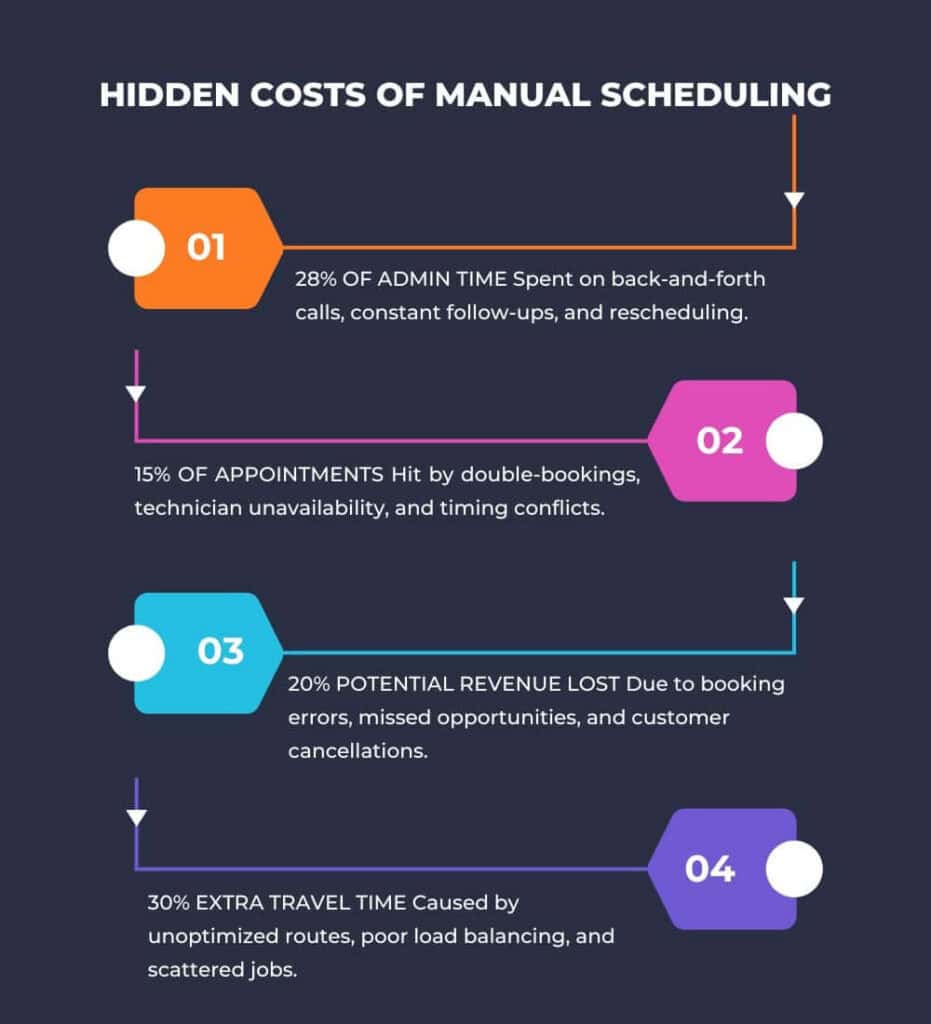
The 4 Cons of Scheduling Software
Scheduling software can be a genuine advantage for managing tasks and coordinating field crews, but it is not without real downsides worth weighing carefully. While these tools offer convenience and structure, they also introduce costs and challenges that can affect workflow and team dynamics. Understanding these limitations is key to making an informed decision before you commit to a platform.
1. Costs Can Be High
Good scheduling software is rarely free, and the total cost extends well beyond the advertised subscription price listed on a pricing page. Implementation fees, per-user charges, and optional add-ons for features like route optimization or AI dispatch can add up quickly, especially for small businesses operating on thin margins during a slow season.
Most businesses recover these costs within a matter of months by improving technician utilization and cutting wasted drive time across the fleet. Still, the upfront expense can feel like a real hurdle for owners who are already stretched thin, particularly when the return on investment is not immediately visible in the first several weeks.
2. Steep Learning Curve
Introducing new tools to a team often meets resistance and confusion, especially among technicians who are less comfortable with mobile apps or digital dashboards on the job. If the software interface is too complex, your team may struggle to adopt it consistently, which leads to wasted time, workarounds, and frustration that undermines the investment.
Invest in software that offers structured training, responsive customer support, and an intuitive interface built for field crews rather than office staff alone. A short onboarding period, paired with hands-on practice during a slower week, tends to produce far better long-term adoption than simply handing technicians a login and expecting them to figure it out.
3. No Magic Fix for Communication Problems
Even the best scheduling software will not fix poor communication habits or a disorganized process that predates the software itself in most cases. If technicians do not update job statuses or share key details with dispatch, no tool can compensate for that gap. Scheduling software works best as a powerful assistant rather than a standalone fix.
4. Internet Dependency
Most scheduling tools depend on a stable internet connection to sync job updates, route changes, and customer communication in real time throughout the day. If your team works in remote areas with limited cellular coverage, this dependency can become a genuine dealbreaker during certain jobs. Some platforms offer offline modes, but coverage gaps remain worth testing.
Real-World Scenarios: Who Benefits the Most?
Scheduling software is not a one-size-fits-all solution, and the value it delivers depends heavily on the type of business using it day to day. Some operations benefit dramatically from the structure and automation these tools provide, while others may see only marginal gains. The three scenarios below highlight where scheduling software tends to deliver the strongest returns.
1. Growing Businesses
As teams grow, scheduling challenges tend to compound quickly rather than scale in a straight line. A small HVAC business with three technicians might manage manual scheduling on a whiteboard, but scaling up to ten or fifteen employees turns that same whiteboard into a source of missed jobs, double bookings, and constant confusion for dispatch.
Scaling businesses generally rely on scheduling software to accomplish the following:
- Track Expanding Teams: As headcount grows, dispatchers need a system that scales alongside the business without adding administrative overhead.
- Assign Jobs Without Overlaps: Automated conflict checks prevent the double-booking errors that become far more common once a team crosses a certain size.
- Monitor Technician Availability: Real-time availability tracking helps dispatchers fill gaps in the schedule as new jobs come in throughout the day.
2. Industries with Time-Sensitive Jobs
For businesses in HVAC, plumbing, or electrical repair, timing is critical because customers expect quick, efficient service when something breaks down. Scheduling tools help these teams arrive on time, handle urgent calls without disrupting the rest of the day, and avoid the cascading delays that inefficient manual routing tends to create across a busy schedule.
Time-sensitive service businesses typically lean on the following capabilities:
- On-Time Arrivals: Predictable routing and realistic job duration estimates help technicians stay within their promised appointment windows consistently.
- Smooth Urgent Calls: Emergency jobs can be slotted into the existing schedule without requiring a full manual reshuffle of the day.
- Delay Prevention: Smarter routing reduces the compounding delays that occur when one late job pushes back every appointment after it.
3. Seasonal Operations
Landscaping, snow removal, and pressure washing businesses experience sharp seasonal spikes in demand that stress even well-run operations during peak months. During these busy stretches, scheduling software helps owners manage a much larger volume of appointments, avoid overlapping technician assignments, and prioritize high-urgency jobs so the business can capture revenue without turning away frustrated customers.
For these seasonal businesses, efficient scheduling means meeting demand without losing customers to competitors:
- Higher Appointment Volume: Software handles booking spikes far better than a manual calendar during the busiest weeks of the season.
- Smarter Prioritization: Urgent or weather-dependent jobs can be flagged and scheduled ahead of routine work automatically.
- Reduced Overlaps: Automated conflict detection prevents the double-booking errors that spike alongside seasonal demand surges.
Common Mistakes When Adopting Scheduling Software
Even the right software can underperform if it is implemented poorly, and most failed rollouts trace back to a small number of avoidable mistakes made early on. Recognizing these patterns ahead of time helps field service owners get more value from their investment and avoid the frustration that comes with a stalled or abandoned adoption process.
1. Skipping Training
Assuming your team will figure out a new platform entirely on their own often leads to frustration and inconsistent use across the crew. Without proper training, even the most intuitive tools can feel overwhelming to technicians who are used to paper schedules or simple phone calls, which slows adoption and undermines the software’s actual value.
Solution: Take advantage of onboarding tutorials, live customer support sessions, and short refresher trainings during the first few weeks of use. Schedule these sessions around real workflows so technicians learn how to update job status, confirm arrivals, and handle changes on mobile devices. Provide quick reference guides, answer questions during live office hours, and measure adoption so adjustments can be made early.
2. Overcomplicating Processes
Adding too many steps, custom fields, or unnecessary features can slow down operations rather than streamline them as originally intended. Some businesses try to configure every available setting on day one instead of starting with a simple workflow that solves their most pressing scheduling problem first, which only adds friction during an already difficult transition.
Solution: Focus on simple workflows that match your team’s real day-to-day work, then build from there. Start by mapping your current scheduling steps, choosing the core features that solve your biggest bottlenecks, and training technicians on those exact actions. Once adoption is consistent, add advanced options like smarter routing, automated status updates, and deeper reporting to improve performance over time.
Data Insights and Reporting
One often overlooked advantage of scheduling software is the access it provides to actionable operational data that manual systems simply cannot capture. Every job, route, and technician interaction generates a data point, and over time those data points reveal patterns that help owners make smarter staffing and scheduling decisions instead of relying on gut feeling alone.
The following data insights and reporting benefits tend to matter most for field service owners:
- Job Completion Tracking: Identify which technicians consistently complete jobs efficiently and which routes tend to run long.
- Bottleneck Detection: Spot recurring delays tied to specific locations, job types, or scheduling patterns before they become chronic problems.
- Forecasting and Planning: Use historical data to predict busy periods and staff accordingly, rather than reacting after demand has already spiked.
For example, if your reporting shows certain locations consistently causing delays or requiring extra travel time, you can allocate more resources to handle those areas better or adjust technician assignments accordingly across the schedule. This kind of visibility turns scheduling software from a simple calendar tool into a genuine planning asset for the business.

AI and Scheduling Software
Artificial intelligence is quickly becoming a standard feature within field service scheduling rather than a premium add-on reserved for large enterprises alone. Recent industry research indicates that a majority of service organizations have already implemented some form of AI, and adoption is accelerating as tools become more accessible to smaller teams with limited technical resources.
AI is reshaping field service operations in several concrete ways:
- Delay Prediction: AI evaluates traffic patterns, weather forecasts, and historical job data to flag appointments at higher risk of running late.
- Intelligent Assignment: Technicians are matched to jobs automatically based on proximity, required skill set, and current workload rather than manual guesswork.
- Continuous Improvement: By analyzing outcomes over time, AI systems refine future scheduling recommendations and become more accurate with additional data.
AI-driven scheduling platforms now go beyond simple route optimization to actively predict risk and improve decisions over time based on historical patterns. A tree care service in Chicago that adopted AI-powered dispatch tools reported a meaningful drop in appointment cancellations after implementation. That said, the added cost of AI features may still outweigh the benefit for very small teams.
A Look at Field Promax
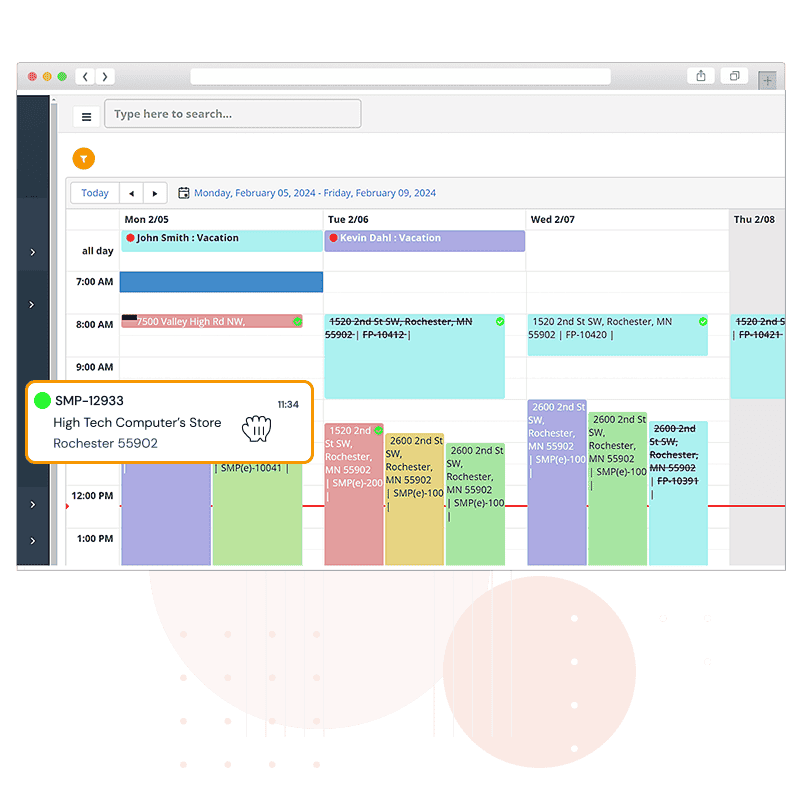
For teams evaluating scheduling platforms, Field Promax stands out as a practical option built specifically for field service businesses of varying sizes and budgets. Rather than overwhelming users with enterprise-level complexity, the platform focuses on core scheduling features that solve the everyday problems field teams actually face, from job assignment to route planning and appointment reminders.
The platform’s core feature set includes the following tools:
- Drag-and-Drop Scheduling: Dispatchers can assign and reassign jobs visually, which simplifies day-to-day schedule management considerably.
- Route Optimization: Automated routing helps technicians save fuel and time across every job on their daily list.
- Automated Reminders: Built-in reminders reduce missed appointments for both customers and technicians without requiring manual follow-up calls.
Field Promax offers practical, focused features without overwhelming users, which makes it a reasonable starting point for field service teams evaluating their first scheduling platform or switching from an outgrown manual system.
Conclusion
Scheduling software is not a magic fix, but it consistently eases the chaos that field teams face every day and helps drive real cost savings alongside measurable efficiency gains across the operation. The clearest returns show up for scaling companies, teams juggling time-sensitive jobs, and businesses navigating seasonal demand spikes. For these operations, the right platform simplifies coordination and removes friction from daily scheduling decisions.
That said, software cannot fix broken communication habits or replace thoughtful process design within a team that already struggles to coordinate. If your business is still relying on manual scheduling, evaluating a platform built for your specific industry is a reasonable next step. Start with a trial, involve your technicians early, and measure the results against your current process before committing.
Frequently Asked Questions About Field Service Scheduling Software
What is field service scheduling software?
Field service scheduling software is a digital platform that helps businesses assign jobs, track technician availability, and optimize routes for teams working outside a central office. It typically includes features like drag-and-drop job assignment, automated customer reminders, live technician tracking, and reporting tools that reveal patterns in job completion and drive time.
How much does scheduling software typically cost?
Pricing varies widely depending on team size, feature set, and whether advanced tools like AI dispatch are included. Most platforms charge a per-technician monthly fee, with additional costs for implementation, training, or premium add-ons. Small teams often start with lower-tier plans and upgrade as they confirm the software delivers measurable efficiency gains.
Can scheduling software work without an internet connection?
Some platforms offer limited offline functionality that allows technicians to view existing job details and update statuses without a live connection, syncing changes once service returns. However, most core features, including live routing, automated reminders, and real-time dispatch updates, require a stable internet connection to function properly.
Is scheduling software worth it for a small field service business?
For small teams handling straightforward routes and a manageable number of daily jobs, the return on investment depends on current pain points. Businesses experiencing frequent no-shows, scheduling conflicts, or wasted drive time typically see faster payback than teams already running efficient manual systems with only a handful of technicians.
How does AI improve field service scheduling?
AI improves scheduling by analyzing historical data, traffic patterns, and technician performance to predict delays before they happen and recommend optimal job assignments. Rather than relying on static rules, AI-driven systems continuously refine their recommendations based on outcomes, which tends to improve technician utilization and reduce cancellations over time.
Suggested articles:
- Operational Readiness For Mobile Teams: The ‘Field Kit’ Checklist That Prevents Expensive Surprises
- The Art of the Multi-Site Project: Coordinating Field Service Across State Lines
- Top 16 Field Service Management Software for Small Businesses

Daniel Raymond, a project manager with over 20 years of experience, is the former CEO of a successful software company called Websystems. With a strong background in managing complex projects, he applied his expertise to develop AceProject.com and Bridge24.com, innovative project management tools designed to streamline processes and improve productivity. Throughout his career, Daniel has consistently demonstrated a commitment to excellence and a passion for empowering teams to achieve their goals.