

In an era where remote and hybrid work as well as virtual collaboration have become integral aspects of our daily lives, the need for a single platform to facilitate connection, communication, and teamwork has never been more pressing. A unified platform allows users to streamline their workflows, reduce the complexities of multiple tools, and improve productivity and efficiency. Such a platform can foster better teamwork and drive innovation across various industries by providing a central hub for communication and collaboration.
Zoom has emerged as a popular choice for such a platform, offering a comprehensive suite of features catering to businesses, educational institutions, and individuals’ needs. As an all-in-one solution for video conferencing, messaging, and collaboration, Zoom has gained widespread adoption across the globe. However, like any tool, it has its pros and cons that users should be aware of when considering its implementation. In this article, we will explore more about Zoom to help you make an informed decision about whether it’s the right solution for your needs.
If you need a project management tool to use with Zoom, give AceProject a try. Its pricing is not on a per-user basis, so you can have substantial savings in the long run.
Zoom – Cloud-Based Video Conferencing Software
Zoom is an AI-first communication platform designed to unify video, chat, phone, and documentation within a single, seamless digital workspace. By prioritizing ease of use and high-performance connectivity, the software enables teams to bridge the gap between physical and virtual environments effectively. It continues to lead the industry through massive innovation in generative assistant technology.
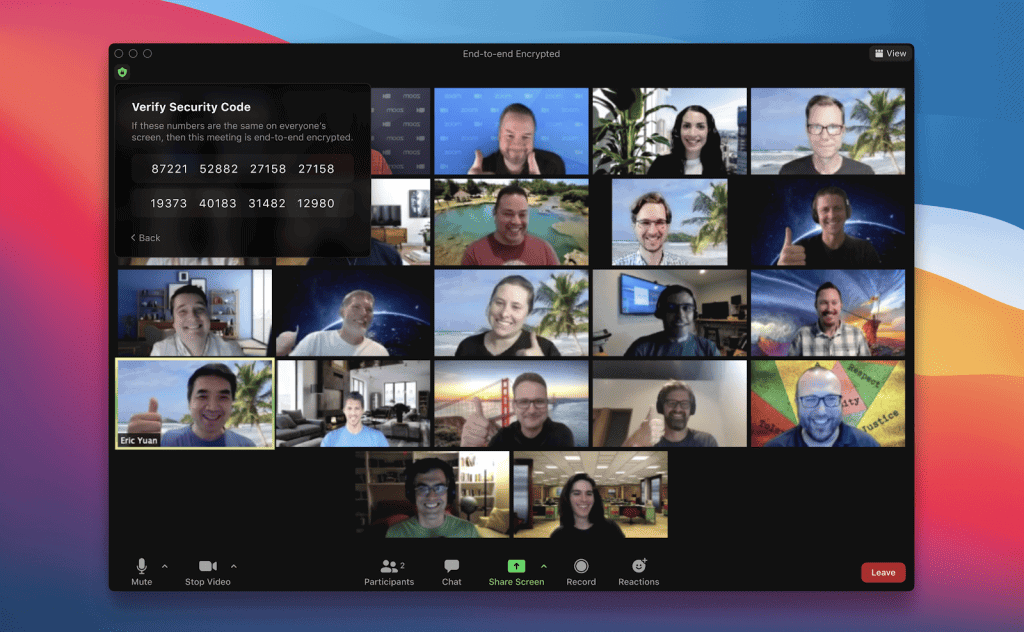
- Global Reliability: The platform utilizes a vast network of distributed data centers to ensure low-latency connections and high-definition video quality for users worldwide. This robust infrastructure supports massive enterprise calls while maintaining stability and crystal-clear audio even in regions with varying internet speeds and technical hardware.
- Unified Workspace: Zoom Workplace consolidates disparate communication channels like team chat, phone systems, and collaborative whiteboards into one centralized and easy-to-navigate desktop application. This integration reduces the cognitive load of switching between different apps, allowing employees to focus on high-value tasks and meaningful team connections.
- AI Companion 3.0: The latest iteration of Zoom’s artificial intelligence provides agentic workflows that can draft documents, summarize meetings, and even automate repetitive post-call administrative tasks. These features are often included at no extra cost in paid plans, making advanced productivity tools accessible to organizations of all sizes.
- Scalable Architecture: From individual freelancers to Fortune 500 enterprises, the software offers a flexible structure that accommodates growth and changing organizational needs without requiring technical overhauls. Users can easily add licenses, upgrade features, or integrate specialized industry modules as their specific communication demands evolve.
The Pros or Advantages of Zoom

Zoom remains a top-tier choice for professionals because it balances powerful enterprise-grade features with an interface that remains accessible to non-technical users. The recent shift toward AI-integrated workflows has further cemented its position as a high-value tool for modern productivity and efficient team management.
- Intuitive User Interface: The software is famous for its simple join process and clean layout that requires almost zero training for new participants or clients. One-click meeting entries and clearly labeled controls ensure that technical hurdles never distract from the actual purpose of the virtual meeting.
- Advanced AI Summarization: The AI Companion 3.0 automatically generates detailed meeting recaps and action items, saving users hours of manual note-taking and administrative follow-up work. It even provides a web-based work surface to track tasks across multiple meetings and chats in a single view.
- High-Definition Quality: Zoom consistently delivers superior 1080p video and spatial audio, using advanced compression algorithms to maintain clarity even when the user’s bandwidth is limited. This reliability is crucial for professional presentations, client-facing sales calls, and high-stakes board meetings where every detail matters.
- Extensive App Ecosystem: With thousands of integrations available in the App Marketplace, users can connect their favorite tools like Slack, Salesforce, and Google Workspace directly. This connectivity turns the platform into a powerful hub that powers entire business workflows rather than just acting as a video tool.
- Robust Breakout Rooms: The ability to split large meetings into smaller, manageable groups remains one of Zoom’s strongest features for workshops and educational settings. Hosts can pre-assign rooms, broadcast messages to all groups, and move between sessions to facilitate deep-dive discussions and brainstorming.
- Cross-Platform Consistency: Whether using the desktop client, mobile app, or a web browser, the experience remains consistent and full-featured across all different operating systems. This flexibility allows a truly mobile workforce to stay connected from any location or device without losing access to key tools.
- Generative Document Collaboration: The new Zoom Docs feature allows teams to co-create and edit documents in real-time within the meeting window using AI assistance. This transforms passive viewing into active collaboration, ensuring that ideas are captured and structured immediately while the creative momentum is still high.
- Superior Security Controls: Following significant updates, the platform now offers end-to-end encryption, waiting rooms, and robust host controls to prevent unauthorized access and data leaks. These security layers give healthcare, legal, and financial professionals the confidence to discuss sensitive and highly confidential information safely.
The Cons or Disadvantages of Zoom

While Zoom offers a robust suite of tools, certain technical and financial limitations can pose challenges for specific users or organizations with strict budget constraints. Understanding these drawbacks is essential for determining if the platform’s requirements align with your existing technical infrastructure and your long-term operational goals.
- Strict Free Limitations: The Basic plan limits group meetings to just 40 minutes, which can be highly disruptive for meaningful collaboration or longer educational lectures. Frequent restarts can break the flow of discussion and professional presentation, often forcing small teams into a paid subscription model.
- High Bandwidth Demand: Delivering high-definition video and real-time AI features requires a strong and stable internet connection, which can lead to lag in rural areas. Users on limited data plans may find that the software consumes significant amounts of data compared to text-based tools.
- Inaccurate AI Transcriptions: While the AI Companion is revolutionary, it can still struggle with complex technical jargon, heavy accents, or multiple people speaking simultaneously. Users must often spend time proofreading and correcting automated summaries to ensure that the final meeting documentation is entirely accurate.
- Complex Admin Dashboard: Larger organizations may find the backend administrative portal overwhelming due to the sheer number of settings, permissions, and reporting features available. Properly configuring security and user roles requires a dedicated IT professional or a significant time investment to avoid potential configuration errors.
- Rising Add-on Costs: While the base plans are competitive, specialized features like Large Meeting capacity, Cloud Storage, and Zoom Phone can quickly increase the monthly bill. Budget-conscious companies must carefully track which features are truly necessary to avoid unexpected and substantial increases in their software spending.
- Web Interface Limitations: Although the web-based version has improved significantly, it still lacks some of the advanced features and stability found in the native desktop app. Users who cannot install local software may experience a slightly reduced set of tools and less reliable performance during calls.
Zoom Key Features
Zoom offers a broad set of features designed to simplify communication, enhance collaboration, and reduce administrative overhead. Its functionality extends beyond meetings into full workplace collaboration and customer engagement. Key features include:
- Workplace AI Companion: This generative assistant provides real-time help by summarizing long chat threads and drafting email responses based on recent meeting transcripts. It functions as a digital secretary that helps users stay organized and ensures that no important action items are missed.
- Zoom Workplace Hub: A centralized interface that allows users to access meetings, phone, chat, and collaborative documents from a single, unified navigation bar. This design philosophy focuses on reducing app fatigue by keeping all essential work communication tools within one primary application.
- Unified Communication and Collaboration Platform: The software combines meetings, team chat, whiteboards, phone systems, and collaborative documents into one integrated offering. This consolidation helps organizations reduce technical fragmentation and streamline daily employee workflows.
- Virtual Meetings: Users can host and join high-definition meetings from any device with professional-grade video, audio, and fluid screen-sharing capabilities. The platform includes interactive features like polling, reactions, and non-verbal feedback to keep participants engaged.
- Team Chat: This persistent messaging tool allows team members to collaborate through direct messages and group channels. It integrates with other Zoom tools to allow users to transition from a chat thread to a live meeting with a single click.
- VoIP Phone System: Make calls and receive calls directly through the Zoom platform without the need for additional hardware. Companies evaluating their business phone options may also consider a Zoom Phone alternative like Ringover if they need deeper conversation intelligence, more competitive international calling rates across 110+ countries, or sales-focused features like power dialers and CRM-integrated click-to-call that aren’t Zoom Phone’s primary focus
- Interactive Whiteboards: This persistent digital canvas allows teams to brainstorm and visualize ideas using a variety of shapes, sticky notes, and drawing tools. Because the boards are cloud-based, participants can continue working on them long after the live video meeting has ended.
- Conversation Intelligence: By analyzing meeting transcripts, this feature provides deep insights into participant engagement, sentiment trends, and key action items. It is particularly useful for sales teams looking to improve performance and for managers tracking project health.
- Email and Calendar Integration: The platform connects with popular providers like Google Workspace and Microsoft 365, allowing users to manage their schedules and communications within the Zoom client. This reduces the need to switch between multiple productivity applications throughout the day.
- Virtual Working Spaces: Zoom Spaces and Rooms create immersive environments for remote teams and large-scale digital events. These solutions include features like workspace reservation, digital signage, and scheduling displays to bridge the gap between physical and virtual offices.
- Agentic Task Automation: Users can now create personal AI agents that handle routine tasks like scheduling follow-up meetings or organizing files across different cloud folders. This feature leverages advanced AI to understand user intent and execute complex workflows without constant manual input.
- Zoom Events and Webinars: A specialized module for hosting large-scale virtual and hybrid events, featuring ticketing, session registration, and detailed attendee analytics. It supports backstage areas for speakers and interactive lobbies to mimic physical conferences.
- Spatial Audio and Virtual Backgrounds: Advanced audio processing provides an immersive sound environment, while AI-powered background removal allows for professional appearances without expensive studio setups. These features include noise suppression to filter out household distractions during professional calls.
Zoom Use Cases
Zoom’s versatility and robust feature set make it applicable across various industries and geographies. It has proven effective in consolidating communications and fostering collaboration in various settings, from the boardroom to the classroom. Use cases include:
- Healthcare and Telehealth: Doctors and clinicians utilize Zoom for secure, HIPAA-compliant patient consultations and remote monitoring, bridging the gap for rural or homebound patients. The platform also supports surgical suite collaboration, allowing specialists to provide real-time guidance to colleagues during complex medical procedures.
- Corporate Hybrid Work: Businesses use the platform to maintain a consistent company culture by connecting remote employees with those working in physical office spaces. Features like Workspace Reservation and Zoom Rooms ensure that hybrid meetings feel inclusive and productive regardless of where each participant is.
- Global Education: Schools and universities leverage the software to host virtual classrooms, record lectures for asynchronous learning, and conduct parent-teacher conferences across different time zones. Interactive tools like polling and breakout rooms help educators keep students engaged in a digital environment that mimics physical classrooms.
- Legal and Judicial Proceedings: Law firms and courtrooms conduct depositions and hearings remotely to reduce travel costs and expedite legal timelines. The platform’s recording and transcription features provide a reliable archive of legal discussions and testimony.
- Creative Arts and Performances: Musicians and theater groups use low-latency audio modes to rehearse and perform together from different locations. It serves as a digital stage for virtual concerts and art workshops, reaching a global audience that would otherwise be geographically restricted.
- Government and Public Services: Municipalities and federal agencies hold public town halls and internal committee meetings to increase transparency and public participation. It facilitates inter-departmental collaboration on emergency response planning and community development projects.
Zoom Pricing and Costs
Zoom’s current pricing structure focuses on bundling AI features into paid tiers, providing more value for teams looking to automate their daily workflows. Users can choose from several levels depending on their participant needs and the depth of administrative control required for their specific business operations.
- Workplace Basic: This free plan supports meetings for up to 100 participants with a 40-minute time limit. It includes limited AI Companion use, 3 editable whiteboards, and the ability to share up to 10 docs.
- Workplace Pro: At $13.33 per month per user billed annually or $16.99 per user monthly, this plan allows meetings up to 30 hours for 100 participants. It unlocks unlimited AI Companion use, unlimited docs/clips, and provides 10GB of cloud storage.
- Workplace Business: Priced at $18.33 per month per user, billed annually or $21.99 per user monthly, this tier supports 300 participants. It features the Zoom Scheduler, unlimited whiteboards, and advanced administrative tools like SSO and managed domains.
- Workplace Enterprise: This custom tier supports up to 1000 participants and includes a full-featured PBX phone system. It also bundles Zoom Webinars for 500 attendees, Workspace Reservation, and translated captions.
Conclusion
Zoom is no doubt the leading cloud-based video conferencing software, offering a wide range of features and use cases that cater to various industries and user needs. While some disadvantages exist, such as privacy and security concerns, the numerous advantages make it a popular choice for remote communication and collaboration. By understanding Zoom’s pros, cons, features, use cases, and pricing plans, users can decide whether it’s the ideal tool for their video conferencing and collaboration needs.
Suggested articles:
- Top 15 Cons or Disadvantages of Using Zoom Meetings
- 25 Icebreakers for Introverts & 7 Ways to Avoid Zoom Fatigue
- Zoom Pricing Plans & Costs Guide

Peter Kanai is a Google-certified freelance writer with over a decade of experience crafting high-quality content for business websites, blogs, and SEO & email marketing campaigns. His on-demand writing services are all about helping businesses expand their online presence and achieve their objectives. With a proven track record in delivering results-driven content, Peter is the go-to freelance writer for business owners seeking a strategic partner to help them grow their brand online.