

Box built its name on secure file sharing for businesses, and it still earns its place. Teams use it to store, share, and govern documents with strict permissions, audit trails, and compliance controls, and many enterprises trust it with their most sensitive content every day. For regulated industries and large organizations, that reputation makes it a highly credible default choice for managing everyday business content.
Box also fits neatly into wider tool stacks, connecting with productivity suites, CRMs, and messaging apps your team already uses, which is why a careful side-by-side comparison pays off before any commitment. Even so, Box has weak points that appear only after rollout and daily real use, once files, permissions, and teams are already firmly in place.
What Is Box?
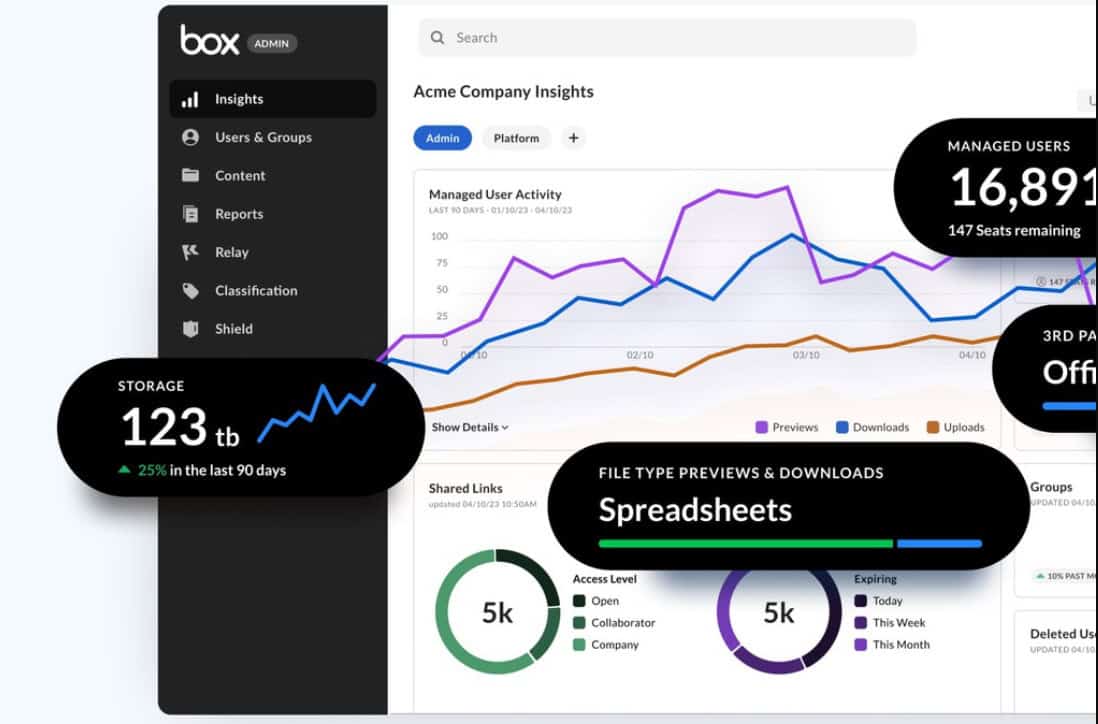
Box is a cloud content management platform that lets organizations store, share, and govern files from any device. Founded in 2005 and headquartered in Redwood City, California, it grew from simple online file storage into a suite that covers collaboration, e-signatures, workflows, and AI-assisted document work for businesses of every size and in many industries.
Box serves individuals on a free plan, small teams on Business Starter, and large organizations on Enterprise tiers with unlimited storage, longer version history, and advanced compliance controls. Its strengths are security, admin control, and integrations, which is why drawbacks tend to show up in cost, usability, and large-file work rather than in basic reliability.
These core features explain why many organizations still choose Box:
- Secure Content Cloud: Box stores files with granular permissions, audit trails, and compliance controls, which suits regulated industries that must prove who accessed which document and exactly when it happened across the organization.
- Collaboration Tools: Teams comment, assign tasks, and co-edit files inside shared folders, keeping feedback attached to the document instead of scattered across email threads, chat tools, and meetings.
- Box Sign: Built-in e-signature requests, unlimited on Business plans and above, let teams send contracts for signature without leaving the storage platform or using a separate tool.
- Integrations: Box connects to a large library of productivity, CRM, and messaging apps, so files stay accessible inside the tools teams already use every day without switching.
- Box AI: Paid tiers include AI features for summarizing and generating content from files, with monthly AI unit allowances that grow on the higher enterprise tiers of the platform.
Real-Life Example: A law firm needs a safe place to share case documents with clients. It sets up Box with folder-level permissions, expiring links, and e-signature requests, then tracks access through audit logs. Clients upload documents without email attachments, and the firm can show exactly who opened each file during a later compliance review.
10 Disadvantages & Drawbacks of Using Box

Box looks polished in a sales demo, which is exactly why its weak points surface late, usually after files, permissions, and workflows are already in place. The ten disadvantages below draw on Box’s own documentation, current plan limits, and verified user reviews. Each one covers what users experience, a short example, and a practical workaround you can apply before it costs you time.
Disadvantage #1: Higher Pricing Compared to Competitors
Box prices its paid tiers per user, and the total climbs quickly once a team outgrows entry plans. Analysts note Box can be more expensive than rivals that bundle more storage for less, which matters most for small teams that need only basic sharing. Advanced security, longer version history, and higher upload limits all sit on higher tiers, so the cost depends on your needs.
Pricing pressure usually builds from a few predictable factors over time:
- Per-User Pricing: Every added seat raises the bill, and business plans require a minimum of three users, so small teams pay more per head than they expect when planning a modest rollout.
- Feature Gating: Longer version history, higher upload limits, and advanced security controls sit on higher tiers, which pushes growing teams toward costlier plans than their first quote suggested.
- Add-On Costs: Extras such as customer-managed encryption keys and threat detection carry separate charges, so the headline plan price rarely covers a security-focused deployment fully for most larger organizations.
Real-Life Example: A ten-person design agency starts on a mid-tier plan for unlimited storage. Within a year, clients demand stronger audit controls and longer version history, which pushes the agency to a higher tier. The monthly bill jumps sharply, and the owner discovers that rivals already included similar storage at a lower per-seat price.
Solution: Map your real needs before buying: required storage, file sizes, security controls, and user count. Request a written quote for the exact tier and its renewal terms first. Compare at least two rivals on total cost per user, and commit to annual terms only after a short paid trial confirms the fit.
Disadvantage #2: Inefficient Notification System
Notifications keep collaborators in sync, so delays in them can quietly stall work. Users report delays in email notifications on Box’s community forum, and Box publishes a help article titled “Notifications Not Sent Or Multiple Sent.” Because comments, task assignments, and shared-link activity all depend on alerts, a late message can leave a teammate unaware of a request until a deadline has slipped.
Alert problems tend to show up in a few specific situations:
- Delayed Email Alerts: Community users have reported emails arriving long after the triggering action, so comments, mentions, and task assignments may reach collaborators well after the work was already requested.
- Duplicate or Missing Messages: Box’s own help article covers cases where alerts are not sent or arrive multiple times, which erodes trust and trains people to ignore notifications altogether.
- Settings Complexity: Preferences live in several places, so teams often miss a toggle and then blame the platform for silence, which makes alert problems harder to diagnose and fix.
Real-Life Example: A project manager assigns a review task in Box on Monday and expects a reply by Wednesday. The email alert reaches the reviewer on Thursday afternoon, so the review slips and the client deliverable ships late. The team then adds a manual chat reminder for every task, which defeats automated alerts.
Solution: Check notification settings for every account and folder at onboarding, and test alerts with a trial task before relying on them. Pair Box with a chat or project tool for urgent requests, and ask reviewers to confirm receipt. If delays persist, open a support ticket with timestamps and screenshots as evidence.
Disadvantage #3: Transition from Local to Network Storage (Box Drive)
Box Drive streams files from the cloud instead of keeping a full local copy, which saves disk space but changes how people work offline. Box documents several limits, and the desktop app doesn’t support Linux at all. Users used to the older Box Sync folders must also switch, because Drive and Sync cannot run on the same machine at once.
Switching to Drive affects daily work in several practical ways:
- Offline Access Limits: Files must be marked for offline use first, and logging out of Drive deletes offline files and folder preferences, so travelers can lose access without any warning.
- Not a Network Drive: Box states the Drive folder cannot be mapped as a network drive, which blocks some legacy workflows, scripts, and software that expect a standard mapped path.
- Slower Large Folders: Large files can open the first time slowly, and folders with many files and subfolders take a while to load, so heavy media teams feel the delay daily.
Real-Life Example: A consultant boards a long flight expecting to edit a client folder offline. She never marked the folder for offline use, and the files appear only as online placeholders. She spends the flight unable to open documents, then rushes to rebuild her work from email attachments after landing.
Solution: Mark critical folders for offline access before you travel, and confirm the files downloaded while you are still online. Avoid logging out of Drive on shared devices, since that clears offline files. For heavy workflows, test Drive with your largest folders during a pilot, and keep a web-access fallback plan ready.
Disadvantage #4: Poor Customer Service Experiences
Support quality varies by plan, and complaints about slow help appear across review sites. Some users report slow customer service response times or difficulties in resolving complex issues once problems get technical. Entry plans get support only during local business hours, while 24-hour enhanced support arrives with Enterprise Plus, so smaller teams often wait the longest for answers.
Support gaps tend to cluster around a few recurring pain points:
- Plan-Based Support Tiers: Business Starter support runs only during local business hours, while round-the-clock enhanced support starts at Enterprise Plus, so urgent issues on lower plans can sit overnight.
- Slow Replies: Reviewers describe response times of several days and a support experience that feels faceless when debugging sync problems, which turns small faults into long outages.
- Escalation Friction: Users describe difficulty resolving complex faults, with cases moving between support levels before anyone with deep product knowledge responds, so people repeat their story and wait again.
Real-Life Example: An operations lead reports that files stopped syncing for a whole department on a Friday. Her plan includes support only during business hours, so the ticket waits until Monday. By then, forty staff members have saved conflicting copies, and the team spends two days merging versions by hand.
Solution: Check the support tier before you buy, and confirm response targets in writing. Keep an internal admin who knows Box’s help center and community forum, since many fixes are documented there. For critical teams, price in the plan that includes enhanced support, and open tickets with logs, screenshots, and timestamps.
Disadvantage #5: Difficulties with Integration and File Sharing
Box connects to a large library of apps, yet connecting them well takes planning. One review notes Box relies on integrations for document editing, so editing, signing, and workflow tools each need separate setup. Sharing adds another layer: business plans cap shared-link downloads at 2 TB per user each month, and permission settings differ across folders, links, and collaborators.
Setup and sharing problems usually appear in these common areas:
- Layered Permissions: Access can be set on folders, files, links, and collaborators, so one wrong setting can expose a file or lock out a colleague, and audits take real time.
- Separate Setup Per App: Each integration needs its own authorization, admin approval, and testing, so a rollout across editing, signing, and messaging tools can stretch into several weeks of testing.
- Download Caps: Business plans cap shared-link downloads at 2 TB per user monthly, and Individual accounts at 10 GB, which surprises teams that distribute large files to clients.
Real-Life Example: A marketing team shares a campaign folder with an outside agency and sets permissions folder by folder. One subfolder stays open to a former contractor, and nobody notices until a quarterly audit. The team then spends a full afternoon reviewing every shared link to confirm who can still view, edit, or download.
Solution: Define a sharing policy before rollout: who can invite outsiders, which links expire, and which folders stay internal. Use groups instead of individual invitations, and set default link expiration. Review shared links monthly, and pilot each integration with one team before enabling it company-wide. Document who owns each integration.
Disadvantage #6: Limitations on File Size
Upload limits depend on the plan, which catches teams that move large media files into the wrong tier. Free accounts stop at 250 MB, while Business Starter allows 2 GB and Business allows 5 GB per file. That remains a significant drawback for users working with very large media files, and higher limits cost more.
File size limits create friction in a few specific workflows:
- Tiered Upload Caps: Business Plus allows 15 GB, Enterprise 50 GB, Enterprise Plus 150 GB, and Enterprise Advanced 500 GB, so video teams must buy higher tiers just to upload raw footage.
- Splitting Large Files: Files above the cap must be compressed or split before upload, which adds editing steps and raises the chance of corruption or missing segments during reassembly.
- Slow Large Transfers: Large files can take long to load and sync, and Box Drive can be slow opening them the first time, which stretches turnaround on media-heavy projects.
Real-Life Example: A video production company records a 20 GB master file and tries to upload it to a Business plan. The upload fails at the 5 GB limit, so an editor splits the file into parts. The client receives them out of order, and the team spends an extra day rebuilding the sequence.
Solution: Check the per-file limit of your exact plan before picking a tier, and test uploads with your largest real files. Use compressed review copies for client feedback, and keep raw masters on storage built for media. If large files are routine, price the higher tiers or a dedicated media platform.
Disadvantage #7: Search Functionality Can Be Improved
Search decides whether a content platform feels fast or frustrating. Some reviewers call Box search unforgiving, and Box’s own community has threads from users whose search returns blank results for files they know exist. Box Drive also limits search results to 20 per query, so deep archives take extra effort and several refined searches to navigate.
Search weaknesses tend to appear in a few repeat situations:
- Strict Matching: Reviewers describe search as unforgiving, so a misspelled term or a slightly different file name can hide the document you need behind several irrelevant results.
- Index Gaps: Community threads report searches that find only some files or return nothing for known content, which erodes confidence and pushes users toward manual folder browsing.
- Drive Result Cap: Searching through Box Drive returns a maximum of 20 results, so broad queries in large archives force users to refine terms or switch to the web interface.
Real-Life Example: A legal assistant searches for a contract signed two years ago, using a client name that appears in the file text. Box returns nothing useful, so she browses folders by date instead. After twenty minutes, she finds the file under an older naming convention, and the team adds a strict naming rule.
Solution: Adopt a consistent naming convention and folder structure so files are easy to find without search. Add metadata and tags to key documents, and train staff to use filters for date, owner, and type. If results look wrong, report the missing file to your admin, because index problems can be raised with support.
Disadvantage #8: Costly Enterprise Version
Enterprise-grade controls are the main reason many organizations choose Box, and they are also its highest cost. Reviewers say advanced features sit on premium plans, which pushes security-minded teams toward the top tiers. Enterprise Advanced has no public price and asks buyers to contact sales, while Enterprise Plus is sold on annual billing only, per Box’s pricing page.
Enterprise costs tend to build up around these specific features and limits:
- Premium-Only Security: Advanced compliance and security controls require higher tiers, so organizations with legal or regulatory duties cannot stay on cheaper plans without giving up key protections.
- Opaque Top Pricing: Enterprise Advanced is quote-only, and Enterprise Plus is annual-only, which makes budgeting harder and weakens a buyer’s ability to compare offers early in the process.
- AI Unit Allowances: Box AI usage runs on monthly units, with 1,000 on Enterprise and 2,000 on Enterprise Plus, so teams planning heavy AI use should model their consumption before choosing a tier.
Real-Life Example: A mid-sized firm moves to an enterprise plan to meet a client’s compliance requirements. Renewal arrives with a higher quote, and switching providers would mean migrating years of files and rebuilding permissions. The finance team accepts the increase because the cost of moving away looks even higher than the cost of staying.
Solution: Negotiate multi-year pricing caps and renewal terms during the initial purchase. Ask which compliance features you truly need, and avoid paying for unused modules. Keep an export of your content structure and metadata, so a future migration stays realistic. Compare quotes from at least two vendors before every renewal.
Disadvantage #9: User Interface Can Feel Dated
A cluttered or confusing interface slows adoption, and adoption decides whether a content platform pays off. One long-running review says Box’s apps aren’t quite as user-friendly as rivals’ and hide useful options behind menus. User reviews add that the dashboard can look cluttered and busy, especially for staff who only need to upload and share files.
Interface friction shows up most often in these everyday moments:
- Cluttered Dashboards: Reviewers describe the home screen and dashboard as busy, which slows new users who only want to upload a file, find a folder, or share a link.
- Hidden Options: Useful settings sit behind menus instead of up front, so staff miss features that would save them time, and admins field the same how-to questions repeatedly.
- Training Overhead: Less technical users find the interface confusing, so rollouts need guides, walkthroughs, and champions in each team before adoption sticks across the whole organization and support questions drop.
Real-Life Example: A school office adopts Box for staff and parents. Teachers struggle to find the sharing options, so many keep emailing attachments instead. The administrator runs two training sessions and writes a one-page guide, and only then does file sharing through Box become the default way the office works.
Solution: Plan training before launch, and create short, task-based guides for the five actions your staff performs most. Appoint a champion in each team to answer questions. Use Box’s web tutorials to onboard users, and gather feedback after thirty days to adjust folder layouts and defaults. Revisit the guide each quarter.
Disadvantage #10: Syncing Issues Can Occur
Sync reliability is the quiet foundation of any desktop storage tool. Box Drive’s own documentation warns that apps saving a file several times per second can delay other changes, and status icons may briefly show synced when content is not. Reviewers add that updates can make desktop syncing finicky, and that Box lacks block-level syncing, so edits to big files upload the whole file again.
Sync trouble usually traces back to a few predictable causes:
- Delayed Syncing: Reviewers report sync delays and slow syncing with large files, which leaves teammates working from outdated versions until the desktop client catches up with the cloud.
- Whole-File Re-Uploads: Without block-level syncing, a small edit to a large file sends the whole file again, which burns bandwidth and stretches sync times on slower connections.
- Version Conflicts: Closing an Office file mid-sync can leave it incorrectly locked, and simultaneous edits can produce conflicting copies that someone must reconcile by hand afterward, which costs time.
Real-Life Example: Two analysts edit the same spreadsheet, one online and one on a train with weak signal. When the second analyst reconnects, Box creates a conflicted copy, and the team cannot tell which version holds the final numbers. They spend an hour comparing both files line by line before the report goes out.
Solution: Use web-based or co-authoring editing for shared documents, so only one live version exists. Avoid saving files into Drive from apps that autosave rapidly, and wait for the sync icon before closing Office files. Keep important backups outside Box, and report repeated sync faults with logs for support. Retest after major updates.
How Could These Disadvantages Be Overcome Globally?
Addressing Box’s drawbacks at scale takes work from Box itself, its partners, and the organizations that deploy it. Targeted improvements in design, alerts, pricing, integrations, and search would make the platform easier to adopt and fairer to smaller teams. Without them, the same complaints will keep repeating in new reviews and community threads for years to come.
These improvements would do the most to reduce the disadvantages above:
- Refresh the User Interface: A cleaner dashboard, clearer navigation, and visible settings would shorten onboarding and help less technical users reach everyday actions without hunting through menus or help pages.
- Improve Notification Reliability: Faster, deduplicated alerts with clearer, centralized controls would make Box dependable for time-sensitive reviews and tasks, and reduce the need for manual chat reminders on every task.
- Offer More Flexible Pricing: Smaller seat minimums, transparent add-on pricing, and clearer paths between tiers would help small teams adopt security features without jumping to a much higher plan.
- Simplify Integrations and External Sharing: Guided setup, policy templates, and clearer permission views would let admins connect apps and share with outsiders without hours of manual checking and constant admin support.
- Strengthen Search: Fuzzy matching, better full-text indexing, and clearer filters would help users find older files and cut reliance on perfect naming conventions across large archives and busy teams.
What Box Plans and Upload Limits Mean in Practice
Plan names hide the details that matter most in daily use. Box’s pricing page shows upload caps, version history, support level, and AI allowances changing at every tier, so the right pricing plan depends on file sizes and support needs, not on storage alone. Reading the limits before you buy prevents most of the surprises described above.
These plan limits show how quickly requirements change between tiers:
- Upload Caps: Free accounts allow 250 MB per file, Business Starter 2 GB, Business 5 GB, Business Plus 15 GB, Enterprise 50 GB, Enterprise Plus 150 GB, and Enterprise Advanced 500 GB.
- Version History: Individual accounts keep one version, Business Starter keeps 25, Business and Business Plus keep 50, Enterprise keeps 100, and the top two tiers keep unlimited versions.
- Support Level: Business Starter support runs during local business hours, while Enterprise Plus adds 24-hour enhanced support, so response expectations should drive the choice as much as price.
How to Decide If Box Is the Right Fit
Box rewards organizations that value security, permissions, and audit trails more than the lowest price. It fits regulated teams, client-facing document work, and companies with many connected apps, and it suits media-heavy or budget-first teams less well. Matching the tool to the workload prevents most of the problems described above, and it saves a painful migration later.
Use these checks before you sign a contract or start a trial:
- Good Fit: Compliance-focused teams, professional services firms, and companies that share documents with outside clients benefit from granular permissions, audit logs, e-signatures, and a large integration library.
- Poor Fit: Small teams chasing the lowest cost per gigabyte, Linux desktop users, and video teams handling heavy raw files may find alternatives cheaper or better suited to their daily workflow.
- Pilot First: Run a thirty-day trial with your largest files, your busiest folders, and your real permission setup, then measure search speed, sync reliability, and support response before committing.
Video About Box
Prefer to see Box in action before weighing these pros and cons? The video below walks through how Box helps organizations manage content, strengthen security, and streamline collaboration across teams, giving you helpful context as you decide whether it fits your own workflow.
Box Plans, Limits, and Support: Facts Worth Checking
Box plans, limits, and support levels change over time, and many teams learn them only after a rollout stalls. The table below gathers the facts that matter most when you compare Box with other storage options. Check each point against Box’s current pricing and help pages before you budget, sign a contract, or migrate files.
This quick-reference table summarizes the plan limits and rules covered above:
| Aspect | Key Fact or Answer | Why It Matters |
|---|---|---|
| Upload Caps | Free accounts cap files at 250 MB, Business at 5 GB, Enterprise at 50 GB, and Enterprise Advanced at 500 GB. | Teams with large media files must pick a tier by file size, not by storage alone. |
| Version History | Individual keeps 1 version, Business keeps 50, Enterprise keeps 100, and the top two tiers keep unlimited. | Longer history protects against bad edits, but it is tied to higher plans. |
| Box Drive | Drive cannot be mapped as a network drive, and logging out deletes offline files. | Offline workers must mark folders in advance and avoid shared devices. |
| Support | Business Starter gets business-hours support, and Enterprise Plus adds 24-hour enhanced support. | Urgent issues on lower plans may wait overnight. |
| Sharing Caps | Shared-link downloads cap at 10 GB per month on Individual and 2 TB per user on Business. | Heavy external distribution can hit limits on lower plans. |
| Company Growth | Box reported 9% revenue growth to $321.1 million in its second quarter of fiscal 2027. | Steady growth suggests a stable vendor, which matters for long content archives. |
Conclusion
Box remains a strong platform for secure sharing, governance, and integrations, and its steady growth shows many organizations across industries and company sizes still rely on it. The drawbacks are real, though: tiered pricing, patchy notifications, Box Drive limits, uneven support, complicated sharing setup, plan-based file caps, strict search, costly enterprise features, a cluttered interface, and occasional sync trouble.
Most of these problems become manageable with preparation. Pilot with real files, read plan limits closely, define sharing rules early, train staff, and keep a trained admin ready to escalate support cases quickly, before problems spread. Weigh your file sizes, budget, and security needs against what each plan actually offers, then choose Box where its strengths match the work.
Frequently Asked Questions About Box
How much does Box cost per user?
Box charges per user on paid plans, and the price depends on the tier. Business Starter needs at least three users, while Enterprise Advanced has no public price and requires contacting sales. Because storage, version history, AI units, and support change by tier, compare the limits you need on Box’s pricing page, and get a written quote before committing to any plan.
What is the maximum file size you can upload to Box?
It depends on the plan. Free accounts allow 250 MB per file, Business Starter 2 GB, Business 5 GB, Business Plus 15 GB, Enterprise 50 GB, Enterprise Plus 150 GB, and Enterprise Advanced 500 GB. Teams that handle large video files should check the cap for their exact tier and test uploads with real files before buying.
Is Box Drive the same as Box Sync?
No. Box Drive streams files from the cloud and saves disk space, while the older Box Sync keeps full local copies. The two cannot run on the same machine at once. Drive also cannot be mapped as a network drive, and logging out deletes offline files, so users should mark important folders for offline use before traveling.
Is Box a good choice for large video files?
Box can handle large files on higher tiers, with caps reaching 500 GB on Enterprise Advanced, but lower plans stop much sooner. Free accounts stop at 250 MB and Business at 5 GB. Large files can also open slowly in Box Drive, so media teams should pilot with their biggest files and compare costs against dedicated media storage.
How do users rate Box compared with other tools?
G2 shows Box at 4.2 out of 5 from 5,256 reviews, which signals broad satisfaction. The recurring complaints are cost, sync delays, a cluttered interface, and strict search. Those themes match the disadvantages above, so reading recent reviews from companies of your size is the best way to judge how Box will perform for you.
Suggested articles:
- Top 10 Cons & Disadvantages of iCloud
- Top 10 Cons & Disadvantages of Using Dropbox
- MediaFire: Top 10 Cons & Disadvantages

Peter Kanai is a Google-certified freelance writer with over a decade of experience crafting high-quality content for business websites, blogs, and SEO & email marketing campaigns. His on-demand writing services are all about helping businesses expand their online presence and achieve their objectives. With a proven track record in delivering results-driven content, Peter is the go-to freelance writer for business owners seeking a strategic partner to help them grow their brand online.