
An agile roadmap turns an abstract product vision into a shared reference point that stakeholders, developers, and leadership can all understand at a glance. Unlike a backlog, which tracks granular tasks and daily work, an agile roadmap template maps priorities, releases, and long-term direction without getting lost in execution details. Product owners rely on this document to explain why the work matters right now.
Choosing the right agile roadmap template depends on how your team already works and which tools sit inside your existing stack. Some platforms favor visual, whiteboard-style planning, while others build roadmaps directly into sprint execution and reporting. Before comparing tools, it helps to understand exactly what a well-built agile roadmap actually does for the person responsible for the product day-to-day.
How An Agile Roadmap Supports The Product Owner
The agile roadmap serves as a single, unified tool that empowers the product owner to translate high-level strategy into actionable direction across the entire organization. Rather than engaging with the backlog at a granular level, the roadmap operates one tier above it — bridging day-to-day execution with the broader business case that underpins the product. As a result, it becomes an indispensable reference point that product owners consult continuously throughout the product lifecycle.
The roadmap specifically helps the product owner in several concrete ways:
- Providing Stakeholders with a High-Level Overview: Executives and cross-functional partners rarely need sprint-level detail, so the roadmap distills months of planned work into a format they can scan in minutes without wading through the full backlog.
- Giving Teams Insight Into Timelines and Priorities for Daily Tasks: Developers and designers use the roadmap to understand how their current sprint connects to what comes next, which helps them flag risks early instead of discovering conflicts after work has already started.
- Explaining the Project’s Importance to the Customer and the Organization: A roadmap ties individual features back to customer outcomes and business goals, making it easier to justify resourcing decisions and defend priorities when competing requests come in from other departments.
- Implementing a Long-Term Strategy: Because the roadmap spans multiple quarters rather than a single sprint, it forces the product owner to sequence work deliberately instead of reacting to whichever request feels most urgent that week.
This guide covers five free, ready-to-use templates for Miro, Monday.com, Jira, Microsoft Planner, and ClickUp, plus the strategy behind building one.
Types Of Agile Roadmaps
Agile roadmaps generally fall into two categories, and most teams eventually use a version of both depending on the audience and the stage of the product. Understanding the difference between a time-based roadmap and a progress-based roadmap helps you pick the right format before you start filling in a template. Each approach communicates a different kind of commitment to stakeholders.
Time-Based Roadmaps
A time-based roadmap is organized around a fixed calendar, whether that means quarters, months, or specific release windows. Stakeholders often prefer this format because it sets clear expectations for when major milestones will land. This type of roadmap works best for organizations that need predictable planning cycles, such as marketing launches or regulated releases that depend on external deadlines.
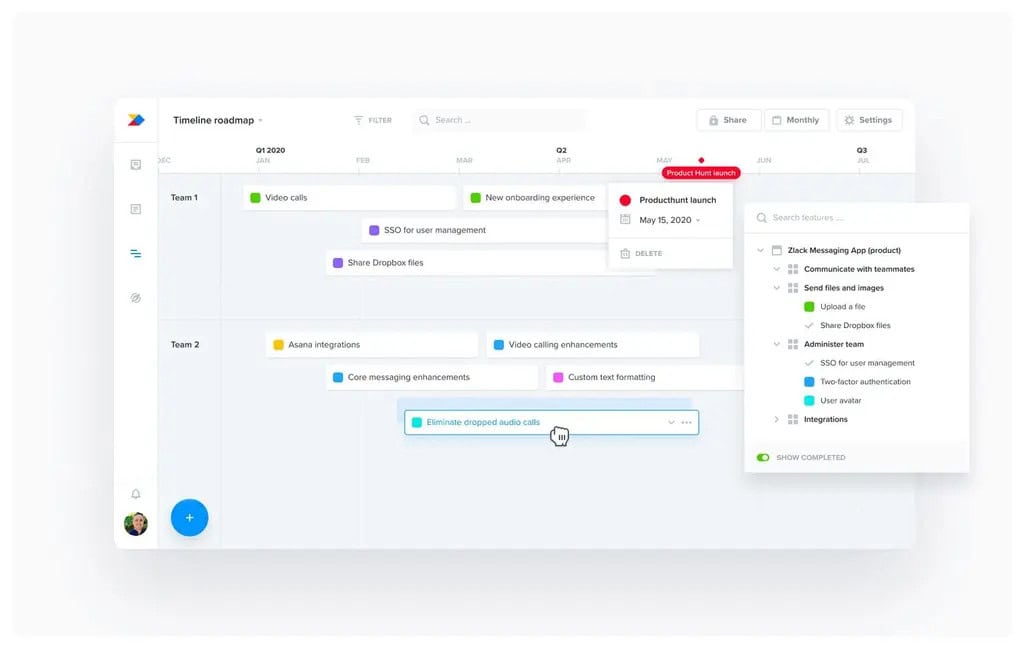
Time-based agile roadmap template
Time-based formats typically break down into a few common variations, each suited to a different pace of delivery.
- Quarterly View: Breaks the roadmap into Q1 through Q4 blocks so leadership can see planned releases across a full year at a glance.
- Monthly View: Offers tighter granularity for teams shipping frequently, useful for fast-moving product lines with short release cycles.
- Release Window: Groups initiatives around a target ship date rather than a strict calendar month, giving engineering some flexibility.
Progress-Based Roadmaps
A progress-based roadmap tracks work through stages such as to do, in progress, and complete, resembling a kanban board more than a calendar. This format suits agile teams because it reflects the iterative nature of sprints rather than forcing commitments to specific dates. It also makes it easier to communicate that priorities can shift as the team learns more with each cycle.
Progress-based roadmaps also come in a few common configurations worth knowing before you build one.
- Now, Next, Later: A simplified three-column structure that groups initiatives by proximity rather than exact timing, popular with product teams.
- Status-Based Board: Mirrors a Kanban workflow, showing which initiatives are actively being built versus queued for a future sprint.
- Theme Grouped Board: Organizes work by strategic theme, such as onboarding or performance, so progress ties back to larger goals.
A roadmap is a living document, not something to be finalized and forgotten once it is published. Because agile principles emphasize adapting to change, the roadmap itself should evolve with every iterative cycle as new information comes in from customers, engineering, and the market. Treating it as fixed defeats the purpose of planning inside an agile framework.
Creating An Agile Roadmap
Start building your agile roadmap by articulating a clear vision before touching any template or tool. Define the value the customer will get, along with the project’s goals, priorities, and key objectives. From there, develop measurable KPIs by identifying milestones and success indicators that tell you whether the roadmap is actually working as intended, not just whether it looks complete.
Optimize your agile roadmap for the audience that will see it, since details vary significantly by role. The version you present to the project team will include far more granularity than the one shared with executive stakeholders, who mainly need timelines, goals, and overall strategy. Use the following steps to keep the process focused and repeatable.
- Define the Vision: Write a single sentence describing the value the roadmap delivers to customers before adding any tasks or dates.
- Set Measurable KPIs: Attach specific success metrics to each milestone so progress can be tracked objectively rather than subjectively.
- Tailor the Detail Level: Build a detailed internal version for the delivery team and a simplified summary version for stakeholders.
- Select a Template: Choose a tool that matches your team’s existing workflow so the roadmap gets updated instead of abandoned.
Why Do Agile Teams Need Roadmaps?
Most agile teams intentionally avoid locking in every detail of future sprints, but that does not mean they can operate without any sense of direction. Without a roadmap, teams risk making short-sighted decisions that ignore the downstream consequences of today’s work. A roadmap gives the team enough visibility into what is coming to plan intelligently rather than reactively.
While a sprint keeps the team focused on current tasks, dependencies, and complexities, further out still need visibility and planning. This lets teams build durable foundations instead of boxing themselves into decisions that only make sense in isolation. Roadmaps also support resource planning, since teams need to know whether they have the right skills and tools lined up.
- Resource Planning: Confirms whether the team has the skills, budget, or tools needed for upcoming work well before a deadline arrives.
- Dependency Visibility: Surfaces cross-team dependencies early, reducing the risk of last-minute delays caused by unplanned blockers.
- Team Morale: Connects daily sprint work to a larger strategic picture, helping contributors see how individual tasks add up to real progress.
- Stakeholder Confidence: Reassures leadership and customers that the team has a coherent plan rather than an endless, disconnected to-do list.
Top 5 Free Agile Roadmap Templates for Project Teams
1. Agile Roadmap Miro
Miro is an online whiteboard platform built for the collaboration of distributed teams, and it remains one of the most popular canvas tools for visual roadmap planning. Its infinite canvas lets more than sixty million users run workshops, brainstorm ideas, and design products in one shared space. Miro was founded in 2011 as RealtimeBoard and rebranded to Miro in 2019.
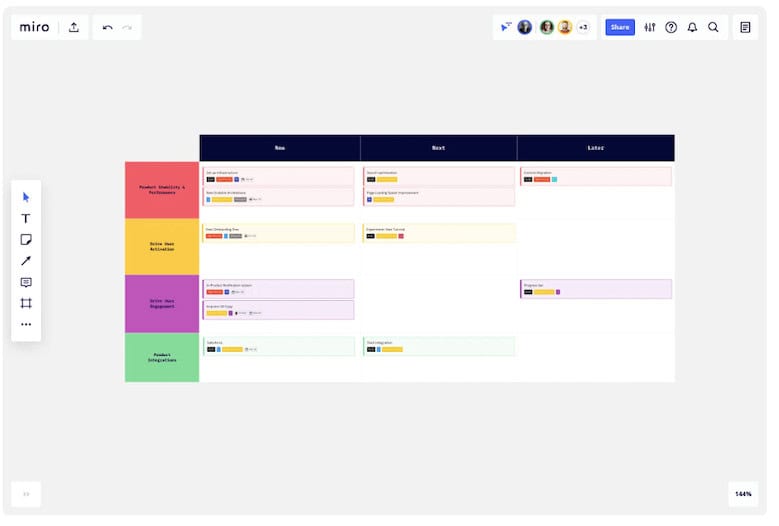
Miro’s agile roadmap template works well because it treats planning as a visual, collaborative exercise rather than a static document. Teams can drag sticky notes, timelines, and dependency lines directly onto the canvas, then switch to presentation mode to share the result with stakeholders. Recent updates have added AI-assisted board creation and deeper Jira issue imports for teams that need execution data alongside strategy.
- Template Library: Provides ready-made agile roadmap layouts alongside story mapping and retrospective templates for related planning work.
- Jira Integration: Imports Jira issues directly into Miro tables, keeping the visual roadmap connected to real sprint data.
- AI-Assisted Boards: Uses Miro Assist to generate sticky notes, timelines, and diagrams faster during live planning sessions.
- Presentation Mode: Converts the working canvas into a clean, stakeholder-ready view without rebuilding the roadmap elsewhere.
2. Agile Roadmap Monday.com
Monday.com is an open work operating system designed for teams to build custom tools for running their work, and it now includes a dedicated monday.com Dev environment for agile teams. The interface uses building blocks like automations, integrations, and apps so teams can customize their roadmap without needing developer support. It works equally well for marketing campaigns, sales pipelines, and product roadmaps.
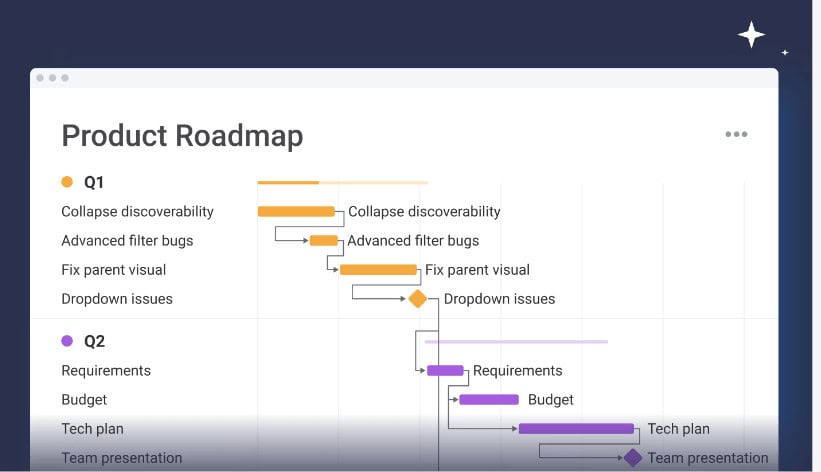
Agile Roadmap Template| Monday
The Monday.com agile roadmap template combines the visual, color-coded boards the platform is known for with automation that reduces manual status updates. Teams can view the same roadmap data as a Gantt chart, timeline, or kanban board depending on the audience, and standardized columns now keep large organizations consistent across boards. This flexibility suits cross-functional teams needing planning and execution together.
- Multiple Views: Switches between Gantt, timeline, and kanban views of the same roadmap without duplicating any data.
- Automation Rules: Triggers status updates and notifications automatically as tasks move through the roadmap, reducing manual admin work.
- Managed Columns: Standardizes column labels across boards so large organizations maintain consistency across multiple team roadmaps.
- Cross-Tool Integration: Connects with Jira, Slack, and Microsoft Teams so roadmap updates stay visible across the wider tech stack.
3. Agile Roadmap Jira
Jira embraces the agile philosophy at its core and gives teams a customizable platform for implementing scrum, kanban, or hybrid workflows. Jira’s roadmap capability illustrates both the what and the why behind a team’s work, connecting product strategy directly to the tasks engineers are executing. This tight link between planning and execution is what makes Jira the default choice for larger engineering organizations.
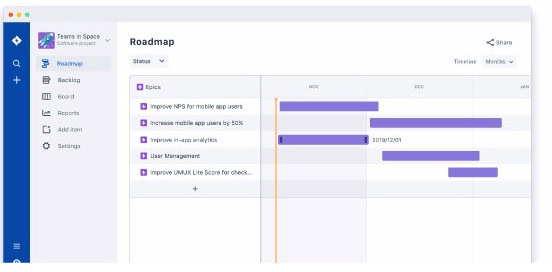
Jira Advanced Roadmaps lets teams connect strategy and tasks while prioritizing and sequencing work based on customer feedback, both of which matter for agile methodology. Because roadmap items live in the same system as sprints and issues, changes in scope or priority are updated automatically without requiring a separate sync step. This suits teams past early discovery and now in active delivery.
- Advanced Roadmaps: Rolls up multiple team boards into a single cross-project view for tracking dependencies and capacity.
- Real-Time Sync: Keeps roadmap timelines aligned with actual sprint data since both live inside the same system of record.
- Dependency Tracking: Flags blocked or at-risk initiatives automatically when a linked issue falls behind schedule.
- Atlassian Intelligence: Applies AI features to summarize progress and suggest sequencing adjustments across the roadmap.
4. Agile Roadmap Microsoft Planner
Microsoft has consolidated its project and task management tools under a single Planner brand, retiring Project for the Web and the standalone Roadmap app in Microsoft Teams. Roadmaps that once lived in the separate Roadmap app now live inside Planner’s Portfolios feature, which gives a consolidated view across multiple projects. Existing Roadmap data remains available, but teams must manually recreate roadmaps as Portfolios.
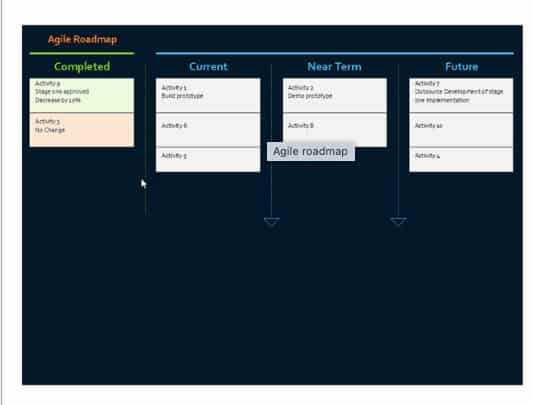
Agile Roadmap Template
Planner now comes in tiers, with Planner Plan 1 covering basic task management and Planner Plan 3 or Plan 5 required for the fuller scheduling and dependency features that Project for the Web previously offered. Licensed Microsoft 365 Copilot users also get access to a Project Manager agent that summarizes risks and blockers directly inside Teams.
Organizations still running Project Online should plan ahead, since Microsoft has confirmed its retirement in 2026, making Planner Premium the designated long-term destination for enterprise-level roadmapping and portfolio management going forward. Teams planning this transition should evaluate their scheduling, dependency, and governance needs early, well before the cutover date arrives.
- Portfolios View: Replaces the retired Roadmap app, rolling up multiple plans into one consolidated timeline for stakeholders.
- Copilot Project Manager: Summarizes risks and blockers automatically for users with a Microsoft 365 Copilot license.
- Tiered Licensing: Requires Planner Plan 3 or Plan 5 for advanced dependencies, baselines, and enterprise scheduling features.
- Teams Integration: Embeds roadmap boards directly into Teams channels through native Planner web components.
5. Agile Roadmap ClickUp
ClickUp is an all-in-one work management platform that has built out one of the more robust free agile roadmap offerings available, including a dedicated Agile Team Roadmap Template. The free plan includes Gantt chart view, custom statuses, and dependency tracking, which puts it ahead of most competitors that reserve those features for paid tiers. This makes ClickUp a practical option for teams that want roadmap functionality without committing to a paid seat immediately.
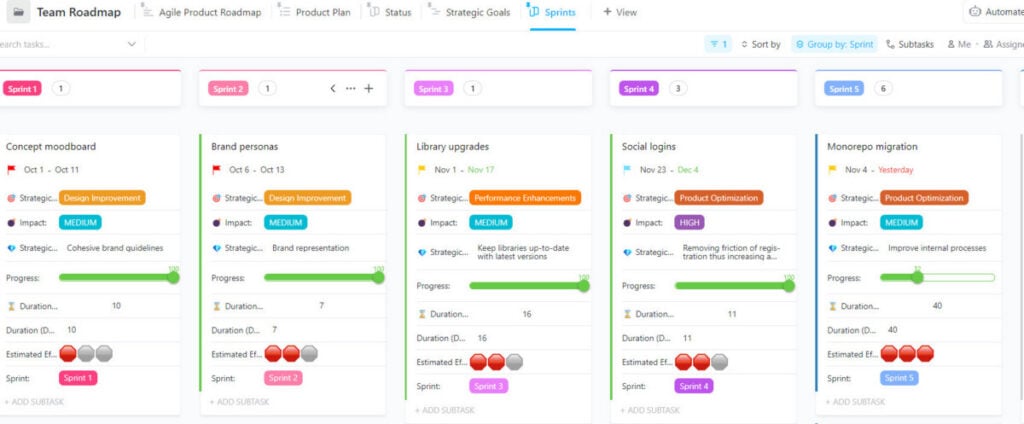
Agile Team Roadmap Template| ClickUp
The ClickUp agile roadmap template pairs a strategic, high-level roadmap list with a separate weekly execution list, so long-term planning and active sprint work stay visible without merging into one cluttered view. Teams can switch between Gantt, Kanban board, workload, and timeline views of the same data, and ClickUp Brain can summarize risks or generate a roadmap draft from meeting notes. This flexibility suits teams that outgrow simpler kanban tools but are not ready for Jira’s complexity.
- Agile Team Roadmap Template: Ships as a pre-built folder with Getting Started, Strategic Goals, and Product Plan views ready to customize immediately.
- Multiple Views On Free Plan: Includes Gantt, Kanban board, workload, and timeline views without requiring a paid upgrade.
- Custom Fields: Tracks Impact, Strategic Goal, and Estimated Effort per initiative, giving product owners more prioritization context.
- ClickUp Brain: Uses AI to flag at-risk dependencies and summarize progress directly from the roadmap view.
Pick What Works and Keep it Updated
Whether you choose one tool or combine several, the most important factor is which option adds the most value to your specific organization. Ask which process needs more visibility and where information gaps or communication breakdowns are actually occurring. A roadmap only earns its place in the workflow if it solves a real, recurring problem rather than existing as documentation for its own sake.
Regardless of which template you select, an inaccurate roadmap is worse than having no roadmap at all. Commit to a regular update cadence so every team member sees the current state of the plan rather than an idealized version that no longer reflects reality. Treat the update habit as part of the process, not an optional extra step handled only when time allows.
How To Use The Agile Roadmap Template
Using a roadmap template effectively means more than just filling in boxes with feature names and dates. A structured template can save significant time compared to emailed spreadsheets or disconnected files by automatically updating stakeholders and simplifying collaboration through built-in integrations. The following four steps walk through how to set up and maintain a working roadmap from scratch.
Explain the Project and Your Team
Start with the basics under the team mission section, outlining the main purpose of the team and what it aims to achieve. In the project information section, add documentation or context that helps team members orient themselves quickly. Treat this as an opportunity to centralize scattered knowledge, from Jira links and OKRs to instructions for filing bugs, saving time for everyone later.
Plan Out Your Quarters
Although the roadmap overview section sits at the top of most templates, it is easier to complete it last. Instead, focus first on planning each quarter individually, using tables to note feature priority, launch dates, status, and estimated effort. If you are building a roadmap for less than a full year, simply delete the quarters that do not apply to your timeline.
- Feature Priority: Ranks each initiative so the team knows what to tackle first if timelines start to slip.
- Launch Dates: Records the target release window for each item, even if it is an estimate rather than a firm commitment.
- Status Field: Tracks whether an item is not started, in progress, or complete so stakeholders can scan quickly.
- Effort Estimate: Notes the relative size of each initiative to help with capacity planning across the quarter.
Complete the Overview
With the quarterly details filled in, completing the agile roadmap overview becomes much easier since it serves as the master timeline for all planned features. Use lanes and bars to capture projects and schedule elements at a high level, resisting the urge to add too much detail here. Keeping this view simple makes it far more useful as a quick reference for busy stakeholders.
Check In on Your Roadmap Frequently
A roadmap is never finished, since priorities shift as the team learns more from customers, data, and market conditions. Return to the template regularly throughout the year and make the necessary updates as changes occur. This habit ensures that everyone across the organization, from engineering to leadership, is working from accurate and current information rather than a stale plan.
Conclusion
An agile roadmap template gives product owners a repeatable way to translate strategy into a format that both engineering teams and executives can act on. Whether you build it in Miro, Monday.com, Jira, or Microsoft Planner, the right choice depends on your team’s existing workflow and how much detail different stakeholders actually need to see.
The tools will keep evolving, but the underlying discipline stays the same: define a clear vision, choose a format that matches your audience, and update it often enough to stay trustworthy. Start with one free template from this list, adapt it to your process, and let the roadmap grow and change alongside the product it represents.
Frequently Asked Questions About Agile Roadmaps
What is the difference between an agile roadmap and a backlog?
An agile roadmap communicates high-level strategy, priorities, and timelines, while a backlog is the detailed, ordered list of specific tasks and user stories the team executes sprint by sprint. The roadmap answers why the work matters and roughly when it will happen, while the backlog answers exactly what needs to be built next, sprint by sprint, task by task.
How often should an agile roadmap be updated?
Most teams review and update their roadmap at least once per quarter, with lighter check-ins after every sprint or planning cycle. Because agile work is iterative, a roadmap that goes untouched for six months or longer quickly becomes inaccurate and can mislead stakeholders about the team’s actual priorities, progress, and near-term direction going into the next planning cycle.
Which free tool is best for a small agile team?
Miro and Monday.com both offer generous free tiers that work well for small teams needing a visual, easy-to-set-up roadmap without a large budget. Jira’s free plan supports up to ten users, making it a strong fit for small teams that also want the roadmap tightly connected to sprint execution and issue tracking.
Can Microsoft Planner replace Project for the Web for roadmapping?
Microsoft Planner has absorbed most Project for the Web functionality through its Portfolios feature, but roadmaps are not automatically migrated and must be manually recreated inside the new interface. Teams that relied heavily on advanced scheduling, dependencies, or baselines will likely need Planner Plan 3 or Plan 5 to match their previous capabilities and reporting depth.
Should a roadmap include specific dates or general timeframes?
The right choice depends on the audience and how confident the team is in its estimates. Time-based roadmaps with specific dates work well for external commitments or regulated releases, while progress-based roadmaps using now, next, and later categories better reflect the uncertainty inherent in early-stage agile planning and ongoing product discovery efforts.
Suggested articles:
- 12 Free Strategic Roadmap Templates
- 9 Agile Performance Metrics to Drive Better Outcomes
- Discovery Workshops for Software Projects: From Idea to Validated Roadmap in 5–10 Days

Shane Drumm, holding certifications in PMP®, PMI-ACP®, CSM, and LPM, is the author behind numerous articles featured here. Hailing from County Cork, Ireland, his expertise lies in implementing Agile methodologies with geographically dispersed teams for software development projects. In his leisure, he dedicates time to web development and Ironman triathlon training. Find out more about Shane on shanedrumm.com and please reach out and connect with Shane on LinkedIn.