

Managing a distributed project team means managing a category of risk that never makes it onto a status report: the moment someone’s machine stops working, and they cannot fix it alone. It is not a resourcing gap, and it will not show up on a dependency map. It is a laptop that will not boot cleanly, a build environment that breaks after an update, a configuration that goes sideways for no obvious reason. On paper, it is a small technical problem. In practice, it can quietly remove a person from the project for hours.
How quickly that gets resolved depends less on the problem itself and more on how well the remote support side of your operation is set up. In a shared office, it resolves informally; someone walks over and looks at the screen. On a distributed team, that path does not exist, and the gap gets filled with tickets, messages, and time zones stretching the wait further. Here are five ways a tool like HelpWire helps you manage that piece of the job deliberately, instead of leaving it to whatever channel the blocked person happens to try first.
1. It Removes the Setup Ritual Before Help Can Start
Starting a support session should not require the blocked person to install and configure something first, because the moment they are stressed and behind is the worst moment to ask them to set up software. Most remote-access tools get this backwards: the person who needs help the least, the one already at their keyboard and calm, has to walk the person who needs help the most through a download, an install, and a permissions dialog before anyone can see the screen.
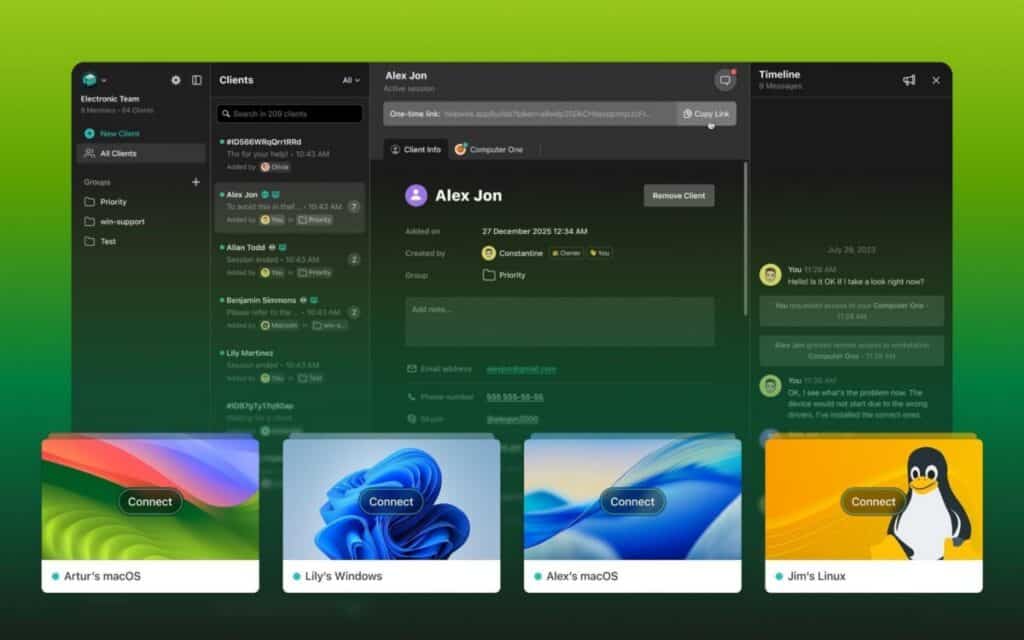
HelpWire is built around that constraint. A support session can start from a link the blocked person opens, without creating an account or entering credentials, so the person in trouble does not have to configure anything to get help. That difference changes behaviour over time as well as speed in the moment: when asking for help costs nothing, people tend to report a problem the minute it happens rather than fighting with it alone for twenty minutes first and losing time you never see logged anywhere.
2. It Works No Matter Which OS the Team is On
A mixed team is the normal case, not the exception, so a remote support tool that only works on one platform ends up unusable for part of the team exactly when it is needed most. HelpWire works across Windows, macOS, and Linux, which matters on a team that does not standardise on one system, since one incompatible operating system can stall an entire support request.
This matters more than it sounds on paper. Contractors bring their own hardware, designers tend to run macOS while engineers run Linux, and a project that spans a few vendors rarely has a single approved machine image to fall back on. Without cross-platform coverage, a project manager ends up keeping a mental map of which support tool works for which person, and reaching for the wrong one during an actual outage costs exactly the minutes the tool was supposed to save.
3. It Keeps Access Permissioned Instead of Standing Open
Managing remote access is not only about speed; it is also about not creating a standing door into a teammate’s machine. A session with someone present begins only after they approve it, so getting help is a choice the person makes, not something done to them. For a project manager, this is the difference between a support tool and a liability.
Software that grants persistent background access, or that quietly stays installed after the one session it was needed for, tends to surface later as a question from security or a client during an audit, at which point nobody can quite remember why it is still running on half the team’s machines. A tool that only opens a session on explicit approval, and closes it when the session ends, does not accumulate that kind of exposure, which matters on client work where access hygiene is itself part of what you are being evaluated on.
4. It Shrinks the Wait Before Someone is Actually Hands-On
The gap between “I’m blocked” and “someone is actually looking at my machine” is measurable, and on a distributed team it tends to run longer than anyone tracks. Reducing it is less about buying more tooling and more about shortening one specific interval: the time between a problem being reported and someone competent taking control of the affected machine. Reaching the machine directly, rather than diagnosing it through a written description across time zones, is what actually closes that gap.
It is worth putting a number on this for your own team. If a blocked contributor typically waits two or three hours before anyone can get hands-on, that is not a one-off; it is a recurring tax on every sprint, and it tends to fall hardest on exactly the people whose work others depend on, which is where it starts eating the critical path. A tool that gets a helper looking at the actual screen in minutes rather than hours turns that recurring tax into a rounding error.
5. It Sits Beside Your Delivery Process Instead of Inside It
It is a remote support and access tool, not a project-management system, so managing it does not mean folding another platform into your existing workflow. It sits beside your delivery process and shortens one interval within it, which is a smaller lift than most tooling decisions a project manager has to make.
That matters for adoption as much as for architecture. A tool that needs its own onboarding, its own admin console, and a line item in next quarter’s software review is a tool most teams quietly stop using after the first month. Something a teammate can open from a link, use once, and forget about until the next time does not compete for attention with the tools people are already using to plan and track the work, which is usually why it is still in use six months after everyone forgot it was new.
Putting It Into Practice
None of this requires a procurement cycle. Start by picking one recurring source of blocked time, a remote contractor whose environment breaks often, or a junior hire who is not yet confident troubleshooting alone, and give that person a fast, low-friction way to get eyes on their screen the next time something goes wrong. Track how long it actually takes before help arrives, both before and after, and you will have a real number instead of a guess about whether the change was worth making.
Managing the Interval That Never Makes the Schedule
You will not put “time-to-hands-on” on a Gantt chart, but it behaves like any other schedule input: measurable, reducible, and more expensive the longer you ignore it. On a co-located team, it stays small on its own. On a distributed one, it does not, and the fix is cheaper than the recurring slippage it prevents.
Managing it deliberately, with a tool built for exactly this handoff, is what keeps a small technical problem from quietly turning into a lost day. The next time a sprint loses time to something technical, it is worth asking how long the person actually waited before anyone could look at their machine. That number, not the repair itself, is usually the part you can change.
Suggested articles:
- 12 Tools for Effective Remote Team Management
- Difference Between CRM Software & Help Desk Software
- How Project Managers Can Support Creative Teams’ Movements to Digital

Daniel Raymond, a project manager with over 20 years of experience, is the former CEO of a successful software company called Websystems. With a strong background in managing complex projects, he applied his expertise to develop AceProject.com and Bridge24.com, innovative project management tools designed to streamline processes and improve productivity. Throughout his career, Daniel has consistently demonstrated a commitment to excellence and a passion for empowering teams to achieve their goals.