
Welcome to the first chapter of our new blog series: Project Schedule Quality 101
Evaluating project schedule quality is a challenge that becomes more complex as the number of vendors, project managers, and deliverables increases. When integrating schedules from multiple sources, it is easy for inconsistencies to slip through. Understanding how to assess and improve schedule quality provides a practical foundation for keeping projects on track and ensuring that every contributor’s work aligns with the broader project plan.
Many project managers rely on experience to evaluate schedules, looking for assigned resources, logical task sequences, accurate dates, and clearly defined milestones. Some organizations use formal checklists to define quality standards. Common red flags include summary tasks with predecessors or resource assignments, milestones with durations greater than zero, tasks missing resource assignments, and unrealistic resource allocation across the plan.
How Do You Know if Your or Vendor’s Schedules are Good?
Assessing project schedule quality can be challenging, particularly when reviewing a schedule received from another project manager, vendor, or team member. Many project managers rely on experience, looking for key characteristics such as assigned resources, clearly defined milestones, accurate dates, and a logical sequence of tasks. Some organizations formalize this process through a standard quality checklist. Dedicated project management software tools can further support this effort by automatically updating forecasts and flagging inconsistencies.
The following indicators are commonly used to identify poor schedule quality:
- Summary tasks with an assigned predecessor
- Summary tasks with resources assigned
- Milestone tasks with a duration greater than zero
- Tasks missing resource assignments
- Tasks missing a project baseline
- Unrealistic or unbalanced resource allocation
These characteristics serve as a practical starting point for evaluating both vendor-supplied schedules and your own project plans.
The DCMA 14-Point Assessment Framework
The Defense Contract Management Agency (DCMA) offers a structured 14-point assessment that provides a consistent method for evaluating project schedule quality. The DCMA is a Department of Defense organization that works with suppliers to manage U.S. Federal Government projects. Its framework applies only to valid tasks, excluding summary tasks, subprojects, zero-duration tasks, and formal milestones from the analysis.
These 14 checks are divided into two categories: schedule development quality checks and schedule management quality checks. Together, they cover everything from logic integrity and relationship types to earned value metrics and baseline execution. Applying this framework consistently helps project managers identify weaknesses before they become schedule failures.
Schedule Development Quality Checks
Project Schedule Quality Check #1: Missing Logic
The missing logic check determines whether any tasks lack a successor, a predecessor, or both. In a well-structured schedule, every activity should have at least one predecessor and one successor, except for the first and last tasks in the sequence.
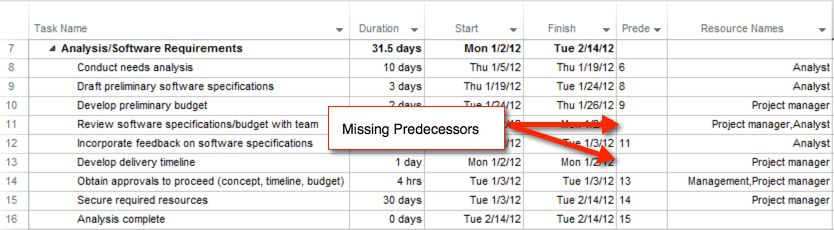
In practice, some tasks may have a fixed start date without a formal predecessor, typically when an external vendor is responsible for delivering a product or service. Regardless, orphaned tasks should be avoided, as they undermine the reliability of critical path analysis. A quality schedule should have no more than 5 percent of its tasks missing predecessor or successor logic.
Project Schedule Quality Check #2: The Lags Check
A lag is an intentional delay between two tasks in the project schedule. Minimizing the use of lags improves the accuracy of critical path calculations. A quality schedule should have fewer than 5% of its tasks with lags.

Where possible, project managers should replace lags with discrete tasks representing the delay period. This approach provides greater transparency and allows the delay to be reduced or eliminated during project execution if circumstances allow.
Project Schedule Quality Check #3: The Leads Check
The Leads check identifies negative lags, commonly referred to as leads, within the project schedule. A lead allows a successor task to begin before its predecessor has fully completed, effectively pulling it earlier in the timeline. This practice is generally discouraged, as the majority of schedule relationships should follow a Finish-to-Start sequence. If a task genuinely needs to start earlier, the appropriate correction is to reduce the duration of the preceding task rather than introducing a negative lag.

You want to calculate the critical path quickly, but adding leads can negatively affect the project’s critical path. I have not used leads in practice; instead, I’ve used lags to fine-tune the schedule when necessary.
Project Schedule Quality Check #4: Relationship Type Check
90 percent of all tasks in the project schedule should use Finish-to-Start (FS) relationships. Microsoft Planner supports multiple relationship types, including Finish-to-Start, Start-to-Start, Finish-to-Finish, and Start-to-Finish.
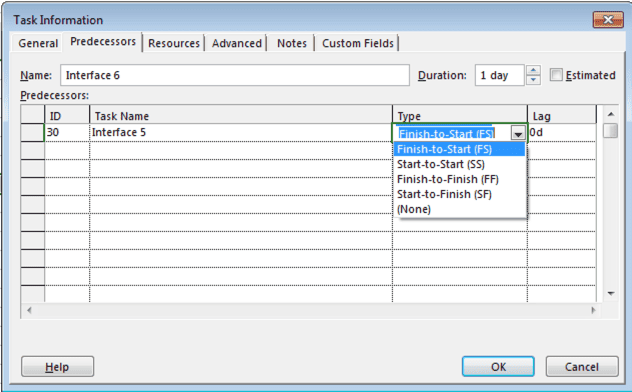
The default relationship type is finish-to-start. Using finish-to-start relationships creates a clear, logical flow in the schedule. While start-to-start relationships may be appropriate in specific cases, I generally prefer to keep the schedule structured around finish-to-start logic.
Project Schedule Quality Check #5: The Hard Constraints Check
Project managers should build dynamic schedules. If the duration on the critical path changes, the project finish date should adjust by the same amount. However, I’ve often seen schedules built using a “pick a date” approach, where key tasks are locked to specific dates. This typically creates hard constraints, such as “must finish on” or “must start on” dates, which prevent schedule changes from flowing naturally through the logic network.
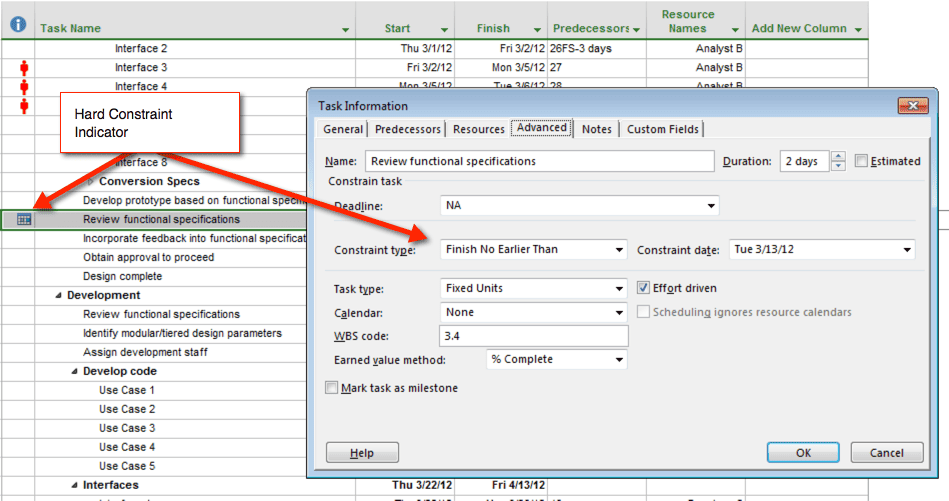
In Microsoft Planner, a hard constraint is any task with a Must Finish On, Must Start On, Start No Later Than, or Finish No Later Than constraint. You ideally want your schedule to be dynamic so date changes flow easily when the project is updated. In a constraint-based schedule, you’ll receive that annoying warning message if the date exceeds the constraint.
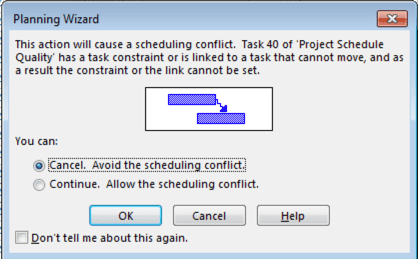
In actual practice, I do sometimes use hard-constrained tasks—typically when an external vendor deliverable is due on a specific date. In those cases, a practical workaround is to use a “deadline” as an alert mechanism rather than a hard constraint. When the vendor deliverable is received, I update the task by setting the actual start date and rescheduling everything from that point forward. Ideally, a quality schedule limits complex constraints to no more than 5% of activities.
Project Schedule Quality Check #6: The High Float Check
Schedule float represents the slack in a project schedule, the total time a task can be delayed without impacting the project’s finish date. The high-float check identifies tasks with a total float greater than 44 working days. If a task exceeds this threshold, it may indicate a missing predecessor or successor in the schedule logic.
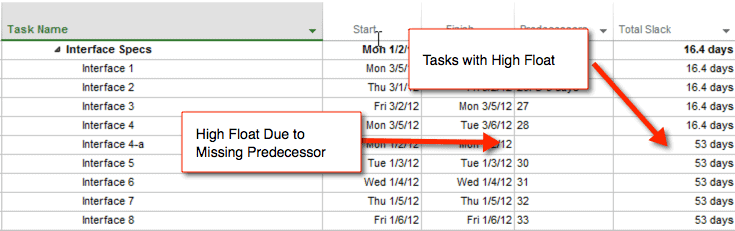
If high-float tasks make up more than 5% of the schedule, review the network for any missing predecessor or successor logic.
Project Schedule Quality Check #7: The Negative Float Check
The Negative Float Check identifies tasks with a total float of less than zero. This is a strong indicator that the schedule has activities that are at—or beyond—their critical timing, potentially impacting downstream work and the overall project completion date. In a quality schedule, there should be zero tasks with negative float, or you should investigate and correct the underlying logic and dependencies.
Project Schedule Quality Check #8: The High Duration Check
A best practice in project schedule management is to break work into tasks no longer than two weeks. I’ve seen project schedules containing activities lasting several weeks or months, which typically indicates the schedule needs to be decomposed into greater detail. The high-duration check flags tasks with baseline durations greater than 44 days.
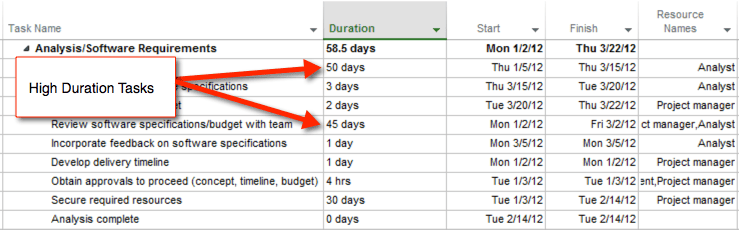
Ideally, a project schedule should have no high-duration tasks. However, allowing up to 5% of tasks to exceed 44 working days is a reasonable schedule-quality guideline, provided the exceptions are understood and reviewed.
Project Schedule Quality Check #9: The Invalid Dates Check
The invalid date check identifies forecast start/finish dates and actual start/finish dates that fall outside the allowable range relative to the project status date.
Invalid Forecast Date
The invalid forecast date assumes that an unfinished task cannot start or finish before the project status date. In a quality schedule, each incomplete task should have forecasted start and finish dates that are on or after the project status date. If these dates need to be updated, you’ll likely find many other incomplete tasks with forecast dates that are no longer valid.
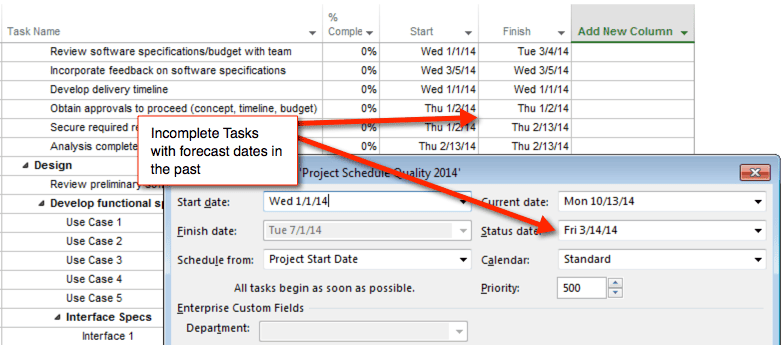
In Microsoft Planner, you must reschedule incomplete work to adjust the forecasted start and finish dates. If you’re using Microsoft Planner, be sure to reschedule the unfinished tasks so the forecast aligns with the current project status date.
Invalid Actual Date
The invalid actual date check identifies tasks with an actual start date or an actual finish date that occurs after the project status date. In a quality project schedule, there should be no “future” actual dates—every actual start and finish must be less than or equal to the project status date. A quality schedule should have zero tasks that fall into this category, because accurate actual dates are essential for reliable schedule management and performance reporting.
Project Schedule Quality Check #10: The Resources Check
The resources check identifies tasks in the project schedule that do not have resources assigned. As the schedule grows, it becomes easy to overlook resource assignment. Assigning resources to individual tasks is essential for accountability and effective scheduling. Without a resource, it is impossible to resource-level the work.
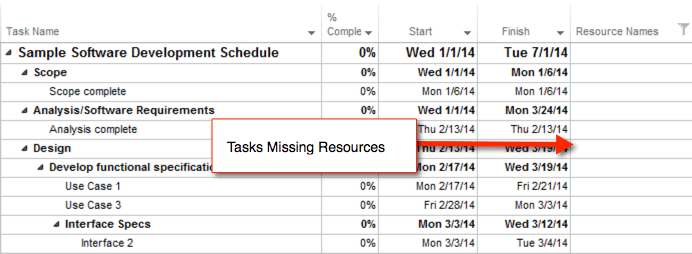
A high-quality schedule assigns resources to every task in the plan. If you manage cost resources separately (e.g., in a spreadsheet), then it may be acceptable to exclude them from the scheduling tool. However, every valid task should have an assigned resource for the standard labor-related roles.
Schedule Management Quality Checks
Project Schedule Quality Check #11: The Missed Tasks Check
This schedule quality check is often referred to as the “late finishes” check. It identifies tasks that were scheduled to be completed by the project status date but were actually finished after the baseline finish date. These completed tasks are known as late finishes. While late tasks are common on real projects, the key is to ensure the forecasted schedule re-aligns with the baseline schedule as closely as possible.
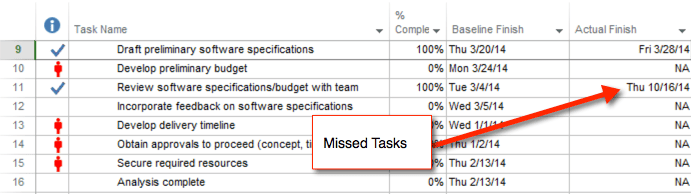
The Missed Task check evaluates how well the project schedule is tracking against the baseline. The number of missed tasks should not exceed 5% of all tasks in the schedule. If this threshold is exceeded, you should assess schedule reliability and review the critical path to identify and address underlying planning or logic issues.
Project Schedule Quality Check #12: The Critical Path Check
The Critical Path Test Check assesses the integrity of the project schedule network. In this check, you identify a task on the critical path and increase its duration to a very large value—typically 600 days. Because the selected task is on the critical path, you should expect the overall project finish date to shift by approximately the same amount (i.e., an additional 600 days).
The schedule passes the critical path test if the project’s finish date reflects the added duration. In real schedules, multiple critical paths can exist, so it’s important to verify the critical path integrity by testing the tasks that form each critical path.
Project Schedule Quality Check #13: The Critical Path Index
You can tell schedule professionals like math, and with earned value metrics and variance calculations, it’s no surprise they use the Critical Path Length Index. This index helps determine whether the project’s forecasted finish date is realistic compared to the baseline. The Critical Path Length Index is calculated as (Critical Path Length + Total Float) / Critical Path Length.
When evaluated against the forecasted finish, a result greater than 1.0 suggests the project finish date is realistic. As part of the assessment, review the critical path in the schedule and confirm that the forecast aligns with the baseline date within an acceptable tolerance.
Project Schedule Quality Check #14: The Baseline Execution Index
If you’re familiar with earned value, the Baseline Execution Index (BEI) will feel intuitive. The BEI is similar to the Schedule Performance Index, but it compares execution against the baseline by measuring how many tasks have been completed versus how many were planned to be completed by the project status date. It is calculated as the number of completed tasks divided by the BEI baseline count, and it should be greater than 1.0.
Conclusion
The DCMA 14-point framework offers a comprehensive and structured approach to evaluating project schedule quality. By applying these checks consistently, project managers can identify logic gaps, constraint issues, resource omissions, and execution problems before they escalate. The framework brings discipline to what is often an inconsistent process, replacing intuition-based assessments with measurable, repeatable quality standards that work across teams and vendor schedules alike.
Improving schedule quality is not a one-time exercise. It requires regular review, timely updates, and a commitment to maintaining schedule integrity throughout the project lifecycle. Whether managing a single project or integrating deliverables from multiple vendors, these 14 checks provide the foundation for a schedule that is reliable, traceable, and fit for purpose. Start applying these checks today to build stronger, more defensible project plans.
FAQs
What is the DCMA 14-point assessment used for?
The DCMA 14-point assessment is a formal framework used to evaluate the quality of project schedules. It was developed by the Defense Contract Management Agency to help assess supplier and contractor schedules on U.S. Federal Government projects. The framework applies 14 specific checks covering logic, constraints, durations, resource assignments, and performance metrics to identify weaknesses in how a schedule has been built and maintained.
How many tasks can have missing logic before a schedule fails the quality check?
A schedule is considered to pass the missing logic check if fewer than 5 percent of its valid tasks are missing a predecessor or successor. Tasks at the very beginning or end of the schedule are naturally exempt from this rule. When the percentage exceeds 5 percent, it suggests that the schedule has orphaned tasks that are not properly connected, which makes it unreliable for critical path analysis and progress tracking.
What is the difference between a lag and a lead in project scheduling?
A lag is an intentional delay added between two tasks, such as waiting for materials to arrive before starting installation. A lead is the opposite, pulling a successor task earlier than its logical start would allow, and is represented as a negative lag. Lags are acceptable in limited use but should be replaced with discrete tasks when possible. Leads are generally discouraged because they distort critical path calculations and reduce schedule transparency.
Why should hard constraints be minimized in a project schedule?
Hard constraints prevent the schedule from behaving dynamically when task durations change. When a task is locked to a specific date, updates to upstream activities do not automatically flow through to the rest of the schedule, creating a false picture of the project timeline. Using deadline indicators instead of hard constraints allows the schedule to remain flexible while still flagging at-risk dates, which is a more effective and accurate approach to managing delivery commitments.
What does a Baseline Execution Index value above 1.0 indicate?
A Baseline Execution Index above 1.0 indicates that the project has completed more tasks than were planned by the current status date, meaning execution is ahead of the baseline schedule. The index is calculated by dividing the number of completed tasks by the number of tasks that were planned to be completed at the time of the assessment. It functions similarly to the earned value Schedule Performance Index, offering a straightforward measure of whether the team is keeping pace with the plan.
Suggested articles:
- Project Schedule Compression Techniques for PMs
- Project Planning Vs Project Scheduling: Key Difference, Benefits And Stages
- What Is A Forward Pass In Critical Path Method: Project Scheduling

Andrew Makar, DMIT, PMP, CSM is an IT director with delivery experience across projects, programs and portfolios in Digital Marketing, Automotive, Software and Financial Management industries. He is an enthusiastic leader who effectively translates project management theory into practical application. His area of interest and practice is in implementing Agile processes and SCRUM techniques to deliver better software to his customers. Find out more about Andrew on andymakar.com and please reach out and connect with Andrew on LinkedIn.