
A Design Sprint is a structured, time-boxed activity that brings design team members together to solve critical business challenges, explore new ideas, and validate solutions — fast. Originally developed by Google Ventures, the Design Sprint framework has become one of the most widely adopted problem-solving methodologies in product development. It works equally well for remote and on-site teams, making it a versatile tool in any organization’s toolkit.
Typically, a Design Sprint runs between two and five days, covering everything from initial research to prototype testing. Whether your team is working within a compressed schedule or tackling a more complex challenge, the framework is designed to flex, and the sections below will walk you through exactly how to make it work for you.
A Flexible Framework for Every Team
One of the greatest strengths of the Design Sprint framework is its adaptability. Not every team has the luxury of blocking out a full five-day week, and not every problem demands it. Teams that are unable to gather all members for a complete sprint — or those operating under tight deadlines — can condense the process into as little as 48 hours. This compressed format works particularly well for experienced teams that have already established strong communication rhythms and a shared working style.
On the other hand, more complex or less urgent challenges may benefit from the full five-day process, which allows deeper exploration and iteration at each stage. Ultimately, the most important principle is that you have the space to experiment, adapt the approach to your team’s needs, or even develop a custom process that fits your context. The sprint is a tool, not a rulebook.
When to Use a Design Sprint
A Design Sprint is most valuable when at least one of the following conditions applies:
- You Need a Quick Solution: Your team is under pressure to test and validate an idea rapidly, without committing to a full development cycle.
- You’re Facing a Complex or Large-Scale Challenge: The problem is too multifaceted to be solved in a standard meeting or brainstorming session.
- Your Team is Stuck: Progress has stalled, alignment is difficult to reach, or the team needs a structured reset to move forward with clarity.
Meet Your Design Sprint Team
Design Sprints work best with a focused team of five to eight people. Smaller groups tend to move faster, communicate more directly, and make decisions more efficiently. Rather than prioritizing team size, focus on selecting members who are genuinely committed to the process. Every participant should be prepared to dedicate their full attention to sprint activities over the course of two to five days — this requires meaningful mobilization, engagement, and willingness to collaborate across disciplines.
Sprint Master
The Sprint Master serves as both the team leader and process designer. They are responsible for inviting participants, setting the agenda, facilitating each day’s activities, and keeping the team on track. A great Sprint Master knows how to create space for creative thinking while also driving the group toward clear decisions.
Sprint Designers
The design output from a sprint doesn’t need to look like a finished, production-ready product — but it does need to be polished and convincing enough to communicate the idea’s potential. Sprint Designers create the visual artifacts that bring concepts to life and make it possible for stakeholders and users to understand and respond to what the team is proposing.
Sprint Engineers
When a sprint requires a functional prototype — rather than just a visual mock-up — an engineer becomes essential. The Sprint Engineer builds the prototype that will be put in front of real users during the validation phase, turning design concepts into testable experiences.
Product Managers
Product Managers play a critical role in grounding the sprint in real user needs and market realities. Because they understand both the customer and the broader business context, they are uniquely positioned to help the team evaluate ideas against actual requirements. A strong Product Manager can bridge the gap between abstract concepts and actionable product decisions.
Experts
An Expert might be a subject matter specialist from within the company, an external consultant, or even a visionary thinker from an adjacent field. Their role is to introduce new information, challenge assumptions, and help push the group outside of conventional thinking. An effective expert asks the questions that the team hasn’t thought to ask itself.
Design Sprint Template — Google Docs
Google Docs-based Design Sprint templates offer a simple, collaborative starting point for teams already working in the Google Workspace ecosystem. Because they live in the cloud, they’re immediately accessible to remote team members and allow for real-time co-editing during sprint preparation.
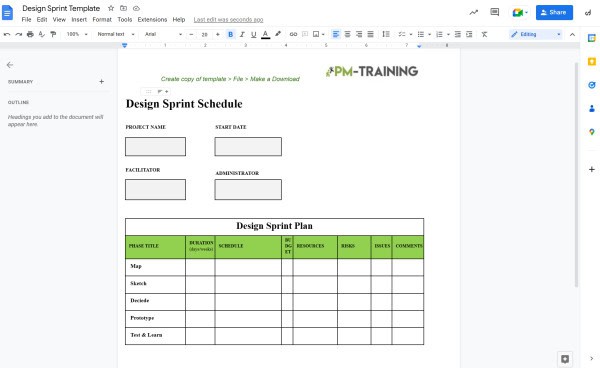
Use our Design Sprint Plan Template
Preparing for the Design Sprint
The Sprint Master sets the workflow before the sprint begins. Thorough preparation is the foundation of a productive sprint — teams that skip this phase often find themselves losing time to logistics during the sprint itself.
- Step 1 – Create the Brief: Build a sprint template that includes a design brief outlining the core challenge. Clearly articulate the constraints, key assumptions, and any timeline requirements for launch. The brief should give every participant a shared understanding of what success looks like.
- Step 2 – Assemble the Team and Schedule Touchpoints: Invite team members and share the sprint board with them in advance. Schedule any interviews, lightning talks, or expert sessions with users, partners, or subject matter specialists who will inform the sprint’s direction.
- Step 3 – Conduct a Design Audit: Before the sprint begins, the Sprint Master collects and reviews existing data about the product or problem space. This audit validates the sprint goals and helps the team establish a clear direction before day one. Walking into a sprint with context already in place saves significant time.
- Step 4 – Prepare the Space and Materials: Book the room (or set up the virtual workspace) and organize the sprint playbook. For in-person sprints, this includes ensuring you have whiteboards, sticky notes, markers, and any other physical materials the team will need.
Design Sprint Template — Word
For teams that prefer working in Microsoft Word, these templates provide a structured, downloadable format that can be easily customized to fit your sprint’s specific goals and timeline.
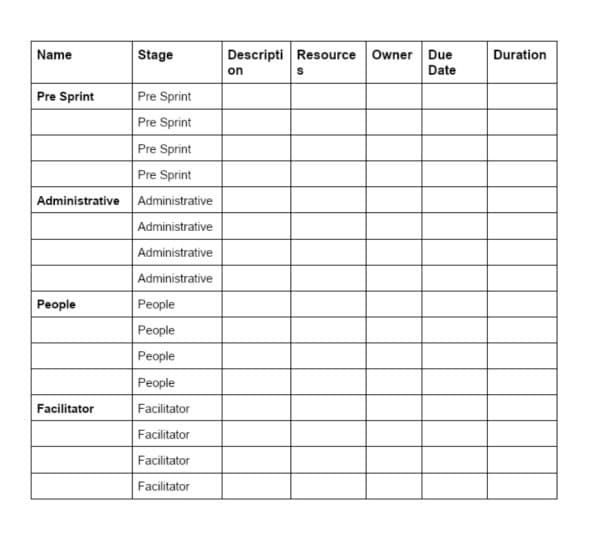
Design Sprint Template — Word (Option 1)
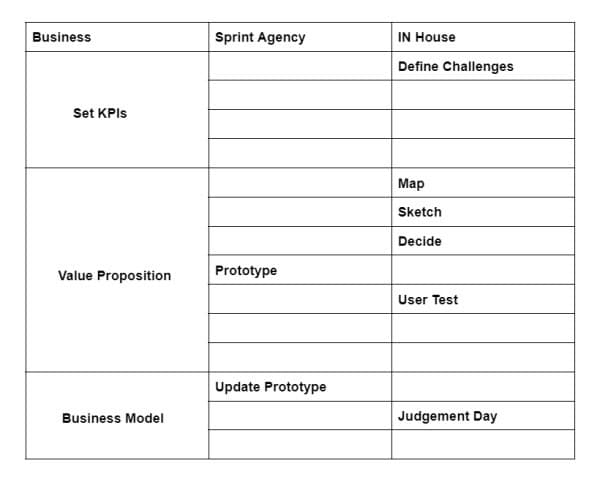
Design Sprint Template — Word (Option 2)
Design Sprint Template — Excel
Excel-based templates are ideal for teams that want to track sprint activities, manage schedules, or log outputs in a structured, data-friendly format. These are particularly useful for Sprint Masters who want to track progress across multiple workstreams.
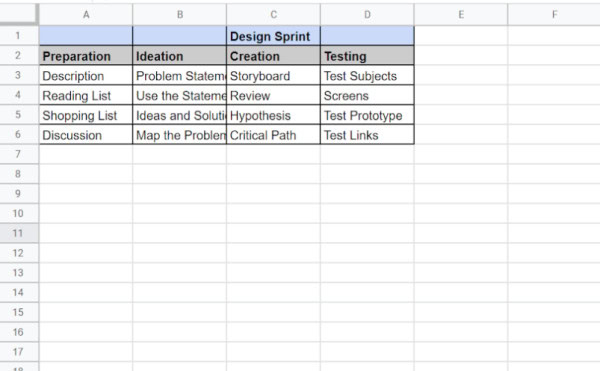
Design Sprint Template — Excel (Option 1)
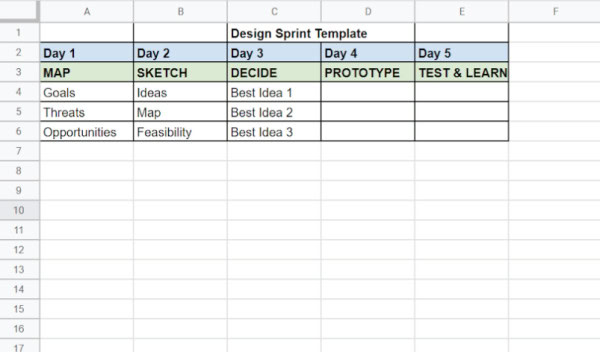
Design Sprint Template — Excel (Option 2)
The Six Stages of a Design Sprint
Each stage of a Design Sprint builds on the last, guiding the team from a place of uncertainty to a testable, validated solution. Understanding what each stage demands — and what success looks like within it — is key to getting the most out of the process.
1. Understand
In the Understand phase, the team uses structured data collection methods to develop a thorough, inside-out view of the challenge. This might include reviewing existing research, mapping customer journeys, or listening to expert lightning talks. The goal is to ensure that every team member has a shared, well-rounded understanding of the problem before any ideas are generated.
2. Define
With data gathered, the team moves into Define — a phase focused on organizing insights and charting a course forward. Sticky notes, user quotes, and research findings get mapped out visually, revealing patterns and helping the group identify where the biggest opportunities lie. By the end of this phase, the team should have a clear, agreed-upon problem statement and a sense of the sprint’s strategic direction.
3. Diverge
In the Diverge phase, ideation begins in earnest. Team members put pen to paper — individually, before sharing — and sketch out as many ideas as possible. This divergent thinking phase is intentionally unconstrained; quantity is prioritized over quality, and no idea is too unusual to capture. It’s an opportunity for the team to explore the full range of possible approaches before converging on a direction.
4. Decide
The Decide phase brings the team together to evaluate ideas critically. Using a shared whiteboard or digital canvas, the group reviews their sketches and concepts, adds annotations, and votes on their favorites. This structured decision-making process ensures that the team moves forward with the ideas that have the strongest potential — not simply the ones that were presented most confidently.
5. Prototype
The Prototype phase is where designers and engineers take the lead. The team’s goal is not to build a finished product, but rather to create a realistic-enough mock-up that can be placed in front of real users. A well-crafted prototype communicates the core experience and allows for meaningful feedback without the cost and time of full development.
The quality and speed of this stage often depend on the software your team uses to create interactive prototypes. If you’re evaluating your options, exploring a list of best rapid prototyping tools can help you compare AI-powered platforms, collaboration features, and workflow integrations that accelerate design sprints while making user testing more efficient.
6. Validate
In the final stage, the prototype is tested with real users. The Sprint Master and team observe how users interact with the prototype, gather qualitative and quantitative feedback, and assess whether the proposed solution genuinely meets user needs. The insights gathered here determine whether the team’s direction is validated — or whether iteration is needed. Validation is not the end of the process; it’s the beginning of the next iteration.
Design Sprint Template — PowerPoint
For teams that prefer to present and facilitate sprints using slides, PowerPoint templates offer a visually organized, shareable format that works well in both workshop and remote settings.
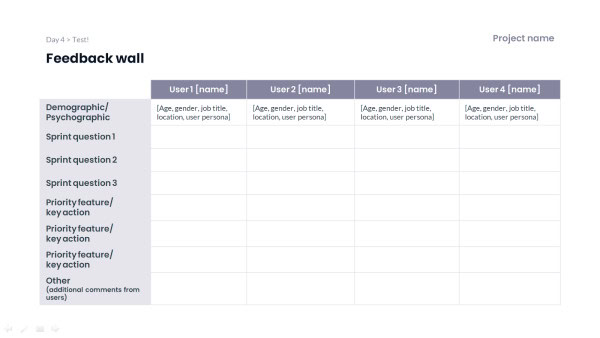
Design Sprint Template — PowerPoint
Top Design Sprint Online Tools
A growing ecosystem of digital tools makes it easier than ever to run Design Sprints remotely or in a hybrid environment. Here are three of the most widely used platforms:
Trello — Design Sprint Board
Trello’s kanban-style boards offer a flexible, visual way to manage sprint activities across multiple days. The Design Sprint board template helps teams organize ideas, track progress, and move tasks through each stage of the sprint with minimal overhead. It’s particularly effective for smaller teams that value simplicity and transparency.
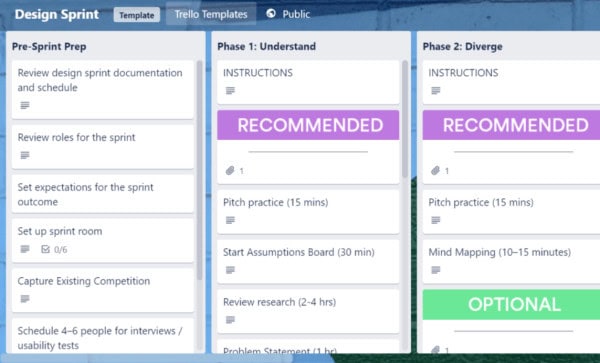
Explore the Trello Design Sprint Template
Miro
Miro is purpose-built for collaborative visual work, making it one of the most popular platforms for running Design Sprints. Its Design Sprint template provides a ready-made digital canvas complete with frameworks for each sprint stage, including mapping exercises, voting tools, and retrospective boards. Whether your team is in the same room or spread across time zones, Miro makes real-time collaboration seamless.
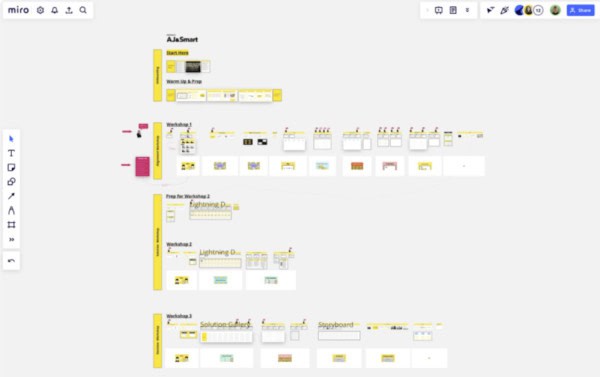
Explore the Miro Design Sprint Template
Confluence — Design Sprint Template
Confluence’s Design Sprint template is a strong choice for teams already embedded in the Atlassian ecosystem. It allows teams to document sprint outcomes alongside project documentation, making it easy to connect sprint findings to roadmap decisions and keep stakeholders informed throughout the process.
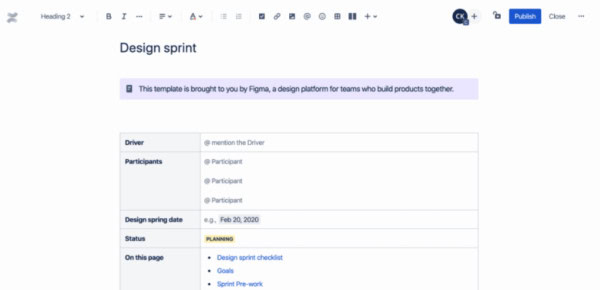
Explore the Confluence Design Sprint Template
Video About Agile vs Design Sprints
Wondering how Agile and Design Sprints compare — and when to use each? Watch this quick breakdown to see how the two methodologies differ, where they overlap, and how teams are combining them to move faster and build better products.
Conclusion
Design Sprints remain one of the most effective tools available to teams looking to solve complex problems quickly and confidently. By bringing the right people together, following a clear structure, and prioritizing real user feedback over internal assumptions, a well-run sprint can compress weeks of back-and-forth into just a few highly productive days.
Whether you choose to run your sprint using a Google Docs template, a collaborative platform like Miro, or a structured PowerPoint presentation, the format you choose matters far less than the commitment your team brings to the process. Use the templates and tools outlined in this guide as your starting point, adapt them to fit your team’s unique needs, and let the sprint do what it was designed to do — turn uncertainty into clarity and ideas into action.
Design Sprint FAQs
When should you use a design sprint?
A Design Sprint is most effective when the problem is challenging, meaningful, and significant enough to warrant collaboration across multiple teams or disciplines. If the challenge is too narrow, a sprint may be overkill. If it’s too broad or complex to solve in five days, the team may need to scope it down before the sprint begins.
Who leads a design sprint?
The Sprint Master — sometimes called the facilitator — leads the Design Sprint from start to finish. Their first priority is to clearly define the problem and ensure that the right team is assembled to address it. Most sprints work best with five to seven participants, a size that’s large enough to bring diverse perspectives but small enough to make decisions efficiently.
Why do design sprints fail?
Design Sprints most commonly fail when they’re applied to problems that aren’t well-suited to the format. The sprint process is intentionally rapid and iterative — it’s designed for testing ideas quickly, not for solving problems that require deep technical investigation or extended development time. Sprints also tend to struggle when the problem statement is too vague, the team lacks decision-making authority, or key stakeholders aren’t engaged in the process.
How do you best prepare for a design sprint?
Great preparation starts well before the sprint begins. Take time to understand the user’s context — their goals, frustrations, and behaviors. Define the core problem as clearly and specifically as possible. Invite team members who can contribute meaningfully to all six sprint stages, and ensure that the Sprint Master has the authority and support needed to keep the group moving. The more thoughtfully a sprint is prepared, the more productive and focused the sprint itself will be.
Suggested articles:
- 5 Sprint Planning Templates Word & XLS
- 9 Free Sprint Review Templates – Word, Google Docs
- 25 Sprint Retrospective Examples for Scrum Masters

Shane Drumm, holding certifications in PMP®, PMI-ACP®, CSM, and LPM, is the author behind numerous articles featured here. Hailing from County Cork, Ireland, his expertise lies in implementing Agile methodologies with geographically dispersed teams for software development projects. In his leisure, he dedicates time to web development and Ironman triathlon training. Find out more about Shane on shanedrumm.com and please reach out and connect with Shane on LinkedIn.