
Sprint planning is the event that starts every sprint. In one meeting, the Scrum Team agrees why the sprint matters, picks the Product Backlog items it can finish, and plans how to get them done. For a project manager working with agile teams, it is also the moment where scope, dates, capacity and stakeholder expectations meet. A good plan here saves days of confusion later.
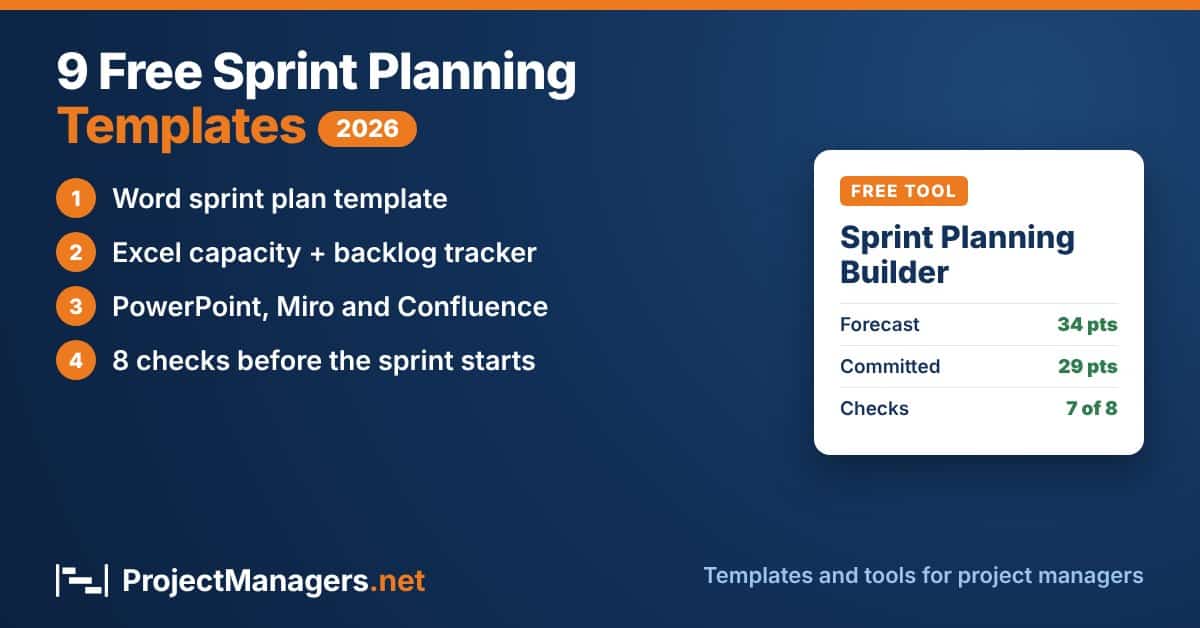
- 9 free templates: our own Word and Excel sprint planning templates plus free options from Smartsheet, Ricksoft, Atlassian Confluence and Miro.
- Plan with capacity, not hope: forecast = average velocity x this sprint’s capacity. A team at 94% capacity should plan about 94% of its usual points.
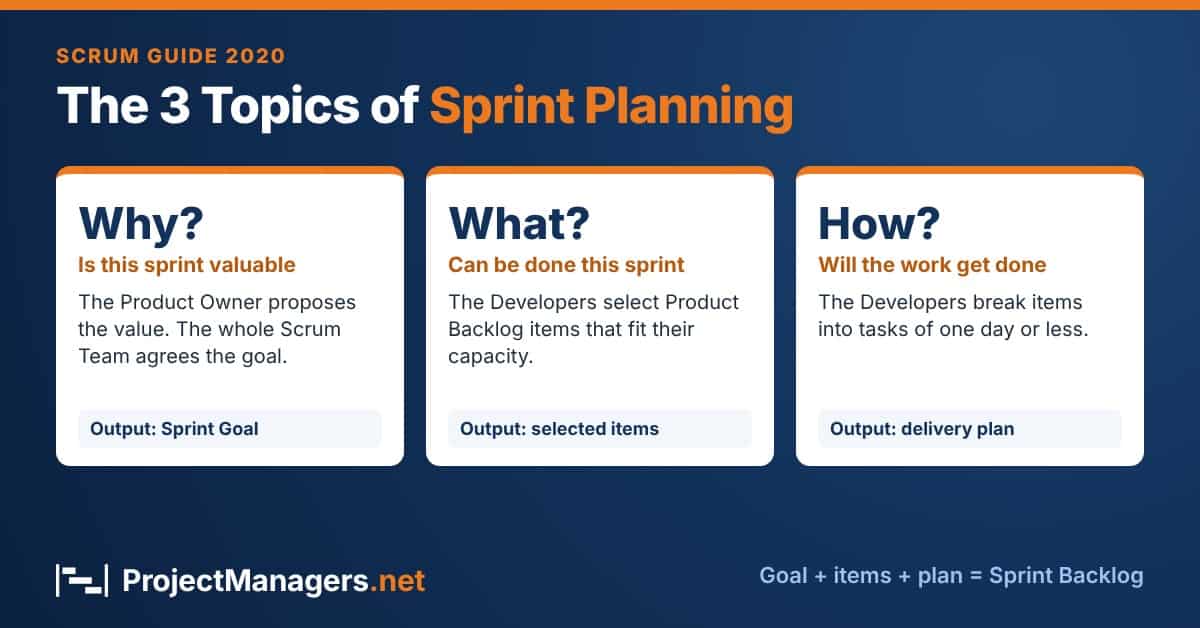
- One goal, three questions: the Scrum Guide frames sprint planning around why, what and how, in a timebox of up to 8 hours for a one-month sprint.
- 8 checks before you start: clear goal, 3 sprints of velocity, commitment within forecast, every item estimated and ready, focus on the goal and no overloaded people.
But without a clear view of the team’s capacity and a simple way to track the selected work, it is hard to know whether the right amount of work is planned at the right time. A sprint planning template fixes that. It gives every sprint the same structure, keeps the team focused on the highest priority work and gives project managers one record they can share with stakeholders. Below you will find 9 free templates, a free online Sprint Planning Builder, a meeting agenda, the roles, the best practices and a short quiz.
What Is a Sprint Planning Template?
A sprint planning template is a ready-made document, spreadsheet or board that walks an agile team through planning one sprint. It holds the sprint goal, the dates, the team’s capacity, the selected backlog items with their estimates and owners, and the risks to watch. Instead of starting from a blank page every two weeks, the team fills in the same sections, so nothing important is forgotten.
The template is not only for the meeting itself. The team uses it from sprint planning to the sprint review and retrospective. Everyone can look at one record to see what is planned, what is in progress and what is done. For a project manager, it is also the easiest way to show stakeholders what the team committed to and why.
According to the Scrum Guide, sprint planning produces three things: a Sprint Goal (why), the Product Backlog items selected for the sprint (what) and a plan for delivering them (how). Together these make the Sprint Backlog. A good template has a section for each.
Real-life example
Microsoft’s Azure DevOps teams email their sprint plan to the whole organization
Microsoft says the group that builds Azure DevOps has 35 feature teams that release to production every three weeks. Each team owns its sprint plan and emails it to the entire organization: what it finished last sprint and what it will focus on next. Microsoft expects teams to deliver about 95% of a sprint plan, compared with about 80% of a six-month plan, which shows why short sprint plans are easier to keep than long ones.
Worth quoting
“Plans are worthless, but planning is everything.”
Dwight Eisenhower, quoted by Microsoft in How Microsoft plans with DevOps
Numbers that matter
Source: Scrum Guide 2020
9 Free Sprint Planning Templates
We checked every template below in November 2026. The count only includes templates you can download or open for free. Smartsheet’s sprint planning board is listed for reference but not counted, because it needs a Smartsheet account.
| Template | Source | Format | Best for | Link |
|---|---|---|---|---|
| 1. Sprint Planning Template (Word) | ProjectManagers.net | Word | A 3-page sprint plan: details, goal, capacity and forecast, backlog, tasks, risks, agenda, Ready and Done, 8-point checklist | Download |
| 2. Sprint Planning Template (Excel) | ProjectManagers.net | Excel | Capacity by person, 100-row sprint backlog with drop-downs, automatic forecast, stretch line and 8 PASS / FIX checks | Download |
| 3. Sprint Planning Template | Smartsheet | Excel, Google Sheets | Teams that want tasks, owners, dates and status with a Gantt chart that updates as they type | View |
| 4. Sprint Planning Document Template | Smartsheet | Word, Google Docs | Small teams that want a simple printable record of sprints, features, dates and notes | View |
| 5. Sprint Planning Slide Template | Smartsheet | PowerPoint, Google Slides | Presenting sprint timelines and per-sprint details to stakeholders | View |
| 6. Product Backlog Template | Ricksoft | Excel | Grooming a product backlog with priority, sprint readiness, estimates and a 5-day sprint view | View |
| 7. Project Backlog Template | Ricksoft | Excel | Backlogs with task types, reporters and sprint totals by type | View |
| 8. Sprint Planning Meeting Template | Atlassian | Confluence (free plan) | Jira teams that want velocity, capacity and risks on one Confluence page | View |
| 9. Sprint Planning Template | Miro | Miro board (free plan) | Remote teams that plan together on a whiteboard with sticky notes | View |
Checked November 12, 2026. Not counted: Smartsheet Sprint Planning Board (needs a Smartsheet account).
Both files come with a worked example (Atlas Web Team, Sprint 24) that you can overwrite. The Word template gives you a ready-to-share sprint plan with an agenda and checklist. The Excel template calculates capacity and the forecast and runs the same 8 checks as our builder.
Need the rest of your project documents? See our 50+ project management templates.
Free Sprint Planning Builder
Prefer to plan online? Our free Sprint Planning Builder works in your browser. It opens with a worked example so you can see how it works, then turns your inputs into a finished sprint plan you can copy, print or download as Word or CSV. Nothing is sent to a server.
- Sprint setup: enter the team, dates, sprint goal and the points completed in your last sprints.
- Team capacity: add each developer’s focus % and days off. The builder calculates the forecast.
- Sprint backlog: list the selected items with points, owner, goal and ready flags. Items past the forecast are marked as stretch.
- Checks and export: fix any of the 8 checks that fail, then export the plan with a timed meeting agenda.
How to Use a Sprint Planning Template
A template only helps if the team fills it in at the right time. Most of the work happens before the meeting, so the meeting itself is about decisions, not data entry. Here is a simple flow that project managers and Scrum Masters can follow every sprint:
- Two or three days before: the Product Owner refines and orders the top of the backlog. Copy last sprint’s template and update the dates.
- One day before: collect days off and holidays, enter the last three velocities and check the forecast.
- Open the meeting (Why): review the last sprint and any carry-over work, then agree one sprint goal.
- Select the work (What): pull ready items in priority order until the running total reaches the forecast.
- Plan the work (How): break the first items into tasks of one day or less and note owners where it helps.
- Close and share: read the goal and the sprint backlog out loud, then share the template with the team and stakeholders.
Some teams also start with a quick check-in on how everyone is feeling. It is not part of the Scrum Guide, but it is a useful way to spot people who are overloaded before they commit to more work.
Sprint Planning Template Word
Our Free Sprint Planning Template (Word)
Our Word template is built for teams that want a clean, shareable sprint plan. Page 1 covers the sprint details, the goal and the capacity forecast. Page 2 holds the sprint backlog with a running total, the task breakdown and the risks. Page 3 has the meeting agenda, a Definition of Ready and Done and the 8-point checklist. Download the Word template.
Smartsheet Sprint Planning Document Template
Source: https://www.smartsheet.com/content/sprint-planning-templates
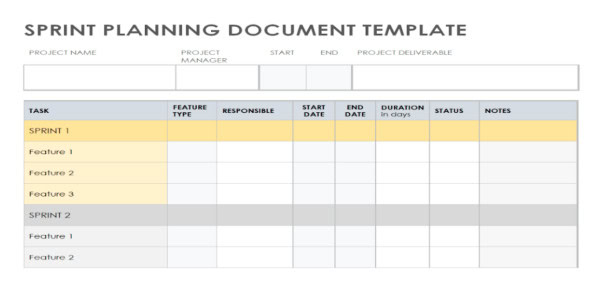
Use this Word template to capture the information about the project’s sprints. Add your project details, including start and end dates, the project manager and the deliverables. Track progress by feature and sprint, with start and end dates, status and duration, plus a notes field for each feature or sprint. It is printable, easy to edit and best for small teams and projects.
Sprint Planning Template Excel
Our Free Sprint Planning Template (Excel)
Our Excel workbook does the math for you. Enter your velocities on Sprint Setup, your developers on Team Capacity and your items on Sprint Backlog. The Summary and Checks sheet shows capacity, forecast, load and 8 PASS / FIX checks, using the same rules as the online builder. Drop-downs keep types, points and owners consistent, and items past the forecast turn orange. Download the Excel template.
Smartsheet Sprint Planning Template (Excel)
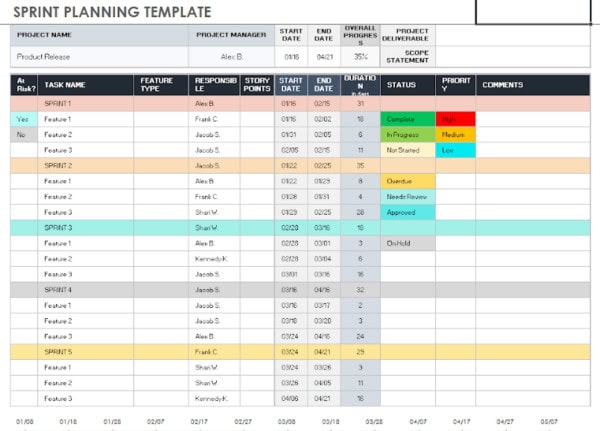
Use this Excel template to plan sprints and see them on a timeline. Add owners, tasks, start and end dates and the status of each feature and task. The template calculates task duration, and its Gantt chart grows as you add data, so you get a quick picture of progress. It is also available for Google Sheets.
Ricksoft Product Backlog and Project Backlog Templates (Excel)
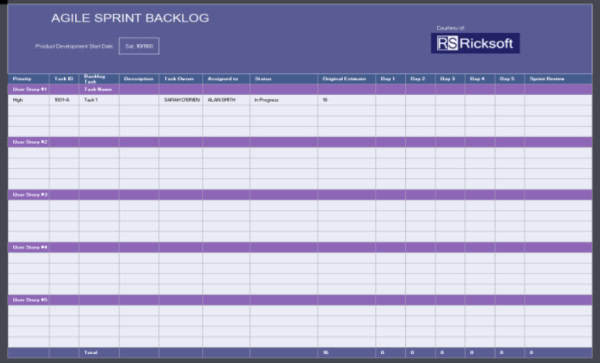
Ricksoft offers two free backlog grooming templates in Excel. The Product Backlog template tracks priority, sprint number, owner, estimates and sprint readiness, with a sprint view that adds up extra hours for each day. The Project Backlog template adds task types and reporters and totals estimates by type across sprints. They are a good fit when the work before sprint planning, not the meeting itself, is your bottleneck.
Sprint Planning Template PowerPoint
Source: https://www.smartsheet.com/content/sprint-planning-templates
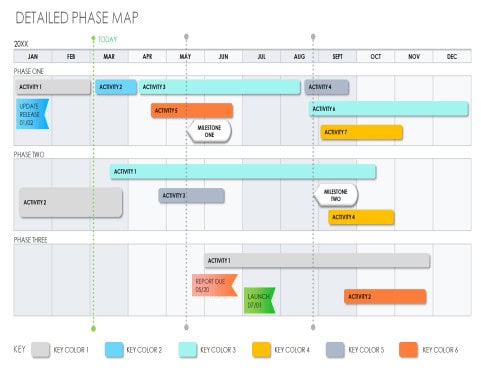
Use this editable PowerPoint template to present your project’s tasks, sprints and timelines. Enter each sprint’s dates and the overall schedule, then add details for each sprint on its own slide. It works well when a project manager needs to brief sponsors or steering committees who will not open Jira. A Google Slides version is also available.
Online Sprint Planning Templates
Atlassian Confluence Sprint Planning Meeting Template
Atlassian’s sprint planning meeting template follows four steps: close the previous meeting, share the sprint goals, present the team’s velocity and plan team capacity. It is a natural choice if your team already works in Jira, because you can attach Jira reports and capacity charts to the page.
Miro Sprint Planning Template
Miro’s sprint planning template gives remote teams a shared board for the goal, the selected items and the task breakdown. Miro’s own product team has also published the board it uses, Sprint Planning #HowIDoItInMiro, which walks from the roadmap down to task refinement.
Smartsheet Sprint Planning Board (not counted)

Smartsheet also offers a sprint planning board with a column per sprint and cards that show owners, story points and status. It is useful for teams that already use Smartsheet, but it needs a Smartsheet account, so we did not include it in the count.
How to Calculate Sprint Capacity and Forecast
Most failed sprints were overloaded on day one. The fix is to plan with two numbers: velocity (what the team actually finished in recent sprints) and capacity (how much time the team has this sprint). Velocity looks back. Capacity looks ahead. You need both.
- Average velocity: take the completed points of the last 3 sprints. One sprint is not a trend.
- Capacity per person: (working days – days off) x focus %. Focus % is the share of the day spent on sprint work after meetings and support; 70% to 85% is common.
- Capacity ratio: this sprint’s capacity divided by the capacity of a normal sprint with nobody away.
- Forecast: average velocity x capacity ratio. Plan up to this number and treat anything above it as stretch work.
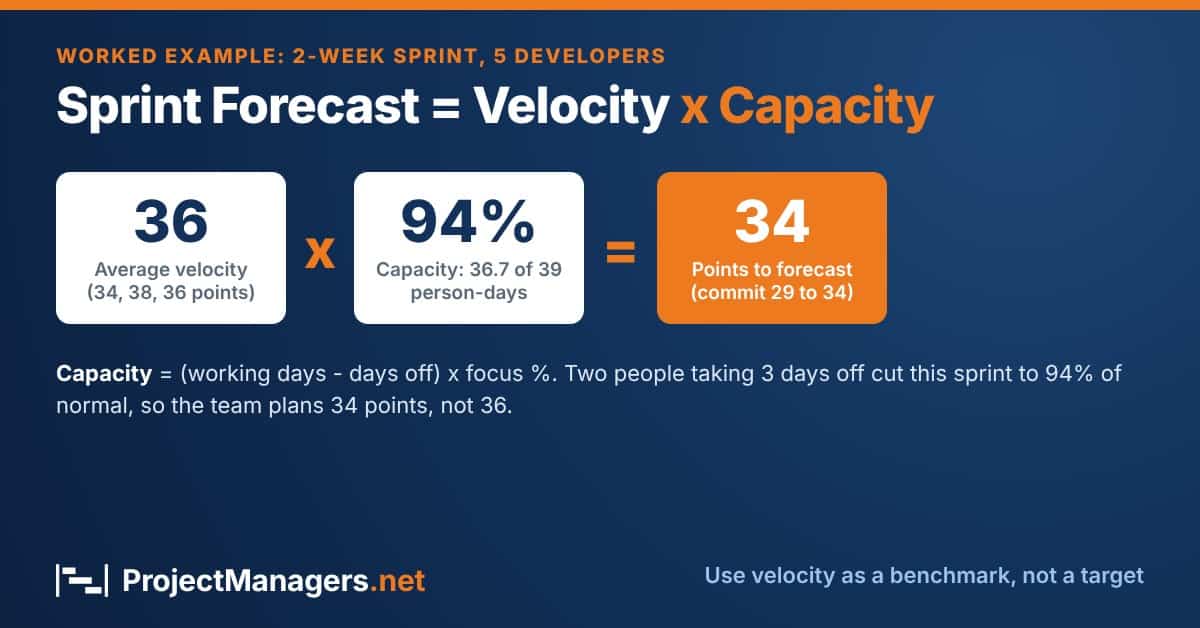
In our example, the team averaged 36 points. Two developers are away for 3 days in total, so the team has 36.7 person-days instead of 39, or 94% of normal. The forecast is 36 x 94% = 34 points, and the team commits to 29, leaving room for surprises. Project managers can use the same numbers to explain to stakeholders why a sprint with holidays delivers less.
Real-life example
Microsoft tried 1-week and 4-week sprints before settling on 3 weeks
In a 2018 keynote, Microsoft cloud developer advocate Abel Wang explained that every Azure DevOps feature team works in the same three-week sprints so that around 50 teams stay in step. Four weeks felt too long and one week did not work, so the teams settled on three. The lesson for project managers: pick one sprint length, keep it consistent across teams and plan capacity against it.
Worth quoting
“We tried four weeks, and that was a really long time.”
Abel Wang, Microsoft, at VSLive! Austin 2018
Numbers that matter
Source: Atlassian sprint planning guide
Sprint Planning Meeting Agenda
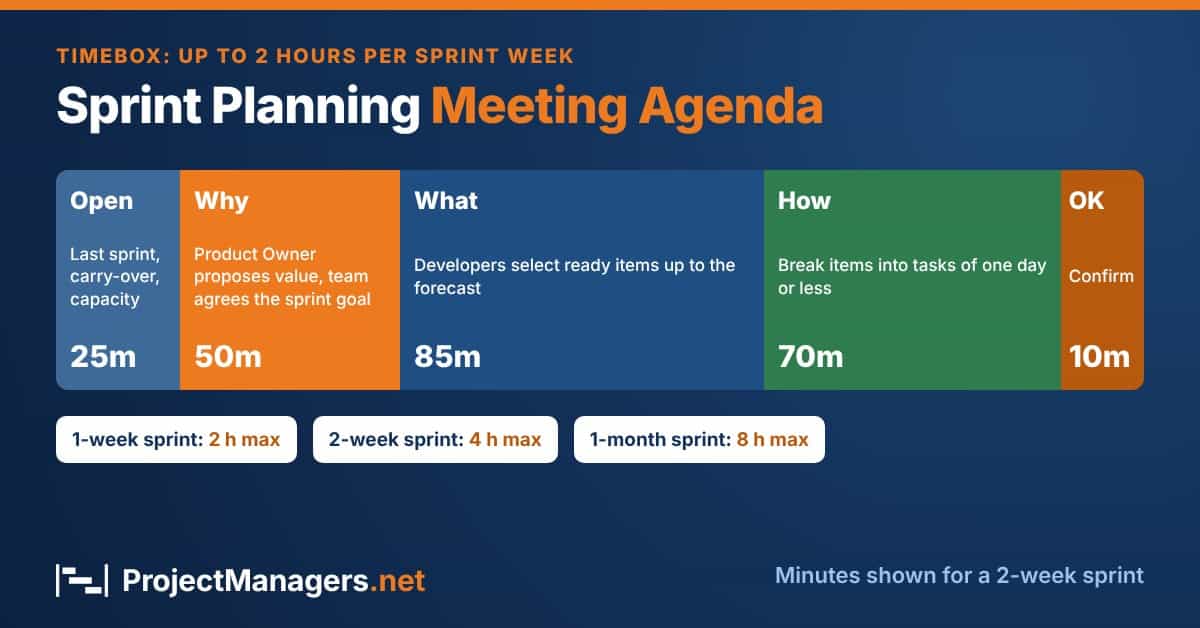
The Scrum Guide caps sprint planning at 8 hours for a one-month sprint and expects shorter sprints to need less. Atlassian’s rule of thumb is no more than 2 hours per week of sprint. A timebox is a maximum, not a target: when the team has a goal and a plan, the meeting ends. Here is an agenda for a 2-week sprint (4 hours at most):
- Open (25 min): review the last sprint, carry-over work and this sprint’s capacity.
- Why (50 min): the Product Owner proposes how the product can gain value; the team agrees one sprint goal.
- What (85 min): the Developers select ready items in priority order up to the forecast.
- How (70 min): break the first items into tasks of one day or less.
- Confirm (10 min): read the goal and the sprint backlog out loud and agree them.
Our Sprint Planning Builder sets these minutes for you based on your sprint length, and the Word template includes the same agenda.
Sprint Planning Key Players
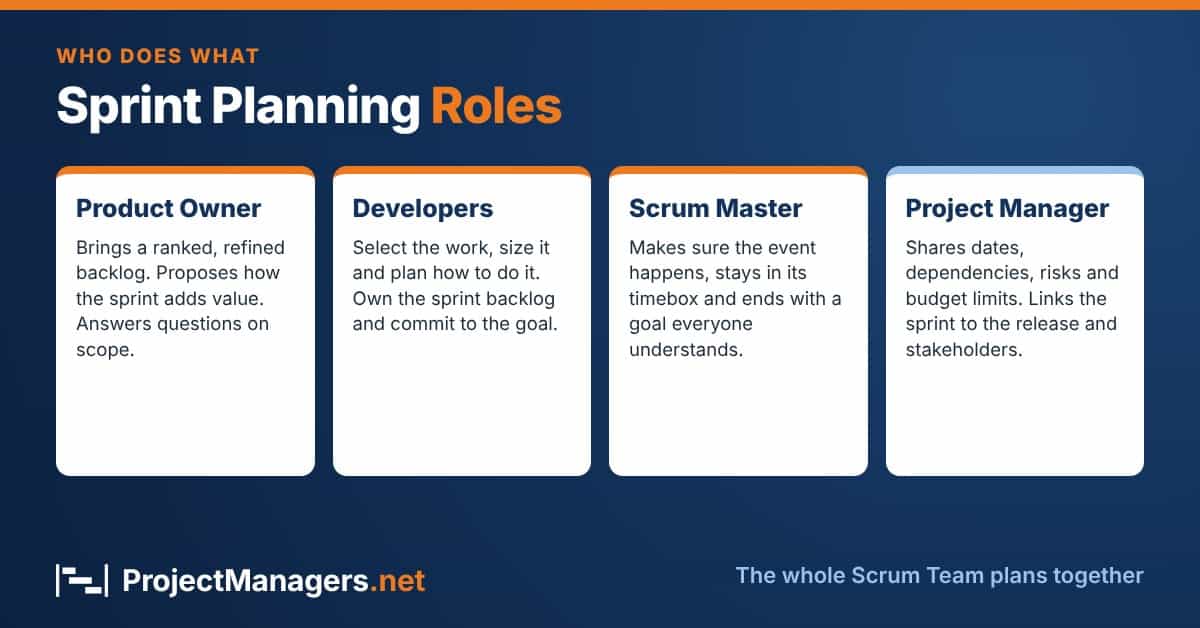
It is important to have the right people in the room. The Scrum Guide says the whole Scrum Team plans together and can invite other people for advice. Here is who does what:
- Product Owner: brings an ordered, refined backlog, proposes how the sprint adds value and answers scope questions. The Product Owner is accountable for maximizing the value of the product, so they make the final call on priorities.
- Developers: select the items, estimate them and plan how to do the work. They own the Sprint Backlog and commit to the sprint goal.
- Scrum Master: makes sure the event happens, stays within its timebox and ends with a goal everyone understands. Many Scrum Masters facilitate the meeting, but any team member can.
- Project manager (if your organization has one): brings release dates, dependencies on other teams, budget limits and risks, and links the sprint plan to the wider project and stakeholders.
If you need to clarify who owns what across the wider project, our roles and responsibilities templates and RACI matrix templates can help.
Sprint Planning vs Other Scrum Events
Sprint planning is often confused with backlog refinement. The table below shows how it differs from the other events a project manager will see in a Scrum team.
| Event | When | Purpose | Timebox | Main output |
|---|---|---|---|---|
| Sprint planning | Start of each sprint | Agree the sprint goal, select items and plan the work | Up to 8 h (1-month sprint) | Sprint Backlog |
| Backlog refinement | Ongoing, often 1 to 3 days before planning | Split, clarify and estimate upcoming items | No fixed timebox | Ready backlog items |
| Daily Scrum | Every working day | Inspect progress toward the goal and adapt the plan | 15 min | Updated plan for the day |
| Sprint review | End of the sprint | Show the increment to stakeholders and adjust the backlog | Up to 4 h | Revised Product Backlog |
| Sprint retrospective | After the review | Improve how the team works | Up to 3 h | Improvement actions |
Timeboxes from the Scrum Guide 2020 for a one-month sprint; shorter sprints usually need less time.
Best Practices for Effective Sprint Planning
A Refined Backlog
One of the first and best practices is product backlog refinement, led by the product owner with the team. It should happen before the meeting, not during it. Refinement saves time and lets the team plan the next sprint properly. The product owner should order the user stories that already have acceptance criteria at the top of the product backlog.
Having a Roadmap and an Agenda
When you have a roadmap and an agenda before the meeting starts, the team has a direction, stays focused and makes better use of its time. Project managers can help by bringing the latest release plan so the team sees how this sprint fits the bigger picture.
Aligning Backlog and Roadmap
Sync the top-priority user stories with the product roadmap. When the two match, the sprint goal is easy to write and the meeting moves faster. When they do not, stop and ask the Product Owner which one is right before the team commits.
The Scrum Master Keeps the Event on Track
The Scrum Master makes sure the meeting is scheduled, the invitations go out and the team has the information it needs, such as last sprint’s velocity and the list of days off. During the meeting, they protect the timebox and make sure the team leaves with one clear goal.
Plan With Capacity, Not Hope
Use velocity as a benchmark and capacity as the adjustment. If the team normally finishes 50 points but has 80% of its usual capacity, plan about 40. Never treat velocity as a target: teams pushed to raise it tend to inflate their estimates instead. For quick sizing before planning, try T-shirt sizing or SWAG estimates.
Handle Carry-over Work on Purpose
Unfinished work should not slide into the next sprint by default. Re-estimate what is left, ask whether it still serves the new sprint goal and let the Product Owner decide whether it goes back to the backlog. Record carry-over in your template so patterns become visible.
Real-life example
Atlassian holds a short “meeting before the meeting”
Atlassian says its teams hold short backlog grooming meetings a couple of days before sprint planning, with the product owner and Scrum Master, and make them optional for the rest of the developers. By the time the full team meets, stories are fully formed and estimated, so sprint planning can focus on the goal and the forecast. The UK government’s GOV.UK content team works the same way with a “pre-sprint planning” session before each one-week sprint.
Source: Atlassian blog and Inside GOV.UK blog
Numbers that matter
Source: Scrum Guide 2020
Common Sprint Planning Mistakes
- Committing to average velocity when people are away. Adjust for holidays and days off every sprint.
- A goal that is a list of tickets. “Finish stories 101 to 108” is not a goal. Say what changes for users or the business.
- Pulling in items that are not ready. Missing acceptance criteria turn into mid-sprint debates.
- Ignoring carry-over work. Unfinished items quietly eat capacity unless you re-estimate them.
- Assigning everything on day one. Leave some items unassigned so the team can pull work and help each other.
- Letting the meeting run forever. Keep the timebox. If you cannot agree a goal, the backlog needs more refinement.
Sprint Planning Quiz
Test what you learned with 10 quick questions. Pick an answer for each question, then check your score.
1. What are the three topics of sprint planning in the Scrum Guide?
2. What is the maximum sprint planning timebox for a one-month sprint?
3. Who selects the Product Backlog items for the sprint?
4. A team averages 40 points but has 75% of its normal capacity. What should it forecast?
5. What does focus % mean in a capacity calculation?
6. Which item should NOT be pulled into the sprint?
7. What is the Sprint Goal?
8. How many past sprints should you use to estimate velocity?
9. What should happen to unfinished work at the end of a sprint?
10. What is the main role of a project manager in sprint planning?
Sprint Planning Video
In this short video from Scrum.org, a Professional Scrum Trainer explains how to facilitate sprint planning so the team leaves with a clear goal and a realistic plan.
Video: How to Facilitate Sprint Planning, Scrum.org on YouTube.
Facts Worth Checking
We checked the main claims on this page, including some from the old version, against their sources. Here is what we found.
| Claim | Verdict | Source or correction |
|---|---|---|
| Sprint planning is timeboxed to 8 hours for a one-month sprint. | Confirmed | Scrum Guide 2020 |
| Sprints last one month or less. | Confirmed | Scrum Guide 2020 |
| Atlassian recommends no more than 2 hours of planning per week of sprint. | Confirmed | Atlassian |
| 63% of team-level agile users run Scrum. | Confirmed | DevClass, 17th State of Agile |
| Microsoft’s Azure DevOps teams ship every three weeks and expect about 95% of a sprint plan to be done. | Confirmed | Microsoft Learn |
| Old page: Smartsheet offers three Excel sprint planning templates. | Corrected | Smartsheet has one Excel template; the second link was its board, and the third was Ricksoft’s backlog templates. Smartsheet |
| Old page: the Scrum Master “facilitates the sprint and goes parallel with the sprint retrospective”. | Corrected | The Scrum Master makes sure events happen and stay in their timebox; the retrospective is a separate event at the end. Scrum Guide |
| Old page: the Product Owner is “the decision maker who requires a solution to their problem”. | Corrected | The Product Owner is accountable for maximizing product value and managing the Product Backlog. Scrum Guide |
| Sprint planning starts with an energy check. | Not in Scrum | A useful facilitation habit some teams use, but it is not part of the Scrum Guide. |
| Velocity is a target the team should raise every sprint. | Myth | Velocity is a planning benchmark. Using it as a target encourages inflated estimates. Atlassian |
Checked November 12, 2026.
Conclusion
A sprint planning template turns a long, messy meeting into a short, repeatable routine. Start with one of the 9 free templates above or plan online with our Sprint Planning Builder. Agree one clear goal, plan with your real capacity, pull only ready items and keep the timebox. Project managers who do this sprint after sprint get more predictable delivery and much easier conversations with stakeholders. When the sprint is done, share what shipped with our release notes templates and report progress with our project status report templates.
Sprint Planning FAQs
How do you make sprint planning fun?
Stressful sprint planning usually comes from a messy backlog and unclear priorities. Refine the backlog before the meeting, use a template so the structure is familiar, and keep the timebox. Small touches help too: a quick check-in at the start, planning poker cards for estimates, and celebrating the last sprint’s goal before planning the next one. Work management tools keep the details easy to find, so the meeting can focus on decisions.
How do you do sprint planning in Scrum?
Sprint planning is the first event of every sprint in Scrum. The whole Scrum Team agrees why the sprint is valuable (the Sprint Goal), the Developers select the Product Backlog items they can finish (what) and plan how to deliver them (how). The result is the Sprint Backlog. The sprint review and sprint retrospective are separate events at the end of the sprint.
What happens during sprint planning?
The team reviews the last sprint and any carry-over work, checks its capacity, agrees the sprint goal, selects ready items up to its forecast and breaks the first items into tasks of one day or less. It ends by confirming the goal and the sprint backlog. Some teams open with a short check-in on how everyone is feeling.
What is a common sprint planning mistake?
A common mistake is handling carry-over work poorly. When a sprint ends with unfinished items, teams often move them into the next sprint without re-estimating them or checking whether they still support the new goal. That quietly eats capacity. Another common mistake is committing to the average velocity when several people are on holiday.
How long should sprint planning take?
The Scrum Guide sets a maximum of 8 hours for a one-month sprint and expects shorter sprints to need less. A common rule is up to 2 hours per week of sprint, so up to 4 hours for a 2-week sprint. Well-prepared teams often finish faster.
How do you calculate sprint capacity?
For each person, multiply the working days they are available (working days minus days off) by their focus %, the share of each day spent on sprint work. Add everyone up. Divide this sprint’s total by the total for a normal sprint to get a capacity ratio, then multiply your average velocity by that ratio to get the forecast.
What is the difference between a sprint plan and a release plan?
A sprint plan covers one sprint: one goal, the selected items and the tasks for the next one to four weeks. A release plan looks across several sprints to forecast when a set of features will ship. Project managers usually use the release plan to talk dates with stakeholders and the sprint plan to see what the team is working on now.
Suggested articles:
- 10+ Roles and Responsibilities Templates + Free Builder
- 33 Free PESTLE Analysis Templates (Excel, Word, PPT, PDF)
- 50+ Work Breakdown Structure Templates (WBS) + Free Builder

Shane Drumm, holding certifications in PMP®, PMI-ACP®, CSM, and LPM, is the author behind numerous articles featured here. Hailing from County Cork, Ireland, his expertise lies in implementing Agile methodologies with geographically dispersed teams for software development projects. In his leisure, he dedicates time to web development and Ironman triathlon training. Find out more about Shane on shanedrumm.com and please reach out and connect with Shane on LinkedIn.