
A project status report tells your sponsor and stakeholders where the project stands today: what is done, what is late, what could go wrong, and what decision you need from them. Good project managers keep it short, honest and on a fixed rhythm. Below you will find 14 free project status report templates for Excel, Word and popular project tools, a free online Status Report Builder that checks your report before you send it, and a step-by-step guide to writing one that people actually read.
- What It Is: A project status report is a short, regular update that shows a project’s overall status (Green, Amber or Red), progress against plan, budget, milestones, risks and the decisions the project manager needs.
- 14 Free Templates: Download our own Excel and Word templates, or pick from 12 other free options by Smartsheet, ProjectManager, Stakeholdermap, Confluence, Asana, Miro and ClickUp.
- Why It Matters: PMI found that 56% of the budget at risk on projects is at risk because of ineffective communication, and 55% of project managers call stakeholder communication the most critical success factor.
- Write It Right: Lead with a 2 to 4 sentence summary, let the numbers set the color, give every Amber or Red a recovery action, and ask for a decision whenever the project is Red.
What Is a Project Status Report?
A project status report is a document a project manager sends on a fixed schedule, usually weekly or monthly, to show the current state of a project at one point in time. It answers one question for the project’s stakeholders: are we on track, and if not, what are we doing about it?
A useful status report is not a diary of everything the team did. It is a decision tool. The sponsor should be able to read the first three lines, see the overall color, and know whether they need to act. Team members and functional managers can read further for milestones, next steps and owners.
Status reports also create a written record of the project. When a sponsor asks in month six why the go-live date moved, the project manager can point to the report where the delay, its cause and the agreed recovery action were first raised.
14 Free Project Status Report Templates
We checked every template below in November 2026. The first two are our own and download directly as files. The Smartsheet entries link to the exact template on their page. Templates in Confluence, Asana, Miro and ClickUp open inside those tools and need a free account.
14 Free Project Status Report Templates
| Template | Source | Format | Best for | Link |
|---|---|---|---|---|
| 1. Project Status Report Template (Excel) | ProjectManagers.net | Excel | Weekly reports with automatic overall RAG, schedule variance, cost index, overdue flags and a trend chart | Download |
| 2. Project Status Report Template (Word) | ProjectManagers.net | Word | Emailed or printed reports with a summary, health table, milestones, risks, decisions and sign-off | Download |
| 3. Weekly Project Status Report | Smartsheet | Excel, Word | Team-level weekly updates | Get template |
| 4. Monthly Project Status Report | Smartsheet | Excel, Word | Longer projects and steering committees | Get template |
| 5. Executive Project Status Report | Smartsheet | Excel, Word | Sponsors who want one page and the headline | Get template |
| 6. One-Page Project Status Report | Smartsheet | Word, PDF | Quick printed updates | Get template |
| 7. Project Status Report Dashboard | Smartsheet | Excel, PowerPoint | Visual reports with charts | Get template |
| 8. Agile Project Status Report | Smartsheet | Excel, PowerPoint, Google Sheets | Sprint-based teams | Get template |
| 9. Project Status Report Template | ProjectManager | Excel | A simple free Excel layout | Get template |
| 10. Project Status Report Template | Stakeholdermap | Word, PDF | A classic written report | Get template |
| 11. Project Status Template | Atlassian Confluence | Confluence page | Teams already working in Jira and Confluence | Get template |
| 12. Project Reporting Template | Asana | Asana project | Status updates linked to tasks | Get template |
| 13. Project Status Report Template | Miro | Miro board | Visual reviews in workshops | Get template |
| 14. Project Status Report Template | ClickUp | ClickUp whiteboard | Teams that run their work in ClickUp | Get template |
Links checked November 7, 2026. Smartsheet hosts 12 status templates on one page; we list the six most useful for project managers.
Download Our Free Templates
Both files come with a filled-in example (a website redesign) so you can see the expected level of detail. Replace it with your project and send.
Need a status report that fits a full project methodology? Our Project Status Report Template for Project Managers is part of the Project Execution Phase kit.
Free Status Report Builder
Prefer to work online? Fill in the four tabs below. The builder suggests Green, Amber or Red from your own numbers, flags overdue milestones and risks without owners, runs eight report checks, and lets you download the finished report for Word, copy it into an email, export it for Excel or print it to PDF. Pick the audience on the last tab to switch between a one-page executive version and a full team version.
Why Project Status Reports Matter to Project Managers
Status reports keep everyone on the same page about progress, and they help the project manager identify any potential issues before they turn into missed dates. Sponsors and senior stakeholders rarely see the day-to-day work, so the report is often the only view they get. A vague or overly positive report costs the project manager credibility, and credibility is what gets a project manager more budget, people or time when the project needs them.
The research backs this up:
Status Reporting by the Numbers
of the budget at risk on projects is at risk because of ineffective communication: $75 million of every $135 million at risk per $1 billion spent. PMI Pulse of the Profession, 2013
of project managers say effective communication with stakeholders is the most critical success factor in project management. (PMI, 2013, survey of 1,093 people)
Organizations that communicate highly effectively are far more likely to be high performers than those that communicate poorly. PMI, The Essential Role of Communications
of U.S. knowledge workers’ time goes to “work about work”, such as status checks and chasing updates, instead of skilled work. Asana Anatomy of Work Index 2021
A good status report cuts both problems: it gives stakeholders the facts in one place, and it replaces dozens of “quick update?” messages.
There is also a human reason. Researchers H. Jeff Smith, Mark Keil and Gordon Depledge studied why people stay quiet about troubled IT projects and called it “keeping mum”. A fixed report format with honest RAG rules makes bad news routine, which makes it easier for project managers and team members to raise problems early.
What to Include in a Project Status Report
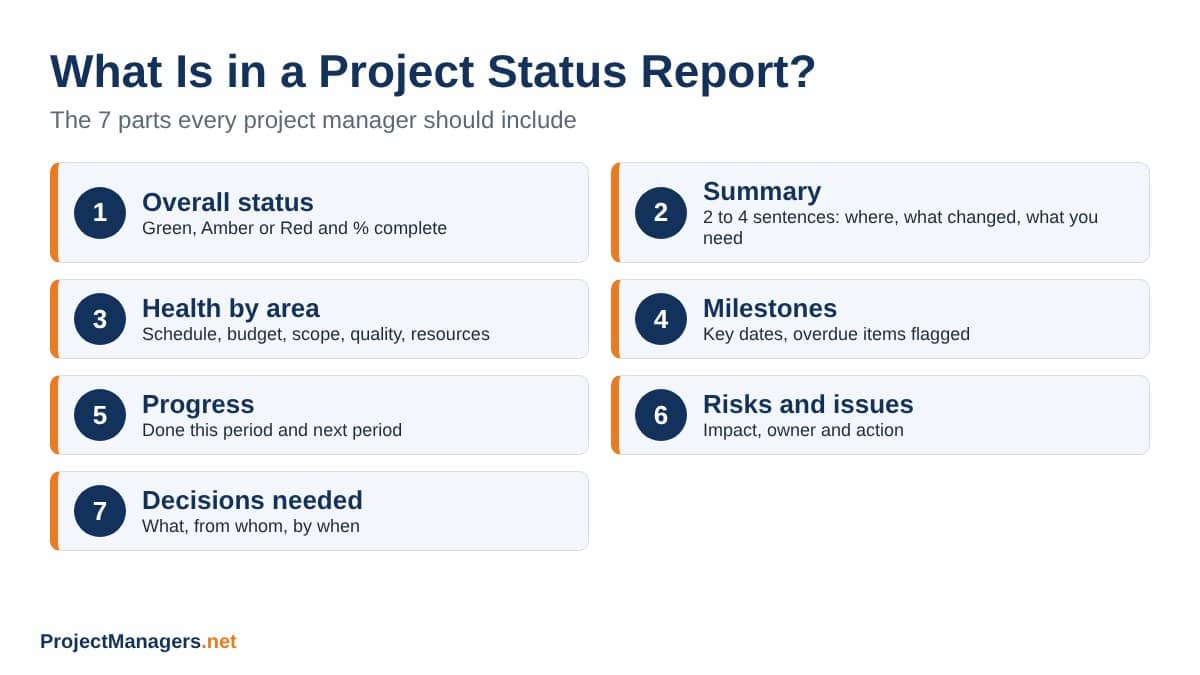
At a minimum, every project status report should include:
- Project details: project name, project manager, sponsor, report date and reporting period.
- Overall status: one color (Green, Amber or Red) and the percent complete against plan.
- Executive summary: 2 to 4 sentences on where the project is, what changed and what you need.
- Health by area: schedule, budget, scope, quality and resources, each with its own color and a note.
- Budget: budget, spent to date and the forecast at completion.
- Milestones: key dates with their status, with overdue items clearly flagged.
- Done this period: what the project team finished since the last report.
- Next period: what comes next, so stakeholders know what to expect.
- Risks and issues: each with an impact, an owner and an action.
- Decisions or help needed: what you need, from whom and by when.
How to Write a Project Status Report in 7 Steps
Creating a project status report takes 20 to 30 minutes once you have a template and a routine. Follow these steps every time so stakeholders learn where to look.
1. Know Your Audience
Ask your sponsor and key stakeholders what they want to see and how often. An executive wants the color, the summary and the decision. The project team wants milestones, owners and next steps. A client usually should not see internal cost rates. Our builder handles this with the audience switch on the last tab.
2. Gather the Facts First
Pull the numbers before you write a single sentence: percent complete, planned percent, spent to date, milestone dates and open risks. Writing first and checking later is how optimistic reports get sent.
3. Let the Numbers Set the Color
Agree on RAG rules at the start of the project and apply them every time. Example: schedule is Green within 5 points of plan, Amber within 15 and Red beyond that. If your numbers say Red, the report says Red.
4. Write the Summary Last, Put It First
Once the details are in, write 2 to 4 sentences that cover where you are, what changed and what you need. PMI advises keeping reports brief and leading with an executive summary; its anatomy of an effective project status report also notes that a project manager who cannot explain status in a few words may have bigger problems.
5. Give Every Amber or Red a Recovery Action
A color without an action only creates worry. For each Amber or Red area, write what went wrong, what you are doing about it, and when it will be back on track.
6. Ask for the Decision You Need
If the project is Red, the report must ask for something: a decision, more people, more time or a scope change, with a name and a date. This is the part sponsors act on.
7. Send It on Schedule and Follow Up
Send the report on the same day every period. For anything Red, follow up with a call or a short meeting. Email alone is easy to skip. Ask for feedback every few months and adjust the format.
RAG Status: How to Pick Green, Amber or Red
Most project status reports use RAG (Red, Amber, Green), sometimes called a traffic light. The colors only help if everyone reads them the same way. Here is a simple rule set you can adopt or adjust. For more detail, read our guide to RAG status in project management.
RAG Rules for Project Status Reports
| Status | Meaning | Schedule rule | Budget rule | What the project manager does |
|---|---|---|---|---|
| Green | On track within agreed tolerance | Within 5 points of planned % complete | Cost index 0.95 or higher | Report progress, no action needed from the sponsor |
| Amber | At risk, but the team can recover | 5 to 15 points behind plan | Cost index 0.85 to 0.94 | Explain the cause and the recovery action with a date |
| Red | Off track, needs help from above | More than 15 points behind plan | Cost index below 0.85 | Escalate and ask for a decision with a name and a deadline |
Cost index (CPI) = budget x actual % complete / spent to date. Tolerances are examples; agree your own with the sponsor at kickoff.
Watch out for “watermelon” reporting: green on the outside, red on the inside. It happens when a project manager reports Green because the team feels busy, while the numbers show the project slipping. The builder above warns you when your colors and your numbers disagree.
5 Types of Project Status Reports
Not every reader needs the same report. Here are five common types project managers use, often on different schedules for different audiences.
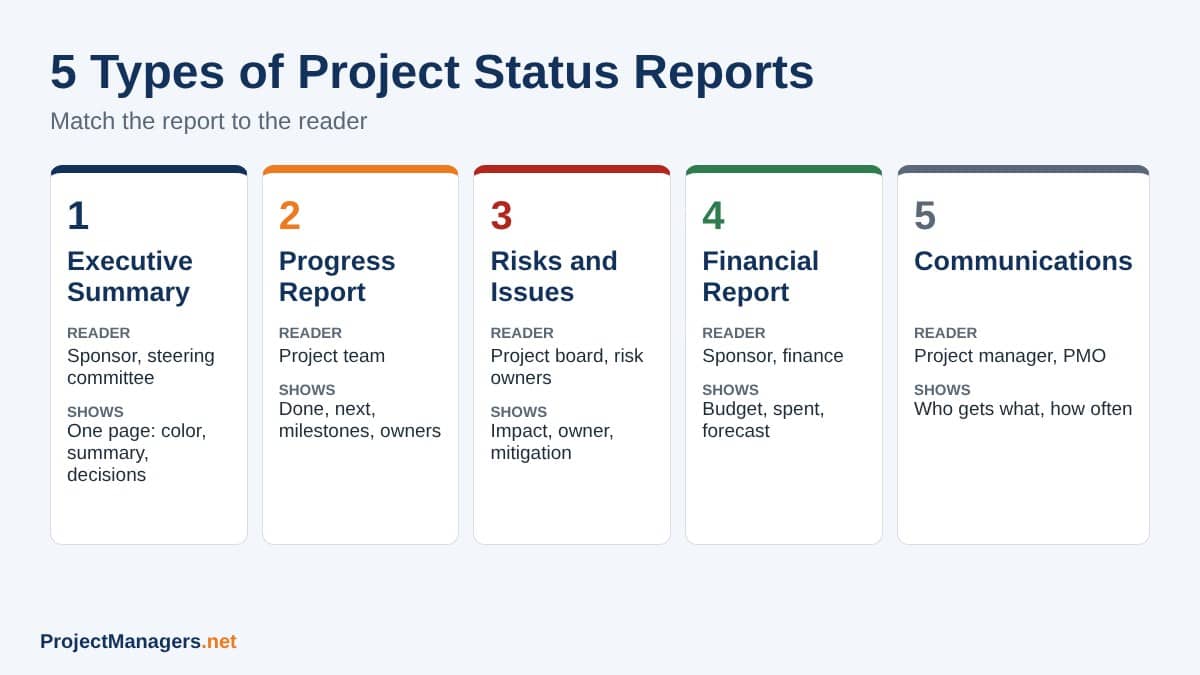
The Executive Summary Report
A one-page, high-level view of the project: the overall color, key objectives, the 2 to 4 sentence summary, top risks and decisions needed. It suits sponsors, steering committees and senior managers who are not close to the daily work.
The Progress Report
A more detailed look at what has been done, what is left and what is next, with milestones and owners. It suits the project team, functional managers and stakeholders who follow the day-to-day work.
The Risks and Issues Report
A report focused on what could go wrong (risks) and what has already gone wrong (issues), with impact, owner and mitigation for each. Pair it with a risk register so nothing falls through the cracks.
The Financial Report
Budget, spending to date, forecast at completion and variances. Finance teams and sponsors use it to track the financial health of the project and to approve changes.
The Communications Report
A summary of who needs which updates, through which channel and how often. It keeps the communication plan honest and confirms that every stakeholder group is getting what it needs.
Which Status Report for Which Reader?
| Report type | Main reader | Typical frequency | Example line |
|---|---|---|---|
| Executive summary | Sponsor, steering committee | Every 2 weeks or monthly | “Amber: go-live at risk by 1 week. Decision needed on launch date by Friday.” |
| Progress report | Project team, functional managers | Weekly | “Moved 120 of 210 pages to the new CMS. Next: clear legal review.” |
| Risks and issues report | Project board, risk owners | Weekly or every 2 weeks | “Issue, High: legal review is slowing migration. Owner: Maya. Action: daily review slot.” |
| Financial report | Sponsor, finance | Monthly | “Spent $70,000 of $120,000. Forecast at completion: $134,600.” |
| Communications report | Project manager, PMO | Monthly or per phase | “Client steering group moved from monthly to every 2 weeks during testing.” |
How Often Should You Send a Project Status Report?
The right frequency depends on the length, risk and pace of the project and on what your stakeholders agreed to. As a starting point:
Status Report Frequency Guide
| Project situation | Suggested frequency | Why |
|---|---|---|
| Short project (under 3 months) or fast-moving work | Weekly | A two-week gap can hide a slip that is hard to recover |
| Agile project with sprints | Every sprint (1 to 2 weeks) | Match the sprint review so the numbers line up |
| Long, stable project | Every 2 weeks or monthly | Less noise for senior readers, still enough warning |
| Project in Red or in a critical phase (testing, go live) | Weekly, plus a quick call | Stakeholders need faster decisions |
| Portfolio or steering committee view | Monthly | Compare many projects on the same cycle |
Whatever the schedule, send an extra update right away when something big changes: a scope change, a lost team member, a missed key milestone or a new high-impact risk. Do not wait for the next report.
Common Project Status Report Mistakes
- Too long: five pages of task lists bury the one thing the sponsor needs to know.
- Green until it is suddenly Red: colors that do not follow agreed rules lose all meaning.
- Problems without actions: every Amber or Red needs an owner, an action and a date.
- No ask: a Red report that does not request a decision leaves the sponsor unable to help.
- Irregular timing: reports that arrive late or skip weeks look like hidden trouble.
- Jargon: write for the least technical reader on the distribution list.
- One report for everyone: tailor the depth to executives, the team and clients.
Video: Project Status Report Must-Haves
Project Status Report Must-Haves
A short training video from ProjectManager on what every project status report should include.
Status Report Facts Worth Checking
6 Status Report Claims, Checked
| Claim | Verdict | What the data says | Source |
|---|---|---|---|
| “More than half of project budget risk comes from poor communication.” | True | PMI found 56% of the budget at risk was at risk because of ineffective communication. The study is from 2013, so treat it as a long-standing finding, not a current figure. | PMI, 2013 |
| “Poor communication causes one third of project failures.” | Partly true | This figure is widely repeated. The PMI 2013 report itself puts ineffective communication as a contributor in about one in five failed projects and links it to half of unsuccessful projects. | PMI |
| “Status reports should always be weekly.” | Partly true | Weekly is a good default for short or risky projects, but PMI advises asking stakeholders and tailoring frequency and detail to each audience. | PMI, PM Network 2014 |
| “Green means there are no problems.” | False | Green means the project is within agreed tolerance. A Green project can still have open risks and issues, which belong in the report. | RAG status guide |
| “Knowledge workers spend most of their time on work about work.” | True | Asana’s 2021 index found U.S. knowledge workers spend 61% of their time on work about work, including status checks. | Asana, 2021 |
| “People tend to hide bad news on troubled projects.” | True | Research on IT projects by Smith, Keil and Depledge (2001) studied this reluctance, known as the “mum effect”, and the factors that drive it. | Journal of Management Information Systems |
Project Status Report FAQs
Project Status Report FAQ
What is a project status report?
A project status report is a short, regular document a project manager sends to the sponsor, team and other stakeholders. It shows the overall status of the project (often Green, Amber or Red), progress against plan, budget, milestones, risks and issues, and any decisions needed.
Why is a project status report essential for a project manager?
It keeps everyone on the same page, surfaces risks and issues while they are still cheap to fix, and gives the project manager a written record of what was raised and when. It is also the main way to ask the sponsor for decisions and help.
What are the main benefits of using a project status report?
A status report tracks progress against plan, flags problems early, keeps stakeholders informed and engaged, cuts down on ad hoc update requests, and supports better decisions on scope, time and budget.
How long should a project status report be?
One page is ideal for executives, and two pages is usually enough for the project team. Lead with a 2 to 4 sentence summary so busy readers get the headline even if they stop there.
What is the difference between a status report and a progress report?
A status report shows where the project stands right now, including health, risks and decisions. A progress report focuses on work completed over a period. Many project managers combine both in one document.
What does RAG status mean in a project status report?
RAG stands for Red, Amber, Green. Green means on track within tolerance, Amber means at risk but recoverable by the team, and Red means off track and in need of help or a decision from above.
Who should write the project status report?
The project manager owns the report, with input from team leads, the project controller or finance for budget figures, and risk owners for risks and issues. The project manager signs off on the colors.
Suggested articles:
- Improving Project Status Reports with Visual Reporting
- Project Status Report Template for Project Managers
- Understanding and Utilizing RAG Status in Project Management
- Free Risk Register Templates

Shane Drumm, holding certifications in PMP®, PMI-ACP®, CSM, and LPM, is the author behind numerous articles featured here. Hailing from County Cork, Ireland, his expertise lies in implementing Agile methodologies with geographically dispersed teams for software development projects. In his leisure, he dedicates time to web development and Ironman triathlon training. Find out more about Shane on shanedrumm.com and please reach out and connect with Shane on LinkedIn.