

A sprint review is a Scrum event held at the end of each sprint, where the team presents completed work, stakeholders give feedback, and the product backlog is reassessed. The sprint itself is a fixed time period, typically one to four weeks, during which the team works toward a defined goal. Done well, the sprint review keeps the product on course and ensures that delivery stays aligned with actual user and business needs.
This event brings together the Scrum team, the product owner, and any relevant stakeholders. It is not a status meeting. It is an inspection and adaptation session, where the team demonstrates what was built, stakeholders respond to what they see, and the backlog is updated to reflect new priorities. Using a sprint review template saves time and keeps these conversations structured and productive.
Sprint Review Purpose
The sprint review validates the sprint goal and sets the team up for the next sprint. It is the moment where real product decisions get made, based on what was delivered and what stakeholders actually think about it. Teams that treat it as a checkbox exercise miss most of the value it offers.
During the review, the team presents completed work, walks through new features or functionality, and discusses any challenges that came up during the sprint. Obstacles that were encountered should be named and explained, not glossed over. Stakeholders use what they see and hear to inform what should happen next.
The review also creates space for honest backlog conversation. After seeing what was delivered, the product owner and stakeholders often reprioritize, remove items, or add new ones. This keeps the backlog connected to the current reality of the product rather than a plan made weeks ago.
The core purposes of the sprint review can be grouped into a few clear areas:
- Sprint Goal Validation: The team confirms whether the sprint goal was met and walks through the evidence, giving stakeholders a clear picture of what was achieved against what was planned.
- Stakeholder Feedback: Stakeholders respond to the demonstrated increment with direct input, which feeds directly into backlog refinement and upcoming sprint planning.
- Backlog Improvement: The product owner uses feedback from the session to update the backlog, adjusting priority, scope, and sequencing for future sprints.
During the sprint review, the team will typically work through the following activities:
- Increment Presentation: The team presents everything completed during the sprint, including features, fixes, and any other deliverables that meet the definition of done.
- Live Demonstration: A working demo of the increment is shown to stakeholders rather than summarized in slides, giving them direct exposure to the product as it stands.
- Sprint Discussion: The team reflects on what went well, what proved harder than expected, and how challenges were handled throughout the sprint.
- Feedback Collection: Stakeholders ask questions and offer input, which the product owner captures and uses to drive backlog decisions before the next sprint begins.
Prepare for the Sprint Review
Good sprint reviews do not happen by accident. Preparation sets the tone for a session that is focused, productive, and worth everyone’s time. The team should confirm logistics, gather materials, and align on the demo flow well before the meeting starts.
Here are the key steps to prepare effectively before the session begins:
- Gather All Necessary Materials: Collect demos, metrics, a progress summary for the sprint, and a draft plan for the next sprint. Having these ready avoids scrambling during the meeting.
- Invite the Key Stakeholders: The sprint review should include the development team, the product owner, and any stakeholders with a genuine interest in the product’s direction. Keep the invite list relevant and purposeful.
- Start the Sprint Review: Open with a brief recap of the sprint goals and what was targeted. Then move directly into the demo of new or updated features, keeping the focus on what was actually built.
- Discuss the Progress of the Project: Review the product’s overall trajectory and assess whether the team is on track to meet broader goals and deadlines. Flag any risks or blockers that have emerged.
- Review the Quality of the Work: Use the sprint review to assess whether the completed work meets the team’s standards and identify any gaps that need attention in the next sprint.
- Review and Refine the Plan for the Next Sprint: Work through the updated product backlog with the development team and product owner. Make sure everyone leaves the room with a shared understanding of the priorities and goals ahead.
What Should a Sprint Review Contain?
The sprint review gives the Scrum team a structured opportunity to present the completed increment to stakeholders and discuss what comes next. The content of each review should be consistent enough to be useful, but flexible enough to reflect what actually happened during the sprint. The following elements typically make up a complete sprint review:
- Team Performance Summary: A discussion of what the team accomplished during the sprint, including completed tasks, delivered features, and any resolved issues that were blocking progress.
- Product Owner Feedback: Direct input from the product owner on the team’s output, covering the quality of delivery, communication throughout the sprint, and specific suggestions for how the team can improve.
- Increment Review: A live walkthrough of the product increment, allowing stakeholders to see and respond to what was built before any backlog decisions are made.
- Action Items and Follow-Ups: A clear record of next steps identified during the session, including who is responsible for each item and when it should be addressed in the upcoming sprint.
PowerPoint Sprint Review Templates
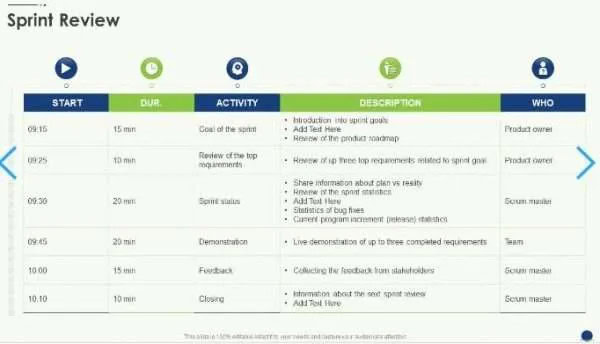
Several ready-made presentation templates are available online to support your sprint review sessions. These templates are worth bookmarking and using as a starting point rather than building slides from scratch each time.
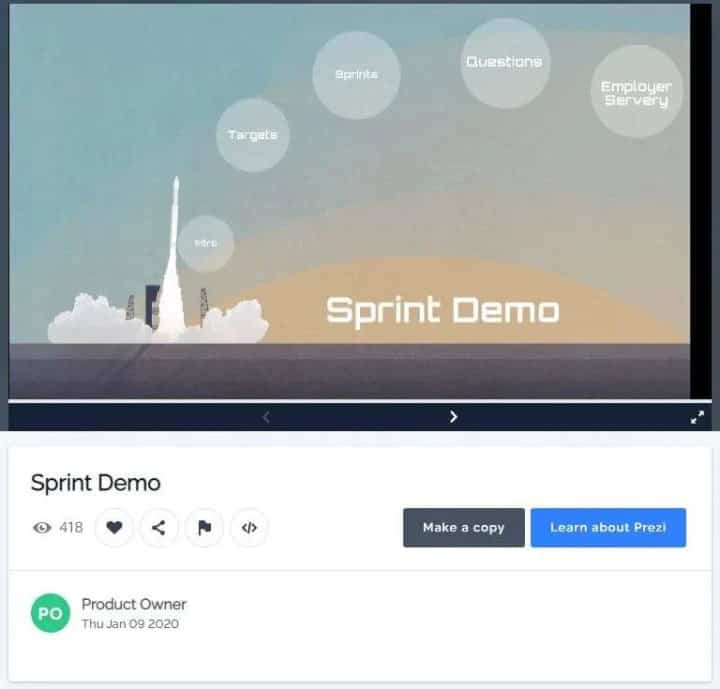
Best Agile Sprint Demo Template Presentation – Prezi
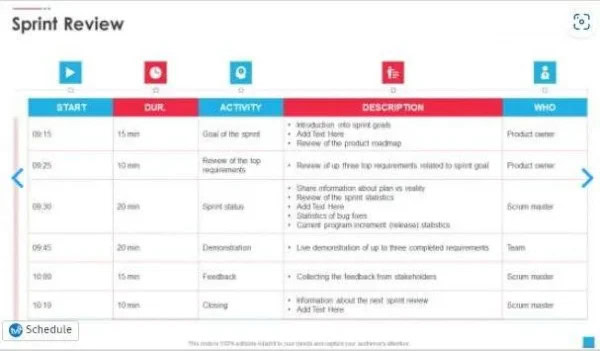
Sprint Review – Slide Team (alternate layout)

Sprint review presentation (slideshare.net)
How Many Hours Is the Sprint Review?
The sprint review is a time-boxed event. For a two-week sprint, the standard maximum is four hours. Shorter sprints call for proportionally shorter reviews. The four-hour limit exists for a practical reason: it prevents the session from expanding to fill whatever time is available, which rarely adds value.
Within those four hours, the team presents completed work, stakeholders give feedback, and the team reflects on what was learned. That is a lot to cover, and it requires discipline on all sides. A review that regularly runs long is a sign that something in the structure or preparation needs to change.
The following issues tend to cause sprint reviews to run over time:
- Scope Creep in the Agenda: The review tries to cover too much ground, including items that belong in the retrospective or planning session rather than the review itself.
- Too Many Stakeholders: A larger group means more questions, more tangents, and longer discussions. Keep the invite list focused on people whose input directly shapes the backlog.
- Lack of Preparation: When the demo is not ready, or materials are missing, the team ends up explaining rather than showing, which takes considerably longer and loses stakeholder attention.
Sprint Review Email Template
A sprint review summary sent after the session keeps all key stakeholders informed and creates a written record of decisions, feedback, and next steps. Writing a clear, structured summary is just as important as running the meeting itself. Some steps that will help you write an effective sprint review summary are:
- Start By Summarizing the Main Objectives of the Sprint and the Results Achieved: This gives context for everything that follows and helps readers who were not in the room understand what the sprint was working toward.
- Review the Product Backlog and Product Increment Goals: Discuss any action items or follow-up tasks identified during the sprint review and explain how they will be addressed in future sprints. This gives the team a clear direction for what comes next.
- Discuss the Value Delivered During the Sprint and the Obstacles Encountered: Walk through what was built, what got in the way, and how the team responded. This gives stakeholders a realistic view of how delivery actually works.
- Ask Questions and Provide Feedback to the Scrum Team: The email is also an opportunity to invite further input from stakeholders who want to weigh in on priorities or raise concerns before the next sprint begins.
Word Sprint Review Templates
If you prefer a document-based format over slides, several Word and Google Docs templates are available to help structure your sprint reviews:
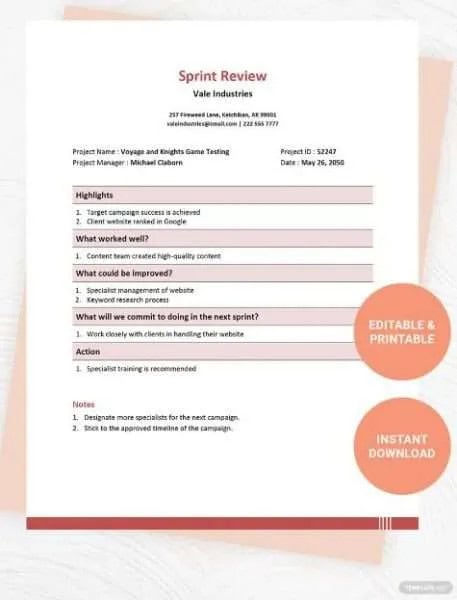
Sprint Review Meeting Template – Google Docs, Word (Template.net)
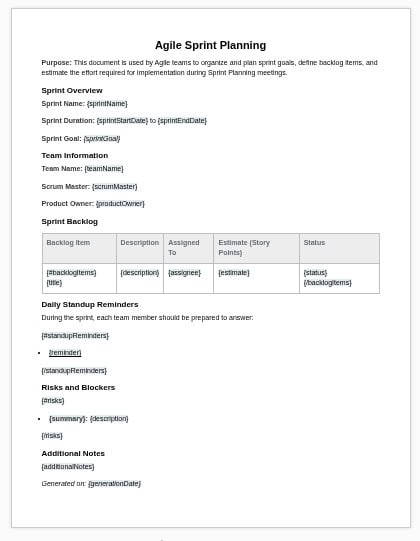
Sprint Review Template – Documentero
Scrum Ceremonies vs Sprint Review
Sprint Review vs Retrospective
The sprint review and the sprint retrospective serve different purposes, even though both happen at the end of a sprint. The review focuses on the product. The retrospective focuses on the team. Mixing up the two, or running them without distinction, tends to make both less useful.
- Sprint Review: This is a meeting between the Scrum team and stakeholders. Its goal is to inspect what was built and decide what to do next with the backlog. The product owner plays a central role, gathering feedback from stakeholders and using it to shape upcoming work.
- Sprint Retrospective: This is a Scrum team-only meeting. Its goal is to examine how the team worked together during the sprint and identify specific process improvements. Stakeholders do not attend. The conversation is internal, honest, and focused on repeatable improvement rather than product decisions.
Key differences between the two meetings include the following:
- Audience: The sprint review includes stakeholders and customers. The retrospective is limited to the Scrum team, keeping the discussion candid and focused on internal process.
- Focus Area: The sprint review examines the product increment and backlog. The retrospective looks at team collaboration, communication, and working practices.
- Outputs: The sprint review produces backlog updates and stakeholder feedback. The retrospective produces action items that the team commits to implementing in the next sprint.
Sprint Review vs Showcase
A sprint review and a showcase can look similar on the surface, but they serve different audiences and have different goals. Understanding the distinction helps teams decide when each format is appropriate.
- Sprint Review: This is a working session. It is attended by the Scrum team and relevant stakeholders, and its primary output is a refined backlog ready for the next sprint. The conversation is iterative, direct, and focused on what needs to change.
- Showcase: This is more of a presentation event. It typically draws a broader audience, including executives and senior decision-makers who are not involved in day-to-day delivery. The goal is to demonstrate the progress made on the product and collect higher-level feedback. Showcases tend to be more polished and less conversational than sprint reviews.
Iteration Review vs Sprint Review
The iteration review and the sprint review cover similar ground, but the terminology reflects different frameworks. Understanding the distinction helps teams recognize how their Agile context shapes the format and expectations of the meeting.
- Iteration Review: This is the equivalent of the sprint review in non-Scrum Agile frameworks such as SAFe or XP. It is used when the work cycle is called an iteration rather than a sprint. The format can be adapted more freely depending on the team’s framework and context, making it a flexible alternative to the more structured sprint review.
- Sprint Review: This is specific to Scrum. It is a defined ceremony with clear roles and expectations, where the Scrum team presents completed work to stakeholders and uses their feedback to refine the backlog. Its structure is guided by Scrum’s formal ceremonies and role definitions.
In practice, both formats involve the team presenting completed work, reviewing what went well, and discussing what should change. Neither the sprint review nor the iteration review is a blame session. Both are designed to move the product forward and help the team get better at delivering it.
Video Showcasing a Real Sprint Review Example
Watch this real-world sprint review in action. This video walks through how a Scrum team presents completed work, gathers stakeholder feedback, and refines their backlog — giving you a practical look at what an effective sprint review looks like.
Conclusion
The sprint review is one of the most direct feedback loops available to a product team. It connects delivery to stakeholder input in real time, keeps the backlog grounded in what actually matters, and gives the team a recurring chance to validate their direction. When run well, it reduces wasted effort and keeps everyone aligned on what the product needs to do next.
Using a template does not make the sprint review mechanical. It gives the team a reliable structure so they can focus on the conversation rather than the format. Whether you are using a slide deck, a Word document, or a Google Docs template, the goal is the same: present what was built, gather honest feedback, and leave with a clear plan for the sprint ahead.
Frequently Asked Questions About Sprint Reviews
What is the difference between a sprint review and a sprint retrospective?
The sprint review focuses on the product increment and involves stakeholders. The retrospective focuses on the team’s process and is attended by Scrum team members only. Both happen at the end of the sprint, but address different questions: the review asks “what did we build?” while the retrospective asks “how did we work?”
How long should a sprint review last?
For a two-week sprint, the sprint review should last no more than four hours. Shorter sprints should have proportionally shorter reviews. If reviews are consistently running over time, the scope, stakeholder list, or preparation process likely needs adjustment.
Who should attend a sprint review?
The sprint review should include the full Scrum team, the product owner, and any stakeholders who have a direct interest in the product’s direction. This may include customers, business leads, or subject matter experts. Executives typically attend showcases rather than sprint reviews.
What should be included in a sprint review template?
A complete sprint review template should cover the sprint goal, a summary of completed work, a demo of the product increment, stakeholder feedback notes, any decisions made about the backlog, and a list of action items for the next sprint.
How is a sprint review different from a showcase?
A sprint review is a working session focused on inspecting the increment and refining the backlog. A showcase is a more formal presentation aimed at a broader audience, including senior stakeholders. The sprint review drives backlog decisions. The showcase communicates product progress at a higher level.
Suggested articles:
- 17 Sprint Retrospective Examples for Agile Teams
- 8 Best Design Sprint Templates: The Complete Guide
- 5 Sprint Planning Templates Word & XLS

Shane Drumm, holding certifications in PMP®, PMI-ACP®, CSM, and LPM, is the author behind numerous articles featured here. Hailing from County Cork, Ireland, his expertise lies in implementing Agile methodologies with geographically dispersed teams for software development projects. In his leisure, he dedicates time to web development and Ironman triathlon training. Find out more about Shane on shanedrumm.com and please reach out and connect with Shane on LinkedIn.