
Keeping your agile team engaged through every sprint requires more than good intentions. Sprint retrospectives are the structured space where teams pause, reflect, and realign, but when the format never changes, participation drops, and honest feedback dries up. Experimenting with different retrospective formats keeps these sessions fresh, surfaces better insights, and gives every team member a genuine reason to show up prepared.
The best retrospectives balance structure with openness. They create an environment where people feel safe sharing what went wrong without fear of blame, and where wins are acknowledged before the team moves on. This guide covers 17 proven sprint retrospective examples, how to facilitate them effectively, and the common mistakes that undermine even the most well-intentioned retro sessions.
17 of Our Favorite Sprint Retrospective Examples
Sprint retrospective formats range from simple three-column boards to rich metaphor-driven frameworks. The right format depends on your team’s maturity, the stage of your project, and how much creative energy the group brings to the session.
1. Glad, Sad, Mad Sprint Retro Template
The Glad, Sad, Mad template shifts the focus away from task completion and onto team wellbeing. Rather than analyzing what was built or shipped, this format gives team members a structured outlet to express how they felt during the sprint. It is particularly useful after high-pressure sprints where burnout, frustration, or low morale may be affecting the group’s cohesion and performance.
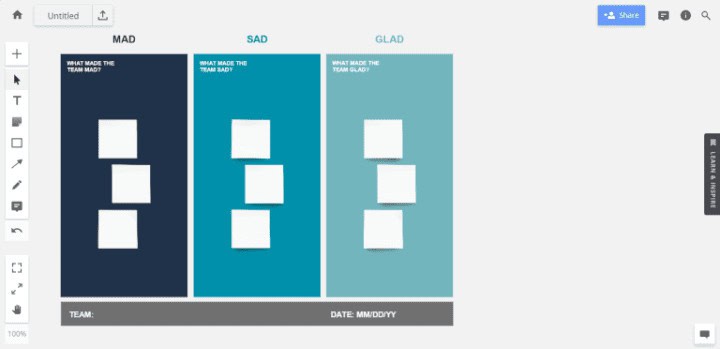
Built on three columns representing emotional states, the template invites participants to be honest about experiences that often go unspoken in standard retrospectives. When facilitated well, it can surface systemic problems that technical-focused templates tend to miss. Here are the key insights that make this format effective:
- Emotional Visibility: This format brings feelings into the room as legitimate data points, helping teams address interpersonal or workload issues before they escalate into larger problems that affect delivery.
- Burnout Detection: When the “Sad” and “Mad” columns consistently outweigh “Glad,” it is a strong signal that sprint capacity, team dynamics, or process health needs immediate attention from leadership.
- Psychological Safety: Teams that regularly use emotion-based retros tend to build stronger psychological safety over time, making all future retrospectives more honest and therefore more actionable.
- Action Orientation: Despite its emotional framing, the format still drives concrete next steps. Recurring themes in any column should generate specific action items assigned to named owners with clear deadlines.
2. Start, Stop, Continue
The Start, Stop, Continue format is one of the most widely used retrospective structures in agile practice, and for good reason. Its simplicity makes it accessible for new teams while remaining useful for experienced ones. The three columns prompt direct, actionable thinking: what new practices should begin, what current practices are causing friction and should end, and what is already working and must be preserved.
This format works across team types and industries, which is why it appears in everything from software development retrospectives to marketing sprint reviews. The directness of the three prompts tends to generate clear, implementable outcomes rather than vague observations. Here are the elements that make this template consistently effective:
- Low Barrier to Entry: Because the prompts are intuitive and require no prior familiarity with agile frameworks, this format is ideal for newly formed teams or when onboarding participants who have limited retrospective experience.
- Clarity of Outcome: Each item entered into the template naturally maps to an action: start items become experiments, stop items become process removals, and continue items become documented best practices worth protecting.
- Versatility Across Contexts: This format works equally well for end-of-sprint reviews, project post-mortems, team offsites, and department-level reflections, making it one of the most reusable tools in an agile coach’s toolkit.
- Balance of Positive and Critical Feedback: The “Continue” column ensures that the session is not purely problem-focused, helping teams acknowledge what is going well before addressing areas for improvement.
3. Sailboat Retrospective Template
The Sailboat Retrospective uses a nautical metaphor to help teams examine the forces driving them forward and the obstacles holding them back. The sailboat represents the team itself, steering toward an island that symbolizes the project goal or product vision. This visual framing helps participants think in systems rather than isolated incidents, which tends to produce richer, more strategic insights.
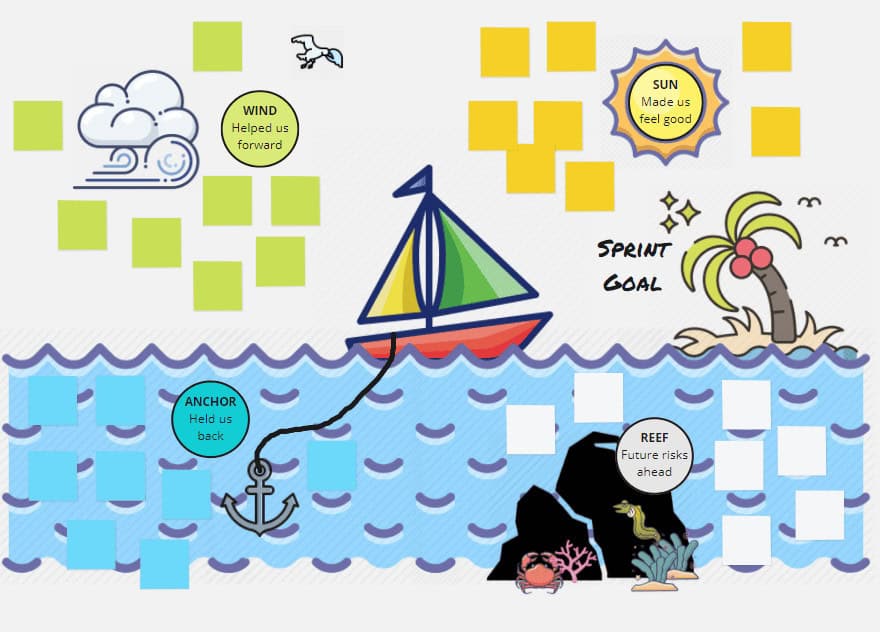
Check out this free Miro sailboat template
The metaphor includes multiple elements that map to real project dynamics. Wind represents helping factors like team collaboration, good tooling, or executive support. Anchors represent delays and blockers. Rocks represent risks on the horizon, and the island is the shared goal that the team is working to reach. Here are the key components teams should explore in this format:
- Wind (Enablers): These are the practices, relationships, tools, or decisions that are actively propelling the team forward. Identifying them clearly helps teams consciously protect and replicate these conditions in future sprints.
- Anchors (Blockers): These represent anything slowing the team down, whether process inefficiencies, unclear requirements, dependency bottlenecks, or communication gaps that have not yet been addressed.
- Rocks (Risks): Unlike anchors, rocks are threats that have not yet materialized but are visible on the horizon. Surfacing them early allows teams to plan mitigation strategies before problems become critical.
- Island (Goal): Keeping the team’s destination visible throughout the session ensures that all feedback is evaluated in relation to the actual project objective rather than individual preferences or complaints.
4. Starfish Retrospective Template
The Starfish Retrospective offers five distinct lenses for evaluating a sprint, making it more nuanced than the standard three-column formats. Named after the five arms of a starfish, the template asks teams to evaluate: what to keep doing, what to do more of, what to do less of, what to stop doing entirely, and what to start doing for the first time.
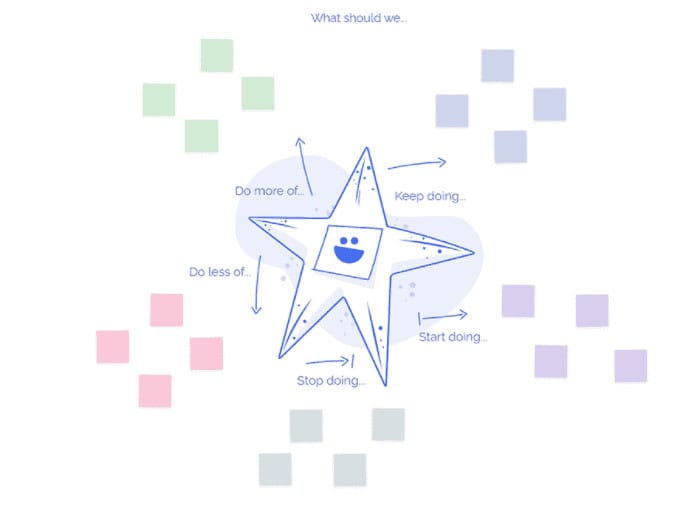
The Starfish Retrospective Template | Lud.co
This granularity is its core strength. Rather than forcing feedback into a binary “good or bad” framing, the Starfish template acknowledges that many team practices are on a spectrum. Something may not need to be stopped entirely but simply scaled back, and that distinction leads to more precise action items. Here are the five areas and why each one matters:
- Keep Doing: These are the practices delivering clear, consistent value. Naming them explicitly helps teams avoid accidentally abandoning what works when they implement changes in the next sprint.
- More of: This category identifies high-value activities that are already happening but not at the frequency or scale needed to fully realize their benefit for the team or project.
- Less Of: Rather than eliminating a practice outright, this column invites teams to calibrate, acknowledging that some activities have value but are consuming disproportionate time or energy relative to their impact.
- Stop Doing: These are practices that are actively creating friction, reducing quality, or wasting time, and that should be formally removed from the team’s working agreements.
- Start Doing: This is the innovation space. Teams use this arm to propose new ideas, tools, or practices they want to experiment with in the next sprint cycle.
5. The 4 L Retrospective
The 4 L Retrospective organizes team feedback into four quadrants: Liked, Learned, Lacked, and Longed For. This framework is particularly strong for teams that want to capture both the emotional and practical dimensions of a sprint within a single structured session. It moves beyond what happened and asks teams to reflect on how it felt and what they wish had been different.
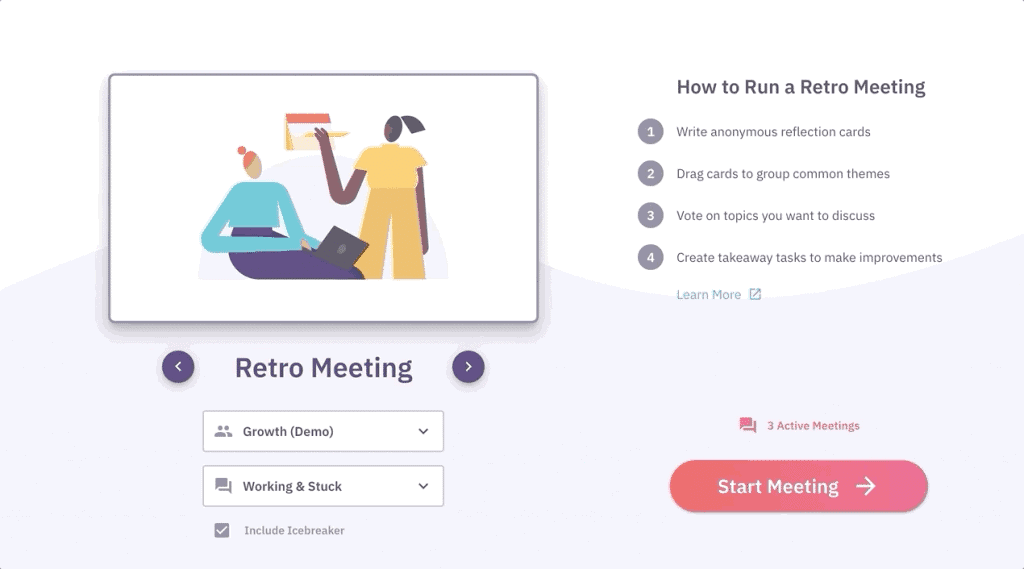
Free Online Agile Retrospective Meetings | Parabol (Free up to 2 teams)
The “Longed For” quadrant is what distinguishes this format from similar templates. It creates space for aspirational thinking, inviting team members to articulate what they genuinely wish the sprint had included, whether that is better tooling, clearer priorities, or more cross-functional collaboration. Here are the four quadrants and what each one captures:
- Liked: Team members record what they genuinely enjoyed or found valuable about the sprint, including processes, interactions, deliverables, or working conditions that contributed positively to their experience.
- Learned: This section captures new knowledge, skills, or insights gained during the sprint, whether from technical discovery, customer feedback, team collaboration, or unexpected challenges that required creative problem-solving.
- Lacked: Teams document what was missing or insufficient during the sprint, such as resources, clarity, tooling, documentation, or communication that would have made the work smoother or more effective.
- Longed For: This forward-facing quadrant captures the team’s aspirations: things they did not have but genuinely wanted, which often reveal gaps between the current team environment and the conditions needed for peak performance.
6. Liked, Learned, Lacked
The Liked, Learned, Lacked template is a streamlined variation of the 4 L format, condensing the framework into three columns while retaining its reflective depth. It works well when time is limited or when teams are newer to retrospectives and benefit from a slightly simpler structure. The format still encourages teams to move beyond surface-level feedback and explore the nuances of their sprint experience.
While it covers less ground than the full 4 L version, this template is highly effective for recurring retrospectives where the cadence matters as much as the depth, particularly in two-week sprint cycles where the team needs to move quickly from reflection to action planning. Here are the key strengths of this three-column format:
- Speed of Setup: With only three prompts, facilitators can explain the format and get teams writing within minutes, making it ideal for shorter retrospectives or teams that need to maintain a brisk pace.
- Balanced Perspective: The combination of Liked, Learned, and Lacked naturally guides teams toward reflecting on what was positive, what was developmental, and what was absent, without veering into negativity.
- Scalability for Small Teams: Teams of three to five people can complete this retro in under thirty minutes, making it one of the most practical formats for lean teams operating under tight time constraints.
- Foundation for 4 L Upgrade: Teams that regularly use this format can easily transition to the full 4 L template once they are comfortable with retrospective habits, simply by adding the “Longed For” column.
7. Feedback Grid
The Feedback Grid is a four-quadrant tool designed specifically for retrospectives held after product demos, user testing sessions, or stakeholder reviews. It captures structured feedback across four categories: Questions, Ideas, Criticisms, and Likes. This breadth ensures that all types of input are recorded and none are lost between the feedback session and the next planning cycle.
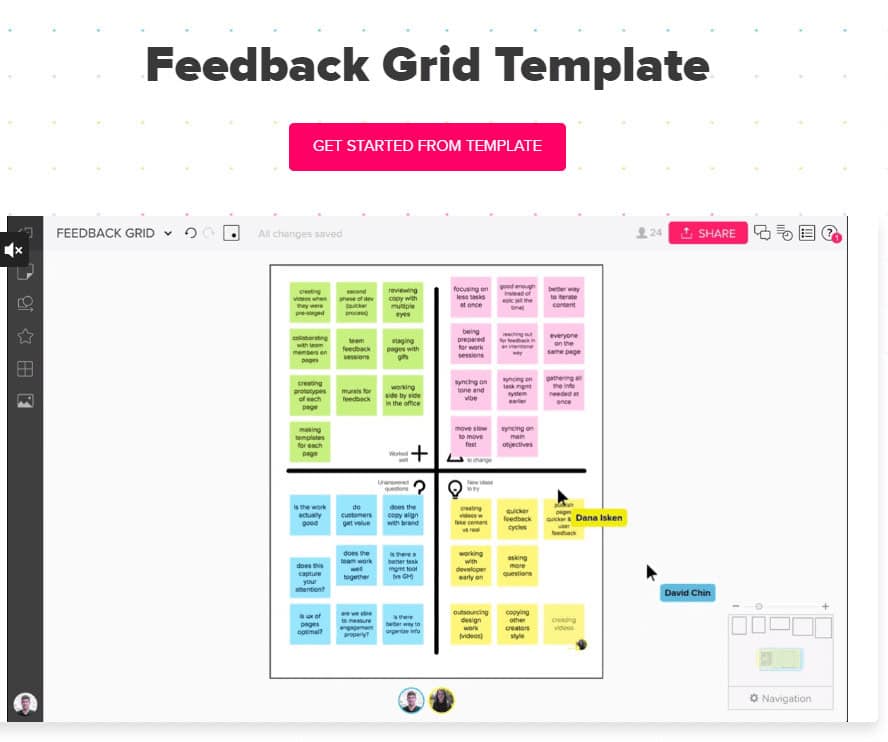
Feedback Grid Template | MURAL
The format is particularly valuable in product development contexts where teams need to balance positive reception with candid critique. By assigning each type of feedback its own quadrant, the template prevents the natural human tendency to focus only on praise or only on problems. Here are the four sections and how each one contributes to the retrospective:
- Likes: This quadrant captures what resonated well with stakeholders, users, or the team itself, providing a foundation of confirmed value that can guide future development priorities and design decisions.
- Criticisms: Structured criticism is more actionable than general dissatisfaction. This section encourages specific, constructive negative feedback that can be directly translated into improvement tasks or backlog items.
- Questions: Unanswered questions from stakeholders or team members often reveal knowledge gaps or misaligned expectations that must be addressed before the next sprint begins to avoid rework.
- Ideas: This quadrant captures creative suggestions and feature proposals that emerged during the session, providing a valuable input source for product backlog refinement and future sprint planning.
8. Three Little Pigs
The Three Little Pigs Retrospective uses the familiar fairy tale as a metaphor for structural stability within a project. The three houses represent different categories of work, each evaluated by how well-built and resilient it is. This storytelling framework is particularly effective for engaging teams that respond well to visual metaphors or who find abstract agile frameworks difficult to connect with in practice.
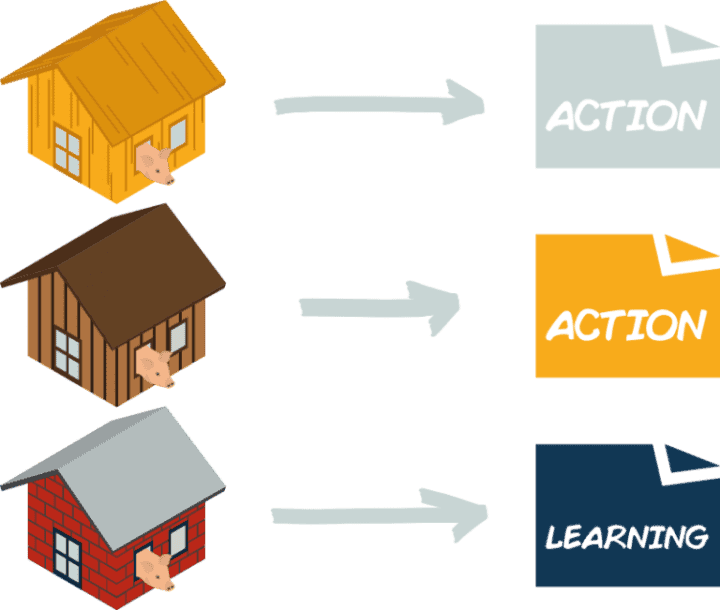
The format helps teams move beyond the question of what happened and toward a more durability-focused question: how well-built are the things we have created, and what needs reinforcing before the next sprint begins? Here are the three categories and what they reveal about project health:
- House of Straw (At Risk): These are processes, decisions, or deliverables that are fragile and likely to collapse under pressure. Identifying them early allows teams to either reinforce them or consciously deprioritize them before they become blockers.
- House of Sticks (Needs Improvement): This category captures things that are functional but not robust, areas that are holding up for now but would benefit from deliberate attention, refactoring, or process improvement in the upcoming sprint.
- House of Bricks (Stable): These are the solid, reliable elements of the project or team process that do not need immediate attention, representing completed work or established practices that can be treated as a stable foundation going forward.
- Prioritization Clarity: Using the three-tier structure forces teams to distinguish between urgent risks and moderate improvements, which leads to more focused sprint planning and prevents every issue from being treated with equal urgency.
9. Rose, Thorn, Bud
The Rose, Thorn, Bud Retrospective uses natural imagery to frame team reflection in an accessible, non-confrontational way. The rose represents the successes and positive outcomes that should continue. The thorn represents the challenges and friction points the team encountered. The bud represents emerging opportunities or new ideas that have potential but have not yet been fully explored.

Joel Blackie’s Festival Retrospective template | Miroverse
This format is particularly effective in creative or cross-functional teams where the metaphor resonates naturally and encourages more expressive, narrative feedback. The “bud” category is especially valuable because it shifts the conversation from problem-solving toward future possibilities. Here are the strengths that make this format worth including in your rotation:
- Accessible Language: The natural metaphors of rose, thorn, and bud are intuitive for participants from any background, making this format especially useful in cross-functional or non-technical retrospectives.
- Forward-Looking Energy: The bud category prevents the session from becoming purely retrospective. It channels creative thinking toward emerging opportunities, which helps teams maintain momentum and optimism even after difficult sprints.
- Emotional Resonance: The visual and natural language of this template tends to elicit more emotionally honest responses than technical frameworks, surfacing interpersonal dynamics and team morale issues more naturally.
- Versatility: This format works equally well at the end of a sprint, a project phase, or an entire product release, making it one of the more adaptable tools in an agile retrospective toolkit.
10. I Like, I Wish, What If?
The “I Like, I Wish, What If?” template is rooted in design thinking methodology and is an excellent choice when teams want to generate speculative ideas alongside reflective feedback. The three prompts move teams from appreciation through improvement, desire to open creative ideation, and creating a session that is both grounded and generative.
The “What If?” prompt is the distinguishing feature. It invites teams to think beyond the constraints of the current sprint and imagine possibilities that could fundamentally change how they work, without immediately filtering those ideas through the lens of feasibility. Here are the three prompts and the unique value each one adds:
- I Like: This opening prompt sets a positive tone and ensures that the session begins with appreciation, which establishes psychological safety and makes participants more willing to share honest criticism in the subsequent sections.
- I Wish: Moving from appreciation to desire, this prompt captures what participants genuinely want to be different, without the bluntness of direct criticism, which makes it easier for facilitators to receive and act on sensitive feedback.
- What If: This speculative prompt transforms retrospective sessions into light innovation workshops, generating ideas that may feed into product strategy, process redesign, or team agreements beyond the immediate next sprint.
- Design Thinking Integration: Because this format originates in design thinking, it pairs naturally with product discovery work, usability testing, retrospectives, or any session where the team wants to connect sprint reflection with broader product thinking.
11. Working and Stuck
The Working and Stuck template is one of the most direct and time-efficient retrospective formats available. It uses two columns, one for what is currently working and should continue, and one for what is stuck and needs to change. Its binary structure eliminates ambiguity and forces the team to make a clear assessment of each practice, process, or dynamic they encounter during the sprint.
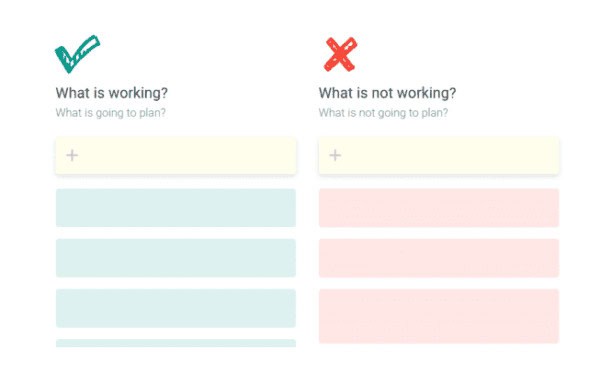
Working, Not Working Retrospective – TeamRetro
This format is best suited to experienced teams who have already developed a strong retrospective habit and want to spend less time on format explanation and more time on substance. It is also highly effective in situations where a team is experiencing a specific, identifiable problem that needs focused attention. Here are the reasons this stripped-down format delivers strong results:
- Directness: The two-column structure removes the risk of participants over-complicating their feedback. Each item must be classified as either working or stuck, which makes prioritization and action planning significantly faster after the session.
- Time Efficiency: Teams can complete a Working and Stuck retrospective in thirty to forty-five minutes, making it ideal for shorter sprint cycles, tight schedules, or situations where multiple retrospective items need to be covered in a single session.
- Focus on Impediments: The “Stuck” column naturally surfaces blockers and impediments that may not have made it into daily standup conversations, giving the Scrum Master a clear picture of systemic issues that require escalation or process change.
- Complementary Use: This template pairs well with more expansive formats like the Starfish or 4 L retrospective by serving as a quick mid-sprint health check rather than a full end-of-sprint reflection.
12. Quick Retrospective
The Quick Retrospective is designed for teams that need rapid feedback cycles without the overhead of a full-length retrospective session. It uses four simple sections: what was good, what was bad, what could be improved, and what actions should be taken. The format is intentionally lean, making it easy to complete in twenty to thirty minutes even with larger teams.
This format is valuable not as a replacement for deeper retrospectives, but as a supplement. Teams running two-week sprints may use the Quick Retrospective at the midpoint of a sprint to identify emerging issues before they compound, reserving the full-length format for the end-of-sprint review. Here are the scenarios where this template delivers the most value:
- Mid-Sprint Check-ins: Running a quick retrospective halfway through a sprint allows teams to course-correct before the sprint ends, reducing the number of unresolved issues that carry over into the retrospective and sprint planning sessions.
- Remote or Distributed Teams: Shorter formats reduce screen fatigue for distributed teams who are attending multiple video calls per day, making engagement and honest participation more sustainable across a full sprint cycle.
- New Team Onboarding: For teams new to retrospectives, the Quick format builds the habit without overwhelming participants, creating a foundation that supports the introduction of more sophisticated formats as the team matures.
- High-Volume Sprint Cycles: Teams running one-week sprints benefit most from this format because it matches the pace of their work, providing enough reflection to drive improvement without slowing the delivery cadence.
13. Anchors and Engines
The Anchors and Engines template focuses entirely on the forces affecting team momentum. Anchors are the things that are slowing the team down or bringing progress to a halt, while Engines are the things actively driving the team forward toward its goals. The two-column simplicity of this format makes it accessible, but its analytical framing makes it particularly powerful for diagnosing persistent performance issues.
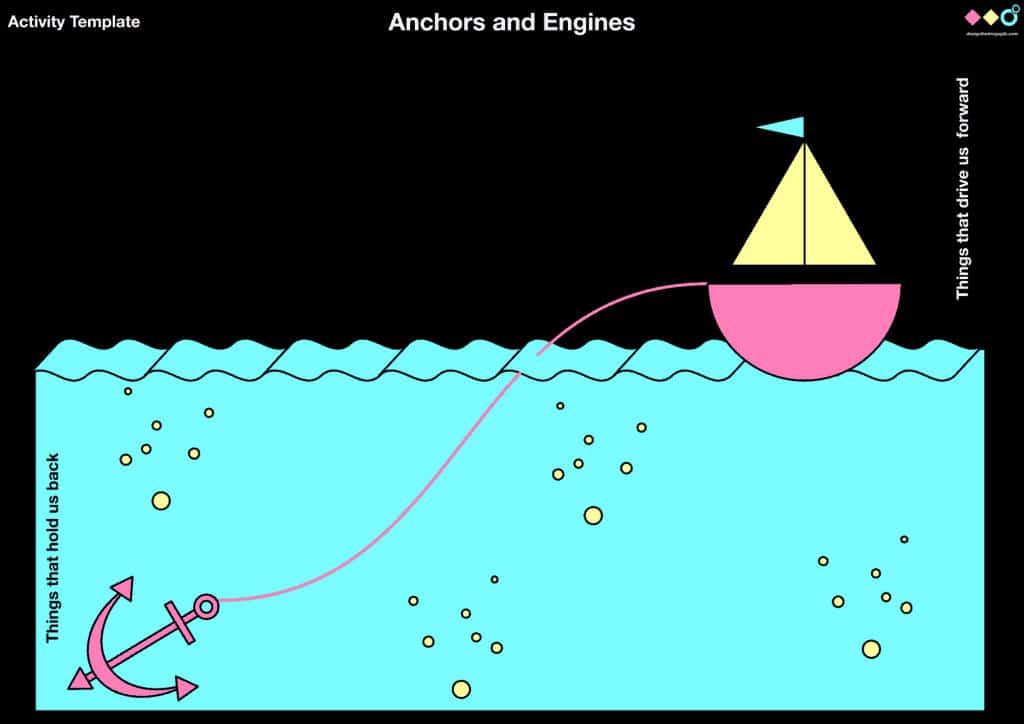
This template works especially well when a team has been struggling with the same blockers across multiple sprints and needs a dedicated session to surface and address them with clarity and accountability. Here are the elements that make this format analytically effective:
- Root Cause Focus: By concentrating entirely on what accelerates or impedes progress, this template pushes teams past surface-level symptoms and toward the underlying causes of velocity problems and delivery friction.
- Engine Recognition: Teams often focus disproportionately on problems during retrospectives. Naming specific engines reminds the team what is genuinely working well, which prevents the inadvertent removal of positive practices during process overhauls.
- Anchor Prioritization: Not all anchors have equal weight. This template naturally prompts teams to discuss which blockers have the highest impact, allowing the Scrum Master to prioritize impediment removal in the next sprint cycle.
- Cross-Sprint Pattern Analysis: Comparing anchor lists across multiple sprints reveals whether impediments are being resolved or simply recurring, which is critical information for continuous improvement planning and team health assessments.
14. Mountain Climber Retrospective
The Mountain Climber Retrospective asks team members to imagine themselves at the summit of a mountain and to reflect on what it took to get there. The metaphor is rich and evocative: ropes represent the tools and support systems that helped the team climb, boulders are the unexpected obstacles that had to be navigated, the weather represents persistent environmental challenges, and first aid represents the solutions and interventions that kept the team moving.
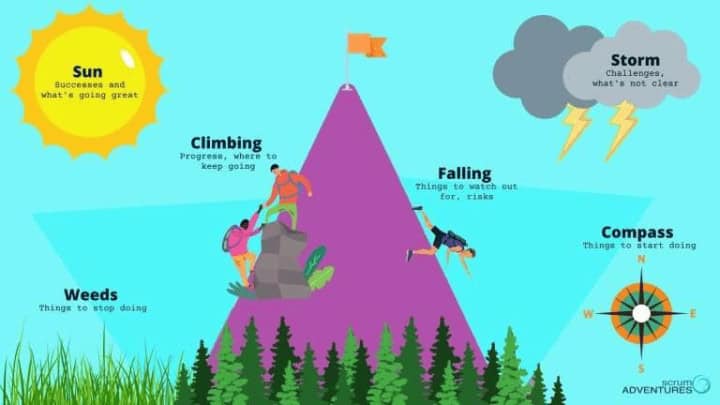
Retrospectives – Scrum Adventures
This format is particularly effective for milestone retrospectives at the end of a major project phase, where the team has genuinely overcome significant challenges and needs a format that honors that journey while extracting meaningful lessons. Here are the metaphorical elements and what they reveal:
- Ropes (Helpers): These are the tools, relationships, processes, and decisions that made the climb possible, including everything from well-defined requirements and strong cross-team collaboration to reliable infrastructure and supportive leadership.
- Boulders (Unexpected Obstacles): Unlike planned risks, boulders are the surprises that require significant effort to navigate. Documenting them helps future teams anticipate similar disruptions and plan contingencies before they materialize.
- Weather (Persistent Challenges): Some challenges do not resolve quickly. The weather category captures ongoing conditions that the team had to work within throughout the sprint or project, such as organizational constraints, resource limitations, or shifting priorities.
- First Aid (Solutions Applied): This section captures the interventions, workarounds, and decisions that kept the team functional during difficult periods, creating a library of practical solutions that can be referenced in future sprints.
15. Lessons Learned
The Lessons Learned template is most commonly used at the end of a complete project or major release rather than at the close of an individual sprint. It provides a formal structure for documenting what succeeded, what failed, what was planned and executed as intended, and what happened unexpectedly during the project lifecycle.
Unlike sprint-level retrospectives that focus on incremental improvements, the Lessons Learned format produces documentation that is explicitly intended for future teams. This shifts the exercise from an internal improvement discussion to a knowledge management activity that benefits the broader organization. Here are the four quadrants and their specific contributions to organizational learning:
- Successful Activities: Teams document what was planned and executed well, creating a record of repeatable practices that future project teams can deliberately adopt rather than rediscover through trial and error.
- Unsuccessful Activities: Honest documentation of what failed and why is the most valuable output of a Lessons Learned retrospective. These entries prevent organizations from repeating costly mistakes across different teams or project phases.
- Planned Activities: This quadrant captures everything that went as expected, providing a baseline understanding of which project management approaches and delivery practices are reliable within the team’s context.
- Unplanned Activities: Documenting what emerged unexpectedly, both positive surprises and unforeseen complications, gives future teams a more realistic picture of how similar projects actually unfold versus how they are typically scoped.
16. Trello Agile Retrospective Templates
Trello offers a set of pre-built agile retrospective templates that allow teams to run structured retrospective sessions directly within their existing project management workflow. Because many teams already use Trello for sprint planning and backlog management, using it for retrospectives reduces tool-switching overhead and keeps retrospective action items close to the tasks they relate to.
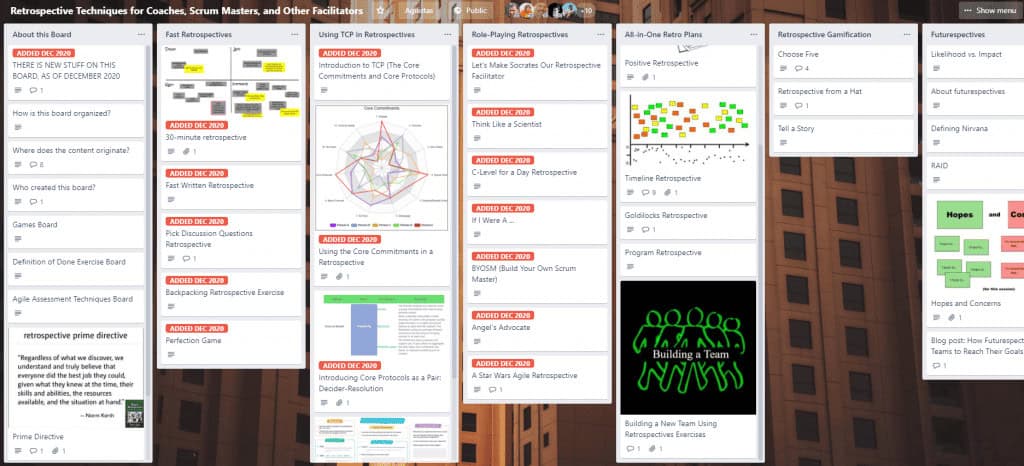
Retrospective Techniques for Coaches, Scrum Masters, and Other Facilitators | Trello
Trello’s card-based format maps naturally to retrospective activities, with lists serving as columns and cards representing individual feedback items that can be labeled, assigned, voted on, and linked to specific actions. Here are the specific advantages Trello templates bring to agile retrospective practice:
- Workflow Integration: Running retrospectives in Trello means action items can be immediately converted into cards, assigned to team members, and added to the sprint backlog without any manual transfer between tools or platforms.
- Asynchronous Participation: Trello’s persistent board structure allows team members to add their retrospective input before the live session, which is particularly valuable for distributed or remote teams operating across time zones.
- Historical Record: Retrospective boards remain accessible after the session ends, allowing teams to review past feedback when planning future sprints and to track whether previously identified issues have been resolved.
- Voting and Prioritization: Trello’s built-in voting features allow teams to prioritize the most important retrospective items democratically, ensuring that discussion time is focused on the issues that matter most to the majority of the team.
17. Hot Air Balloon Retrospective
The Hot Air Balloon Retrospective works on a similar principle to the Sailboat format but uses the imagery of a balloon in flight to frame team reflection. Team members imagine themselves drifting in a hot air balloon and consider what forces are affecting their journey: the hot air that lifts them higher, the weight that keeps them grounded, the wind that pushes them forward, and the storm clouds that threaten their path.
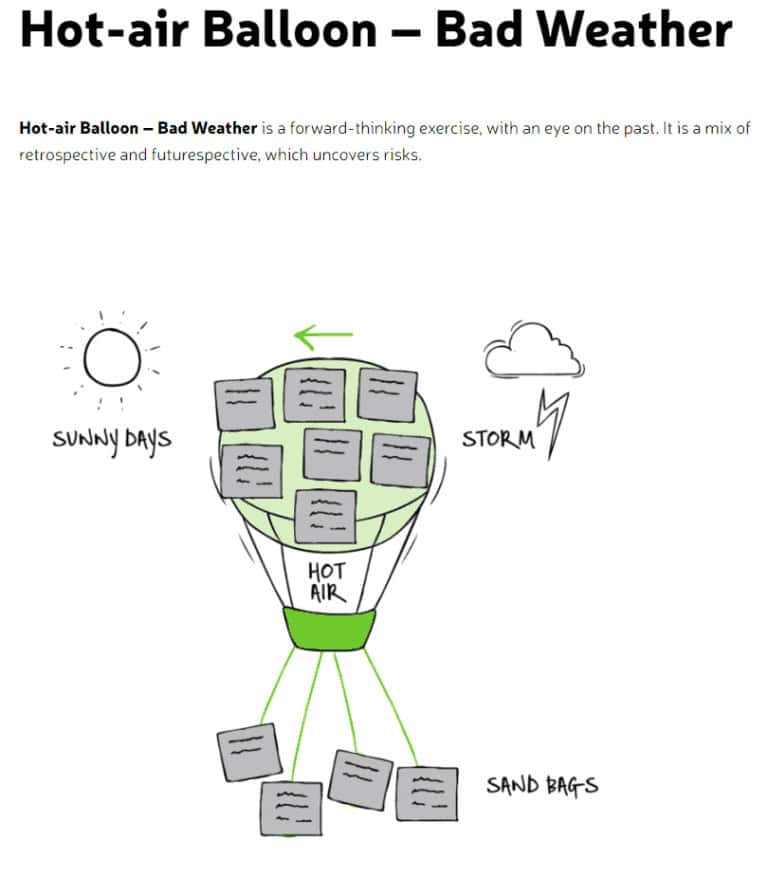
Hot-air Balloon – Bad Weather | FunRetrospectives
This format is particularly effective for teams that have used the Sailboat template frequently and want a fresh metaphor that evokes the same analytical framework. The absence of a fixed destination metaphor makes it slightly more open-ended, which some teams find allows for more exploratory discussions.
Here are the metaphorical elements and how they translate to sprint reflection:
- Hot Air (What Keeps Us Aloft): This represents the energy sources and motivating forces that sustain the team’s performance, including strong team culture, meaningful work, clear goals, or leadership support that makes the work worth doing.
- Weight (What Holds Us Back): These are the burdens the team is carrying, such as technical debt, unclear requirements, resource constraints, or organizational bureaucracy that reduces speed and increases friction across sprints.
- Wind (What Propels Us Forward): Wind represents the external or internal forces actively accelerating progress, including strong stakeholder alignment, well-functioning CI/CD pipelines, or effective sprint ceremonies that support delivery.
- Storm Clouds (Risks Ahead): Like rocks in the Sailboat template, storm clouds represent visible risks that have not yet materialized. Naming them explicitly invites the team to discuss mitigation strategies before those risks become active blockers.
Facilitating a Sprint Retrospective
Sprint retrospectives are short, focused meetings held at the end of every sprint. They serve a dual purpose: they strengthen team cohesion through honest dialogue, and they identify process gaps that are slowing delivery or degrading quality. Getting the facilitation right is just as important as choosing the right template.
The format should follow a consistent five-stage structure to ensure the session is productive and that all participants have a genuine opportunity to contribute. Here is the standard flow that experienced facilitators use to structure every retrospective:
- Icebreakers: Opening activities like quick word association games or a single-question check-in warm the group up and signal that this is a psychologically safe space where candid feedback is genuinely welcomed.
- Setting the Stage: The facilitator introduces the retrospective format, clarifies the scope of the sprint being reviewed, and establishes any ground rules that will guide the session toward constructive rather than adversarial discussion.
- Combining Ideas: Participants add their individual inputs, and the facilitator groups similar themes together, ensuring that every voice is captured before the team moves to prioritization and discussion.
- Voting on Priorities: Teams use dot voting, show of hands, or digital polling tools to identify which items deserve the most discussion time, preventing the loudest voices from dominating the agenda.
- Follow-Up Actions: Each priority item generates a specific, assigned action item with a clear owner and a due date, ensuring that the retrospective produces measurable outcomes rather than good intentions.
After every sprint or release cycle, the Scrum Master or team lead should hold a retrospective guided by three core questions. Every retrospective format, regardless of its metaphor or structure, ultimately maps back to this foundation. The three core questions that every retrospective must answer are:
- What is going well?
- What areas could be improved?
- What should we be doing differently?
A retrospective is typically time-boxed to two hours and is structured around brainstorming solutions, committing to specific changes, and reviewing those changes in the following retrospective. When used consistently, retrospectives produce measurable improvements in four areas: productivity, capability, quality, and team capacity.
How to Run a Sprint Retrospective: The 5-Step Process
Esther Derby and Diana Larsen defined a five-step process for running effective retrospectives that remains the gold standard in agile coaching practice. Each step has a specific purpose and a set of facilitation techniques that make it work.
Step 1: Set the Stage
Setting the stage is about creating the psychological conditions for honest participation. Retrospectives only work when team members feel safe enough to share genuine concerns. If people are worried about how their feedback will be received, they default to safe, shallow answers that generate no useful insights.
Getting people talking early, even informally, increases the likelihood of meaningful participation later. The Scrum Master can introduce one of these engagement techniques to open the session:
- Check-In: A round-robin opening where each person shares two sentences about what they hope to get from the retrospective, which helps facilitators understand the team’s current mood and adjust the session accordingly.
- Focus On/Off: A word-association warm-up that invites participants to react to paired concepts like “conversation vs. argument” or “understanding vs. defending,” which surfaces team tensions gently before the formal session begins.
- ESVP: An anonymous poll where participants classify their current attitude toward the retrospective as Explorer, Shopper, Vacationer, or Prisoner. The aggregate results tell the facilitator how much energy and buy-in they have to work with.
- Working Agreements: Small groups draft behavioral agreements for the session, which are then combined into a master list, giving every participant a sense of ownership over how the conversation will be conducted.
Step 2: Gather the Data
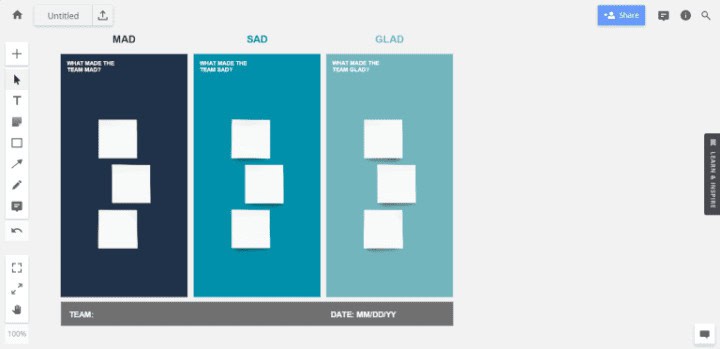
Gathering data means creating a shared picture of what actually happened during the sprint, not what people assumed or heard second-hand. The goal is to move the team from individual recollections to a collective understanding that everyone can engage with. The facilitator can draw on several team-based techniques to bring richer data into the session:
- Timeline: The team co-creates a chronological map of the sprint, marking key events, decisions, and emotional inflection points, which helps surface patterns that are not visible in any single standpoint.
- Triple Nickels: Five groups spend five minutes generating five ideas, repeated five times. This high-intensity format produces a large volume of diverse perspectives in a short period and works well with larger teams.
- Color-Coded Dots: Participants use colored sticky dots on a timeline to mark where emotional intensity ran high or low, creating a visual heat map of the sprint that guides discussion toward the most significant moments.
- Mad, Sad, Glad Cards: Colored cards representing emotional reactions help teams connect feelings to specific sprint events, which tends to produce more honest and detailed retrospective input than abstract questioning.
- Satisfaction Histogram: A visual representation of team satisfaction across different aspects of the sprint, such as collaboration, tooling, clarity, and delivery, that reveals where the greatest gaps between expectation and experience occurred.
Step 3: Generate the Insights
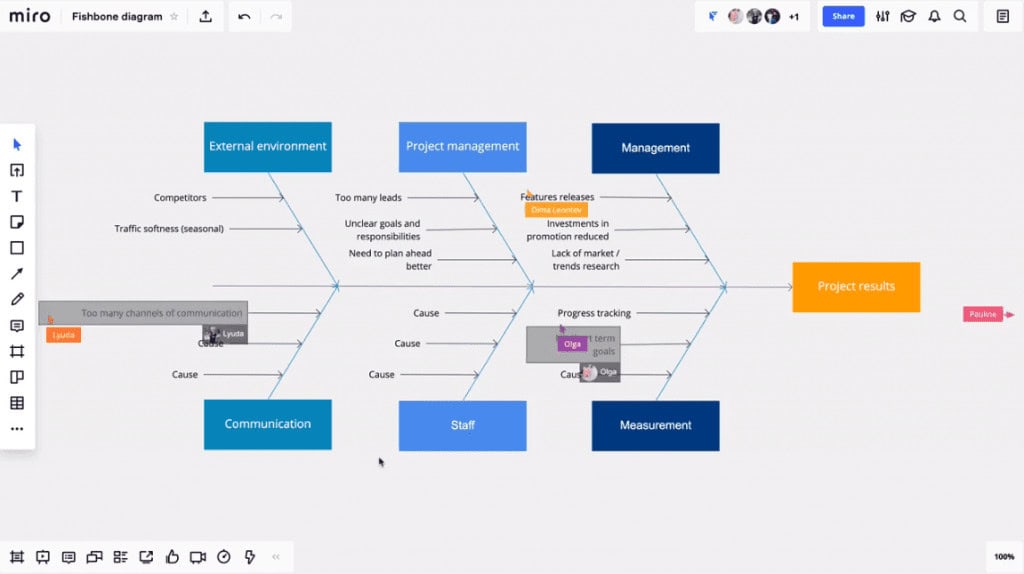
Once the data has been collected, the team evaluates it to find root causes and recurring patterns. This is the analytical heart of the retrospective and where the most valuable insights are typically generated. The following techniques help teams move from data to insight effectively:
- Five Whys: Working in pairs, team members select an issue and apply the “Why?” question repeatedly until they reach the root cause rather than stopping at the symptom, which is where most retrospective discussions typically end.
- Fishbone Diagram: Also called the Ishikawa diagram, this technique maps potential causes onto a visual branching structure, organizing contributing factors into categories and revealing how multiple inputs combine to produce a single outcome.
- Prioritize with Dots: Participants use adhesive dots to vote on the issues they find most important, creating a visual priority ranking that guides the team toward the discussions most likely to produce meaningful improvement.
- Identify Themes: The facilitator looks for recurring patterns across all data gathered, grouping related feedback into themes that reveal systemic issues rather than isolated one-off events.
Step 4: Decide What to Do
After generating insights, the team must commit to specific, measurable improvements. Good retrospective discussions that produce no action items represent wasted time, and teams that repeat this pattern quickly lose faith in the retrospective process. Any goals created to address identified issues must meet the SMART criteria: Specific, Measurable, Attainable, Relevant, and Timely.
This ensures that improvements can be tracked across future sprints. Teams can use an action wheel to categorize each item using a Keep/Drop/Add or Start/More/Less framework, making prioritization faster and more objective.
Step 5: Close the Sprint Retrospective
The closing phase formally ends the session and gives participants a structured opportunity to reflect on the retrospective itself. This meta-reflection is often skipped, but is genuinely valuable for improving how the team runs future sessions. Four techniques support a strong retrospective close:
- Plus/Delta: Participants share what they want to keep doing in future retrospectives and what they want to change about how the session is run, generating direct feedback on retrospective facilitation quality.
- Helped, Hindered, Hypothesis: A three-part closing that allows everyone to rate the session’s value and suggest hypotheses about what a different approach might improve the next retrospective.
- Return on Invested Time: Team members grade the meeting on a scale of one to five. If scores are consistently low, it signals that the format, facilitation, or scope of the retrospective needs adjustment.
- Appreciations: Team members express specific gratitude to each other for contributions made during the sprint, ending the session on a positive note that reinforces team cohesion and morale.
>> For more information, check out this PDF extract of Esther & Dianna’s book
Mistakes to Avoid for End-of-Sprint Retrospectives
Even well-intentioned retrospectives can produce poor outcomes when common facilitation mistakes are allowed to persist. Many teams run retrospectives on autopilot, repeating the same format regardless of what the sprint required, and then wonder why participation drops and action items go unfollowed. Being aware of the most common failure patterns is the first step toward running consistently effective retrospective sessions.
Here are the most damaging mistakes agile teams should actively work to avoid:
- Groupthink: When teams default to consensus without genuine debate, retrospectives surface only what everyone already agrees on. Requiring individual brainstorming before group discussion reduces social pressure and produces more honest, diverse feedback.
- Technology Dependency: Over-relying on digital tools can slow sessions down and exclude team members with limited technical confidence. The best format is the one the team can use fluently, whether that is a digital board or a physical whiteboard.
- Interpersonal Conflict: Retrospectives that drift into blame or interpersonal grievances lose their value quickly. The facilitator’s role is to redirect conflict toward process analysis rather than personal accountability.
- Unchecked Negativity: While honest critique is essential, sessions dominated by complaints without corresponding solutions drain team morale and reduce the likelihood of follow-through on action items.
Why Are Agile Retrospective Templates Important?
Retrospective templates provide teams with a structured framework that removes the need to design the session from scratch each time. Without structure, meetings tend to drift, conversations become repetitive, and the time-box gets violated. Templates solve all of these problems by giving both the facilitator and the participants a shared map for the session.
Beyond logistics, templates serve a deeper purpose: they signal to the team that reflection is a valued and protected activity within the development process. Regular retrospectives that are well-facilitated build a culture of continuous improvement that compounds over time, producing teams that consistently perform better with each sprint cycle.
Here are the specific benefits that make retrospective templates indispensable for agile teams:
- Improved Communication: Templates create structured opportunities for all team members to share perspectives that might not surface in daily standups or sprint reviews, improving information flow across the team.
- Early Issue Resolution: Regular retrospectives catch problems while they are still small. Addressing friction early, before it compounds into a serious delivery risk or team morale issue, is far less costly than post-project analysis.
- Goal Reinforcement: Templates that include a goal or vision component keep the team’s broader objectives visible throughout the sprint review, preventing retrospectives from becoming isolated complaint sessions.
- Team Empowerment: Well-run retrospectives give teams the agency to identify and solve their own process problems rather than waiting for management to intervene, which builds ownership and accountability.
- Team Building: The collaborative nature of retrospective sessions, particularly formats that include games or creative metaphors, strengthens interpersonal relationships and builds the trust that underpins high-performing teams.
Software development teams operating within Scrum frameworks tend to benefit most from retrospective templates, but the practice extends well beyond software. Marketing, operations, customer success, and product teams all run better when they reflect deliberately and act on what they find.
Video Explaining Top Sprint Retrospective Ideas
Watch the video below from Yeti LLC for a quick walkthrough of the top sprint retrospective ideas to help your agile team reflect, improve, and collaborate more effectively.
Conclusion
Sprint retrospectives are among the most powerful tools available to agile teams, but only when they are run with intention, variety, and a genuine commitment to acting on what is discovered. The 17 formats covered in this guide offer a broad range of approaches, from emotion-focused formats like Glad, Sad, Mad to strategic frameworks like the Sailboat and Starfish templates, giving facilitators the flexibility to match the retrospective format to the specific needs of each sprint.
Choosing the right retrospective format is not a one-time decision. The most effective agile teams rotate through multiple formats, use data from previous sessions to guide their choices, and continuously refine how they facilitate. Start with one or two formats that fit your team’s current stage, build the habit, and expand from there. The return on that investment, in better team communication, faster problem resolution, and sustained delivery quality, compounds with every sprint.
Frequently Asked Questions About Sprint Retrospectives
What do agile teams most often get wrong with retrospectives?
The most common mistake is failing to time-box individual contributions, which means quieter team members never get a chance to speak. Teams also frequently run retrospectives without following up on previous action items, which signals that the session is performative rather than genuinely improvement-focused. Strong retrospectives are short, structured, and followed by visible action.
What makes a good sprint retrospective template?
A good retrospective template has three to four clearly defined sections or quadrants that map to the core retrospective questions: what went well, what could be improved, and what should change. The best templates are simple enough to explain in under two minutes, flexible enough to accommodate teams of different sizes, and structured enough to keep the conversation focused and time-bounded.
Why does a team need a retrospective template at all?
Templates eliminate the overhead of designing a session from scratch each time, which means the team spends its energy on reflection rather than on logistics. A good template also sets expectations in advance, allowing participants to come prepared with specific feedback rather than thinking on the spot, which produces higher-quality inputs and more actionable outputs.
How do you choose the right retrospective format for your team?
Teams with experience running retrospectives should review their previous sessions to identify recurring themes or problems that a different format might address more effectively. New teams benefit from starting with simple three-column formats before introducing more complex metaphor-driven frameworks. The key variable is psychological safety: choose a format that matches the current comfort level of the team, then gradually introduce more nuanced structures as trust develops.
How often should a team run a sprint retrospective?
In standard Scrum practice, a retrospective should be held at the end of every sprint, typically within a two-hour time-box for a two-week sprint. Teams running shorter sprint cycles may use a quick retrospective format at each sprint end and reserve longer sessions for end-of-quarter or end-of-project reviews. Consistency matters more than duration: a brief, regular retrospective produces better results than an infrequent, comprehensive one.
Suggested articles:
- 25 Sprint Retrospective Examples for Scrum Masters
- 9 Free Sprint Review Templates – Word, Google Docs
- 5 Sprint Planning Templates Word & XLS

Shane Drumm, holding certifications in PMP®, PMI-ACP®, CSM, and LPM, is the author behind numerous articles featured here. Hailing from County Cork, Ireland, his expertise lies in implementing Agile methodologies with geographically dispersed teams for software development projects. In his leisure, he dedicates time to web development and Ironman triathlon training. Find out more about Shane on shanedrumm.com and please reach out and connect with Shane on LinkedIn.
Shane – Thanks for sharing so many amazing techniques for engaging Sprint Retrospectives! A valuable collection for all.