
Managing a remote team comes with real challenges, and keeping everyone productive and accountable is at the top of the list. Without the right tools, it’s easy to lose visibility into how work is actually getting done. That’s where employee monitoring software comes in. The right tool gives you real-time insights into your team’s activity, helps you spot bottlenecks early, and ensures everyone stays focused during work hours, without micromanaging.
But with so many options on the market, choosing the best one can feel overwhelming. We’ve researched for you. Below, you’ll find an honest breakdown of the 4 best employee monitoring tools for 2026, what they offer, what they cost, and which one is the right fit for your team.
Top Picks for 2026: Best Employee Monitoring Apps
| Software | Best For | Ratings (Capterra) | Starts At |
|---|---|---|---|
| Apploye | Live employee monitoring with screenshots and detailed activity reports | 4.8 | $2.50/user/month |
| Controlio | Real-time monitoring and flexible deployment options | 4.4 | $7.99/user/month |
| Deputy | Scheduling and workforce management | 4.6 | $4.50/user/month |
| RescueTime | Automatic productivity tracking | 4.6 | Free |
How We Evaluate the Best Employee Monitoring Software
We carefully evaluated each monitoring software on this list based on the following criteria:
- Features & Functionality: From time tracking to activity monitoring, we check for tools that offer robust, useful capabilities.
- Ease of Use: A great tool should be simple for both managers and employees to navigate.
- Security & Compliance: Data privacy and compliance with regulations like GDPR are non-negotiable.
- Integrations: We look for software that plays well with your existing tools and workflows.
- Pricing & Scalability: Whether you’re a small team or a large enterprise, affordability and scalability matter.
- Customer Support & Reviews: Real-world feedback and responsive support are critical for long-term success.
4 Best Employee Monitoring Software
1. Apploye – The Best Employee Productivity Monitoring Software of 2026
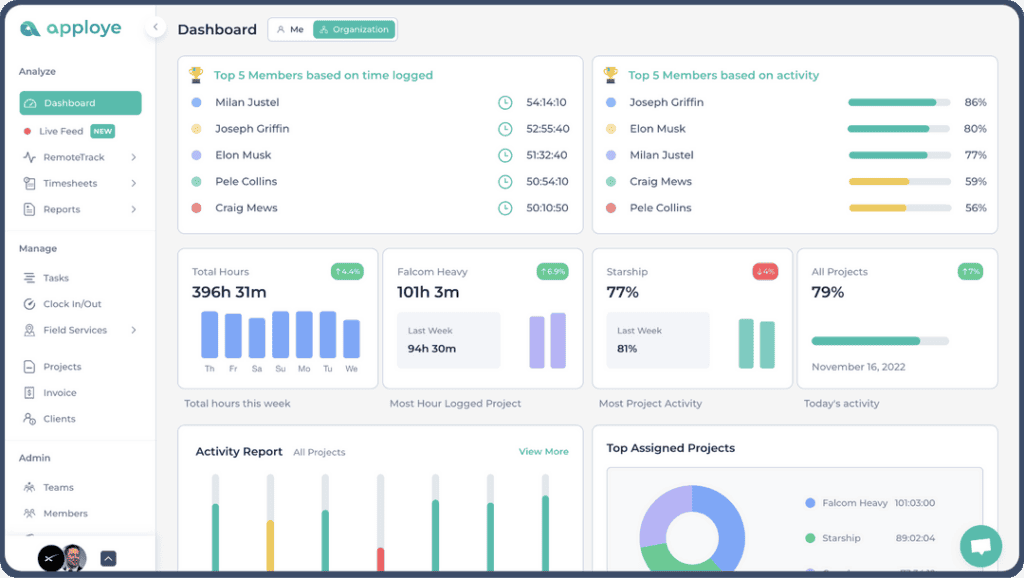
Apploye employee monitoring is our #1 choice. It has powerful features like instant screenshots, screen recording, apps & URL tracking, and live activity monitoring. I can see everything my team does. I watch their work in real-time and know exactly how they’re performing. Apploye works for all types of teams. It monitors remote workers, office staff, and people working from home. It works on all devices and platforms.
With this platform, we can also check each team member’s internet use and online activities. Then we show them detailed reports. They see their active time, idle time, the websites they visit, and the apps they use during work hours. This really helped us to know if our employees were productive. Now, monitoring employee productivity and accountability is easy for me. Apploye is also cloud-based. That allows me to access real-time data from anywhere.
Key Features
- Takes automatic random screenshots and records full sessions.
- Shows live employee activity on your dashboard.
- Tracks which apps and websites team members use.
- Offers different access levels for owners, admins, and employees.
- Tracks time even without the internet. It syncs when you’re back online.
- Measures productivity through keystroke and activity tracking.
- Tracks time automatically. You can adjust it for your industry.
- Works for remote teams and office teams.
- Creates online timesheets with detailed reports. You can export them anytime.
- Helps you manage projects, track budgets, and control costs.
- Includes payroll with timesheet approval and easy invoicing.
- Connects with tools you already use, like Trello, ClickUp, and Asana.
- Has mobile apps for Android and iOS.
Pricing
- Standard (Monthly): $5 per user/month
- Standard (Yearly): $2.5 per user/month
- Elite (Monthly): $7 per user/month
- Elite (Yearly): $3.5 per user/month
Who Should Use Apploye
- Large companies and small to medium-sized businesses.
- Directors who manage remote or hybrid teams.
- Project managers who need to track tasks, projects, and budgets.
- Employers who want detailed reports on employee activity.
- Teams that need payroll and invoicing built in.
- Managers who want real-time employee data.
- HR and IT teams that measure employee productivity.
- Freelancers and entrepreneurs managing multiple clients.
Why Apploye is the Best Choice for Most Businesses
There are many top time tracking tools available in the market. But Apploye stands as the best option with a mix of features, ease of use, and price. Here’s why:
- Complete Features: Apploye has everything you need. It tracks time and gives detailed productivity reports.
- Affordable for Small Businesses: It costs just $4.5 per user per month. It’s one of the cheapest options with full features.
- Perfect for Remote Teams: It’s easy to manage remote workers or freelancers with the robust Apploye employee monitoring tool. It also makes team monitoring effortless with zero interruption in the employee workflows.
2. Controlio – Best for Stealth Monitoring
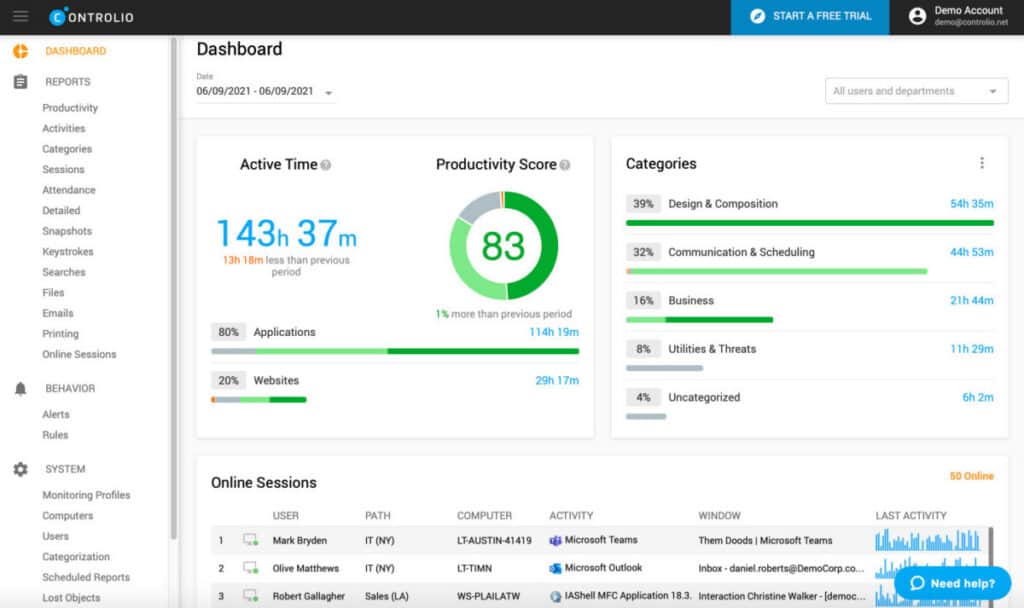
Controlio is an advanced employee tracking tool. It helps businesses boost their workplace productivity and reduce wasted time. It gives you useful performance data and strong monitoring features. These help organizations find and fix unproductive behaviors. This intuitive solution offers a simple dashboard. It gives managers and administrators a clear view of workforce activity. So, it becomes easier for them to maintain efficiency and security.
Key Features
- Monitors screens live and full-time.
- Stores data and filters web content.
- Tracks web and app usage in real-time.
- Monitors file usage and keystrokes.
- Has stealth mode and tray icon options.
- Offers customizable monitoring profiles.
- Installs remote agents via LAN.
- Calculates productivity scores.
Pricing
- Cloud: $7.99/user/month
- On-Premises: Custom plan
- Private Cloud: Custom plan
| Reasons to Use | Reasons to Avoid |
| – Gives detailed performance reports for better decisions. – Helps identify potential insider threats. – Has a user-friendly interface that’s easy to navigate. – Integrates well with other applications. | – May raise privacy concerns for employees. – Might create distrust in the workplace. – Non-technical users may find it hard to learn. – The cost might be too high for smaller organizations. |
Who Should Use Controlio
- HR departments that are interested in monitoring employee performance.
- Organizations worried about insider threats.
- Businesses that need to comply with data usage policies.
What Could Be Improved
Controlio has powerful features, but it can still get better. Better tutorials and support would help everyone use this tool in the proper way. Clear privacy policies and better consent options would build trust among employees.
3. Deputy – Best for Employee Management and Scheduling
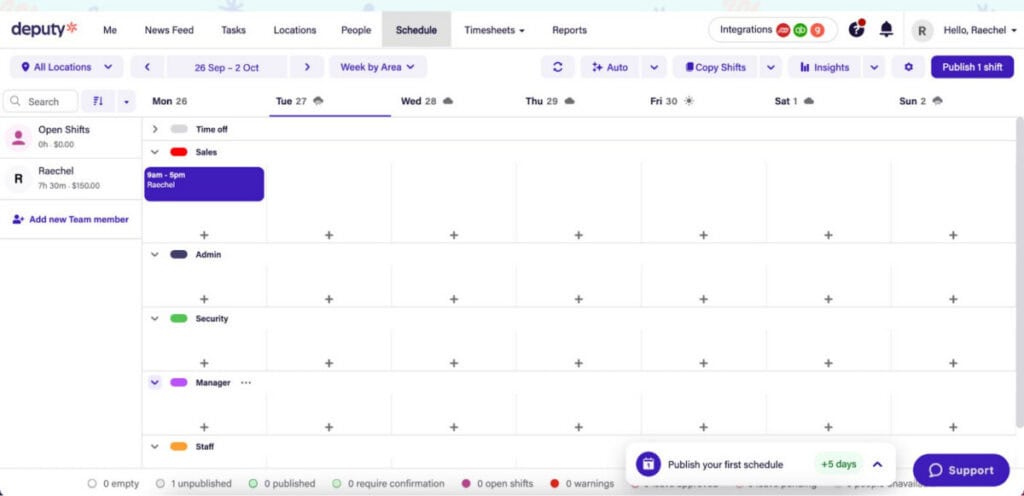
Deputy is a versatile employee scheduling and task management software. It simplifies operations and manages workloads. It also tracks assignments effectively. You can also use Deputy on desktop and mobile with more flexibility. Employees can check their tasks from anywhere. It also offers an intuitive and easy-to-use dashboard, which enhances team coordination. This unique feature also makes Deputy perfect for dynamic work environments.
Key Features
- Schedules tasks and manages teams in one place.
- Has a color-coded dashboard to monitor workloads in real-time.
- It lets you assign tasks to the right team members.
Pricing
- Scheduling: $4.50 per user per month
- Time & Attendance: $4.50 per user per month
- Premium: $6.00 per user per month
- Enterprise: Custom pricing
| Reasons to Use | Reasons to Avoid |
| – Makes team allocation and task scheduling easy. – Uses color-coded messages for quick workload insights. – Works for various industries like nonprofits, retail, and more. | – May not suit very small teams with limited budgets. – Advanced features are only available in higher pricing tiers. |
Who Should Use Deputy
- Retail businesses.
- Government agencies.
- Educational institutions.
- Nonprofits and restaurants.
What Could Be Improved
Deputy could make advanced features available in lower-priced plans. This would help more users access them. They can also offer more customization options for reports and scheduling. This would benefit larger organizations with special needs. Better customer support would also help. This is especially important when onboarding large teams.
4. RescueTime – Best for Tracking Personal Productivity
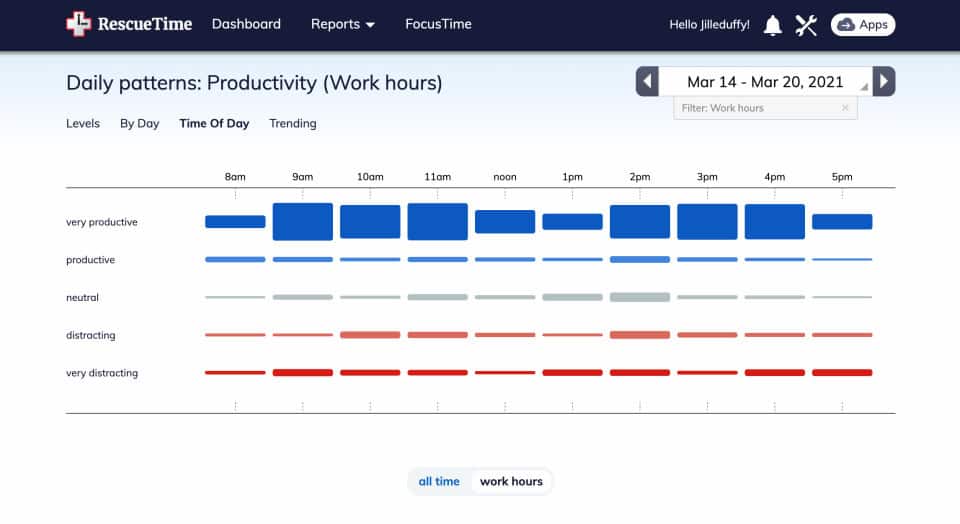
RescueTime is a handy time-tracking tool. It helps individuals and teams boost productivity. It monitors daily activities on desktop and mobile. The software runs quietly in the background and tracks apps and websites in an automatic way. You don’t need to do anything manually to run the app. It also has clear visuals, goal-setting, and detailed reports. These intuitive solutions are perfect for managing your own productivity. It also works well for tracking employee performance.
Key Features
- Tracks app and website usage without interruption.
- Offers focus sessions to boost productivity.
- Sets daily task goals to keep you on track.
- Shows visual graphs comparing productive and unproductive tasks.
- Monitors mobile and desktop activity.
- Provides in-depth reports and analysis.
- Integrates with over 300 apps and services.
Pricing
- RescueTime Lite: Free
- RescueTime: $12.00 per month
| Reasons to Use | Reasons to Avoid |
| – Fully automatic time tracking. – Gives deep insights and visual breakdowns of work habits. – Helps you set and achieve goals. – Great for personal productivity and light employee tracking. | – Lacks strong team collaboration features. – Mobile call monitoring might feel excessive. – The free version only offers basic tracking. |
Who Should Use RescueTime
- Anyone who wants to increase their personal productivity.
- Remote workers who need clear time usage data.
- Managers who want simple, non-invasive employee monitoring.
What Could Be Improved
RescueTime needs better team collaboration tools. Shared dashboards or project-based tracking would help. This would make it stronger for businesses. The mobile call monitoring feature could be reduced in order to respect user privacy more.
Top Features to Look for in Employee Monitoring Software
When selecting employee monitoring software, focus on features that match your goals. Features that will help you enhance productivity, ensure compliance, and simplify team management. Here are the main features to consider when picking an employee monitoring tool:
1. Real-Time Activity Monitoring
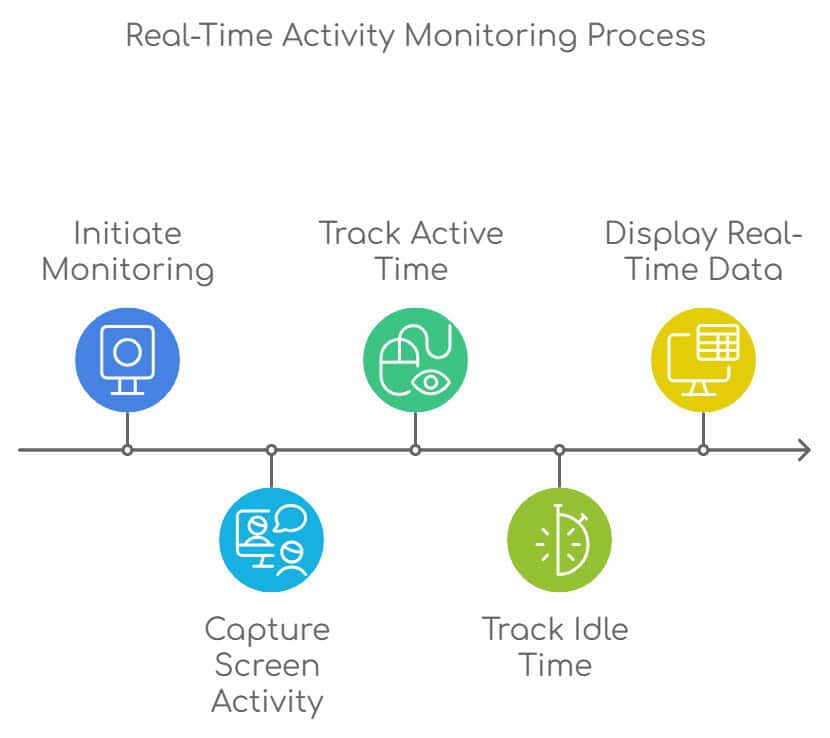
Live work monitoring shows managers what employees are doing right now. This keeps both remote and on-site workers focused on their tasks. Besides, the screen monitoring from activity monitoring tools lets you see employee screens in real-time. You can also see how much time is spent working versus the idle time using this feature.
2. Automatic Time Tracking
This feature records employee work hours automatically. You don’t even need to enter anything in a manual process. It also shows you your work hours, overtime, and breaks. With Automatic time logging, you can remove the need for manual oversight. Its Timesheet generation can create reports you can easily export for payroll and HR.
3. Task and Project Monitoring
Some businesses need to track project progress and allocate resources. Project time tracking is one of the most essential features for them. It keeps projects on time and within budget. You can also find workflow inefficiencies and bottlenecks. This is especially important for virtual project management.

4. Employee Behavior Analytics
When you understand your employee behavior, it becomes easier for you to identify top performers. It also shows you who might be disengaged. Behavior analytics gives you data on application usage and web browsing habits. It shows overall engagement levels. Moreover, Keystroke logging, on the other hand, helps you monitor typing patterns to assess their productivity.
5. Data Loss Prevention (DLP)
Businesses that handle sensitive information need data loss prevention features. This helps them to protect against breaches and ensure compliance. The DLP feature also tracks file movements to prevent unauthorized sharing. Moreover, its Sensitive data alerts notify you of risky activities involving confidential information.
6. Reporting and Analytics
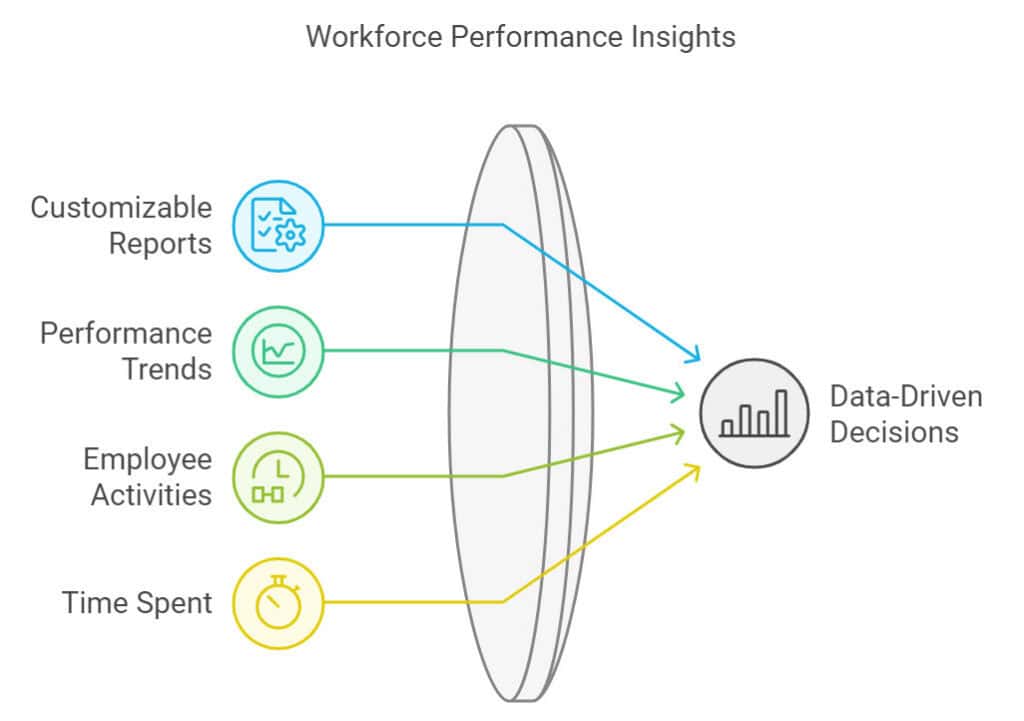
In-depth reporting and analytics help you make informed decisions. They give you a clear picture of workforce performance and productivity. You can identify trends, spot inefficiencies, and take targeted action to continuously improve your team’s overall output and keep projects running smoothly.
7. Screen Capture and Recording
This feature is essential for companies that need visual evidence of work activity, especially when managing remote employees. Using a time tracker with screenshots that allows you to take periodic images to document employee activity and verify productivity. For deeper auditing or client reporting, you can also enable continuous screen recording when needed.
8. Application and Website Usage Tracking
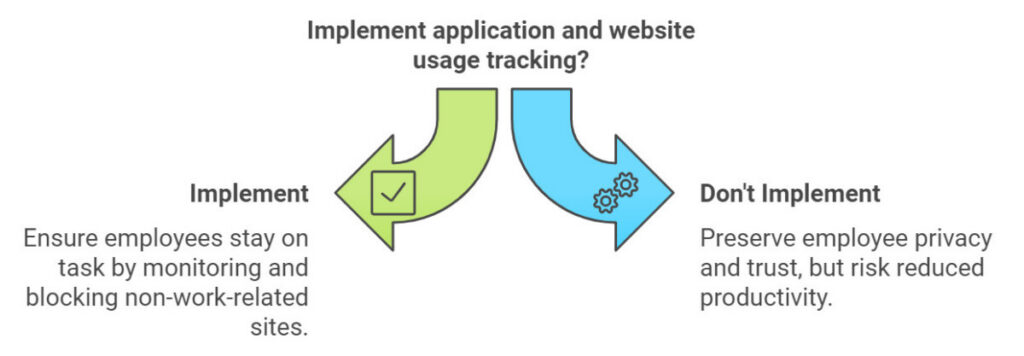
User activity Monitoring during work hours keeps employees on task. This is also prominent for employee productivity. Employee monitoring software blocks non-work-related sites. It tracks time spent on work-related apps versus non-work-related apps. So, measuring employee performance becomes easier.
9. Compliance Features
Some industries have strict regulatory requirements, making compliance monitoring absolutely critical. Features like data encryption, audit trails, and GDPR compliance help ensure businesses meet legal standards. These tools also support industry-specific regulations such as HIPAA and SOX, protecting both the organization and its employees from potential legal risks.
10. Cloud-Based Access
Cloud-based employee monitoring software offers flexibility. This is especially important for organizations managing workers from different locations. Managers can access employee activity from any device with internet. This eliminates the need for expensive on-premise servers.
How to Implement Employee Monitoring Software Effectively
Rolling out employee monitoring software requires a thoughtful, transparent approach. Rushing the process or keeping employees in the dark can lead to distrust and resistance. Here’s how to do it the right way:
- Start with Transparency: Before launching any monitoring tool, communicate openly with your team. Explain why you’re implementing the software — whether it’s to improve productivity, streamline workflows, or ensure accountability. When employees understand the purpose, they’re far more likely to embrace the change rather than feel threatened by it.
- Create Clear Policies and Guidelines: Draft a straightforward monitoring policy that outlines exactly what is being tracked, when monitoring takes place, and how the data will be used. Make this policy easy to read and accessible to everyone. Encourage questions and feedback, and update the policy as needed to reflect any changes in how the software is used.
- Provide Proper Onboarding and Training: Share easy-to-follow guides, video tutorials, or live walkthroughs so every team member knows how to use the software. Both managers and employees should feel comfortable navigating the platform from day one. A smooth onboarding experience reduces friction and builds confidence across the team.
- Use Data to Empower, Not Just Monitor: Don’t just use the data to flag underperformance. Leverage the insights to celebrate wins, recognize top performers, and identify areas where additional support or resources may be needed. When employees see the data working in their favor, it fosters a positive, growth-oriented culture.
- Monitor the Impact Regularly: Keep a close eye on how the software is affecting team morale, productivity, and overall performance. Schedule regular check-ins to gather feedback from employees and managers alike. If something isn’t working, be willing to adjust your approach.
- Always Stay Legally Compliant: Make sure your monitoring practices comply with local labor laws and data privacy regulations, such as GDPR or HIPAA. Always obtain necessary consent, store data securely, and limit monitoring to work-related activities only. Respecting employee privacy isn’t just good practice — it’s a legal obligation.
Common Misconceptions about Employee Monitoring Software
Employee monitoring software has many benefits. But it still gets a bad reputation. Let’s clear up some big misconceptions:
It Invades Privacy
Yes, it tracks activities. But most trusted tools offer privacy settings to keep personal stuff off-limits. Features like selective monitoring and data access controls ensure that only work-related activities are observed. Transparency and clear guidelines shared with employees can further ease any worries and build mutual trust.
It’s Only for Distrustful Employers
No, it’s not about distrust. Many businesses use employee monitoring software to boost productivity and streamline their operations. It helps managers spot workflow issues, identify bottlenecks, and better understand how their teams work. Ultimately, it allows organizations to offer more targeted support, helping employees perform at their very best.
It’s Complicated to Use
This is a myth. Today’s monitoring software is designed to be easy and intuitive. Tools like Apploye have simple, clean interfaces that anyone can navigate. They also provide great onboarding resources and training materials. Whether you’re tech-savvy or not, getting started is not an issue at all.
It Creates a Negative Work Environment
Actually, it’s the opposite. When done right, employee monitoring software promotes accountability and a culture of continuous improvement. Use the data to celebrate wins, recognize top performers, and identify areas for growth. Rather than creating tension, this transparent approach can genuinely lift your team’s spirit and boost overall morale.
Conclusion
As you can see, choosing the right employee monitoring software can greatly improve how you manage your team. There are plenty of options available. But Apploye really stands out. It has all-in-one features. The interface is easy to use. It integrates smoothly with other tools. You might be leading a big crew or a small remote group. Either way, Apploye strikes the perfect balance. It monitors work and boosts productivity. This makes it the top pick for businesses in 2026.
Frequently Asked Questions
Is employee monitoring software legal?
Yes, employee monitoring software is usually legal, but it depends on where you are. Companies need to follow local laws about privacy. It’s a good idea to let employees know what monitoring is happening to keep things transparent and build trust.
How does Apploye compare to other employee monitoring tools?
Apploye stands out with its easy-to-use interface and cool features like real-time tracking and task management, all at a great price. Unlike some other tools out there, Apploye is a solid choice for businesses of any size. It delivers effective monitoring without any complexity.
Can I use employee monitoring software for remote teams?
Absolutely! Employee monitoring software is perfect for remote teams. It allows managers to check productivity and track how much time is spent on tasks. Also, it ensures everyone stays accountable, no matter where they are working from.
How can I ensure privacy when using monitoring tools?
To protect employee privacy, set clear monitoring policies and share them openly with your team. Use tools that focus on specific areas, such as monitoring work hours, and avoid invasive methods.
What is the best employee monitoring software for a small business?
While there are plenty of choices, Apploye stands out as a top pick due to its affordable, super user-friendly, and packed with essential employee surveillance features. You get all the monitoring options you need without the hassle or hefty price tag that comes with larger enterprise solutions. If you’re looking for something simple yet effective, Apploye is definitely the best choice.
Suggested articles:
- Employee Tracking and Attendance Tools: Features & Benefits
- Top 11 Best Time Tracking Tools to Improve Teamwork
- Managing Remote Teams Effectively in a Hybrid Work Environment

Daniel Raymond, a project manager with over 20 years of experience, is the former CEO of a successful software company called Websystems. With a strong background in managing complex projects, he applied his expertise to develop AceProject.com and Bridge24.com, innovative project management tools designed to streamline processes and improve productivity. Throughout his career, Daniel has consistently demonstrated a commitment to excellence and a passion for empowering teams to achieve their goals.