
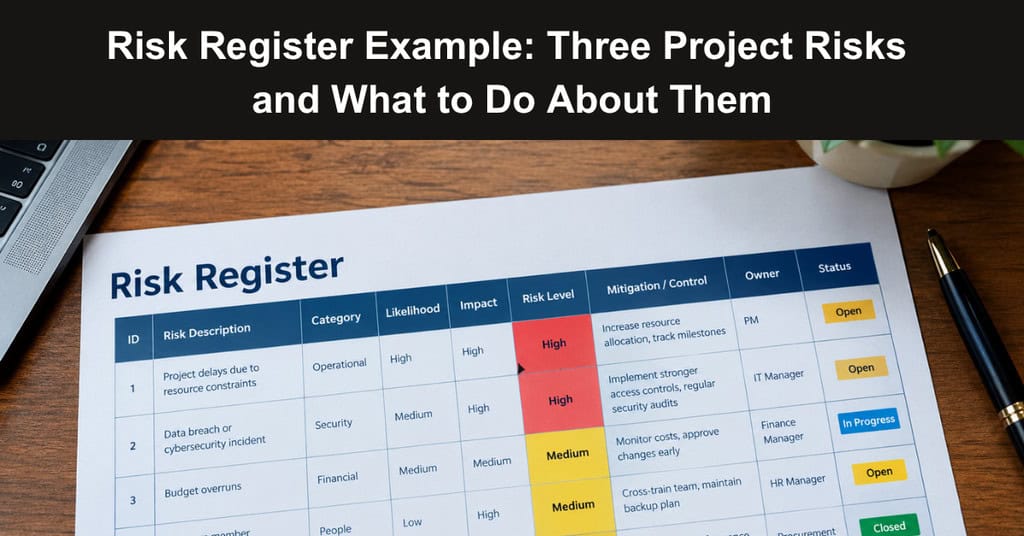
The call-routing configuration for a new customer-support service is due before testing begins. A readiness review follows, then the sponsor’s decision on whether to launch. For this fictional project, a schedule holds the dates; a risk register shows what might disrupt them and who will respond. Without both, a team can see its deadlines but not the threats to them.
A schedule tells a team when work should happen, yet it rarely explains what could knock that work off course. A well-kept risk register fills the gap by naming possible events, the people responsible for them, and the actions that keep dates realistic. The worked entries below show how one looks in practice, starting with what each entry needs to contain.
What Belongs in the Register
Write each risk as a possible event and its consequence. “Staff availability” is a subject; “If no trained reviewer is available for the readiness check, the launch decision could be delayed” gives the team something to manage. An entry also needs an owner, a likelihood and impact rating, a warning sign, an action to reduce the risk, and a fallback if it occurs.
Set a point to review it. The risk register ratings below are illustrative:
- Medium likelihood means there is a credible route to the event.
- Low likelihood means there are few current signs of it.
- High impact means the planned launch date could be threatened.
Everyone using the register needs to understand what its ratings mean.
A Worked Risk Register Example
1. Cover for the Readiness Review
- Risk: If the only trained reviewer is unavailable for the readiness check and no deputy can take over, the team could lose the review needed for the launch decision.
- Likelihood: medium.
- Impact: high.
- Owner: support operations manager.
- Next review: before the readiness timetable is confirmed.
Reliance on one reviewer explains the likelihood rating; the review’s place before launch approval explains the impact. As the timetable is drafted, an empty deputy slot is the warning sign. The manager should appoint someone who can assess the test results and share the review criteria with them beforehand. If cover remains unresolved, the project manager revisits the review date and any knock-on effect on launch.
Approved leave is a known scheduling constraint. The uncertain risk is reaching the review without suitable cover. Checking approved leave and recorded absences in an absence management tracking system can help the owner confirm availability. The project register records the delivery consequence, rather than personal health information.
2. Supplier Input Arrives Too Late for Testing
- Risk: If the call-routing supplier delivers its configuration after the test window opens, the technical team could run out of time to find and correct faults before launch.
- Likelihood: medium.
- Impact: high.
- Owner: technical lead.
- Next review: at the supplier checkpoint before testing.
A missed draft-delivery date gives the lead an early signal. They should establish which parts can be supplied for initial testing and agree a date for the remainder, keeping track of what has yet to be checked. If the final configuration misses its deadline, the late delivery becomes an issue.
The project technical lead identifies which tests can still proceed; the project manager takes any proposed change to the launch date to the sponsor. That is more useful than an action reading “chase supplier”, which leaves the delivery decision unanswered.
3. Launch Approval Is Delayed
- Risk: If questions about launch criteria remain unresolved when the sponsor meets to approve go-live, they could defer the decision.
- Likelihood: low.
- Impact: high.
- Owner: project manager.
- Next review: before the decision pack is circulated.
The meeting is booked, and the criteria have been agreed, which explains the low likelihood rating. Disagreement about what must be ready at launch, or an unanswered question for the sponsor, would change that assessment. The project manager should circulate a short pack covering test outcomes, outstanding items and a recommendation for each. If approval is deferred, they agree a new decision date with the sponsor and tell affected teams which activities should pause.
Keep the Entries Moving
Suppose the support operations manager appoints a trained deputy, confirms their availability, and shares the review criteria. They record those actions and reassess entry 1. Its likelihood might fall, even though missing the review would still have a high impact. Once the readiness check is complete, the owner can close the risk.
A supplier moving its draft date is a warning to reassess entry 2; missing the final delivery date calls for an issue to be managed now. Any remaining risk to testing or launch can stay on the register. At a project check-in, each owner should be able to answer three questions: has the warning sign appeared, what action is due, and when will this entry be reviewed again?
Common Mistakes That Weaken a Register
A register can look complete and still fail the team using it. Most problems appear after the first review, when entries stop being questioned, and the document becomes a record rather than a working tool. For this fictional launch project, four habits are worth watching for as the dates approach, and each one can be corrected early:
- Vague Risk Wording: Entries such as “supplier problems” describe a subject rather than an event, so nobody knows what to prevent. Rewrite each one as a possible event with a clear consequence for the launch date.
- Unowned Actions: An action without a named person tends to wait for someone else. Give every response one owner and one date, so the project manager can see at a glance what is due and who is responsible.
- Stale Ratings: Likelihood and impact change as the project moves. Reassess them at each review, because a rating left untouched since kickoff tells the sponsor nothing about where the project stands today.
- Mixing Risks and Issues: A risk is something that might happen; an issue is something that has already happened. Move an entry out of the register and into issue management once the event occurs, so the team responds rather than monitors.
Fixing these habits takes minutes at a review but saves days later. A short, regular check that each entry is worded as an event, has an owner, and carries a current rating keeps the register honest. It also gives the project sponsor confidence that the launch date rests on managed risks rather than hopeful assumptions.
Conclusion
A risk register earns its place when it changes what people do. In this fictional project, three entries show how a clear event, a named owner, a warning sign, and a fallback turn vague worries into manageable work. The ratings explain why each risk matters, and the review points keep the entries current as dates move and new information arrives.
The same habits apply to any project with a launch decision at the end. Write risks as events, review them on a schedule, and treat a risk as an issue once the event occurs. When each owner can answer the three check-in questions without hesitation, the register is doing its job, and the sponsor can decide with a clear view of what remains.
Suggested articles:
- 60+ Free Risk Register Templates (Google Docs, Excel, PDF)
- Risk Register Template for Project Managers
- 27 Risk Category Examples for Project Managers

Daniel Raymond, a project manager with over 20 years of experience, is the former CEO of a successful software company called Websystems. With a strong background in managing complex projects, he applied his expertise to develop AceProject.com and Bridge24.com, innovative project management tools designed to streamline processes and improve productivity. Throughout his career, Daniel has consistently demonstrated a commitment to excellence and a passion for empowering teams to achieve their goals.