
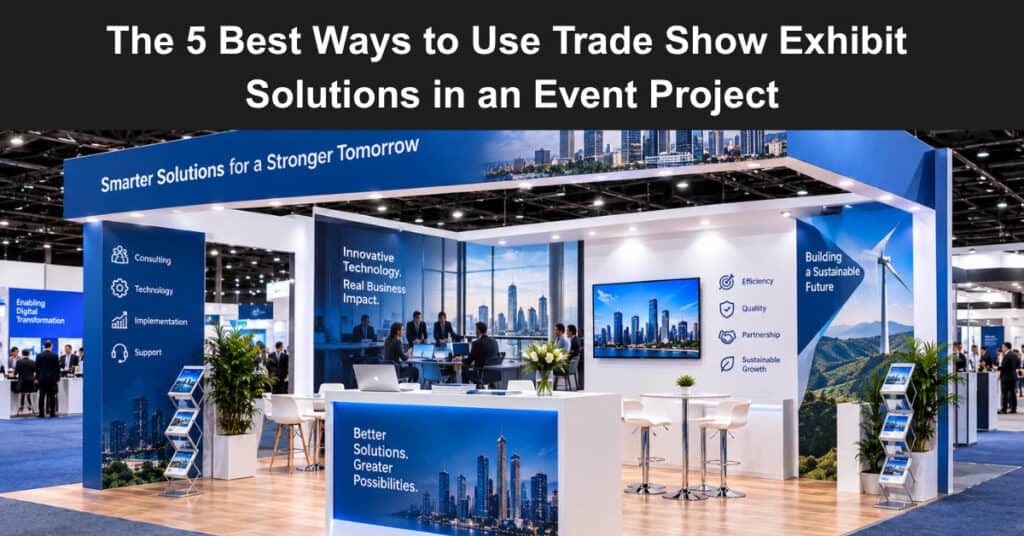
A display that ships late costs more than the booth ever will. I learned that the expensive way: a 20×20 build stuck in a freight hub two days before doors opened, a client standing in the aisle with a clipboard, and nobody on my team holding a straight answer. Project management covers scope, schedule, budget, and risk. An exhibit touches all four at once, which is why so many event PMs get caught flat-footed when the crates show up damaged.
Get ahead of it by treating display assets as project deliverables instead of decorations. Here are the five ways that actually hold up under deadline pressure, and a short word on when each one earns its place in your plan.
1. Lock Your Exhibit Scope Before You Lock the Floor Plan
Scope creep on a booth is sneaky. Someone on the marketing side sees a hanging banner at another conference, the booth grows by six feet, and your layout, freight weight, and rigging budget all shift with it. Treat the display the way you would treat any other work package: define it, freeze it, then change it only through a formal request. Write the scope as a single sentence. “Ten by twenty island with backlit wall, two counters, one meeting nook.” That sentence becomes your line in the sand when the inevitable upgrade request lands three weeks out.
You also need to know what your vendor can turn around. Custom fabrication runs longer than modular systems, and rush fees eat contingency fast. Ask for the production calendar in writing before you commit the floor plan to your venue, because the venue contract is the one you can rarely renegotiate. Scope discipline is the unglamorous first move. It is also the one that keeps you from paying twice for the same booth.
2. Build the Display Into Your Critical Path, Not Alongside It
Most event schedules treat the booth as a side task, penciled in after sessions, speakers, and catering are locked down. That casual approach works fine until the graphics file arrives late, the proof sits unapproved, and the whole install compresses into one frantic night before doors open, with your crew scrambling under entirely avoidable pressure.
Put these on the critical path with real owners and real dates:
- Art file handoff and proof approval
- Production start and ship date
- Freight booking to the advance warehouse
- Install window from your general service contractor
- Dismantle and return shipping
Each of those is a dependency, not a checkbox. The proof approval gates production. Production gates freight. Freight gates install. Miss the first one and every date after it slides, which is how teams end up paying overtime on the show floor. Here is the part that trips people up. Freight to the advance warehouse has a hard cutoff that is usually several days before the show, and missing it means material handling at a much higher rate.
Your display vendor knows those dates because they ship to venues every week. Mine the vendor’s calendar for milestone dates and drop them straight into your project plan. That single move saves more rework than any other habit on this list. Event logistics has a rhythm learned only by doing it, much like the multi-step coordination behind complex missions, where parallel workstreams only succeed when every handoff date is fixed in advance.
3. Match Booth Size to Traffic Goals, Not to Ego
The biggest booth is rarely the best booth. A 10×20 with a clear sightline and one strong message will outdraw a crowded 20×20 every time, especially when attendees are moving fast and scanning for a reason to stop. Your job is to translate a traffic target into cubic feet, staffing capacity, and layout, then defend that number in the budget meeting with data, not preference.
Ask three questions before you size anything:
- How many qualified conversations per hour does the team need to hit its number?
- How many people can actually staff the space at once?
- What does the venue give you, carpet, power, rigging, and walls included?
Those answers shrink the design faster than any opinion. A team of two cannot work a 20×20 properly. Fill it with displays, and you get a walk-through showroom, not a lead machine. I would take a well-lit 10×20 with a single bold headline over an unfocused 20×20 every single time. Smaller footprints also cut freight and drayage, and those two line items are where event budgets quietly bleed. Every square foot you buy has to be earned by the conversations it supports.
4. Treat Rentals as a Schedule Tool, Not a Consolation Prize
Rental exhibits get a bad reputation in some marketing departments, often dismissed as a fallback for teams without the budget to own their booth. That reputation is undeserved. A rental is a schedule decision, not a compromise, and in plenty of real-world scenarios it is the smartest call a project manager can make.
Choose rental when any of these is true:
- Your first show in a new market, before you know the traffic pattern
- A one-off regional event with no repeat in the next twelve months
- A redesign is already planned, so buying now would be dead money
- A new product launch where the messaging will change again by spring
- Storage, insurance, and refurbishment costs would exceed the rental rate
Rentals ship event-ready, which removes the inspection window from your critical path entirely. You also skip the storage lease. Owners focus on total cost across the asset life, and small and mid-size exhibitors often find that leasing beats buying once storage, upkeep, and graphics refreshes land in the math. The Small Business Administration covers this kind of lease-versus-buy planning in its general business guidance, and the logic applies to exhibit assets the same way it applies to equipment. Run the five-year number in a spreadsheet before you let anyone convince you that ownership is always the grown-up choice.
5. Manage the Show Floor Like a Project Phase
Install and show days are a delivery phase. They deserve a runbook, a communication channel, and a named owner for every failure mode you can imagine. Build a one-page playbook. It should carry the install schedule with names next to each task, the venue contact and the general service contractor contact, a spare parts list, a damage protocol with photos attached to the freight claim, and the teardown plan with who signs the return paperwork. Print it.
Cell service in exhibit halls is famously unreliable, and your team will thank you for paper when the wifi dies. Good trade show exhibit solutions plug into this runbook cleanly because the vendor supplies setup instructions, part labels, and a support number staffed during show hours. Ask for those three items before you sign the order, not after the crates arrive.
Federal procurement guidance from the General Services Administration treats vendor documentation as part of the deliverable, and event work should hold vendors to the same standard. The project manager’s real edge at a trade show is not design taste. It is the calm of someone whose dependencies are already handled. Walk the floor the night before with your runbook in hand, and most problems introduce themselves early.
Bringing It Together
None of these five moves is exotic. Freeze the scope, put the booth on the critical path, size it to traffic, weigh rental against ownership honestly, and run the floor like a phase with a checklist. That sequence turns a display from a purchase into a managed deliverable, and it puts you in the room as the person who thinks in systems rather than the person chasing crates.
So here is your call to action. Open your current event plan and check whether the booth has a named owner and dated milestones. If either is missing, that is your gap. Which of the five will you fix before your next show?
Suggested articles:
- Corporate Event Planning: 6 Tips to Succeed Without Hassle
- How to Make Your Brand Stand Out at an Industry Event
- Top Conference Lead Capture Apps to Convert Event Contacts Into Sales Leads

Daniel Raymond, a project manager with over 20 years of experience, is the former CEO of a successful software company called Websystems. With a strong background in managing complex projects, he applied his expertise to develop AceProject.com and Bridge24.com, innovative project management tools designed to streamline processes and improve productivity. Throughout his career, Daniel has consistently demonstrated a commitment to excellence and a passion for empowering teams to achieve their goals.