
Bitrix24 is an all-in-one business workspace built to replace the patchwork of separate apps most companies rely on for sales, communication, and project tracking. What began as an intranet and CRM tool has evolved into a sprawling suite covering CRM, task and project management, team collaboration, website building, HR, and an integrated AI assistant called CoPilot. Today, it serves more than 15 million organizations worldwide, drawn largely by its flat-rate pricing model.
For teams paying per-seat fees across five or six disconnected tools, Bitrix24 changes the math entirely by consolidating that spend into one predictable monthly bill. In this article, you’ll explore the pros and cons of using Bitrix24 and how it fits into today’s digital collaboration landscape.
Bitrix24 – The All-in-One Workspace Built on Flat-Rate Pricing
Bitrix24, launched in 2012 as a cloud-based intranet and CRM platform by Bitrix Inc., was built around the idea of replacing multiple business tools with a single connected workspace. Over more than a decade, it has expanded well beyond its CRM roots into task and project management, website and online store building, HR administration, and workflow automation, all anchored by a pricing model that charges per organization rather than per user.
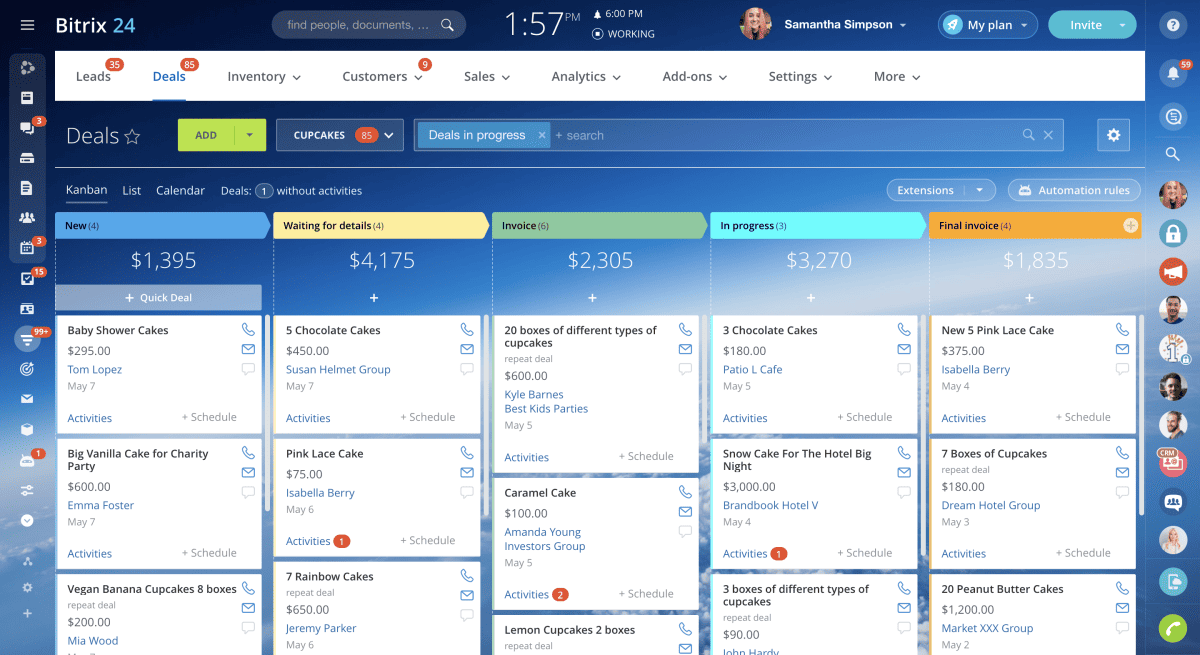
Today, businesses use Bitrix24 to run sales pipelines, manage projects with Kanban boards and Gantt charts, communicate through chat and video calls, and build company websites, all from a single login. Its real strength lies in this breadth combined with flat-fee plans, which let growing teams add headcount without paying more, empowering organizations to scale operations without a proportional increase in software costs.
The Pros or Advantages of Bitrix24
Bitrix24’s biggest strengths center on consolidation, cost predictability, and built-in AI. The platform bundles tools that would otherwise require separate subscriptions, prices them at a flat organizational rate, and layers AI assistance across nearly every module. Its free tier and broad feature set also make it accessible to businesses that would otherwise be priced out of comparable functionality. The following pros reflect the categories where Bitrix24 most consistently outperforms single-purpose alternatives.
- Flat-Rate Organizational Pricing: Bitrix24 charges a fixed monthly or annual fee per organization rather than per user, with each tier including a set number of users. A 50-person team on the Standard plan pays the same flat rate whether it has 10 active users or the full 50, which creates substantial savings over per-seat competitors as headcount grows.
- Genuinely Unlimited Free Plan: The free tier supports an unlimited number of users with 5 GB of storage, basic CRM, Kanban and Gantt task tools, shared calendars, and chat and video calls. Few competitors offer a no-cost plan without a hard user cap, making it a realistic option for bootstrapped teams.
- Built-In CoPilot AI Assistant: CoPilot is woven into CRM, tasks, chat, sites, HR, and video calls, generating call transcriptions and summaries, drafting task descriptions and checklists, and writing marketing copy. This embeds AI assistance directly into daily workflows rather than requiring a separate AI subscription.
- Breadth of Consolidated Tools: A single subscription replaces CRM, project management, website builders, e-signature, invoicing, and HR software that would otherwise require five or more separate vendors. This consolidation is the platform’s most consistently cited advantage among long-term users.
- Deep CRM and Sales Automation: The CRM includes pipeline management, recurring deals, call tracking, email marketing, and sales automation on higher tiers, supporting omnichannel contact through WhatsApp, Instagram, and live chat. Sales teams gain a fuller toolkit than most bundled CRMs typically include.
- Workflow and Task Automation: Recurring tasks, automation rules and triggers, and Robotic Process Automation tools let teams automate repetitive processes like approvals and recurring deals. This reduces manual administrative work as operations scale.
- Enterprise-Grade Security Options: Higher-tier plans include encryption at rest, Active Directory integration, multi-level permissions, and a 99.95% SLA, with SOC-compliant hosting available on Enterprise. Organizations handling sensitive client or financial data get controls comparable to dedicated enterprise software.
- On-Premise Deployment Option: Beyond its cloud product, Bitrix24 offers a self-hosted edition with full source code access for organizations that need complete infrastructure control. This appeals to enterprises with strict data residency or compliance requirements that cloud-only competitors cannot satisfy.
The Cons or Disadvantages of Bitrix24

Bitrix24’s breadth is also its biggest liability. Cramming CRM, project management, HR, and website tools into one interface creates real tradeoffs in usability, support quality, and feature depth compared to dedicated single-purpose software. Organizations evaluating Bitrix24 should weigh these limitations against the cost savings before committing.
- Cluttered, Dense Interface: Reviewers consistently cite a crowded, unintuitive interface as the platform’s top complaint, with frequently used features buried behind menus. New users often need days or weeks of orientation before navigation feels natural.
- Steep Learning Curve for Non-Technical Teams: Configuring workflows, permissions, and automation requires meaningful setup time, and founders without prior CRM experience report a difficult onboarding process. Many organizations end up relying on certified partners just to get the platform properly configured.
- Inconsistent Customer Support: Support quality varies widely, with users reporting slow response times and unresolved tickets, particularly for complex technical issues. Some reviewers also note that AI-driven support has replaced human agents in ways that have made problem resolution feel less reliable.
- Restricted Free and Entry-Tier Features: The free plan caps storage at 5 GB and excludes telephony, sales automation, and most Bitrix24 Market apps, pushing growing teams toward paid tiers faster than the headline “free forever” framing suggests. Lower tiers also lack the workflow automation and AI sales tools reserved for Professional and above.
- Mobile App Gaps: The mobile app lags behind the desktop version in stability and feature parity, with users reporting occasional crashes and missing functionality. Teams relying heavily on field or remote access may find this gap disruptive.
- Large File Handling Friction: Uploading and managing large files or bulk uploads can be slow and error-prone, particularly on lower-tier storage allowances. This becomes a recurring bottleneck for teams with heavy document or media workflows.
Bitrix24 Key Features
Bitrix24 organizes its functionality into six core areas, spanning customer management, task execution, team communication, web presence, and HR operations, with AI woven throughout. The following tools and features represent the platform’s most current and widely used capabilities.
- CRM Sales Management: Tracks leads, deals, contacts, and pipelines with access permissions and role-based visibility, giving sales teams a structured view of every stage of the customer journey.
- Omnichannel Contact Center: Connects web forms, live chat, WhatsApp, Instagram, and telephony into one inbox, so client conversations across channels stay centralized and trackable.
- Task and Project Management: Offers Kanban boards, Gantt charts, and Scrum tools alongside checklists, subtasks, and time tracking, supporting both simple to-do lists and complex multi-stage projects.
- CoPilot AI Assistant: Generates task descriptions, call summaries, marketing copy, and chat replies across modules, reducing manual drafting and analysis work throughout the platform.
- Website and Online Store Builder: Provides a no-code site builder with templates, AI-generated copy and images, and built-in e-commerce tools for inventory, payments, and order processing.
- HR and Employee Management: Includes employee profiles, company org charts, performance KPIs, and work-hour tracking, centralizing HR administration alongside other business functions.
- Workflow Automation and RPA: Automates recurring tasks, approvals, and business processes through rules, triggers, and robotic process automation, cutting down on manual administrative overhead.
- Shared Calendars and Online Meetings: Combines company and personal calendars, meeting room booking, and video conferencing with screen sharing and call recording for coordinated scheduling.
- MCP Server Integration: Connects external AI tools directly to Bitrix24 to run secure actions within the workspace, extending the platform’s automation reach beyond its native AI features.
- Bitrix24 Market Integrations: Connects with over 740 third-party apps and services, including Slack, Google Drive, Zapier, and QuickBooks, plus a REST API for custom development.
Bitrix24 Use Cases
Bitrix24’s combination of CRM, project tools, and flat pricing makes it especially attractive to growing small and mid-sized businesses, agencies, and organizations managing distributed teams. Its breadth also suits industries that need both customer-facing and internal operational tools in one place. The following use cases reflect where it delivers the clearest value.
- Sales and Marketing Agencies: Agencies use the CRM and marketing automation tools to manage multiple client pipelines and campaigns simultaneously, gaining centralized visibility across accounts without per-client software costs.
- Remote and Distributed Teams: Companies with geographically spread employees rely on chat, video calls, and shared calendars to keep collaboration synchronous despite time zone differences, reducing the coordination gaps common in remote work.
- Real Estate and Construction Firms: These industries use pipeline management and task tracking to manage long sales cycles and multi-phase projects, gaining clearer accountability across drawn-out deals and building timelines.
- Retail and E-Commerce Businesses: Online sellers use the website and store builder alongside CRM and payment tools to manage storefronts and customer orders from one connected system.
- Professional Service Firms: Consulting, legal, and similar firms use task automation and client management tools to track billable engagements and deliverables without juggling separate billing and project software.
- HR and Operations Teams: HR managers use employee directories, performance tracking, and approval workflows to administer staffing and internal processes alongside the same platform used for client-facing work.
Bitrix24 Pricing and Costs
Bitrix24 prices its cloud plans per organization rather than per user, with each tier including a set number of users and offering roughly 30% savings when billed annually instead of monthly. The pricing structure below reflects current published rates.
- Free ($0): Supports unlimited users with 5 GB of storage, basic CRM, Kanban and Gantt tasks, shared calendars, and chat and video calls. Telephony and Bitrix24 Market apps are excluded, making it best suited to very small teams testing the platform.
- Basic ($49/month annual, $69/month billed monthly): Includes 5 users, adds 24 GB storage, sales pipelines, recurring deals, email integration, telephony, and a website builder. It fits solo entrepreneurs or small teams needing core CRM and web presence tools.
- Standard ($99/month annual, $144/month billed monthly): Includes 50 users, adds 100 GB storage, sales automation, unlimited leads, invoicing, online payments, e-commerce, and unlimited projects. This is the most popular tier, built for mid-sized businesses scaling their operations.
- Professional ($199/month annual, $289/month billed monthly): Includes 100 users, adds 1,024 GB storage, AI-powered sales tools, workflow automation, RPA, e-signature, and HR management tools. It targets scaling companies that need automation and AI across departments.
- Enterprise ($399/month annual, $579/month billed monthly): Includes 250 users, offers 3 TB storage, unlimited branch accounts, SOC-compliant AWS hosting, encryption at rest, 99.95% SLA guarantee, Active Directory integration, multi-level permissions, custom branding, and priority customer support. Scales up to 10,000 users for large organizations needing enterprise-grade compliance and data protection.
For a detailed breakdown of all available tiers, features included at each level, and tips to help you choose the best plan for your budget, check out our Bitrix24 Pricing Plans & Costs Guide
Conclusion
Bitrix24’s core strength remains its rare combination of breadth and flat-rate pricing, letting organizations consolidate CRM, project management, communication, and HR tools into one subscription that doesn’t scale with headcount. That same breadth creates real tradeoffs: a denser interface, a longer onboarding curve, and support quality that doesn’t always match the platform’s ambition.
Organizations weighing Bitrix24 should size up their tolerance for setup time against the savings of replacing several point solutions with one. With AI now embedded across CRM, tasks, chat, and HR, and an MCP server extending its automation reach further, Bitrix24’s trajectory points toward an increasingly AI-native workspace, provided its usability keeps pace with its feature growth.
Suggested articles:
- The Pros and Cons of Using Businessmap Software
- The Pros and Cons of Using Quire Software
- The Pros and Cons of Using MeisterTask Software

Peter Kanai is a Google-certified freelance writer with over a decade of experience crafting high-quality content for business websites, blogs, and SEO & email marketing campaigns. His on-demand writing services are all about helping businesses expand their online presence and achieve their objectives. With a proven track record in delivering results-driven content, Peter is the go-to freelance writer for business owners seeking a strategic partner to help them grow their brand online.