
Every business that sells anything runs on relationships, and relationships that live in inboxes, sticky notes, and someone’s memory eventually break down. Follow-ups get missed, deals go cold, and the same customer ends up explaining their situation to three different people. As teams grow past a handful of reps, that informal system stops scaling, and the cost shows up in the pipeline: leads that never get worked, forecasts that are really just guesses, and customer relationships that feel transactional instead of trusted.
Customer relationship management software exists to close that gap, and few names come up as often in that conversation as Zoho CRM. Positioned as a Visionary in the 2025 Gartner Magic Quadrant for Sales Force Automation Platforms and trusted by more than 300,000 businesses worldwide, Zoho CRM has grown from a budget alternative into a genuinely AI-powered platform built around Zia, its conversational assistant. This guide walks through what Zoho CRM does well, where it falls short, and whether it fits your team.
What Is Zoho CRM?
Zoho CRM is a cloud-based customer relationship management platform built to manage the full sales lifecycle, from the first lead to a closed deal and beyond. It’s the flagship product in the broader Zoho ecosystem of business applications, and it centers on five pillars: sales force automation, lead management, process automation, deep customization, and business intelligence. What sets the current version of Zoho CRM apart from earlier releases is Zia, an AI layer built into the platform rather than bolted on.
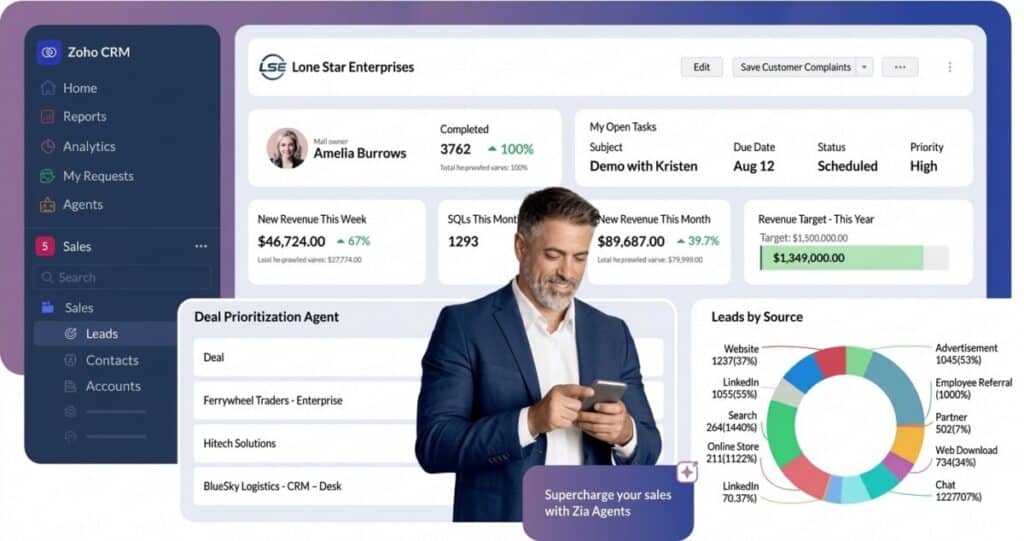
Zia agents can act on plain-language requests, draft communications, flag deals at risk, and surface predictions across the pipeline. Zoho CRM is available as a free edition for up to three users and across four paid tiers, Standard through Ultimate, so businesses can start small and grow into more advanced automation and AI capability over time. For businesses looking to get the most out of these tools, it’s often beneficial to hire a Zoho developer who can tailor the CRM to specific needs, ensuring Zia and the platform’s deeper automation are configured to match how the team actually sells.
Pros of Zoho CRM
Across thousands of verified user reviews online, a consistent set of strengths emerges. These points reflect what real users report once Zoho CRM is fully implemented and running smoothly. Below are the advantages users most consistently cite as the biggest benefits of working in Zoho CRM day-to-day, based on real-world experience.
- Budget-Friendly Entry Point: Users report that the free plan for up to three users, combined with Standard pricing well below Salesforce or HubSpot, makes Zoho CRM an easy first step. Many say the low cost of entry lets them prove out CRM value before committing budget to a larger platform.
- Deep Automation and Workflow Tools: Reviewers frequently point to Blueprint, workflow rules, and Cadences as reasons routine follow-up work disappears from a rep’s plate. Teams say leads get routed, fields get updated, and outreach sequences fire automatically once the rules are set up.
- Built-In AI With Zia Agents: Many users describe Zia as a genuine time-saver once historical data builds up, flagging anomalies, predicting deal outcomes, and drafting email replies. Sales managers report that forecasting accuracy improves noticeably after a few months of consistent data entry.
- Extensive Integration Ecosystem: Users highlight the Zoho Marketplace, which connects to more than 1,000 third-party applications alongside the wider Zoho suite. Teams say this makes it simple to pull in accounting, calling, or marketing tools without waiting on custom development work.
- Centralized 360° Customer View: Reviewers consistently mention that having contacts, deals, activities, and communication history in one record cuts down on the back-and-forth between departments. Support and sales teams say this shared view shortens response times and avoids duplicate outreach.
- Strong Customization Without Code: Admins report that Canvas, custom modules, and page layouts let them reshape the interface to match how their business actually sells, without hiring a developer. Many describe the drag-and-drop tools as approachable once the initial learning curve is behind them.
- Cross-Team Collaboration via CRM for Everyone: Users say the CRM for Everyone update finally brought marketing, finance, and operations into the same system as sales, each in their own teamspace. Reviewers credit this with reducing the silos that used to stall deals waiting on other departments.
- Scales From Startup to Enterprise: Many long-term users note they have moved from Free to Standard to Enterprise over several years without switching platforms or re-training staff. Growing companies say this path, plus the option to add Zoho CRM Plus later, protects their original setup investment.
Cons of Zoho CRM
No CRM is a flawless fit for every organization, and Zoho CRM’s users are refreshingly candid about where the platform creates friction. These recurring complaints deserve careful consideration before committing to a plan. Below are the areas where users most consistently report that Zoho CRM falls short, drawn from recurring themes across verified online reviews:
- Steep Learning Curve for New Users: New admins frequently describe the interface as cluttered, with dense menus that take real time to master. Reviewers say the depth that makes Zoho CRM powerful also makes the first few weeks of setup feel overwhelming without guidance.
- AI and Advanced Features Locked Behind Higher Tiers: Users note that Zia AI, Blueprint, and advanced customization only appear from Enterprise upward, so budget-tier customers see a lighter version of the product. Many say this makes early plan selection more consequential than it first appears.
- Inconsistent Customer Support Response Times: Reviewers on Capterra and G2 report waiting days for replies on Classic support, especially for time zones outside Zoho’s primary support hours. Some users describe billing and invoicing communication as a particular pain point during account setup.
- Interface Feels Dated Compared to Newer Competitors: Users comparing Zoho CRM to HubSpot or Pipedrive often say the navigation feels more cluttered and less immediately intuitive. Reviewers add that while the functionality is there, the visual polish trails some newer, narrower-scope competitors.
- Performance Slows With Large Data Volumes: Teams running large record counts report occasional lag and slower page loads, particularly during reporting or bulk operations. High-volume users say this becomes more noticeable as an organization scales past a few hundred thousand records.
- Occasional Bugs and Syncing Glitches: Some reviewers describe minor but frustrating issues, such as search results not opening correctly or new records failing to save on the first attempt. Users say these glitches are infrequent but disruptive enough to interrupt a workflow mid-task.
- Billing and Account Management Friction: A number of reviews describe confusion around invoicing, payment methods, and renewal timing, occasionally escalating to service suspension threats. Customers say clearer upfront communication about payment windows would prevent most of this friction.
- Migrating From Other CRMs Takes Real Effort: Teams switching from Salesforce, HubSpot, or spreadsheets report that data migration and workflow re-creation take meaningful time, even with Zoho’s migration tools. Users say budgeting extra weeks for cleanup and testing avoids surprises during the switch.
Key Features of Zoho CRM
Beyond the core pros and cons, Zoho CRM’s feature set is worth a closer look on its own. The platform bundles automation, artificial intelligence, customization, and analytics into a single system, and understanding these capabilities matters just as much as the general reputation. Below are the features that show up most often in how real businesses actually configure and rely on the platform daily.
- Zia AI Agents: Conversational AI that turns plain-language requests into CRM actions, drafts emails, flags anomalies, and predicts deal and churn outcomes.
- Sales Force Automation: Workflow rules, sales forecasting, pipeline views, and territory management remove manual busywork from day-to-day selling.
- Lead Management: Tools for lead capture, enrichment, nurturing, and omnichannel engagement carry prospects from first contact through to a qualified deal.
- Process Automation: Blueprint, Cadences, Kiosk Studio, and Journey Orchestration standardize multi-step sales and service processes across a whole team.
- Customization Suite: Canvas, Client Script, custom modules, and layouts let admins reshape the interface and logic without waiting on developers.
- Business Intelligence & Analytics: Dynamic dashboards, unlimited reports on higher plans, and Zoho Analytics on Ultimate turn CRM data into decision-ready insight.
- Configure, Price, Quote (CPQ): Built-in pricing rules and product configuration keep quotes accurate and consistent as deals move through negotiation.
- CRM for Everyone: Dedicated teamspaces bring marketing, finance, and support into the same CRM as sales, each seeing only what they need.
- Marketplace & App Integrations: Over 1,000 pre-built integrations connect Zoho CRM to accounting, calling, marketing, and collaboration tools your team already uses.
Use Cases for Zoho CRM
Zoho CRM is built to serve businesses across virtually every industry, from small startups to large enterprises, thanks to its flexible customization options and adaptable modules. Its use case library reflects that breadth, covering everything from sales pipelines to compliance-heavy sectors. Here are some of the most common Zoho CRM use cases:
- Sales Pipeline Management: Growing sales teams use Zoho CRM to replace spreadsheets with a structured, stage-by-stage view of every active deal.
- Real Estate & Construction: Agencies track leads from first inquiry through closing, using custom modules for property details and multi-stage approval workflows.
- E-Commerce & Retail: Online and retail sellers connect storefront and support data to personalize outreach and manage repeat-customer relationships at scale.
- Healthcare & Pharma: Providers rely on HIPAA-aligned data handling to manage patient or provider relationships without risking regulatory violations.
- Financial Services & Insurance: Advisors and agents use field-level encryption and approval processes to manage sensitive client data through compliant workflows.
- Manufacturing & Distribution: B2B sellers pair inventory management with multi-stage pipelines to track quotes, purchase orders, and vendor relationships in one place.
- Non-Profit Organizations: Development teams manage donor relationships, campaign tracking, and constituent communication using the same automation built for sales.
- Cross-Functional Collaboration: Companies of all sizes use CRM for Everyone to give operations, marketing, and support staff CRM access without full sales licenses.
Zoho CRM Pricing
Zoho CRM pricing runs on a per-user, per-month subscription, billed monthly or annually, with annual billing saving roughly 20 to 34% depending on the tier. All figures below are in USD and sourced from Zoho’s official pricing page; local taxes may apply, and regional currency pricing can differ.
| Plan | Monthly Billing | Annual Billing | User/Client Limits | Best For |
| Free | $0 | $0 | Up to 3 users | Solopreneurs and home businesses testing a first CRM |
| Standard | $20/user/mo | $14/user/mo | No user cap; core modules | Small teams outgrowing spreadsheets who need email tools and forecasting |
| Professional | $35/user/mo | $23/user/mo | No user cap; unlimited records | Growing sales teams that need inventory, CPQ, and process automation |
| Enterprise | $50/user/mo | $40/user/mo | No user cap; sandbox included | Mid-size to large teams needing Zia AI, territory management, and custom functions |
| Ultimate | $65/user/mo | $52/user/mo | No user cap; highest limits | Data-heavy enterprises that want Zoho Analytics and maximum storage or API throughput |
Add-Ons (Priced Separately)
- Team User Add-On: Roughly $9/user/month annually or $11/user/month billed monthly. Adds light-access seats for marketing, support, or operations staff under the CRM for Everyone model; requires an existing paid plan.
- Zoho CRM Plus: An all-in-one bundle starting at $20/user/month that pairs CRM with marketing, helpdesk, social, and analytics tools, priced and licensed separately from standalone CRM plans.
- Premium Support Plans: An additional fee unlocks phone and chat support, faster response times on critical issues, and a dedicated Technical Account Manager beyond Classic support.
- Jumpstart & Migration Services: Paid onboarding and data-migration assistance for teams switching from Salesforce, HubSpot, spreadsheets, or another CRM, priced based on scope.
For a deeper breakdown of these tiers, discounts, and hidden costs, check out our detailed article on Zoho CRM Pricing, where we go plan-by-plan into what’s actually worth paying for.
Conclusion
Zoho CRM’s core tradeoff is straightforward: you get a genuinely powerful, AI-assisted platform at a price well below Salesforce or HubSpot, but that power comes wrapped in a steeper learning curve, tiered feature gating, and support that isn’t always fast. For budget-conscious teams willing to invest time in setup, or larger organizations that need Zia AI and deep customization, the pros of Zoho CRM tend to outweigh the cons. Teams that need a lighter, more polished interface with minimal onboarding may want to weigh that tradeoff carefully first.
The best next step is to see how Zoho CRM fits your own sales process rather than take any review, including this one, at face value. Start the 15-day free trial, run your actual pipeline through it for a couple of weeks, and use Zoho’s Edition Selector to confirm which tier matches your team’s size and automation needs before you commit to an annual plan.
Suggested articles:
- The Pros and Cons of Using Zoho Projects Software
- Top 10 Cons & Disadvantages of Using HubSpot CRM
- The Advantages Of Using CRM Software For Project Managers

Peter Kanai is a Google-certified freelance writer with over a decade of experience crafting high-quality content for business websites, blogs, and SEO & email marketing campaigns. His on-demand writing services are all about helping businesses expand their online presence and achieve their objectives. With a proven track record in delivering results-driven content, Peter is the go-to freelance writer for business owners seeking a strategic partner to help them grow their brand online.