
A competitor’s traffic jumps 40% in Similarweb, your team rushes out a response, and only later does someone notice that the number was an estimate built on a thin data sample. Similarweb is the best-known tool for sizing up competitors’ websites, and marketers, sales teams, and investors rely on it. Yet its figures are modeled, not measured, and the gaps can be large.
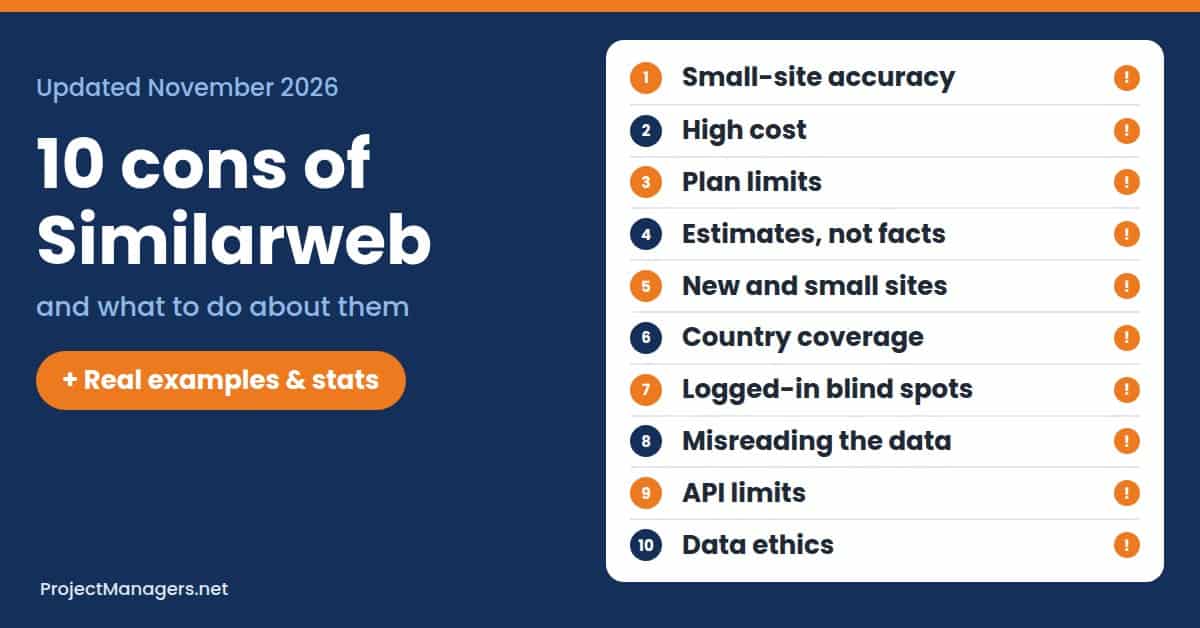
This article covers the 10 biggest cons of Similarweb in 2027, from accuracy on small sites and steep pricing to country coverage, API limits, and data ethics. Each con includes a real case, current numbers, and practical steps for individuals, small businesses, and teams, so you know when to trust the data and when to check it.
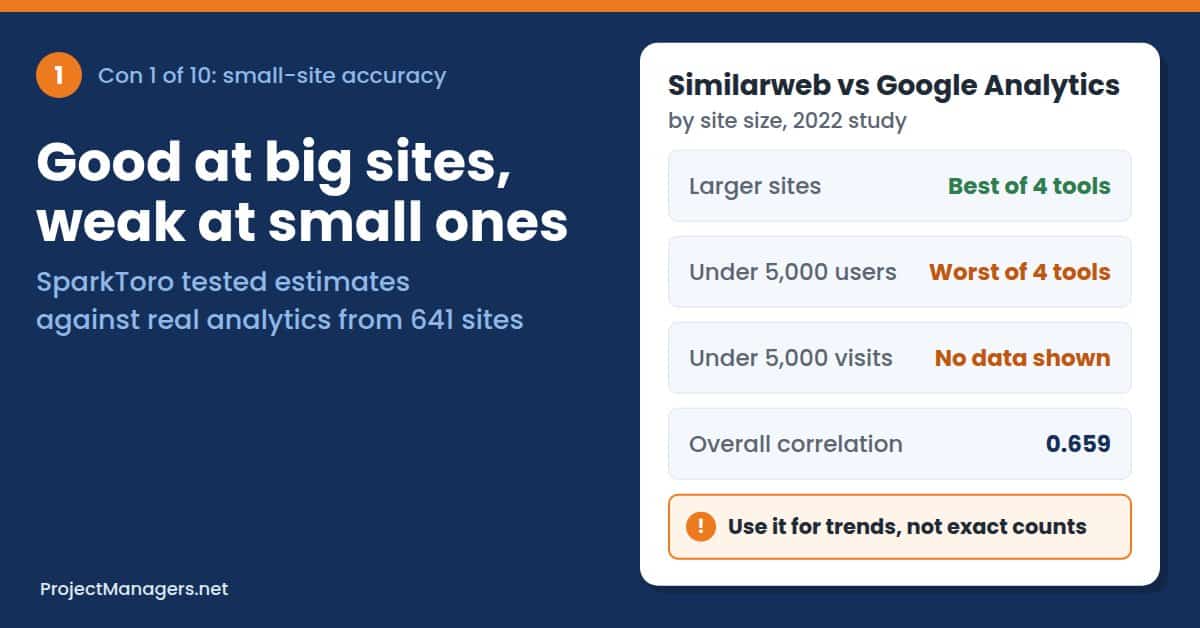
Estimates, Not Measurements: Similarweb models its traffic figures rather than measuring them. In SparkToro’s test of 641 websites, it was the most accurate tool for larger sites but the weakest for sites under 5,000 monthly users, and it shows no data below 5,000 monthly visits.
Cost of Full Access: Similarweb’s entry plan costs $199 a month for one user and three months of history, and its 7-day trial converts to a paid plan automatically. Longer history, country filters, extra seats, and API access require custom deals, with a median contract near $37,800 a year.
Coverage Blind Spots: Similarweb offers 58 country filters and cannot see most logged-in, intranet, or in-app activity. A drop in public web traffic does not always mean a company is losing users.
Context before Conclusions: Similarweb showed ChatGPT’s traffic falling 9.7% in June 2023, which many outlets read as fading interest, but the drop matched school holidays. Checking seasonality, app launches, and data sourcing prevents costly misreadings.
None of these drawbacks means you should stop using Similarweb. It is still one of the most useful ways to see how a market moves, which channels competitors rely on, and how your share changes over time. The cons below explain where its numbers stop being reliable, so you can use it with the right expectations.
Each con below includes a short example scenario, a documented real-life case, the numbers behind it, and practical steps you can take, whether you use Similarweb on your own, in a small business, or across a team.
10 Disadvantages & Drawbacks of Using Similarweb

The cons range from the accuracy of the data itself to cost, coverage, technical limits, and ethics. Some matter most to small businesses researching local rivals; others matter most to agencies, analysts, and investors who make large decisions based on Similarweb numbers.
1. Accuracy Concerns, Especially for Smaller Websites
Similarweb cannot see your competitors’ analytics. It estimates their traffic from a mix of signals, including a panel of devices whose owners share browsing data, partner data, public data, and websites that connect their own Google Analytics. Large sites send plenty of signals, so their estimates tend to land closer to reality. Small sites send few, so a handful of panel users can swing the numbers up or down.
That is a problem for the people who most often research small markets: local businesses, startups sizing up rivals, and agencies pitching to small clients. The tool looks just as confident for a 3,000-visit site as for a 30-million-visit one.
Where accuracy problems hit hardest:
- Small Samples: Few panel users visit small sites, so one unusual month can double or halve the estimate.
- Niche Markets: Specialist audiences are often under-represented in the panel, which skews both traffic and audience data.
- False Precision: Figures such as 41,382 visits look exact, even when the real range is far wider.
Example Scenario (Illustrative): A small online pet supply store checks three local rivals. Similarweb shows one of them at about 40,000 visits a month, so the owner adds $3,000 to the ad budget to keep up. Months later, a supplier who works with that rival mentions that the rival gets closer to 12,000 visits a month.
Real-Life Example: In a 2022 study, SparkToro compared four traffic tools with real Google Analytics data from 641 websites. Similarweb was the best of the four for larger sites, but for sites with under 5,000 monthly users, its estimates were the weakest in the test.
What You Can Do: Use Similarweb for direction and ranking, not exact counts. For small competitors, look at trends across 6 to 12 months instead of a single month, and cross-check with other signals such as search volume for their brand name, review counts, and social following. Connect your own Google Analytics so you can see how far Similarweb’s estimate for your site is from the real figure; that gap is a useful guide for similar-sized competitors.
Real-Life Example
SparkToro Tests Similarweb against 641 Sites’ Real Analytics
SparkToro collected Google Analytics data from 641 websites, covering June 2020 to June 2021, and compared it with estimates from Similarweb, Semrush, Ahrefs, and Datos. For larger sites, Similarweb landed within 30% of the real number about two-thirds of the time, the best result in the test. For sites under 5,000 monthly users, it came last.
Source: SparkToro, November 2022
Expert View
“IMO, we’re just not there yet.”
Rand Fishkin, SparkToro co-founder, on whether any third-party traffic estimate is accurate enough to rely on. SparkToro
By the Numbers
- 0.659
correlation between Similarweb estimates and real Google Analytics users across 641 sites (Semrush: 0.790)
Source: SparkToro, 2022
- 5,000
monthly visits: below this, Similarweb shows no traffic figures at all
Source: Similarweb Knowledge Center
- 94%
more sessions than Google Analytics recorded, on average, across 1,787 ecommerce sites, and small sites were the least accurate
Source: Omniconvert
From Similarweb
Similarweb says it is an estimation tool and does not expect its figures to match a site’s own analytics exactly; it aims for trend alignment instead.
Similarweb, in its Knowledge Center article on data accuracy. Similarweb
2. High Cost for Comprehensive Features
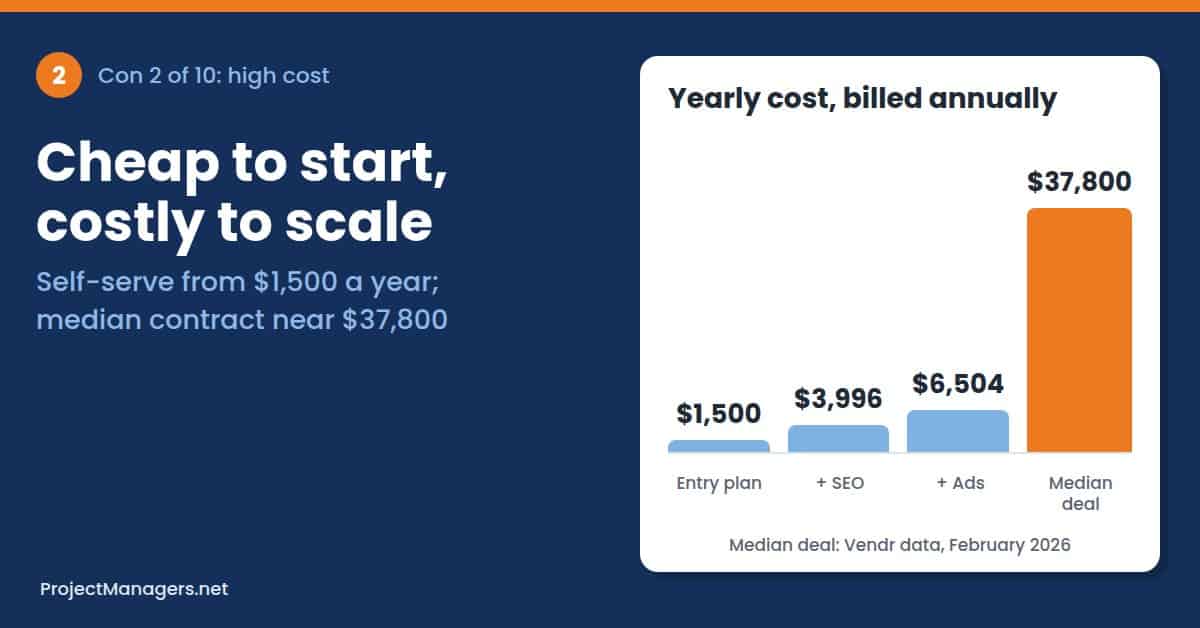
Similarweb’s self-serve plans start at $199 a month, or $125 a month billed annually, for one user. Adding SEO and AI search data takes the price to $399 a month, and adding ad intelligence raises it to $649. Anything beyond that, such as more users, longer history, country selection, or API access, needs a custom quote from sales (Similarweb pricing).
Those custom packages are where most companies end up, and they are not cheap. Contract data from Vendr puts the median Similarweb deal at about $37,800 a year. The 7-day free trial also needs a card and rolls into a paid plan automatically, which has caught out a steady stream of users.
Where the cost bites:
- Steep Jump to Team Plans: The move from a $199 single-user plan to a business package can multiply the bill many times over.
- Hidden Team Pricing: Business and enterprise prices are not published, so budgeting needs a sales call.
- Automatic Renewals: The trial converts to a paid plan if you do not cancel in time, and annual plans renew too.
Example Scenario (Illustrative): A two-person marketing agency starts a 7-day trial to research a pitch. The pitch is postponed, nobody cancels, and a $199 charge lands on the company card. The team then spends a week emailing support for a refund instead of working on clients.
Real-Life Example: On Trustpilot, several 2026 reviews describe charges after a trial or renewal that the reviewer did not expect. One reviewer in January 2026 wrote that they had expected a reminder email before a $420 charge. Similarweb’s overall score is still high, at 4.5 out of 5 from 821 reviews. These complaints are a minority, but they come up again and again.
What You Can Do: Write down the exact questions you need answered before you start a trial, and set a reminder for day 5 to cancel or commit. Pay with a card you can control. For business packages, ask for itemized pricing per module, negotiate near the end of Similarweb’s quarter, and check the renewal and notice terms before you sign. If you only need occasional checks, a cheaper all-round SEO tool may cover most of the same questions.
Real-Life Example
Trial Users Report Surprise Charges
Trustpilot reviewers in 2026 describe being charged after the 7-day trial ended or a plan renewed, including one $420 charge with no reminder email beforehand. Others say the sign-up flow did not make the automatic conversion clear enough. Similarweb’s terms state that the trial converts to a paid plan unless it is cancelled in time.
Sources: Trustpilot, Similarweb pricing
By the Numbers
- $199
per month for the entry Competitive Intelligence plan, or $125 a month billed annually, for one user
Source: Shila, checked October 2026
- $37,800
median yearly Similarweb contract in Vendr’s purchase data (February 2026)
Source: Shila, citing Vendr
- 4.5
out of 5 on Trustpilot from 821 reviews, despite recurring billing complaints
Source: Trustpilot
From the Field
A reviewer said most companies send a reminder email before charging a card, especially for a $420 charge.
Bradley S., Similarweb user, Trustpilot review, January 2026. Trustpilot
3. Limited Data Granularity in Lower Tiers

The self-serve plans limit the data in ways that matter for real analysis. The entry plan includes three months of history, and the higher self-serve plans include six, while business packages go back up to 37 months. Self-serve plans are for one user, and choosing specific countries is part of the business packages.
Three months of history is not enough to tell a seasonal spike from a real trend, and that distinction is the question most competitive research is trying to answer. Teams often discover this after they have paid, when the report they need sits one tier higher.
What lower tiers usually leave out:
- Year-over-Year Views: With 3 to 6 months of data, you cannot compare this season with the same season last year.
- Country Detail: Picking specific markets is part of the custom business packages, not the self-serve plans.
- Shared Access: Self-serve plans cover a single user, so a team has to share one login or upgrade.
Example Scenario (Illustrative): A product manager at a ski equipment retailer wants to compare a rival’s winter season with last year’s. Their entry plan shows only the last three months, so last winter is out of reach, and the comparison is impossible.
Real-Life Example: Similarweb’s plan comparison, checked in October 2026, lists three months of history for the $199 Competitive Intelligence plan and six months for the $399 and $649 plans. Up to 37 months of history and a choice of more than 100 countries are reserved for custom Business and Enterprise packages (Shila, Similarweb pricing).
What You Can Do: Before you buy, list the exact reports you need and check which plan includes each one, especially history length and country filters. Ask sales for a trial of the business package if your questions are year-over-year. If you stay on a lower tier, export the key numbers every month so you build your own history over time.
Real-Life Example
Three Months of History versus 37
In October 2026, Similarweb’s self-serve plans offered three or six months of history for one user. The 37-month history, country selection, and extra seats needed for year-over-year and multi-market analysis came only with custom Business and Enterprise packages.
Sources: Shila, October 2026, Similarweb pricing
By the Numbers
- 3 months
of history on the $199 entry plan (6 months on the $399 and $649 plans)
Source: Shila, 2026
- 37 months
of history available only in custom Business and Enterprise packages
Source: Shila, 2026
- 1 user
on each self-serve plan; extra seats need a custom package
Source: Similarweb pricing
Why It Matters
Most competitive questions are about change over time: is a rival growing, and is that growth seasonal? Short history makes that question hard to answer.
ProjectManagers.net analysis of Similarweb’s current plans.
4. Reliance on Estimations and Potential for Inaccuracies

Even for large sites, every Similarweb number is modeled, not measured. Independent studies disagree not only on how far off the estimates are but also on which direction they miss. One peer-reviewed study found Similarweb under-counted traffic; a large ecommerce study found it over-counted sessions by almost double.
Accuracy also varies by metric. Estimates of total visits tend to land closer to real analytics than estimates of unique visitors, bounce rate, and visit duration, which depend heavily on how panel users behave. When you cannot know which way the error runs, small differences between two sites tell you very little.
Why estimates can mislead:
- Unknown Direction: You cannot tell from the dashboard whether a site is over- or under-estimated.
- Weaker Engagement Metrics: Bounce rate, pages per visit, and visit duration are further from real analytics than visit counts.
- Model Updates: Changes to data sources and algorithms can shift historical figures and trends.
Example Scenario (Illustrative): An investor compares two direct-to-consumer brands before a funding round. Similarweb shows Brand A growing 30% a year. The company’s own analytics, shared in due diligence, show 8%. Had the investor relied on the estimate, the valuation would have been built on growth that was not there.
Real-Life Example: A 2022 study in PLOS ONE compared Similarweb with Google Analytics for 86 websites. Similarweb reported 19.4% fewer visits and 38.7% fewer unique visitors on average, while its bounce rate was 25.2% higher and visit duration 56.2% higher.
What You Can Do: Treat Similarweb figures as an index for comparing sites inside the same tool, not as absolute numbers. Never mix Similarweb data with another provider’s numbers in the same chart. Give more weight to visits than to engagement metrics, and confirm any number that drives a big decision, such as an investment or market entry, with first-party data or a second source.
Real-Life Example
Two Studies, Two Opposite Errors
Researchers Jansen, Jung, and Salminen found Similarweb counted fewer visits and visitors than Google Analytics across 86 websites. Omniconvert’s analysis of 1,787 ecommerce sites found the opposite: Similarweb reported about 94% more sessions than the sites tracked. The lesson is that the size and direction of the error depend on the site.
Sources: PLOS ONE, Omniconvert
Expert View
The researchers concluded that Similarweb gives conservative results compared with Google Analytics and that it is less reliable for smaller sites.
Bernard J. Jansen, Soon-gyo Jung, and Joni Salminen, PLOS ONE, 2022. PLOS ONE
By the Numbers
- 19.4%
fewer total visits than Google Analytics, on average, across 86 websites
Source: PLOS ONE, 2022
- 38.7%
fewer unique visitors than Google Analytics in the same study
Source: PLOS ONE, 2022
- 56.2%
higher average visit duration than Google Analytics reported
Source: PLOS ONE, 2022
From Similarweb
Similarweb tells site owners who feel under-counted that its method differs from direct measurement and invites them to connect Google Analytics.
Similarweb, Knowledge Center. Similarweb
5. Limited Coverage for New or Very Small Websites
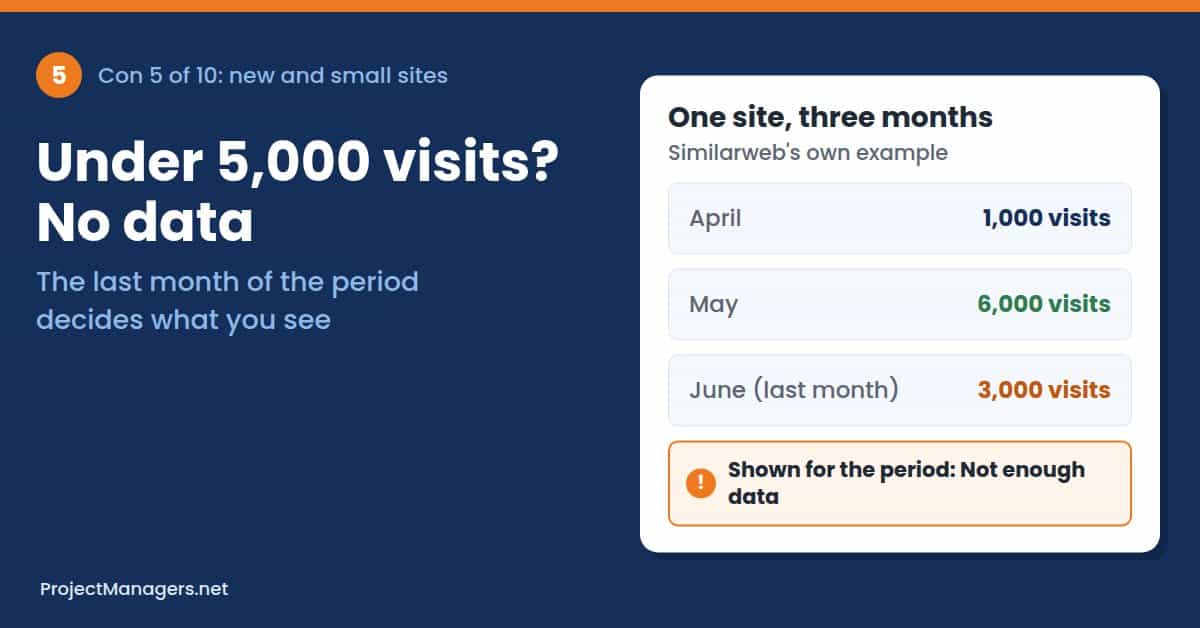
Similarweb does not show traffic numbers for websites with fewer than 5,000 monthly visits. You see “Not enough data” or N/A instead. The rule uses the last month in your date range, so a site with 6,000 visits in May and 3,000 in June shows nothing for the whole period.
Some features use desktop data only, so a site also needs 5,000 desktop visits a month to appear there. Mobile-first brands and new launches can vanish from reports even when they are growing fast. Similarweb says a 2024 update improved data for small sites, but it still warns that results may be limited.
Where coverage runs out:
- New Launches: A new site or product has no history and often sits under the threshold for months.
- Mobile-First Brands: Desktop-only features can show N/A for sites whose audience is mostly on phones.
- Broken Comparisons: One small site in a comparison can turn the whole view to N/A until you remove it.
Example Scenario (Illustrative): A venture analyst lists 20 seed-stage startups in a new market and runs them through Similarweb. Fourteen show N/A. The analyst has to fall back on LinkedIn headcount, job posts, and founder interviews to size the market.
Real-Life Example: Similarweb’s own Knowledge Center explains the rule with an example: a site with 1,000 visits in April, 6,000 in May, and 3,000 in June shows no data for that period, because the last month is under 5,000. It adds that some features show N/A for any site with fewer than 5,000 desktop visits a month.
What You Can Do: Accept that Similarweb is built for established sites. For new or very small competitors, use other signals: Google Trends and search volume for their brand name, social followers, app store rankings, job postings, and customer reviews. Remove tiny sites from comparisons so the rest of the data still shows.
Real-Life Example
Below 5,000 Visits, the Numbers Disappear
Similarweb documents that it shows no data for sites under 5,000 monthly visits, judged on the last month of the period, and that desktop-only features need 5,000 desktop visits. It says a 2024 update improved small-site coverage, but results for small sites can still be limited.
Sources: Similarweb Knowledge Center, Similarweb: Not enough data
By the Numbers
- 5,000
monthly visits needed before any traffic figure is shown
Source: Similarweb
- 5,000
desktop visits a month needed for desktop-only features
Source: Similarweb
- 2024
year Similarweb added new functionality for small sites; coverage is still limited
Source: Similarweb
From Similarweb
Similarweb says that when a site’s traffic is too low, it cannot support accurate estimates, so it shows no number at all.
Similarweb, on what “Not enough data” means. Similarweb
6. Geographical Data Limitations and Accuracy
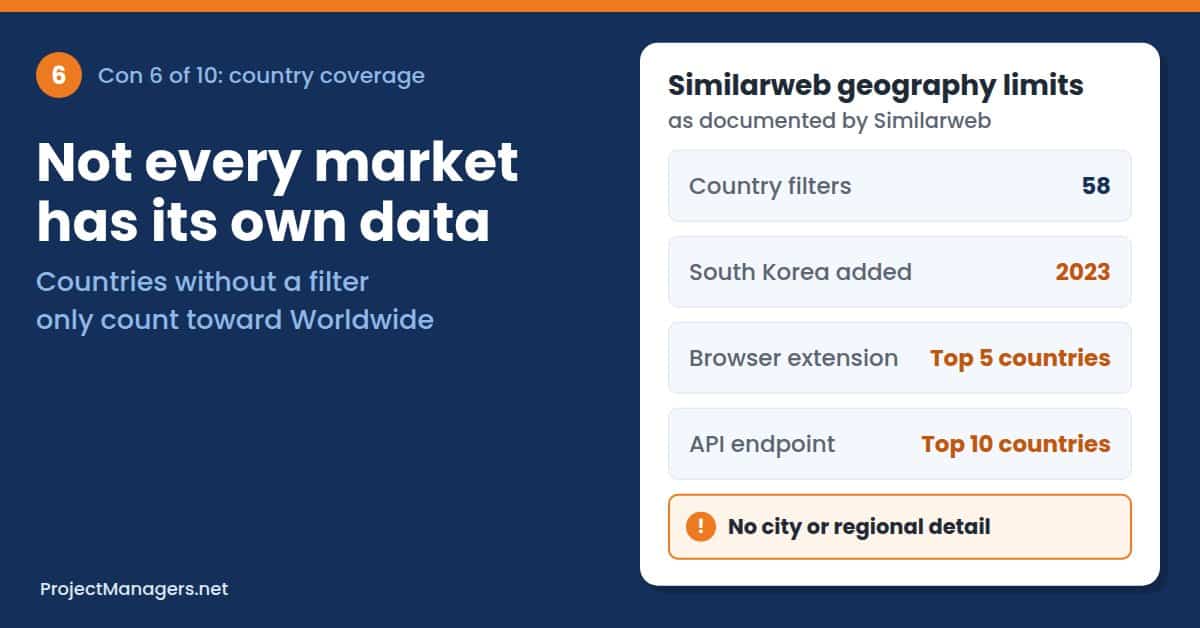
Similarweb’s panel is not spread evenly around the world. The platform offers 58 dedicated country filters; traffic from other countries still counts toward Worldwide figures, but you cannot isolate it. If your market is not on the list, you cannot see a competitor’s traffic there.
Even where a country filter exists, smaller markets have fewer panel users, so the estimates are noisier. There is no city or regional detail, and some views show only the top countries: the browser extension lists five, and the API’s top-geographies endpoint returns ten.
How geography limits the data:
- Missing Markets: Countries without their own filter are folded into Worldwide data.
- Thin Panels: Smaller or less connected markets produce less reliable estimates.
- No Local Detail: You cannot split traffic by city or region inside a country.
Example Scenario (Illustrative): A consumer brand plans to launch in Kenya and Ghana and wants to see which local competitors attract the most visitors in each country. Neither market is easy to isolate in the data, so the team pays for local research instead.
Real-Life Example: South Korea, which Similarweb itself describes as one of the world’s largest economies and a top e-commerce market, only got its own country filter in March 2023, years after the platform launched (Similarweb press release). Until then, companies could not separate Korean traffic in Similarweb at all.
What You Can Do: Check Similarweb’s country filter list before you buy if you work in specific markets. For countries with thin coverage, combine Similarweb with local sources such as national analytics panels, local search engines’ tools, and regional market research. Treat country splits in smaller markets as rough shares, not counts.
Real-Life Example
South Korea Gets Its Own Country Filter in 2023
In March 2023, Similarweb announced that customers could now filter for activity from within South Korea. Before that, one of Asia’s largest digital economies had no separate country view in the platform.
By the Numbers
- 58
dedicated country filters in Similarweb; other countries are only part of Worldwide data
Source: Similarweb Knowledge Center
- 2023
year South Korea was added as a separate country filter
Source: Similarweb
- Top 5
countries shown per site in the free Similarweb browser extension
Source: Similarweb Knowledge Center
Why It Matters
For any business working outside the largest markets, the first question is not how accurate Similarweb’s country data is, but whether your country is there at all.
ProjectManagers.net analysis of Similarweb’s country coverage.
7. Difficulty in Analyzing Intranets, Apps, and Password-Protected Sites
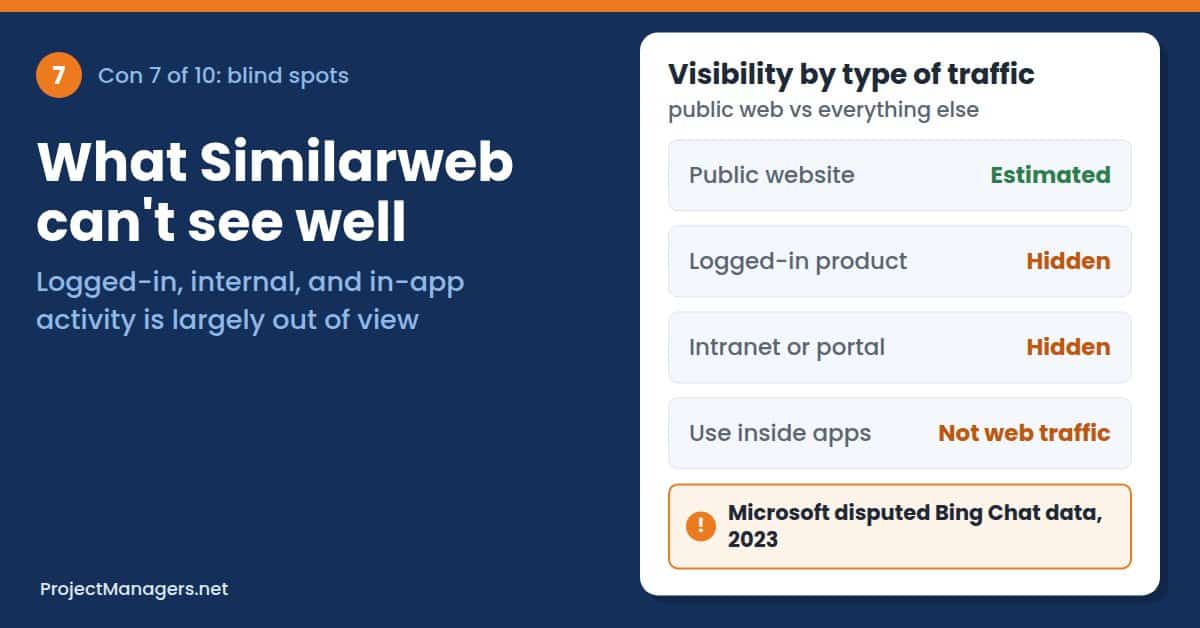
Similarweb is built to measure public websites. Intranets, client portals, logged-in product areas, and paywalled content are largely out of view. So is the growing share of activity that happens inside mobile apps and AI chat interfaces rather than on a classic web page.
For software companies, this is a big gap. Their marketing site may look flat while real use of the product, behind a login or in an app, grows quickly. Reading the public number as the whole story leads to the wrong conclusion.
What Similarweb cannot see well:
- Internal Tools: Intranets and employee portals need their own analytics.
- Logged-In Products: Usage of SaaS apps, member areas, and portals is mostly invisible.
- App and Chat Activity: Use inside native apps and chat interfaces is not the same as website traffic, and web numbers can miss it.
Example Scenario (Illustrative): A project management software vendor sees a rival’s website traffic fall 10% and assumes it is losing ground. The rival’s next funding announcement reports record active users, most of whom log in through the desktop and mobile apps.
Real-Life Example: In August 2023, Similarweb and StatCounter data showed Bing’s search share flat six months after Microsoft launched its AI chat. Microsoft disputed the outside data, arguing it did not capture all visitors to Bing’s chat experience, but gave no figures of its own (Search Engine Land, Windows Central).
What You Can Do: For your own logged-in areas, use first-party product analytics. For competitors, read Similarweb’s web data alongside app store data, public user numbers from earnings reports or press releases, and job postings. Ask whether a change in web traffic could be a shift to an app rather than a real loss of users.
Real-Life Example
Microsoft Disputes Outside Data on Bing Chat
Six months after Bing’s AI chat launched, Similarweb estimated Bing’s worldwide search share at about 3.2%, little changed. Microsoft told the Wall Street Journal that third-party trackers were not counting all visitors to its chat page and later said only that Bing had passed 100 million daily active users.
Sources: Search Engine Land, Windows Central
By the Numbers
- 3.23%
Similarweb’s estimate of Bing’s worldwide search share, June 2023
Source: Windows Central
- 100M+
daily active users Microsoft cited for Bing instead of disputing the figures directly
Source: Windows Central
- 6 months
after Bing’s AI chat launch, outside data still showed its search share flat
Source: Search Engine Land
From the Field
Microsoft argued that outside data providers were missing part of Bing’s chat traffic, a gap any estimates tool faces with logged-in and app activity.
Microsoft, as reported by the Wall Street Journal via Search Engine Land
8. Potential for Misinterpretation of Data
Similarweb puts a lot of numbers in front of users, and it is easy to read more into them than they hold. A month-on-month dip may be seasonal, a shift from web to app, a change in Similarweb’s model, or a real decline, and the dashboard does not tell you which.
The risk grows when Similarweb figures leave the tool. Journalists, analysts, and executives quote them as hard facts, and a single chart can shape decisions far beyond the person who pulled it.
Common ways the data gets misread:
- Seasonality Ignored: A drop in July may simply mean that schools are closed, not that customers are leaving.
- Visits Mistaken for Users: Visits, unique visitors, and deduplicated audience are different numbers.
- Engagement Over-Read: Bounce rate and visit duration are the least reliable metrics, yet they are often used to judge quality.
Example Scenario (Illustrative): A small business owner sees a competitor’s bounce rate at 70% and concludes that the rival’s website is failing. Yet a one-page booking site where visitors find the phone number and leave would show the same rate, and for that site, a high bounce rate means success, not failure.
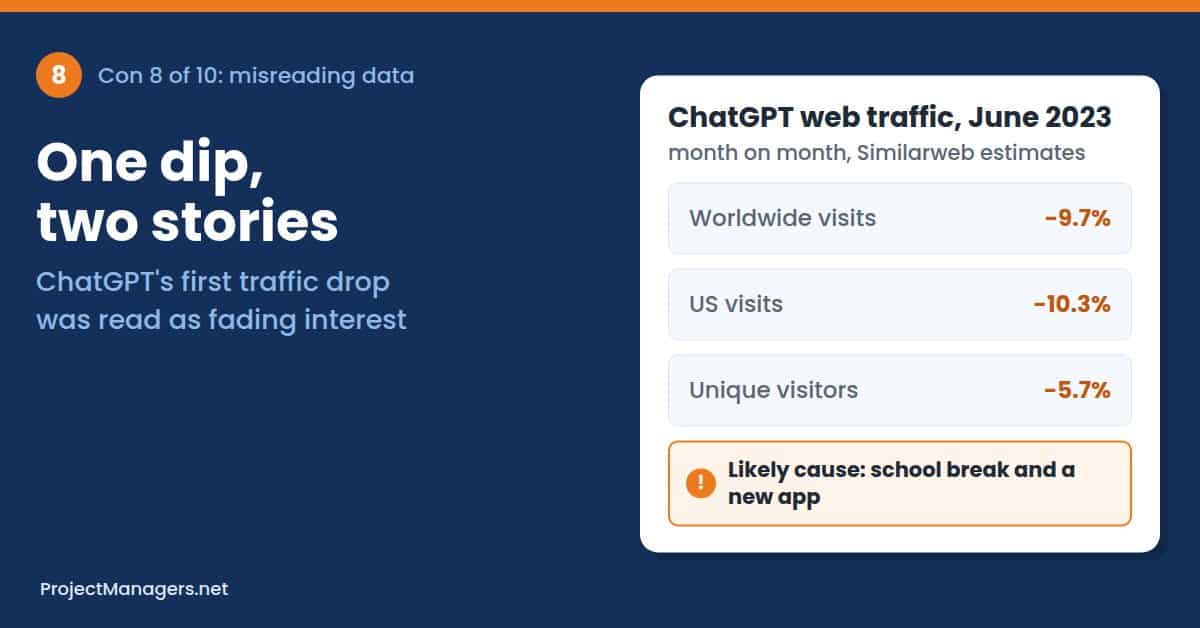
Real-Life Example: In July 2023, Similarweb estimated that ChatGPT’s website traffic fell 9.7% from May to June, its first monthly decline. Headlines asked whether the AI boom was fading. The likely causes were summer break for students and the new iPhone app, and traffic recovered when schools reopened (Fortune, Engadget).
What You Can Do: Always ask what else changed before reading a trend: the season, product launches, a new app, or Similarweb’s own data updates. Compare year over year where you can, and look at desktop and mobile separately. When you share a Similarweb chart, label it as an estimate and add a one-line note on what it can and cannot show.
Real-Life Example
ChatGPT’s “First Decline” in June 2023
Similarweb data showed ChatGPT’s global traffic down 9.7% and unique visitors down 5.7% in June 2023, which many outlets reported as waning interest in AI chatbots. The drop lined up with school holidays and the iOS app launch in May, and traffic stabilized as the school year resumed.
Expert View
Similarweb’s own analysts later linked the summer dip and the autumn rebound to students going on break and returning to class.
David F. Carr, Similarweb senior insights manager, September 2023. Similarweb
By the Numbers
- 9.7%
drop in ChatGPT’s global web traffic from May to June 2023, by Similarweb estimates
Source: Fortune
- 10.3%
decline in US traffic over the same month
Source: Fortune
- 5.7%
fall in unique visitors, a smaller drop than total visits
Source: Fortune
Why It Matters
The same numbers supported two stories (a fading AI boom or a summer holiday), and only context told them apart.
ProjectManagers.net analysis of the 2023 coverage.
9. Limited API Access in Lower Tiers

None of the self-serve plans includes the Similarweb API. It is a subscription add-on that you arrange through an account manager, and it is billed in data credits rather than a fixed number of calls. Credits are used up according to the amount of data returned, so a request across many countries, at daily granularity, or over a long period costs more.
Credits reset on the first of each month and are shared across the REST API, batch API, Similarweb’s MCP connection for AI assistants, and its data exporter. The REST API is also capped at 10 requests per second per account. For teams building dashboards or AI agents on Similarweb data, credit budgets become a real planning task.
How API limits affect teams:
- No Self-Serve Access: Small teams cannot try the API without a sales conversation and a contract.
- Variable Cost per Request: The same report can use very different amounts of credits depending on countries, granularity, and date range.
- Shared Budget: API calls, AI assistant requests, and report downloads draw from the same monthly credits.
Example Scenario (Illustrative): An agency connects Similarweb to a reporting dashboard for 15 clients, pulling daily data for five countries each. By the 18th of the month, the credits are gone, and the dashboards show blanks until the balance resets.
Real-Life Example: Similarweb’s API documentation states that customers pay for the data they receive, not for each call, and that each endpoint has its own base credit cost (Similarweb API docs). Its support pages confirm that credits renew monthly and are also used by MCP requests from AI assistants and by report downloads (Similarweb Knowledge Center).
What You Can Do: Estimate your credit use before you sign, using Similarweb’s credit calculation guide and your real queries. Ask admins to set per-user monthly credit limits, cache results instead of pulling the same data daily, and use monthly rather than daily granularity where it is enough. If you only need occasional exports, the platform’s download options may be cheaper than an API contract.
Real-Life Example
Pay for the Data, Not the Call
Similarweb’s v5 API charges in data credits based on the results returned. The same monthly credit pool covers the REST API, batch API, MCP requests from AI tools, and data exports. The REST API allows up to 10 requests per second per account.
Sources: Similarweb API docs, Similarweb Knowledge Center, Similarweb Knowledge Center
By the Numbers
- 0
self-serve plans that include API access; it is a contracted add-on
Source: Similarweb pricing
- 10/sec
maximum REST API requests per account; extra calls return an error
Source: Similarweb Knowledge Center
- 1st
of each month, when data credit balances renew
Source: Similarweb Knowledge Center
From Similarweb
Similarweb lets admins cap each user’s monthly credits across the API, MCP, and data exports so that a shared budget does not run out early.
Similarweb, Data Credits documentation. Similarweb
10. Potential for Misuse and Unethical Competitive Intelligence
Part of Similarweb’s data comes from people who install browser extensions and apps that share their browsing activity. Similarweb says users consent and that its extensions follow EU rules and Google’s policies. But this model depends on users understanding what they agreed to, and it has a troubled history.
The data can also be misused by the people who buy it. Detailed traffic, referral, and campaign data make it easy to copy a competitor’s launches or target their customers. Investors also use web traffic data to trade ahead of earnings reports, which raises its own fairness questions.
Ethical risks to keep in mind:
- Data Sourcing: Panel data depends on consent that users may not fully understand.
- Copycat Tactics: Campaign and referral data can be used to clone a rival’s work instead of competing on your own ideas.
- Privacy Compliance: Combining Similarweb data with personal data can create obligations under GDPR and similar laws.
Example Scenario (Illustrative): A growth team notices a spike in a rival’s traffic from a new partner site. Within a week, they copy the partnership offer word for word and target the same partner, starting a price war that hurts both companies’ margins.
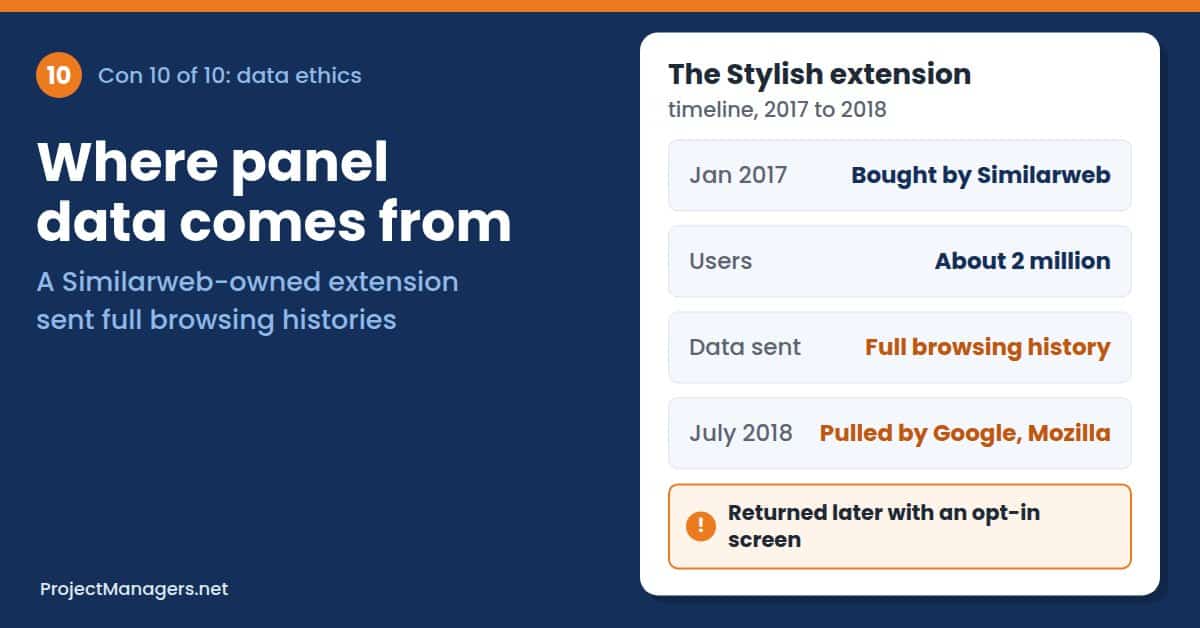
Real-Life Example: In July 2018, developer Robert Heaton showed that Stylish, a popular browser extension Similarweb bought in January 2017, was sending users’ complete browsing activity with a unique identifier to Similarweb’s servers. Google and Mozilla removed it from their stores; it later returned with an opt-in screen (Robert Heaton, Dark Reading).
What You Can Do: Use Similarweb for market-level questions, such as category size, channel mix, and trends, rather than tracking individual people or copying specific campaigns. Write a short internal rule on what competitive data may be used for. In procurement, ask how the vendor collects panel data and how consent is recorded, especially if you operate under GDPR.
Real-Life Example
The Stylish Extension Sends Browsing Histories to Similarweb
Stylish let users restyle websites and had about 2 million users. After Similarweb acquired it, the extension began sending full browsing histories to Similarweb’s servers. Once this was reported in July 2018, Google and Mozilla pulled it. Similarweb said the data was used to suggest themes for the pages users visited.
Sources: Robert Heaton, Dark Reading
Expert View
Heaton pointed out that Similarweb could have collected just domain names to suggest themes, instead of complete web addresses.
Robert Heaton, software engineer who exposed the data collection, 2018. Robert Heaton
By the Numbers
- 2M
Stylish users whose browsing activity was being sent to Similarweb
Source: Robert Heaton, 2018
- 2017
year Similarweb acquired the Stylish extension
Source: Dark Reading
- 2018
year Google and Mozilla removed Stylish from their stores
Source: Dark Reading
From Similarweb
Similarweb says its extensions comply with EU regulations and Google’s policies and ask users for specific approval before collecting browsing data.
Similarweb, as reported by Globes
How Could These Disadvantages Be Overcome Globally?
Most of the cons above can be reduced with a few habits, and some need changes from Similarweb and the wider industry. Whether you use Similarweb on your own, in a small business, or across a team, start with these:
- Treat Numbers as Estimates: Use Similarweb for trends, rankings, and shares, and confirm any figure that drives a big decision with first-party data or a second source.
- Calibrate with Your Own Site: Connect your Google Analytics and compare it with Similarweb’s estimate, so you know how far off it tends to be for sites like yours.
- Buy for Your Real Questions: List the reports you need, and then check history length, country filters, seats, and API access before you choose a plan or start a trial.
- Control the Spend: Set trial and renewal reminders, cap API and MCP credits per user, and review the contract’s notice period.
- Add Context Before You Share: Check seasonality, app launches, and data updates, and label every shared chart as an estimate.
- Use the Data Ethically: Focus on market-level insight, set internal rules for competitive research, and ask vendors how panel data and consent are handled.
- Push for Transparency: Ask Similarweb for confidence ranges, coverage details per country, and clearer published pricing; vendors respond when enough customers ask.
Facts Worth Checking: Common Claims about Similarweb
Reviews, sales pages, and social posts repeat many claims about Similarweb, in both directions. The table below checks ten of them, one per con, against official and independent sources.
Claims you will hear about Similarweb, checked against the data.
| Con | You May Hear | What the Data Says | Source |
|---|---|---|---|
| 1 | Similarweb is accurate for any website. | Not for small sites. In SparkToro’s 641-site test, Similarweb was best for larger sites but weakest for sites under 5,000 monthly users, and Similarweb itself says its estimates will not match direct measurement exactly. | SparkToro, Similarweb |
| 2 | Similarweb is a cheap tool. | The free version is limited. Paid plans start at $199 a month for one user, and business packages are custom; Vendr data puts the median contract around $37,800 a year. | Shila, Similarweb |
| 3 | Any paid plan gives you full history. | No. Self-serve plans include 3 or 6 months of history. Up to 37 months of history is available only with Business and Enterprise packages. | Shila |
| 4 | Similarweb always over-estimates traffic. | The error goes both ways. A PLOS ONE study found 19.4% fewer visits than Google Analytics across 86 sites, while Omniconvert found about 94% more sessions across 1,787 ecommerce sites. | PLOS ONE, Omniconvert |
| 5 | N/A in Similarweb means a site gets no traffic. | It means the site had under 5,000 visits in the last month of the period, or under 5,000 desktop visits for desktop-only features. | Similarweb |
| 6 | Similarweb covers every country equally. | It has 58 dedicated country filters; other countries are only part of Worldwide data. South Korea got its own filter only in 2023. | Similarweb, Similarweb IR |
| 7 | Similarweb shows all of a company’s users. | It measures public web traffic. Logged-in areas, intranets, and app use are largely outside its view, and Microsoft disputed outside data on Bing Chat for that reason. | Search Engine Land |
| 8 | A traffic drop in Similarweb means a company is in trouble. | Not necessarily. ChatGPT’s 9.7% drop in June 2023 matched school holidays and a new app, and traffic recovered in the autumn. | Fortune, Engadget |
| 9 | Every paid plan includes the API. | No. The API is a contracted add-on billed in data credits that reset monthly, with a limit of 10 requests per second on the REST API. | Similarweb, Similarweb |
| 10 | Similarweb data is collected without consent. | Similarweb says its extensions ask for user approval. But in 2018, its Stylish extension sent full browsing histories of about 2 million users before an opt-in was added. | Globes, Robert Heaton |
Checked November 2026. Prices and figures change; follow the source links for the latest numbers.
What Is Similarweb?
Similarweb is a digital intelligence platform that estimates traffic and engagement for websites and apps and turns that data into market and competitor insights. It was founded in 2007 by Or Offer in Israel and has been listed on the New York Stock Exchange (NYSE: SMWB) since 2021. In the second quarter of 2026, it reported revenue of $77.2 million, up 9% year over year, with 473 customers paying more than $100,000 a year. Source: Similarweb investor relations.
Similarweb builds its estimates from several sources, including a consumer panel of devices that share browsing data, public data, partner data, and websites that connect their own analytics. It then models the full market from these signals, which is why its figures are estimates rather than measurements.
- Web Intelligence: Shows estimated visits, unique visitors, engagement, traffic sources, and audience geography for almost any large website.
- SEO and AI Search: Adds keyword, ranking, and AI search visibility data, sold as add-on tiers in the self-serve plans.
- Ad Intelligence: Reveals competitors’ display and search ads and the publishers they use.
- Sales and Shopper Intelligence: Builds lead lists from website signals and tracks ecommerce data on products and brands.
- API and MCP: Feeds data into dashboards and AI assistants, billed in data credits.
How people use Similarweb today, and where each con above applies:
- Small Businesses: Owners check local competitors and size up a niche. Watch for small-site accuracy and missing data (see cons 1 and 5).
- Marketing Teams: Marketers benchmark channels, keywords, and campaigns. Read every trend in context (see cons 4 and 8).
- Agencies: Agencies pitch and report to clients across many sites and countries. Check plan limits, geography, and API credits (see cons 3, 6, and 9).
- Sales Teams: Sales reps qualify leads by web traffic. Remember that logged-in and app use is hidden (see con 7).
- Investors and Analysts: Analysts track company growth between earnings reports. Confirm the numbers with other data, and consider data ethics (see cons 4 and 10).
- Project Managers: Project managers use it for market research behind a product launch or business case. Budget for the right plan, and record estimates as assumptions in the risk register (see cons 2 and 4).
Learn More:
- Similarweb on Wikipedia
- Similarweb’s Data Accuracy (Similarweb Knowledge Center)
- Similarweb Data Methodology FAQs
- Similarweb pricing page
Research on Similarweb
Independent research on Similarweb mostly tests one question: how close its estimates come to real analytics. These studies are a good starting point if you want to go deeper than vendor claims, set rules for how your team uses traffic estimates, or brief stakeholders on what the numbers mean:
- Measuring user interactions with websites: A comparison of two industry standard analytics approaches using data of 86 websites (PLOS ONE, 2022)
- Which 3rd-Party Traffic Estimate Best Matches Google Analytics? (SparkToro, 2022)
- Google Analytics vs Similarweb: analysis of 1,787 ecommerce websites (Omniconvert)
- Stylish browser extension steals all your internet history (Robert Heaton, 2018)
- Semrush vs Similarweb: Accuracy Test on 787 Sites (OWOX)
Video: What Similarweb Does and Where Its Data Comes From
In this review from Cybernews, a technology news and review publication, the reviewer walks through Similarweb’s main tools, its self-serve plans, and its data sources. The pricing section (5:06) confirms that the entry plan includes three months of history and the top self-serve plan six, which ties to con 3. The data sources section (6:37) explains that Similarweb models its figures from app and extension panels, site owners’ data, ISP partnerships, and public information.
The reviewer also notes that the estimates are more accurate for larger websites, which ties to cons 1, 4, and 10. Cybernews discloses that it earns affiliate commissions, so treat the overall verdict as a product overview rather than an independent accuracy test.
Similarweb review: All-in-one web analysis and research tool, Cybernews on YouTube (February 2026, 7:43). Watch on YouTube
Similarweb FAQ
Is Similarweb Accurate?
Similarweb is reasonably accurate for trends on large websites but much less reliable for small ones. In SparkToro‘s test of 641 sites, its estimates landed within 30% of real Google Analytics figures about two-thirds of the time for larger sites, yet it was the weakest of four tools for sites under 5,000 monthly users. Use it to compare sites and spot trends, not as exact traffic counts.
How Much Does Similarweb Cost?
Self-serve plans start at $199 a month for one user, or $125 a month billed annually, with three months of history. Adding SEO and AI search data costs $399 a month, and adding ad intelligence costs $649. Business and Enterprise packages are custom quotes. Vendr’s purchase data puts the median contract near $37,800 a year (prices checked October 2026, Shila).
Does Similarweb Have a Free Version?
Yes, but it is limited. The free website and browser extension show high-level traffic, rankings, and the top five countries for a site. The 7-day free trial of the paid plans requires a card and converts to a paid plan automatically unless you cancel in time.
Why Does Similarweb Show No Data for Some Websites?
Similarweb shows “Not enough data” instead of traffic figures for sites with fewer than 5,000 visits in the last month of the period you select. Some features use desktop data only, so a site also needs 5,000 desktop visits a month to appear there (Similarweb Knowledge Center).
Where Does Similarweb Get Its Data?
Similarweb combines a consumer panel of devices whose owners share browsing data through apps and browser extensions, partner data, public data, and websites that connect their own Google Analytics. It then models the full market from these signals, which is why its figures are estimates (Similarweb).
Does Similarweb Include API Access?
Not on the self-serve plans. The API is a contracted add-on billed in data credits, which renew on the first of each month and are shared with MCP requests and data exports. The REST API allows up to 10 requests per second per account (Similarweb Knowledge Center).
What Are the Main Alternatives to Similarweb?
Semrush, Ahrefs, and Datos also estimate website traffic. In SparkToro’s 2022 test, Semrush had the highest overall correlation with real Google Analytics data (0.790, against 0.659 for Similarweb), while Ahrefs focuses on organic search traffic. See our articles on the cons of Semrush and the cons of Ahrefs before you switch.
Conclusion
Similarweb is a powerful research tool, but it does not deliver exact numbers. Its estimates are least reliable for small and new sites, and errors can run in either direction. Genuine depth costs far more than the entry price, while coverage thins across many countries, logged-in products, and apps. The data is easily misread, API access is metered, and its panel-based model raises real privacy concerns.
The good news is that simple habits make most of these risks manageable. Treat figures as estimates, calibrate with your own analytics, buy for the questions you actually have, add context before you share a chart, and use the data ethically. Individuals can build these habits in minutes, small businesses can follow a short checklist, and teams and project managers can record Similarweb figures as assumptions rather than facts. Used that way, Similarweb can sharpen your view of the market without leading you into costly mistakes.
Suggested Articles:
- Top 10 Cons & Disadvantages of Semrush
- Top 10 Cons & Disadvantages of Ahrefs
- Choosing the Right SEO Tool: A Guide for Marketers in 2026

Peter Kanai is a Google-certified freelance writer with over a decade of experience crafting high-quality content for business websites, blogs, and SEO & email marketing campaigns. His on-demand writing services are all about helping businesses expand their online presence and achieve their objectives. With a proven track record in delivering results-driven content, Peter is the go-to freelance writer for business owners seeking a strategic partner to help them grow their brand online.