
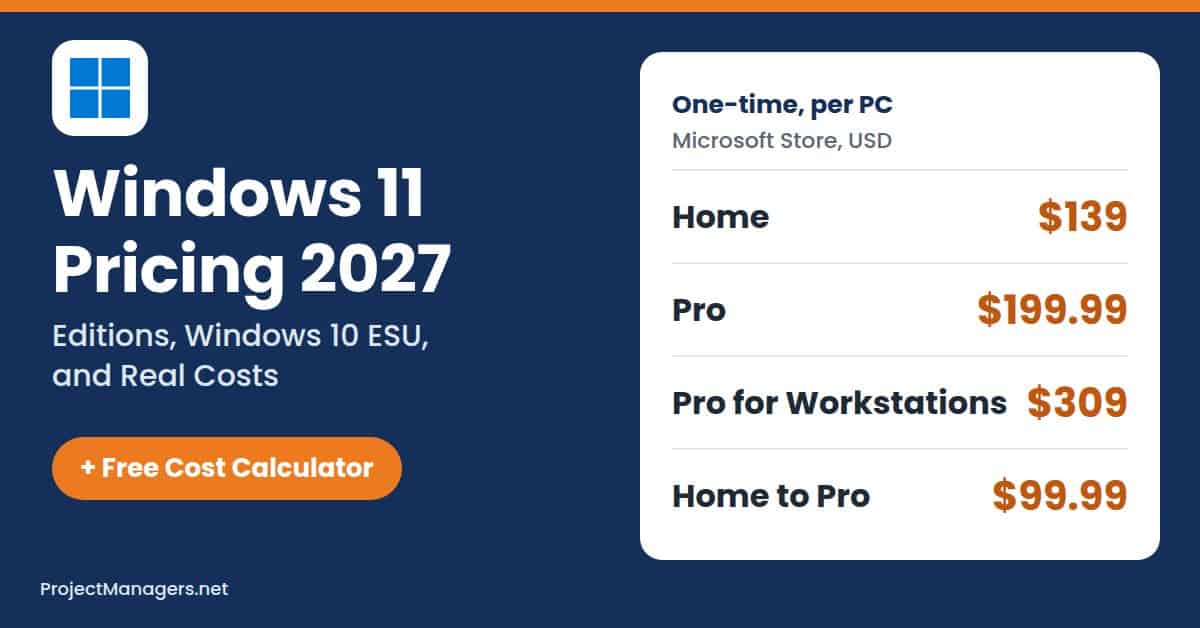
A Windows 11 upgrade looks free until the PC Health Check app says your laptop fails the TPM 2.0 test. Then the bill starts: a $139 or $199.99 license for a new build, $99.99 to turn Home into Pro, $61 to $244 a year per office PC kept on Windows 10, or a whole new computer. For a project team with ten aging PCs, the license is often the smallest line.
This guide explains the Windows 11 prices you will pay in 2027, as checked in the Microsoft Store and on Microsoft’s support pages in November 2026. It covers every edition, what changed this year, how Windows 10 Extended Security Updates are billed, and which add-ons quietly raise the total. Use the free Windows 11 cost calculator below to price your own PCs in a few seconds.
- Windows 11 License Prices: The Microsoft Store sells Windows 11 Home for $139, Windows 11 Pro for $199.99, and Windows 11 Pro for Workstations for $309. Each is a one-time license for one PC, and an eligible Windows 10 PC still upgrades to the same Windows 11 edition for free.
- Home to Pro Upgrade: A PC already running Windows 11 Home can move to Pro for about $99.99 in Settings, half the price of a full Pro license. Windows 11 Pro adds BitLocker, Remote Desktop hosting, Hyper-V, and domain or Microsoft Entra ID join, which most business PCs need.
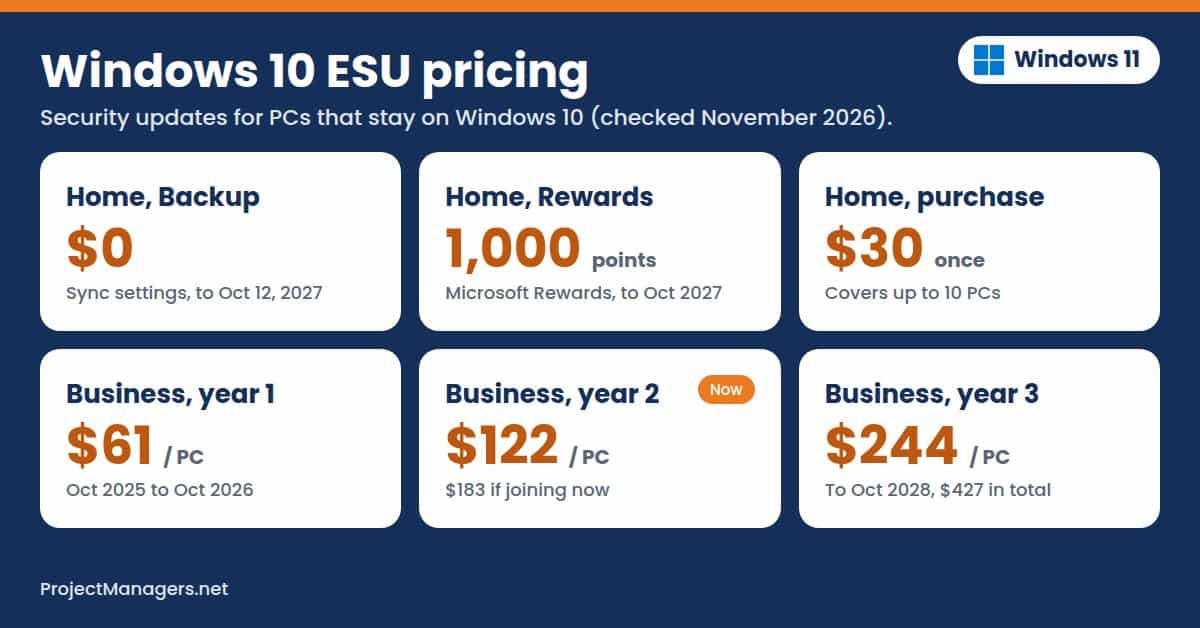
- Windows 10 ESU Costs: Home users can keep Windows 10 PCs patched through October 12, 2027, for free with Windows Backup, for 1,000 Microsoft Rewards points, or for $30. Businesses pay $61, $122, and $244 per device for years one to three, and the payments are cumulative.
- Real Cost per PC: The Windows 11 license is often the smallest cost. In our examples, a 10-PC office pays about $180 per PC in the first year, mostly for two replacement computers, and 25 Windows 365 Cloud PCs cost $10,800 a year.
Windows 11 Cost Calculator
Your Windows 11 bill depends on how many PCs upgrade for free, how many need a new license or a Pro upgrade, and which edition your features require. It also depends on how many PCs must be replaced or kept on Windows 10, and which subscriptions you add. Enter your PCs below to see the lowest-cost edition, your one-time and yearly costs, and every cost line.
Try Our Free Windows 11 Cost Calculator Below
The calculator uses Microsoft Store license prices, Microsoft’s Windows 10 ESU rates, and the list prices of Microsoft 365 and Windows 365 to estimate what you will pay.
- Count Your PCs: Enter how many Windows 10 PCs can upgrade for free, how many need a new license, how many run Windows 11 Home, how many must be replaced, and how many will stay on Windows 10 for now.
- Tick What You Need: Under “Which edition do you need?”, tick features such as BitLocker, Remote Desktop, or domain join. With “Best fit” selected, the calculator picks the lowest-cost edition that covers them and explains why.
- Choose Your ESU Option: Pick free or $30 home ESU for personal PCs, or business ESU through October 2027 or October 2028 for office PCs that stay on Windows 10.
- Add Subscriptions: Pick a Microsoft 365 plan and the number of subscriptions, or add Windows 365 Cloud PCs for staff who work from any device.
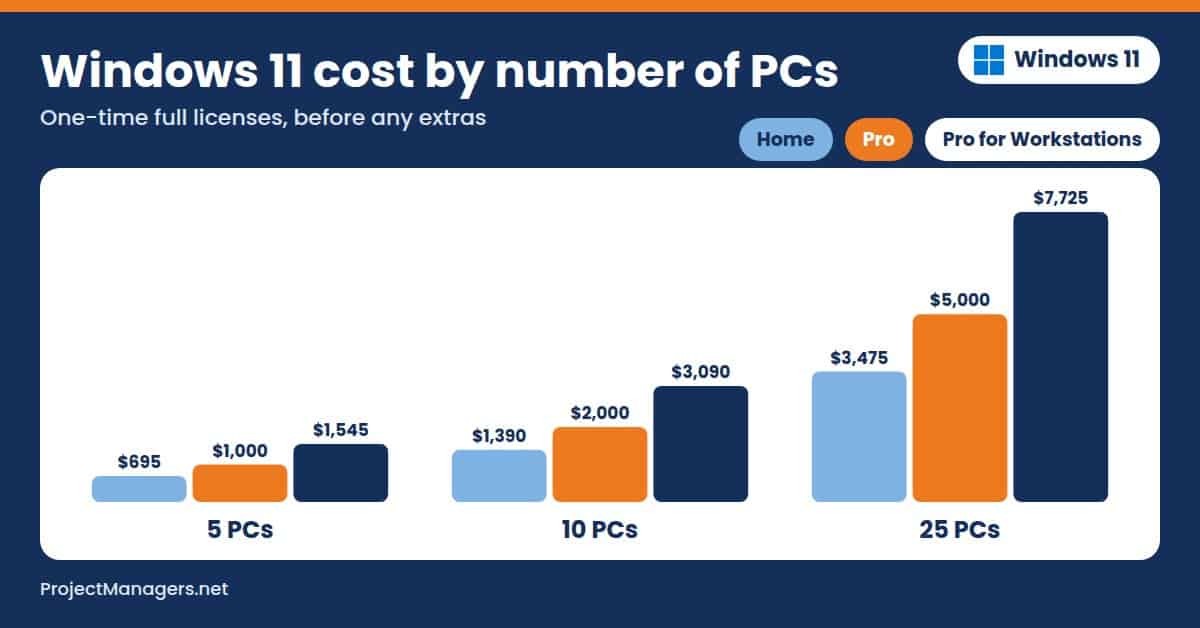
- Compare and Share: “Every edition for your PCs” shows Home, Pro, and Pro for Workstations side by side, and the chart shows license cost by number of PCs. Click “Copy results” for a text summary or “Print” for a clean report.
Tip: Your entries are saved in your browser, so the calculator shows them again when you come back. It opens with the “Office of 10” example; click “Reset to example” to start over, or try the other example buttons.
Windows 11 Cost Calculator
Prices checked November 10, 2026, in USD, per PC.
Copilot+ PCs need 16 GB of RAM, 256 GB of storage, and an NPU with 40+ TOPS.
Home: $30 covers up to 10 PCs. Business: $61, $122, and $244 per PC for years one to three, paid cumulatively.
$99.99, $129.99, and $199.99 a year. Family covers up to 6 people.
Windows 365 Business, per user per month, for up to 300 users.
Where your PCs stand
Cost breakdown
| First-year total | $1,799.98 |
|---|
Tip: The $99.99 Home to Pro upgrade is about half the price of a full Pro license. Buy it in Settings > System > Activation on each Home PC.
Which edition do you need?
Because of: BitLocker drive encryption with central key management; Remote Desktop into the PC (host).
Every edition for your PCs
| Edition | Covers Your Needs | One-Time Cost | First Year | Three Years | Per PC, First Year |
|---|---|---|---|---|---|
| Home | No: needs Pro | $1,600.00 | $1,600.00 | $1,600.00 | $160.00 |
| Pro best fit | Yes | $1,799.98 | $1,799.98 | $1,799.98 | $180.00 |
| Pro for Workstations | Yes | $2,218.00 | $2,218.00 | $2,218.00 | $221.80 |
Totals include replacement PCs, ESU, and subscriptions. On Pro for Workstations, Home PCs need a full $309 license.
License cost by number of PCs
Home ($139)Pro ($199.99)Pro for Workstations ($309)
Full license prices only. The $99.99 Home to Pro upgrade, ESU, new PCs, and subscriptions come on top.
Estimates from Microsoft’s US list prices. Taxes, IT labor, and Windows Enterprise and Education licenses (sold through Microsoft partners and schools) are not included. Replacement PC prices are your own estimate.
How Much Does Windows 11 Cost?
Windows 11 costs $0 if your Windows 10 PC is eligible for the free upgrade, which keeps the same edition you already have. Otherwise, the Microsoft Store sells Windows 11 Home for $139, Windows 11 Pro for $199.99, and Windows 11 Pro for Workstations for $309. Each is a one-time purchase for one PC, as a download or on a USB drive.
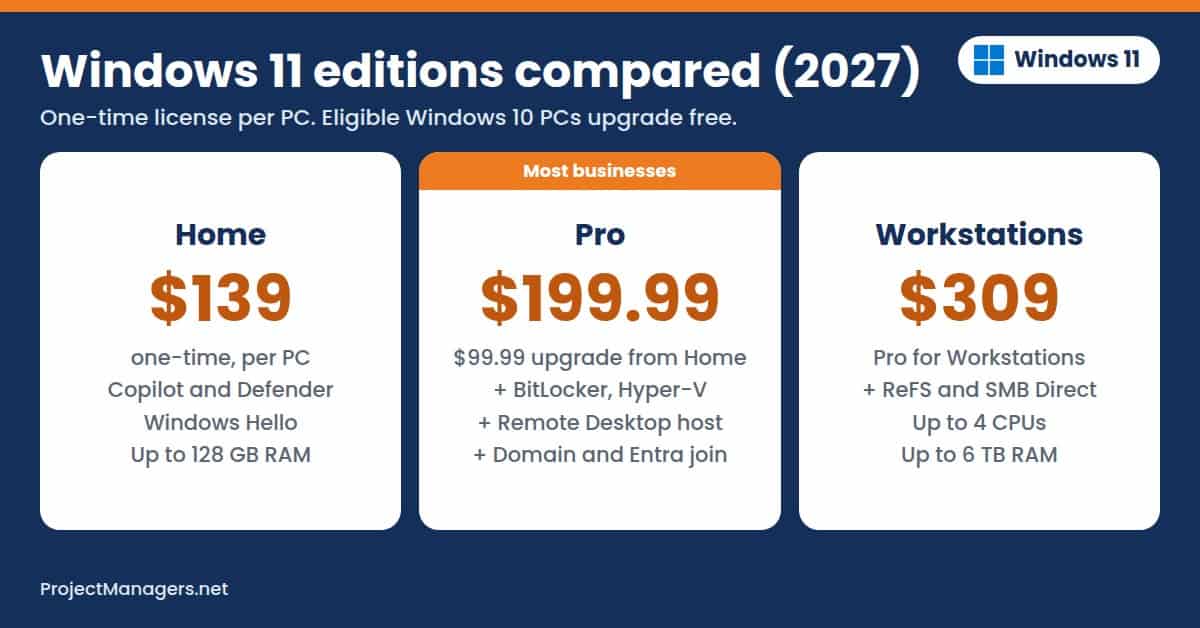
- Windows 11 Home ($139): Includes Copilot, Microsoft Defender, Windows Hello, Snap layouts, Clipchamp, and Xbox features for personal PCs with up to 128 GB of RAM.
- Windows 11 Pro ($199.99, or $99.99 from Home): Adds BitLocker, Remote Desktop hosting, Hyper-V, Windows Sandbox, domain and Microsoft Entra ID join, and Group Policy for business PCs with up to 2 TB of RAM.
- Windows 11 Pro for Workstations ($309): Adds the ReFS file system, SMB Direct, and support for up to 4 CPUs and 6 TB of RAM for engineering, data, and media workstations.
- Windows 11 Enterprise and Education (Quote): Are sold through Microsoft licensing partners and school agreements, usually per user and bundled with Microsoft 365, so the price depends on your contract.
Windows 11 Editions Compared (November 2026)
Prices are Microsoft Store list prices in US dollars, one-time per PC.
| Edition | Price | Maximum RAM | What You Get | Best For |
|---|---|---|---|---|
| Windows 11 Home | $139 | 128 GB | Copilot, Microsoft Defender, Windows Hello, Snap layouts, and device encryption on supported hardware | Personal and family PCs |
| Windows 11 Pro | $199.99 ($99.99 upgrade from Home) | 2 TB | Home plus BitLocker, Remote Desktop hosting, Hyper-V, Windows Sandbox, domain and Entra ID join, and Group Policy | Freelancers and small businesses |
| Windows 11 Pro for Workstations | $309 | 6 TB | Pro plus ReFS, SMB Direct, persistent memory, and up to 4 CPUs | Engineering, data, and media workstations |
| Windows 11 Enterprise | Quote | 6 TB | Pro plus advanced security and management, sold per user through partners | Larger organizations |
| Windows 11 Education | Quote | 2 TB | Enterprise-level features for schools, licensed through education programs | Schools and universities |
Sources: Microsoft Store (Home, Pro, and Pro for Workstations), Microsoft memory limits, and Windows Central for the upgrade price, checked November 10, 2026.
What Changed in Windows 11 Pricing in 2026
- Home ESU Was Extended to 2027: In late June 2026, Microsoft extended the consumer Windows 10 ESU program to October 12, 2027. Enrolled PCs continue automatically, and new PCs can still join for free, for 1,000 Rewards points, or for $30.
- Business ESU Doubled: Year two of business ESU started in October 2026 at $122 per device, up from $61. A PC that joins now pays for year one too, because ESU payments are cumulative.
- Windows 365 Got Cheaper: Microsoft cut Windows 365 Business list prices by 20% on May 1, 2026. A 2 vCPU, 8 GB Cloud PC is now listed at $36 per user per month.
- Microsoft 365 Business Suites Went Up: On July 1, 2026, Microsoft 365 E3 rose from $36 to $39 per user per month and E5 from $57 to $60, which matters because many companies get Windows Enterprise through these suites.
- PC Makers Reportedly Pay More: Windows Central reported in August 2026 that some PC makers face Windows license increases of 7% to 10%, on top of higher memory prices. Microsoft has not changed its retail prices.
- New Versions Stay Free: Windows 11, version 26H2 arrived on September 29, 2026, as a free update, and support for version 24H2 on Home and Pro ended in October 2026.
How Windows 11 Pricing Really Works
Six rules decide what Windows 11 costs you. They come from Microsoft’s Store listings, support pages, and license documentation.
- You Pay per PC, Once: A retail Windows 11 license covers one PC and has no monthly fee. Ten new builds on Pro cost $1,999.90 once.
- Eligible Upgrades Are Free: A Windows 10 PC that meets the Windows 11 requirements upgrades for free through Windows Update. It keeps its edition, so Windows 10 Home becomes Windows 11 Home.
- Hardware Decides Eligibility: Windows 11 needs a 1 GHz or faster 64-bit processor with 2 or more cores, 4 GB of RAM, 64 GB of storage, UEFI with Secure Boot, and TPM 2.0. A PC that fails these checks needs ESU or a replacement.
- Upgrading an Edition Is Cheaper Than Buying It: Moving an activated Home PC to Pro costs about $99.99 in Settings > System > Activation, compared with $199.99 for a full Pro license.
- New PCs Include Windows: A computer bought from a PC maker comes with a Windows 11 license built into its price. That license stays with the PC.
- Setup Needs a Microsoft Account: Microsoft requires a Microsoft account and an internet connection to set up Windows 11 Home and Pro. The account adds 5 GB of free OneDrive storage.
Windows 11 Editions in Detail
Windows 11 Home ($139)
Windows 11 Home is the edition on most consumer laptops and the one families and students need. It costs $139 as a download or on a USB drive.
- Centered Start menu, Snap layouts, and virtual desktops
- Microsoft Copilot, the Photos app with Generative Erase, Clipchamp, and Snipping Tool
- Microsoft Defender antivirus, Smart App Control, firewall, and Windows Hello sign-in
- Device encryption on supported hardware
- DirectStorage, Auto HDR, and the Xbox app (Game Pass is sold separately)
- Up to 128 GB of RAM and one CPU socket
- No BitLocker management, Remote Desktop hosting, Hyper-V, or domain join: those start on Pro
Windows 11 Pro ($199.99)
Windows 11 Pro is for professionals and small businesses that need encryption, remote access, and central management. It costs $199.99, or about $99.99 as an upgrade from Home.
- Everything in Home
- BitLocker drive encryption with recovery keys you can store in Microsoft Entra ID
- Remote Desktop host, so you can connect to the PC from another device
- Hyper-V virtual machines and Windows Sandbox for testing untrusted apps
- Domain join, Microsoft Entra ID join, Group Policy, and Intune management
- Windows Update for Business controls for scheduling updates
- Up to 2 TB of RAM
Windows 11 Pro for Workstations ($309)
Windows 11 Pro for Workstations is built for high-end PCs that handle large engineering, data, or video workloads. It costs $309 per PC.
- Everything in Pro
- Resilient File System (ReFS) for large volumes
- SMB Direct for fast file transfers over compatible network cards
- Persistent memory support
- Up to 4 CPUs and 6 TB of RAM
Windows 11 Enterprise and Education (Quote)
Windows 11 Enterprise is sold per user or per device through Microsoft licensing partners and is included in Microsoft 365 E3 and E5. Windows 11 Education and Pro Education reach schools through education agreements, often bundled with Microsoft 365 Education. Prices depend on your agreement, so ask a Microsoft partner for a quote. Windows 11 SE, the low-cost school edition, stopped at version 24H2.
Windows 10 Extended Security Updates Pricing
Windows 10 support ended on October 14, 2025. PCs that cannot or will not move to Windows 11 can still receive critical security fixes through Extended Security Updates (ESU), and the price depends on whether the PC is personal or managed by an organization.
Windows 10 ESU Options and Prices
| Option | Price | Coverage | Who It Is For |
|---|---|---|---|
| Home ESU with Windows Backup | $0 | Through October 12, 2027 | Personal PCs that sync settings with a Microsoft account |
| Home ESU with Microsoft Rewards | 1,000 points | Through October 12, 2027 | Personal PCs |
| Home ESU purchase | $30 one-time | Through October 12, 2027, on up to 10 PCs | Personal PCs |
| Business ESU, year one | $61 per device | October 2025 to October 2026 | Organizations, through volume licensing |
| Business ESU, year two | $122 per device ($183 if joining now) | To October 2027 | Organizations |
| Business ESU, year three | $244 per device ($427 in total) | To October 2028 | Organizations |
| Windows 365 and Azure Virtual Desktop | Included | Up to three years | Windows 10 virtual machines and PCs that connect to Cloud PCs |
Sources: Microsoft consumer ESU page and Microsoft ESU documentation for organizations, checked November 10, 2026.
- Who Qualifies for Home ESU: PCs must run Windows 10, version 22H2, in the Home, Pro, Pro Education, or Workstations edition. PCs joined to a domain or Microsoft Entra ID, or managed by Intune, must use business ESU.
- What ESU Includes: ESU delivers critical security updates only. It adds no new features and includes no technical support.
- Why ESU Is a Stopgap: Business ESU ends by October 2028 at the latest, and three years cost $427 per PC, often close to the price of a basic new computer.
Example: An office that keeps 15 Windows 10 PCs on business ESU through October 2027 pays 15 × $183, or $2,745, because each PC joining in year two also pays for year one.
Hardware Costs: Replacing PCs and Copilot+ PCs
For many teams, the highest Windows 11 cost is hardware, not the license. Run the PC Health Check app on each Windows 10 PC before you budget, because older processors and missing TPM 2.0 chips are the most common blockers.
- Minimum PC for Windows 11: Microsoft lists a 1 GHz or faster processor with 2 or more cores, 4 GB of RAM, 64 GB of storage, UEFI with Secure Boot, TPM 2.0, and a DirectX 12-compatible graphics card.
- Copilot+ PCs: Copilot+ features such as Recall and on-device image creation need an NPU with 40+ TOPS, 16 GB of RAM, and a 256 GB SSD. Copilot itself is free on any Windows 11 PC.
- Replacement PCs Include a License: A new PC from a PC maker comes with Windows 11 Home or Pro, so you do not buy a separate license for it.
- Memory Prices Are Rising: Higher memory prices in 2026 have pushed PC prices up, so price replacements close to the date you buy.
Windows 11 Add-Ons and Their Prices
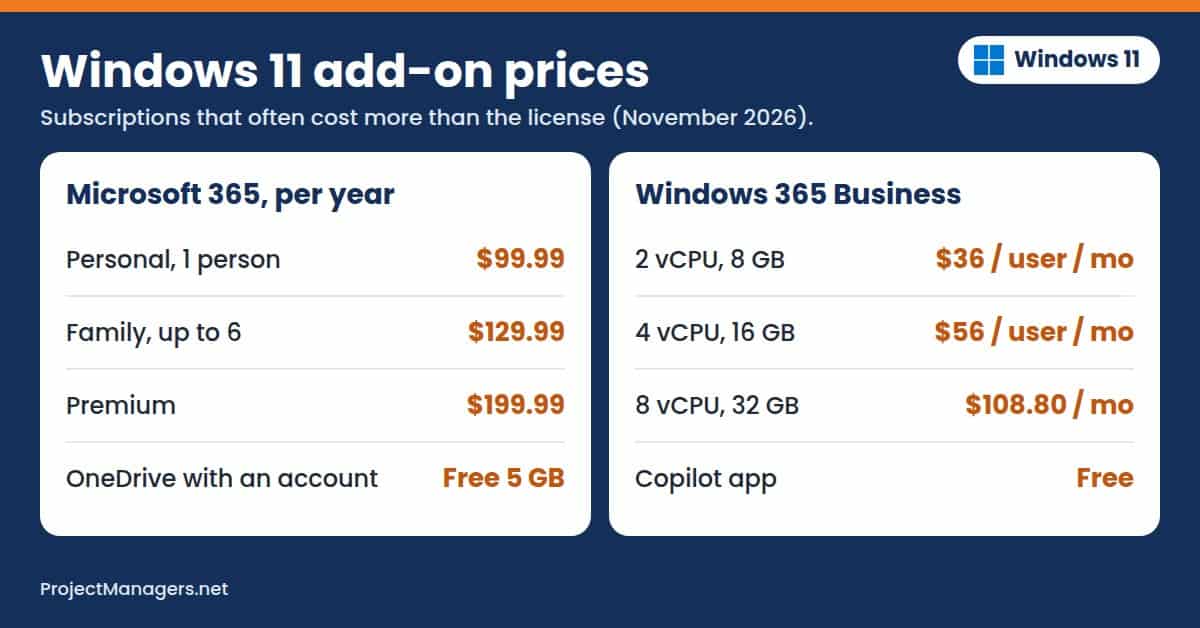
- Microsoft 365 Personal ($99.99 a Year): Includes the desktop Office apps, 1 TB of OneDrive storage, and Copilot in the apps for one person.
- Microsoft 365 Family ($129.99 a Year): Covers up to 6 people with 2 TB of shared OneDrive storage, and each person can use it on up to 5 devices at once.
- Microsoft 365 Premium ($199.99 a Year): Adds advanced Copilot chat with extensive usage and other exclusive Copilot features on top of Family.
- Windows 365 Business (from $36 per User per Month): Streams a Windows 11 Cloud PC to any device for organizations with up to 300 users. A 2 vCPU, 8 GB Cloud PC costs $36, a 4 vCPU, 16 GB model $56, and an 8 vCPU, 32 GB model $108.80.
- Microsoft 365 E3 and E5 ($39 and $60 per User per Month): Include Windows Enterprise rights alongside Office apps, email, and security tools for larger organizations.
- Xbox Game Pass (Separate Subscription): Unlocks the game library in the Xbox app. Windows 11 Home and Pro include the app but not the subscription.
What Windows 11 Really Costs: Examples
Here is what six common setups pay, using the same math as the calculator. The chart shows how full license cost grows with the number of PCs on Home, Pro, and Pro for Workstations.
What Real Teams Pay
Worked examples from the calculator above, in US dollars.
| Setup | Edition and Extras | First Year | Three Years | Per PC, First Year |
|---|---|---|---|---|
| New PC build, 1 PC | Windows 11 Home license | $139.00 | $139.00 | $139.00 |
| Family with 3 PCs: 2 free upgrades, 1 PC on free home ESU | Home + Microsoft 365 Family | $129.99 | $389.97 | $43.33 |
| Office of 10: 6 free upgrades, 2 Home PCs, 2 replacements at $800 | Pro (2 upgrades at $99.99) + 2 new PCs | $1,799.98 | $1,799.98 | $180.00 |
| 25 PCs: 10 upgrade, 15 stay on Windows 10 to October 2027 | Pro + business ESU at $183 per PC | $2,745.00 | $2,745.00 | $109.80 |
| 25 remote staff on Windows 365, all PCs upgrade free | Pro + 25 Cloud PCs at $36 a month | $10,800.00 | $32,400.00 | $432.00 |
| 3 new engineering workstations | Windows 11 Pro for Workstations licenses | $927.00 | $927.00 | $309.00 |
Taxes and IT labor are not included. Replacement PCs use an $800 estimate; enter your own price in the calculator.
Hidden Costs to Watch
- Replacement Hardware: A PC that fails the TPM 2.0 or processor check cannot run Windows 11, and replacing it costs far more than any license.
- Cumulative ESU Payments: Business PCs that join ESU late pay for every earlier year, so a PC joining in year three pays $427.
- Buying Pro Twice: A full $199.99 Pro license on a Home PC costs about $100 more than the $99.99 upgrade.
- Unofficial Product Keys: Very cheap keys from marketplaces may be volume or OEM keys that stop activating, leaving you to pay again.
- IT Time: Checking eligibility, backing up data, and reinstalling apps takes hours per PC, even when the upgrade itself is free.
- Subscriptions That Renew: Microsoft 365 and Windows 365 renew every month or year, so over three years they often cost more than the licenses.
- Taxes: Microsoft Store prices exclude sales tax and VAT where they apply.
Windows 11 Discounts and Free Options
- The Free Upgrade: Eligible Windows 10 PCs move to Windows 11 for free through Settings > Privacy and Security > Windows Update.
- Free Home ESU: Personal PCs get security updates through October 12, 2027, at no cost by syncing settings with Windows Backup or redeeming 1,000 Microsoft Rewards points.
- One ESU License for 10 PCs: The $30 home ESU purchase covers up to 10 personal PCs on the same Microsoft account.
- ESU Included with Windows 365: Windows 10 PCs that connect to Windows 365 Cloud PCs get ESU for up to three years at no extra cost.
- Students and Schools: Schools license Windows 11 Education through Microsoft education programs, and eligible students can often get it through their school.
- The Home to Pro Upgrade: Paying $99.99 to upgrade an existing Home PC saves about $100 compared with a full Pro license.
Is Windows 11 Worth the Price?
Windows 11 is worth it for nearly every PC that qualifies, because the upgrade is free and Windows 10 now gets security fixes only through paid or temporary ESU. Home at $139 suits personal PCs, and Pro at $199.99, or $99.99 as an upgrade, is the right choice for business PCs that need encryption, remote access, and central management.
It gets expensive when old PCs fail the hardware check, and you must choose between ESU and new computers. Run your numbers in the calculator, check every PC first, and replace the oldest ones before ESU prices climb. If you also need a full-featured, cloud-based project management platform, consider AceProject. It does not charge per user, which can make it more cost-effective as your team grows.
Windows 11 Pricing Facts Worth Checking
Many Windows 11 pricing claims online are out of date or only half right. Here are ten common ones, checked against Microsoft’s own pages.
10 Windows 11 Pricing Claims, Checked
| Claim | Verdict | What the Data Says | Source |
|---|---|---|---|
| Windows 11 is free. | Partly true | It is free for eligible Windows 10 PCs, in the same edition. A new build or a PC without a license needs a $139 or $199.99 license. | Microsoft |
| Windows 11 Home costs $139.99. | Partly true | The Microsoft Store lists Windows 11 Home at $139.00 as a download or on USB. | Microsoft Store |
| Upgrading from Home to Pro costs the full $199.99. | False | An activated Home PC can upgrade to Pro for about $99.99 in Settings. | Windows Central |
| Windows 10 home security updates ended in October 2026. | Out of date | In June 2026, Microsoft extended home ESU to October 12, 2027, for enrolled PCs. | Microsoft support |
| Windows 10 ESU costs $30 for everyone. | False | The $30 option is for personal PCs. Businesses pay $61, $122, and $244 per device for years one to three. | Microsoft Learn |
| Businesses can join ESU later for the current year only. | False | Business ESU is cumulative, so a PC joining in year two also pays for year one. | Microsoft Learn |
| BitLocker needs Windows 11 Pro. | Partly true | Full BitLocker management is a Pro feature, but Home includes device encryption on supported hardware. | Microsoft |
| Copilot costs extra on Windows 11. | False | Copilot is included free in Windows 11. Copilot+ features need a PC with a 40+ TOPS NPU and 16 GB of RAM. | Microsoft |
| Windows 365 Cloud PCs got more expensive in 2026. | False | Microsoft cut Windows 365 Business list prices by 20% on May 1, 2026. | Microsoft Tech Community |
| Windows 11 Home supports up to 2 TB of RAM. | False | Home supports 128 GB. Pro supports 2 TB, and Pro for Workstations 6 TB. | Microsoft Learn |
Checked against Microsoft’s own pages on November 10, 2026.
Video: Windows 11 Home vs Pro Explained
Prefer to watch? The choice between Home and Pro decides most Windows 11 license costs, and this video walks through the features that actually differ.
Windows 11 Pro vs Home Edition – the Biggest Differences (ThioJoe, 10:37)
A walk through the Pro features that matter, from BitLocker and Hyper-V to Group Policy and Remote Desktop. It was published on November 1, 2026; use the prices in this article as the current ones.
Windows 11 Pricing FAQ
Windows 11 Pricing FAQ
How Much Does Windows 11 Cost?
Windows 11 Home costs $139, Windows 11 Pro costs $199.99, and Windows 11 Pro for Workstations costs $309 in the Microsoft Store. Each is a one-time license for one PC. Eligible Windows 10 PCs upgrade for free.
Is Windows 11 Free to Upgrade from Windows 10?
Yes, if the PC meets the Windows 11 requirements, including TPM 2.0 and a supported processor. The free upgrade keeps your edition, so Windows 10 Home becomes Windows 11 Home and Windows 10 Pro becomes Windows 11 Pro.
What Is the Difference between Windows 11 Home and Pro?
Windows 11 Pro adds BitLocker, Remote Desktop hosting, Hyper-V, Windows Sandbox, domain and Microsoft Entra ID join, and Group Policy. Home supports up to 128 GB of RAM, and Pro supports up to 2 TB.
How Much Does It Cost to Upgrade Windows 11 Home to Pro?
The upgrade costs about $99.99 in the US. Buy it in Settings > System > Activation on a PC with an activated Home license; it is about half the price of a full Pro license.
How Much Do Windows 10 Extended Security Updates Cost?
Home users can enroll for free with Windows Backup, for 1,000 Microsoft Rewards points, or for $30, with coverage through October 12, 2027. Businesses pay $61, $122, and $244 per device for years one to three, and the payments are cumulative.
Do I Need to Pay for Copilot on Windows 11?
No. Copilot is included in Windows 11 at no extra cost. Copilot+ PC features need a PC with an NPU of 40+ TOPS and 16 GB of RAM, and Microsoft 365 Personal, Family, or Premium add Copilot inside the Office apps.
How Much Does Windows 11 Cost for a Business?
Small businesses usually buy PCs with Windows 11 Pro or upgrade Home PCs for about $99.99 each. Larger organizations license Windows Enterprise per user through Microsoft partners or Microsoft 365 E3 ($39) and E5 ($60), and Windows 365 Business Cloud PCs start at $36 per user per month.
Conclusion
Windows 11 costs far less than most people expect. Eligible Windows 10 PCs upgrade for free, while a new license runs $139 for Home or $199.99 for Pro. The $99.99 Home-to-Pro upgrade and the $309 Workstations edition cover special needs. Since each license is a one-time, per-PC purchase, your edition choice mostly determines your long-term spending.
The bigger expenses usually sit outside the license. Replacing PCs that fail the hardware check, paying for Windows 10 ESU, and adding subscriptions like Microsoft 365 or Windows 365 can quickly dominate your budget. Check every PC first, choose the lowest-cost edition that meets your needs, and use the calculator above to plan a replacement schedule that avoids paying for ESU year after year.
Suggested Articles:
- Windows 10 vs Windows 11: Differences in 15 Aspects
- Top 10 Cons & Disadvantages of Windows 11
- Top 10 Pros & Advantages of Windows 11

Daniel Raymond, a project manager with over 20 years of experience, is the former CEO of a successful software company called Websystems. With a strong background in managing complex projects, he applied his expertise to develop AceProject and Bridge24, innovative project management tools designed to streamline processes and improve productivity. Throughout his career, Daniel has consistently demonstrated a commitment to excellence and a passion for empowering teams to achieve their goals.