

Every project runs on people, equipment, materials and money, and none of them are unlimited. A resource plan tells the project manager which resources the project needs, when it needs them and whether they are actually available, so the team finds a shortage on paper during planning instead of in the middle of delivery.
A resource plan matches demand to capacity. It shows which people, skills, equipment and budget the project needs, when, and whether anyone is booked beyond their available hours.
12 free templates, all checked in November 2026. Our own Excel template, a Google Sheets IT plan, six Smartsheet files, plus Atlassian, ProjectManager, ClickTime and AnalysisTabs.
Plan people at 80 to 85%, not 100%. Gallup links unmanageable workloads to burnout, sick days and resignations, and a late fix rarely works: adding people to a late project often makes it later.
Spot over-allocation before it happens. The free Resource Plan Builder turns weekly hours into a load heat map, flags overbooked weeks and exports your plan as a CSV.
This guide gives project managers 12 free resource planning templates for Excel, Google Sheets, Word and Confluence, including our own Excel template. You will also find a free online Resource Plan Builder, a six-step method for building a resource plan, and practical advice on capacity, physical resources, team resources and tailoring the plan to your project.
What Is a Resource Plan?
A resource plan is the part of the project plan that lists every resource the project needs, how much of each, when, and at what cost. It covers people and their skills, but also equipment, materials, software, facilities and the budget that pays for them. Project managers use it to align tasks, the schedule and the budget, so materials arrive when the team needs them and nobody is booked on two projects at once.

Most resource plans go through two stages. A generic plan is built early from resource types, such as two developers and a tester for six weeks, without limits on who is available. A named plan replaces each role with an actual person and checks their real availability. The jump from the first to the second is where most staffing conflicts appear, so project managers should make it as early as they can.
A complete resource plan usually records:
- People and roles: who works on the project, their role, skills and weekly capacity in hours.
- Allocation by period: the hours each person gives the project each week or month.
- Physical resources: equipment, materials, software licenses and facilities, with quantities and dates.
- Costs: hourly rates, unit costs and the total labor and non-labor cost.
- Owners and status: who secures each resource and whether it is planned, ordered or confirmed.
- Assumptions: leave, holidays, shared resources and anything the plan depends on.
12 Free Resource Planning Templates
The 12 templates below were opened and checked in November 2026. They range from a simple grid of hours to formal plans for approval, so pick the one that matches the size of your project and the tools your team already uses.
All 12 templates are free. Every link was opened and checked in November 2026.
| # | Template | Format | Best for |
|---|---|---|---|
| 1 | Resource Plan Template (ProjectManagers.net) | Excel | 12-week plans with automatic utilization, cost and over-capacity flags |
| 2 | IT Resource Planning Template (PM-Training) | Google Sheets | Day-by-day project allocation for small IT teams |
| 3 | Smartsheet Agile Resource Planning | Excel | Planning roles and skills across two-week sprints |
| 4 | Smartsheet Project Resource Planning | Excel | People plus materials and equipment, by project phase |
| 5 | Smartsheet Staff Resources Planning | Excel | A staff histogram to optimize the schedule |
| 6 | Smartsheet Team Resource Planning | Excel | A heat map of team hours and utilization |
| 7 | Smartsheet Human Resource Planning | Excel | Hours by person and activity, with a pivot table |
| 8 | Smartsheet IT Resource Planning | Word, PDF | A formal IT resource plan for approval |
| 9 | Confluence Capacity Planning (Atlassian) | Confluence page | Team bandwidth by role inside Confluence |
| 10 | ProjectManager Resource Plan Template | Excel, Word | Monthly calendar of labor, materials and equipment costs |
| 11 | ClickTime Resource Planning Template | Excel, Google Sheets | Allocating hours across several projects |
| 12 | AnalysisTabs Resource Planning Spreadsheet | Excel (online viewer) | A quick look at a resource grid in the browser |
Some third-party sites ask for an email address or show a trial offer before the download. The templates themselves are free.
1. Resource Plan Template for Excel (ProjectManagers.net)

Our free template plans up to 20 people over 12 weeks. Enter each person’s weekly capacity and rate, type the hours you plan for each week, and the sheet calculates total hours, utilization, the number of weeks over capacity and the labor cost. Weeks over capacity turn orange, a second sheet lists equipment, materials, software and facilities with their costs, and a summary compares demand with capacity week by week. It comes filled in with a website redesign example you can overwrite.
Download our free Resource Plan Template
Excel (.xlsx): 12-week plan for up to 20 people, automatic totals, utilization and cost, orange flags for over-capacity weeks, a physical resources list and a demand vs capacity summary. Opens in Excel, Google Sheets and LibreOffice.
2. IT Resource Planning Template for Google Sheets
This IT Resource Plan Template Google Sheets from PM-Training maps each team member to projects day by day, with weekends and public holidays blocked out. It suits small IT teams that share people across a few projects. Open it, then choose File and Make a copy to save your own version in Google Drive.
3 to 8. Smartsheet Resource Planning Templates
Smartsheet’s Free IT Resourcing Template by Smartsheet page offers six separate files, updated in September 2025:
- Agile Resource Planning (Excel): plans roles and skills across two-week sprints with a Gantt-style view.
- Project Resource Planning (Excel): separates people from materials and equipment for each project phase.
- Staff Resources Planning (Excel): uses a histogram to show staff demand and smooth the schedule.
- Team Resource Planning (Excel): forecasts team bandwidth in hours with a heat map.
- Human Resource Planning (Excel): totals hours by person and activity with a pivot table.
- IT Resource Planning (Word and PDF): a text-based plan to present to sponsors for approval.
9. Confluence Capacity Planning Template
Atlassian’s Agile capacity planning template for Confluence helps a team see its real bandwidth. Each person lists their weekly activities, the team calculates the share of time spent on projects, and the project manager groups the results by role. It works best for teams that already plan their work in Confluence.
10. ProjectManager Resource Plan Template
The ProjectManager resource plan template from ProjectManager comes in Excel and Word. Each tab is one month: you allocate daily hours to team members and quantities of materials and equipment, and the template calculates labor and material costs. A day turns red when someone is booked for more than eight hours.
11. ClickTime Resource Planning Template
ClickTime’s free resource planning template works in Excel and Google Sheets. It lists each team member’s capacity, allocates hours across several projects and calculates utilization automatically, which makes it a good fit for professional services teams that track billable hours.
12. AnalysisTabs Resource Planning Spreadsheet
The AnalysisTab Excel Online Resource Planning Template Spreadsheet opens directly in Microsoft’s online Excel viewer, so you can look at the layout before you download it. It is a simple grid of resources and periods, useful as a starting point for a quick capacity check.
Free Resource Plan Builder
Prefer to build your plan online? The free Resource Plan Builder below opens with a website redesign example. Enter each person, their weekly capacity and rate, then the hours you plan for each week. The builder flags over-allocated weeks, shows a load heat map for the whole team and lists what to fix. Download the result as a CSV for Excel or Google Sheets, or copy a short summary for your status report.
How to Create a Resource Plan in 6 Steps
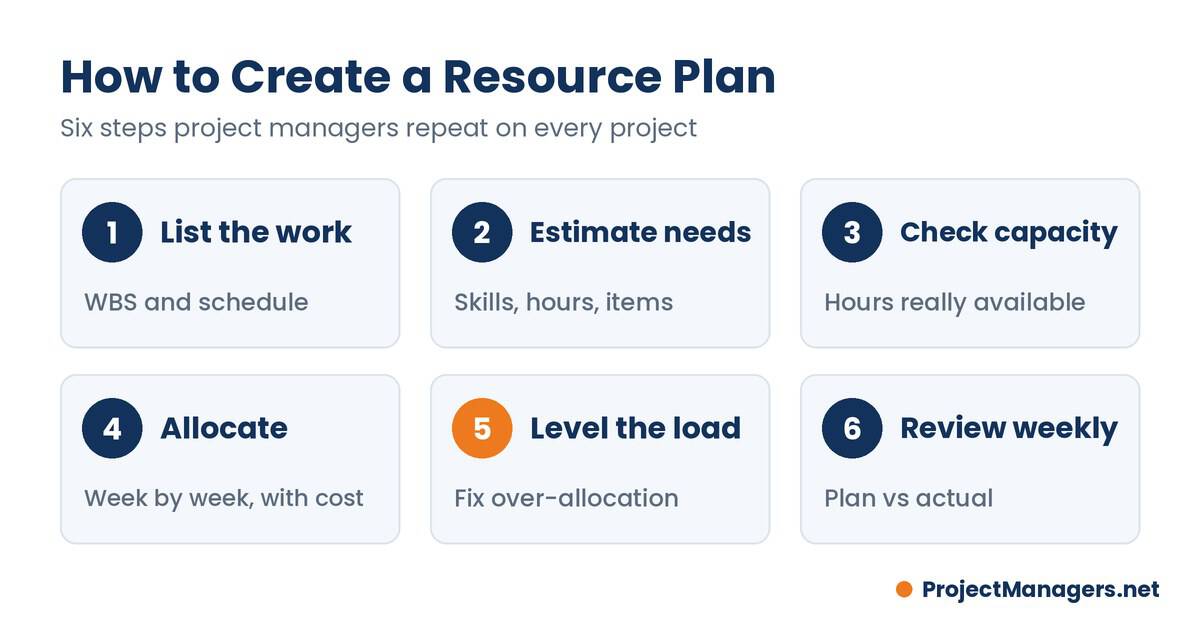
- List the work. Start from the work breakdown structure and the schedule so every task and deliverable is on the table.
- Estimate what each task needs. Record the role or skill, the effort in hours, and any equipment, materials or facilities.
- Check capacity. For each person or role, note the hours available per week after leave, holidays and other projects.
- Allocate. Assign people and physical resources to tasks period by period, and calculate the cost.
- Level the load. Where demand exceeds capacity, move non-critical work into float, share it with a teammate, extend dates or request more people.
- Review every week. Compare planned hours with actuals, update the plan when scope or priorities change, and tell the people affected.
Steps five and six are where most plans fail. Resource leveling and resource smoothing are the two standard ways to fix an overloaded plan, and a resource histogram makes the overload easy to spot before the project manager commits to dates.
Real-life example
IBM’s OS/360 and Brooks’s law
While managing IBM’s OS/360 software in the 1960s, Fred Brooks added programmers to a project that was already behind. He later concluded the extra people made it even later, because newcomers need training and every added person multiplies the communication paths. His 1975 book turned the lesson into Brooks’s law.
By the numbers
8.5%of projects meet or beat both their time and budget estimates in Flyvbjerg’s research
Project manager takeaway
Size the team during planning, not after the slip. When a project is late, cut or re-sequence scope before you add people.
Resource Capacity Planning: Demand vs Capacity
Resource capacity planning compares two numbers for each period: the hours the project needs (demand) and the hours the team can give (capacity). Demand forecasting is one of the pillars of resource planning, because the gap between the two shows where the project is short of people or skills, and where people are idle. Project managers use that gap to decide whether to hire, borrow from another team, re-sequence work or push back on scope.

If you need more detail on this side of planning, you might need one of the 21 Free Capacity Planning Templates. A good capacity plan also respects the schedule logic, whether you plan with the critical path or the critical chain, so that scarce specialists are booked first for the tasks that drive the finish date.
Capacity planning matters most for pipeline projects. Starting several projects at once looks productive, but without enough people the result is quality issues, bottlenecks and missed deadlines. Agile teams handle the same problem with a fixed team capacity per sprint and a prioritized backlog, which turns resource planning into a regular conversation rather than a one-time forecast.
Real-life example
US air traffic control staffing
A 2023 audit by the US Department of Transportation’s inspector general found that 20 of the FAA’s 26 most critical air traffic facilities were staffed below the agency’s 85% target. The gap between demand and qualified capacity raised the risk of delays across the system.
By the numbers
20 of 26critical FAA facilities below the 85% staffing threshold
Project manager takeaway
Compare demand with capacity by role and skill, not just by headcount. A full team can still be short of the one skill the project needs.
Physical Resources
Physical resources are the tangible things a project needs to do its work: raw materials, tools, machinery and other equipment, technology, buildings and facilities, energy and the budget that funds them. Product companies need them to build what they sell, and service companies need them to deliver, from adequate workspace to the right hardware and software.
Managing physical resources on a project follows four steps:
- Plan the acquisition: list each item, the quantity, the date it is needed and who owns it.
- Obtain the resources: order, rent, reserve or transfer them, allowing for supplier lead times.
- Ensure availability: confirm delivery dates and storage, and reserve shared items such as rooms or test environments.
- Monitor: track use, cost and condition, and record lessons for the next project.
Before buying, the project manager should check with other managers and the people doing the work what is already available, and weigh the risks and benefits of each acquisition. Functional managers often control these resources, which is why resource managers are such important partners for project managers. Good physical resource management reduces duplication and waste and keeps late deliveries from stalling the team.
Real-life example
The 2021 chip shortage
A global shortage of semiconductors forced carmakers to idle plants throughout 2021. AlixPartners forecast that the shortage would cut auto industry revenue by $210 billion that year, because a single missing component stopped whole production lines.
Source: AlixPartners, September 2021
Project manager takeaway
Rank physical resources by how hard they are to replace, and order or reserve the critical ones before the schedule needs them.
Team Resources
People are the most important resource on almost every project, and the hardest to plan. A resource management matrix such as a RACI chart makes it clear who is responsible for each task, and roles and responsibilities templates turn those roles into clear expectations. Data on utilization and availability is useful, but it cannot make a team productive on its own.
Project managers need soft skills such as communication and leadership to get the most from their team. Discuss concerns early, help people resolve them, and make sure everyone understands why their tasks matter. Involve team members in planning and risk discussions, and let them help set realistic timelines; people commit more to dates they helped estimate.
Recognition matters too. Acknowledging the time and effort people put into their tasks shows that their contribution is seen, and encouraging collaboration brings everyone to a common understanding of the goal. Regular, specific feedback builds confidence and reduces errors.
Research example
Workload and burnout
Gallup’s study of nearly 7,500 full-time employees named an unmanageable workload and unreasonable time pressure among the top five causes of burnout. Employees who said they often had enough time for their work were 70% less likely to report high burnout.
By the numbers
2.6xas likely to be looking for another job when burned out very often or always
Project manager takeaway
Plan people at 80 to 85% of their capacity. The buffer absorbs meetings, support work, leave and rework without breaking the plan.
Considerations for Tailoring Project Resource Management
No single resource plan fits every project. The more the plan is adapted to the project, the better it works, and tailoring also earns more commitment from the team and a more efficient use of resources. Here are the main considerations for tailoring project resource management:
- Diversity: team members differ in location, experience, skills and working hours. Plan around those differences rather than treating everyone as interchangeable.
- Industry: a construction project plans crews, equipment and materials; a software project plans skills and environments. The resource categories change with the sector.
- Team management: as the project moves forward, keep managing, engaging and mentoring the team, and keep the schedule aligned with costs to avoid delays.
- Physical location: know where resources are and the cultural background of the people involved, especially on distributed and multi-site projects.
- Team member acquisition: identify the skills each role needs at the start. If nobody fits, plan time to train someone or bring in outside help.
- Life cycle approach: a predictive project plans resources phase by phase, while an agile project plans a stable team and adjusts the work. Match the plan to the project’s start and end dates.
Survey example
PMI’s tailoring research
A PMI white paper surveyed 202 project practitioners about their methods. Respondents with no defined methodology reported project success about 66% of the time, while those using a fully tailored methodology reported about 82%.
By the numbers
82%reported success with a fully tailored methodology, against 66% with none
Project manager takeaway
Adapt the resource plan to the project: a two-person sprint needs a one-page plan, a multi-site build needs roles, skills, equipment and budget.
Templates vs Resource Management Software
A spreadsheet is the right tool for one project and a small team. Once project managers share people across several projects, the spreadsheet starts to lag behind reality: every change has to be typed in, versions multiply and nobody sees the whole picture. Purpose-built resource management software takes over by automating allocation and updating availability in real time as priorities shift, and tools such as Resource management connect assignments directly to the tasks the team works on.
Consider moving from templates to software when:
- people work on three or more projects at the same time;
- you update the plan more than once a week;
- managers need a portfolio view of who is available;
- you need to compare planned hours with actual time tracked.
Software shows the gap; it does not fill it. When resource planning reveals critical delivery bottlenecks, operations leaders often leverage nearshore staffing to balance engineering capacity without lengthy domestic hiring cycles. Resource management using Microsoft Project also covers how to plan resources in a desktop scheduling tool.
Video About Resource Planning for Projects
Watch this short video for a practical overview of resource planning for projects: what it is, why it matters and simple steps you can apply right away to improve resource allocation.
Resource Planning for Projects: A Guide, by ProjectManager.
Facts Worth Checking
Eight common beliefs about resource planning, checked against published data.
| # | You may hear | What the data says | Source |
|---|---|---|---|
| 1 | Booking people at 100% gets the most out of a team. | Burned-out employees are 63% more likely to take a sick day and 2.6 times as likely to look for another job. | Gallup, Employee Burnout Part 1 (2018) |
| 2 | Tight deadlines only affect the schedule. | Employees who often have enough time for their work are 70% less likely to experience high burnout. | Gallup, Employee Burnout Part 1 (2018) |
| 3 | Adding people to a late project brings it back on track. | Brooks’s law, drawn from IBM’s OS/360 project, holds that adding people to a late software project makes it later. | The Mythical Man-Month (Wikipedia) |
| 4 | Most project estimates hold up. | Only 8.5% of projects meet or beat both their time and budget estimates. | Bent Flyvbjerg via Thought Economics |
| 5 | Tailoring the method is just extra overhead. | Practitioners with a fully tailored methodology reported about 82% project success, against about 66% with none. | PMI white paper, The Benefits of Tailoring (2014) |
| 6 | Skilled project people will always be easy to hire. | PMI estimates the world needs 25 million new project professionals by 2030. | PMI Talent Gap report |
| 7 | Staffing gaps only happen in small organizations. | In 2023, 20 of the FAA’s 26 most critical air traffic facilities were below the 85% staffing target. | US DOT Office of Inspector General (2023) |
| 8 | Physical resources are easy to swap when one runs short. | The 2021 chip shortage was forecast to cost carmakers 7.7 million vehicles of lost production. | AlixPartners, September 2021 |
Sources checked November 2026. Figures come from the organizations linked and may be updated by them.
Conclusion
Effective resource planning is essential for delivering projects on time and within budget. By identifying the resources each task needs, forecasting demand and comparing it with real capacity, project managers can remove bottlenecks before they happen and protect their teams from burnout.
Start with one of the 12 free templates above or the online Resource Plan Builder, plan people at a realistic level of utilization, and tailor the plan to your industry, team and life cycle. Then review it every week. A resource plan that is kept current becomes one of the most useful tools a project manager has.
Frequently Asked Questions on Resource Planning
How do you create a resource plan?
Start by identifying required resources and their quantities. Map tasks to specific people, equipment, or materials, estimate time and cost per task, build a schedule, assign responsibilities, monitor progress, and update allocations regularly to address risks, delays, or changing priorities.
What is a resource plan sample?
A resource plan sample is a practical template showing tasks, assigned resources, estimated hours, availability, and cost. It helps align schedule and budget, standardizes tracking, and serves as a reusable starting point for future projects, simplifying forecasting and resource communication.
What is resource planning in project management?
Resource planning determines which resources are needed, when, and in what quantity for a project. It balances demand with capacity, allocates people, equipment, and budget, forecasts shortages or surpluses, and guides decisions to optimize productivity, timelines, and costs.
What is the difference between resource planning and capacity planning?
Capacity planning looks at supply: how many hours each person or team can give over a period. Resource planning starts from the project: which people, skills, equipment and budget the work needs, and when. Project managers compare the two, and the gap tells them where to hire, re-sequence work or push back on scope.
What utilization should a project manager plan for?
Most project managers plan people at about 80 to 85% of their available hours. The remaining time absorbs meetings, support requests, leave and rework, so the plan survives a normal week. Planning everyone at 100% leaves no buffer, and any surprise turns into overtime or a missed date.
How do I use the free Resource Plan Builder?
Pick an example or a blank plan, enter each person with their weekly capacity and an optional hourly rate, then type the hours you plan for each week. The builder flags over-allocated weeks, shows a load heat map and a summary with fixes, and lets you download the plan as a CSV for Excel or Google Sheets.
Suggested articles:
- Resource Histogram PMP: What It Is & How to Use It
- Resource Management Plan Template for Project Managers
- Advantages of Resource Leveling vs Resource Smoothing
- 21 Free Capacity Planning Templates

Shane Drumm, holding certifications in PMP®, PMI-ACP®, CSM, and LPM, is the author behind numerous articles featured here. Hailing from County Cork, Ireland, his expertise lies in implementing Agile methodologies with geographically dispersed teams for software development projects. In his leisure, he dedicates time to web development and Ironman triathlon training. Find out more about Shane on shanedrumm.com and please reach out and connect with Shane on LinkedIn.