

Ever asked yourself what is slowing your business down today? For many businesses, the answer is not a shortage of tools or people. It is the time lost to work that should not require human effort at all. Chasing approvals. Re-entering data. Sending the same follow-up emails week after week. AI and automation are changing how businesses handle this, not by replacing people, but by handling the repetitive work so teams can spend time on decisions, customers, and growth.
According to the U.S. Chamber of Commerce, employees estimate saving 240 hours a year through automation. This article looks at where businesses are using AI and automation today, which tools are making it possible, and what that looks like across different functions.
Why Automation Is a Business Priority Now
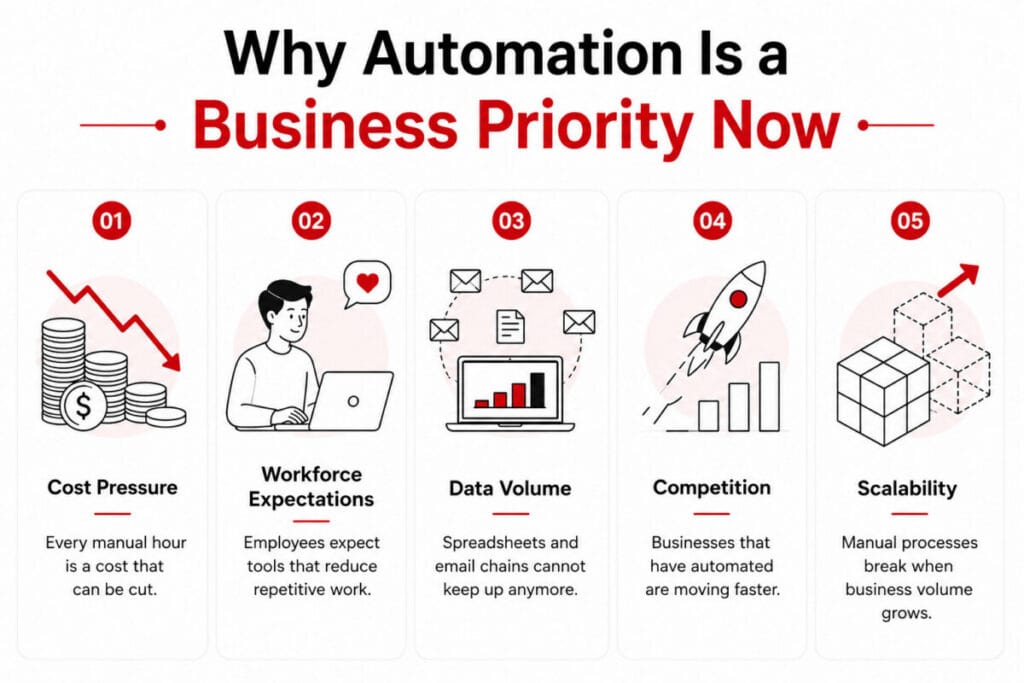
A few years ago, automation was something only large enterprises could afford to think about. Custom integrations, expensive software licenses, and long implementation cycles kept it out of reach for most businesses. That has changed. Cloud platforms and low code tools have made automation accessible to businesses of any size. But accessibility alone is not what is driving adoption.
Several business pressures are driving companies to act now, and the effects are already visible across core functions. Rising customer expectations, faster turnaround demands, cost pressures, and the need for better visibility are pushing teams to automate repetitive work and make smarter decisions—without adding headcount.
Where Businesses Are Using Automation
Automation is no longer limited to one department or one type of business. It is working across functions, handling the work that used to take up hours every week. From finance to operations, teams are reclaiming time that was previously lost to manual, repetitive tasks and redirecting it toward work that actually requires human thinking and decision-making.
Finance
Invoice processing, expense approvals, and financial reporting are among the most automated functions today. Workflows route, flag, and close tasks without back and forth between teams. Month-end reporting that used to take days now runs on a schedule without manual input or follow-up. Finance teams can focus on analysis and strategy rather than chasing down approvals or correcting data entry errors that slow the entire process down.
HR
Onboarding involves dozens of repetitive steps that are easy to automate and costly to miss. HR automation handles document collection, system access requests, and leave management, so HR teams spend less time on admin and more time supporting people. New hires move through the process faster, and nothing gets missed or delayed. The result is a smoother experience for employees from day one and fewer bottlenecks for the HR team to manage.
Sales and Customer Service
Follow-up emails, lead status updates, and ticket routing are handled automatically without requiring manual intervention at every step. Sales teams get notified when a lead takes action, allowing them to respond at exactly the right moment. Support tickets reach the right person without manual sorting, cutting response times, and keeping customer interactions moving forward. The outcome is a faster, more consistent experience for customers and a more focused workday for the teams serving them.
Operations
Inventory levels trigger reorder requests automatically, removing the need for someone to manually monitor stock and send purchase requests. Procurement workflows move without waiting for someone to forward an email or chase an approval. Field service teams get job assignments and updates in real time, reducing delays and keeping work moving across multiple locations. Operations automation gives teams better visibility and faster execution without adding headcount or increasing the burden on existing staff.
Compliance and Admin
Document handling, audit trails, and policy acknowledgments are tracked automatically, creating a reliable record without any manual effort. Everything is logged and accessible when needed, so teams are not chasing signatures or digging through folders every time a compliance check comes up. Automated reminders ensure deadlines are met and nothing falls through the cracks. This reduces the risk of non-compliance and frees up admin teams to focus on work that genuinely requires their attention and judgment.
Where AI Comes In

Automation handles tasks that follow a fixed set of rules. The same input always produces the same output. That works well for invoice routing, leave approvals, and data entry. But not every business task works that way. This is where AI comes in. AI handles tasks where the input changes, the context matters, or a decision needs to be made based on patterns rather than rules.
| Automation | AI | |
| How it works | Follows fixed rules | Recognizes patterns and makes decisions |
| Best for | Repetitive, predictable tasks | Variable inputs, judgment-based tasks |
| Example | Sending a payment reminder on day 3 | Deciding whether to offer an extended payment term based on customer history |
Where Businesses are Using AI
- Customer Service: AI-powered chat handles queries that do not fit a predefined script, understands customer intent in real time, escalates emotionally sensitive interactions appropriately, and routes complex issues to the right person without relying on a rigid, rule-based decision tree.
- Finance: AI flags anomalies in expense reports, identifies duplicate invoices, and surfaces unusual patterns in spending data that a rule-based system would routinely miss. It also helps finance teams prioritise investigations and respond to irregularities faster and with greater accuracy.
- Sales: AI scores leads based on engagement behaviour and historical data, predicts which deals are most likely to close, and recommends the next best action for each sales rep, helping teams focus their time and energy where it will have the most impact.
- Operations: AI continuously analyses demand patterns across multiple variables to adjust inventory planning in real time, reducing both costly overstock and damaging shortages. This allows operations teams to make smarter supply chain decisions without relying on time-consuming manual intervention or guesswork.
What to Avoid When Implementing AI and Automation
- Automating a Broken Process: Automation makes a process faster, not better. If the process has gaps, errors, or inefficiencies, automating it simply accelerates those problems at scale. Take the time to identify and fix the root issues first, then automate.
- Choosing a Tool Before Understanding the Problem: The tool should always follow the problem, not the other way around. Picking a platform first and then trying to fit existing processes into it rarely works and often creates unnecessary complexity and wasted investment.
- Measuring the Wrong Things: Tracking whether automation is running is not the same as tracking whether it is delivering real value to the business. Define clear success metrics for AI automation and expected outcomes before going live, not after the fact when problems have already emerged.
- Treating Automation as a One-Time Project: Processes evolve, teams grow, and business needs shift over time, meaning workflows require regular review and adjustment. Businesses that set automation up and forget about it often end up with more inefficiencies and compounding problems than they started with.
How Businesses Are Getting Started With AI and Automation
Most businesses do not start with a company-wide automation strategy. They start with one process that is causing the most friction, demonstrate measurable results, and build from there gradually. Here is a simple, practical approach to getting started without overcomplicating things.
Identify Where Time Is Being Lost First
Look carefully at where delays happen consistently across your teams and workflows. It could be expense approvals taking too long, customer queries going unanswered for hours, or data being entered manually into multiple systems. The starting point is always a specific, well-defined problem rather than a broad or general goal that is difficult to measure.
Start With What Fits Your Existing Setup
Adding AI tools that do not connect with existing systems creates more problems than it solves and significantly slows down adoption across teams. Businesses that see the strongest early results pick automation tools that integrate with what they already use, keeping data consistent, reducing duplication, and avoiding unnecessary complexity that derails progress.
Measure Before Scaling
Once one process is automated, track exactly what changed and quantify the impact clearly. Time saved, errors reduced, response times improved, and cost differences noted. That data builds a compelling internal case for automating the next process and keeps the overall approach focused, justified, and results-driven rather than scattered across too many initiatives.
Involve the Right People Early
The people closest to the process understand where it consistently breaks down and what a practical fix genuinely needs to look like in day-to-day operations. Including them from the very start means the solution is built around how work is actually done, and adoption comes naturally and willingly rather than being imposed or forced on the team.
Conclusion
AI and automation are not initiatives with a defined finish line — they are an evolving approach to how work gets done, continuously improving as more processes are mapped, measured, and refined. Businesses that begin with a focused scope, target the right problems, and scale deliberately are consistently seeing the greatest returns. The technology is mature, the use cases are well-established, and the barriers to entry have never been lower. The only remaining step is knowing where to start.
FAQs
What are the types of AI automation?
The main types are robotic process automation for rule-based tasks, intelligent automation for complex decisions, and cognitive automation for tasks that involve understanding and judgment.
What are the 5 layers of automation?
Task automation, process automation, system automation, cognitive automation, and autonomous automation. Each layer builds on the previous, moving from simple repetitive tasks to systems that learn and decide independently.
What industries benefit most from AI and automation?
Finance, healthcare, retail, manufacturing, and logistics see the highest impact, but automation applies to any industry where repetitive, rule-based work takes up significant time.
Author Bio: Jayaprakash is a Marketing Manager with experience in content strategy, digital marketing, and the Microsoft ecosystem. He works closely with businesses adopting Microsoft Power Platform, SharePoint, and automation tools, helping translate complex technology into clear, practical content for business audiences.
Suggested articles:
- How AI and Automation Are Reshaping Project Management: Insights & Forecasts
- How AI Can Reduce Project Delays by Connecting CRM, Tasks, and Calendars
- Best AI Tools for Small Businesses to Automate Content Creation

ProjectManagers.net is a website that provides articles about project management software, training, templates, and resources tailored for project managers. Enhance skills and streamline workflows.