
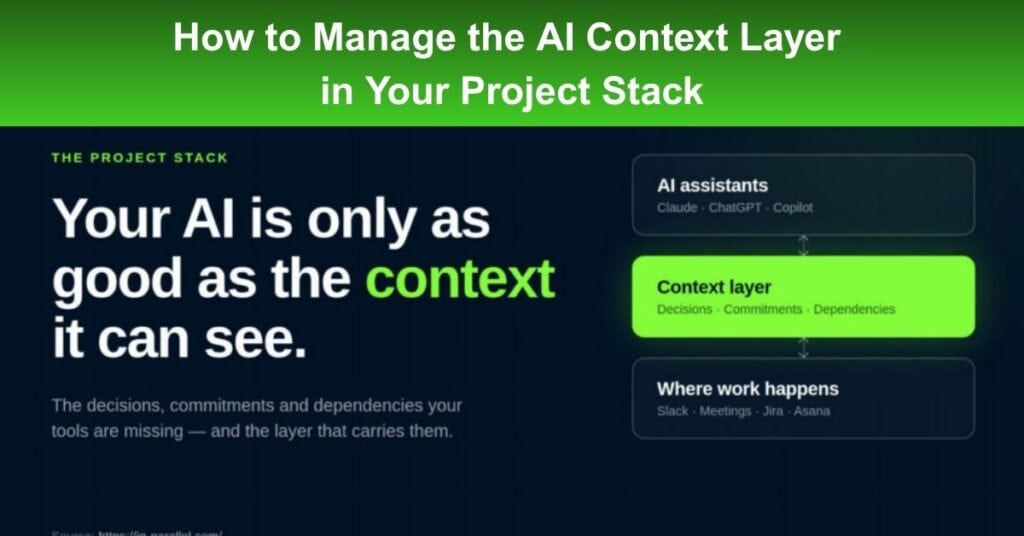
Every project team that adopts AI tools hits the same wall within a few weeks. The assistant sounds confident, the output looks polished, and the answers keep missing the details that matter: the dependency raised in last Thursday’s stand-up, the scope decision buried in a Slack thread two sprints ago, the commitment made in a steering committee meeting that never became a ticket. The AI isn’t broken. It’s working with what it can see, and what it can see is only a fraction of your team’s knowledge. The result isn’t just weaker answers; it’s weaker decisions.
That’s why a new category of tools is emerging to provide AI with organisational context. Rather than replacing ChatGPT, Claude or Copilot, these platforms give them access to the decisions, commitments, dependencies and project history that shape how teams actually work. In Parallel is one example of this approach. It captures context as work happens across meetings, Slack and project management tools, then makes that organisational memory available to the AI assistants teams already use.
What is an AI Context Layer?
An AI context layer is a shared organisational memory that gives AI assistants access to your team’s decisions, commitments, dependencies and project history. Unlike a meeting recorder or transcript archive, its purpose isn’t simply to preserve information but to make it retrievable when work is happening.
The distinction matters. A 90-minute meeting recording stored in a drive technically contains the scope decision from minute 47, but finding it still means sitting through 46 minutes of discussion first. Most teams have solved the problem of capturing information. Far fewer have solved the problem of retrieving it. An AI context layer bridges that gap by maintaining a live record of decisions, commitments, and dependencies that updates automatically as work happens and surfaces inside the AI tools teams already use.
Ask your assistant about a risk raised three weeks ago, and it answers from your team’s actual project history, complete with the original source. For project managers evaluating AI project management tools, the key question is how those tools build and maintain organisational memory. The strongest systems capture context automatically, connect it to the work itself and make it available exactly when teams need it.
Why Do AI Tools Miss Project Context?
AI tools are only as effective as the data they can actually access. When critical information stays trapped in unstructured team communications, AI models fail to see the full operational picture, leading to flawed updates and misaligned recommendations. Understanding why standard AI tools struggle comes down to three main context gaps:
- Unstructured Data Fragmentation: Most project decisions never make it into a structured knowledge base, instead remaining scattered across Slack, meetings, emails, and task comments.
- High Operational Friction: Finding relevant information across disconnected tools creates significant bottlenecks. In Cortex’s 2024 research on developer productivity, 40% of developers cited difficulty finding context as a major barrier to getting work done. Project managers see the same problem when AI generates stakeholder updates or dependency assessments that sound convincing but miss key decisions made weeks earlier.
- Inaccessible Decision Records: Communication breakdowns continue to undermine project success. PMI’s 2013 Pulse of the Profession identified communication breakdowns as a major contributor to project failure. Today, the issue is less that communication doesn’t happen and more that it isn’t captured in a way AI can retrieve—the decisions exist, but they’re trapped in conversations rather than becoming shared organizational memory.
How Do You Evaluate an AI Context Layer?
Evaluating an AI context layer requires looking past marketing claims to focus on how well the technology handles real-world workflows. The right platform must seamlessly integrate with existing tools while protecting sensitive information and maintaining data accuracy. To make an informed choice, project leaders should evaluate three critical capabilities before deploying any system across their portfolio.
Permission boundaries
Context shared indiscriminately across workstreams creates governance risk. A typical programme portfolio contains decisions that shouldn’t be visible to every team, and a context layer that gives every AI query unrestricted access isn’t a feature; it’s a security problem. The strongest platforms mirror existing access controls rather than bypassing them.
Source traceability
The first time an AI answer relies on a decision that was reversed two sprints ago, the team stops trusting the system and rightly so. Every response should point back to its source: which meeting, which thread, and which date. A claim a project manager can’t verify is a claim they can’t confidently act on.
Automatic capture
Any context layer that depends on someone remembering to update it is a documentation project disguised as a technology platform. The systems that last capture context where decisions actually happen, in Slack, meetings, and comment threads without requiring a dedicated owner.
In Parallel illustrates this approach in practice.
- It connects to Zoom, Google Meet, Microsoft Teams, Slack, Jira, and Asana, extracts decisions and commitments as they’re made, and exposes them through MCP to Claude, ChatGPT, and Copilot.
- The company reports recovering 25–35 hours per manager each month—a self-reported figure that should be evaluated against your own team’s coordination overhead.
- It’s also EU-hosted and holds ISO 27001, ISO 42001 and SOC 2 Type II certifications, considerations that matter for enterprise procurement and regulated industries.
How Should Project Managers Implement an AI Context Layer?
For teams working out how AI fits into project management, context infrastructure is the precondition, not the payoff. The tools that deliver real productivity gains are the ones that know what your team decided last Tuesday, not just what best practice says should have happened.
To successfully integrate a context layer into your workflow, project managers should follow three key implementation steps:
- Audit Current Decision Locations: The practical starting point is identifying where critical project decisions actually land. If the honest answer is “mostly in Slack threads and the heads of three senior engineers,” then the AI tools in your stack are already missing most of the picture.
- Build the Context Layer First: Establish your context infrastructure before rolling out additional specialized AI features. When you build this foundation first, every AI tool you add afterward works from real organizational memory instead of the generic model the vendor shipped.
- Prioritize Context Over Budget: Treat context as core operational infrastructure rather than an afterthought or a high-end software add-on. The teams getting this right aren’t the ones with the largest AI budgets—they’re the ones that treated context as infrastructure before they treated it as a feature.
Conclusion
The shift toward AI in project management isn’t about replacing human leadership—it’s about giving team leads and tools the complete picture. Unfiltered AI assistants often fail because they lack access to the real, day-to-day decisions buried across chat channels, unrecorded meetings, and task comments. By establishing a robust context layer first, organizations turn scattered team updates into a dependable, centralized memory.
This foundation ensures that every tool added to your workflow operates with complete historical accuracy, security, and traceability. The teams that successfully unlock AI’s potential won’t be those spending the most on high-end standalone features, but those that treat organizational context as core operational infrastructure.
Suggested articles:
- The Rise of the AI-First Project Tech Stack
- Best Conversational AI Platforms for Project Teams in 2026
- AI Content Creation Tools: 7 Best Picks to Speed Up Your Marketing Projects (2026)

Daniel Raymond, a project manager with over 20 years of experience, is the former CEO of a successful software company called Websystems. With a strong background in managing complex projects, he applied his expertise to develop AceProject.com and Bridge24.com, innovative project management tools designed to streamline processes and improve productivity. Throughout his career, Daniel has consistently demonstrated a commitment to excellence and a passion for empowering teams to achieve their goals.