
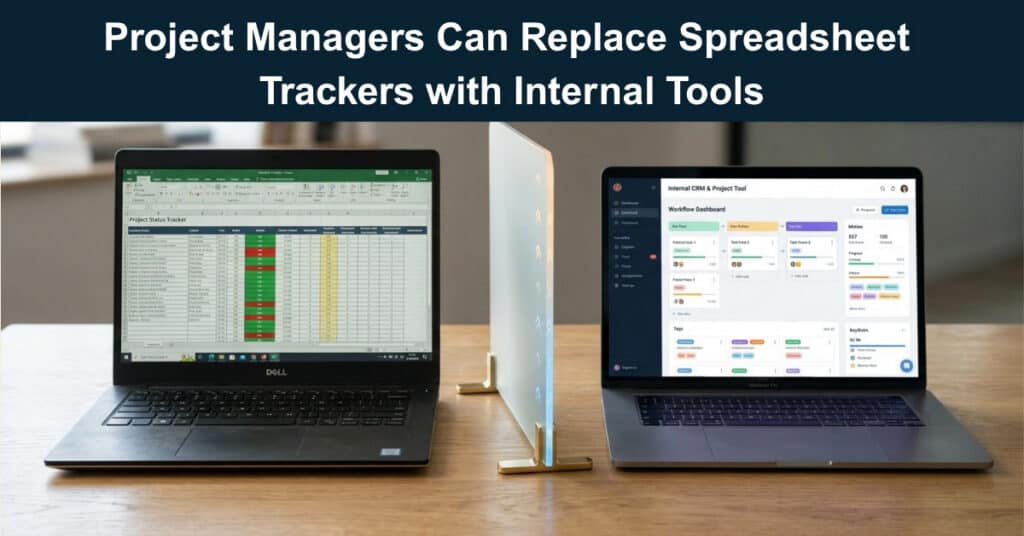
Ask any project manager who’s spent a Friday afternoon reconciling three different versions of the same tracker, and you’ll get the same answer: spreadsheets don’t scale. They’ve been the default home for project tracking for decades, mostly because they’re flexible, familiar, and already sitting in every office suite. But as projects pick up more stakeholders, more dependencies, and more moving parts, the spreadsheet stops being a tool and starts being a liability. And the cracks tend to show up exactly when a team can least afford them.
This isn’t a manifesto against spreadsheets. It’s about recognizing where they stop being enough, and what a project manager can actually do once a project has well and truly outgrown one.
Why Spreadsheets Break Down as Projects Scale
Spreadsheets were built to calculate numbers, not to run projects. Task ownership, status tracking, timeline visualization, cross-team visibility — all of that is a workaround bolted onto a tool designed for something else entirely. That mismatch is where the predictable problems come from:
- Version Chaos: The moment more than one person touches a tracker, version control turns into an honor-system process. Someone emails the “final” file, someone else edits it and forgets to rename it, and a week later three people are working off three different sources of truth until a deadline slips through the cracks.
- No Real-Time Visibility: A spreadsheet is a snapshot, not a live system. Unless someone remembers to update it consistently, in the same format, every time, it quietly drifts from what’s actually happening — a status column can say “In Progress” on a task that wrapped up two weeks ago.
- Fragile Formulas and Structure: One dragged cell, one broken reference, one accidentally deleted column, and the tracker is quietly corrupted. These errors are usually invisible until a report doesn’t add up, and by then you’re already three reports deep into bad data.
- Weak Permission Controls: Spreadsheets are mostly all-or-nothing when it comes to access. Letting a client see only their own project, or letting a subcontractor update status without touching budget numbers, usually isn’t possible without a patchwork of separate files that reintroduces the version chaos problem.
- Zero Automation: Every status change, every notification, every handoff has to happen manually. Nothing reminds a task owner that a deadline is approaching or routes an approval to the right person, so the project manager ends up doing the coordination work a system should be handling.
None of this makes spreadsheets bad tools. For quick calculations, one-off analyses, or small, single-owner projects, they’re still hard to beat. The issue is scale — somewhere between a five-person project and a fifty-person program, the spreadsheet’s simplicity turns into a bottleneck. And every workaround you add to keep it functional makes the next one a little more fragile.
What “Internal Tools” Actually Mean
Internal tools are software built around how a specific team actually works, instead of a generic product everyone has to bend themselves around. Building one used to mean hiring developers, writing specs, and waiting weeks or months for something usable — which is exactly why so many teams defaulted to spreadsheets in the first place. A spreadsheet was ready today. A custom tool was a quarter away, and most project managers don’t have a quarter to spare.
That trade-off has largely disappeared, and it’s worth breaking down what actually changed:
- No-Code Platforms Closed the Gap: AI-assisted, no-code platforms, such as AgentUI, let teams describe what they need in plain language and get a working system back in a fraction of the time it used to take.
- Turnaround Dropped from Quarters to Days: A project tracker with real permissions, live dashboards, and automated notifications isn’t a months-long engineering project anymore. It’s something a project manager can request and have running within days.
- The Tool Still Needs an Owner: An internal tool doesn’t maintain itself. Someone has to update permissions when a person leaves, migrate data when pricing changes, and handle an API key expiring on a Friday night.
- Discipline Doesn’t Disappear, It Shifts: The difference isn’t that one tool is perfect, and the other isn’t — the internal system needs just as much discipline to run as the spreadsheet did to maintain, and skipping that is how silent abandonment happens within three months.
What a Purpose-Built Project Tracker Looks Like (When It Works)
Replacing a spreadsheet doesn’t have to mean trading simplicity for complexity. Done well, an internal tool should feel more intuitive than the spreadsheet it replaces, while quietly handling everything the spreadsheet couldn’t:
- A Single, Live Source of Truth: Instead of a file that gets emailed around and forked into versions, everyone works off the same live system. A task marked complete by one person is instantly visible to everyone else: no refreshing, no re-uploading, no guessing which copy is current.
- Granular Permissions: Clients see their project. Contractors see their tasks. Managers see everything. Because permissions live inside the system rather than being faked with separate files, sensitive information like budgets, internal notes, and vendor rates stays visible only to the people who should see it.
- Automated Updates: When a project task status changes, the right people find out automatically. Deadlines approaching, approvals pending, blockers flagged — the system does the reminding instead of the project manager having to chase people down.
- Dashboards That Update Themselves: Instead of rebuilding a status report every Friday, a live dashboard reflects the current state of the project at any given moment, pulling straight from the same data everyone else works in.
- Integration with What’s Already in Use: A good internal tool doesn’t ask a team to abandon everything else. It connects to email, messaging platforms, and existing databases, so the tracker becomes the coordination layer instead of one more disconnected system to check.
None of this requires a large software budget or a dedicated engineering team anymore. That’s the real shift: capability that used to be reserved for large organizations with in-house developers is now something a project manager can go get directly, often without waiting on IT at all.
When It’s Time to Make the Switch (and When It’s Not)
Not every project needs to drop spreadsheets immediately. Plenty of small, contained work is still better off in a simple file. But a few signals tend to show up right before it’s time to move on:
- Version Conflicts Are Costing You: Multiple people are editing the same file regularly, and a version conflict has already caused a missed deadline or a miscommunication.
- Outside Stakeholders Need Visibility: Clients, execs, or partners who shouldn’t have full access to the working file still need status updates on a regular basis.
- Reporting Eats Real Time: If someone spends hours a week manually compiling a project status report from a spreadsheet, that’s a strong sign the data should already be structured to generate the report on its own.
- The Project Crosses Team Boundaries: Once a project stops being a single team’s responsibility, spreadsheet-based coordination tends to break down first.
- Mistakes Have Started Costing Something: A broken formula that goes unnoticed for a week, or a stale status that leads to a missed handoff, means the tracker has outgrown its format.
If two or more of these sound familiar, it’s usually worth evaluating a dedicated tool. But go in with your eyes open. This isn’t about patching the spreadsheet with more tabs, more color-coding, or more manual discipline. Discipline runs out eventually; a system that doesn’t depend on it is the goal. But don’t trade one problem for another. Make sure you know who’s going to own the new system before you pull the trigger.
Making the Transition Without Disrupting the Team
Successful rollouts rarely happen by accident. Whether it’s a five-person team or a fifty-person program, the transitions that actually stick tend to follow a similar pattern, one built on deliberate sequencing rather than a rushed, all-at-once switch. The steps below outline what that pattern typically looks like in practice.
- Start with One Project, Not the Whole Portfolio: Pick a project where the spreadsheet is actively causing friction, and use that as your pilot. Don’t try to migrate everything at once.
- Rebuild the Core Structure First: Get tasks, owners, statuses, and deadlines right before layering on automation and dashboards. An internal project tracking tool that mirrors what the team already understands is easier to adopt than one that reinvents the workflow on day one.
- Bring the Team in Early: A tool nobody trusts gets quietly abandoned for the old spreadsheet within a month. Input from the people updating task statuses every day is what makes a system stick, not a top-down mandate.
- Add Automation Gradually: Notifications, approvals, and integrations can be layered in once the basic tracker is working reliably, rather than all at once.
- Keep the Spreadsheet as a Fallback: Run it alongside the new system during the transition, but set a retirement date. Running both indefinitely just recreates the version-control problem the switch was meant to fix.
The Bottom Line
Spreadsheets got project managers this far because, for a long time, they were the only accessible option available to teams without a budget for custom software. That’s no longer true. The gap between “we need a custom system” and “we can only afford a spreadsheet” has closed enough that a purpose-built tracker, complete with permissions and automation, is realistic for teams of almost any size. But don’t kid yourself: there are no silver bullets, and no tool replaces the work of managing it well.
If you swap a spreadsheet for an internal tool and don’t assign someone to actually manage it, including owning the permissions, watching the integrations, and handling the inevitable Friday-night hiccups, you’ll be staring at that old spreadsheet with nostalgia within six months. The real question isn’t whether you should move on. It’s whether you’re ready for the new set of headaches you’re about to buy. If the answer is yes, go for it. If not, maybe staying put is the smarter call. Just know that the clock is ticking.
Suggested articles:
- The New Project Update Stack: Real-Time Tracking Meets Visual Reporting
- How to Use Software for Efficient Productivity Tracking on Jobsites in a Project
- The Best Visual Bug Tracker for Remote QA and Development Teams Looking for Clarity and Speed

Daniel Raymond, a project manager with over 20 years of experience, is the former CEO of a successful software company called Websystems. With a strong background in managing complex projects, he applied his expertise to develop AceProject.com and Bridge24.com, innovative project management tools designed to streamline processes and improve productivity. Throughout his career, Daniel has consistently demonstrated a commitment to excellence and a passion for empowering teams to achieve their goals.