
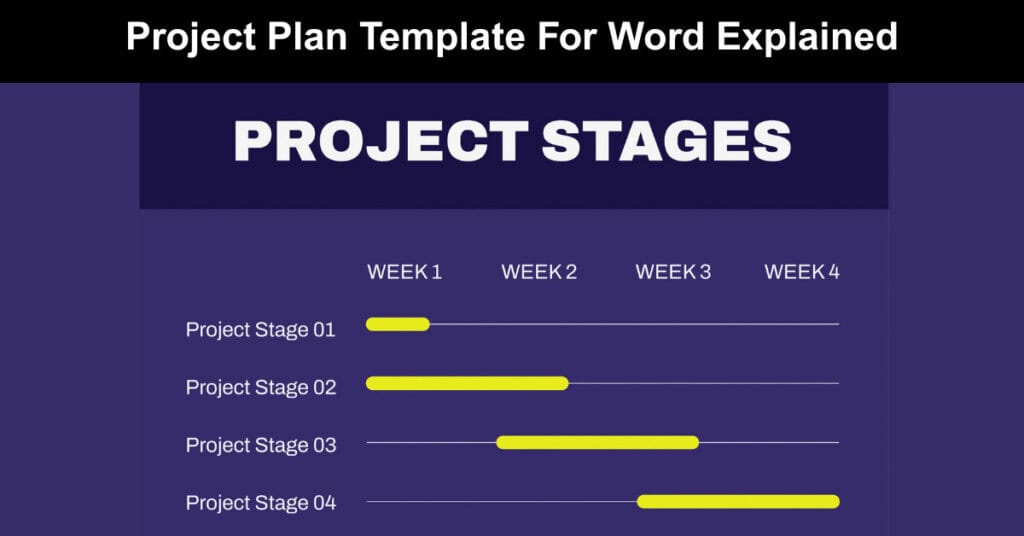
A project plan is the foundation of any successful initiative, providing a structured roadmap that guides teams from concept through completion. Without a clear plan, projects risk scope creep, budget overruns, and missed deadlines. Whether you are managing a small internal project or a large cross-functional initiative, having a standardized template ensures consistency, accountability, and clarity across every phase of the work.
This guide walks you through each section of a project plan template for Word, explaining what to include and why each component matters. By the end, you will have a clear understanding of how to build a comprehensive project management plan that stakeholders can trust, and teams can execute against confidently.
Purpose of the Project Management Plan
The project management plan (PMP) serves as the central governing document for any organized initiative. It defines how the project will be executed, monitored, and controlled from initiation through closure. A well-written PMP ensures that every team member, sponsor, and stakeholder understands the project’s goals, constraints, and operating procedures before work begins.
This section should clearly articulate why the PMP was created and what decisions or approvals it supports. It sets the tone for the entire document and signals to reviewers that a disciplined, structured approach is in place.
Executive Summary of the Project Charter
The executive summary recaps the approved project charter in concise terms. It should highlight the project’s purpose, primary objectives, and authorized scope, while referencing where the full charter document is stored. If any sections of the charter require elaboration or clarification, this is the appropriate place to expand on them within the PMP.
Providing this summary ensures that readers who have not reviewed the charter directly can still understand the project’s strategic context. It also creates a traceable link between the original project authorization and the operational plan that follows.
Project Plan Template Sections
Assumptions and Constraints
Every project begins with a set of assumptions about resources, timelines, and conditions. This section documents any changes to those original assumptions or constraints that were stated in the project charter. Updating this information keeps the PMP aligned with current realities rather than outdated expectations.
Constraints typically include fixed deadlines, budget ceilings, regulatory requirements, or resource availability. Capturing these clearly prevents misunderstandings later and gives the project team a shared understanding of the boundaries within which they must operate.
Scope Management
Scope management defines what is included in the project and, equally important, what is not. This section should contain the scope management plan or a reference to where that plan is stored. A well-defined scope protects the project from unauthorized additions that can derail timelines and inflate costs.
It should describe the process for how scope changes will be identified, evaluated, and approved. Clear scope documentation also helps resolve disputes between stakeholders who may have differing expectations about deliverables.
Work Breakdown Structure
The work breakdown structure (WBS) decomposes the total project scope into manageable components. It provides a hierarchical view of all deliverables and the work required to produce them. Insert the WBS directly into this section or provide a reference to where it is stored.
A well-constructed WBS makes it easier to assign responsibilities, estimate costs, and sequence tasks. It also serves as the foundation for the project schedule, ensuring that no work is overlooked during planning.
Deployment Plan
The deployment plan outlines how the project’s outputs will be rolled out to the intended audience. For example, a project deploying a health application to state partners would cover environmental assessments, memorandums of understanding, hardware and software installation, and data conversion activities.
This section should describe the sequencing of deployment activities and the criteria for determining readiness. It ensures that implementation is handled in a controlled, repeatable way rather than improvised at the end of the project.
Change Control Management
Change control defines how modifications to the project’s scope, schedule, or budget will be managed. For instance, if a development server is administered by an external organization that schedules maintenance outages, the project plan must account for how those outages affect timelines and what approvals are needed to adjust the schedule accordingly.
A formal change control management process prevents unofficial modifications from undermining project integrity. It typically includes a change request form, an impact assessment process, and an approval workflow involving relevant stakeholders.
Schedule and Time Management
Effective schedule management begins with establishing a baseline early in the project. A recommended approach is to set this baseline within the first two weeks and then monitor progress against it on a weekly basis. The project manager is responsible for keeping the schedule current, with updates made no more than three business days after any significant change.
The following are key elements that support strong schedule management across any project type:
- Baseline Establishment: Setting a schedule baseline early gives the team a fixed reference point against which actual progress can be measured and variances identified quickly.
- Milestone Tracking: Documenting key milestones with estimated completion timeframes helps stakeholders monitor progress without needing to review the full schedule.
- Dependency Management: Identifying both internal and external dependencies ensures that delays in one area are flagged and addressed before they cascade into others.
- Regular Updates: Keeping the schedule updated within a defined window maintains accuracy and supports confident decision-making by the project manager and sponsors.
Project Schedule
Insert the detailed project schedule here or provide a reference to the document where it is stored. The schedule should reflect all tasks, milestones, assigned resources, and dependencies identified during planning.
Dependencies
This section captures both internal and external dependencies that could affect the project timeline. Internal dependencies might include work that must be completed by one team before another can proceed. External dependencies could involve third-party vendors, regulatory approvals, or shared infrastructure managed outside the project team.
Cost and Budget Management
Insert the project’s cost management plan here or reference the location where it is stored. This section should describe how costs will be estimated, tracked, and reported throughout the project lifecycle. It should also outline the process for requesting and approving budget changes when actual spending deviates from the plan.
Quality Management
Quality management ensures that project deliverables meet defined standards before being accepted. For an information system, this might involve checking that all screen layouts meet required design standards. Quality assurance activities can include inspections, audits, formal testing cycles, and a defect tracking system to ensure identified issues are resolved before release.
This section should describe both quality assurance activities, which are process-focused, and quality control activities, which are output-focused. Together, they provide a complete picture of how the project will deliver results that meet stakeholder expectations.
Human Resource Management
Insert the project’s human resource management plan here or reference where it is stored. This section should address team structure, roles and responsibilities, onboarding processes, and any staffing strategies such as performance-based contracts or contractor engagement models.
Communications Management
Communication Plan
Insert the project’s communication management plan here or provide a reference to where it is stored. The plan should describe what information will be communicated, to whom, at what frequency, and through which channels.
Communication Matrix
The communication matrix provides a structured overview of all planned project communications. Insert the matrix directly or reference its location. The table below illustrates the standard format:
| Stakeholder | Messages | Vehicles | Frequency | Communicators | Feedback Mechanisms |
|---|---|---|---|---|---|
Risk Management
Risk Plan
Insert the project’s risk management plan here or reference where it is stored. This section should describe how risks will be identified, assessed, prioritized, and mitigated throughout the project.
Risk Log
The risk log is typically maintained as a separate document. Provide a reference to its location here. It should be reviewed and updated regularly as new risks emerge and existing ones are resolved or retired.
Issue Management
Issue Plan
Include the project’s issue management plan here or reference where it is stored. This section should distinguish issues from risks and describe the process for logging, assigning, escalating, and resolving issues as they arise.
Issue Log
The issue log is normally maintained as a separate document. Provide a reference to where it is stored and clarify who is responsible for keeping it current throughout the project.
Procurement Management
This section covers how the project will acquire the goods and services it needs. It may include information on procuring computers for team members, standing up development and test servers, and the acquisition strategy for staffing the project. Strategies might include performance-based fixed-price contracts or the engagement of contract staff through approved procurement vehicles.
Compliance-Related Planning
Insert a list of all compliance-related processes the project must adhere to. This might include data privacy regulations, accessibility standards, security frameworks, or industry-specific requirements. Each compliance requirement should be linked to a responsible owner and a verification method to ensure accountability.
Appendix A: Project Management Plan Approval
The undersigned acknowledge they have reviewed the project management plan and agree with the approach it presents. Changes to this plan will be coordinated with and approved by the undersigned or their designated representatives.
| Signature: | Date: | ||
| Print Name: | |||
| Title: | |||
| Role: |
| Signature: | Date: | ||
| Print Name: | |||
| Title: | |||
| Role: |
| Signature: | Date: | ||
| Print Name: | |||
| Title: | |||
| Role: |
Appendix B: Summary of Spending
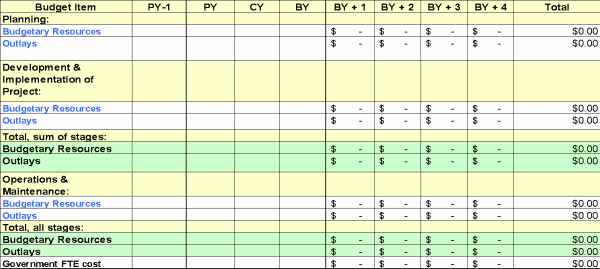
The table below summarizes planned project spending across prior, current, and budget years. Double-click the table to edit it with figures applicable to your project.
| Category | PY: Previous Year | CY: Current Year | BY: Budget Year |
|---|---|---|---|
Project Planning Tips
Strong project planning depends as much on discipline and process as it does on tools. The tips below reflect proven practices that experienced project managers apply to improve outcomes across complex initiatives:
- Human Factor Awareness: Schedule planning should account for team capacity, individual workloads, and the realistic pace at which people can sustain quality output over time.
- Critical Chain Method: Managing resources using the Critical Chain Method helps eliminate bottlenecks by focusing on the longest chain of dependent tasks rather than individual task deadlines.
- Team Involvement: Involving the project team in planning improves buy-in, surfaces risks earlier, and produces more realistic estimates than top-down scheduling alone.
- Collaborative Planning Software: The tools used for scheduling should allow team members to contribute directly, ensuring the plan reflects distributed knowledge and shared ownership.
- Iterative Planning Practices: Adopting iterative planning allows the team to refine estimates and priorities as more information becomes available, reducing the risk of large mid-project corrections.
- Early Risk Sequencing: Placing high-risk tasks earlier in the schedule creates space to address problems before they affect downstream deliverables or the critical path.
- Technology Efficiency: Using appropriate project management technology reduces manual effort, improves visibility, and supports faster, more informed decision-making across the team.
Video About How to Write a Project Plan
Conclusion
A project plan template for Word provides a structured, repeatable framework that brings consistency and discipline to project management. Each section, from scope and schedule to risk and communications, plays a distinct role in keeping the project on track. When completed thoroughly, the PMP becomes a living document that guides decision-making and keeps all stakeholders aligned throughout the initiative.
Investing time in building a comprehensive project plan before work begins significantly reduces the likelihood of costly surprises later. Teams that plan well communicate better, respond to change more effectively, and deliver results that match stakeholder expectations. Use this template as your starting point and adapt it to fit the scale and complexity of every project you manage.
FAQs
What is a project plan template for Word?
A project plan template for Word is a structured document that outlines all the key components of a project management plan, including scope, schedule, risk, and communications. It provides a standardized framework that teams can customize for any project type or size.
Why is a project management plan important?
A project management plan ensures that everyone involved in a project understands the objectives, constraints, and processes that will govern execution. It reduces ambiguity, supports accountability, and provides a reference point when decisions or disputes arise.
How detailed should a project plan be?
The level of detail depends on the size and complexity of the project. Larger, higher-risk projects require more comprehensive documentation, while smaller initiatives may only need the core sections. The goal is always to provide enough detail to guide execution without creating unnecessary administrative overhead.
Who is responsible for maintaining the project plan?
The project manager is typically responsible for keeping the project plan current. This includes updating the schedule, logging changes, and ensuring that any approved modifications are reflected in the relevant sections of the document.
How often should the project plan be reviewed?
Project plans should be reviewed regularly, typically on a weekly basis for active projects. Key milestones, changes in scope, and emerging risks are all triggers for a more immediate review to keep the plan aligned with actual project conditions.
Suggested articles:
- 4 Free Project Planning Templates For Better Project Management
- 5 Project Planning Examples Across Industries
- Complete Guide To The Best Project Planning Techniques

Shane Drumm, holding certifications in PMP®, PMI-ACP®, CSM, and LPM, is the author behind numerous articles featured here. Hailing from County Cork, Ireland, his expertise lies in implementing Agile methodologies with geographically dispersed teams for software development projects. In his leisure, he dedicates time to web development and Ironman triathlon training. Find out more about Shane on shanedrumm.com and please reach out and connect with Shane on LinkedIn.