
Businessmap, formerly known as Kanbanize, is an enterprise-grade lean project and portfolio management platform built on Kanban principles and enhanced by AI. Rebranded to reflect its broader ambitions, it has evolved far beyond simple task boards into a unified system for connecting organizational strategy with day-to-day execution. The platform consolidates project portfolio management, OKR goal tracking, and work management into a single environment, removing the need for disconnected tools across departments.
Businessmap fundamentally changes how organizations operate by giving every team, from individual contributors to executive leadership, real-time visibility into the flow of work and its alignment with strategic objectives. In this article, you’ll explore the pros and cons of using Businessmap and how it fits into today’s digital collaboration landscape.
For teams seeking a more cost-effective project management solution, AceProject offers a suitable alternative. Its pricing structure isn’t dependent on the number of users, providing significant cost savings, especially for organizations with large teams.
Businessmap – Lean Portfolio Management for Enterprise Agility
Businessmap was founded in 2008 and initially gained recognition as Kanbanize, a focused Kanban tool that helped teams visualize workflows and limit work in progress. Over the years, the platform evolved into a comprehensive lean project and portfolio management system, eventually rebranding as Businessmap to signal its expanded scope. Built on the three pillars of enterprise agility — connecting strategy with execution, gaining visibility across projects and portfolios, and optimizing delivery workflows — the platform is trusted by Fortune 50 companies and organizations across aerospace, banking, manufacturing, and software development.
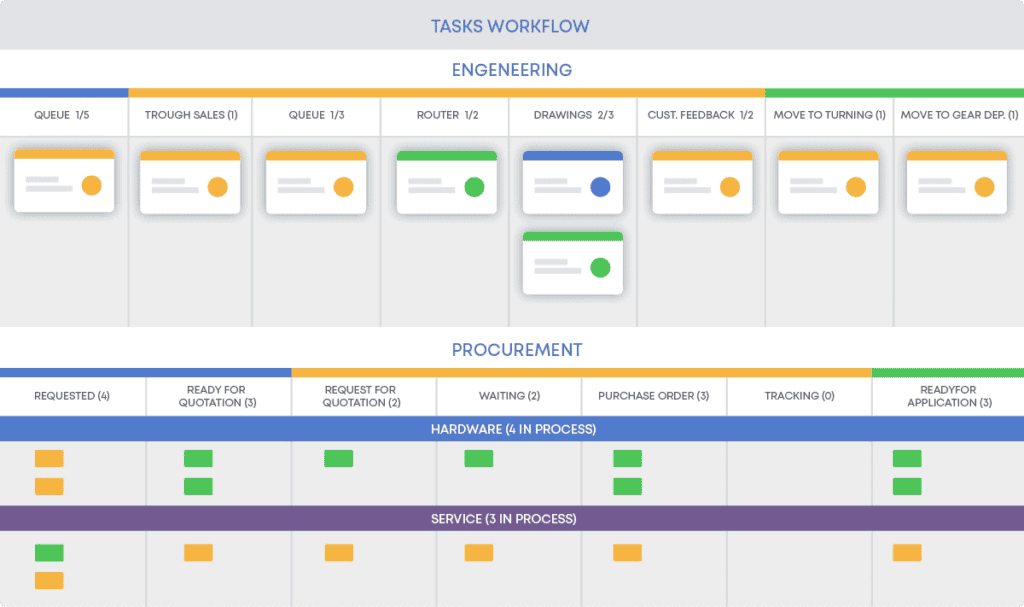
Today, users manage the full arc of organizational work within Businessmap, from setting company-wide OKRs and cascading them to team-level boards, to running real-time analytics on cycle time and throughput. The platform’s strength lies in its ability to operate at multiple altitudes simultaneously, strategic planning, portfolio oversight, and granular task management without requiring separate tools for each layer. Organizations gain the transparency needed to accelerate delivery, reduce bottlenecks, and make decisions grounded in flow data rather than status meetings.
The Pros or Advantages of Businessmap
Businessmap delivers some of the most comprehensive workflow visibility available in any lean project management platform today. Its advantages span from sophisticated Kanban analytics and OKR integration to a growing suite of AI-powered features, automated business rules, and enterprise-grade security. Teams in highly regulated industries rely on its depth, while scaling organizations value its ability to extend from individual boards to enterprise-wide portfolio views without friction.
- Strategy-to-Execution Alignment: Businessmap’s native OKR functionality allows organizations to define objectives at the company, department, and team levels, then link those goals directly to Kanban cards and initiatives. This creates a live connection between strategic intent and daily work, eliminating the gap that typically exists between leadership planning and team delivery.
- Multi-Level Kanban Visibility: Interlinked boards allow managers to track progress at the portfolio level while teams operate on their own boards — with data flowing between levels automatically. Organizations managing dozens of concurrent projects gain a consolidated view of progress, dependencies, and risks without requiring manual status reporting.
- AI-Powered Work Assistance: Businessmap’s AI suite includes an AI Work Assistant that can summarize boards and suggest next steps, AI-generated OKRs following the John Doerr methodology, AI Subtask generation, AI-powered comments, and an AI Canvas within whiteboards. These features reduce planning overhead and accelerate decision-making by surfacing relevant information at the point of need.
- Advanced Workflow Analytics: The platform’s Lean/Agile analytics engine tracks cycle time, lead time, throughput, and cumulative flow diagrams in real time. These metrics help teams identify bottlenecks, model delivery forecasts probabilistically, and continuously improve flow performance based on historical data — not guesswork.
- Flexible Automation via Business Rules: If-this-then-that automation policies allow teams to trigger actions automatically based on board events — such as reassigning cards, sending notifications, or moving work items when conditions are met. This removes repetitive manual overhead and enforces process consistency across teams and workflows.
- Native MCP Integration for AI Ecosystems: Businessmap provides native Model Context Protocol (MCP) support, enabling seamless integration with AI tools, including Claude Desktop, Claude Code CLI, and Cursor. Teams can use AI agents to query project status, create tasks, and update progress programmatically — making Businessmap a core component of modern AI-augmented work environments.
- Digital Whiteboards Linked to Boards: Smart Canvases and whiteboards allow teams to brainstorm, map dependencies, and build work breakdown structures visually. Any text object on a whiteboard — a sticky note, shape, or diagram element — can be converted directly into a Kanban card, bridging planning and execution within a single surface.
- Enterprise Security and Data Control: Businessmap offers daily database backups, multi-factor authentication, custom domain and subdomain options, and a dedicated cloud server option for Enterprise accounts. European organizations benefit from a local data center option, and the platform maintains high-standard security inspection procedures, making it suitable for industries with strict compliance requirements.
The Cons or Disadvantages of Businessmap

No platform at this level of sophistication comes without tradeoffs, and Businessmap is no exception. Organizations evaluating it should weigh several limitations that relate to its pricing structure, onboarding complexity, and the behavior of heavily loaded boards. Understanding these constraints upfront prevents misalignment between the platform’s capabilities and an organization’s readiness to leverage them.
- Entry Price Point Excludes Small Teams: The Standard plan starts at $149 per month billed annually — structured for a minimum of 15 users — which translates to approximately $8.50 per user per month at that floor. There is no free version, no individual-user tier, and no entry point designed for teams of fewer than 15, making Businessmap financially inaccessible for small businesses or solo practitioners.
- Advanced Feature Complexity Requires Training: While the core Kanban interface is intuitive, configuring multi-workspace portfolios, custom automation rules, and workflow analytics demands experimentation and formal training. New users without Lean or Agile methodology backgrounds often find the depth of the platform overwhelming, and the Businessmap Academy and onboarding documentation represent a time investment before value is realized.
- Automation and SSO Gated Behind Add-Ons or Enterprise: Unlimited business rules and single sign-on (SSO) are not included in the Standard plan and require either additional fees or an upgrade to the Enterprise tier. Organizations with high automation needs — particularly those seeking to enforce complex workflow policies at scale — may find the Standard plan’s constraints restrictive as their usage matures.
- Performance Lag on Data-Heavy Boards: Boards with large numbers of cards and complex automation rules can experience slower load times. This is a documented limitation in user reviews, particularly affecting teams that have been on the platform for extended periods and have accumulated significant historical card data within a single board.
- No Free Tier for Evaluation Beyond Trial: The 14-day free trial provides full feature access without a credit card requirement, but there is no permanent free tier for teams that want extended evaluation time or for individuals managing personal projects. Competing tools in the Kanban space offer free plans, making this an obstacle for budget-constrained teams in the initial consideration phase.
- Initiative Limits on Standard Plan Restrict Portfolio Scale: Some users on the Standard plan report that limitations on the number of initiatives constrain large-scale portfolio planning. Organizations managing complex, multi-program portfolios may hit these ceilings before they are ready to commit to Enterprise pricing, creating pressure to escalate plans earlier than anticipated.
Businessmap Key Features
Businessmap’s feature set is built to serve the complete spectrum of knowledge work — from individual task tracking to enterprise portfolio governance — within a single unified platform. The features below represent the platform’s official capability areas as published by Businessmap, spanning visual planning tools, AI assistance, strategic alignment, analytics, and integrations.
- Smart Canvas: Brings creativity and structure together in a flexible planning surface where teams can visualize strategy, plan projects, and turn ideas into outcomes. Any object containing text, such as notes, shapes, or diagrams, converts directly into a workflow card, closing the gap between ideation and execution.
- Portfolio Workspaces: Increases visibility across all projects and connects planning with execution at the organizational level. Flexible workspaces allow teams to distribute and track work across departments, business units, and geographies while maintaining a consistent view of portfolio-wide progress.
- Outcomes / OKRs: Enables organizations to visualize OKRs and set goals across every level, then connect those goals directly to daily execution on Kanban boards. Objectives cascade from company to team level, with KPI dashboards showing current metrics and progress toward targets in a single view.
- Management Dashboards: Provides a central hub for monitoring business objectives, understanding risks, and tracking the most important performance metrics. Leaders can compare work delivery against goal progress, visualize data across departments, and accelerate decision-making without waiting for manual status updates.
- AI Tools: A suite of AI-powered capabilities that transforms how teams manage work, including an AI Work Assistant, AI Coach, AI Summaries, AI-powered comments, AI Subtask generation, and AI-generated OKRs following the John Doerr framework. Native MCP support extends these capabilities to external AI agents such as Claude Desktop and Cursor.
- Workflow Management: Consolidates team workflows with multi-layered Kanban boards, customizable process policies, service level expectations, and end-to-end flow governance. Teams model any workflow — from simple task queues to complex multi-stage delivery pipelines — within a single configurable environment.
- Digital Whiteboards: Real-time collaborative canvases for brainstorming, process mapping, dependency charting, and roadmap visualization. Whiteboards are embedded directly inside dashboards, work management boards, and work items, and support advanced search widgets for dynamic reporting within the canvas.
- Kanban Boards: Real-time task tracking with unlimited columns, sub-columns, swimlanes, card templates, WIP limits, and custom fields. Boards support interlinked hierarchies that flow data from team level to portfolio level automatically, giving every stakeholder an accurate, live view of progress.
- Dashboards and Reporting: Customizable dashboards aggregate analytics across boards, track worklog data, and surface performance metrics in one place. Advanced search and quick search functionality give teams granular access to card data across the entire account.
- Work Item Properties and Functions: Rich card customization through custom fields, subtasks, task types, external links, deadlines, assignees, card sizes, and full task history. Card links enable dependency tracking across boards, giving teams visibility into cross-team relationships and blockers.
- Project Forecasting: Uses historical flow data to create probabilistic plans for future project delivery, embracing forecasting over estimation. Teams generate delivery confidence intervals based on actual cycle time and throughput metrics, enabling realistic commitments in uncertain environments.
- Business Rules: Runtime automation policies that let teams set up if-this-then-that scenarios tailored to their specific workflows. Triggers automatically catalyze actions — card movements, notifications, assignments, and status changes — reducing manual coordination and enforcing process consistency at scale.
- Workflow Analytics: A comprehensive Lean/Agile analytics suite covering cycle time distributions, lead time tracking, throughput charts, cumulative flow diagrams, and Monte Carlo simulations. Teams use these tools to continuously evaluate and improve workflow performance based on empirical data.
- Limiting Work in Progress: WIP limits reduce multitasking, alleviate bottlenecks, and maintain a steady flow of work by matching demand with team capacity. Limits are configurable at the column, swimlane, and user level, providing flexible enforcement of flow discipline across any workflow structure.
- Integrations: Native and third-party integrations connect Businessmap to external tools, including Jira, Azure DevOps, Power BI, GitHub, Zapier, and more, enabling smooth data exchange across existing technology stacks without manual synchronization.
- Email Integration: Full email integration allows teams to create and update cards directly from their inbox, and to respond to card activity by adding comments via email reply. Task templates are applicable to both API and email integration, maintaining consistency across all entry points.
- REST API: A comprehensive REST API gives developers programmatic access to all account data — including workspaces, boards, cards, analytics, and user permissions. The OpenSearch endpoint supports advanced query DSL payloads for fine-grained, programmatic card retrieval suited to reporting, AI-driven features, and custom automation workflows.
Businessmap Use Cases
Businessmap is particularly well-suited to organizations operating at scale that need both granular task visibility and high-level strategic alignment, a combination rarely achieved in a single platform. Industries including IT services, aerospace, pharmaceuticals, banking, and manufacturing rely on the platform’s ability to manage complex, interdependent workflows. Agile teams, PMOs, and enterprise operations leaders are among its most active user communities. Here are some of its key use cases:
- IT Operations and Service Management: IT departments use Businessmap to manage demand intake, prioritize customer requests, and track resolution workflows across service queues. Interlinked boards give IT managers visibility across teams while individual teams maintain autonomy over their own workflows.
- Software Development: Engineering teams build Kanban-based delivery systems that track work from discovery through deployment, with WIP limits enforcing flow discipline and throughput analytics providing data for sprint planning and release forecasting.
- Portfolio and Program Management: PMOs manage cross-team initiatives by connecting strategic objectives to project portfolios, tracking dependencies between programs, and monitoring aggregate progress against OKRs, all without exporting data to separate reporting tools.
- Manufacturing and Operations: Production and operations teams use Businessmap’s workflow management and business rules to model lean manufacturing processes, enforce stage-gate policies, and gain visibility into bottlenecks that affect delivery timelines.
- Aerospace and Regulated Industries: Organizations in aerospace, pharmaceuticals, and banking rely on Businessmap’s security controls, audit trails, and custom workflow governance to manage compliance-sensitive processes while maintaining operational agility.
- Executive Strategy Execution: Leadership teams use the Initiatives and Outcomes hub to monitor company-wide OKR progress, compare work delivery against goal attainment, and make resource allocation decisions informed by real-time flow data rather than periodic status reports.
Businessmap Pricing and Costs
Businessmap operates a streamlined two-tier pricing structure designed to serve teams from small-to-medium organizations through large enterprises, with a 14-day free trial available without requiring a credit card. Pricing is based on user counts and scales incrementally above the base minimum of 15 users. There is no permanent free tier.
- Free Trial (14 days, no credit card required): Available to all organizations, the trial provides full access to all Standard plan features, including Kanban boards, OKRs, workflow analytics, automation rules, whiteboards, and AI tools. This allows teams to evaluate the platform against real workflows before committing to a paid plan.
- Standard Plan (Starting from €160.00/month billed annually, or €193.00/month billed monthly): The entry-level paid plan covers a base of 15 users at approximately $9.20 per user per month on annual billing. It includes unlimited Kanban boards, swimlanes, card templates, OKR tracking, workflow analytics, digital whiteboards, integrations, AI Work Assistant features, and daily database backups. Additional single-user seats are purchasable above the base package.
- Standard Plan with Add-Ons: Organizations on the Standard plan can expand their capabilities by adding unlimited automation business rules and SSO as paid additions. This allows teams to access advanced automation and identity management without committing to a full Enterprise upgrade as the team grows.
- Enterprise Plan (Custom pricing, contact sales): The Enterprise tier is designed for large-scale deployments requiring dedicated infrastructure, advanced security configurations, multiple workspaces, custom analytics, program management, time tracking, and premium support. Organizations with global footprints, heightened compliance requirements, or multi-divisional rollouts work with the Businessmap sales team to build a customized agreement. A dedicated cloud server option is exclusive to this tier.
For a full breakdown of user-tier pricing and Enterprise options, see this Businessmap Pricing Plans guide.
Conclusion
Businessmap stands as one of the most capable lean project and portfolio management platforms available today, particularly for organizations that need to operate across multiple levels of strategy and execution simultaneously. Its combination of enterprise-grade Kanban, native OKRs, AI-powered planning tools, and MCP-enabled AI integrations places it well ahead of most competitors in the Lean/Agile space.
The platform’s primary constraints, including a minimum pricing floor that excludes small teams, add-on costs for advanced automation, and a meaningful learning curve for non-Agile practitioners, are worth weighing carefully against the depth of value it delivers at scale. Organizations that invest in onboarding and methodology alignment consistently report strong returns.
As AI-augmented project management becomes standard practice, Businessmap’s early investment in MCP support, AI Canvases, and AI-generated OKRs positions it well for the direction enterprise work management is heading. For organizations ready to connect strategy to execution across the full enterprise, it remains a benchmark platform.
Suggested articles:
- The Pros and Cons of Using Jira Software
- The Pros and Cons of Using Kissflow Software
- The Pros and Cons of Using Smartsheet Software

Daniel Raymond, a project manager with over 20 years of experience, is the former CEO of a successful software company called Websystems. With a strong background in managing complex projects, he applied his expertise to develop AceProject.com and Bridge24.com, innovative project management tools designed to streamline processes and improve productivity. Throughout his career, Daniel has consistently demonstrated a commitment to excellence and a passion for empowering teams to achieve their goals.