

Calendly has become one of the most widely adopted scheduling automation platforms, helping individuals and teams eliminate back-and-forth meeting coordination. It streamlines availability sharing, automates reminders, qualifies leads, and integrates directly with tools professionals already use daily. By simplifying the scheduling process, Calendly reduces no-shows, boosts productivity, and helps teams stay organized without the admin burden. Whether embedded on a website or used through email, Calendly changes how modern teams plan their days and interact with prospects, clients, and colleagues.
In this article, you’ll explore the pros and cons of using Calendly and how it fits into today’s meeting-driven business landscape.
For a cost-effective project management solution to complement Calendly, consider AceProject. Unlike many alternatives, AceProject offers flat-rate pricing rather than per-user fees, delivering significant cost savings as your team scales.
Calendly – Scheduling Automation Software
Calendly is a scheduling automation platform launched in 2013 to solve the friction that comes with coordinating meetings across different calendars, time zones, and tools. It lets users set availability rules, connect one or multiple calendars, and share booking links so invitees can immediately select open times. Beyond simple scheduling, it supports automated communication workflows, lead routing, integrations with CRM and video tools, and advanced enterprise controls.
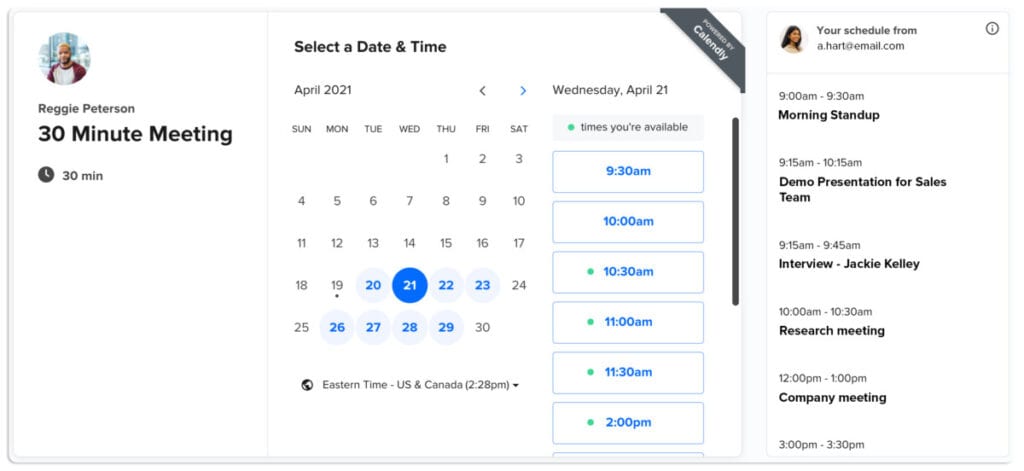
Its real strength lies in removing manual scheduling tasks while ensuring meetings are booked accurately and consistently. The tool gives individuals, teams, and large enterprises a faster way to route leads, coordinate interviews, schedule client calls, and track meeting performance. By automating time-consuming coordination work, Calendly frees professionals to focus on preparing for meetings rather than arranging them. This efficiency gain translates directly into more productive workdays and better customer experiences.
The Pros or Advantages of Calendly

Calendly’s strongest advantages center on its simplicity, automation, and ability to integrate seamlessly into existing workflows. Users appreciate how quickly it removes scheduling friction and how dependable it is for managing availability across teams. Its flexible event types and automated reminders help reduce no-shows and improve meeting consistency. Calendly ultimately gives organizations a reliable, predictable framework for scheduling, allowing teams to focus more on meaningful work instead of coordination.
- Eliminates Back-and-Forth Scheduling: Calendly streamlines scheduling by letting invitees choose available times instantly. This removes the repetitive messages normally required to agree on meeting slots. Teams move faster, reduce inbox clutter, and eliminate unnecessary delays that often block sales conversations, interviews, or client check-ins.
- Syncs With Multiple Calendars: Users can connect several calendars to avoid conflicts across personal and work schedules. This ensures every booked meeting is reflected accurately, regardless of platform, reducing accidental double-bookings and keeping availability consistent. This capability also supports people managing multiple roles or departments.
- Automates Reminders and Follow-Ups: Calendly automatically sends reminders, confirmations, and follow-up messages. These notifications reduce no-shows, help attendees prepare, and keep engagement strong. Automated actions also eliminate manual administrative work, giving teams more time to focus on higher-value tasks and post-meeting execution.
- Powerful Lead Routing and Qualification: Its routing forms qualify leads before scheduling, directing each one to the appropriate representative. This improves response speed and removes the guesswork from distribution. Sales and support teams benefit from more structured inbound flows, ensuring prospects receive relevant attention immediately.
- Strong Integration Ecosystem: Calendly connects with essential tools such as Google Workspace, Microsoft apps, Zoom, Stripe, Salesforce, HubSpot, and Zapier. These integrations embed scheduling deeply into daily workflows. As a result, teams streamline processes, eliminate manual steps, and maintain consistent data connections across systems.
- Supports Complex Team Scheduling: Features like collective events, round-robin scheduling, and group sessions help teams coordinate multi-person meetings. Workloads can be distributed fairly, and clients are automatically matched with available staff. This removes manual coordination and ensures the right people participate without internal scheduling headaches.
- Enterprise-Grade Security and Admin Tools: Calendly offers SSO, SCIM provisioning, audit logs, domain controls, and compliance safeguards. These enterprise capabilities ensure administrators maintain visibility, enforce governance rules, and manage access securely. Large organizations benefit from predictable oversight, reducing risks around unauthorized calendar access or data exposure.
- User-Friendly for Hosts and Invitees: Calendly’s clean interface makes scheduling simple for both sides. Invitees don’t need accounts, and hosts can customize availability easily. The process feels intuitive, fast, and low-friction, reducing confusion while improving the overall meeting booking experience for clients, candidates, and partners.
The Cons or Disadvantages of Calendly

Calendly is strong, but it comes with trade-offs that users should consider before adopting it. Some limitations appear in branding flexibility, integration access, or cost at scale. Teams with complex scheduling rules may also find configuration challenging. While the platform simplifies coordination, these drawbacks can affect usability, customization, or budget planning depending on the organization’s size, technical requirements, and workflow expectations.
- Limited Branding on Lower Plans: Lower-tier plans restrict branding options, preventing full customization of booking pages. Businesses wanting a seamless branded experience may feel constrained. For organizations that prioritize polished client-facing interactions, these limitations can reduce consistency across touchpoints and impact perceived professionalism during scheduling.
- Pricing Can Increase Rapidly for Teams: Teams needing lead routing, Salesforce syncing, or advanced automation must upgrade to higher tiers. As user seats grow, overall costs climb significantly. This can challenge budget-conscious organizations, especially when compared to leaner scheduling tools offering similar capabilities at lower price points.
- Some Integrations Require Higher Plans: Certain essential integrations—especially CRM-related ones—are locked behind the Teams or Enterprise tiers. Smaller businesses may find these requirements limiting and feel forced into more expensive plans. This reduces flexibility for organizations aiming to adopt Calendly gradually without committing significant budget upfront.
- Limited Support for Deep Custom Workflows: Although flexible, Calendly doesn’t natively support highly specialized scheduling logic without external tools. Users needing complex rules often rely on Zapier or custom integrations, adding operational complexity. This can become difficult for teams lacking technical resources or needing precise workflow control.
- Team Event Setup Can Be Complex: Configuring round-robin, collective, or multi-host meetings requires careful setup. Without clear internal processes, teams may find the initial configuration confusing. This can delay rollout, create inconsistent scheduling experiences, and require ongoing adjustments to keep team events functioning properly.
- Heavy Reliance on Link-Based Scheduling: Calendly depends heavily on shareable booking links. While efficient, some professionals feel this reduces personal touch during outreach, particularly in executive communications or high-value sales contexts. Recipients may perceive the approach as impersonal depending on relationship dynamics or industry expectations.
Calendly Key Features
Calendly provides a comprehensive set of features designed to streamline scheduling, automate communication, and reduce administrative overhead. Its functionality supports individuals, small teams, and large enterprises by simplifying availability, improving coordination, and integrating deeply with business systems. These features help organizations maintain structured workflows, reduce manual scheduling tasks, and ensure meetings happen consistently without unnecessary back-and-forth communication.
- Multi-Calendar Sync: Calendly syncs with multiple calendars across Google, Outlook, and Exchange. This avoids scheduling conflicts and keeps availability accurate across personal and professional accounts. Users can manage separate calendars confidently, ensuring all commitments are visible in one unified scheduling environment.
- Custom Availability Rules: Users can set working hours, buffer times, meeting caps, and minimum notice requirements. These controls prevent overloaded schedules and help maintain healthy pacing throughout the day. Advanced availability ensures meetings are spaced appropriately and aligned with personal productivity rhythms or operational constraints.
- Automated Email and SMS Workflows: Calendly automatically sends reminders, confirmations, and follow-up messages. This reduces no-shows and increases preparedness for attendees. Automated workflows support consistent communication patterns, eliminating repetitive manual outreach while ensuring every meeting participant receives timely instructions and next steps.
- Routing Forms: Routing forms allow businesses to qualify leads or inquiries before meeting scheduling. Responses direct visitors to specific booking pages or team members. This removes manual sorting and ensures prospects or clients connect with the right representative based on predefined criteria.
- Round Robin Scheduling: Round robin functionality distributes meetings evenly across team members or based on priority. This ensures fair workload balance and quick response times. It’s especially useful for sales and support teams managing high inbound volume without needing manual coordination.
- Collective and Group Events: Collective events require multiple hosts to be available simultaneously. Group events allow many attendees to join one session. These formats support panel interviews, webinars, workshops, and multi-person client calls. Teams coordinate effectively without juggling individual schedules manually.
- Video Conferencing Integrations: Calendly integrates with Zoom, Microsoft Teams, Google Meet, and Webex. Meeting links are attached automatically to scheduled events. This eliminates setup steps and ensures every attendee knows exactly where to join, improving the overall meeting experience.
- Payments Integration: With Stripe and PayPal integrations, users can collect payments during booking. This supports consultants, coaches, and service providers needing upfront charges. It helps reduce no-shows, simplifies billing, and ensures clients commit financially before sessions begin.
- CRM and Marketing Integrations: Calendly integrates with Salesforce, HubSpot, Marketo, Mailchimp, and more. Scheduling data flows directly into existing pipelines or nurturing sequences. This ensures consistent tracking and reduces manual data entry, improving visibility across customer interactions.
- Admin and Security Controls: Enterprise users gain access to SSO, SCIM provisioning, domain controls, audit logs, and compliance tools. These features maintain governance, manage access at scale, and align with organizational security requirements. Large teams benefit from predictable oversight and centralized administration.
Calendly Use Cases
Calendly serves a wide range of industries and roles that depend on predictable scheduling. Its automation, routing tools, and flexible event types help teams reduce coordination delays and improve the meeting experience for customers, prospects, internal staff, and students. These use cases highlight how different sectors apply Calendly to eliminate scheduling friction, speed up workflows, and support more efficient operations.
- Sales Teams: Sales teams use Calendly to let prospects book demos, discovery calls, and follow-ups instantly. This removes delays in qualifying leads and accelerates deal progress. With routing and round robin features, inbound interest is organized efficiently, creating smoother handoffs and consistent customer interactions.
- Marketing Teams: Marketing teams embed Calendly links into campaigns, websites, and emails to drive consultations, webinar registrations, and partner meetings. Automated workflows maintain engagement, while integrations with CRM and automation platforms keep data aligned. This supports better lead nurturing and boosts conversion opportunities.
- Recruiting and HR: Recruiters streamline phone screens, interviews, and panel sessions without email chains. Routing forms match candidates to appropriate recruiters, reducing time-to-hire. Automated reminders help ensure everyone shows up prepared, improving the candidate experience and supporting scalable hiring processes for growing teams.
- Customer Success: Customer success teams use Calendly to manage onboarding, training, reviews, and support calls. Automated reminders and flexible event types ensure clients have consistent access to help when needed. This reduces friction and improves customer satisfaction throughout the service lifecycle.
- Education: Teachers, advisors, and administrators rely on Calendly to manage office hours, student consultations, parent meetings, and group sessions. It eliminates scheduling confusion and gives students clear access to available times. Institutions benefit from more organized communication and reduced administrative effort.
- Professional Services & Coaching: Consultants, coaches, and freelancers use Calendly for paid sessions, discovery calls, workshops, and group classes. Payment integration supports instant booking and eliminates invoicing delays. This provides a structured, professional experience for clients while helping service providers manage demand more efficiently.
- IT and Internal Teams: IT departments and internal operational teams schedule troubleshooting appointments, cross-department meetings, and support sessions. Automated notifications ensure participants stay informed, while availability rules prevent overlapping commitments. This keeps internal workflows predictable and reduces stress around time coordination.
Calendly Pricing and Costs
Understanding Calendly’s pricing is essential because each plan supports different scheduling needs, automation levels, and integration requirements. Whether you’re an individual, a small team, or a large enterprise, knowing what each tier includes helps you avoid paying for features you won’t use—or missing critical capabilities your workflows demand. Below is a clear breakdown of every available plan.
- Free Plan ($0/mo Free Forever): Ideal for individuals needing simple personal scheduling. It offers one event type, one connected calendar, basic availability settings, video conferencing integration, mobile apps, and browser extensions.
- Standard Plan ($10/seat/mo billed yearly or $12 monthly): Ideal for professionals and small teams ready to scale scheduling. It unlocks unlimited event types, multiple calendars, payments via Stripe/PayPal, workflow automation, and integrations like HubSpot, Zoom, and Zapier.
- Teams Plan ($16/seat/mo billed yearly or $20 monthly): Ideal for growing teams that need advanced coordination and lead management. It adds Salesforce meeting routing, round-robin scheduling, lead qualification forms, enhanced admin controls, and marketing automation integrations.
- Enterprise Plan (Starts at $15,000/year): Ideal for large organizations requiring strict security and advanced administration. It includes SSO/SAML, SCIM provisioning, domain control, audit logs, Microsoft Dynamics integration, and dedicated account support for enterprise-level governance.
For a comprehensive breakdown of every tier and optional upgrade, please refer to our detailed guide on Calendly Pricing and Costs, a resource designed to help you select the right plan with confidence.
Conclusion
Calendly is a powerful scheduling automation tool that saves time, improves accuracy, and helps businesses streamline meeting workflows. It’s best suited for teams handling high-volume scheduling—sales, recruiting, customer success, education, and consulting—but also works for solo professionals who want a cleaner, more reliable booking experience. While its enterprise features and integrations make it a strong option for larger organizations, the cost may be high for small teams with advanced needs.
Still, the platform remains one of the most trusted solutions for eliminating scheduling friction. Calendly continues to shape how businesses coordinate meetings, setting a strong foundation for future growth and innovation. As scheduling demands continue to evolve, Calendly remains positioned to adapt and deliver even greater value to businesses of all sizes.
Suggested articles:
- The Pros and Cons of Using Slack Software
- The Pros and Cons of Using Hive Software
- The Pros and Cons of Using Miro Software

Peter Kanai is a Google-certified freelance writer with over a decade of experience crafting high-quality content for business websites, blogs, and SEO & email marketing campaigns. His on-demand writing services are all about helping businesses expand their online presence and achieve their objectives. With a proven track record in delivering results-driven content, Peter is the go-to freelance writer for business owners seeking a strategic partner to help them grow their brand online.