
An action plan is the document that turns a project goal into work people can actually finish. It lists every step, the one person who owns it, when it starts and ends, what it needs and how you will know it is done. For project managers, it is the bridge between “we agreed on a goal” and “the team knows what to do on Monday morning.”
Key takeaways
- 1An action plan turns one goal into owned, dated steps. Each step has one owner, a start and due date, the resources it needs and the evidence that it is done.
- 218 free templates, all checked in November 2026. Our own Excel and Word templates, eight Smartsheet files, ProjectManager, two government templates, a printable pack and four online templates.
- 3Planning really changes behavior. A meta-analysis of 94 studies found that specific “when, where, how” plans had a medium-to-large effect on reaching goals (d = 0.65).
- 4Pad your dates. In a classic study, students predicted 33.9 days for their thesis and needed 55.5. Build buffer into every due date and review the plan weekly.
This guide gives project managers 18 free action plan templates for Excel, Word, Google Sheets and PDF, including two templates of our own. You will also find a free online Action Plan Builder, a six-step method for writing an action plan, the main types of action plans and the best practices that keep a plan alive after the kickoff meeting.
What Is an Action Plan?
An action plan is a short, structured list of the actions needed to reach one goal. Unlike a to-do list, every action is tied to the same objective, has a named owner and a due date, and is sequenced so nothing important is missed. Project managers use action plans to launch a deliverable, fix a problem, roll out a change or follow up on decisions from a meeting or a lessons learned review.
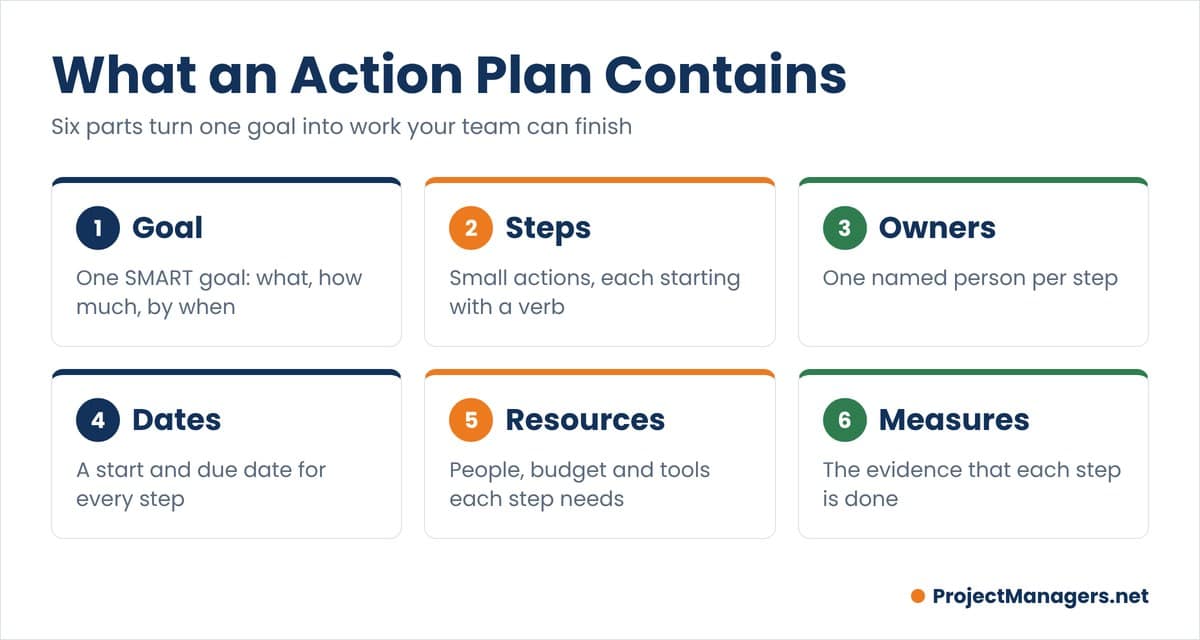
Every good action plan contains the same six parts:
- Goal: one SMART goal that says what will change, by how much and by when.
- Action steps: small, concrete actions, each starting with a verb.
- Owners: one named person per step, not a team or a department.
- Dates: a start date and a due date for every step, plus milestones.
- Resources: the people, budget, tools and approvals each step needs.
- Measures: the evidence that each step, and the whole plan, is done.
Action plans are living documents. As the project changes, the project manager updates steps, dates and owners rather than letting the plan drift away from reality.
REAL-LIFE EXAMPLE
Apple puts one name next to every action item
Apple calls the owner of each task its DRI, the directly responsible individual. Fortune editor Adam Lashinsky reported that action lists in Apple meetings show a DRI next to every item, so nobody has to ask who is responsible. When Scott Forstall left Apple in 2012, Lashinsky noted he had been the DRI for Siri and Maps.
BY THE NUMBERS
1 name
per action step. A step owned by “the team” or “marketing” has no one to chase when it slips.
Source: Apple DRI practice, as reported by Adam Lashinsky
PROJECT MANAGER TAKEAWAY
Write a person’s name, not a department, in the owner column of every step.
18 Free Action Plan Templates
We opened every template below in November 2026 and removed duplicate links from the earlier version of this page. Templates 1 and 2 are ours. The others come from trusted project management vendors and two public health agencies.
All 18 templates are free. Every link was opened and checked in November 2026.
| # | Template | Format | Best for |
|---|---|---|---|
| 1 | Action Plan Template (ProjectManagers.net) | Excel, Google Sheets | 40 steps with overdue flags and a summary by owner |
| 2 | Action Plan Template (ProjectManagers.net) | Word | A printable plan with risks, reviews and sign-off |
| 3 | Smartsheet Simple Action Plan | Excel, Word, PDF | Any goal, with priority and status drop-downs |
| 4 | Smartsheet Corrective Action Plan | Excel, Word, PDF | Fixing a quality, safety or compliance problem |
| 5 | Smartsheet Incident Action Plan | Excel, Word, PDF | Outages, breaches and other incidents |
| 6 | Smartsheet Mutual Action Plan | Excel, Word, Google Sheets | Shared plans with a client or vendor |
| 7 | Smartsheet Project Action Plan | Excel | Multi-phase projects with KPIs and costs |
| 8 | Smartsheet Marketing Action Plan | Excel, Word, PowerPoint | Campaigns and product launches |
| 9 | Smartsheet Business Action Plan | Excel, Word, PDF | New markets and cross-team initiatives |
| 10 | Smartsheet Sales Action Plan | Excel, Word, PowerPoint, Google Sheets | Revenue goals by team and period |
| 11 | ProjectManager Action Plan Template | Excel | Project, corrective, strategic and contingency plans in one file |
| 12 | Victoria Department of Health Action Plan | Word | A plain government-style action table |
| 13 | Minnesota Department of Health QI Action Plan | Excel | Quality improvement projects |
| 14 | WordTemplatesOnline Action Plan Pack | Word, PDF | 34 printable layouts to choose from |
| 15 | ClickUp Action Plan Template | Online (ClickUp) | Weekly, monthly and quarterly reviews on a whiteboard |
| 16 | Miro Action Plan Template | Online (Miro) | Kanban-style planning workshops |
| 17 | Wrike Action Plan Template | Online (Wrike) | Teams that already work in Wrike |
| 18 | Lucid Action Plan Template | Online (Lucidspark) | Visual plans with timelines and roadblocks |
Some vendors ask for an email address or offer a free trial before the download. The templates themselves are free.
1 and 2. Action Plan Templates for Excel and Word (ProjectManagers.net)
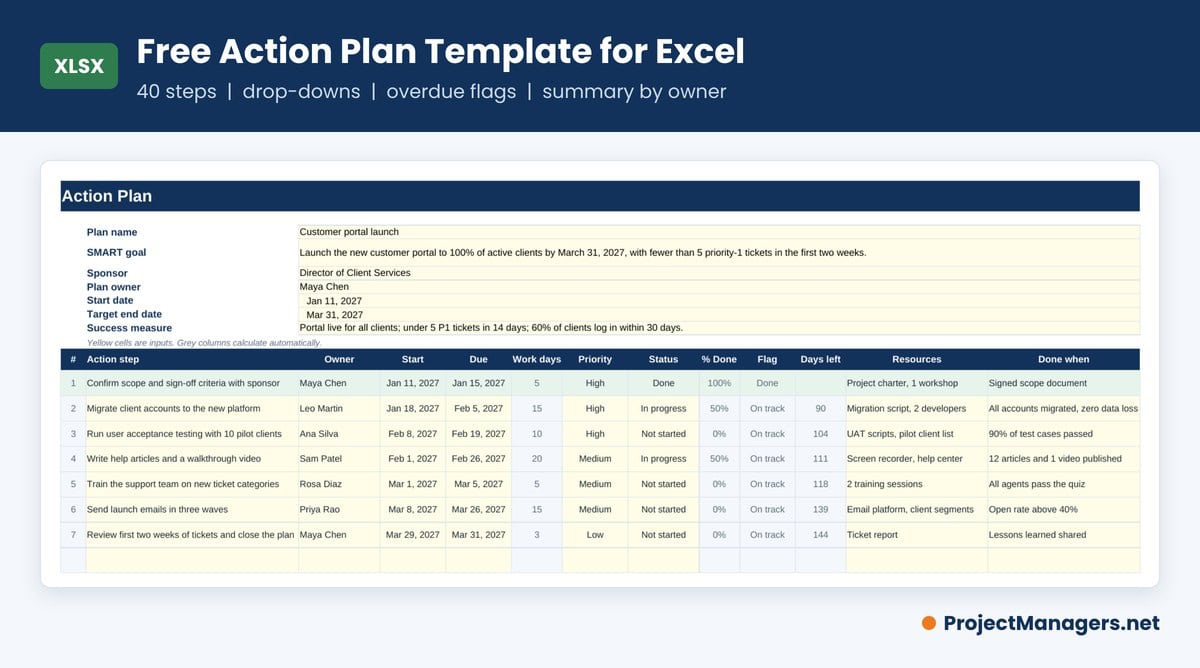
Our Excel template gives project managers a goal block, 40 action step rows and a summary tab. Status and priority come from drop-down lists, work days and days left calculate on their own, and overdue or blocked steps turn orange. The Summary tab shows percent complete, overdue steps, a count by status and open steps by owner. It opens in Excel, Google Sheets and LibreOffice.
The Word template is built for plans you print, sign or attach to a status report. It has five sections: goal, action steps, risks and blockers, progress reviews and approval, in landscape so the table stays readable.
Download our free Action Plan TemplatesExcel (.xlsx) with formulas and drop-downs, and Word (.docx) for printing and sign-off. No email required.
3 to 10. Smartsheet Action Plan Templates
Smartsheet’s action plan templates page offers blank and sample versions of each file, updated in August 2025. These eight are the most useful for project managers:
- Simple Action Plan (Excel, Word, PDF): action steps, owner, resources, due date, priority and status.
- Corrective Action Plan (Excel, Word, PDF): problem statement, root cause and result assessment.
- Incident Action Plan (Excel, Word, PDF): objectives, a timed action table, a communication plan and an incident map.
- Mutual Action Plan (Excel, Word, Google Sheets): shared steps with a client, with a customer feedback column.
- Project Action Plan (Excel): one table per phase with KPIs, durations and estimated cost.
- Marketing Action Plan (Excel, Word, PowerPoint): audience, strategy and marketing KPIs.
- Business Action Plan (Excel, Word, PDF): goal, resources, challenges and outcomes for a business initiative.
- Sales Action Plan (Excel, Word, PowerPoint, Google Sheets): several sales goals with steps and dates.
11. ProjectManager Action Plan Template for Excel
The ProjectManager action plan template is one Excel file with four tabs: project, corrective, strategic and contingency action plans. Each tab splits the plan into action steps, a timeline with planned hours, and resources with department, materials and cost.
12. Victoria Department of Health Action Plan Template (Word)
This Word action plan template from the Department of Health in Victoria, Australia, was written for workplace culture programs, but its simple table of actions, owners and timelines works for any small project. The link downloads the .docx file directly.
13. Minnesota Department of Health QI Action Plan (Excel)
The Minnesota Department of Health shares an action plan spreadsheet in its public health quality improvement toolbox. It suits improvement projects that move through plan, do, study and act cycles. The link downloads an older .xls file that opens in any spreadsheet app.
14. WordTemplatesOnline Printable Action Plan Pack (Word and PDF)
WordTemplatesOnline offers 34 printable action plan layouts: 16 in Word and 18 in PDF. They are a good choice when you want a polished one-page plan for a workshop or a wall chart rather than a tracker.
15 to 18. Online Action Plan Templates
If your team already works in a collaboration tool, start from that tool’s template so updates happen where people work:
- ClickUp Action Plan Template: a whiteboard with weekly, monthly and quarterly review rows and To Do, Doing and Done columns. ClickUp’s action plan templates article lists 19 more.
- Miro Action Plan Template: a Kanban board for SMART action plans, part of a collection of 58 action plan templates.
- Wrike Action Plan Template: folders by department, Gantt charts and dashboards. It needs a Wrike Business plan or higher.
- Lucid Action Plan Template: a Lucidspark board that breaks a goal into tasks, timelines, milestones and roadblocks.
monday.com also explains how to build an action plan template with two filled-in examples, a useful read before you design your own.
Free Action Plan Builder
Prefer to build the plan online? Pick an example or start blank, write your SMART goal, add your action steps, then check the timeline and the plan checks. The builder flags overdue and blocked steps, steps without an owner and goals that are not measurable or time-bound. Download the result as Word or CSV for Excel. Your plan stays in your browser.
How to Write an Action Plan in 6 Steps
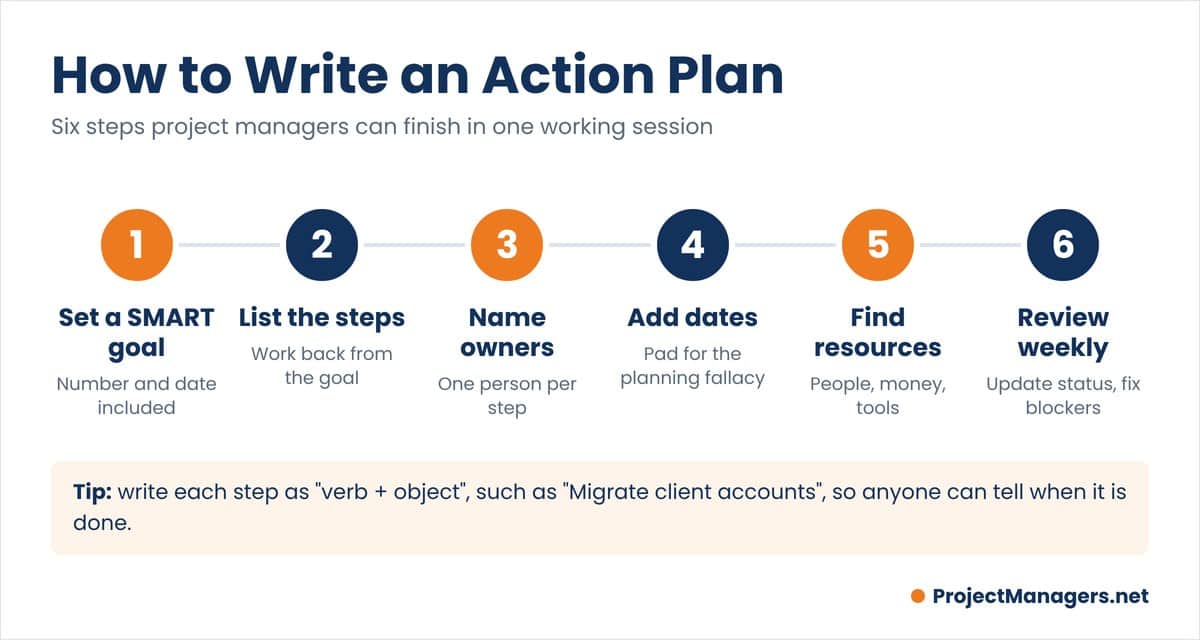
- Set a SMART goal. Write one sentence that is specific, measurable, achievable, relevant and time-bound. “Improve onboarding” becomes “Cut new-hire setup time from 5 days to 2 by June 30.”
- List the action steps. Work backward from the goal and break it into steps small enough to finish in days or a few weeks. Start each step with a verb so anyone can tell when it is done.
- Name one owner per step. Assign a person, not a team. Check with each owner that the step fits their workload before you publish the plan.
- Add start and due dates. Sequence the steps, mark dependencies and milestones, and add buffer: people routinely underestimate how long their own work will take.
- Identify resources. List the people, budget, tools, materials and approvals each step needs. If something is missing, add a step to get it.
- Review and update weekly. Agree on when the plan is reviewed and who updates it. Mark steps done, chase blockers and adjust dates openly instead of letting the plan go stale.
Once the action plan is ready, it often feeds a wider project plan. For larger work, break the scope down first with a work breakdown structure, then clarify roles with a RACI matrix.
REAL-LIFE EXAMPLE
The thesis study that named the planning fallacy
In 1994, psychologists Roger Buehler, Dale Griffin and Michael Ross asked 37 students when they would finish their senior thesis. The average prediction was 33.9 days. The average real time was 55.5 days, and only about 30% of students finished by their own predicted date. Even their “everything goes wrong” estimate of 48.6 days was too short.
Source: Planning fallacy (Wikipedia), citing Buehler, Griffin and Ross, 1994
BY THE NUMBERS
d = 0.65
average effect on goal attainment of specific “if-then” plans, across 94 independent tests and more than 8,000 participants.
PROJECT MANAGER TAKEAWAY
A written plan with concrete steps helps people act, but its dates will still be optimistic. Pad every due date and compare it with how long similar work took last time.
Action Plan vs Strategic Plan vs Project Plan

A strategic plan sets the direction for one to five years: where the organization is going and which goals matter most. A project plan explains how one project will deliver its scope, with the schedule, budget, risks and communication. An action plan is the most detailed level: who does what, by when, to reach one specific goal. Action plans make strategic plans operational, and a single project can contain several action plans, for example one per phase or one per problem found in a status review.
An action plan is also different from a backup plan. A plan B is an alternative strategy that the team switches to if the original approach fails. Project managers usually keep plan B in the risk register and turn it into its own action plan only when it is triggered. Our free risk register templates show how to record those responses.
Types of Action Plans
Most action plans share the same columns. What changes is the trigger and the goal:
- Project action plan: delivers a defined result, such as a launch or a migration, phase by phase.
- Corrective action plan: fixes a problem after a defect, audit finding or complaint, starting from the root cause.
- Incident or emergency action plan: sets out who does what, in what order, when something goes wrong.
- Strategic or business action plan: turns an annual goal into quarterly and monthly actions.
- Mutual action plan: a shared plan between your team and a client, vendor or partner.
- Personal or employee action plan: development goals, onboarding or a performance improvement plan.
REAL-LIFE EXAMPLE
Johnson & Johnson and the 1982 Tylenol recall
After seven people in the Chicago area died from cyanide-laced Tylenol capsules in 1982, Johnson & Johnson recalled about 31 million bottles nationwide and stopped advertising the product. Its corrective action did not stop at the recall: the company relaunched Tylenol with triple-sealed, tamper-resistant packaging, and the FDA went on to set tamper-resistant packaging rules for over-the-counter drugs.
Source: EBSCO Research Starters
BY THE NUMBERS
31 million
bottles recalled, at a reported cost of about $240 million once the recall was complete.
Source: EBSCO Research Starters
PROJECT MANAGER TAKEAWAY
A corrective action plan needs two kinds of steps: actions that contain the problem now, and actions that stop it from happening again.
Action Plan Best Practices for Project Managers
These action planning practices keep a plan useful long after the kickoff:
- Keep steps small. If a step will take more than two or three weeks, split it. Small steps show progress and expose delays early.
- Write “done when” for every step. A signed document, a published page or a passed test removes arguments about whether a step is finished.
- Share the plan where the team works. One shared file or board, not copies in email, so everyone sees the same dates and priorities.
- Review on a fixed rhythm. A 15-minute weekly review of overdue and blocked steps does more than a long monthly meeting.
- Escalate blockers fast. A blocked step needs a named person who will unblock it and a date, not just a red status.
- Balance the load. Count open steps per owner. If one person owns half the plan, it will slip. Our resource planning templates help you check capacity.
- Close the plan properly. When the goal is met, confirm it with the sponsor and record what you learned for the next plan.
REAL-LIFE EXAMPLE
Why a single shared plan matters
Asana’s Anatomy of Work Index 2021 surveyed 13,123 knowledge workers in seven countries. Respondents said they lost most of their week to coordinating work: searching for information, switching between apps, chasing status updates and sitting in status meetings, rather than doing the skilled work they were hired for.
Source: Asana Anatomy of Work Index 2021
BY THE NUMBERS
60%
of knowledge workers’ time went to “work about work” instead of skilled work, according to the same survey.
Source: Asana Anatomy of Work Index 2021
PROJECT MANAGER TAKEAWAY
One shared action plan that shows owners, dates and status replaces many of the update requests and status meetings that eat a project team’s week.
Video About How to Create an Action Plan
In this short video, author and business coach Brian Tracy explains how to turn a goal into a list of actions, organize them by priority and sequence, and act on the plan every day.
How to Create an Effective Action Plan, by Brian Tracy
Facts Worth Checking
Six common beliefs about action planning, checked against published sources.
| # | You may hear | What the evidence says | Source |
|---|---|---|---|
| 1 | Planning is just paperwork; it does not change what people do. | Across 94 tests, plans that specify when, where and how to act had a medium-to-large effect on reaching goals (d = 0.65). A 2024 synthesis of 642 tests found a smaller but still positive average effect. | Gollwitzer and Sheeran (2006) |
| 2 | Writing goals down makes you 42% more likely to reach them. | The figure traces to a small study by Gail Matthews (Dominican University). Participants who wrote goals, made action commitments and sent weekly progress reports to a friend achieved 76% of their goals, versus 43% for those who only thought about them. The study was not peer reviewed, and the effect came from accountability as much as writing. | Michigan State University Extension |
| 3 | Experienced people estimate their own deadlines well. | Students predicted 33.9 days for their thesis and needed 55.5. Only about 30% finished by their own estimate, even though they knew past work had run late. | Planning fallacy (Wikipedia) |
| 4 | Shared ownership means shared commitment. | Apple assigns one directly responsible individual (DRI) to every action item, and the practice is widely credited for its accountability. | Fortune (2012) |
| 5 | Most of the workday goes to skilled work. | Knowledge workers reported spending 60% of their time on “work about work” such as status updates and searching for information. | Asana Anatomy of Work Index 2021 |
| 6 | A corrective action plan only needs to fix the immediate problem. | Johnson & Johnson’s 1982 response combined a 31 million bottle recall with tamper-resistant packaging that stopped the problem from recurring. | EBSCO Research Starters |
Sources checked November 2026. Figures come from the organizations linked and may be updated by them.
Conclusion
An action plan is one of the simplest tools a project manager can use, and one of the most effective. A clear goal, small steps, one owner per step, honest dates and a weekly review turn good intentions into finished work.
Start with one of the 18 free templates above or the online Action Plan Builder, fill in your goal and first few steps today, and share the plan with your team before the next status meeting.
Frequently Asked Questions on Action Plans
Action Plan FAQ
Why do project managers need action plans?
An action plan gives the team one shared list of what must happen, in what order, by whom and by when. It helps the project manager spot missing steps before work starts, track progress against dates and hold people accountable for their part.
What is the difference between an action plan and a strategic plan?
A strategic plan sets long-term direction and priorities, usually for one to five years. An action plan makes that strategy operational: it lists the specific steps, owners, resources and dates needed to reach one goal in the coming weeks or months.
Who develops an action plan?
The project manager or team lead usually drafts the action plan and owns it, with input from the people who will do the work. Each step is then assigned to one owner, and the sponsor approves the goal and the plan.
Is an action plan the same as a deliverable?
No. A deliverable is a product or result the project must produce, such as a report or a working system. An action plan is the list of tasks that produce deliverables. One action plan can lead to several deliverables.
What are the main parts of an action plan?
A goal, action steps, an owner for each step, start and due dates, the resources each step needs and a way to measure that each step is done. Many plans also track priority, status and risks.
What is the difference between an action plan and a to-do list?
A to-do list is a set of tasks that may have nothing to do with each other. An action plan ties every step to one goal, sequences the steps and gives each one an owner and a due date.
How do I use the free Action Plan Builder?
Choose an example or a blank plan, write your SMART goal, then add action steps with owners, dates, priority and status. The Timeline tab shows your steps on a calendar bar chart, and the Checks and export tab lists problems to fix and lets you download the plan as Word or CSV for Excel.
Suggested articles:
- 33 Free PESTLE Analysis Templates (Excel, Word, PPT, PDF)
- 31 Free Test Plan Templates (Word, Excel, Google Docs)
- 5 Sprint Planning Templates Word & XLS
- Free Risk Register Templates

Shane Drumm, holding certifications in PMP®, PMI-ACP®, CSM, and LPM, is the author behind numerous articles featured here. Hailing from County Cork, Ireland, his expertise lies in implementing Agile methodologies with geographically dispersed teams for software development projects. In his leisure, he dedicates time to web development and Ironman triathlon training. Find out more about Shane on shanedrumm.com and please reach out and connect with Shane on LinkedIn.