
Social media captions are your voice, your spark and your invitation to connect. A good caption stops the scroll, starts a conversation and tells people what to do next. Writing one good caption is easy. Writing five a week for a product launch, a hiring push and a client project, in the right tone for each platform, is where most teams run out of time.
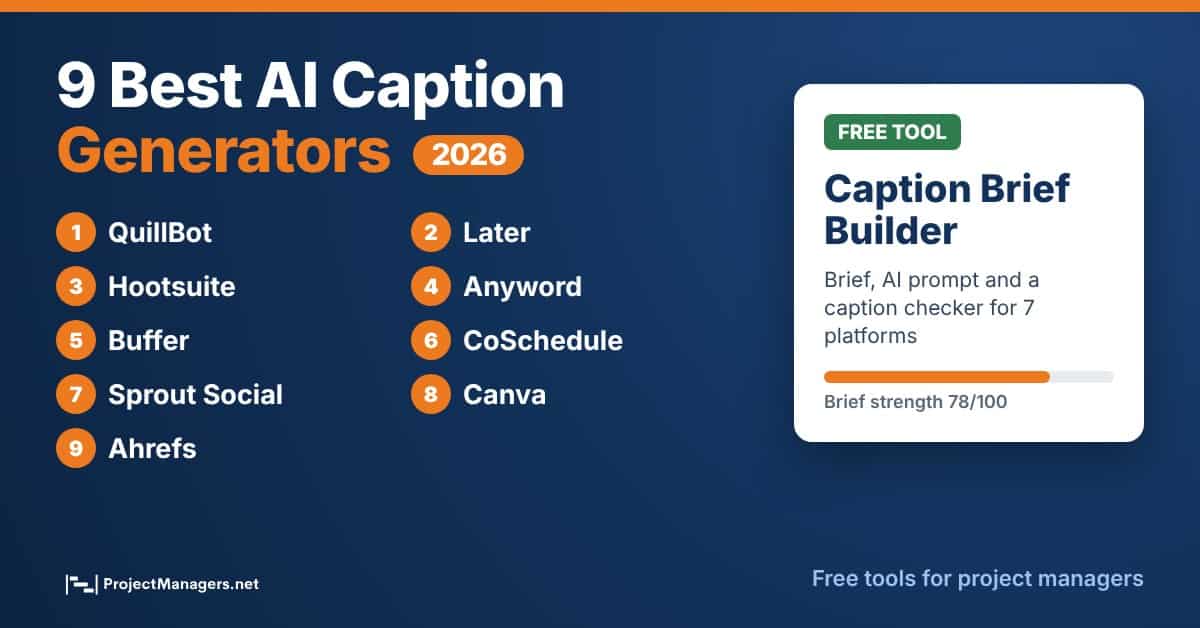
That is why AI caption generators have become a normal part of the social workflow, for creators and small business owners as much as for project managers who own launch communications, stakeholder updates or a client’s social calendar. This guide compares 9 AI caption generators that are live and working in 2026, explains what each one is best at, and gives you a free Caption Brief Builder so the captions you get back are specific, accurate and on brand.
- QuillBot is the best all-round pick for drafting and polishing captions for free, while Buffer and Ahrefs are the easiest free options and Later, Hootsuite, Anyword and Sprout Social suit teams that already schedule in those platforms.
- The list changed in 2026. INK and Writesonic’s caption tools are gone, Hootsuite’s OwlyWriter is now part of Wisdom, and Instagram caps every post and Reel at 5 hashtags.
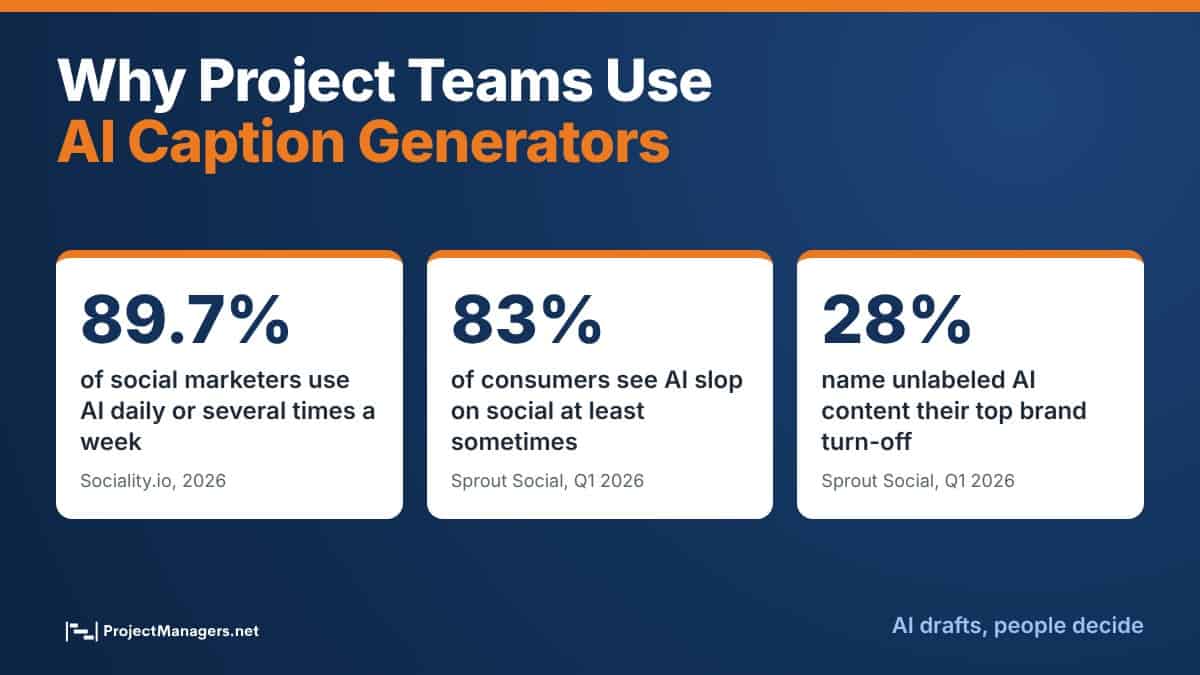
- AI drafts, people decide. Sprout Social found that 83% of consumers see “AI slop” on social at least sometimes, so edit every caption for facts, voice and a clear call to action.
- Better input beats a better tool. A short brief with the goal, audience, facts and CTA gives any generator what it needs to write captions worth posting.
Think of the tools on this list as a fast first draft. The best results still come from a clear brief and a human edit, the same way a good project plan still needs a project manager to own it.
Why Project Teams Use AI Caption Generators
Social posts are rarely a one-person job anymore. A product launch project can need a LinkedIn announcement, an Instagram carousel, a short TikTok and a Facebook event post, all written for different audiences and all approved by a project sponsor before go-live. AI caption generators help the project team get from a blank box to reviewable options in minutes.
They are also now standard practice. In the 2026 Sociality.io survey of social media marketers, 89.7% said they use AI daily or several times a week, and content ideation and trend research were among the most common uses. For a project manager, that means stakeholders expect fast turnaround on social copy, and the bottleneck moves from writing to reviewing.
The risk is the same as with any shortcut in a project: speed without quality control. Audiences notice generic AI copy, and they react to it. Treat the generator as one step in a small caption workflow with a brief, a draft, a fact check and an approval.
AI Captions in Numbers
Real-life example: A software project team preparing a feature launch writes one brief, asks a generator for five LinkedIn options and five Instagram options, then spends its time choosing, fact checking and tightening the best two instead of drafting from scratch.
Sources: Sociality.io 2026 AI in Social Media Marketing Report, Sprout Social Stat Library, EMARKETER.
Free Caption Brief Builder
Every caption generator on this list works better when you give it a clear brief. Our free Caption Brief Builder turns your post idea into a ready-to-paste prompt and checks your final draft against the rules of the platform you picked. It opens with a project milestone example on LinkedIn so you can see how it works.
- Pick an example or start blank and choose the platform and the goal of the post.
- Describe the post and list the facts the caption must use, one per line. Facts stop the AI from inventing numbers.
- Set the audience, tone and call to action. The Brief strength score shows what is still missing.
- Copy the AI prompt into QuillBot, Buffer, Canva or any other generator on this list.
- Paste your favorite draft into the Caption checker to check length, hook, hashtags, emojis, CTA and banned words, then print or copy the brief for your approver.
The 9 Best AI Caption Generators in 2026
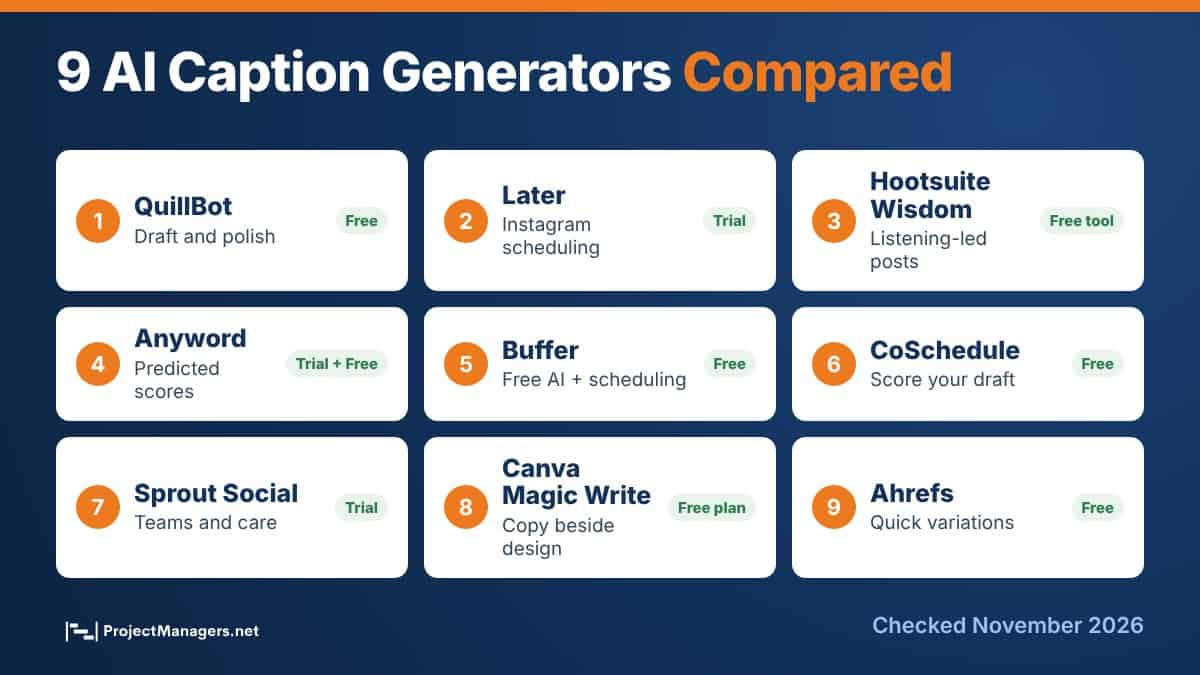
We checked every tool on November 9, 2026. Two tools from the earlier version of this list no longer offer a caption generator (INK and Writesonic), two entries for Later were merged into one, and we added Buffer, Sprout Social, Canva and Ahrefs. Here is how the 9 compare before the details.
AI Caption Generators at a Glance
| Tool | Best for | Free option | Standout feature |
|---|---|---|---|
| 1. QuillBot | Drafting and polishing captions | Yes, basic version | Rewrite, grammar and tone tools in one place |
| 2. Later | Instagram-first scheduling | 14-day trial, then paid credits | Learns your tone from past posts |
| 3. Hootsuite Wisdom | Teams already on Hootsuite | Free caption generator; Wisdom on paid plans | Uses live social listening data |
| 4. Anyword | Performance-focused marketers | 7-day trial, then a Free plan | Predictive Performance Score |
| 5. Buffer AI Assistant | Small teams on a budget | Yes, unlimited with a free account | Repurposes one post for each channel |
| 6. CoSchedule | Checking and improving drafts | Yes | Scores your message before you post |
| 7. Sprout Social AI Assist | Larger social and care teams | 30-day trial | Captions, alt text and reply drafts |
| 8. Canva Magic Write | Designers and visual posts | Yes, limited monthly uses | Writes copy next to your design |
| 9. Ahrefs Caption Generator | Quick free variations | Yes | Platform, tone, hashtag and emoji toggles |
Free options and trials checked on each vendor’s site on November 9, 2026. Plans change often, so confirm before you buy.
1. QuillBot
QuillBot’s AI Caption Generator combines a creative spark with polish. Describe your post or the vibe you want, such as “a playful caption for our team offsite photo”, and QuillBot returns several well-structured options in seconds. You can ask follow-up questions until the tone is right, then make it your own.
What sets QuillBot apart is everything around the generator. The same account gives you a Paraphraser, a Grammar Checker and other writing tools, so a project team can draft a caption, tighten it and check it without switching apps. It works for Instagram, TikTok, LinkedIn, Facebook and more, and it supports several languages for global audiences.
Best for: Teams that want one free tool to draft, rewrite and proofread captions, including multilingual project teams.
- Multiple caption options per prompt, each with a different style.
- Tone you control, from playful to professional or inspirational.
- Built-in Paraphraser and Grammar Checker for the final edit.
- Basic version is free; Premium adds more advanced options and style control.
Proof and Practical Notes
Real-life example: A project coordinator announcing a new client portal pastes the release notes into QuillBot, asks for three LinkedIn captions in a professional tone, then runs the favorite through the Grammar Checker before sending it to the sponsor.
Source: QuillBot AI Caption Generator page, checked November 9, 2026.
2. Later Caption Writer
Built into Later’s social media management platform, the Caption Writer generates Instagram captions from a short prompt while you create a post. Add details about your brand, audience or preferred tone, generate, then insert your favorite option straight into a post that is ready to schedule.
This entry replaces the two Later listings in the earlier version of this article. The Caption Writer is not a separate free tool: it runs on monthly credits included in Later’s paid plans, with one credit used per generation. You can try it with Later’s 14-day free trial. Later says the tool learns your tone from your previous posts, and it pairs well with its Hashtag Suggestions and Best Time to Post features.
Best for: Instagram-first teams that plan, schedule and analyze content in one calendar.
- Captions generated inside the post you are scheduling.
- Matches your brand voice based on your past posts.
- Hashtag Suggestions and analytics on the same platform.
- Credits reset monthly; extra credits cannot be bought yet.
Proof and Practical Notes
Real-life example: A marketing project manager running a 4-week campaign builds the Instagram calendar in Later, generates a caption for each post, and uses Best Time to Post to schedule them before the campaign kickoff.
Source: Later Caption Writer page and FAQ, checked November 9, 2026.
3. Hootsuite Wisdom (Formerly OwlyWriter)
Hootsuite’s OwlyWriter AI is now part of Wisdom. Hootsuite says its earlier AI tools, Yeti and OwlyGPT, evolved into this single chat assistant. Wisdom can draft posts, captions, content briefs and campaign ideas, and it is connected to Hootsuite’s social listening, so suggestions can reflect what is trending in your space right now.
People stay in control: Wisdom does not publish on its own, so every draft goes through review and approval. If you only need quick captions, Hootsuite also offers a free AI caption generator that covers 7 networks, 5 languages and dozens of writing styles.
Best for: Teams already on Hootsuite that want captions grounded in listening data and a review step before publishing.
- Drafts posts, captions and briefs in a plain-language chat.
- Uses real-time social signals and your brand context.
- Free caption generator for Instagram, Facebook, X, TikTok, LinkedIn, Pinterest and Threads.
- Human review before anything is published.
Proof and Practical Notes
Real-life example: A PMO communications lead asks Wisdom which topics are trending with the company’s audience this week, then has it draft three posts about the new project portfolio report that the team reviews in its approval workflow.
Sources: Hootsuite Wisdom and Hootsuite free caption generator, checked November 9, 2026.
4. Anyword
Anyword is built for marketers who care about results more than inspiration. You fill in a short brief about the post, generate several caption variations, and each one comes with a Predictive Performance Score that estimates how well it should perform, plus age and gender insights about who it will resonate with.
Anyword also labels copy as safe, sensitive or unsafe for promotion, supports more than 20 languages and can learn your brand voice from examples. New users get a 7-day free trial with full features, after which the account moves to Anyword’s Free plan.
Best for: Performance-focused teams that want to compare variations before they post or boost.
- Predictive Performance Score on every caption.
- Audience insights by age and gender.
- Brand voice training from your own examples.
- Safety labels for paid promotion.
Proof and Practical Notes
Real-life example: Before boosting a webinar post, a project marketing team generates six variations in Anyword, shortlists the two highest scores and runs a small A/B test to confirm the prediction with real data.
Source: Anyword Instagram caption generator page and FAQ, checked November 9, 2026.
5. Buffer AI Assistant
Buffer’s AI Assistant lives inside the post composer. It can brainstorm ideas, write a caption from a prompt, rephrase, shorten or expand text, switch between casual and formal tone, and turn one post into versions tailored to LinkedIn, Threads, X, Instagram, Bluesky and more.
The big draw is price. Buffer says the AI Assistant is free to use without limits when you sign up for a free Buffer account. Without an account, its public AI social media post generator allows five posts a day. Buffer uses OpenAI’s models and says only the text you type into the assistant is shared with OpenAI.
Best for: Small teams, freelancers and project teams that need free captions and simple scheduling in one place.
- Free and unlimited with a free Buffer account.
- Repurposes one idea into a version for each channel.
- One-click rephrase, shorten, expand and tone changes.
- Optional: nothing is generated unless you open the assistant.
Proof and Practical Notes
Real-life example: A nonprofit project team turns its monthly progress update into a LinkedIn post, a Threads post and an Instagram caption with Buffer’s repurposing feature, then schedules all three from the same free account.
Sources: Buffer AI Assistant page and FAQ and public post generator, checked November 9, 2026.
6. CoSchedule Social Message Optimizer
CoSchedule takes a different angle: instead of writing for you, its free Social Message Optimizer scores the message you already wrote. Choose the type of message, paste your caption and get feedback on what makes it stronger, based on best practices and data for each social network.
It pairs well with any generator above. Draft with QuillBot or Buffer, then run your favorite option through CoSchedule before it goes to approval. CoSchedule also offers a free download of message templates to help you structure better posts.
Best for: Reviewers and project managers who approve copy and want a quick, objective second opinion.
- Free message scoring before you post.
- Guidance tailored to each social network.
- Free message templates to download.
- Works with captions from any tool or writer.
Proof and Practical Notes
Real-life example: During a product launch project, the project manager asks every contributor to paste their captions into CoSchedule and fix the flagged issues before the copy reaches the approval queue, which cuts review rounds.
Source: CoSchedule Social Message Optimizer, checked November 9, 2026.
7. Sprout Social AI Assist
Sprout Social’s AI Assist is built into Compose, the place where Sprout users write and schedule posts. Drop in a few ideas or a link and it suggests several captions in different tones. Enhance by AI Assist rewrites a draft to sound more friendly or more professional, and it can also generate image alt text, which helps with accessibility.
Sprout is a premium platform with no free plan, but it offers a 30-day free trial. It is a strong fit when the same team handles publishing, customer care and reporting, because AI Assist also helps summarize reports and draft replies.
Best for: Larger social, marketing and customer care teams that need governance and brand consistency.
- Multiple caption suggestions in different tones from a link or a few ideas.
- Tone rewrites with Enhance by AI Assist.
- AI-generated alt text for images.
- Report summaries and reply drafts on the same platform.
Proof and Practical Notes
Real-life example: Sprout’s own social team says it uses AI Assist in Compose as a guard rail for brand voice when a new employee or an occasional contributor needs to publish, which is a common situation on cross-functional project teams.
Source: Sprout Social AI Assist case study, checked November 9, 2026.
8. Canva Magic Write
Canva Magic Write is an AI text generator powered by OpenAI that works inside the Canva editor. Start with a prompt and it writes first drafts of captions, bios, content ideas and lists right next to the graphic or carousel you are designing.
That makes it the most natural pick for teams that start with the visual. Magic Write is available on Canva’s Free plan with a limited monthly allowance of AI uses, and paid plans raise that allowance. Like every generator here, its drafts need an edit for tone and accuracy.
Best for: Designers and visual-first teams who want copy and design in the same file.
- Writes captions beside the design you are working on.
- Powered by OpenAI, with prompts in plain language.
- Included on the Free plan with limited monthly uses.
- Pairs with Canva templates and resizing for each platform.
Proof and Practical Notes
Real-life example: A project team creating a carousel that explains a new process designs the slides in Canva, then uses Magic Write to draft the Instagram caption and a LinkedIn version without leaving the file.
Sources: Canva Magic Write page and Canva pricing page, checked November 9, 2026.
9. Ahrefs Social Media Caption Generator
The Ahrefs Social Media Caption Generator is one of the simplest free tools on this list. Describe your content, choose the social network and writing tone, decide whether you want hashtags and emojis, and it returns five variants by default.
Ahrefs also has a separate free Instagram Caption Generator where you can upload an image (JPG, PNG or GIF under 10 MB) and get captions based on what is in the picture. Neither tool requires a paid Ahrefs plan.
Best for: Anyone who needs a few quick, free variations without opening a full platform.
- Choose platform, tone and number of variants.
- Toggles for hashtags and emojis.
- Image-based captions in the Instagram version.
- Free, with no paid plan required.
Proof and Practical Notes
Real-life example: A project manager posting a team photo after a successful go-live uploads it to the Instagram version, picks a friendly tone and adds hashtags, then edits one option to thank the people involved by name.
Sources: Ahrefs Social Media Caption Generator and Instagram Caption Generator, checked November 9, 2026.
How to Choose the Right Caption Generator for Your Team
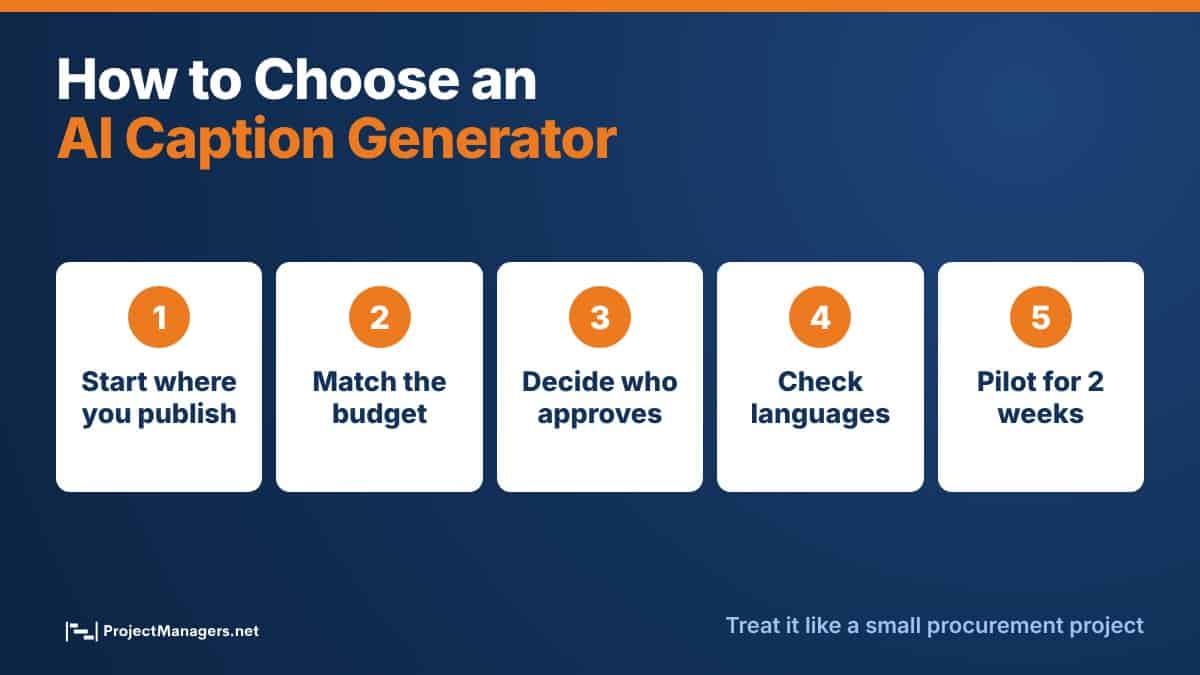
Choosing a caption tool is a small procurement decision, so treat it like one on any project: start from the workflow and the constraints, not the feature list.
- Start where you already publish. If your team schedules in Later, Hootsuite, Buffer or Sprout Social, the built-in assistant saves a copy and paste step and keeps captions next to the calendar.
- Match the budget. QuillBot, Buffer, Ahrefs, CoSchedule and Canva all have free options. Later, Anyword, Hootsuite Wisdom and Sprout Social make more sense when you already pay for the platform or need performance data.
- Decide who approves. For regulated industries or client projects, pick a tool with a review step and keep the approval in your project management tool.
- Check language and accessibility needs. Multilingual teams should test QuillBot, Hootsuite or Anyword. Sprout Social adds AI alt text for images.
- Run a two-week pilot. Give two or three tools the same brief, compare the drafts and track the time saved per post before you commit.
Captions are only one growth lever. Teams that want a bigger audience also use consistent posting, creator collaborations, giveaways and interactive campaigns, and some brands explore available Instagram profiles to buy to start with an established audience. Whatever the approach, captions are what turn reach into conversations, so the brief and the review step still matter.
Caption Length and Hashtag Rules by Platform
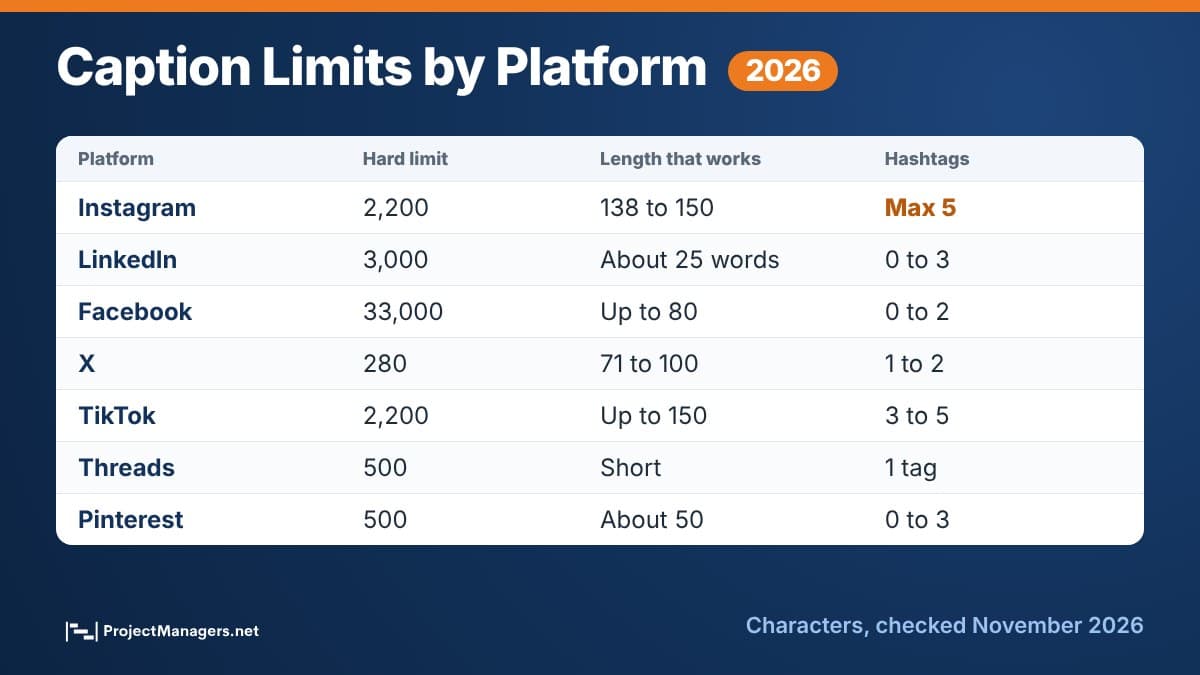
AI tools do not always respect platform limits, so check the draft before it goes live. The biggest change in the last year is Instagram: it now allows a maximum of 5 hashtags per post or Reel, down from 30. The Caption Brief Builder above uses these numbers in its checker.
Caption Limits and Guidance by Platform (2026)
| Platform | Hard limit | Length that works | Hashtags | Links in caption |
|---|---|---|---|---|
| 2,200 characters; about 125 show before the cut | 138 to 150 characters | Maximum 5 | Not clickable | |
| 3,000 characters | About 25 words for quick updates | 0 to 3 | Clickable | |
| 33,000 characters (per Hootsuite) | Up to about 80 characters | 0 to 2 | Clickable | |
| X (Twitter) | 280 characters on standard accounts | 71 to 100 characters | 1 to 2 | Clickable |
| TikTok | 2,200 characters (posting API) | Up to about 150 characters | 3 to 5 | Not clickable |
| Threads | 500 characters | Short and conversational | 1 topic tag | Clickable |
| 500 characters (100 for the title) | About 50 characters show in the feed | 0 to 3 | Destination link per Pin |
Sources: Hootsuite (lengths), Anyword (Instagram cut), Social Media Today (Instagram hashtag cap), Meta Threads docs. Hashtag ranges other than Instagram and Threads are our guidance.
7 Smart Tips to Get Better Captions From AI
AI caption tools are powerful, but the results depend on how you use them. Treat them as creative partners, not replacements, and give them the same clarity you would give a new member of your project team.
- Write a real brief. Include the goal, audience, platform, tone and call to action. “Write a caption” gets generic copy; a brief gets usable options.
- Give the facts, ban the guesses. List the numbers, dates and names the caption may use, and tell the tool not to invent others.
- Ask for different angles. Request a question, a number, a short story and a bold claim so you compare real alternatives, not five versions of one sentence.
- Edit for your voice. Read the caption out loud. Cut filler words, swap in the terms your audience uses and remove anything you would not say yourself.
- Put the hook first. On Instagram, only about 125 characters show before the cut, so the key idea belongs in the first line.
- End with one clear CTA. Ask for a comment, a save, a click or a registration, not all four.
- Track what works. Log the caption angle and results for each post in your project tracker or analytics, and feed the winners back into your next brief.
For recurring posts, such as monthly project status highlights or sprint demos, save your best brief as a template. Your team then spends minutes, not hours, on each new post, and the voice stays consistent even when contributors change.
Quiz: How Well Do You Know AI Captions?
10 quick questions based on this article. Pick an answer to see the explanation.
1. How many hashtags can you add to an Instagram post or Reel in 2026?
Instagram now caps posts and Reels at 5 hashtags, down from 30.
2. About how many characters of an Instagram caption show before it is cut?
Anyword's guide puts the visible part at about 125 characters, so the hook belongs in the first line.
3. What happened to Hootsuite's OwlyWriter?
Hootsuite says Yeti and OwlyGPT evolved into Wisdom, its single AI assistant.
4. Which tool gives every caption a Predictive Performance Score?
Anyword scores each variation and adds age and gender insights.
5. How do you get unlimited use of Buffer's AI Assistant at no cost?
The public generator allows five posts a day; a free account removes the limit.
6. What does CoSchedule's Social Message Optimizer do?
It evaluates your draft and suggests improvements for each network.
7. In Sprout Social's Q1 2026 Pulse Survey, what was the top brand turn-off on social?
28% of users named unlabeled AI content as their top turn-off.
8. Which detail most improves AI caption quality?
Specific inputs give the model what it needs and stop it from inventing details.
9. What is the character limit for a Threads post?
Meta's Threads documentation sets the limit at 500 characters.
10. Why should a project manager keep a human approval step for AI captions?
AI drafts can include invented facts or off-brand phrasing; approval protects the project and the brand.
Score: 0 / 10
Watch: Writing an Instagram Caption With AI
In this workshop, the Anyword team walks through creating an Instagram caption with AI, from the brief to choosing between scored variations.
Facts Worth Checking: AI Caption Claims
| Claim | Verdict | What we found |
|---|---|---|
| You can still add 30 hashtags to an Instagram post. | False | Instagram announced a cap of 5 hashtags per post and Reel, after a year of testing lower limits. |
| AI captions are fine to post without editing. | Misleading | In Sprout Social's Q1 2026 Pulse Survey, 83% of consumers said they see AI slop at least sometimes, and unlabeled AI content was the top brand turn-off (28%). |
| Hootsuite's OwlyWriter is still a separate product. | Outdated | The OwlyWriter page now redirects to Wisdom. Hootsuite says Yeti and OwlyGPT evolved into Wisdom. |
| Later's Caption Writer is a free tool. | Partly true | It runs on monthly credits included in paid plans. You can try it free during Later's 14-day trial. |
| Buffer charges extra for its AI Assistant. | False | Buffer says the AI Assistant is free and unlimited with a free account; the no-account generator allows five posts a day. |
| Longer captions always get more engagement. | False | Hootsuite recommends 138 to 150 characters on Instagram and 71 to 100 on X. Long captions work only when the first line earns the click. |
| Most social marketers already use AI every week. | True | Sociality.io's 2026 survey found 89.7% use AI daily or several times a week. |
| INK and Writesonic still offer the caption generators listed in 2025. | False | On November 9, 2026, inkforall.com redirected to an unrelated GitHub project and Writesonic's caption generator pages redirected to its AI Article Writer. |
| Links in Instagram captions are clickable. | False | Instagram caption links are not clickable, which is why brands say "link in bio" or use comments and DMs. |
| A high predicted score guarantees a post will perform. | Misleading | Tools like Anyword predict performance from past data. Test top options with your own audience before you scale. |
Checked November 9, 2026, against the vendor pages, surveys and announcements linked in this article.
AI Caption Generators: Your Questions Answered
What is the best free AI caption generator?
QuillBot is the best all-round free option because it combines the caption generator with rewriting and grammar tools. Buffer is best if you also want free scheduling, Ahrefs is the quickest for a few variations, and Canva Magic Write is best when you are designing the post in Canva.
Can AI caption generators write for LinkedIn as well as Instagram?
Yes. QuillBot, Buffer, Hootsuite, Ahrefs, Sprout Social and Canva all write for several networks. Tell the tool which platform you are writing for, because a good LinkedIn update and a good Instagram caption have different lengths, tones and hashtag rules.
Should I tell my audience that a caption was written with AI?
If AI wrote most of the post, or the post includes AI-generated images, labeling it is the safer choice. Sprout Social's Q1 2026 Pulse Survey found that unlabeled AI content was the top brand turn-off for social media users. When AI only helped you brainstorm or edit your own words, most brands do not add a label.
How many hashtags should I use in 2026?
On Instagram, use up to 5, because that is now the maximum per post and Reel. On Threads, use 1 topic tag. On LinkedIn, Facebook and X, one to three relevant tags is usually enough.
How can project managers use AI caption generators?
Project managers use them to announce launches and milestones, recruit for project roles, promote webinars and share stakeholder updates. The key is a short brief with approved facts, a clear owner for review, and a template you can reuse for recurring posts.
Are AI-generated captions accurate?
Not always. Generators can invent numbers, features or quotes, and they do not know your project details unless you provide them. List the facts the caption must use, tell the tool not to add others, and fact check every draft before it is approved.
Final Thoughts
Captions build conversations, and the 9 tools in this guide help you write them faster. They generate tone-specific options, suggest hashtags, score drafts and adapt one idea to every platform. The teams that get the most from them treat AI as the first draft, then add the facts, voice and judgment that only people who know the project can bring.
QuillBot’s AI Caption Generator stands out as the best all-round starting point, thanks to its editing tools and flexible tone options. Pair it with a scheduler such as Buffer, Later, Hootsuite or Sprout Social, check your drafts with CoSchedule, and use the free Caption Brief Builder to give every tool a clear brief. That combination takes your content from first spark to scroll-stopping post.
Suggested articles:
- How Project Managers Can Use Creator Insights in Campaigns
- Best Practices, Metrics, and Benefits of Social Media Monitoring
- Top 5 Advantages of Using AI Video Generators

Daniel Raymond, a project manager with over 20 years of experience, is the former CEO of a successful software company called Websystems. With a strong background in managing complex projects, he applied his expertise to develop AceProject.com and Bridge24.com, innovative project management tools designed to streamline processes and improve productivity. Throughout his career, Daniel has consistently demonstrated a commitment to excellence and a passion for empowering teams to achieve their goals.