
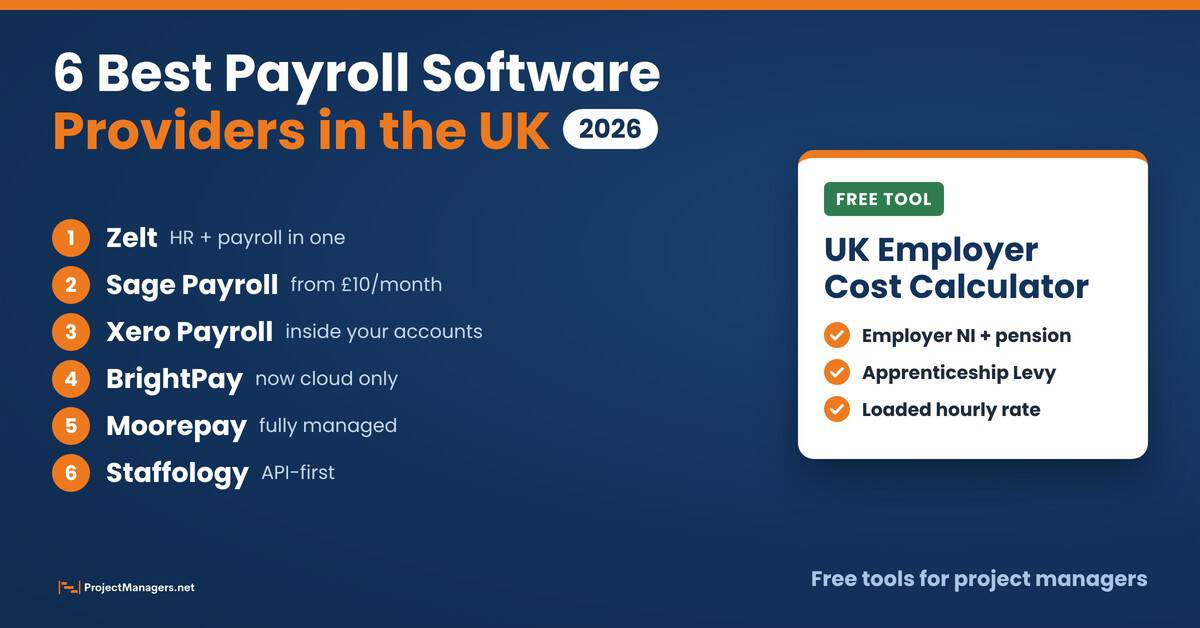
Running payroll in the UK sounds simple until you are the one doing it. PAYE, National Insurance, pension auto-enrolment and a Full Payment Submission to HMRC every time anyone is paid: it adds up fast, and one late or wrong submission can cost you penalties, staff trust and hours you do not have. For project managers it matters for another reason too. Payroll is where your project’s labour costs stop being estimates and become real numbers.
This guide compares the 6 best payroll software providers in the UK for 2026: what each one does well, what it costs and who it suits. You will also find the 2026/27 rules your payroll software must handle and a free calculator that shows what your project team really costs once employer NI, pension and the Apprenticeship Levy are added.
- Zelt is the best all-in-one pick for growing UK teams. HR and payroll live in one system, so joiners, pay rises, overtime and leave flow straight into payslips without retyping.
- Choose by how you already work. Sage or Xero if your accounts live there, BrightPay for accountants and bureaus, Moorepay to hand payroll off completely, and Staffology for API-led teams.
- The 2026/27 tax year changed the numbers. Employer NI is 15% above £5,000, the National Living Wage is £12.71, and Statutory Sick Pay now starts on day one.
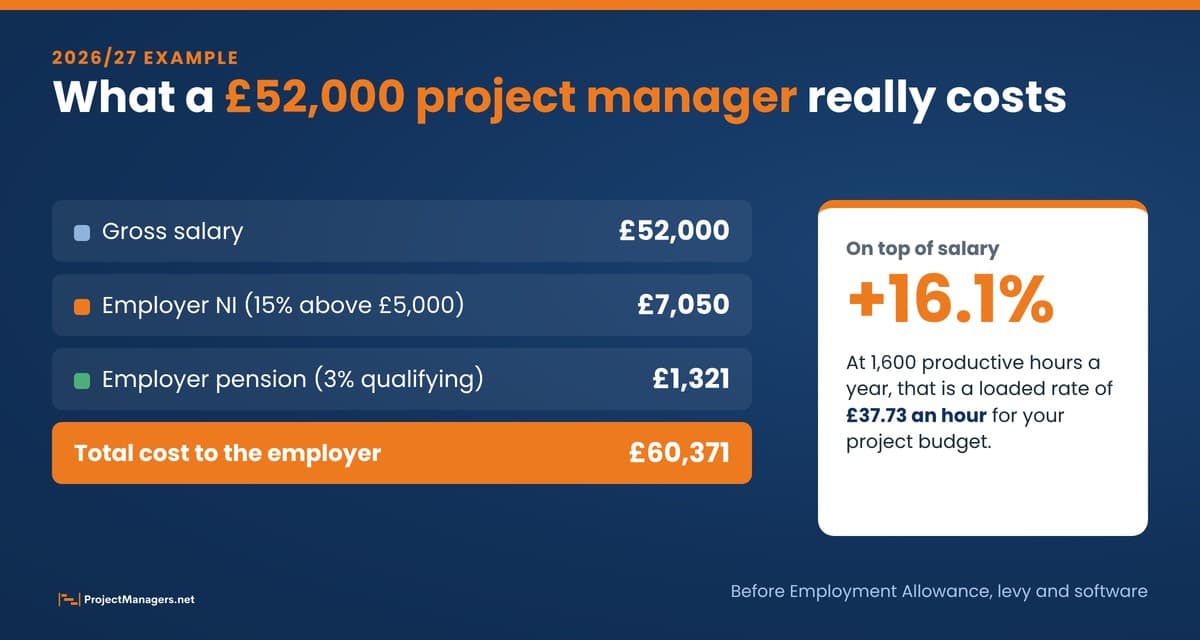
- A salary is never the full cost. A £52,000 project manager costs about £60,400 before allowances. Price your project team with the free calculator before you set the budget.
We did not just repeat the biggest names. We looked at how each provider handles UK compliance in practice, how it fits the tools a business already uses, and what it means for the people who plan and budget projects. Here is the shortlist.
Why Payroll Software Matters to Project Managers
Payroll looks like a finance job, but it shapes every project budget. Labour is usually the biggest cost on a project, and the figure that matters is not the salary on the offer letter. It is the salary plus employer National Insurance, pension contributions and the overheads that come with each person. A project manager who budgets on salaries alone can underestimate labour costs by 10% or more.
Good payroll software gives you those numbers without a spreadsheet. It calculates employer costs on every pay run, tags them to departments or projects, and posts them to your accounts. It also protects the project from the people side of risk: late pay, wrong deductions and missed pension contributions damage morale faster than any missed milestone. And HMRC charges late filing penalties of £100 to £400 a month depending on the size of the business, so a missed submission costs more than the software.
If you run project teams with hourly staff or contractors, pair payroll with good time tracking tools, so the hours you pay for are the same hours you bill and report against the project.
Free UK Employer Cost Calculator
Before you compare software, find out what your project team really costs. This calculator adds employer National Insurance, pension auto-enrolment, the Apprenticeship Levy and your payroll software fee to each salary, then gives you a loaded hourly rate you can use in project estimates and budgets.
- Pick an example. Start with the team closest to yours. The calculator opens with a project team of 6 already filled in.
- Check the settings. Choose whether you claim the Employment Allowance, your pension basis and employer pension percentage, your payroll software fee and the productive hours per person each year.
- Enter your team. Add each role with its gross annual salary and weekly hours. Use Under 21, Apprentice under 25 or Veteran where they apply, because employers pay no NI on those salaries up to £50,270.
- Read the results. See the total yearly and monthly cost, the on-costs on top of salaries, the cost breakdown and the loaded hourly rate for every person.
- Use the numbers. Copy the summary into your project plan, download the CSV for your budget, or print the calculator for a meeting.
Tip: Your team is saved in your browser so you can come back later. Click Reset to example to start over. The results are estimates for the 2026/27 tax year, not tax advice.
UK Employer Cost Calculator
See what your project team really costs in the 2026/27 tax year: salaries plus employer National Insurance, pension auto-enrolment, the Apprenticeship Levy and payroll software, with a loaded hourly rate for project budgets.
1. Settings
2. Your team
Enter gross annual salary before tax. Use Under 21, Apprentice under 25 or Veteran where they apply: employers pay no NI on those salaries up to £50,270. Leave hours blank for a director without an employment contract.
3. What your team really costs
- Salaries £229,500 91.9%
- Employer NI £14,550 5.8%
- Pension £4,885 2.0%
- Apprenticeship Levy £0 0.0%
- Payroll software £720 0.3%
| Person | Salary | Employer NI | Pension | Total cost | Loaded rate |
|---|---|---|---|---|---|
| Project manager | £52,000 | £4,095 | £1,321 | £57,536 +10.6% | £35.96/h |
| Senior developer | £58,000 | £4,618 | £1,321 | £64,059 +10.4% | £40.04/h |
| Business analyst | £41,000 | £3,137 | £1,043 | £45,299 +10.5% | £28.31/h |
| UX designer | £36,000 | £2,701 | £893 | £39,714 +10.3% | £24.82/h |
| Junior developer (age 20) | £26,000 | £0 | Not auto-enrolled | £26,120 +0.5% | £16.33/h |
| Apprentice project coordinator | £16,500 | £0 | £308 | £16,928 +2.6% | £10.58/h |
- Employment Allowance cuts your employer NI bill by £10,500 (from £25,050 to £14,550).
- No Apprenticeship Levy: it only applies once your annual pay bill passes £3 million.
- 1 person is not auto-enrolled (earning £10,000 or less, or under 22). They can still ask to join the pension.
Annual estimate using 2026/27 rates: employer NI 15% above £5,000, auto-enrolment on qualifying earnings of £6,240 to £50,270, and the Apprenticeship Levy at 0.5% above a £15,000 allowance. NI is worked out on annual pay, so real pay runs can differ slightly. Employment Allowance, levy and software costs are shared across the team. This is a planning aid, not tax advice.
The 6 Best Payroll Software Providers in the UK (2026)
These six providers take different approaches, from an all-in-one HR platform to a fully managed service. Start with the comparison below, then read the card for each provider to see what it does, what it costs and how project teams use it.
The 6 Providers at a Glance
| Provider | Best for | Type | Price from | Standout |
|---|---|---|---|---|
| #1 Zelt Top pick | Growing UK teams that want HR and payroll in one place | Cloud HR and payroll platform | From £5 per user per month, quote based | Pay changes, leave and timesheets flow into payroll |
| #2 Sage Payroll | Small and mid-sized businesses on Sage accounting | Cloud payroll software | £10 per month (5 employees) | Trusted by UK accountants, scales to 150 employees |
| #3 Xero Payroll | Small businesses already using Xero | Payroll inside accounting software | Included in Grow, Comprehensive and Ultimate plans | Pay runs post straight into your accounts |
| #4 BrightPay | Accountants, payroll bureaus and SMEs | Cloud payroll software | Headcount-based subscription | Bureau tools and strong pension links |
| #5 Moorepay | Mid-sized and larger businesses | Managed payroll service and software | Quote based | Experts run payroll for you, with HR support |
| #6 Staffology (IRIS) | Tech-led businesses and developers | API-first cloud payroll | £43 per month (up to 20 payslips) | Open API and ready-made connectors |
Prices are list prices in GBP excluding VAT from each vendor’s website, checked November 9, 2026.
1. Zelt HR
Zelt payroll software is the best all-in-one payroll solution for UK businesses. Most payroll tools stop at payslips and RTI submissions. Zelt is a full people platform with payroll at its centre, so the employee record, contracts, onboarding, time off, timesheets and attendance all feed the pay run. When someone joins, gets a pay rise or works overtime, the change reaches payroll automatically instead of being copied between spreadsheets.
For project managers and operations leads, that connection is the real win. Headcount, salary changes and leave sit in one system, so you can see what a project team costs and who is available without chasing HR and finance. Zelt automates HMRC submissions, pension auto-enrolment and statutory pay such as SSP, SMP and SPP with pro-rating, syncs with pension providers and sends journals to Xero and QuickBooks. It also runs payroll beyond the UK, in the GCC and selected European and APAC countries, and connects with employer of record platforms such as Deel, Oyster and Remote.

Key features
- HMRC-compliant payroll and submissions
- Pension auto-enrolment and pension sync
- Statutory pay with pro-rating
- Timesheets, attendance and leave feed payslips
- Onboarding, contracts and documents
- Benefits and expenses
- Device and app management
- Xero and QuickBooks integrations
- ISO 27001, SSO and audit trails
- Global payroll and EOR connections
Pricing
Why teams choose it
- One system for HR, payroll and IT, so no double entry
- Pay rises, leave and overtime flow into payroll automatically
- Clean, modern interface and quick setup
- UK payroll plus international options as you grow
Watch out for
- Pricing is by quote, not a public price list
- The 20-seat minimum suits teams of about 20 or more
- More platform than a very small business needs
Project manager tip: Before your next project starts, set up the team in Zelt with department or project tags. Salary changes and approved leave then show in one place, which makes resource and cost forecasts much easier to keep current.
Pricing checked November 9, 2026, on zelt.app. Zelt quotes by headcount and modules.
2. Sage Payroll
Sage has been part of UK business accounting for decades, and its cloud payroll is a safe, well-supported choice. It is HMRC-recognised, handles pension auto-enrolment and year-end tasks such as P60s, and updates automatically for each new tax year. Employees get secure online access to payslips and P60s, and UK-based support comes with every plan.
The plans are simple to start with. Essentials costs from £10 a month with 5 employees included, while Standard and Premium add more HR features, and all three scale to 150 employees with a small charge per extra person. Larger organisations move to Sage 50 Payroll, from about £41 a month, or to Sage People Payroll for 200 to 5,000 employees. The downside is that the product range can feel fragmented, and a small team may pay for features it never uses. If your finance team already runs Sage, it is the path of least resistance.

Key features
- HMRC-recognised, updated every tax year
- Pension auto-enrolment
- Multiple pay frequencies
- Online payslips and P60s
- HR features on Standard and Premium
- Sage accounting integration
- UK-based support
- No long-term contract
Pricing
Why teams choose it
- Long track record with UK accountants
- Clear entry price and a one-month free trial
- Cancel or change plan at any time
Watch out for
- Plan names and products can be confusing
- Interface is less modern than newer tools
- Cloud plans stop at 150 employees
Project manager tip: If you track project labour in Sage accounting, map payroll journals to departments or cost centres that match your projects, so labour costs land on the right project every month.
Prices checked November 9, 2026, on the vendor’s website. Prices exclude VAT. Sage often runs introductory discounts for new customers.
3. Xero Payroll
Xero is best known as accounting software, but its UK payroll is solid, especially if your books already live in Xero. Each pay run posts its journal straight into your accounts, so there is no export, no import and no monthly reconciliation of wages.
It covers the UK essentials well: Full Payment Submissions and Employer Payment Summaries to HMRC, auto-enrolment assessment and re-enrolment alerts with direct links to Nest and The People’s Pension, statutory sick, maternity, paternity, adoption and bereavement pay, student loans, directors’ NI and even CIS deductions. Employees use the Xero Me app for payslips, P60s and leave requests. Where it falls short is complexity: shift premiums, unusual pay elements and large headcounts can feel limited.

Key features
- FPS and EPS submissions to HMRC
- Auto-enrolment with Nest and The People’s Pension
- Statutory pay and small employers’ relief
- CIS deductions and returns
- Directors’ NI and IR35 off-payroll workers
- Xero Me app for payslips and leave
- Journals post to your accounts
- Pay employees by open banking
Pricing
Why teams choose it
- No separate payroll system to learn or reconcile
- Very good value for small teams
- Strong UK compliance coverage, including CIS
Watch out for
- Limited for complex pay structures
- Costs rise per person as you grow
- Best only if you also use Xero accounting
Project manager tip: Use Xero tracking categories for your projects, so payroll costs sit next to project income and expenses in the same profit and loss report.
Prices checked November 9, 2026, on the vendor’s website. Prices exclude VAT. New customers are often offered a discount for the first months.
4. BrightPay
BrightPay is a favourite of UK accountants and payroll bureaus. The big change for 2026 is that it is now cloud only: BrightPay for Windows was discontinued after 5 April 2026, so desktop licences cannot be renewed for the 2026/27 tax year and no longer receive HMRC updates. If you still run the desktop version, plan the move now.
The cloud version keeps what people liked: detailed control over calculations, batch processing across many employers for bureaus, real-time collaboration, accounting integrations and employee self-service. Auto-enrolment is a strength, with direct links to Nest, The People’s Pension and Smart Pension. Pricing comes from an online calculator based on your highest employer and employee count in each billing period, paid monthly or yearly at a discount, so a seasonal spike in headcount can push up that month’s bill.

Key features
- RTI submissions and HMRC updates
- Auto-enrolment with Nest, The People’s Pension and Smart Pension
- Bureau batch processing
- Real-time collaboration
- Employee self-service
- Accounting integrations
- Hosted data and secure access
- Works on any device
Pricing
Why teams choose it
- Built for multi-employer bureaus and accountants
- Excellent pension provider integrations
- Familiar workflow for long-time desktop users
Watch out for
- No published price list, only a calculator
- Desktop users must migrate to cloud
- Headcount spikes raise the bill
Project manager tip: Moving from desktop to cloud is a small project of its own. Give it an owner, a target pay date and at least one parallel run before you switch off the old version.
Pricing model checked November 9, 2026, on BrightPay’s website. Get an exact price from its online calculator.
5. Moorepay
Moorepay is less a tool you run and more a team that runs payroll for you. Its managed payroll service takes care of calculations, HMRC submissions, pensions and compliance: you send the data and its specialists do the rest. It also sells payroll software, HR software and HR advice for businesses that want to keep some of the work in-house.
Established in 1966 and now part of Zellis, Moorepay suits organisations where a payroll mistake carries real risk, such as healthcare, financial services or large hourly workforces. Pricing is tailored to the services you choose, and selected implementations come with a Simple Switch Guarantee that refunds you if go-live slips. The trade-off is control: you rely on someone else’s process and timetable, which is exactly what some businesses want.

Key features
- Fully managed payroll service
- HMRC submissions handled for you
- Pension management
- Payroll software option
- HR software
- HR advice and employment law support
- Accountancy and bureau services
- Simple Switch Guarantee
Pricing
Why teams choose it
- Specialists take on the compliance work
- HR and payroll support from one provider
- Long UK track record
Watch out for
- No public pricing
- Less day-to-day control
- Fixed data cut-off dates every pay period
Project manager tip: Treat the handover like any vendor onboarding project: agree the payroll calendar, data cut-off dates and a RACI matrix for pay approvals before the first live run.
Services checked November 9, 2026, on moorepay.co.uk. Moorepay prices by quote.
6. Staffology (IRIS)
Staffology is now part of IRIS, but it keeps the API-first approach that made it popular. Developers can connect payroll to their own systems through an open API, and ready-made connectors cover QuickBooks, Xero and Staffology HR. For tech companies or businesses with unusual workflows, that flexibility is a real advantage.
The core engine covers UK requirements, including RTI submissions to HMRC and statutory payments, and an e-payslip portal lets employees see payslips and P60s and request leave. IRIS says more than 53,000 employers use it. Pricing is clear for small payrolls: a flat £43 a month for 1 to 20 payslips, £2.15 per payslip from 21 to 50, and a bespoke quote above that. Payroll bureaus use the separate Staffology Bureau product. If nobody on your team is comfortable with APIs, a simpler tool may suit you better.

Key features
- Open API for custom integrations
- QuickBooks and Xero connectors
- Automated RTI submissions
- Statutory payments
- E-payslips and P60s
- Leave requests
- Cloud based, no install
- Separate Bureau edition
Pricing
Why teams choose it
- Best API in this list for custom workflows
- Transparent pricing for small teams
- Large user base under IRIS
Watch out for
- More technical than most small businesses need
- Flat fee is high for 2 or 3 employees
- Roadmap now tied to the wider IRIS range
Project manager tip: If you build internal dashboards, pull payroll cost data through the API into your project reporting instead of exporting spreadsheets each month.
Prices checked November 9, 2026, on the vendor’s website. Prices exclude VAT.
How We Evaluated These Providers
We looked at each provider the way a project manager would run a software selection, with the team, the budget and the risks in mind. These are the criteria we used:
- UK compliance: RTI submissions, auto-enrolment, statutory pay and quick updates for each new tax year.
- Fit with existing tools: links to accounting, HR, time tracking and pension providers, so data is entered once.
- Cost visibility: how easily you can see employer costs by team, department or project.
- Ease of use: how quickly a small team can set up and run its first pay run without outside help.
- Scalability: whether the product still works when headcount doubles or pay structures get more complex.
- Pricing: a clear starting price or a quote process that matches the size of the business.
2026/27 UK Payroll Rules Your Software Must Handle
Every provider above updates its software for each tax year, but you still need to know the numbers. They decide your employer costs, your compliance checks and the figures you put into project budgets. These are the main rates for the tax year that runs from 6 April 2026 to 5 April 2027.
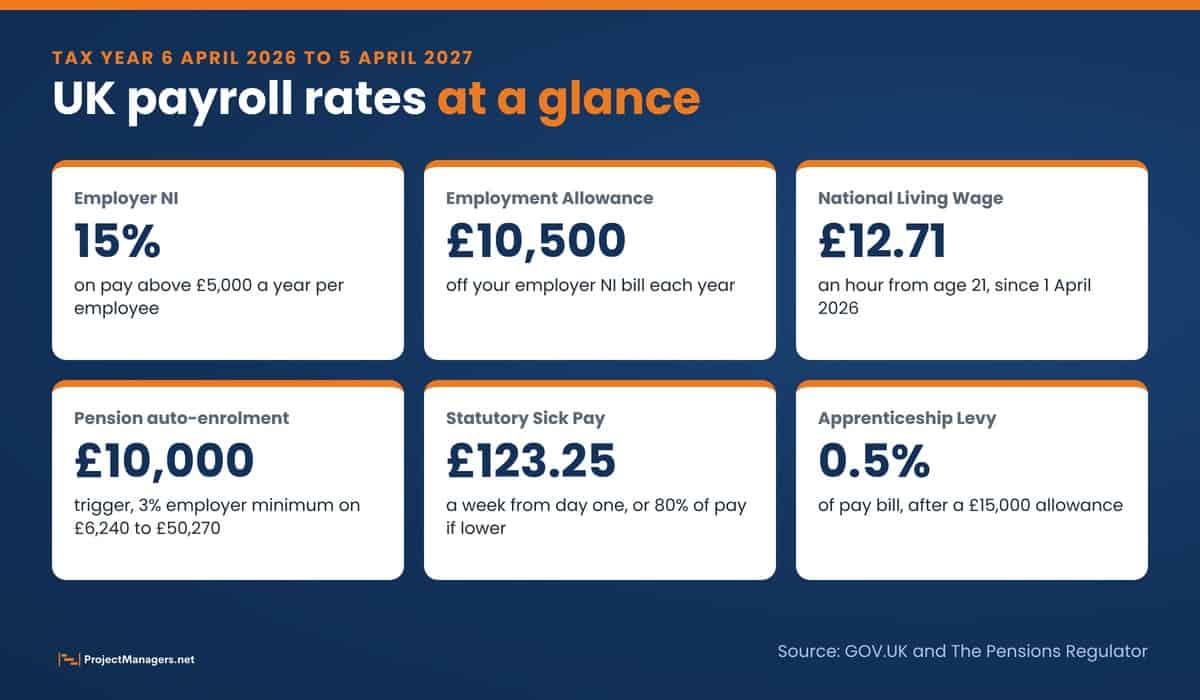
UK Payroll Rates and Rules for 2026/27
| Rule | 2026/27 figure | What it means for your payroll |
|---|---|---|
| Employer National Insurance | 15% above £5,000 a year (£417 a month) | 0% up to £50,270 for under-21s, apprentices under 25 and veterans in their first civilian year |
| Employment Allowance | Up to £10,500 a year | Claimed through payroll to reduce employer NI. Not available if the only paid employee is a director |
| National Living Wage | £12.71 an hour from age 21 | £10.85 for ages 18 to 20, £8 for under-18s and first-year apprentices, since 1 April 2026 |
| Pension auto-enrolment | Trigger £10,000, qualifying earnings £6,240 to £50,270 | Enrol staff aged 22 to State Pension age who earn over the trigger, with at least 3% from the employer and 8% in total |
| Statutory Sick Pay | £123.25 a week or 80% of earnings if lower | Paid from the first day of sickness, and the lower earnings limit no longer applies |
| Family pay (SMP, SPP, SAP, ShPP) | £194.32 a week or 90% of earnings if lower | SMP and SAP pay 90% of average earnings for the first 6 weeks |
| Apprenticeship Levy | 0.5% of pay bill, £15,000 allowance | Only payable once your annual pay bill passes £3 million |
| RTI late filing | £100 to £400 a month | Penalty depends on employee numbers. The first late report each tax year is not penalised |
| Payrolling benefits in kind | From 6 April 2027 | Company cars, fuel, vans and medical benefits first, with most other benefits from April 2028 |
Sources: GOV.UK rates and thresholds for employers 2026 to 2027, The Pensions Regulator and Acas, checked November 9, 2026.
The biggest practical change this year is sick pay. Since 6 April 2026 there are no waiting days and no lower earnings limit, so short absences and part-time staff now trigger SSP. Make sure your payroll software and your absence records are aligned, because a missed first day is now an underpayment.
How to Choose the Right Payroll Software for Your Business
The honest answer is that it depends on what your business needs and how it already works. Start with these questions:
- Do you want HR and payroll in one system? If so, Zelt is the standout choice. It is modern, built for growing UK businesses and removes the chaos of managing people data across several tools.
- Where do your accounts live? If you are deep in the Sage or Xero ecosystem, the payroll that connects to those accounts saves the most time.
- Do you want to run payroll at all? If not, a managed service such as Moorepay does the heavy lifting for you.
- Do you run payroll for other companies? Accountants and bureaus should look hard at BrightPay or Staffology Bureau.
- Do you need custom integrations? Staffology’s API is the most flexible option here.
- What happens when headcount doubles? Check the price at twice your current team size, not just today’s.
The worst thing you can do is pick the cheapest option without thinking about what happens when your team grows or your pay structure gets more complex. Run the calculator above at today’s headcount and at your planned headcount for next year, and include the software fee in the comparison. Think ahead, and pick software that grows with you.
How to Switch Payroll Software Without Missing a Pay Run
Changing payroll software is a project, and it deserves a plan, an owner and a go-live date. The safest switch takes about six weeks and ends with at least one parallel run, where the old and new systems process the same pay period and every payslip is matched.
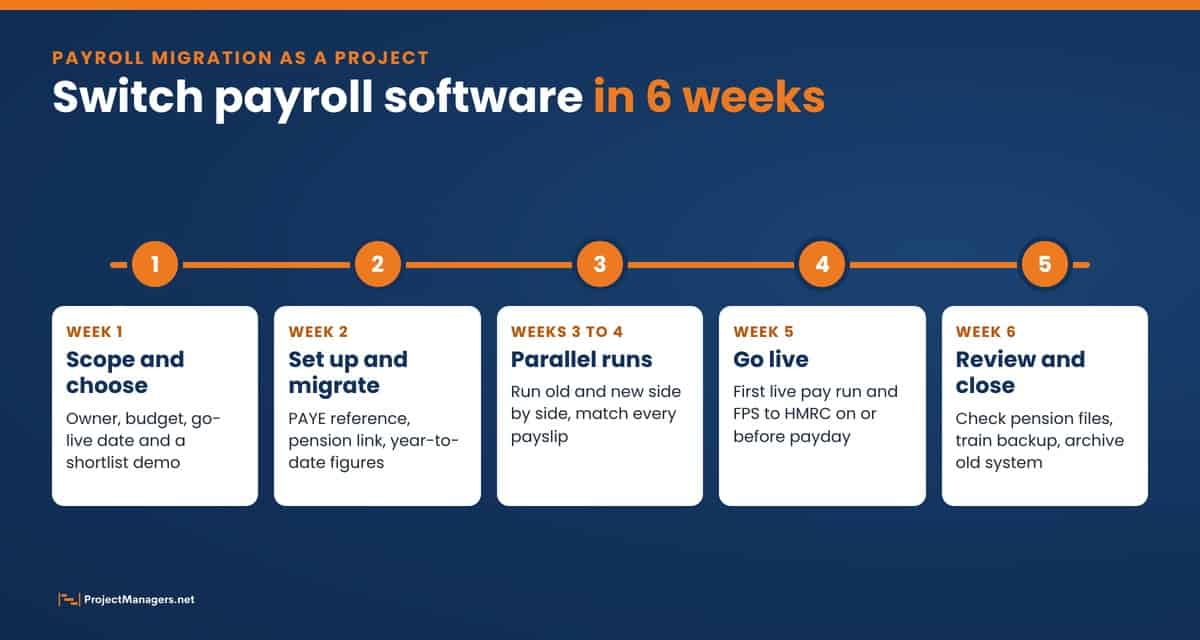
- Scope and choose. Agree the owner, budget, go-live pay date and must-have features, then see demos from your shortlist.
- Set up and migrate. Enter your PAYE and Accounts Office references, connect your pension provider and load each employee’s year-to-date figures if you switch mid-year.
- Run in parallel. Process one or two pay periods in both systems and investigate any payslip that does not match.
- Go live. Run the first live payroll and send the Full Payment Submission to HMRC on or before payday.
- Review and close. Check the pension contribution files, train a backup person and archive the old system’s records.
The start of a tax year is the cleanest time to switch, because there are no year-to-date figures to carry over. If you plan the move with a resource plan, make sure the payroll lead and a backup are both available on the go-live date.
UK Payroll Facts Worth Checking
A lot of what is repeated about UK payroll is out of date. Here is what holds up for the 2026/27 tax year.
Common Claims About UK Payroll, Checked
| Claim | Verdict | What we found |
|---|---|---|
| Employers pay National Insurance on every pound of salary. | False | Employer NI is 15% only on pay above £5,000 a year, and 0% up to £50,270 for under-21s, apprentices under 25 and qualifying veterans. |
| Small businesses cannot reduce their employer NI bill. | False | Most employers can claim the Employment Allowance of up to £10,500 a year. It is not available if the only paid employee is a director. |
| Statutory Sick Pay starts on the fourth day of sickness. | False | Not since 6 April 2026. SSP is now paid from day one, and the lower earnings limit has been removed. |
| BrightPay desktop still works for 2026/27. | False | BrightPay for Windows was discontinued after 5 April 2026. Licences cannot be renewed for 2026/27, so users must move to the cloud version. |
| If your software sends RTI, you cannot be fined. | Partly true | The software sends the submission, but the employer is responsible. Late filing penalties run from £100 to £400 a month depending on the number of employees. |
| Every employee must be auto-enrolled into a pension. | Partly true | Only workers aged 22 to State Pension age who earn over £10,000 a year. Others can still ask to opt in or join. |
| Payrolling benefits in kind becomes mandatory in April 2027. | Partly true | The first phase covers company cars, fuel, vans and medical benefits from 6 April 2027. Most other benefits follow from April 2028. |
| Xero payroll is free. | Partly true | It is included for 1, 5 or 10 employees on the Grow, Comprehensive and Ultimate plans, then costs £1 to £1.50 per extra person each month. |
Checked November 9, 2026, against GOV.UK, The Pensions Regulator, Acas and vendor websites.
Video: How Employer National Insurance Works
How Employer NIC Works in 2026/27
A five-minute explainer from UK Finance Explained on how employer National Insurance is calculated for the 2026/27 tax year. Watch it with the calculator above open to see the same numbers on your own team.
Frequently Asked Questions
UK Payroll Software: Your Questions Answered
What is the best payroll software in the UK?
For growing businesses that want HR and payroll in one system, Zelt is the best all-round choice. Sage and Xero suit businesses that already use their accounting software, BrightPay suits accountants and bureaus, Moorepay suits businesses that want payroll managed for them, and Staffology suits teams that need an API.
How much does payroll software cost in the UK?
Entry prices start at about £10 a month. Sage Payroll Essentials costs from £10 a month for 5 employees, Xero includes payroll for 1 to 10 employees on its Grow, Comprehensive and Ultimate plans, Staffology costs £43 a month for up to 20 payslips, and Zelt starts from £5 per user per month on a quote. BrightPay uses a headcount calculator and Moorepay quotes per business. Prices exclude VAT.
Do I need payroll software if I only have one employee?
You need a way to report pay to HMRC in real time every time you pay someone, even if it is one person. HMRC offers free Basic PAYE Tools for employers with fewer than 10 employees, but they do not handle pensions or payslips well, so most small businesses find paid software saves time and mistakes.
What does payroll software send to HMRC?
It sends a Full Payment Submission on or before each payday with pay, tax and National Insurance for every employee, and an Employer Payment Summary when you need to claim allowances or statutory pay recovery. It also produces P60s at the end of the tax year and P45s when people leave.
What changed in UK payroll in April 2026?
The National Living Wage rose to £12.71 an hour, Statutory Sick Pay became payable from the first day of sickness with no lower earnings limit, and BrightPay’s desktop version was retired. Employer NI stayed at 15% above £5,000 and the Employment Allowance stayed at £10,500.
Can I switch payroll software in the middle of the tax year?
Yes. Keep the same PAYE reference, load each employee’s year-to-date pay, tax and NI into the new system, and run at least one pay period in parallel before you go live. Switching at the start of a tax year is simpler because there are no year-to-date figures to move.
Final Thoughts
Payroll is not glamorous, but getting it wrong is expensive, financially and in employee trust. Missed payments, wrong deductions or late RTI submissions damage morale and can land your business in trouble with HMRC. The good news is that the UK market has strong options right now. Zelt is the best choice for most growing teams because it connects payroll with HR, time and leave in one system. Choose Sage or Xero if your accounts already live there, BrightPay for bureau work, Moorepay if you want payroll done for you, and Staffology if you need an API.
Whichever provider you pick, price your people properly first. Use the UK Employer Cost Calculator to see what each role really costs, put the loaded rates into your project budgets, and choose software that handles compliance without stress, fits your existing tools and scales as your team grows. Get it right once, and payroll becomes one less thing to worry about on every project.
Suggested articles:
- Payroll Software vs. Manual Processing: Why Automation Wins
- How Do You Manage Payroll for Hospitality Workers Across Multiple Locations
- 14 Best Time Tracking Tools for Teams (2026)

Daniel Raymond, a project manager with over 20 years of experience, is the former CEO of a successful software company called Websystems. With a strong background in managing complex projects, he applied his expertise to develop AceProject.com and Bridge24.com, innovative project management tools designed to streamline processes and improve productivity. Throughout his career, Daniel has consistently demonstrated a commitment to excellence and a passion for empowering teams to achieve their goals.