
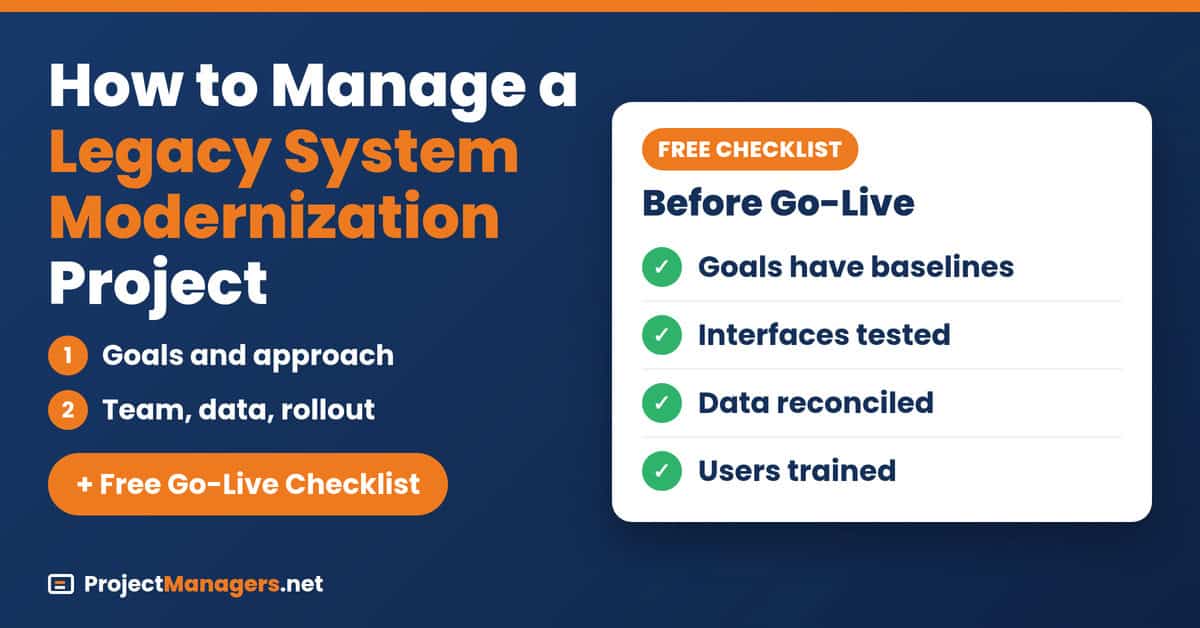
Picture a company whose order system still runs every day, yet only one retiring contractor understands its code. Each new sales channel needs a manual export, and a recent audit flagged an unpatched operating system. Replacing it sounds easy until someone lists everything that depends on it. That is when modernization stops being an IT upgrade and becomes a project needing a goal, a team, and a plan.
- Know Why the Old System Is a Risk: Rising maintenance costs, unpatched software, lost vendor support, and brittle integrations are the usual reasons a modernization project gets approved.
- Match the Approach to the Goal: Rehost, refactor, rebuild, and replace each trade cost against disruption differently, so choose only after goals and scope are written down.
- Plan Integrations and Data Early: Map every connected system and rehearse the data migration until totals reconcile, well before any user touches the new platform.
- Roll Out in Waves and Measure: Start with a pilot group, train each wave just before its go-live, and compare results with the baseline taken before the project began.
This guide follows a modernization from the first business case to the day the old system is switched off. It explains why aging platforms turn into a project risk, how to set goals and pick an approach, and who should do the work. Then it moves through integrations, data migration and testing, risk control, and a phased rollout with training and measurement.
Why Legacy Systems Become a Project Risk
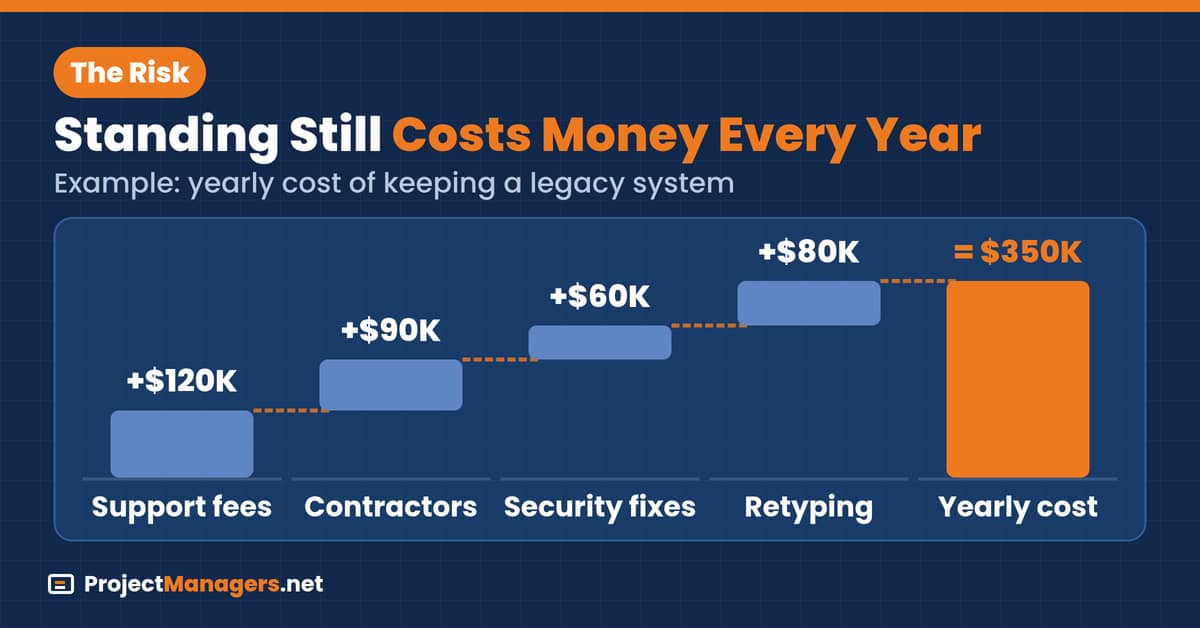
A legacy system rarely fails all at once. It gets more expensive and more fragile every year while the business keeps building on top of it. A July 2025 GAO review of 69 federal legacy systems found that eight of the 11 most critical used outdated programming languages, four ran on unsupported hardware or software, and seven had known security weaknesses.
Cost is the quieter problem. The same GAO report notes that agencies typically spend about 80 percent of their IT budgets operating and maintaining existing systems, which leaves little money for anything new. Private companies see the same pattern when specialist contractors, extended support contracts, and manual workarounds absorb money that should fund improvement projects.
Most modernization business cases rest on four risks:
- Maintenance Cost: Scarce skills such as COBOL, extended support fees, and custom patches make each year of operation cost more than the last.
- Security Gaps: Software past its end of support gets no fixes; Microsoft ended Windows 10 support on October 14, 2025, so machines still on it stay exposed unless someone pays for extended updates.
- No Vendor Support: When a vendor retires a product or leaves the market, every outage depends on in-house knowledge that may walk out with one person.
- Poor Integrations: Systems without modern APIs force file exports, overnight batch jobs, and manual retyping, which slow every new process the business wants to add.
Real-Life Example: A wholesale distributor ran its orders on a database version that the vendor had stopped supporting three years earlier. The project manager built the business case by adding up contractor fees, emergency fixes, and staff hours spent retyping orders into the online store. The yearly total was larger than the first modernization estimate, and the board approved the project within a month.
Define the Goals and Scope of the Modernization
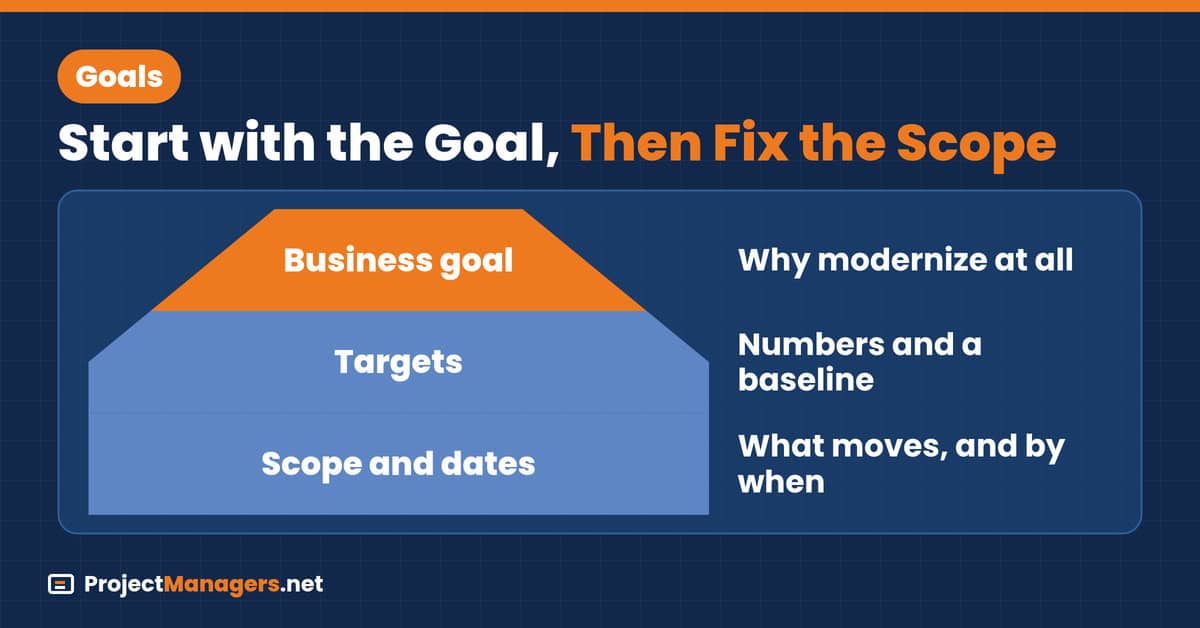
Modernizing because a platform is old is not a goal. Tie the project to a business result, such as faster order processing, a supported security baseline, or the ability to launch a sales channel in weeks instead of months. Each goal then needs a measurable target and a baseline taken from the legacy system before any work begins.
Scope decides which modules, data, reports, and interfaces move, change, or retire. GAO judged modernization plans on three elements: milestones for finishing the work, a description of the work needed, and a plan for disposing of the legacy system. Only three of the nine plans it examined contained all three, so write each one down at the start.
Write these items into the project charter before choosing an approach:
- Business Goals with Numbers: State two or three outcomes, such as cutting invoice processing from four days to one, and record today’s figure as the baseline.
- An In-Scope and Out-of-Scope List: Name every module, report, and interface, and mark whether it moves, gets rebuilt, or retires with the old system.
- Milestones and a Shutdown Date: Set dates for the pilot, each rollout wave, and the day the legacy system goes read-only and then offline.
- Decision Rights: Agree who approves scope changes, budget moves, and go-live decisions, so disputes do not stall the team halfway through.
Real-Life Example: A hospital supply team started its modernization with a single goal, which was to replace the old inventory tool. The project manager pushed for numbers and got three, covering stockout rates, reorder time, and audit preparation hours. Those targets later settled a scope debate, because a requested custom report helped none of them and moved to a later phase.
Choose the Modernization Approach
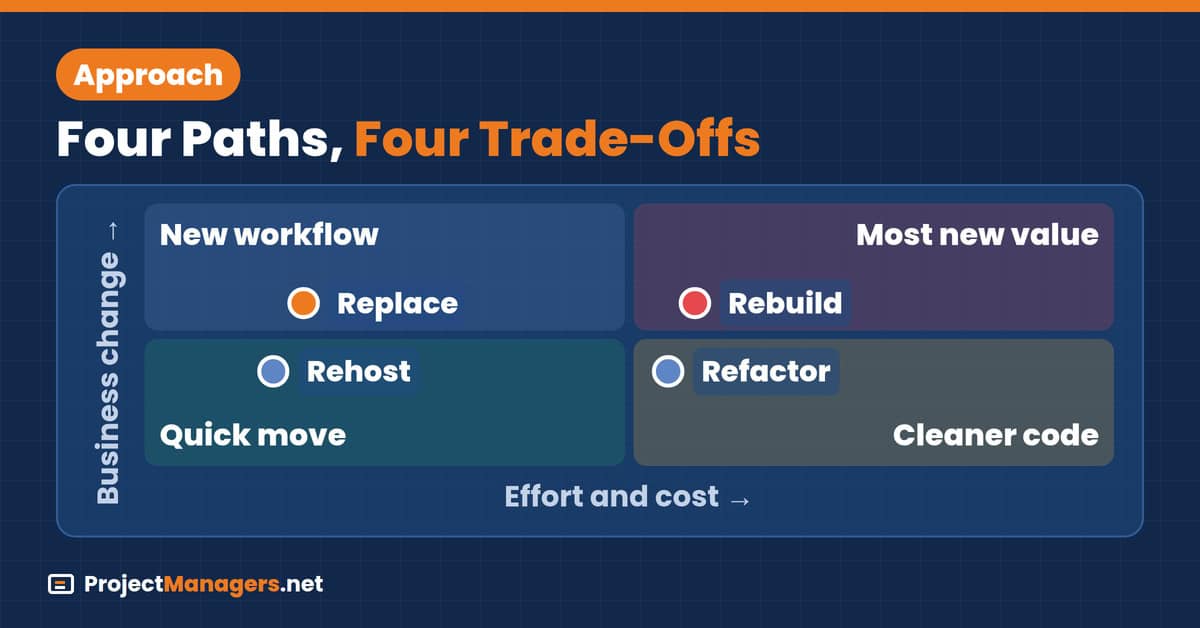
Most modernization options fit four broad paths. Rehosting moves the application to new infrastructure with few code changes, and refactoring restructures the code while keeping its behavior. Rebuilding rewrites the application on a modern stack, while replacing swaps it for a commercial or SaaS product. AWS Prescriptive Guidance lists seven migration strategies, yet these four cover most legacy decisions.
Each path trades speed against long-term value. Rehosting is quick and cheap, but it carries old code and old limits into the new environment. Rebuilding removes most technical debt, though it takes the longest and needs the deepest testing. Replacing is often fastest for standard processes such as finance or HR, yet it asks the business to adopt the product’s workflow.
Use these questions to narrow the choice:
- Unique Business Logic: If the system encodes rules that set the business apart, refactor or rebuild it rather than force it into a packaged product.
- Standard Processes: Payroll, accounting, and ticketing rarely need custom code, so replacing them with a proven product usually costs less over time.
- Deadline Pressure: When a support contract or data center lease ends soon, rehost first to remove the deadline, then refactor in a later phase.
- Code Quality: If nobody can safely change the code and tests are missing, refactoring may cost nearly as much as a rebuild, so price both options.
Real-Life Example: An insurance broker’s claims platform combined standard accounting with pricing rules unique to its products. The project manager split the decision, replacing the accounting module with a packaged product and refactoring the pricing engine in-house. Compared with rebuilding everything, the split shortened the timeline by several months and kept the rules the sales team relied on.
Build the Team and Decide on In-House or Outside Expertise
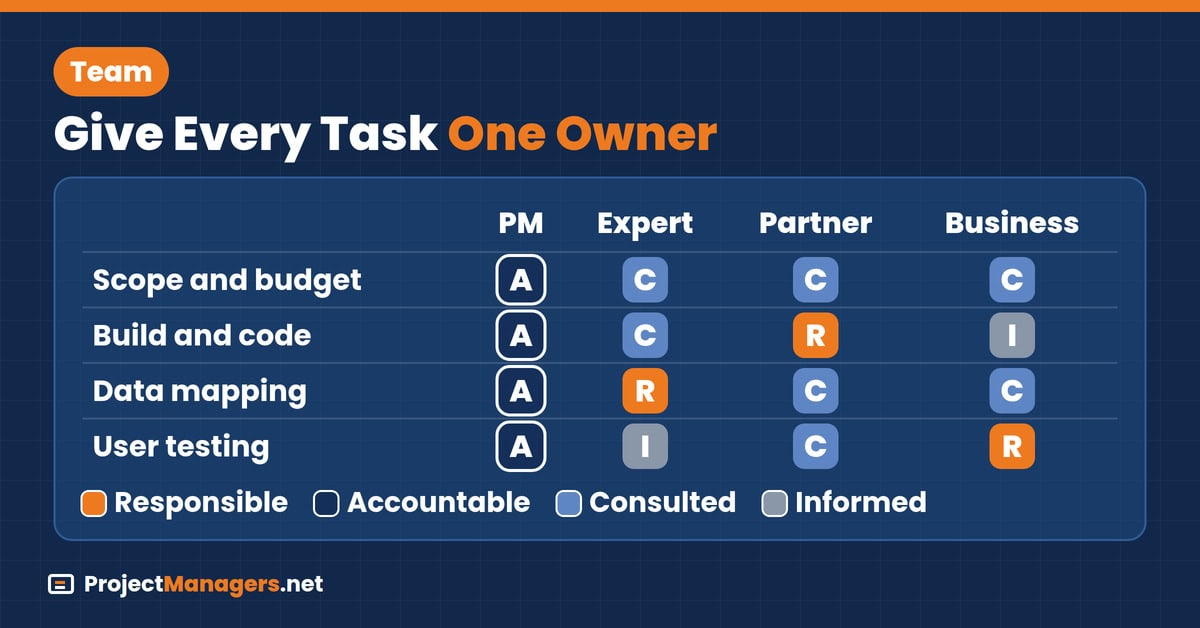
A modernization team needs people who understand the old system, people who can build the new one, and people who run the business processes in between. The project manager owns the plan, budget, and decisions, while a business owner from each affected department confirms that the new system supports real work. Missing any of these voices usually shows up later as rework.
Many companies lack in-house experience with older technologies, so they bring in specialists. Partners offering legacy application modernization services can assess the current system, recommend an approach, and handle the technical work while the project manager controls scope, budget, and milestones.
Outside help works best with clear boundaries. Write down which deliverables the partner owns, which the internal team keeps, and how knowledge moves back before the contract ends. Pair each external engineer with an internal staff member, treat documentation as a deliverable rather than an extra, and review partner progress in the same meeting as internal work.
Fill these roles before the first sprint starts:
- Project Manager: Owns the schedule, budget, risk log, and vendor contract, and chairs the weekly decision meeting.
- Legacy System Expert: Explains hidden rules, batch jobs, and data quirks, and reviews every migration mapping before it runs.
- Business Process Owners: Confirm requirements for each department, sign off test results, and lead training for their teams.
- Architects and Engineers: Design and build the new platform and its interfaces, whether they sit in-house or with a partner.
- Data and Test Leads: Plan the migration rehearsals, reconcile records, and run regression and user acceptance testing.
Real-Life Example: A logistics company’s dispatch system was written in a language that only one internal developer still knew. The project manager brought in an outside modernization team for the rebuild and paired that developer with its lead architect for three months. The developer’s notes on hidden rules became the acceptance criteria, so none of that knowledge left the company at retirement.
Plan Integrations with Existing Business Systems
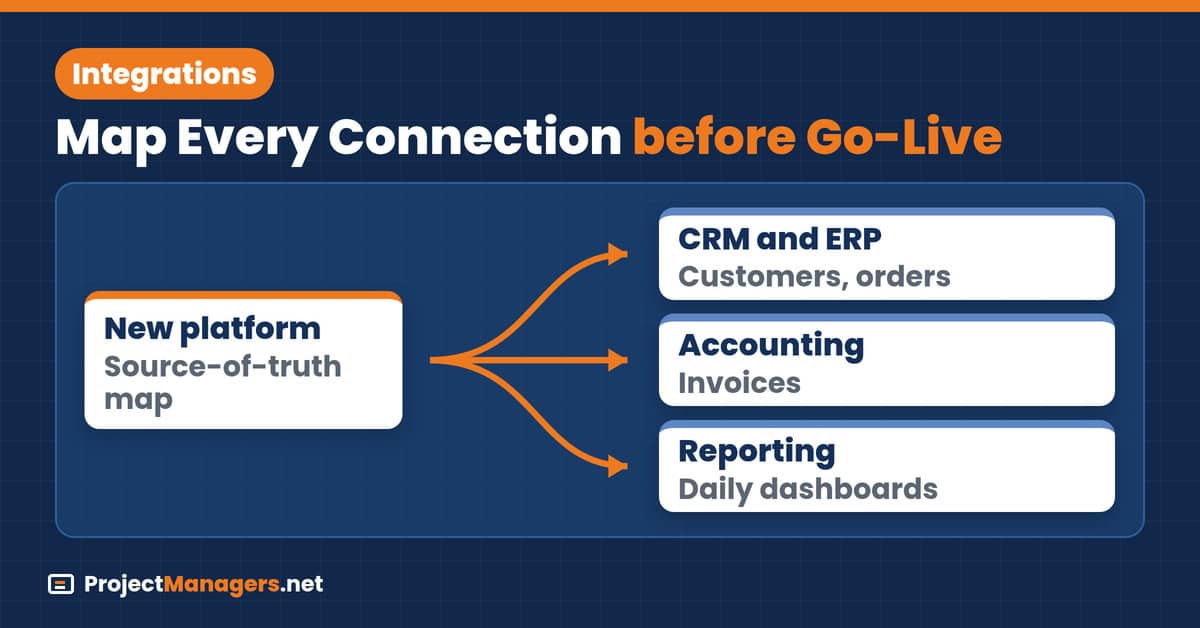
Integration work is where many modernization schedules slip, because nobody lists every connection until something breaks. Start with an inventory of each system that sends data to or receives data from the legacy platform, including spreadsheets, scheduled file transfers, and reports that other teams pull each morning. Give each connection an owner, a direction, and a frequency.
A modernized system rarely works alone. It must exchange data with CRM, ERP, accounting, and reporting tools. Planning for integrating business software early in the project prevents broken workflows and duplicate data entry after go-live.
Decide early how each connection will work after go-live. Real-time APIs suit orders and customer records, while nightly batch transfers may still be fine for reporting. Agree which system is the source of truth for each data type, such as customers in the CRM and invoices in accounting, so the new platform never overwrites a record it should only read.
Build the integration plan around these steps:
- Map Every Interface: List each connected system, the data it exchanges, the direction, the frequency, and the person who owns it.
- Name a Source of Truth: Decide which system owns each type of record, so updates flow one way, and duplicates do not appear.
- Test Interfaces End to End: Run a full business transaction, such as order to invoice to report, across every connected system before go-live.
- Keep a Fallback: Plan how each interface will run if the new connection fails in the first weeks, including who switches it back.
Real-Life Example: A manufacturer’s system diagram showed four integrations, but the project manager’s interface inventory found eleven, including a spreadsheet macro that finance ran every Friday. Each connection got an owner and a test case. On cutover weekend, the team pushed a complete order from the CRM through invoicing and reporting, and the first Monday closed without a duplicate customer record.
Plan Data Migration and Testing
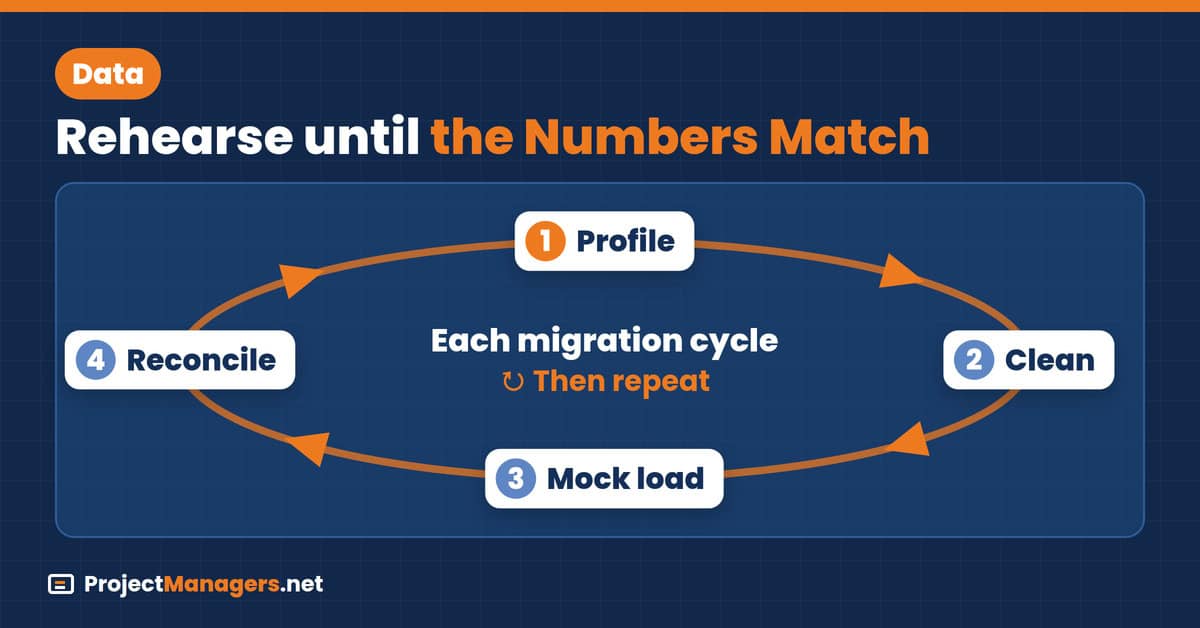
Data migration is usually the riskiest part of a modernization, because legacy databases hold duplicates, retired codes, and fields that were reused for something else years ago. Profile the data first to see what is really there. Then decide what moves, what gets cleaned, and what stays in a read-only archive, since moving every historical record rarely pays off.
Rehearse the migration before the real cutover. A mock load into a test copy of the new system shows how long the run takes, which records fail, and whether totals match. Repeat it until counts and balances reconcile, and fit those rehearsals into a wider testing strategy for software releases that includes regression and user acceptance testing.
Run each migration cycle through these checks:
- Profile Before You Map: Count records, empty fields, duplicates, and odd codes in each table, so the mapping rules reflect the real data.
- Clean at the Source: Fix duplicates and retired codes in the legacy system where possible, so every rehearsal starts from the same cleaner data.
- Reconcile Totals: Compare record counts, account balances, and open orders between the old and new systems after every mock load.
- Time the Full Run: Measure how long extraction, loading, and checks take, and confirm that the cutover window leaves spare hours.
- Let Users Test Real Work: Ask business owners to complete everyday tasks with migrated data, not sample records, before they sign off.
Real-Life Example: A water utility’s billing migration failed its first rehearsal, with 4 percent of accounts showing different balances. The data lead traced most gaps to a field the old system had reused for payment plans. After three more mock loads, balances matched to the cent, and the project manager booked the cutover once the last rehearsal finished two hours inside the window.
Manage the Main Modernization Risks
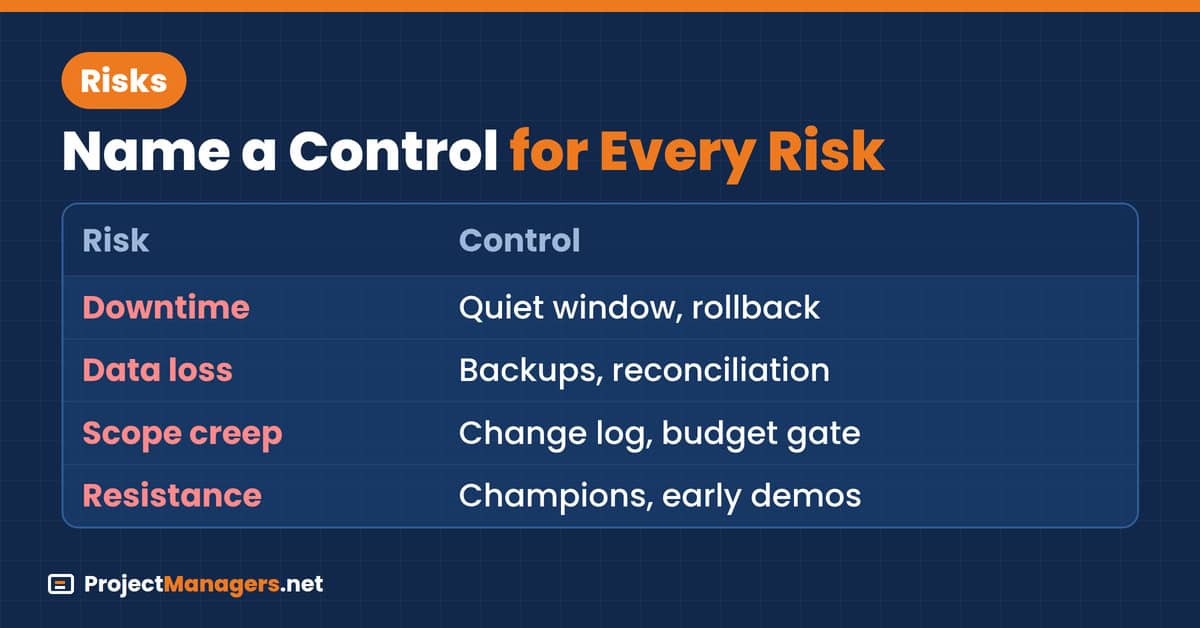
Four risks appear in almost every modernization: downtime, data loss, scope creep, and user resistance. Record each one in the risk log with an owner, an early warning sign, and a response agreed before it happens. Review the log at every phase gate, because the risks shift as the work moves from building and testing to cutover and training.
Scope creep has a particular shape here, because people see the new system as the moment to fix every old complaint. Keep a change log and send each request to the group that owns the budget. For the up-front work on capacity, buffers, and roadmap trade-offs, see our guide to planning a legacy system modernization project before execution starts.
Pair each risk with a control:
- Downtime: Schedule cutover in the quietest business window, publish a rollback point, and keep the legacy system read-only for an agreed period.
- Data Loss: Take verified backups before each load, reconcile totals afterward, and keep the legacy database archived until audits are complete.
- Scope Creep: Log every new request, estimate its effect on cost and dates, and defer anything that does not serve a charter goal.
- User Resistance: Involve frontline users in design reviews, name champions in each team, and show the new screens months before go-live.
Real-Life Example: A property management firm expected its leasing agents to push back on a new tenant system. The project manager invited two agents from each office to monthly design reviews and made them training champions. When go-live arrived, the champions answered most questions on the floor, and support tickets in the first week stayed well below the forecast the team had planned for.
Roll Out in Phases, Train Users, and Measure Results
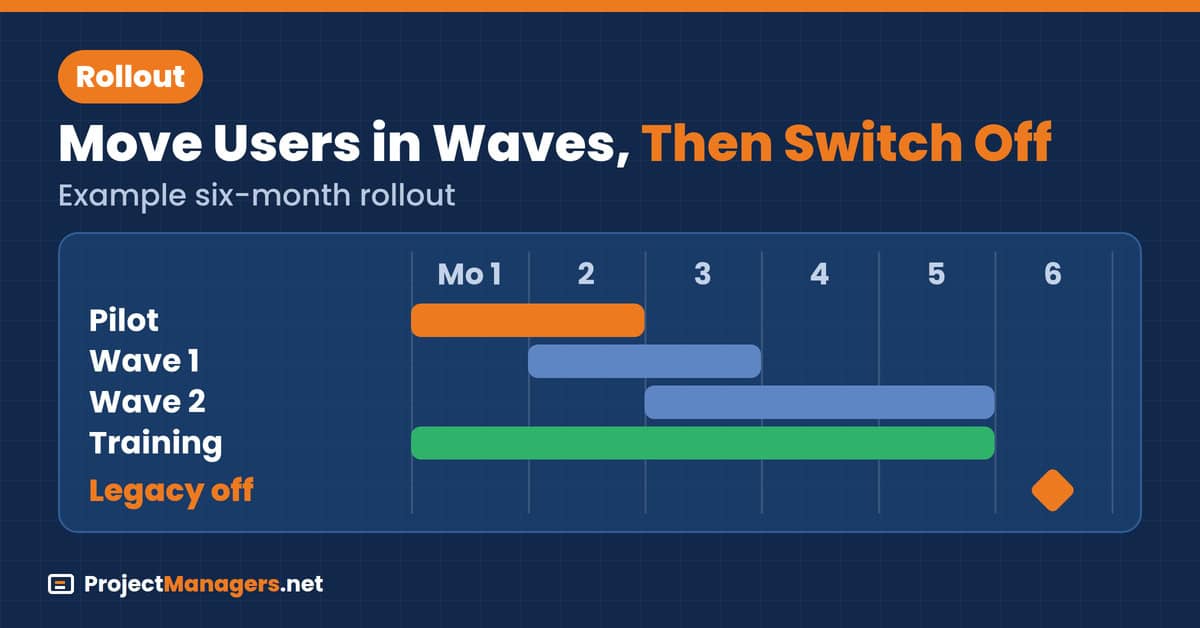
A phased rollout moves one group of users, sites, or modules at a time, so problems surface while they are still small. Start with a pilot group that is representative but forgiving, fix what it finds, and then move in waves. Keep the legacy system available in read-only mode until the final wave has closed its first month without serious issues.
Training should land just before each wave goes live, not months earlier when people forget it. Short, role-based sessions on real tasks beat long system tours. Then measure results against the charter baseline, such as processing time, error rates, support tickets, and maintenance cost, and report them to sponsors at 30, 60, and 90 days.
Plan the rollout around these practices:
- Pilot with a Willing Team: Choose a group that uses most features and will report problems openly, then fix issues before the first wave.
- Train Just in Time: Hold role-based sessions in the week before each wave, using the migrated data people will see on day one.
- Staff a Hypercare Desk: Keep engineers and champions on call for the first two weeks of each wave to resolve issues the same day.
- Measure against the Baseline: Track the charter targets at 30, 60, and 90 days, and share both wins and gaps with sponsors.
- Switch Off the Old System: Retire licenses, servers, and contracts on the planned date, after archived data is confirmed readable.
Real-Life Example: A university’s student records modernization went live in one faculty first, then in three more across two waves. Each wave received two days of task-based training in the week before its go-live. By the 90-day review, transcript requests took one day instead of five, and the old mainframe contract ended on schedule, which freed budget for the next phase.
Legacy Modernization Go-Live Checklist
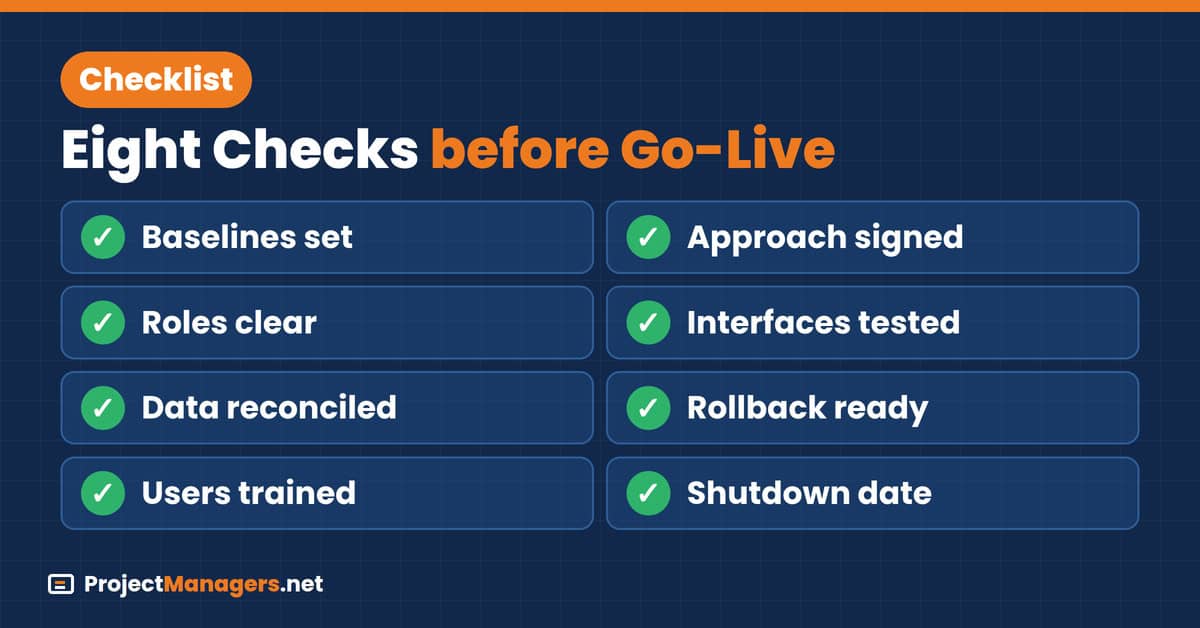
Use this checklist in the final weeks before each go-live, from the pilot through the last wave. Each item points back to a decision made earlier in the project, so a box you cannot tick shows exactly where the plan is still open. Tick the items as the team confirms them, and hold the go-live date until every box is checked.
- Baselines Make Results Visible: Measured starting values help sponsors see whether the new system is actually performing better.
- Rehearsals Lower Cutover Surprises: Reconciled mock loads reduce the chance of missing records on go-live weekend.
- A Shutdown Date Limits Double Running: A fixed end date helps the team avoid paying for two systems longer than planned.
Real-Life Example: Before its pilot go-live, a payroll modernization team ran this checklist and could not tick the rollback item because nobody had timed a restore. The project manager moved the date by one week and ran a full restore test, which took six hours instead of the expected two. The team widened the cutover window, and the pilot went live without incident.
Video: How AI Is Changing Legacy Code Modernization
IBM Technology published this nine-minute explainer in September 2026. Anna Gutowska explains what legacy code is, why skills gaps and technical debt make it hard to change, and how generative and agentic AI can help with code migration, documentation, and testing. Gutowska also covers the limits of AI and why human review stays essential in any migration.
What Is Legacy Code? How AI Is Modernizing Legacy Systems (IBM Technology, 9:11)
A short explainer on legacy code, the skills gap and technical debt behind it, and how AI supports migration, documentation, and testing.
Legacy System Modernization FAQs
Legacy System Modernization FAQs
How Long Does a Legacy System Modernization Project Take?
It depends on the approach and the size of the system. Rehosting one application can take a few months, while rebuilding or replacing a core system often runs a year or more. A phased rollout lets the business see results from the pilot long before the final wave.
What Is the Difference between Rehosting and Refactoring?
Rehosting moves an application to new infrastructure with few or no code changes. Refactoring restructures the code so it is easier to maintain and extend while keeping its behavior. Rehosting is faster, while refactoring removes more technical debt.
Should We Use an Outside Partner or Our Own Team?
Bring in specialists when the internal team lacks experience with the old technology or the new platform, or has no spare capacity. Keep project management, business decisions, and acceptance testing in house, and make documentation and knowledge transfer part of the contract.
How Do You Avoid Data Loss during Migration?
Profile and clean the data first, take verified backups before every load, and rehearse the migration in a test environment. After each run, reconcile record counts and balances, and keep the legacy database archived until audits are finished.
Which Integrations Should Be Planned First?
Start with the connections that carry money or customers, such as ERP, accounting, and CRM links. Map every interface, name the system that owns each type of record, and test full business transactions across all of them before go-live.
How Do You Get Users to Accept a New System?
Involve frontline users in design reviews, name champions in each team, and train people on real tasks in the week before their go-live. A hypercare desk in the first weeks helps people get answers quickly.
How Do You Measure the Success of a Modernization Project?
Compare results with baselines recorded before the project started, such as processing time, error rates, support tickets, and maintenance cost. Review them 30, 60, and 90 days after each wave, and confirm that the old system was retired on schedule.
Conclusion
Legacy modernization succeeds or fails on execution details that are easy to postpone: who knows the old rules, which interfaces nobody listed, and whether the data reconciles before cutover. The approach you pick matters, but most overruns trace back to people, integrations, and data rather than to the technical choice between refactoring and fully rebuilding.
If the old system still runs, use that time well. Start the interface inventory and a data profile this month, because both are cheap, need no vendor decision, and show the true size of the project. Then choose the approach, the team, and any partner with real numbers instead of guesses, and set the shutdown date before the first wave.
Suggested Articles:
- Strategic Planning for Digital Transformation Projects
- Migrating Applications to Kubernetes: Challenges and Solutions
- How to Manage a Martech Stack Consolidation Project

Peter Kanai is a Google-certified freelance writer with over a decade of experience crafting high-quality content for business websites, blogs, and SEO & email marketing campaigns. His on-demand writing services are all about helping businesses expand their online presence and achieve their objectives. With a proven track record in delivering results-driven content, Peter is the go-to freelance writer for business owners seeking a strategic partner to help them grow their brand online.