

Customer service platforms have become essential tools for businesses looking to manage client relationships at scale. Zendesk is one of the most widely adopted solutions in this space, helping organizations streamline support operations, reduce response times, and deliver consistent service across multiple channels. Built to serve businesses of every size, the platform brings together ticketing, live chat, AI automation, voice support, and workforce management under one roof.
Teams can manage every customer interaction from a single interface, reducing the need for disconnected tools and manual processes that slow down resolution times and frustrate both agents and customers. From small startups establishing their first support workflows to global enterprises handling millions of tickets each year, Zendesk offers the flexibility and depth to meet demanding operational requirements. In this article, you’ll explore the pros and cons of using Zendesk, its features, use cases, pricing, and how it fits into today’s customer service and CRM landscape.
Bridge24 is currently developing a powerful reporting and exporting tool for Zendesk. Contact them for more details. Looking for project management software that integrates with Zendesk? Consider AceProject, a cost-effective solution with pricing that is not based on the number of users.
Zendesk – Customer Service Software and Sales CRM
Zendesk was founded in 2007 in Copenhagen, Denmark, and has since grown into one of the world’s leading customer service platforms. It was built to solve a common problem: businesses struggling to manage scattered customer interactions across email, phone, and chat. Zendesk consolidates these touchpoints into a single platform, giving support teams a unified view of every customer conversation. What sets Zendesk apart is its combination of AI-powered automation, deep integration capabilities, and a scalable architecture that adapts to businesses of any size.
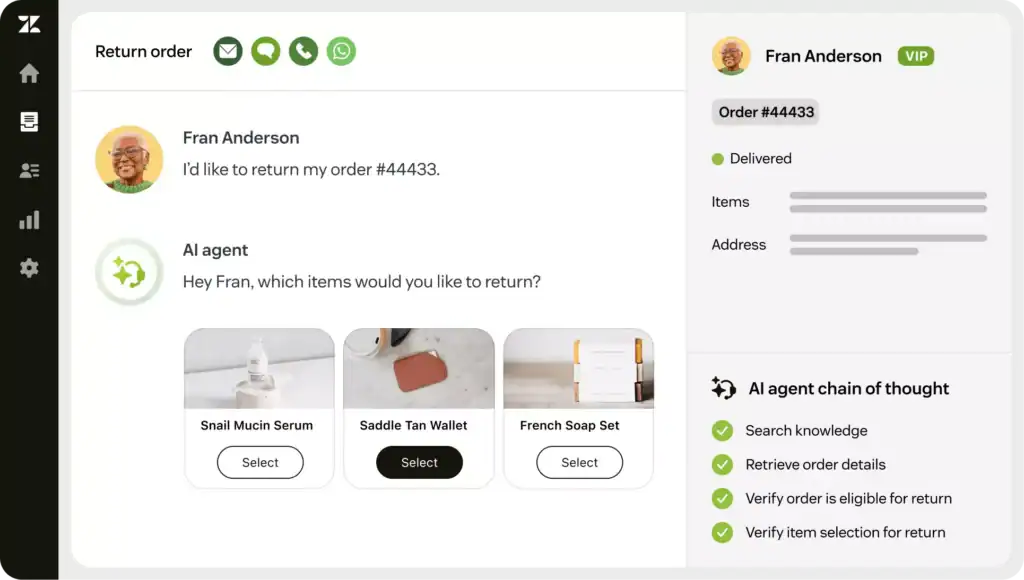
The platform has earned recognition from industry analysts, including being named a Leader in the 2025 Gartner Magic Quadrant for CRM Customer Engagement Center. Its Resolution Learning Loop technology continuously improves automation rates by connecting AI, human agents, and knowledge in one place. Today, it serves over 100,000 companies globally, including Uber, Siemens, Mailchimp, Black & Decker, Tesco, and Khan Academy, helping teams resolve issues faster and deliver measurable improvements in customer satisfaction.
The Pros or Advantages of Zendesk
Zendesk has built a strong reputation for delivering a comprehensive and flexible customer service experience. Its feature set spans automation, AI, and multichannel communication, making it a compelling choice for support teams across industries. Here are eight key advantages that help businesses improve service quality, agent productivity, and overall customer satisfaction.
- Multichannel Support: Zendesk consolidates customer conversations from email, live chat, phone, social media, and messaging apps into one platform. This unified inbox ensures agents never miss an inquiry and can deliver a consistent, connected experience regardless of how a customer reaches out.
- AI-Powered Automation: Zendesk’s AI agents and Answer Bot handle routine inquiries automatically, reducing agent workload and speeding up resolution times. These tools learn from interaction data over time, improving accuracy and enabling teams to focus on complex, high-value customer issues.
- Copilot for Agents: The built-in Copilot assistant provides real-time guidance to human agents during live interactions. It recommends next steps, drafts responses, and surfaces relevant context automatically, helping agents resolve tickets faster and with greater consistency across the support team.
- Scalable Ticketing System: Zendesk’s ticketing system organizes and prioritizes incoming requests efficiently. With features like skills-based routing, SLA management, and ticket queues, support teams can handle high volumes without losing track of critical issues or allowing requests to fall through the cracks.
- Advanced Reporting and Analytics: Built-in dashboards and customizable reports give managers real-time visibility into team performance, ticket trends, and customer satisfaction scores. Higher-tier plans include live analytics, helping businesses make faster, data-driven decisions about staffing, workflows, and service quality.
- Knowledge Base and Help Center: Zendesk allows businesses to build a self-service portal with articles, FAQs, and tutorials. Customers can find answers independently without contacting support, which reduces inbound ticket volume and frees agents to handle more complex and time-sensitive requests.
- Quality Assurance Tools: Zendesk’s QA add-on automatically evaluates 100% of customer conversations across both human and AI agents. It identifies coaching opportunities, flags risky interactions, and helps managers maintain consistent service standards as teams grow and ticket volumes increase.
- Workforce Management: Built-in workforce tools provide AI-powered forecasting, automated scheduling, and real-time performance monitoring. These capabilities help managers optimize staffing levels, reduce idle time, and ensure the right number of agents are available during peak demand periods.
The Cons or Disadvantages of Zendesk

While Zendesk offers an impressive range of capabilities, it is not without limitations. Businesses evaluating the platform should weigh these drawbacks carefully against their specific needs, team size, and budget. Here are six disadvantages that commonly impact users across different types of organizations.
- High Cost at Scale: Zendesk’s pricing rises quickly as teams grow. Monthly plans range from $25 to $219 per agent, and adding tools like Copilot, Workforce Management, or Quality Assurance increases costs further. For small or mid-sized businesses, the total investment can become difficult to justify.
- Steep Learning Curve: The platform’s wide range of features and configuration options can overwhelm new users. Without structured onboarding or dedicated admin resources, teams may take weeks to fully adopt Zendesk and use it effectively, delaying the expected return on investment.
- Integration Complexity: Connecting Zendesk to existing tools and internal systems often requires technical expertise or developer involvement. While Zendesk supports 1,000+ integrations, complex setups can introduce delays, compatibility issues, and ongoing maintenance requirements that strain smaller IT teams.
- Limited Customization in Lower Tiers: Many of Zendesk’s most powerful customization features, including custom reporting, App Builder, and layout controls, are locked behind higher-tier plans. Businesses on entry-level plans may find the platform too rigid to match their specific workflows or branding needs.
- Add-On Dependency: Core capabilities like Copilot, Quality Assurance, and Workforce Management are sold as separate add-ons rather than included in standard plans. This modular pricing model can make it difficult to predict total costs and may lead businesses to pay significantly more than the base plan price suggests.
- Ticketing System Complexity at Volume: As ticket volumes grow, managing and prioritizing requests inside Zendesk can become increasingly complicated. Without careful configuration of automation rules and routing logic, high-volume support teams risk inefficiencies, miscategorized tickets, and slower resolution times.
Zendesk Key Features
Zendesk offers a broad and continuously expanding set of features designed to support modern customer service operations. Its platform now places artificial intelligence at the center of the experience, from automated resolutions to agent assistance and workforce planning. Here are ten core features that define what Zendesk delivers across its plans.
- AI Agents: Autonomous AI agents handle customer and employee conversations across any channel without human intervention. They are built to reason, adapt, and take action, with Zendesk targeting an automation rate of 80% or more for routine interactions.
- Copilot: The Copilot assistant supports human agents in real time by automating repetitive tasks, surfacing relevant customer context, and recommending responses. It reduces the time agents spend searching for information and helps maintain consistency across every customer interaction.
- Ticketing System: Zendesk’s core ticketing system captures, organizes, and routes customer requests from all channels. Agents can set priorities, apply SLAs, track conversation history, and collaborate internally, ensuring every ticket is handled efficiently from open to resolution.
- Messaging and Live Chat: Real-time messaging is available across web, mobile, and social platforms, including WhatsApp, Instagram, and Slack. Agents can manage multiple live conversations simultaneously, delivering fast, personalized support without switching between separate tools or interfaces.
- Help Center: Zendesk’s help center builder enables teams to create branded self-service portals with searchable knowledge articles and FAQs. Higher-tier plans support up to 300 separate help centers, making this feature particularly valuable for enterprises managing multiple brands or markets.
- Voice: Built-in phone support with call routing and IVR (interactive voice response) allows businesses to handle customer calls directly within Zendesk. Agents receive full customer context before answering, enabling more informed and efficient phone-based support interactions.
- Reporting and Analytics: Standard plans include prebuilt dashboards for agent performance and ticket trends. Suite Professional and Enterprise plans unlock customizable reports and real-time analytics, giving managers the data they need to identify bottlenecks and continuously improve service quality.
- Quality Assurance: The QA add-on automatically scores 100% of conversations handled by both human and AI agents. It surfaces coaching opportunities, detects compliance risks, and enables managers to maintain high service standards without manually reviewing individual tickets.
- Workforce Management: AI-powered scheduling, forecasting, and real-time monitoring tools help managers optimize staffing levels and reduce operational inefficiencies. This add-on is particularly valuable for contact centers managing fluctuating demand across multiple channels and time zones.
- Advanced Data Privacy and Protection: An optional add-on for businesses with strict compliance requirements, this feature provides a customizable layer of data security. It supports organizations operating in regulated industries such as healthcare, finance, and government, where data handling standards are especially demanding.
Zendesk Use Cases
Zendesk is used across a wide range of industries and team types, from lean startup support teams to enterprise-scale contact centers. Its flexibility and AI-powered toolset make it adaptable to many different business environments. Here are seven examples of how organizations use Zendesk to solve real operational challenges.
- Retail and E-Commerce: Retail teams use Zendesk to manage high volumes of order inquiries, returns, and shipping questions across email, chat, and social media. AI agents handle common requests automatically, while human agents focus on escalated issues requiring personalized attention.
- Financial Services: Banks and fintech companies rely on Zendesk’s data privacy controls and audit logging to manage sensitive customer interactions securely. The platform’s compliance features, including HIPAA support and data location options, help meet strict regulatory requirements across different regions.
- Healthcare: Healthcare providers use Zendesk to manage patient inquiries, appointment requests, and billing questions. The platform’s HIPAA-compliant plans ensure that sensitive patient data is handled appropriately, while automation reduces administrative burden on support and administrative staff. Healthcare teams comparing multiple options often evaluate HIPAA compliant help desk software side by side before committing to an enterprise-grade platform.
- Software and SaaS: Technology companies use Zendesk to deliver technical support at scale. The help center and community forums enable customers to self-serve, while Copilot helps agents resolve complex bug reports and integration questions more efficiently with AI-assisted guidance.
- Education: Universities and online learning platforms use Zendesk to support students, faculty, and staff across multiple channels. Automated responses handle common enrollment and access questions, freeing support teams to focus on more nuanced academic and administrative issues.
- Enterprise Operations: Large enterprises with global support teams use Zendesk’s workforce management, quality assurance, and sandbox environment to manage operations at scale. Custom agent roles, approval workflows, and business rules analysis give administrators precise control over complex service environments.
- Startups: Early-stage companies use Zendesk to establish professional customer service processes from day one. The platform’s out-of-the-box setup, 1,000+ integrations, and scalable pricing allow startups to grow their support capabilities in line with their business without rebuilding systems later.
Zendesk Pricing and Costs
Understanding Zendesk’s pricing is essential because the platform’s total cost depends heavily on team size, plan tier, and which add-ons your operation requires. While the entry-level plan is relatively accessible, costs can escalate quickly once you factor in per-agent pricing, AI features, and tools like Copilot or Workforce Management. Annual billing saves approximately 20% compared to monthly rates, which is meaningful for larger teams making a long-term commitment. Before deciding, project your team’s growth trajectory and support volume to ensure the plan you choose fits both your current needs and your future budget.
Here are the plans available:
- Support Team ($25/agent/month | ~$19/agent/month billed annually): Ideal for teams getting started with email-based support. Includes email and ticketing, Facebook and X support, conversation history, pre-written macros, ticket routing, customizable automations, prebuilt analytics dashboards, and 1,000+ integrations. AI agents are not included but can be unlocked by adding the Help Center add-on at checkout.
- Suite Team ($69/agent/month | ~$55/agent/month billed annually): Designed for teams that need AI and multichannel support. Includes everything in Support Team, plus AI agents (Essential), generative replies, customizable AI agent persona, automated resolution reporting, Knowledge Builder, generative search, one help center, messaging with live chat, social messaging on Instagram, WhatsApp, and Slack, phone support, and call routing.
- Suite Professional ($149/agent/month | ~$115/agent/month billed annually): The recommended tier for growing businesses that need advanced reporting and customization. Includes everything in Suite Team, plus Copilot writing tools, up to five help centers, customizable real-time reporting, App Builder, layout builder, CSAT surveys, skills-based routing, IVR phone tree, customizable ticket forms, SLA management, HIPAA compliance, and data location options.
- Suite Enterprise ($219/agent/month | ~$169/agent/month billed annually): Built for large organizations requiring enterprise-grade control and security. Includes everything in Suite Professional, plus up to 300 help centers, approval workflows, a sandbox environment, custom agent roles, audit logs, business rules analysis, visual data alerts, dynamic contextual workspaces, and ticket queues to prevent agent cherry-picking.
Add-Ons:
- Copilot: $50/agent/month
- Zendesk Quality Assurance: $35/agent/month
- Zendesk Workforce Management: $25/agent/month
- Advanced Data Privacy and Protection: $50/agent/month
- Contact Center: $50/agent/month
- Workforce Engagement Bundle (QA + WFM): $50/agent/month
- Suite + Copilot Professional: $155/agent/month billed annually
- Suite + Copilot Enterprise: $209/agent/month billed annually
For a deeper breakdown of every tier and optional upgrade, check out our in-depth guide on Zendesk Pricing and Costs — it’s packed with insights to help you choose the right plan confidently.
Conclusion
Zendesk is a powerful and mature customer service platform with clear strengths in AI automation, multichannel support, and scalability. Its expanding suite of AI tools, including autonomous agents, Copilot, and quality assurance, makes it especially well-suited for businesses that handle high ticket volumes and need consistent, measurable service delivery. However, the cost can climb quickly once add-ons are factored in, and smaller teams may find both the pricing and the setup complexity challenging to navigate.
Organizations with dedicated support operations and room to grow will likely get the most value from the platform. Businesses with tighter budgets or simpler needs should carefully assess whether the full feature set justifies the investment. Zendesk continues to shape how businesses support their customers, setting a strong foundation for future growth and innovation.
Suggested articles:
- The Pros and Cons of Using Zoho CRM Software
- The Pros and Cons of Using FreshBooks Software
- The Pros and Cons of Using Basecamp Software

Peter Kanai is a Google-certified freelance writer with over a decade of experience crafting high-quality content for business websites, blogs, and SEO & email marketing campaigns. His on-demand writing services are all about helping businesses expand their online presence and achieve their objectives. With a proven track record in delivering results-driven content, Peter is the go-to freelance writer for business owners seeking a strategic partner to help them grow their brand online.