
AceProject is a web-based project management tool for tasks, timesheets, expenses and documents, used by teams for more than 20 years. Its pricing is unusual: you pay one flat price per account, not per user, and every plan, the free one included, has every feature.
This guide explains every AceProject plan as of November 2026, the rules that decide which plan you need, and what real teams pay. Use the free calculator below to price your own team in a few seconds.
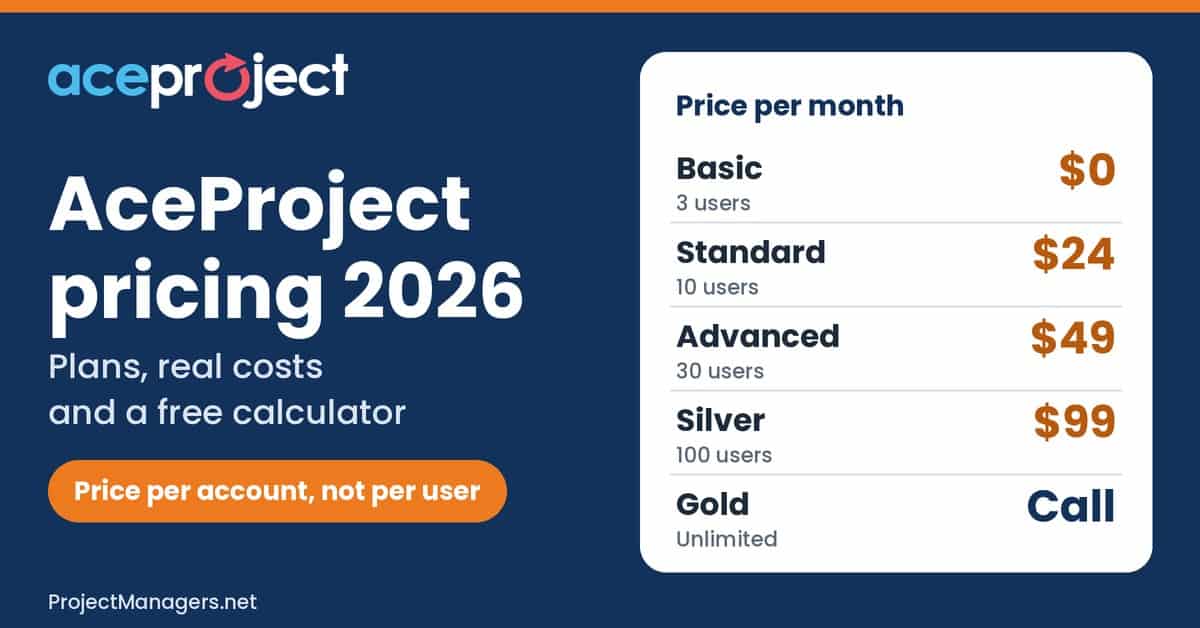
- AceProject charges per account, not per user: Basic is free for 3 users, Standard costs $24, Advanced $49 and Silver $99 per month. Gold, with unlimited users and projects, is quote only.
- Every plan, the free one included, has all features. Plans differ by active users, active projects and storage, and paid plans add the API, daily backups and extra disk space.
- Only active users and projects count. Set people who leave to Inactive and finished projects to Completed to stay on a smaller plan.
- Yearly billing gives 12 months for the price of 10, nonprofits get 20% off, and extra disk space costs $10 per 10 GB. Use the calculator to see your real cost.
AceProject Cost Calculator
AceProject plans are set by three limits: active users, active projects and file storage. Enter your team below to see the lowest-cost plan, your monthly and yearly total, and how the price grows as you hire.
Try our Free AceProject Cost Calculator Below
The calculator uses AceProject’s public prices and package limits to estimate what your team will pay.
- Enter your team. Type your number of “Active users” and “Active projects”, or drag the sliders, then enter the “File storage you need (GB)”. Leave out people you can set to Inactive and projects you can set to Completed, since they do not count.
- Check the best fit. With “Best fit” selected, the calculator picks the lowest-cost plan for your team. The navy box shows your monthly and yearly total, and “Plan limits used” turns orange when you are close to a limit and red when a plan is too small.
- Pick billing and discounts. Choose “Monthly” or “Yearly (12 months for 10)”, and tick the nonprofit box if it applies. The green figure shows what yearly billing saves, and the “Cost breakdown” table lists the plan and any extra disk space.
- Tick the extras you need. Under “Which plan do you need?”, tick the API, daily backups, more than 100 users or projects, or payment by check or wire. The lowest-cost plan that covers them appears with the reasons, and “Use the best fit” applies it.
- Compare and share. “Every plan for your team” shows each plan side by side, and the chart shows how the price grows with your team, billed monthly in orange and yearly in navy. Click “Copy results” for a text summary or “Print” for a clean report.
Tip: Your entries are saved in your browser, so the calculator shows them again when you come back. It opens with the “Team of 8” example; click “Reset to example” to start over, or try the other example buttons.
AceProject cost calculator
Prices checked November 2, 2026, in USD, per account.
People who log in or get assignments. Inactive users (for example someone who left) do not count.
Projects not yet set to Completed. Completed projects stay readable and do not count.
Documents attached to projects, tasks and expenses. Paid plans can add 10 GB for $10 a month.
Plan limits used
- Active users8 of 10
- Active projects6 of 10
- File storage3 GB of 5 GB
Cost breakdown
| Standard plan$24.00 per month | $24.00 |
|---|---|
| Extra disk space5 GB included, nothing extra | $0.00 |
| Total per month | $24.00 |
Tip: yearly billing gives 12 months for the price of 10 and saves $48.00 a year on this plan.
Total $24.00 per month on the Standard plan.
Which plan do you need?
Because of: 8 active users (Standard allows 10); 6 active projects (Standard allows 10).
Every plan for your team
| Plan | Fits your team | Billed monthly | Billed yearly | Per user |
|---|---|---|---|---|
| Basic | No: Too many users | Not available | Not available | n/a |
| Standard best fit | Yes | $24.00 / mo | $240.00 / yr | $3.00 |
| Advanced | Yes | $49.00 / mo | $490.00 / yr | $6.13 |
| Silver | Yes | $99.00 / mo | $990.00 / yr | $12.38 |
| Gold | Yes | Contact AceProject | Contact AceProject | Quote |
Includes any extra disk space you need. Per user follows your billing choice.
How the price grows with your team
The price steps up only when you pass a plan limit. Lines use your projects, storage and needs as entered.
Estimates only, based on AceProject’s public prices and package limits. Prices are per account, not per user. Gold is quote only. Extra disk space is shown at $10 per 10 GB per month; ask AceProject whether the yearly and nonprofit discounts also apply to it. Your entries stay in your browser.
How Much Does AceProject Cost?
AceProject pricing has one free plan, three paid plans with published prices and one quote-only plan. Prices are per account, per month, in US dollars. Each plan raises the number of active users, active projects and storage; the features stay the same.
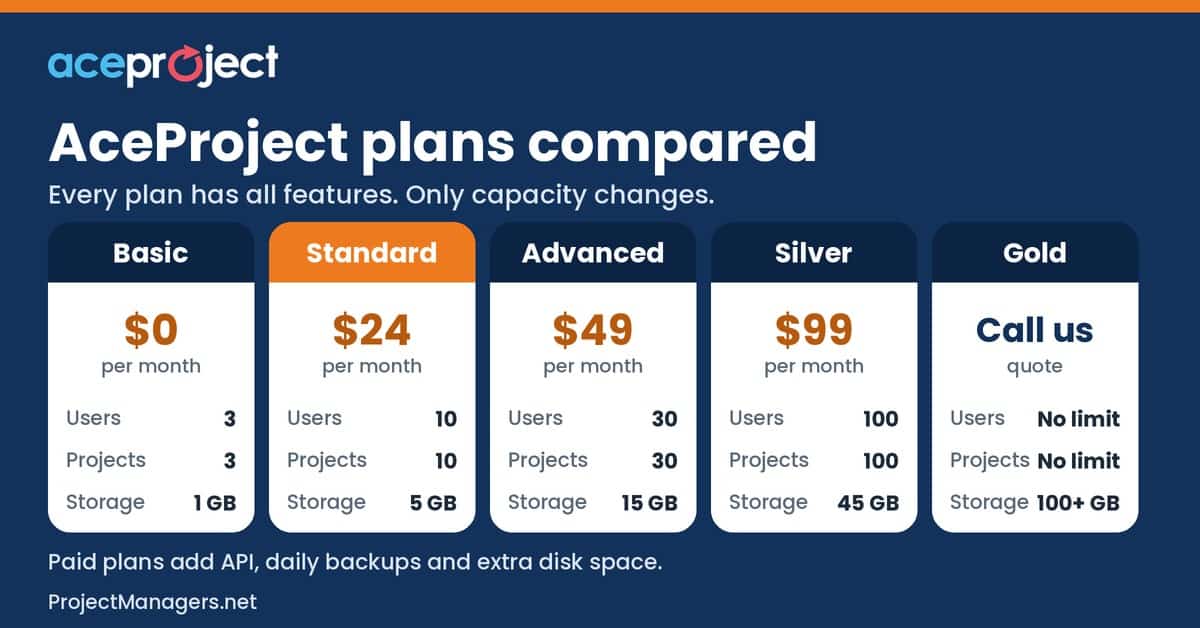
- Basic (free): up to 3 active users, 3 active projects and 1 GB of storage, with every feature enabled. A good start for freelancers and very small teams.
- Standard ($24 per month): up to 10 active users, 10 active projects and 5 GB. Adds the API for developers, daily backups and the option to buy extra disk space.
- Advanced ($49 per month): up to 30 active users, 30 active projects and 15 GB, for growing teams and agencies.
- Silver ($99 per month): up to 100 active users, 100 active projects and 45 GB, for departments and larger companies.
- Gold (contact AceProject): unlimited active users and projects, with 100+ GB of storage. The price is not published.
AceProject plans compared (November 2026)
Prices are per account, per month, in US dollars. Tasks are unlimited on every plan.
| Plan | Price per month | Active users | Active projects | Storage | What you get | Best for |
|---|---|---|---|---|---|---|
| Basic | $0 | 3 | 3 | 1 GB | Every feature, free support, team subdomain, custom fields | Freelancers and very small teams |
| Standard | $24 | 10 | 10 | 5 GB | Basic plus API, daily backups and extra disk space | Small teams |
| Advanced | $49 | 30 | 30 | 15 GB | Same as Standard, with more room | Growing teams and agencies |
| Silver | $99 | 100 | 100 | 45 GB | Same as Standard, with more room | Departments and larger companies |
| Gold | Call AceProject | Unlimited | Unlimited | 100+ GB | Same as Standard, plus database replacement from backup and check or wire payment on yearly plans | Large organizations |
Source: AceProject pricing page and AceProject terms of service, checked November 2, 2026. The Silver card on the pricing page says 50 GB; the comparison table says 45 GB.
How AceProject Pricing Really Works
Four rules decide your bill. They come from AceProject’s pricing page, its help article on package limits and its terms of service.
- One price per account: the prices are total subscription fees, not per user. A full Standard account costs $2.40 per user each month, Advanced about $1.63 and Silver $0.99.
- Only active work counts: a user set to Inactive, for example someone who left, does not count toward the user limit, and a project set to Completed does not count toward the project limit. History stays readable.
- Limits are hard: AceProject will not let you go over a limit. Adding one more active project or user shows an error until you upgrade or free a slot.
- Tasks are unlimited: there is no task limit on any plan, so only users, projects and storage matter.

This model rewards teams that fill their plan. Seven people on Standard pay $24, the same as ten. It also means a team of 11 jumps from $24 to $49, so check whether an inactive user or a completed project could keep you on the smaller plan.
AceProject Plans in Detail
AceProject Basic Plan (Free)
The free Basic plan suits freelancers and small groups. It is a real free account, not a time-limited trial, and every feature is turned on.
- Up to 3 active users and 3 active projects, with unlimited tasks
- 1 GB of storage for project, task and expense documents
- All features enabled: Gantt charts, time tracking with approvals, expense tracking, recurring tasks, document versioning and locking, templates and reports
- Free support, automatic updates, a team subdomain and custom fields in the new interface
- No API, no daily backups and no extra disk space
- The account expires, and its data is deleted, if nobody logs in for 30 days in a row
AceProject Standard Plan ($24 per month)
Standard is the first paid plan, for small teams of up to 10 active users. It costs $24 a month for the whole account, or $240 a year on yearly billing.
- Up to 10 active users and 10 active projects
- 5 GB of storage, with extra disk space at $10 per 10 GB per month
- API for developers, to connect AceProject to other systems and build reports
- Daily backups
- Everything in Basic
AceProject Advanced Plan ($49 per month)
Advanced triples the room of Standard for about twice the price. It suits growing teams and agencies that run many projects at once.
- Up to 30 active users and 30 active projects
- 15 GB of storage, with extra disk space available
- Everything in Standard, including the API and daily backups
AceProject Silver Plan ($99 per month)
Silver is built for departments and larger companies. At full capacity it costs less than $1 per user per month.
- Up to 100 active users and 100 active projects
- 45 GB of storage in the comparison table (the plan card says 50 GB), with extra disk space available
- Everything in Standard
AceProject Gold Plan (Contact AceProject)
Gold removes the user and project limits. AceProject no longer publishes its price, so you need a quote.
- Unlimited active users and projects
- 100+ GB of storage
- If data is lost, Gold accounts can ask for their database to be replaced from a backup (a paid service hour applies)
- Payment by check or wire transfer is possible on yearly Gold accounts
Extra Storage, Billing and Payment
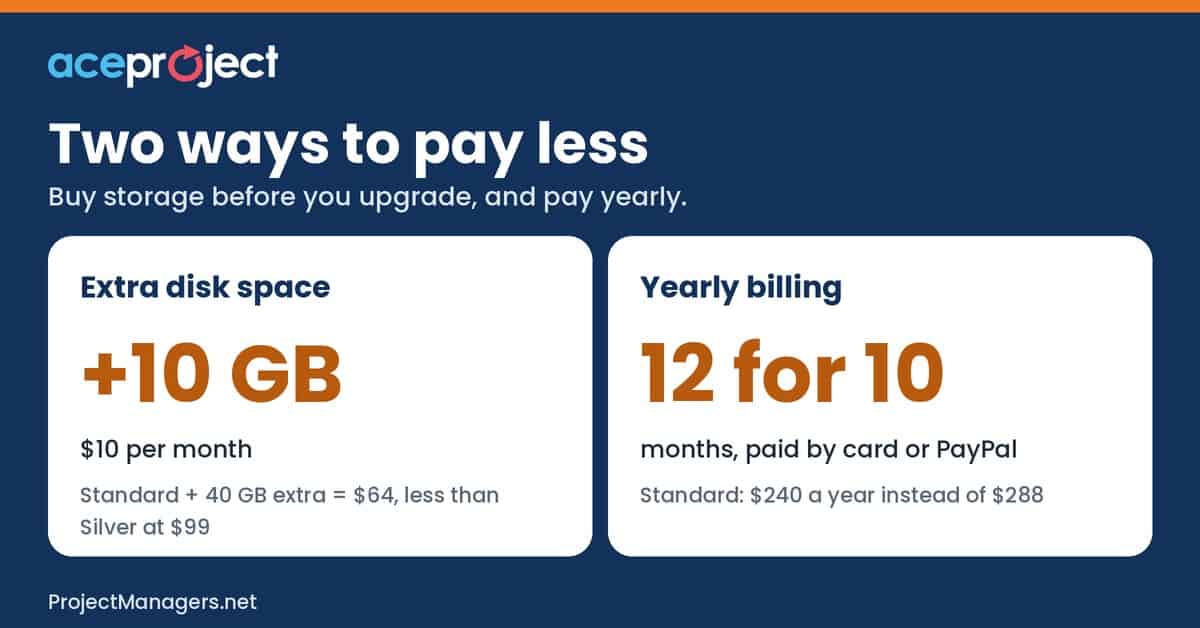
- Extra disk space: paid plans can add storage in blocks of 10 GB for $10 a month ($1 per GB), with no limit. A team of 10 with 45 GB of files pays $64 a month on Standard with 40 GB extra, which is less than Silver at $99.
- Yearly billing: AceProject Help says that a yearly plan costs 12 months for the price of 10 when you pay online by card or PayPal. Standard drops from $288 to $240 a year.
- Payment methods: credit card or PayPal online. Check or wire transfer is possible for yearly Gold accounts, without the yearly discount.
- Upgrades and downgrades: you can change plans at any time. An upgrade is billed right away with a pro rata credit; a downgrade takes effect at the next billing period.
- Cancellation and refunds: there is no contract. Monthly payments are not refunded, and yearly payments can be refunded within 14 days.
- Taxes: the terms of service say Canadian organizations pay applicable taxes and organizations in other countries do not.
What AceProject Really Costs: Examples
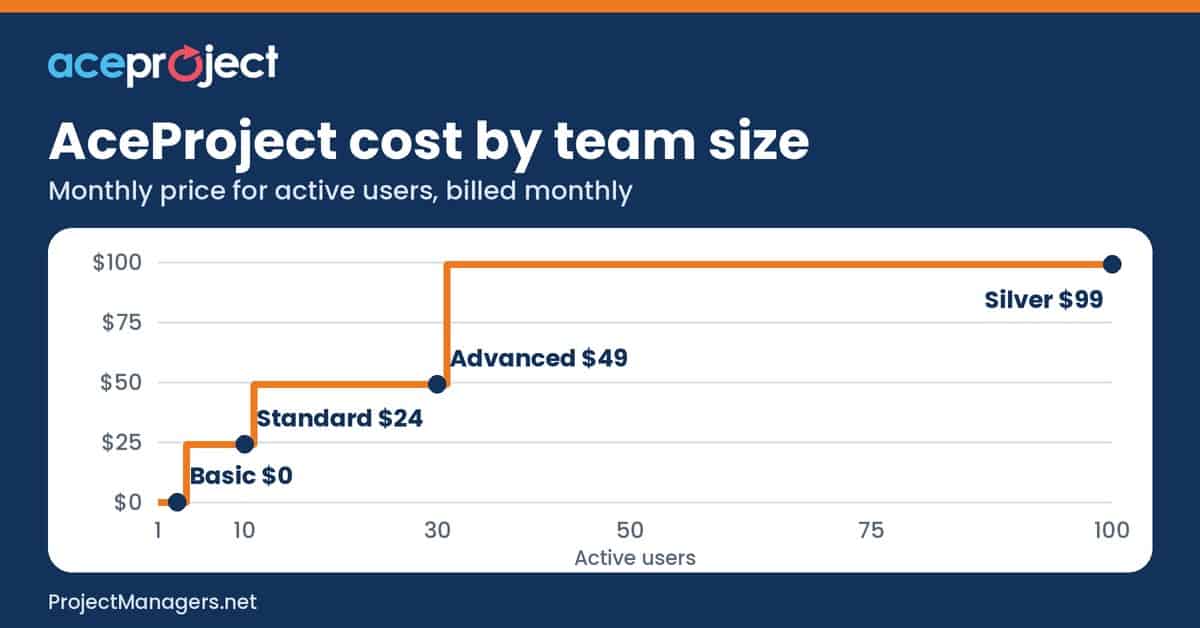
Here is what six common teams pay, using the same math as the calculator. The chart shows how the monthly price steps up only when a plan limit is reached.
What real teams pay
Worked examples from the calculator above. Yearly prices are shown as a monthly average.
| Team | Plan and billing | Per month | Per year | Per user, per month |
|---|---|---|---|---|
| Freelancer (2 users, 3 projects) | Basic, free | $0 | $0 | $0 |
| Team of 8 (6 projects, 3 GB) | Standard, monthly | $24.00 | $288.00 | $3.00 |
| 10 people with 45 GB of files | Standard + 40 GB extra, monthly | $64.00 | $768.00 | $6.40 |
| Agency of 25 (20 projects, 12 GB) | Advanced, yearly | $40.83 | $490.00 | $1.63 |
| Nonprofit of 15 (12 projects) | Advanced, yearly, 20% off | $32.67 | $392.00 | $2.18 |
| Firm of 80 (50 projects, 60 GB) | Silver + 20 GB extra, monthly | $119.00 | $1,428.00 | $1.49 |
Extra disk space is counted at $10 per 10 GB per month, with no yearly or nonprofit discount. Canadian organizations also pay applicable taxes.
Hidden Costs to Watch
- Limit jumps: the 11th active user or project moves you from $24 to $49, and the 31st from $49 to $99.
- Inactive free accounts: a Basic account with no login for 30 days expires and its data is deleted.
- Storage: big files fill a plan fast. Extra disk space costs $10 per 10 GB each month and is not available on Basic.
- Gold is quote only: more than 100 users or projects means a custom price.
- Data restores: restoring lost data from a backup costs one service hour at AceProject’s regular rate.
- Monthly billing: it costs two extra months each year compared with yearly billing.
- Taxes: Canadian organizations pay applicable taxes on top of the listed prices.
AceProject Discounts
- Nonprofits: 20% off after sending proof of nonprofit status to AceProject support.
- Yearly billing: 12 months for the price of 10, paid online by card or PayPal.
- Free plan: Basic stays free for up to 3 users, with no credit card needed to start.
Is AceProject Worth the Price?
For small and mid-size teams that track time and expenses, AceProject is very good value. A full Standard account costs $2.40 per user and a full Silver account under $1, and you never pay extra for features, since every plan has them all. The free plan lets you test everything before you pay.
It is less attractive if your team sits just above a limit, needs more than 100 users without a published price, or stores large files. Run your numbers in the calculator, check whether inactive users or completed projects could keep you on a smaller plan, and create a free account to try it. Want a deeper look before you commit? Our AceProject Pros and Cons article covers its strengths and limits.
AceProject Pricing Facts Worth Checking
Many AceProject pricing claims online are out of date or only half right. Here are ten common ones, checked against AceProject’s own pages.
10 AceProject pricing claims, checked
| Claim | Verdict | What the data says | Source |
|---|---|---|---|
| AceProject charges per user. | False | Prices are total fees per account. Standard costs $24 a month whether 2 or 10 people use it. | AceProject pricing FAQ |
| The free plan is only a trial. | False | Basic is a real free account with no time limit. It expires only if nobody logs in for 30 days in a row, and its data is then deleted. | AceProject terms of service |
| The free plan has every feature. | Partly true | All features are enabled on Basic, but the API, daily backups and extra disk space start on Standard. | AceProject pricing table |
| AceProject Gold costs $199 a month. | Out of date | That was the old list price. Gold now shows “call us” on the pricing page. | AceProject pricing |
| Silver includes 50 GB of storage. | Partly true | The Silver plan card says 50 GB, but the comparison table on the same page says 45 GB. Check with AceProject before you rely on the extra 5 GB. | AceProject pricing |
| Completed projects count toward your limit. | False | Only incomplete projects count. Completed projects stay readable and can be reopened by a project manager or administrator. | AceProject Help |
| People who leave still take a user slot. | False | Set them to Inactive. Their history stays, and inactive users do not count toward the user limit. | AceProject Help |
| You must upgrade to get more storage. | False | Paid plans can add disk space in 10 GB blocks for $10 a month ($1 per GB), with no limit. | AceProject pricing FAQ |
| Yearly billing is cheaper. | True | AceProject Help says a yearly plan costs 12 months for the price of 10 when paid by card or PayPal online. | AceProject Help |
| Nonprofits get a discount. | True | Nonprofit organizations get 20% off after sending proof of status to AceProject support. | AceProject Help |
Checked against AceProject’s own pages on November 2, 2026.
Video: AceProject Product Tour
Prefer to watch? This short official tour shows the features that come with every AceProject plan, including the free one.
AceProject product tour (official, 1:38)
A short tour of the projects, tasks, timesheets, expenses and documents you get on every plan, the free one included.
AceProject Pricing FAQ
AceProject pricing FAQ
Is AceProject free?
Yes. The Basic plan is free with no time limit for up to 3 active users, 3 active projects and 1 GB of files, with every feature enabled. A free account expires if nobody logs in for 30 days in a row.
Is AceProject priced per user?
No. Prices are total fees per account. Standard costs $24 a month for up to 10 active users, so a full Standard account works out to $2.40 per user.
What happens when I reach my plan limit?
AceProject will not let you go over it. Adding one more active project or user shows an error until you upgrade, complete a project or set a user to Inactive.
How much is AceProject Gold?
Gold has unlimited users and projects and 100+ GB of storage. Its price is not published, so you need to contact AceProject for a quote.
Can I cancel or get a refund?
There is no contract and you can cancel at any time with the cancellation form. Monthly payments are not refunded, and yearly payments can be refunded within 14 days.
Do I pay sales tax on AceProject?
According to the terms of service, Canadian organizations pay the applicable federal or provincial tax, and organizations in other countries do not.
Can I go back to the free plan?
Yes, as long as your account fits the Basic limits: 3 active users, 3 active projects and 1 GB of files.
Conclusion
AceProject keeps pricing simple: one flat price per account, every feature on every plan, and plans that differ only by active users, active projects and storage. For most teams the choice is between the free Basic plan, Standard at $24 and Advanced at $49 a month, with Silver at $99 for up to 100 users.
Before you decide, count your active users and projects, check your storage, and price your team with the calculator above. Matching those numbers to the right plan means you pay for what you actually use, nothing more.
Suggested articles:
- Smartsheet Pricing Plans & Costs Guide
- Asana Pricing Plans & Costs Guide
- Trello Pricing Plans & Costs Guide

Daniel Raymond, a project manager with over 20 years of experience, is the former CEO of a successful software company called Websystems. With a strong background in managing complex projects, he applied his expertise to develop AceProject.com and Bridge24.com, innovative project management tools designed to streamline processes and improve productivity. Throughout his career, Daniel has consistently demonstrated a commitment to excellence and a passion for empowering teams to achieve their goals.