
Managing projects across distributed teams has never been more complex, yet the right platform can transform how work gets done. Basecamp has long been a trusted choice for teams that value simplicity and streamlined communication over feature complexity. However, as team needs evolve and AI-powered workflows become standard, many organisations find themselves evaluating tools that offer deeper customisation, automation, and analytical capability at every tier.
This guide examines six of the strongest Basecamp alternatives currently available, covering features, AI capabilities, real-world use cases, and current pricing. From monday.com’s AI agent workforce to ClickUp’s expansive free-tier functionality, each platform has unique strengths worth a closer look. Whether you lead a small startup or a large enterprise team, this breakdown will help you find the right fit for your project management needs.
What Is Basecamp?
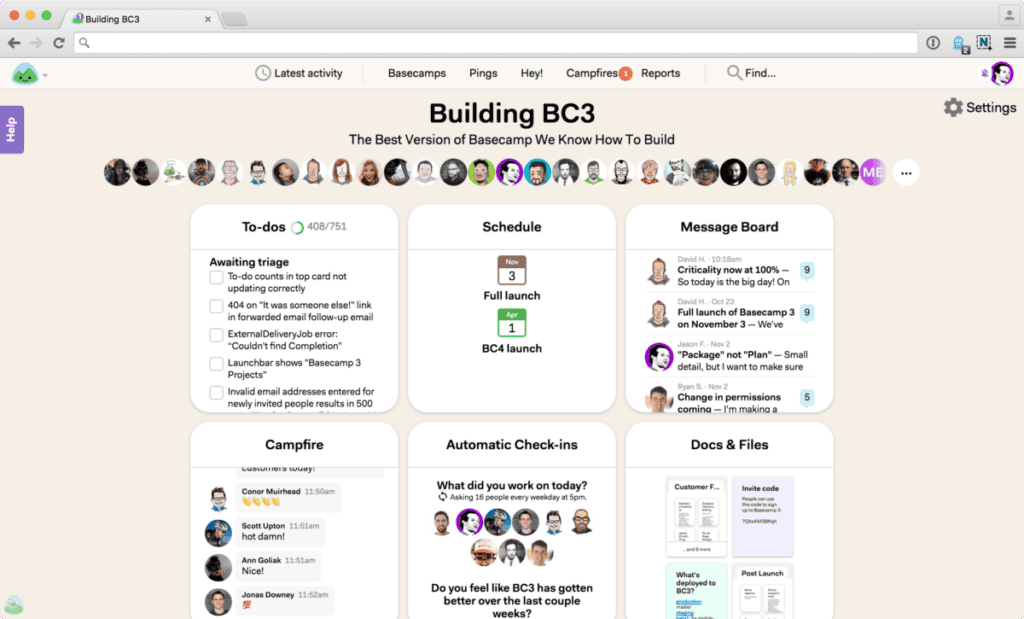
Basecamp is a web-based project management and team collaboration platform built around simplicity, asynchronous communication, and flat organisational workflows. Founded by 37signals and updated to version 4 in 2024, the tool remains a popular choice for small to mid-sized teams. Its clean interface centralises tasks, messaging, file storage, and scheduling, removing the need to juggle multiple apps across different areas of a project.
Basecamp’s core feature set is designed around these key tools and capabilities:
- Single-Page Dashboard: A unified project overview that displays all tasks, messages, files, and upcoming deadlines in one place, giving every team member instant visibility into current project activity without navigating between multiple screens.
- Message Boards: A structured discussion space where teams can post announcements, share updates, and pitch ideas, serving as a more organised and searchable alternative to group email threads within each project.
- To-Do Lists: A task management tool with assignees, due dates, notes, and subscriber notifications, including support for sublists and recurring tasks to handle structured and repeatable workflows within each project.
- Campfire and Pings: Built-in real-time group chat via Campfire and private direct messaging via Pings, keeping all work-related communication consolidated inside the platform and away from personal messaging applications.
- Hill Charts and Card Tables: Visual progress tracking that allows teams to monitor task momentum on a curve-based chart, alongside a Kanban-style Card Table for managing reactive or inbound work queues.
- Automatic Check-Ins: Recurring prompts that gather asynchronous status updates from team members on a scheduled basis, reducing the need for regular status meetings while keeping managers informed of ongoing progress.
- Docs and Files: A centralised document and file repository with cloud storage linking support, enabling teams to store, version, and discuss files and documents directly within each project workspace.
Basecamp offers three pricing options, including a free tier, designed to scale with team size without gating core features behind higher-tier paywalls:
- Free Plan (No credit card required): Run 1 project free with 1 GB of storage and up to 20 users. Includes access to all core features. Upgradeable to a paid plan when you need more projects or storage.
- Pro Plan ($15 per user per month, billed monthly): Ideal for freelancers, startups, and smaller teams. Includes unlimited projects, 500 GB of storage, free guest and client access, self-guided onboarding, and 24/7 customer support. Optional upgrades sold separately. Comes with a 30-day free trial.
- Pro Unlimited Plan ($299 per month, billed annually): Top-of-the-line flat-rate pricing for organisations that want to bring their entire team on board without per-user fees. Includes unlimited users, unlimited projects, 5 TB of storage, the Admin Pro Pack, Timesheet tracking, personal onboarding with the Basecamp team, priority 24/7 support, and an extended 60-day free trial.
Top 6 Best Basecamp Alternatives
The project management landscape has expanded significantly, with each leading platform developing its own approach to AI integration, workflow automation, and cross-team collaboration. The six alternatives below offer capabilities ranging from advanced AI agent frameworks to visual resource planning and flat-rate pricing. Each has been selected based on feature depth, recent platform developments, pricing transparency, and its suitability across various team sizes.
1. AceProject
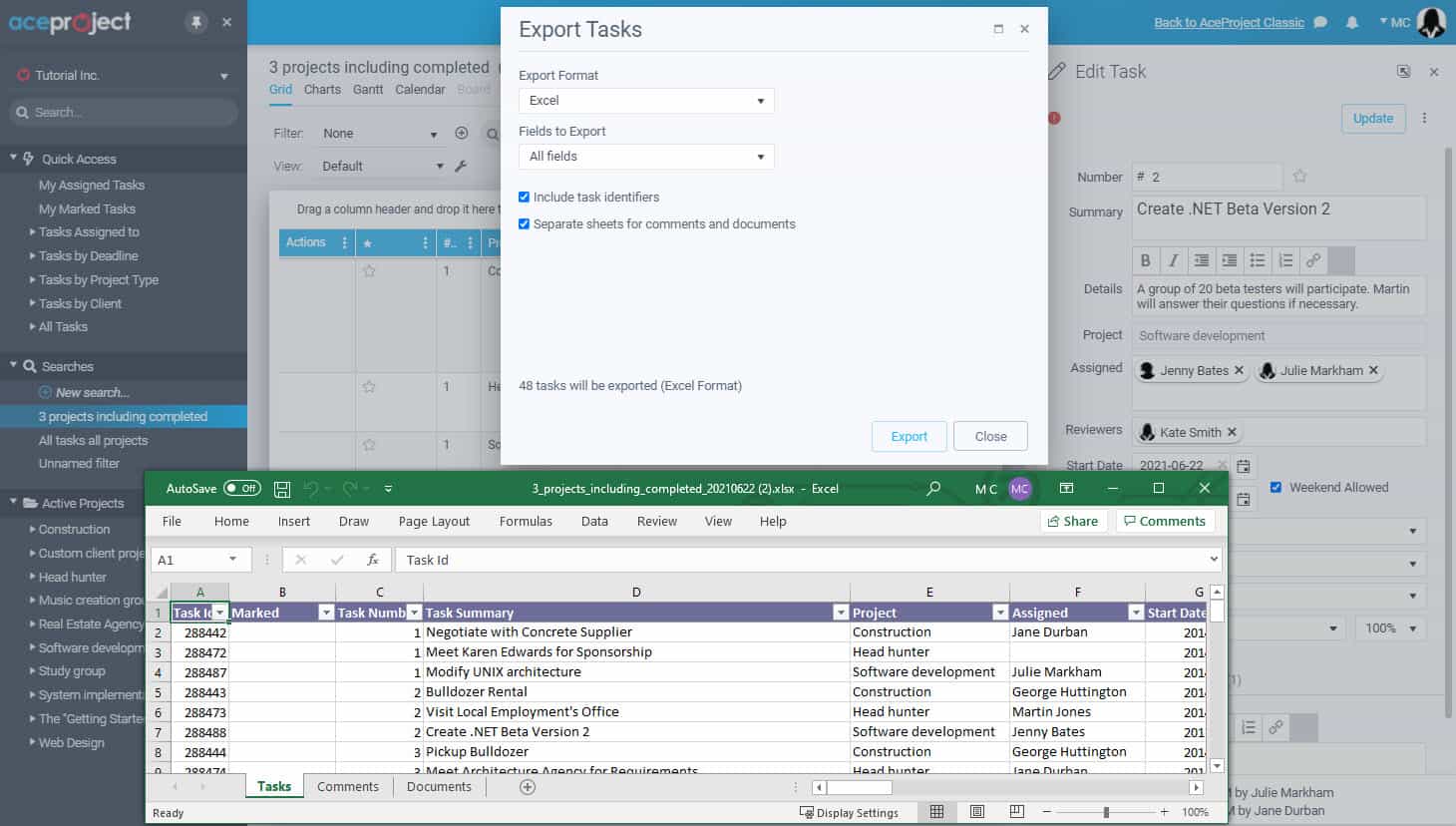
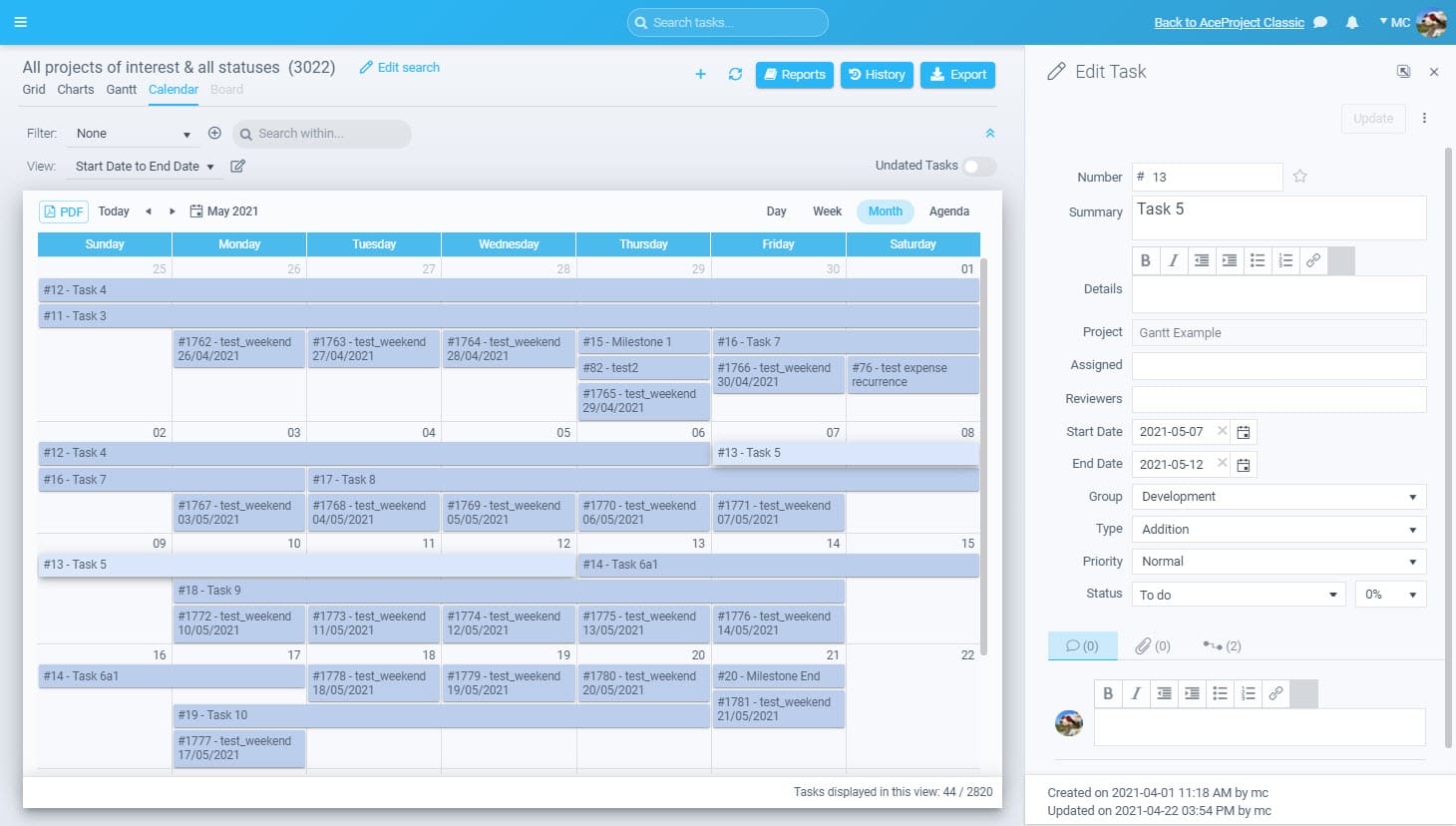
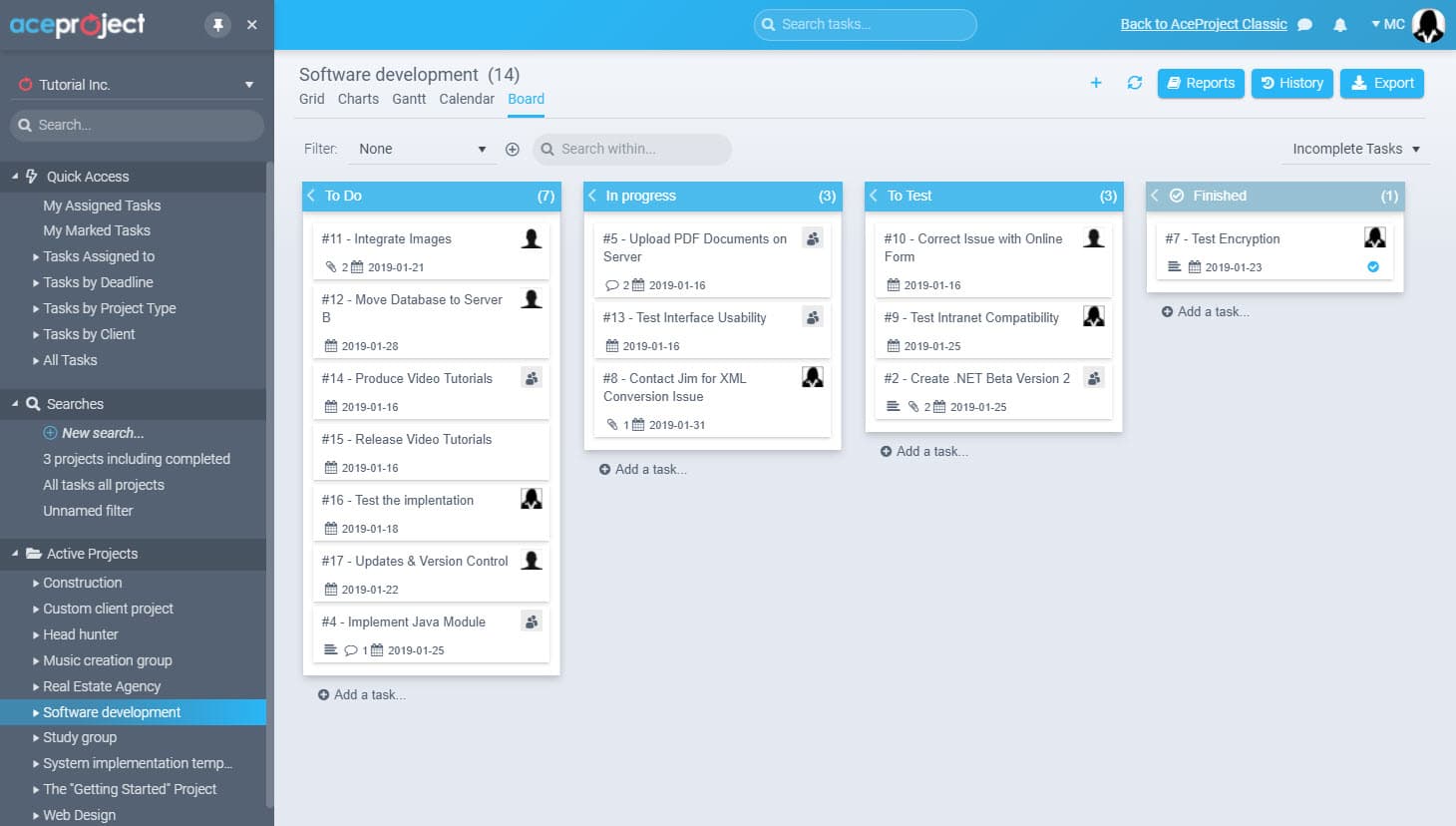
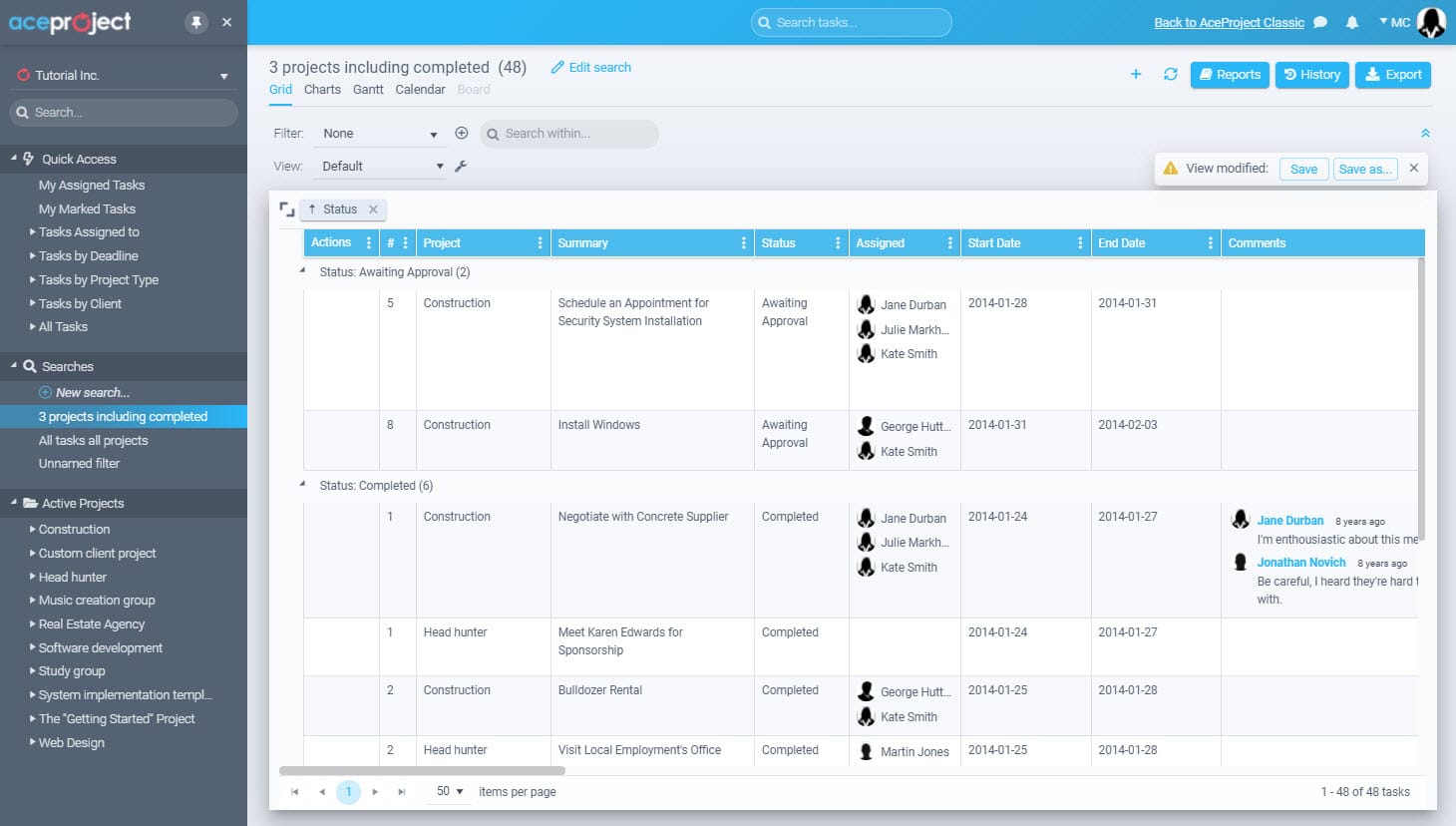
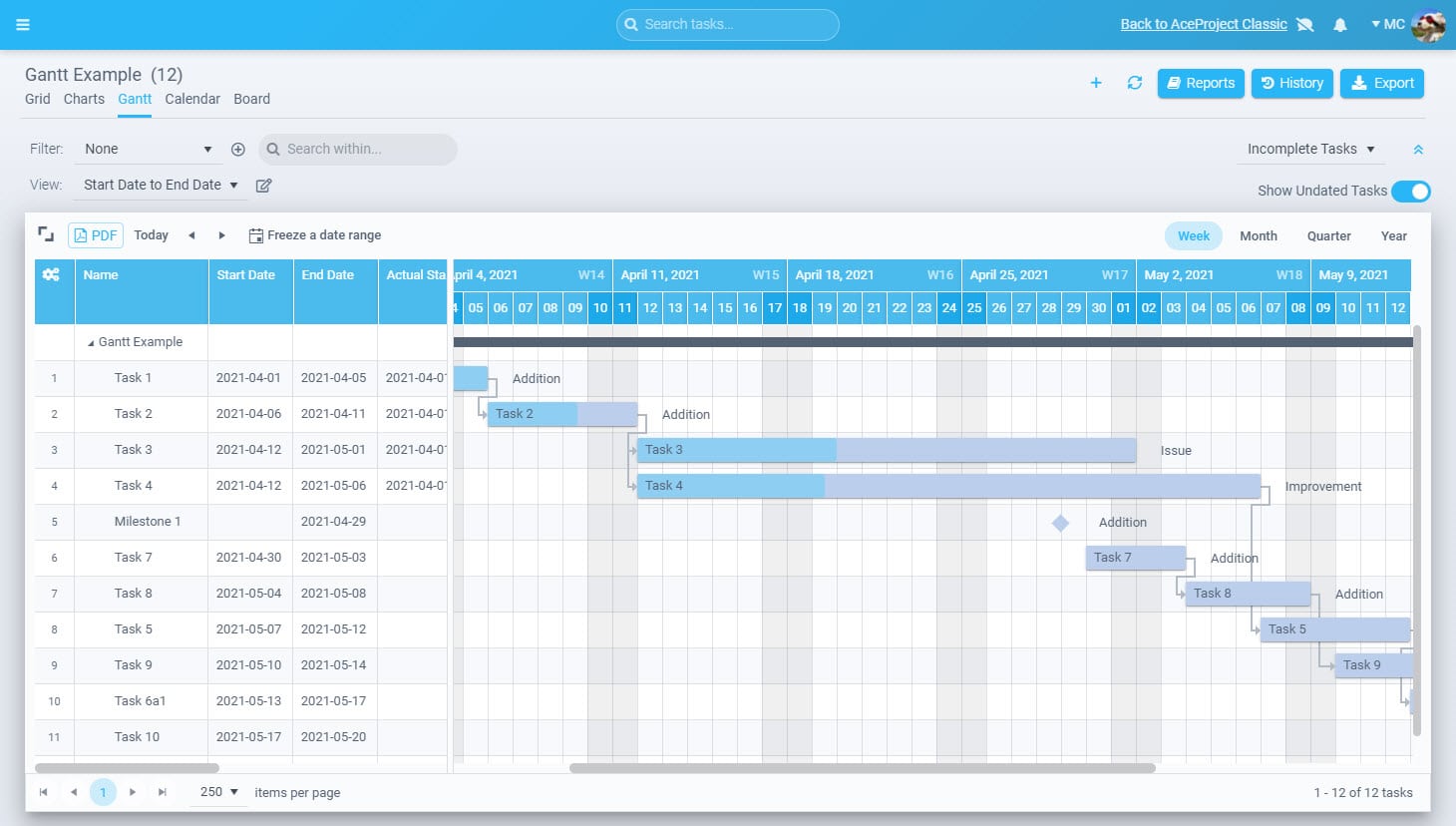
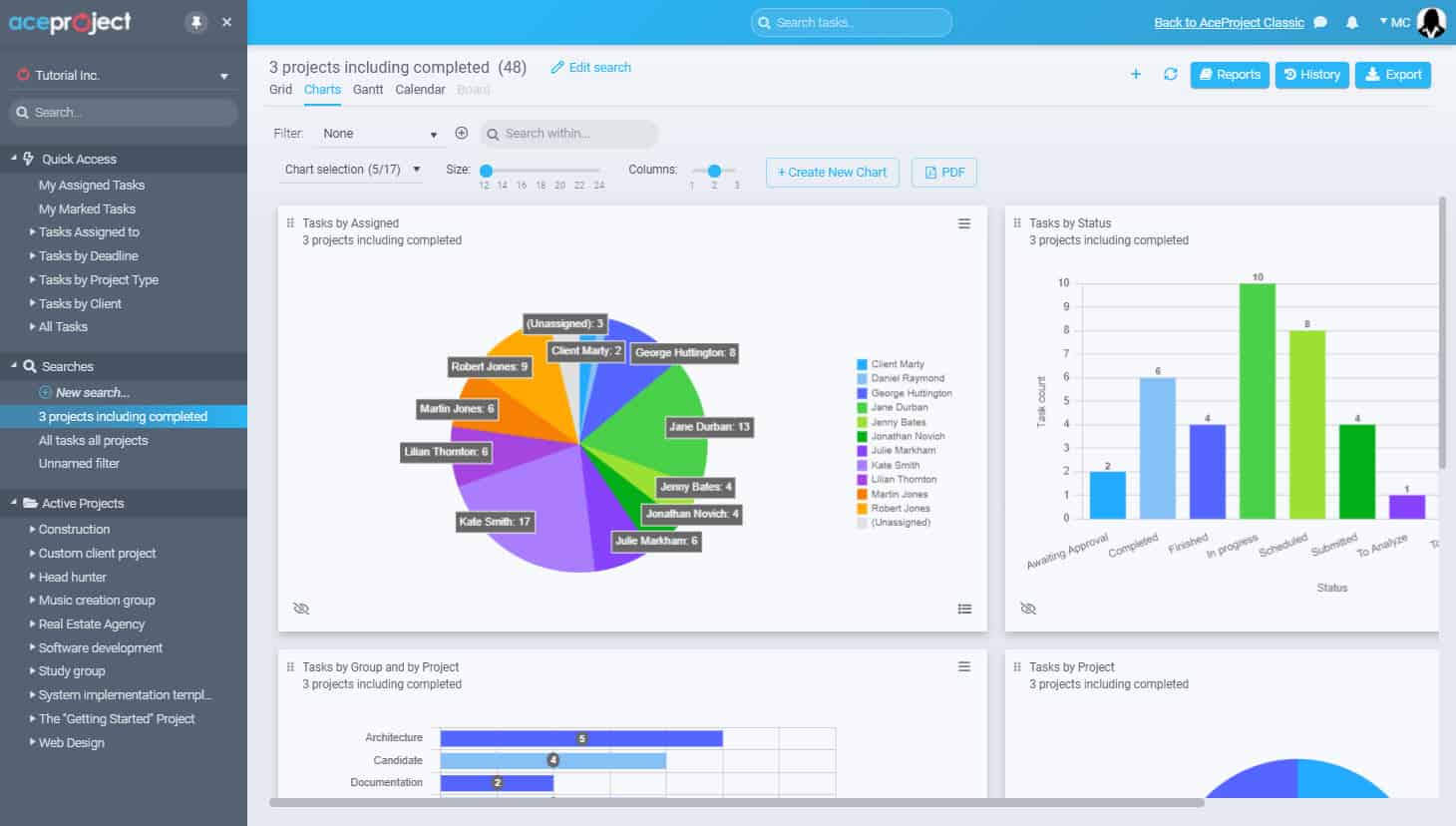
AceProject is a cloud-based project management platform developed by Websystems, Inc. in Quebec, Canada. Designed for teams across industries, including construction, IT, healthcare, and marketing, it provides a comprehensive suite of tools for managing projects from initiation to completion. Core capabilities include task tracking, time management, document control, expense reporting, and multi-project oversight from a single, web-accessible dashboard.
While AceProject does not yet offer the AI-driven automation featured by newer competitors, it compensates with a robust API that enables custom integrations and plug-in development. The platform’s strength lies in its financial oversight capabilities, with dedicated expense approval workflows and detailed time reports that support disciplined budget management. It is particularly well-suited to teams that prioritise control and auditability over interface modernity.
If you need an advanced reporting and exporting platform to boost Basecamp’s capabilities, consider Bridge24 for Basecamp.
Key Features
AceProject’s feature set supports full project lifecycle management through these capabilities:
- Gantt Charts: A visual project timeline tool that maps task sequences, dependencies, and milestone deadlines, giving project managers a structured overview of how work progresses across the entire project schedule.
- Advanced Reporting: Configurable reporting module that generates detailed analytics on task completion rates, team workloads, and budget consumption, supporting evidence-based decision-making throughout each phase of a project.
- Time Tracking and Approval: Multi-layered time tracking system with clock-in functionality, timesheet submission, and manager approval workflows, enabling accurate billing records and resource utilisation data across concurrent projects.
- Expense Management: Built-in expense tracking and approval module that records spending against project budgets, generates cost reports, and supports financial accountability from project kickoff through to delivery closeout.
- Document Management: Centralised file repository with version control, document locking, and sharing capabilities, ensuring every team member works from the most current asset while protecting files from accidental overwriting.
- Project Templates and Recurring Tasks: Configurable project templates and recurring task settings that reduce setup time for repetitive engagements and help teams maintain workflow consistency across different clients or project types.
- API Integration: Open API support that allows developers to build custom plug-ins and connect AceProject with existing tools, extending the platform’s functionality to meet unique organisational requirements over time.
Use Cases
AceProject is best suited for teams with these specific operational requirements:
- Construction and Engineering Teams: Project managers overseeing multi-phase builds benefit from AceProject’s Gantt charts and milestone tracking, which provide a structured view of contractor assignments, deadlines, and sequential task dependencies across complex projects.
- IT and Software Development Firms: Development teams use AceProject to assign tasks, log hours against project budgets, and produce performance reports that inform planning decisions on upcoming development cycles and client engagements.
- Financial Services Organisations: Finance teams rely on AceProject’s expense management and detailed reporting features to maintain strict budget oversight, document expenditure accurately, and produce audit-ready project cost summaries for internal stakeholders.
- Marketing Agencies Managing Multiple Clients: Agencies juggling numerous campaigns use AceProject’s multi-project dashboard and recurring task automation to keep client work visible, standardise delivery processes, and ensure no deadlines are missed.
- Healthcare and Compliance-Driven Organisations: Teams operating under regulatory frameworks benefit from AceProject’s document versioning and approval workflows, which help maintain accurate records, enforce accountability, and support audit requirements across project lifecycles.
Pricing Breakdown
AceProject uses an account-wide bundle pricing model tailored to accommodate all kinds of business and team realities, rather than traditional per-user licensing:
- Basic Plan (Free): Supports 3 active users, 3 active projects, and 1 GB of storage.
- Standard Plan ($24 per month): Supports 10 active users, 10 active projects, and 5 GB of storage.
- Advanced Plan ($49 per month): Supports 30 active users, 30 active projects, and 15 GB of storage.
- Silver Plan ($99 per month): Supports 100 active users, 100 active projects, and 50 GB of storage.
- Gold Plan (custom pricing — contact for quote): Supports unlimited users, unlimited projects, and 100+ GB of storage.
Teams can get started by creating a free account and upgrading at any time from within the application.
2. monday.com
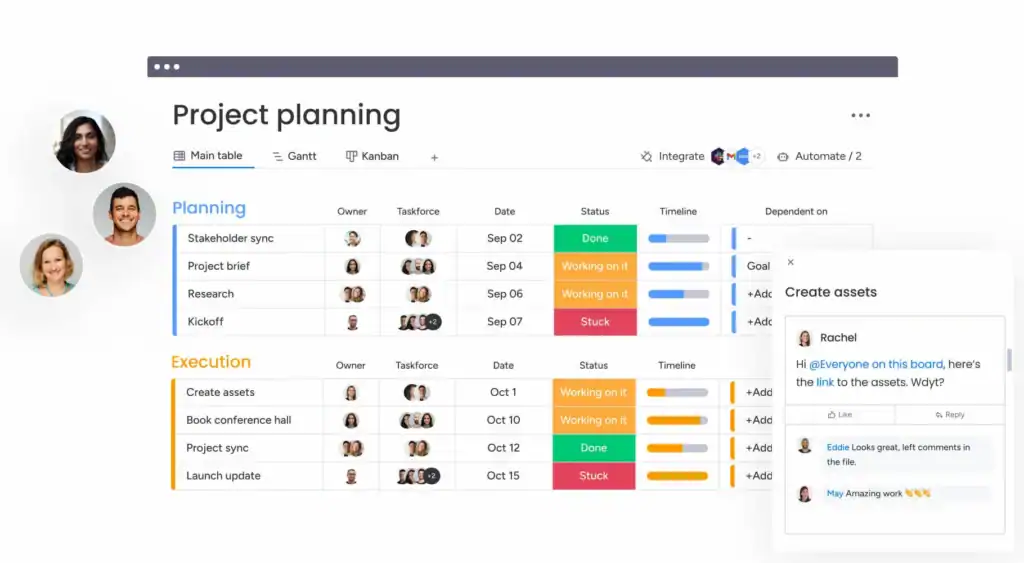
Monday.com is one of the most widely adopted work management platforms available, serving over 250,000 customers globally across industries including technology, finance, marketing, and professional services. Originally known as a highly customisable project management tool, it has evolved significantly into a fully-fledged AI work platform, integrating intelligent automation, AI-powered agents, and an expanding suite of product-specific modules for CRM, service management, and software development.
At its Elevate 2025 conference, monday.com unveiled monday agents, AI-powered specialists designed to handle tasks end-to-end without human intervention. The platform now includes monday sidekick, monday magic, and monday vibe, a tool that enables users to build software using plain English prompts. These capabilities position monday.com well beyond a standard project management tool, making it a compelling choice for teams looking to adopt agentic, AI-driven workflows at scale.
Key Features
Monday.com’s platform delivers a broad range of capabilities across these core areas:
- Monday Agents: AI-powered autonomous specialists that go beyond assisting users to completing tasks end-to-end, including risk analysis, onboarding, and workflow orchestration without requiring continuous manual input from the project team.
- Over 200 Workflow Templates: Extensive template library covering project management, CRM, HR, marketing, and software development, enabling teams to set up structured workflows quickly without building every process from scratch.
- 27-Plus Work Views: Comprehensive range of views including Kanban, Gantt, timeline, calendar, chart, map, and workload options, giving every team member flexibility to visualise work in the format most useful to their role.
- Advanced Automation Engine: Automation builder handling rule-based workflow triggers across boards and products, with up to 100,000 automation actions per month on Pro plans, significantly reducing repetitive administrative overhead.
- Monday Sidekick and AI Assistant: Conversational AI embedded across the platform that summarises data, drafts content, suggests automations, generates formulas, and assists with onboarding new users to specific workflows and platform features.
- CRM, Dev, and Service Suites: Separate but integrated product lines covering sales CRM, software development, and customer service, allowing organisations to run multiple business functions from within a single unified ecosystem.
Use Cases
Monday.com is an ideal choice for teams with these working requirements:
- Cross-Functional Enterprise Teams: Large organisations with multiple departments benefit from monday.com’s board-based architecture, which supports distinct workflows per team while offering leadership a unified dashboard for portfolio-level oversight.
- Product and Software Development Teams: Development teams use monday.com’s sprint planning, dependency tracking, and integrations with tools like GitHub to manage agile workflows and release cycles from a single, centralised platform.
- Sales and Marketing Operations: Teams managing pipelines, campaigns, and client communications use the monday CRM suite alongside work management boards to align sales activity with project delivery and track engagement in one place.
- Remote and Distributed Workforces: With built-in real-time collaboration, automated check-ins, and asynchronous-friendly structure, monday.com is well configured for globally distributed teams needing strong visibility across different time zones.
- Organisations Adopting AI-Driven Workflows: Teams exploring how to automate repetitive processes and deploy intelligent task handling will find monday agents and the AI credit system a practical entry point into agentic project management.
Pricing Breakdown
Monday.com pricing spans five tiers from free to fully custom enterprise plans:
- Free Plan: Supports up to two seats with three boards and 500 MB of storage, suitable for individuals or pairs exploring the platform before committing to a paid subscription with additional features.
- Basic Plan ($9 per seat per month, billed annually): Provides unlimited boards, unlimited free viewer access, and five GB of storage, covering essential project management features with a minimum of three seats required per account.
- Standard Plan ($12 per seat per month, billed annually): Monday.com’s most popular tier, adding Gantt views, timeline, calendar, automation, integrations, and guest access with 20 GB of storage, also requiring a minimum of three seats.
- Pro Plan ($19 per seat per month, billed annually): Adds time tracking, formula columns, private boards, dependency columns, chart views, and up to 100,000 automation and integration actions per month alongside 1,000 GB of storage.
- Enterprise Plan (custom pricing): Tailored for large organisations requiring advanced security, multi-level permissions, dedicated onboarding, enterprise automations, and a dedicated customer success manager with a 99.9% uptime service-level agreement.
- AI Credits (from May 2026 for new accounts): AI credits must be purchased alongside seats, enabling access to monday agents, AI blocks, and all AI capabilities, priced at $0.01 per credit on annual billing for Standard and Pro tiers.
3. Hive
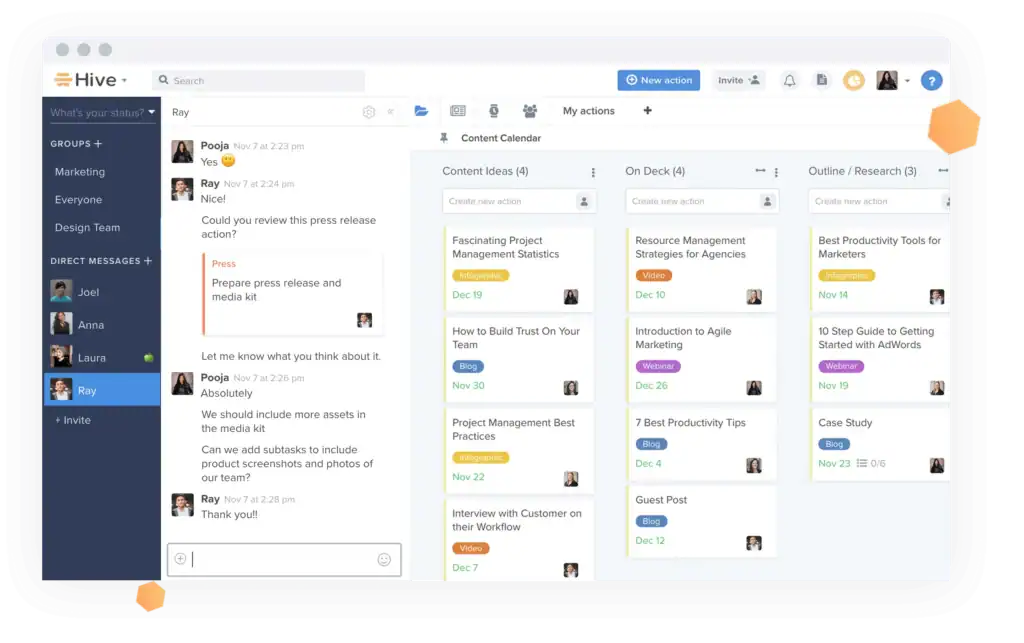
Hive is an all-in-one project management and collaboration platform launched in 2016, designed to consolidate the tools teams use across planning, communication, and delivery into a single workspace. It supports multiple project views, including Gantt, Kanban, calendar, table, and portfolio views, and natively integrates with email, Salesforce, Zoom, Slack, and over 1,000 other applications to connect project work with customer and operational data.
Hive’s standout AI offering is its HiveMind assistant, which automates routine tasks, answers questions using actual workspace data, and generates project plans and content within the platform. This is supplemented by Buzz, a workspace intelligence tool that resolves queries without requiring users to change context. Together, these features reflect Hive’s commitment to embedding practical AI across everyday project workflows throughout the team.
Key Features
Hive’s capabilities span project management, collaboration, and AI across these key areas:
- HiveMind AI Assistant: Embedded AI tool that automates project plan creation, conducts market research, generates written content and custom images, and provides contextual answers using live workspace data rather than generic AI responses.
- Multiple Project Views: Six flexible viewing options, including Gantt, Kanban, calendar, table, team, and portfolio views, allowing individual contributors and managers to track work in the format that best serves their working style.
- Native Salesforce and Email Integration: Direct integration with Salesforce and email clients connects project task management with customer relationship data, giving client-facing teams full visibility across projects and accounts without switching platforms.
- Over 1,000 App Integrations: Broad integration ecosystem covering productivity tools, cloud storage services, communication platforms, and business applications, allowing teams to build a connected workflow without abandoning their existing preferred tools.
- Time Tracking and Resourcing: Built-in time tracking linked to individual tasks and projects, combined with resource management tools that allow managers to view team capacity and redistribute workloads to prevent burnout.
- Goal Tracking and Approvals: Native goal-setting features that link project tasks to measurable business objectives, alongside a structured approval workflow for reviewing and signing off on deliverables without leaving the platform.
- Pre-Built Templates and Custom Workflows: A library of ready-to-use project templates across departments, complemented by customisable workflow automation that handles recurring processes and reduces manual task management overhead.
Use Cases
Hive is particularly well-suited to teams operating in these specific contexts:
- Client-Facing Agency Teams: Agencies managing external client projects benefit from Hive’s native Salesforce integration and email connectivity, which aligns project execution with customer data and keeps all communications visible within the workspace.
- Small to Mid-Sized Teams Seeking Simplicity: Hive’s clean interface and short learning curve make it accessible for smaller teams that need robust project management without the configuration complexity found in larger enterprise-grade platforms.
- Teams Consolidating Multiple Tools: Organisations looking to replace several disconnected applications with one platform will find Hive’s combination of task management, built-in chat, time tracking, approvals, and goal-setting a compelling consolidation option.
- Creative and Content Teams: Hive’s ability to generate content and images via HiveMind, combined with its built-in approval workflows, makes it well-suited to content production teams managing review cycles and creative asset delivery pipelines.
- Remote Teams Requiring Real-Time Collaboration: With built-in messaging, shared notes, Zoom integration, and real-time project view updates, Hive provides remote teams with the transparency and communication infrastructure needed to stay aligned effectively.
Pricing Breakdown
Hive’s pricing model includes a free tier and several paid options (billed monthly, with a 33% saving available on annual billing):
- Free Plan ($0 — Free Forever): Available for up to ten workspace members with unlimited tasks, unlimited collaborative notes, 200MB storage, multiple work views, email in Hive, and native chat messaging.
- Starter Plan ($5 per user per month): Includes everything in the Free plan, plus unlimited storage, up to ten workspace members, up to ten projects, Gantt view, cloud storage integrations, in-app calendar, Zoom and Slack connectivity, and access to the AI assistant feature.
- Teams Plan ($12 per user per month): Includes everything in the Starter plan, plus unlimited workspace members, flexible add-ons, shareable forms, time tracking, portfolios, team sharing, and custom fields, labels, and statuses.
- Enterprise Plan (pricing available on request): Includes everything in the Teams plan, plus flexible add-ons included at no extra cost, enhanced security and permission controls, unlimited onboarding, a dedicated customer success manager, enterprise API access, and access to professional services.
4. ProofHub
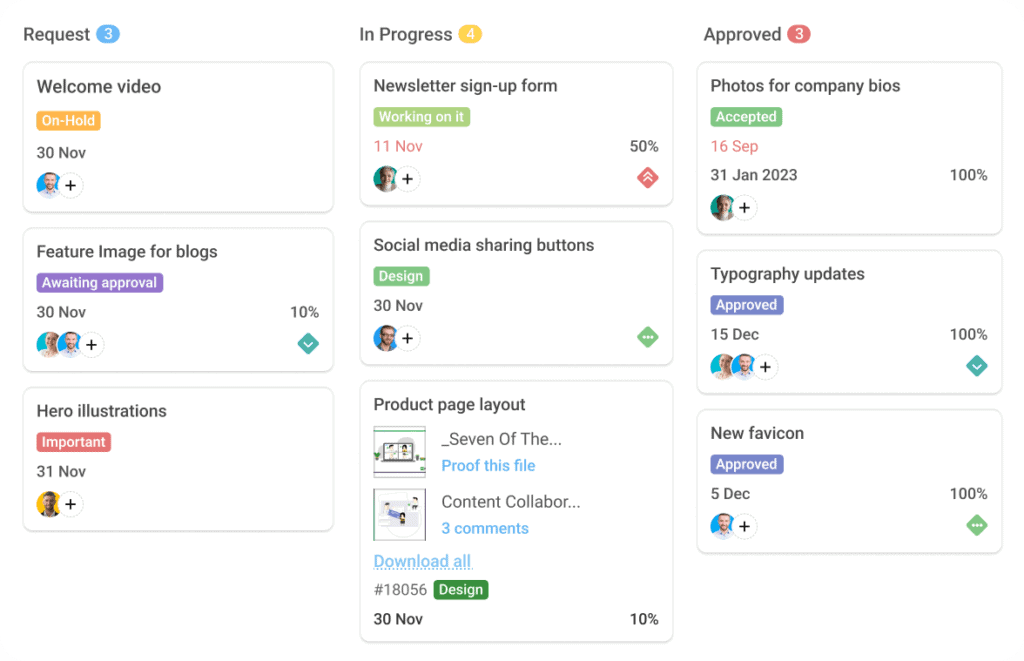
ProofHub is an all-in-one project management and team collaboration platform trusted by organisations including Google, NASA, Netflix, Disney, and Nike. It brings together project planning, task management, time tracking, communication, and file proofing within a single interface. Designed for simplicity and accessibility, ProofHub serves teams from small agencies to large enterprises, making it a versatile alternative to both Basecamp and more feature-heavy enterprise platforms.
In 2025 and into 2026, ProofHub introduced AI-powered task assignment automation, which learns from team workflows and allocates routine tasks based on member availability and skill sets. While competitors like monday.com have invested heavily in full AI agent frameworks, ProofHub maintains its competitive advantage through its uniquely flat pricing model, allowing unlimited users at a fixed monthly rate that does not escalate with team growth.
Key Features
ProofHub’s integrated platform addresses project delivery and team collaboration through these capabilities:
- Gantt Charts: A visual project timeline builder that maps tasks, dependencies, and milestones, enabling managers to plan, visualise, and adjust project schedules while keeping the full team aligned on all delivery timelines.
- Multiple Project Views: Kanban boards, calendars, Gantt charts, table views, and list formats give project managers and team members flexibility to track work in the view most relevant to their role and task type.
- Built-In Online Proofing Tool: Native file review and markup system that allows teams to annotate documents, designs, and assets directly within ProofHub, centralising feedback and approval cycles without relying on any external review tools.
- Time Tracking and Timesheets: Integrated time logging feature that records hours against individual tasks and projects, with exportable timesheet reports supporting billing accuracy and resource utilisation analysis across client engagements.
- Custom Roles and Permissions: Granular user permission system allowing administrators to define exactly what each team member or external user can view, edit, or manage, supporting security requirements and client collaboration needs.
- Team Chat and Discussion Threads: One-on-one and group chat functionality alongside structured discussion topics and centralised comment threads, keeping all project-related conversations organised and accessible throughout each project lifecycle.
- AI-Powered Task Assignment: Automation that learns from team workflows and assigns routine tasks based on member availability and skill sets, reducing manual scheduling effort and helping managers maintain sustainable and balanced workloads.
Use Cases
ProofHub is best suited to teams operating in these specific environments:
- Design and Creative Agencies: Teams producing visual assets, marketing materials, and content benefit from ProofHub’s built-in proofing and annotation tools, which streamline client review cycles and eliminate the need for separate feedback platforms.
- Consulting Firms Managing Multiple Client Projects: Consultants running parallel client engagements use ProofHub’s project segmentation, custom roles, and centralised communication features to maintain clear boundaries between client workspaces and control information access precisely.
- Software Development Teams Using Agile Methods: Development teams adopt ProofHub’s Kanban boards, Gantt chart dependencies, and sprint-compatible task structures to manage iterative delivery cycles while keeping non-technical stakeholders informed via clear visual timelines.
- Organisations Seeking Predictable Software Costs: Companies concerned about per-user cost escalation as their teams grow find ProofHub’s flat-rate unlimited user pricing a significant financial advantage, particularly when scaling beyond fifteen to twenty people.
- Educational Institutions and Training Providers: Schools and training organisations use ProofHub to coordinate educators, content developers, and administrators, with straightforward task assignment and centralised file management, reducing the complexity of cross-team scheduling.
Pricing Breakdown
ProofHub uses flat-rate pricing that is not tied to user count:
- Essential Plan ($45 per month, billed annually; $50 billed monthly): Supports unlimited users and up to 40 projects with 15 GB of storage, including task management, Gantt charts, time tracking, and full team communication tools at a fixed rate.
- Ultimate Control Plan ($89 per month for the first three months, then $135 per month): Includes unlimited users, unlimited projects, 100 GB of storage, and advanced features such as custom roles, white labelling, IP restrictions, and priority support for larger organisations.
- 14-Day Free Trial: Both plans are accessible via a 14-day free trial with no credit card required, allowing teams to evaluate the platform’s complete feature set thoroughly before committing to any paid subscription tier.
5. ClickUp
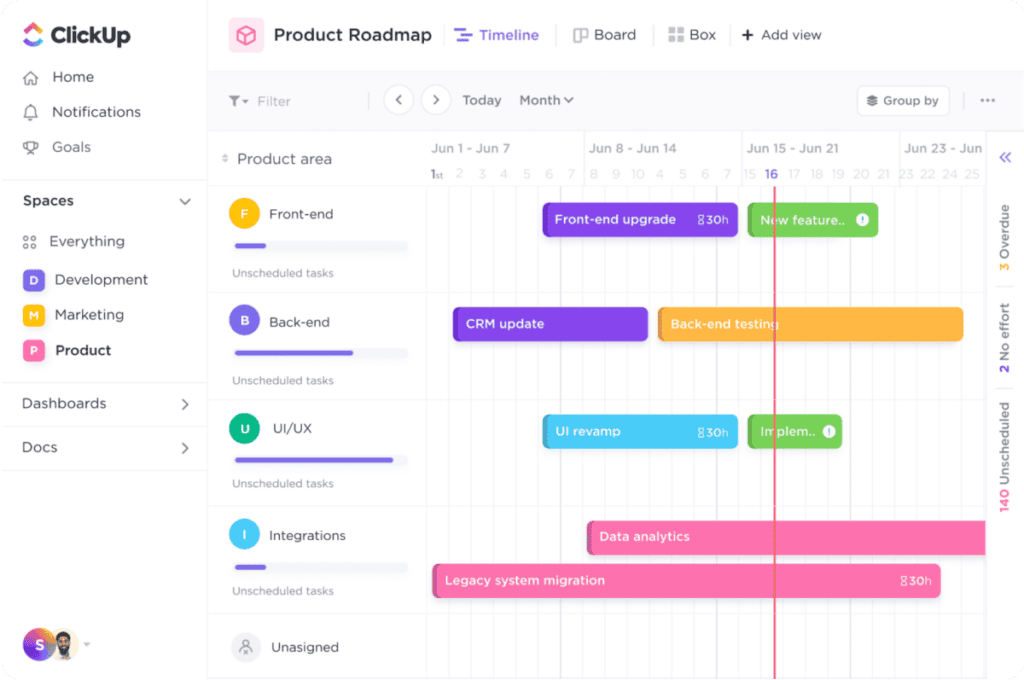
ClickUp positions itself as the “everything app for work,” combining task management, collaborative documents, goal tracking, whiteboards, time tracking, and team chat within a single platform. It is one of the most feature-rich project management tools available in 2025, used widely by software developers, product managers, engineers, marketing teams, and operations professionals who require deep workflow customisation at highly competitive pricing across its plan tiers.
ClickUp’s most significant recent development is ClickUp Brain, an AI add-on that integrates generative AI, intelligent search, and workflow automation across the platform. Available from $7 per user per month, Brain offers automated task summaries, AI-generated responses, and smart workspace search. While a separate cost, it significantly extends ClickUp’s utility for teams investing in automation-driven work management throughout the organisation.
Key Features
ClickUp’s extensive feature set spans task management, AI, and collaboration tools:
- ClickUp Brain (AI Add-On): Optional AI layer available from $7 per user per month that adds generative AI, task auto-summarisation, intelligent search, and automation suggestions across tasks, documents, and project dashboards throughout the workspace.
- 15-Plus Custom Views: Over 15 flexible view options, including Gantt, timeline, calendar, board, list, chat, and workload views, allowing teams to visualise project progress in whichever format best supports their day-to-day workflow.
- ClickUp Docs: Collaborative document editor embedded directly within the platform, enabling teams to create wikis, standard operating procedures, project briefs, and meeting notes that link directly to tasks across the workspace.
- Whiteboards: Built-in visual brainstorming tool that allows teams to map ideas, create process flows, and connect whiteboard nodes directly to actionable tasks, making it valuable for planning sessions and project kickoff workshops.
- Goals and OKR Tracking: Native goal-setting feature allowing teams to define measurable objectives, link them to specific tasks or milestones, and track progress automatically as work is completed throughout the sprint or quarter.
- Custom Automation Builder: Workflow automation engine supporting up to 25,000 automation actions per month on the Business plan, enabling teams to automate task assignments, status updates, notifications, and cross-workspace triggers at scale.
- Sprint Management and Agile Tools: Native sprint planning, backlog management, and burndown chart functionality built for Agile teams, enabling scrum masters and product managers to run structured sprint cycles without additional tooling.
Use Cases
ClickUp serves a wide range of teams across these use cases:
- Software Development and Engineering Teams: Developers benefit from ClickUp’s sprint planning, backlog management, Agile views, and deep integrations with GitHub, GitLab, and Figma to manage full development cycles from a single workspace.
- Product Management Teams: Product managers use ClickUp to manage roadmaps, track OKRs, assign feature requests, and maintain visibility across multiple product areas and teams without switching between disconnected tools.
- Marketing and Content Teams: Campaign managers rely on ClickUp’s custom status tracking, recurring tasks, collaborative docs, and automation triggers to manage editorial calendars, campaign launches, and content production pipelines end-to-end.
- Remote and Asynchronous Teams: ClickUp’s range of views, real-time notifications, and async-compatible commenting system supports globally distributed teams that need strong task visibility and clear accountability without dependence on synchronous meetings.
- Budget-Conscious Teams Seeking Comprehensive Features: ClickUp’s free tier and Unlimited plan at $7 per user per month offer an exceptional feature-to-cost ratio, making it particularly attractive to startups and small teams managing tight software budgets.
Pricing Breakdown
ClickUp’s pricing structure spans four plans from a free tier upwards:
- Free Forever Plan: Includes unlimited tasks, collaborative docs, whiteboards, and sprint access with 100 MB of storage, making it one of the most feature-generous free plans available in the project management software category.
- Unlimited Plan ($7 per user per month, billed annually; $10 billed monthly): Removes storage limits and adds unlimited integrations, Gantt charts, time tracking, and 1,000 automation actions per month, suited to early-stage startups and smaller teams.
- Business Plan ($12 per user per month, billed annually; $19 billed monthly): Adds Google SSO, advanced reporting, workload management, 25,000 automation actions per month, and additional security controls for mid-sized teams with more complex workflow requirements.
- Enterprise Plan (custom pricing): Includes enterprise-grade security, dedicated support, unlimited automations, custom onboarding, managed user permissions, and service-level agreement options tailored to large-scale organisational deployments across the platform.
- ClickUp Brain (AI Add-On, from $7 per user per month): Optional AI layer available on all paid plans, adding generative AI, smart workspace search, automated task summaries, and workflow intelligence across every area of the ClickUp platform.
6. Toggl Focus (formerly Toggl Plan)
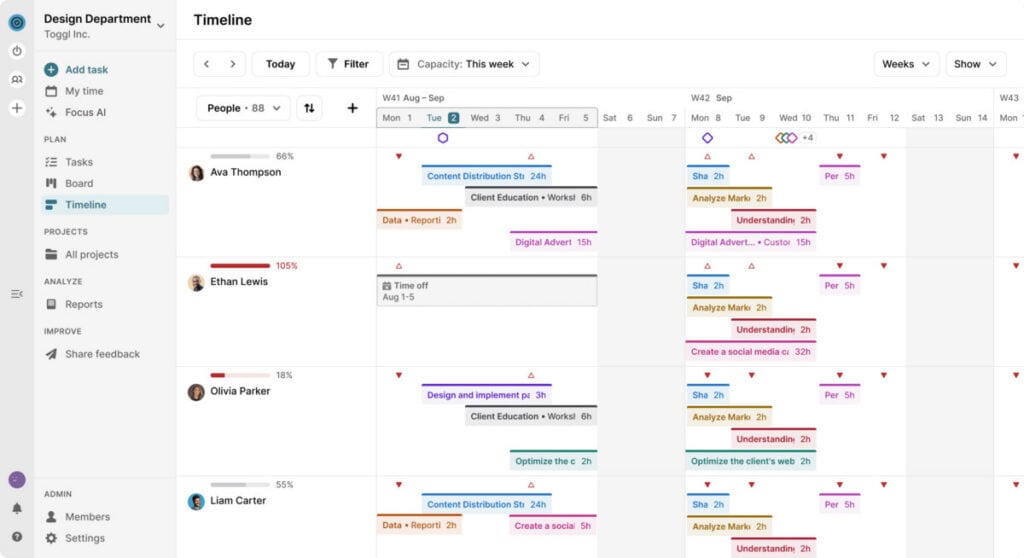
Toggl Focus is a visual project planning and resource management platform that has evolved significantly following its 2025 rebranding. Built on over 15 years of time-tracking expertise, Toggl Focus differentiates itself from competing tools by placing time intelligence at the core of every planning decision — not as an afterthought, but as the foundation.
It is designed for individuals, freelancers, and small to mid-sized teams in knowledge-based industries who need clear capacity management and accurate project planning without operational complexity or enterprise bloat. Unlike most planning tools that treat time tracking as a secondary feature, Toggl Focus connects plans directly to real-time data, making estimates smarter over time and giving teams genuine visibility into workloads, capacity, and profitability.
Key Features
Toggl Focus centres its feature set around time-informed planning and team clarity:
- Time Tracking Integration: Flexible time entry options, including live timer, manual entry, calendar sync, and Pomodoro mode, all feeding into a unified data layer. Teams can see estimated versus actual time per task and project at a glance, closing the gap between planning assumptions and reality.
- Capacity and Workload Management: Real-time capacity view that accounts for holidays, time off, and actual working hours, enabling managers to spot overbooked team members before burnout occurs rather than after the damage is done.
- Reporting and Clarity: Built-in reports pulling together time tracked, billable rates, utilisation, and capacity in a single view — eliminating the need to export data into spreadsheets. Filter by member, client, priority, project, or status for targeted insight.
- Multiple Project Views: Board, Calendar, and Timeline views that can be switched without losing context, with the ability to zoom into a single day or out to a full quarter, depending on planning needs.
- Cross-Platform Time Tracking: Native desktop apps for Mac and Windows, iOS and Android mobile apps, a browser extension that pre-fills time entries from supported tools, and a one-way Jira sync that automatically carries over projects, issues, labels, and assignees.
- Milestone and Priority Visibility: Shared project timelines ensure all team members see the same milestones, reducing the need for status update meetings and keeping priorities transparent across the team.
Use Cases
Toggl Focus suits teams and individuals with these specific planning and management requirements:
- Freelancers and Independent Contractors: Solo professionals benefit from the combination of planning and time tracking in a single tool, building a historical time record that makes future estimates more accurate and supports transparent client billing.
- Knowledge-Based Service Agencies: Consulting, design, and professional services agencies managing multiple concurrent client projects gain timeline visibility, capacity tracking, and billability reporting in one place.
- Small Teams Without Dedicated Project Managers: Teams that need project oversight without complex software benefit from Toggl Focus’s straightforward interface and minimal learning curve, with enough structure to keep work aligned without enterprise overhead.
- Agencies Tracking Billable Hours: Teams billing clients by the hour can connect planned tasks to tracked time, access billability reports per project and member, and use real data to price proposals and manage scope accurately.
- Growing Teams Managing Capacity: Managers overseeing expanding teams use Toggl Focus’s capacity and workload views to distribute work evenly, prevent burnout, and maintain deadline reliability as team size increases.
Pricing Breakdown
Toggl Focus offers four pricing plans, including a free entry-level option:
- Free Plan ($0): Available at no cost for up to five users, including time tracking with manual and real-time timers, focus mode, calendar integrations, basic task and board management, task estimates, and personal-level reports to track individual progress.
- Starter Plan ($9 per user per month): Adds billable rates, timeline views, tags, milestones, PTO, and public holiday tracking, flexible hours, and team-level reports — designed for teams that need clarity on availability and workload grounded in real-time data.
- Premium Plan ($20 per user per month): Expands on Starter with full capacity management including utilization and workload reporting, project dashboards with time actuals vs. estimates and smart forecasts, labor costs and profitability reports, Jira integration, fixed fee projects, and single sign-on (SSO) — suited to teams that need confidence in future project delivery.
- Enterprise Plan (Custom Pricing): A turnkey solution built for larger organizations, adding custom roles, personalized onboarding, priority support, custom engineering solutions, and multiple workspaces under a single subscription.
Conclusion
Each platform reviewed in this guide represents a distinct and considered approach to the challenges of modern project management. AceProject and ProofHub offer reliable, cost-effective solutions for teams that value straightforward functionality and predictable pricing. Hive and monday.com stand out for collaborative capabilities and AI-driven features, with monday.com’s agent workflows positioning it as a leading platform for teams ready to automate work at scale.
ClickUp delivers outstanding value for budget-conscious teams requiring a broad feature set, while Toggl Plan suits those prioritising visual simplicity and capacity management. As AI becomes increasingly central to how project management platforms evolve, the right choice ultimately depends on your team’s size, complexity, and readiness for automation. Use available free trials to evaluate each platform carefully before committing to any subscription.
Suggested articles:
- The Pros and Cons of Using Basecamp Software
- Basecamp Pricing Plans & Costs Guide
- The Pros and Cons of Using AceProject Software

Daniel Raymond, a project manager with over 20 years of experience, is the former CEO of a successful software company called Websystems. With a strong background in managing complex projects, he applied his expertise to develop AceProject.com and Bridge24.com, innovative project management tools designed to streamline processes and improve productivity. Throughout his career, Daniel has consistently demonstrated a commitment to excellence and a passion for empowering teams to achieve their goals.