
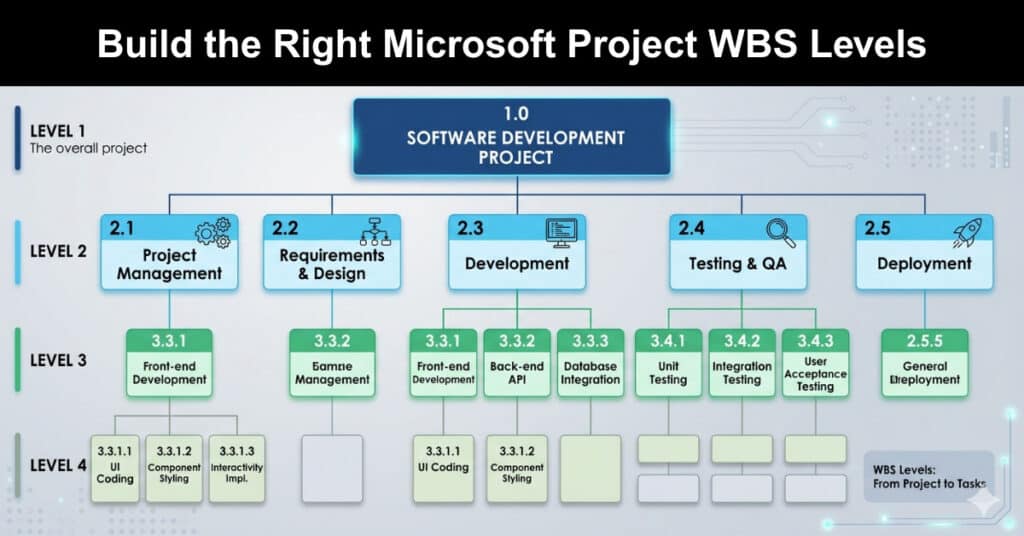
A work breakdown structure serves as the foundational architecture for any successful project schedule. Creating an effective framework requires a deep understanding of how tasks decompose into manageable components. This guide explores how to optimize your project hierarchy, improve resource accountability, and leverage the latest modern scheduling tools to ensure your project delivery remains on time and within scope.
The evolution of enterprise scheduling tools introduces new terminology that project managers must navigate carefully. While the core mechanics of decomposition remain unchanged, the platform ecosystem has evolved significantly. This article provides a comprehensive blueprint for structuring your project data, establishing clear resource ownership, and configuring your scheduling environment for maximum tracking efficiency and overall team success.
Poor Microsoft Project WBS Example
Ineffective project schedules frequently suffer from a major structural flaw known as over-allocation or ambiguous assignment. When a project manager lists high-level summary tasks without breaking them down into specific work packages, the tracking process becomes highly compromised. This lack of granularity creates immediate visibility challenges during execution and obscures the actual progress of individual deliverables.
This work breakdown structure (WBS) is a poor one because numerous team members are assigned to each task without a clear definition of who is working on the task. When tracking against these tasks, it becomes difficult to understand which team member contributed to the system integration task. When monitoring this level, there is always a detailed discussion around the unlisted functions contributing to the overall task.
If delays occur, the project manager will have difficulty explaining why the summary task is late. In larger projects, presenting the project status becomes even more complicated if the project manager doesn’t understand the details behind the work breakdown structure. Below is an example of a poor WBS (Figure 1):

Figure 1 – Poor WBS Example
Better MS Project WBS Example
An optimized work breakdown structure solves tracking ambiguities by decomposing major deliverables into individual work packages. This approach ensures that every micro-deliverable aligns with a specific owner, eliminating confusion during status updates. By establishing this granular level of control, the project manager can easily monitor the health of the project and identify baseline variances early.
A better approach includes the additional tasks and assigns individual team members to each task as appropriate. Assigning multiple resources to the same task is acceptable as long as the project manager can accurately track the task’s progress by a team member. According to PMBOK, the work elements “should be described in terms of tangible, verifiable results to facilitate performance measurement” (PMBOK, 1996). Simply put, the WBS needs to be defined at a measurable level that specifically and clearly describes the task.

In the improved WBS (Figure 2), the summarized project task depends on the subtasks in the project plan. Each sub-task contributes to the overall summary task. Each subtask is uniquely identified and assigned a resource. The plan details are improved, and the project manager can quickly identify the individual tasks by resource. It also holds the team members accountable for the individual deliverables and helps identify additional dependencies.
Including the Work Breakdown Structure ID in the Gantt chart view is also helpful. To add the Work Breakdown Structure ID:
- Select View – Gantt Chart
- Select Table – Entry
- Click on the Task Name column or another column
- Select Insert – Column
- Select the WBS value
- Click Ok
By providing detailed subtasks, overall project control is improved. There is no task ambiguity, and project team members know who works on the individual tasks. By decomposing the WBS to the “right” level, the project manager can adequately track the work with sufficient control. Depending on the process steps and work involved, the “right” level may differ between three and six WBS levels.
The project manager should avoid providing too much detail; however, the “right” level still depends on the project. When the project manager applies resource leveling to the project schedule, it will be easier to level with each task assigned to a single unique resource.
Adapting to the New Project Planner Ecosystem
The modern project management landscape requires familiarity with recent software rebranding and functional updates. Microsoft has unified its powerful scheduling tools under the collective Planner ecosystem, affecting how users access features. Understanding these tier differences ensures your project team utilizes the correct interface commands for creating hierarchical task lists and managing deliverables.
The choice of application tier determines your specific user interface capabilities and structural constraints. Here are the three main environment options available for modern project planning:
- Planner Basic: This lightweight version comes included with standard corporate accounts and offers basic task management without support for nested task hierarchies.
- Planner Premium: This advanced web application represents the evolution of web scheduling, utilizing a clean grid view where users configure tasks.
- Project Desktop Client: This robust application remains the traditional powerhouse for complex tracking, allowing advanced customization, resource leveling, and structural control.
Best Practices for Hierarchical Soundness
Maintaining a mathematically sound and logical structure requires adhering to established project management guidelines. A well-structured hierarchy prevents the project schedule from becoming either too vague or overly cumbersome to maintain. Implementing standardized rules ensures consistency across subtasks, balancing necessary detail with high-level summaries for executive reporting stakeholders.
The following core design principles help ensure your breakdown structure remains accurate and highly manageable:
- The 100% Rule: Every hierarchical level must fully encompass all the work required for its parent task without omitting any deliverables.
- The 8/80 Rule: Work packages should be scoped to require between eight and eighty hours of operational effort for proper tracking.
- Outcome-Based Naming: Tasks should be titled using nouns that describe the final verifiable deliverable rather than using ambiguous action verbs.
Conclusion
Building a robust work breakdown structure is essential for maintaining scheduling accuracy and ensuring clear resource accountability. Whether utilizing the traditional desktop application or transitioning to the updated web-based planning ecosystem, the core principles of structural decomposition remain identical. Granular task separation empowers project managers to track progress effectively, minimize reporting ambiguity, and optimize overall team performance.
Ultimately, mastering these hierarchical techniques allows organizations to execute complex initiatives with greater predictability and control. By implementing disciplined scope decomposition and leveraging appropriate software fields, you safeguard your project baseline against common tracking pitfalls. Review your current project schedules today to ensure your task structures provide the visibility your team needs.
FAQs
How does the Microsoft rebranding affect my existing desktop project files?
The renaming of the ecosystem does not modify or corrupt your local project files. The desktop client application retains its full traditional functionality, allowing you to open, edit, and manage your hierarchical schedules exactly as before. The changes primarily focus on licensing bundles and the integration of web-based collaborative tools.
What is the ideal number of levels for a standard project schedule?
Most experienced project managers recommend limiting the total structural hierarchy to four or five levels. Going deeper often introduces unnecessary administrative overhead and makes the Gantt chart difficult to read. The structure should remain deep enough to assign clear accountability but shallow enough to maintain operational agility.
Can I generate automatic alphanumeric WBS codes in the web version?
The web-based premium interface focuses on visual hierarchy using modern collapsible task rows and timeline views rather than traditional alphanumeric numbering strings. If your stakeholders strictly require rigid numeric codes like one point one, utilizing the traditional desktop client remains the most effective approach for your portfolio.
How do summary tasks behave when tracking actual project costs?
Summary tasks act as automated consolidation points that reflect the collective data of their underlying work packages. You do not manually enter progress or cost data directly into a summary row. Instead, the system automatically aggregates the durations, baseline costs, and resource hours from the individual subtasks.
Why should I avoid assigning multiple resources to a single work package?
Assigning multiple individuals to one specific task reduces individual accountability and complicates progress tracking. If a deliverable falls behind schedule, it becomes difficult to isolate the bottleneck or balance workloads. Splitting the work into distinct subtasks with unique owners ensures cleaner metrics and easier resource leveling.
Suggested articles:
- Resource Management Using Microsoft Project
- Finding Late Tasks with Microsoft Project Custom Filters
- How to Calculate Earned Value in Microsoft Project

Andrew Makar, DMIT, PMP, CSM is an IT director with delivery experience across projects, programs and portfolios in Digital Marketing, Automotive, Software and Financial Management industries. He is an enthusiastic leader who effectively translates project management theory into practical application. His area of interest and practice is in implementing Agile processes and SCRUM techniques to deliver better software to his customers. Find out more about Andrew on andymakar.com and please reach out and connect with Andrew on LinkedIn.