
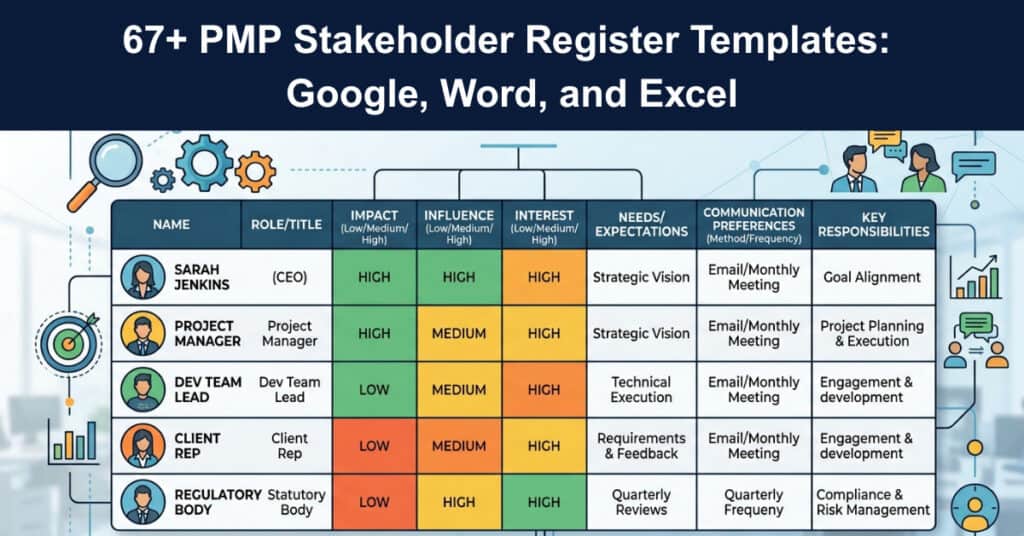
Every project manager eventually learns that stakeholder expectations shape a project’s outcome as much as its plan does, and the stakeholder register is the document that captures them all. It records who the work affects, what each person wants, and how much influence they hold. Kept current, it becomes the most reliable map of the people a project depends on from day one.
This guide explains why a template saves time, who owns the register, and how to build one through identification, evaluation, and classification. It also reviews the best free options available in Word, Excel, PDF, and online tools. By the end, you will know exactly how to create and maintain a register that keeps stakeholders engaged and moves projects forward productively.
Why Do You Need to Use a Template?
Templates are a lifesaver for any project because they provide the framework and details that get you back on track with your work quickly. They save time in reviews and reduce the need for fresh set-ups every time someone requests something different from the work done before. A good stakeholder register template contains all the essential fields that a successful project plan requires.
Once the template is saved and personalized, it becomes a reusable asset for every single future project on your calendar. Paste it into your next kickoff and the groundwork is already complete. Save your own copy of our free register below to begin immediately and adapt it as your stakeholder landscape evolves naturally over time.
Here is why a proven template pays for itself repeatedly:
- Speed of Setup: A ready-made structure means you fill in fields instead of designing sections from scratch, which gets the whole register usable in a matter of minutes rather than hours.
- Consistent Quality: Every project receives the same comprehensive fields, so nothing important is overlooked and quality standards remain uniform across the entire portfolio.
- Fewer Omissions: Built-in prompts for power, interest, and concerns reduce the risk of forgetting a stakeholder who could influence the final outcome.
Who Is Responsible for Creating and Managing?
The project manager is ultimately responsible for the stakeholder register and the wider stakeholder management plan behind it. They involve everyone who will be affected by the work and gather information about how each person expects things to proceed. They also decide what level of involvement each stakeholder should have so expectations can be met and exceeded consistently throughout the delivery.
The project manager’s ownership spans several practical duties:
- Owning the Plan: They build and maintain the stakeholder management plan that the register feeds, keeping it current as the project and its people change over time.
- Gathering Input: They reach out to all affected parties to understand expectations, concerns, and desired involvement so the register reflects real priorities.
- Updating Records: They review the register regularly and amend entries when stakeholders join, leave, or shift in power and interest during the lifecycle.
- Driving Engagement: They use register insights to schedule the right communication with the right people, so high-priority stakeholders never feel neglected.
- Sharing Visibility: They communicate register updates to the sponsor and team so everyone understands who influences decisions and how.
When You Should Use a Template in an Agile Environment Versus Waterfall?
Agile project management relies on certain key components to keep the team on track and effective, and a stakeholder register template supports that discipline. You should use one whenever the scope and timeline are well defined, because it ensures everyone works from the same information at all times. That alignment can save real time down the line when something changes unexpectedly during the delivery.
The register adds value differently across the two approaches:
- Fixed Structures: In waterfall, clearly documented roles and responsibilities make the template a stable reference that guides decision-making throughout each phase.
- Iterative Updates: In agile, the register is refreshed every iteration as the product owner and team reassess who matters most for each delivery increment.
- Shared Baseline: In both cases, a single register prevents the confusion that arises when team members hold conflicting views about stakeholder priorities.
- Change Readiness: A living register lets the team respond quickly when a stakeholder’s influence shifts, keeping communication aligned with reality.
How to Create a Stakeholder Register
The register is a living document that holds all the necessary information for anyone who needs to understand who matters on a project. You will decide which stakeholders deserve their own space, including people with high power, influence, and interest. A stakeholder map helps you sort these groups and see at a glance where the team should concentrate its attention and energy.
Creating the register follows a dependable three-step process today:
- Identification: List every person, group, or organization that can affect or be affected by the project, capturing name, title, and role for every single entry.
- Evaluation: Speak with stakeholders individually to understand their requirements, concerns, and level of interest, gathering the data needed for smart later grouping.
- Classification: Sort stakeholders using the power and interest grid so the team knows exactly who needs the most attention and when to engage.
Identification
The process of identifying stakeholders begins before a project is even formally created, because early awareness shapes everything that follows. The first step is assessing needs and interests so the team knows who the audience is for the charter or policy document. Confirming that every interested party is involved from the start prevents costly surprises later in the project.
Thorough identification draws on several reliable sources at once:
- Review Past Registers: Look at current and past project stakeholders for similar individuals, groups, or companies.
- Talk With Your Team: Ask team members to nominate people at higher levels within operational areas, since colleagues often know informal power structures.
- Include Support Functions: Consider departments such as Human Resources that may not seem obvious at first but often influence resources and approvals.
Evaluation
Speak to the stakeholders individually to determine what their requirements and concerns really are, rather than relying on assumptions and guesswork. You are also judging their interest in the project at the same time, which becomes essential data for classification later in the work. These candid conversations build rapport while uncovering the honest priorities that a written survey routinely misses.
Evaluation benefits from a few practical, structured techniques:
- One-on-One Interviews: Hold individual conversations where stakeholders can speak openly about expectations, since private settings produce more honest answers.
- Explore Vendor Networks: Talk with vendors linked to similar projects because they often know who might be interested parties behind the scenes.
- Document Everything: Conduct a stakeholder analysis and record stakeholder requirements, concerns, and interest levels immediately after each conversation before the nuance fades.
Classification
The power and influence grid is a simple technique that helps project managers decide who deserves the most attention. It groups stakeholders by where they fall on those two dimensions, and for complex organizations you can add a stakeholder cube with a third axis. The grid needs honest input from every side, because flawed grouping leads to major misunderstandings downstream.
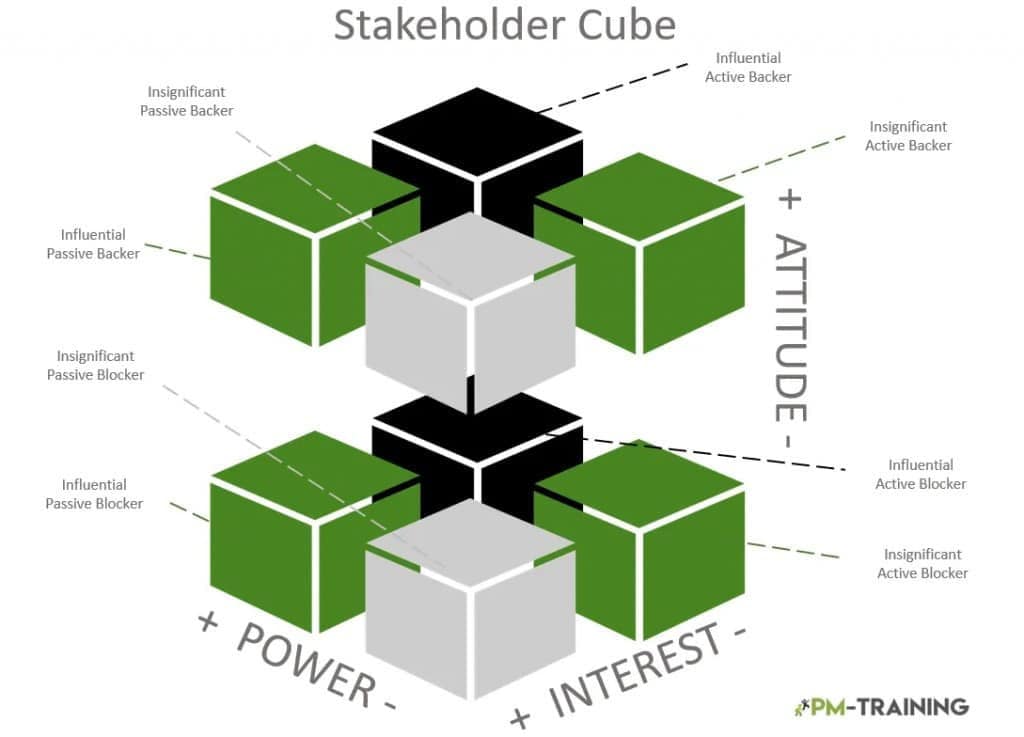
Classification works best when the team applies core principles like these:
- Map the Grid: Place each stakeholder into high or low power and interest quadrants to reveal who needs frequent engagement and who needs only periodic updates.
- Prioritize Action: Focus energy on high-power, high-interest players while keeping others informed, so limited time goes where it matters most.
- Refresh Regularly: Revisit classifications as the project evolves and stakeholder power and influence shift in response to changes in scope.
Choosing Templates Options
The software you choose to host the register affects how easily your team collaborates and how safely the information is stored. Each option balances usability, cost, editing flexibility, and data handling differently. Matching the tool to your team’s habits and security needs prevents friction later and keeps the document genuinely useful for everyone who touches it.
Here is how the most common options compare in practice:
| Software | Advantages | Disadvantages |
| Google Docs | Eliminates need for storage | The potential risks of storing documents outside the organization are significant. |
| Is an intuitive and easy-to-use tool for collaborating on documents. | ||
| Microsoft Word | A versatile and user-friendly program. | Not always intuitive. |
| It’s available practically everywhere, making it easy to use wherever you happen to be. | It can be expensive. | |
| Excel | It is the best way to store data. | It is hard to consolidate |
| You can visualize data easily with charts. | It is prone to human error. | |
| It’s Multidimensional | It is challenging to edit PDFs for free |
Stakeholder Register Template Options
We have collected a list of free templates you can use on your future projects, available in Microsoft Word, Excel, and PDF formats. There are also online tools where you can build and save a stakeholder register directly in the cloud. These options give you the flexibility to pick the format that matches how your team already shares and stores information.
Stakeholder Register Template Word
Word templates are easy to customize and widely recognized across teams, which makes them a comfortable starting point for most project offices. You can edit headings, add company branding, and print or share the file without special software. A good Word register gives you full control over layout while keeping the essential stakeholder fields organized and readable throughout the document.
Begin your Word search with a few dependable free sources:
- TemplateLab: Browse their collection of 50 free Word register templates to find an editable structure you can tailor to your project.
- Customizable Layouts: Pick a template with clear columns for name, role, power, and interest so the finished register stays scannable and professional.
- Branded Versions: Adapt whichever base you choose with your logo and color scheme so the register aligns with your organization’s style.
Stakeholder Register Template Excel
Excel and spreadsheet templates excel at handling structured stakeholder data, sorting it instantly, and producing the clear charts that make classification visible to everyone. Formulas can even calculate priority scores automatically as you enter each new entry to the register. For teams that already live in spreadsheets, an Excel register feels completely natural and integrates easily with standard reporting and quarterly reviews.
Several strong free spreadsheet options are worth exploring:
- TemplateLab: Free Excel Templates
- Canvas Sample Course: Free Download Excel Register Template
- Rocketlane Blog: Free Download of Excel Template
- Smartsheet: Free Excel Template
Stakeholder Register Templates PDF
PDF templates are ideal when you need a stable, shareable register that preserves its layout on any device. Because they are harder to edit, they work best for finalized versions or documents you want to distribute widely without accidental changes. Their consistent formatting makes them a reliable choice for stakeholder registers that need to look professional in reports.
Useful free PDF options include the following sources:
- Sample Templates: Grab Sample Templates’ collection of 10+ free PDF templates when you need multiple designs to review.
- Stakeholder Map: Download Stakeholder Map’s free PDF template for a practical, grid-based layout you can fill in by hand or digitally.
- Filled Copies: Use a PDF editor to complete the fields once, then export a clean version that keeps its formatting for stakeholder distribution.
Online Tools to Create Free Stakeholder Register Templates
Cloud-based tools let you build, share, and update the register in real time, which suits distributed teams that need a single live version. These platforms add collaboration, version history, and easy access from any device. If your team already uses one of these suites for project work, building the register there keeps everything in one familiar place.
Consider these online tools for a collaborative register:
monday.com
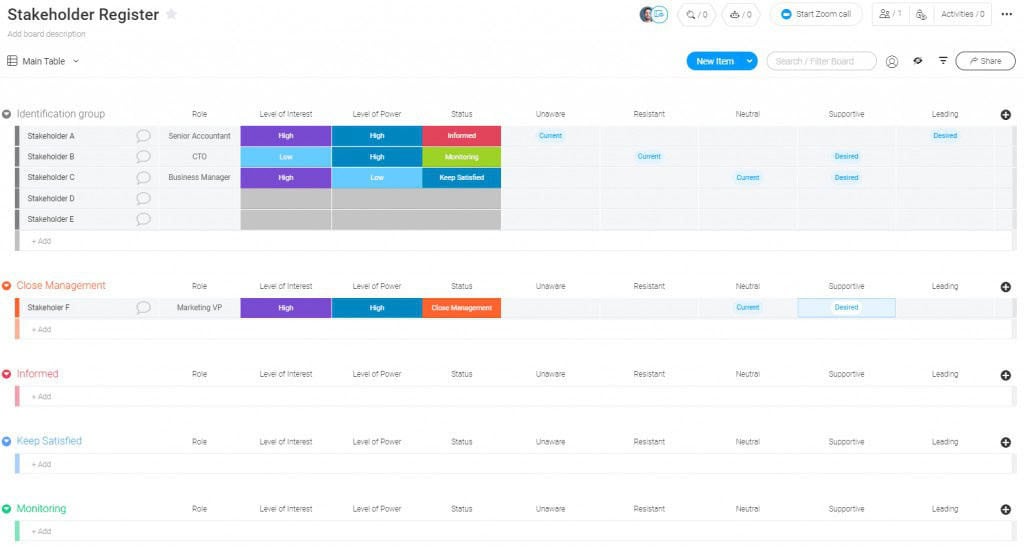
Use monday.com’s stakeholder register template to manage stakeholders alongside your other project work items.
Creately
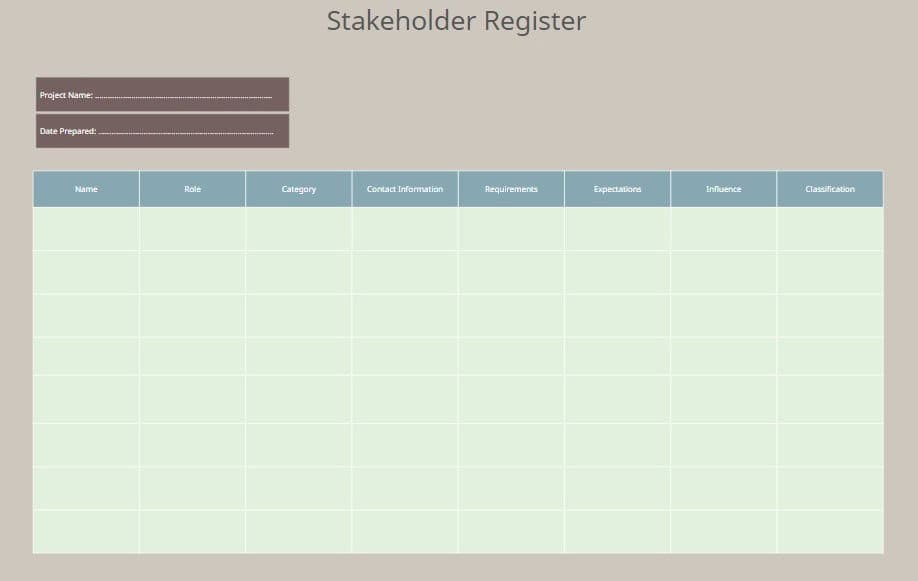
Build a visual, shareable register with Creately’s stakeholder register template and collaborate with your team in the browser.
Atlassian
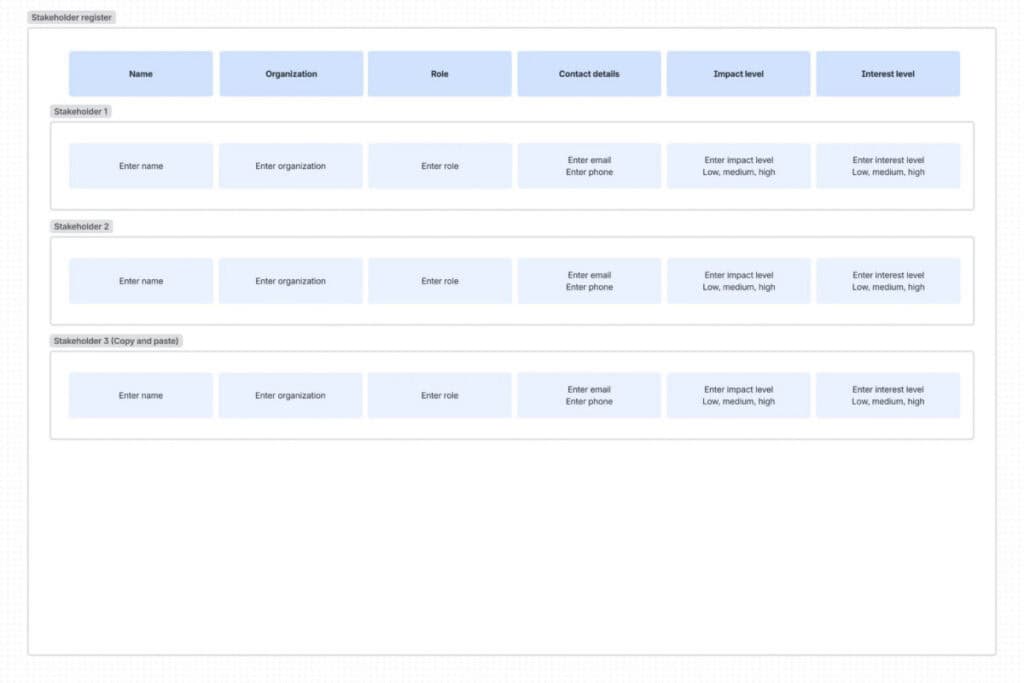
Use Atlassian’s stakeholder register template to build your register directly in Confluence and keep it linked to your team’s existing project documentation.
Video About Stakeholder Register
This short video walks through how to build a stakeholder register step by step, including the tools and techniques you can use to keep it organized and effective.
Conclusion
A stakeholder register is among the most valuable assets a project manager can maintain, and a well-designed template makes it effortless to sustain. Through identification, evaluation, and classification, the team develops a clear understanding of who matters most and what they expect. Whether built in Word, Excel, PDF, or an online tool, the right template ensures consistency across every project you manage.
Begin by saving a free template, then customize it for your team and update it consistently as the project progresses. This ongoing investment yields fewer surprises, stronger stakeholder relationships, and smoother project delivery. By treating the register as a living document, you ensure your stakeholder management approach continues to mature with every project completed and every relationship strengthened along the way.
Frequently Asked Questions About Stakeholder Registers
What is included in a stakeholder register?
A stakeholder register is a record that contains information about everyone who has an interest in or influence over the project. It typically includes names, titles, roles, and responsibilities for each person, along with their requirements, concerns, and their power and interest levels. Keeping this data current helps the team plan engagement and manage expectations throughout the work.
What is the purpose of a stakeholder register?
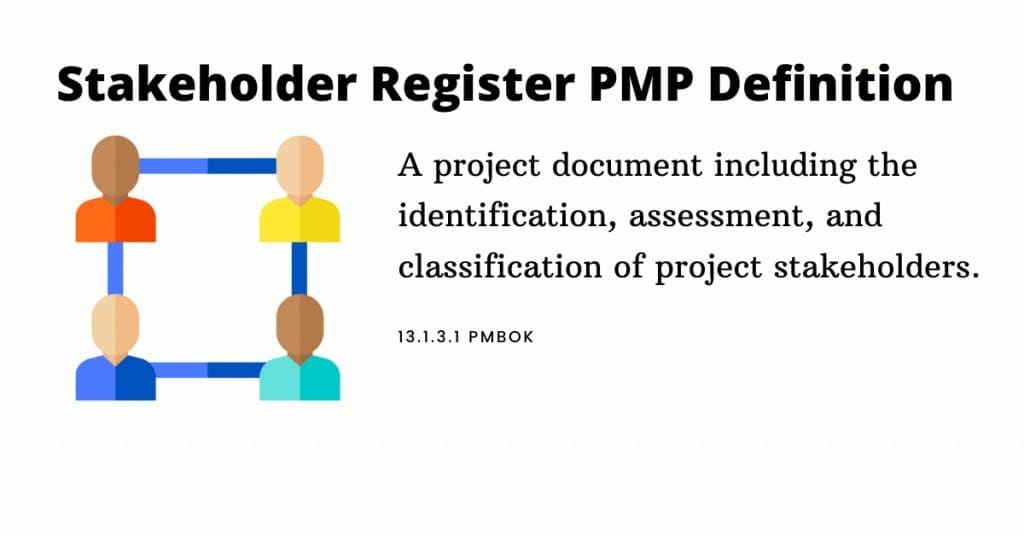
The purpose of the register is to list everyone the project might impact and to record their degree of influence over it. The document becomes an important tool for planning, forming teams, developing success criteria, and ensuring the organization meets its goals. It also gives the project manager a shared reference for deciding who to consult and when to communicate.
Who is responsible for creating and managing the register?
The project manager is responsible for creating and maintaining the stakeholder register and the stakeholder management plan that supports it. They involve everyone affected by the work and gather information about expectations and desired involvement. In larger programs, a stakeholder engagement specialist may help, but the project manager stays fully accountable for keeping the register current.
Why is a stakeholder register important for a project?
A stakeholder register is a central tool for any project or program because it documents who will be impacted by the work and how much influence they hold. It supports planning decisions such as choosing participants and forming teams, and it helps the organization address needs across communities. A current register reduces surprises and keeps communication focused on the right people.
What is the difference between a stakeholder register and a stakeholder map?
A stakeholder register is a structured document that records detailed information such as names, roles, requirements, and concerns. A stakeholder map is a visual representation, often a grid or cube, that shows where each stakeholder sits in terms of power and influence. Most teams build a register for the data and a map for quick, shared understanding.
Suggested articles:
- 26 Free Stakeholder Analysis Templates (Word, Excel, and PDF)
- 13 Free Stakeholder Map Templates
- 80+ Stakeholder Identification Templates

Shane Drumm, holding certifications in PMP®, PMI-ACP®, CSM, and LPM, is the author behind numerous articles featured here. Hailing from County Cork, Ireland, his expertise lies in implementing Agile methodologies with geographically dispersed teams for software development projects. In his leisure, he dedicates time to web development and Ironman triathlon training. Find out more about Shane on shanedrumm.com and please reach out and connect with Shane on LinkedIn.