

Modern teams need clear structures, predictable workflows, and collaboration tools that keep everyone in sync. Hive positions itself as an all-in-one platform for planning, tracking, and delivering work with more visibility and fewer delays. Understanding what Hive excels at and where it falls short helps teams choose a tool that genuinely supports their operations. Knowing the strengths and drawbacks upfront prevents wasted time, reduces unnecessary spending, and ensures teams adopt systems that reinforce accountability rather than complicate it.
Let’s break down Hive’s core advantages, limitations, features, and real-world use cases so you can decide if this platform delivers the stability and efficiency your team needs. For organizations seeking a more cost-effective and scalable solution, AceProject presents a compelling alternative. Unlike per-user pricing models, AceProject offers a pricing structure that is more cost-effective in the long run.
Hive – The #1 Project Management Software For Teams
Hive is a collaborative project management and workflow platform built to help teams coordinate work more efficiently. It combines task management, project planning, communication, automation, and reporting into one unified system. Hive offers multiple work views—including Gantt, Kanban, calendar, portfolio, and table views—giving teams flexibility to structure their work however they prefer. The platform also integrates messaging, approvals, forms, time tracking, AI assistance, and automation into the same workspace, reducing the need to rely on multiple disconnected tools.
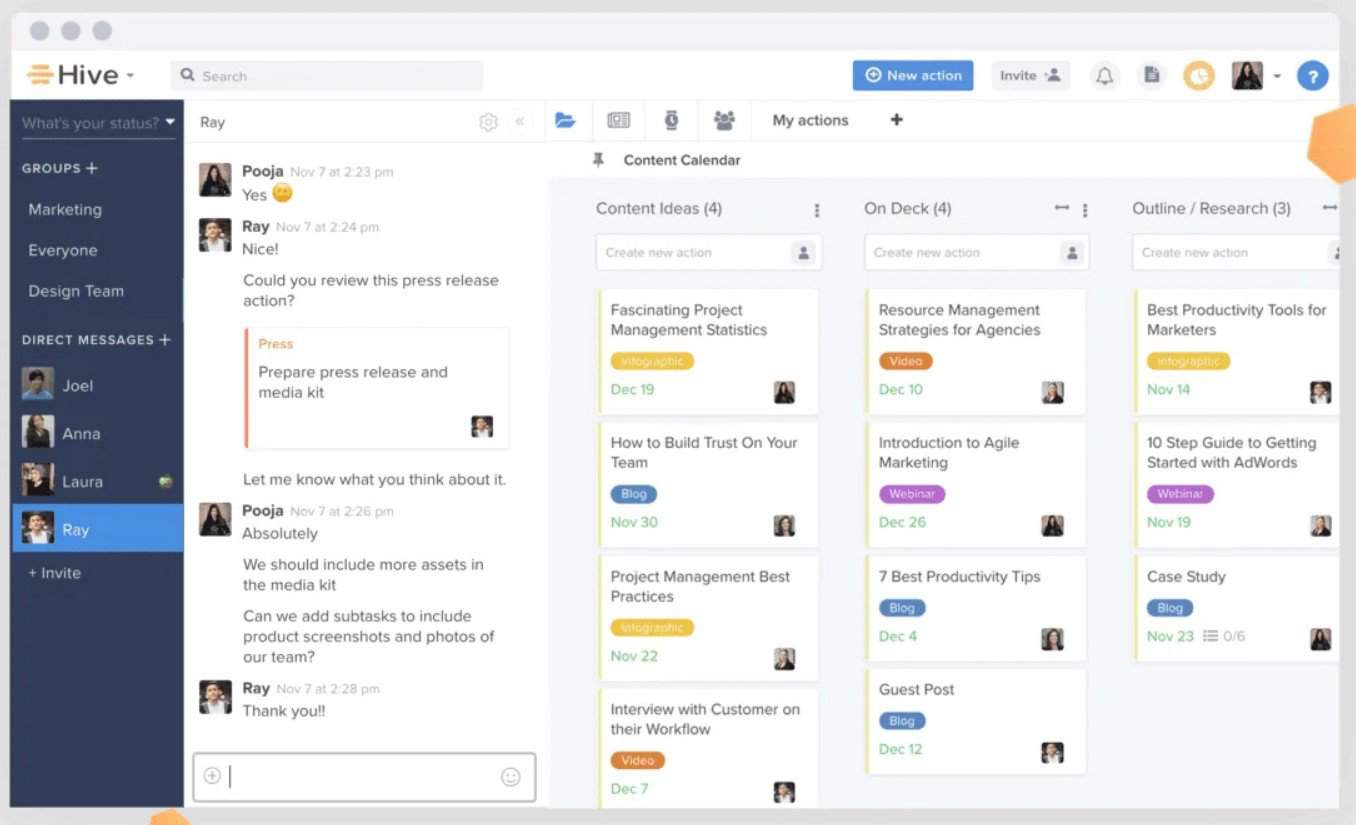
Hive was originally built for high-velocity agencies and operations teams, but today it’s used across marketing, product, consulting, IT, and operations. Its versatility makes it useful for teams needing coordination across projects, clients, or departments. With strong customization options, a growing AI layer, and scalable collaboration features, Hive aims to be a central execution hub for fast-moving organizations.
The Pros or Advantages of Hive
Hive earns attention because it tackles real productivity problems: scattered communication, unclear ownership, and complicated workflows. Its strength lies in pulling everything into one command center where teams can plan, execute, track, and communicate without switching tools. Below are the advantages of using Hive:
- Strong Customizable Workflows: Hive’s flexible workflow builder lets teams mirror real processes across projects, departments, and clients. From automation to custom fields, it supports detailed operational needs. This adaptability helps teams unify processes, eliminate inconsistencies, and reduce manual oversight across recurring workstreams.
- Multiple Project Views for Clarity: Teams can switch between Gantt, Kanban, table, portfolio, and calendar views instantly. This ensures every role—managers, coordinators, creatives, clients—works in the format most useful to them. It also improves execution speed by showing the same work through different lenses.
- Built-In Messaging and Collaboration: Hive Chat removes the need for separate communication tools. Users can discuss tasks, attach files, share updates, and collaborate directly where work happens. This reduces context switching and keeps every relevant conversation tied to the task or project it impacts.
- Advanced Automation That Saves Time: Hive Automate helps replace repetitive steps like task creation, handoffs, approvals, tagging, and reminders. Teams report significant time savings by eliminating manual steps in recurring workflows. This improves reliability and reduces human error during fast-moving projects.
- Strong Template and Repeatable Process Support: Hive’s action templates, project templates, and workflow libraries let teams standardize complex processes. Agencies, marketing departments, and operations teams use them to reduce planning time and ensure recurring work always follows consistent steps.
- Robust Proofing and Approval Tools: Built-in markup, review cycles, versioning, and approval routing make Hive ideal for creative and marketing teams. It simplifies feedback loops and keeps all revisions in one place. Users praise how much faster it makes content production.
- Powerful Reporting and Analytics: Hive Analytics provides visual dashboards, workload insights, and real-time project health tracking. Managers gain immediate visibility into bottlenecks and workload imbalances. This leads to more accurate forecasting and more balanced team allocation.
- AI Tools That Accelerate Work: Hive AI assists with task creation, project setup, writing support, and summarizing activity. These AI capabilities help reduce administrative overhead and improve team responsiveness, especially during high-volume work periods.
The Cons or Disadvantages of Hive
Despite its strengths, Hive is not always the perfect fit. Users report several areas where the platform creates friction or requires adjustment. These drawbacks appear frequently in online reviews. Understanding these limitations helps teams set realistic expectations and avoid surprises during implementation or scaling. Here are the most relevant concerns:
- Can Feel Overwhelming for New Users: Hive’s depth and flexibility lead to a learning curve, especially for teams unfamiliar with multi-view project tools. New users often report needing time to understand workflows, automations, and custom fields before feeling fully confident.
- Occasional Performance Slowdowns: Large workspaces with heavy automation or many active projects may experience lag or slow load times. Users managing high-volume environments report that this occasionally disrupts momentum during planning or execution.
- Mobile App Functionality Is Limited: While Hive offers a mobile app, it lacks the full capabilities of the desktop version. Users often mention challenges completing tasks, reviewing complex boards, or accessing advanced workspace features on mobile.
- Pricing Can Increase Quickly: Hive’s cost scales based on features and team size. Organizations requiring add-ons—such as analytics, automations, or advanced collaboration tools—can see pricing rise faster than expected, making it less ideal for small budgets.
- Steep Setup for Complex Teams: Custom workflows, templates, and automations take time to configure properly. Teams with unique processes may need extended onboarding to replicate their existing operational structure within Hive.
- Notifications Can Become Noisy: Users frequently mention receiving too many alerts when multiple projects or automations are active. Without fine-tuning, notifications can distract rather than clarify priorities.
- Limited Native Time-Tracking Depth: While Hive includes time tracking, it is not as advanced as tools dedicated to the function. Some teams rely on integrations or external platforms for detailed timesheet breakdowns.
- Dependence on Internet Stability: As a cloud platform, Hive’s performance heavily depends on a reliable internet connection. Users in less stable environments mention difficulties during periods of slow connectivity.
Hive Key Features
Understanding Hive’s features helps teams identify what matters most for daily operations, scalability, and long-term efficiency. These capabilities determine how well the platform fits recurring workflows, collaborative needs, and reporting demands. A clear view of the core functionality helps teams match Hive to their environment before committing fully. Below are Hive’s most important features and how they support real work.
- Project and Task Management: Provides structured workflows using Gantt, Kanban, calendar, and portfolio views. Teams can assign tasks, set deadlines, add subtasks, attach files, and track dependencies. This centralizes work and keeps execution clear for cross-functional teams.
- Automation Builder: Allows teams to automate repetitive steps, such as task routing, approvals, assignments, status changes, and reminders. This reduces manual oversight and ensures consistent execution across recurring workflows.
- Forms and Proofing Tools: Offers built-in forms for intake, request handling, and data collection. Proofing tools provide markup, version comparison, review workflows, and approvals for creative teams needing controlled feedback cycles.
- Hive Analytics: Delivers real-time dashboards, performance insights, workload visibility, and progress tracking. Managers gain immediate clarity on bottlenecks, team capacity, and at-risk projects, improving forecasting and decision-making.
- Integrated Messaging: Hive Chat enables 1:1 messaging, group discussions, file sharing, and threaded conversations directly inside the workspace. This eliminates tool-switching and keeps collaboration tied to relevant tasks and projects.
- Custom Templates: Teams can create task, action, and project templates to standardize processes. This supports agencies, marketing teams, and operations groups managing recurring or client-based workflows.
- Time Tracking: Built-in tracking helps teams log hours, monitor time spent on tasks, and generate reports. While not as advanced as dedicated tools, it supports basic operational needs and client billing.
- AI Assistance: Hive AI helps with task creation, content drafting, project setup, and summarizing activity. It improves efficiency by handling administrative work faster and reducing planning time.
Hive Use Cases
Hive supports a wide range of teams and industries because its flexibility adapts to both structured and fast-moving work environments. Understanding these use cases helps teams evaluate whether Hive can support their specific workflows, clients, and operational pace. These examples reflect real-world adoption patterns across marketing, product, operations, agencies, IT, and consulting. Below are the strongest and most common use cases for Hive.
- Marketing Teams: Manage campaigns, content calendars, creative workflows, approvals, and cross-channel planning. Hive’s proofing and templates help teams move faster, reduce errors, and coordinate launches across designers, strategists, managers, and stakeholders.
- Agencies and Client Work: Enable structured client onboarding, recurring deliverables, reporting cycles, and multi-account management. Hive’s templates and dashboards help agencies handle high-volume client work with fewer bottlenecks.
- Product Teams: Plan roadmaps, track releases, manage backlog items, and coordinate feature development across engineering and design. Hive’s multiple views help product managers adjust priorities quickly.
- Operations Teams: Use workflows, automations, and reporting tools to standardize recurring processes. These teams depend on Hive to maintain consistency and accountability across departments.
- Creative Teams: Rely on proofing tools, review workflows, and version control to accelerate design cycles. Hive centralizes all feedback and reduces back-and-forth communication.
- IT and Implementation Teams: Plan deployments, manage tickets, track infrastructure changes, and coordinate cross-team work. Hive’s clarity helps minimize risk during technical projects.
- Consulting Firms: Organize client deliverables, timelines, research tasks, and documentation in one structured environment. Hive helps consultants present progress clearly and maintain predictable delivery cycles.
- Sales Operations: Track leads, manage sales pipelines, coordinate proposals, and align with marketing. Hive’s dashboards help leaders understand performance and spot gaps.
Hive Pricing and Costs
Hive uses a tiered pricing model that scales with team size, required features, and long-term collaboration needs. Understanding these pricing levels is essential because Hive becomes more powerful—and more expensive—as you add automation, analytics, and workspace controls. Teams evaluating Hive should compare monthly vs. annual pricing, add-on costs, and expansion requirements before committing. Below is the full breakdown of Hive’s current plans.
- Free ($0 per month): Designed for individuals or very small teams who need core task management. It offers unlimited tasks, notes, and fundamental task views for up to 10 members, but with a restrictive 200MB storage limit.
- Starter ($1.50/user/month or $1/user/month paid annually): Starter elevates the experience by adding essential project planning tools. This tier introduces the Gantt view, cloud storage integrations, and an in-app calendar, while removing the storage cap for up to 10 full-access users.
- Teams ($5 per user/month or $3/user/month paid annually): Unlocks full scalability and advanced workflow features for growing organizations. Key additions include unlimited members, native time tracking, Portfolio view, and the ability to create unlimited custom workflows.
- Enterprise (Custom Pricing): Tailored for large organizations with complex security and administrative needs. It includes all add-ons by default, alongside advanced permission controls, a dedicated Customer Success Manager, and access to the Enterprise API for seamless integration.
Hive also offers optional add-ons for deeper workflow automation, expanded analytics, and advanced support packages. For a deeper analysis, including a feature comparison and an evaluation of which plan is right for your team, be sure to read our Hive Pricing Plans and Costs guide.
Conclusion
Choosing Hive requires weighing both its strengths and limitations. Its flexibility, automation capabilities, and collaboration tools make it a strong choice for teams needing structure and clarity. At the same time, setup complexity, pricing considerations, and occasional performance issues mean it’s not the right fit for every environment. Understanding these factors before adopting Hive helps teams set realistic expectations and ensures smoother onboarding.
When used correctly, Hive can streamline operations, strengthen accountability, and create a unified workspace where work moves faster and more predictably. With the right configuration and team discipline, it becomes a reliable engine for managing projects, clients, and internal processes with far greater efficiency.
Suggested articles:
- The Pros and Cons of Using Nutcache Software
- The Pros and Cons of Using Wrike Software
- The Pros and Cons of Using Redbooth Software

Peter Kanai is a Google-certified freelance writer with over a decade of experience crafting high-quality content for business websites, blogs, and SEO & email marketing campaigns. His on-demand writing services are all about helping businesses expand their online presence and achieve their objectives. With a proven track record in delivering results-driven content, Peter is the go-to freelance writer for business owners seeking a strategic partner to help them grow their brand online.