
Trello remains one of the most widely recognized project management tools due to its simple, visual, card-based approach to organizing work. Designed to reduce complexity, Trello helps teams plan projects, assign tasks, and track progress without relying on long email threads or disconnected tools. Its intuitive layout allows users to see responsibilities, deadlines, and workflow stages at a glance. Over time, Trello has expanded beyond basic Kanban boards by introducing automation, integrations, and collaboration features that support modern, remote-first teams.
However, its core philosophy of simplicity remains unchanged, which can be both an advantage and a limitation. In this article, we’ll explore the pros and cons of using Trello, its features, use cases, pricing, and how it fits into today’s project management landscape. For users seeking advanced reporting, customizable exports, and enhanced analytics to complement Trello’s core features, Bridge24 for Trello delivers a robust, user-friendly solution. It simplifies data extraction, produces professional reports, and improves visibility across projects, helping teams make better decisions and streamline workflows effectively.
Trello – Capture, Organize, and Tackle Your To-Dos from Anywhere
Trello is a cloud-based project management platform developed by Fog Creek Software and launched in 2011. It was created to help individuals and teams organize work visually using boards, lists, and cards. Each board represents a project, lists reflect workflow stages, and cards function as individual tasks or action items. By blending simplicity with powerful automation, Trello ensures you stay productive whether you’re at your desk or on the go, making organized teamwork feel entirely effortless.
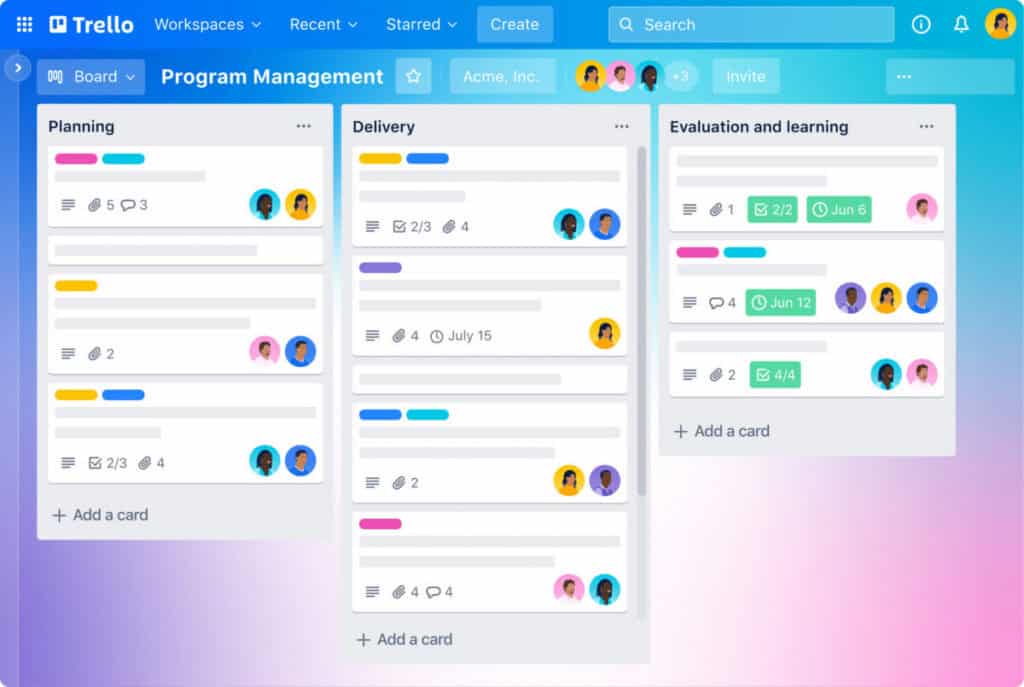
Its intuitive interface removes the friction of project management, allowing users to move fluidly between high-level roadmaps and granular daily checklists. By providing a shared perspective on progress, Trello transforms how people connect, communicate, and conquer their most ambitious goals together. This clarity ensures that every team member knows exactly what needs to happen next, reducing the need for constant status updates and allowing everyone to focus on the work that truly matters.
Why Trello Stands Out
- Visual Simplicity: The intuitive Kanban-style layout lets you see project status at a glance without digging through menus.
- No-Code Automation: Its built-in “Butler” feature handles repetitive tasks and triggers, saving hours of manual work.
- Universal Syncing: Real-time updates across mobile and desktop ensure your team stays aligned from anywhere in the world.
- Unlimited Power-Ups: Scale your boards by integrating favorites like Google Drive, Slack, and Jira directly into your workflow.
- Customizable Flexibility: It adapts to any use case, from high-level corporate roadmaps to personal daily habit tracking.
If you feel Trello’s pricing is too high for your budget, consider looking at AceProject. By charging per project instead of per user, this software offers the potential for significant cost savings, especially for fast-growing teams and organizations that manage many contributors across a limited number of projects.
The Pros or Advantages of Trello

Trello’s primary appeal lies in its simplicity, visual clarity, and adaptability across many workflows. Teams choose Trello because it delivers fast onboarding, minimal friction, and an intuitive way to manage tasks without complex configuration. For individuals and small teams, it provides immediate value with little overhead.
- Easy-to-Use Interface: Trello’s signature drag-and-drop design allows users to create, move, and update tasks within seconds. This extreme simplicity dramatically reduces onboarding time and ensures that even non-technical team members can adopt the platform quickly and use it consistently without constant training or oversight.
- Visual Task Management: Boards, lists, and cards provide a clear visual overview of project status. This high-level perspective allows teams to identify bottlenecks, shift priorities, and celebrate completed work instantly, providing much-needed clarity without the need for generating deep reports or navigating complex dashboards.
- Real-Time Collaboration: Team members can comment, tag colleagues, and share files while receiving instant updates. Because all changes sync immediately across every user’s screen, distributed teams stay perfectly aligned, significantly reducing the need for excessive status update meetings or lengthy, cluttered internal email chains.
- Flexible Workflow Customization: Trello adapts easily to different processes, ranging from simple personal to-do lists to multi-stage professional pipelines. Users are free to structure their boards exactly how they think, meaning they are never forced into rigid, pre-defined project management frameworks that don’t fit.
- Strong Integration Ecosystem: Trello integrates seamlessly with popular tools like Slack, Google Workspace, Jira, and Dropbox. These Power-Ups help teams centralize their entire workflow into a single hub, allowing them to pull in data from their existing software stack without constantly switching between apps.
- Built-In Automation With Butler: Butler automation enables users to create custom rules, triggers, and buttons that eliminate repetitive manual actions. This functionality saves hours of work and improves overall consistency across the board, all without requiring any specialized technical skills or complex coding and scripting knowledge.
- Cross-Platform Accessibility: Trello works seamlessly across desktop, tablet, and mobile devices, ensuring you never lose momentum. Users can manage their tasks from any location without losing core functionality, making it a reliable companion for professionals who need to stay productive while they are traveling.
- Generous Free Plan: Trello’s free tier offers an impressive range of meaningful features and power-ups. This makes it an ideal starting point for individuals or small startups who want to professionalize their task management without making an immediate or significant upfront financial commitment.
The Cons or Disadvantages of Trello
While Trello performs well for simple and moderate workflows, it may not meet the needs of teams managing complex projects. As requirements grow, users often encounter limitations related to reporting, structure, and scalability that can affect long-term suitability.
- Limited Advanced Project Management Features: Trello doesn’t include native Gantt charts, built-in time tracking, or task dependency management. Teams managing complex timelines with interlocking parts may find these missing capabilities restrictive, often forcing them to seek out more specialized, robust software to handle sophisticated project scheduling.
- Scalability Challenges for Large Teams: As the number of boards and cards increases, maintaining a clear overview becomes increasingly difficult. Large organizations often struggle with “board clutter,” finding it hard to maintain structure, oversight, and effective communication across dozens of different teams and hundreds of active projects.
- Basic Reporting and Analytics: Trello provides very minimal built-in reporting tools for managers. To generate meaningful performance insights, workload distribution reports, or detailed productivity analysis, users are almost always forced to rely on third-party solutions or manual data exports, which can be time-consuming.
- Dependence on Third-Party Integrations: Many advanced capabilities are not native and rely entirely on Power-Ups. This heavy reliance can increase monthly costs and introduce a dependency on external developers for essential functionality, which might lead to security concerns or potential workflow breaks if integrations fail.
- Limited Customization for Complex Workflows: Trello’s dedication to simplicity inherently limits its ability to handle advanced customization. Teams requiring strict conditional logic, multi-stage approval gates, or multi-layered automation may eventually find they have outgrown the platform’s flat structure and need more hierarchical project depth.
- Minimal Offline Functionality: Trello fundamentally requires a stable internet connection for full access and real-time syncing. The limited offline capabilities can be quite inconvenient for users working in areas with unstable connectivity, as they may face issues with data conflicts once they reconnect.
Trello Key Features
Trello simplifies task management with clear visual organization and collaborative tools. Its key features — boards, lists, cards, real-time syncing, Butler automation, custom fields, advanced checklists, and rich integrations — reduce friction and increase transparency. These capabilities let teams capture ideas, assign owners, and monitor progress effortlessly, providing a seamless transition into the detailed feature breakdown below.
- Inbox for Rapid Capture: The Inbox acts as a central landing zone for every fleeting thought, urgent email, or Slack message. By allowing you to capture to-dos from anywhere at any time, it ensures that vital details are never lost in the shuffle before they are organized.
- Boards, Lists, and Cards: This core visual structure provides a manageable way to track progress from “To-Do” to “Mission Accomplished.” It transforms a daunting list of responsibilities into a clear, drag-and-drop interface that gives everyone a shared perspective on the current workload and goals.
- Integrated Planner and Calendar: The Planner allows you to drag top tasks directly into a calendar view to allocate focused time slots. By syncing your schedule with your task list, Trello helps you protect your time and ensures that deadlines remain realistic and visible.
- AI-Powered Productivity: Trello now harnesses AI to help users brainstorm new ideas, organize complex action items, and condense lengthy text instantly. This built-in intelligence assists in refining your writing for a polished finish, making your cards more professional and your communication more effective.
- Butler Automation: Trello’s built-in automation system allows you to create a foolproof process for moving work forward without manual effort. You can set automated rules, triggers, and commands for almost any action, allowing your team to focus on high-value creative work instead of admin.
- Advanced Checklists and Due Dates: Break overwhelming tasks into small, achievable steps with checklists that feature a satisfying progress bar. When paired with easily adjustable due dates and automated reminders, these tools ensure that no task—no matter how small—slips through the cracks or misses its deadline.
- Strong Integration Ecosystem: Stay on top of your game by linking Trello with the apps your team already relies on, such as Slack, Microsoft Teams, and Gmail. Specialized integrations like Jira Lists allow for seamless syncing, ensuring all your technical and non-technical tasks live in one place.
- Custom Fields and Flexibility: Need to structure information specifically for a unique task? Custom Fields provide the process and formality required to meet your specific workflow needs, allowing you to add data points like priority levels, cost estimates, or drop-down menus to any individual card.
- Admin Permissions and Security: Trello provides peace of mind with 99.99% uptime and industry-leading compliance certifications. Easily manage users in real-time and control content-management permissions with a few clicks, ensuring that sensitive project data remains accessible only to the right people at all times.
- Ready-to-Use Board Templates: Give your team a blueprint for success by using pre-built templates from industry leaders and the Trello community. These templates cover a wide range of common workflows, allowing you to launch new projects in seconds rather than building them from scratch.
- Advanced Security Features: Trello provides enterprise-grade protection to keep your data secure and compliant. Key features include SAML-based Single Sign-On (SSO), SCIM user provisioning, and granular organization-wide permissions. With 99.99% uptime and industry-standard certifications like SOC2 and ISO 27001, administrators can easily manage content-management permissions and restrict attachment sources, ensuring that sensitive project information remains accessible only to authorized team members.
Trello Use Cases
Trello is designed to get your entire team up and running in minutes, regardless of your department or industry. Its flexible architecture provides specific boards, techniques, and integrations tailored to help diverse groups succeed. By offering a shared perspective on every project, it empowers teams to bridge the gap between initial brainstorming and final execution with unparalleled speed and visual clarity. Here are its most common use cases:
- Design: From managing complex creative requests to facilitating seamless cross-team collaboration, Trello helps design teams maintain their creative flow. It provides a visual canvas that ensures designers can deliver high-quality assets with style while keeping feedback loops tight and organized.
- Engineering: Developers can ship more code and embrace agility with Trello’s specialized developer tools. It allows engineering teams to manage backlogs, track bug fixes, and visualize sprints, ensuring that technical projects remain transparent and move toward deployment without friction.
- Human Resources: Trello enables HR teams to modernize their entire employee lifecycle. From tracking candidates through the hiring pipeline to streamlining the onboarding process, it provides the structure needed to build and sustain a lasting, positive company culture.
- Marketing: Whether launching a groundbreaking new product, coordinating a multi-channel campaign, or managing an editorial content calendar, Trello helps marketing teams succeed. It centralizes assets and timelines, ensuring every campaign is executed with precision and clarity.
- Personal Productivity: Beyond the office, Trello is a premier tool for taking your personal organization to the next level. You can use it to track daily habits, manage home improvement projects, or organize life goals, turning overwhelming to-do lists into actionable visual boards.
- Product Management: Become a productivity powerhouse by managing complex product life cycles and internal processes. Trello allows product managers to bridge the gap between high-level vision and granular execution, keeping stakeholders informed and development teams on track.
- Remote Teams: In a world of distributed work, Trello provides the techniques and tips necessary to keep remote teams connected and motivated. It serves as a digital headquarters where everyone stays aligned on goals, regardless of where they are located around the world.
- Sales: From nurturing cold leads to closing high-value deals, Trello is a significant win for sales teams. By visualizing the sales funnel, representatives can easily track interactions and follow-ups, ensuring that no potential opportunity falls through the cracks.
- Startups: Thriving as a startup requires wearing many hats, and Trello is built for that speed. It helps founders manage everything from hiring their very first employee to tracking the key performance indicators (KPIs) needed to hit their revenue goals.
- Support: From resolving technical support tickets to coordinating the delivery of company swag, Trello helps support teams deliver a delightful experience. It ensures that customer needs are addressed promptly and that the team has a clear view of all open requests.
- Team Management: Level up your management practices by using Trello for everything from project coordination to planning your next virtual team party. It provides a central hub that improves team productivity and fosters a sense of community through organized collaboration.
Trello Pricing and Costs
Understanding Trello’s pricing is important because each plan delivers different levels of collaboration, automation, and project visibility. Whether you’re an individual, a growing startup, or a global enterprise, choosing the right tier requires matching cost to the features and capabilities your team needs. Below is a concise breakdown of the available plans to help you select the option that best balances functionality and budget.
- Free Plan ($0/mo Free Forever): Ideal for individuals or small teams needing to capture to-dos and organize basic projects. It offers unlimited cards, up to 10 boards per Workspace, the Trello Inbox, unlimited Power-Ups, and mobile app access for managing work on the go.
- Standard Plan ($5/seat/mo billed yearly or $6 monthly): Ideal for teams that need more organization and unlimited space. It unlocks unlimited boards, the Trello Planner for calendar syncing, advanced checklists, custom fields, and AI-powered task capture from email and Slack.
- Premium Plan ($10/seat/mo billed yearly or $12.50 monthly): Ideal for scaling teams that require multiple perspectives and deeper automation. It adds full AI integration, high-level views (Timeline, Table, Dashboard), unlimited automation command runs, and enhanced admin controls for better security.
- Enterprise Plan ($17.50/seat/mo billed yearly): Ideal for large organizations requiring centralized management and enterprise-grade governance. It includes unlimited Workspaces, organization-wide permissions, SSO, and user provisioning via Atlassian Guard, and 24/7 dedicated admin support.
For a detailed comparison of each plan and available upgrades, consult our comprehensive Trello Pricing and Costs guide. It will help you evaluate features, limits, and pricing so you can confidently choose the plan that best fits your team’s needs.
Conclusion
Trello is a premier collaboration tool for those prioritizing visual clarity and immediate results. By distilling complex project management into a simple board-and-card system, it lowers the barrier to entry for teams of all sizes. Whether you are managing personal goals or high-stakes corporate initiatives, Trello provides a flexible, intuitive foundation that adapts to your unique workflow and keeps everyone focused on progress.
As your requirements evolve, Trello’s massive ecosystem of Power-Ups and AI-driven features ensures the platform grows alongside your team. While it may lack some native high-end analytics found in heavier tools, its unmatched ease of use and cross-platform accessibility make it a powerful ally in the pursuit of productivity. Ultimately, Trello empowers you to organize your work beautifully and tackle your to-dos with confidence.
Suggested articles:
- Top 5 Best Ways to use Trello for your Content Strategy
- What is Trello? Features, Pricing, Integrations & More
- Top 5 Trello Gantt Chart Add-ons

Daniel Raymond, a project manager with over 20 years of experience, is the former CEO of a successful software company called Websystems. With a strong background in managing complex projects, he applied his expertise to develop AceProject.com and Bridge24.com, innovative project management tools designed to streamline processes and improve productivity. Throughout his career, Daniel has consistently demonstrated a commitment to excellence and a passion for empowering teams to achieve their goals.